Vista Social

Vista Social

Your AI-powered command center for social media.

1 время чтения · Обновлено 7 мая 2026 г.
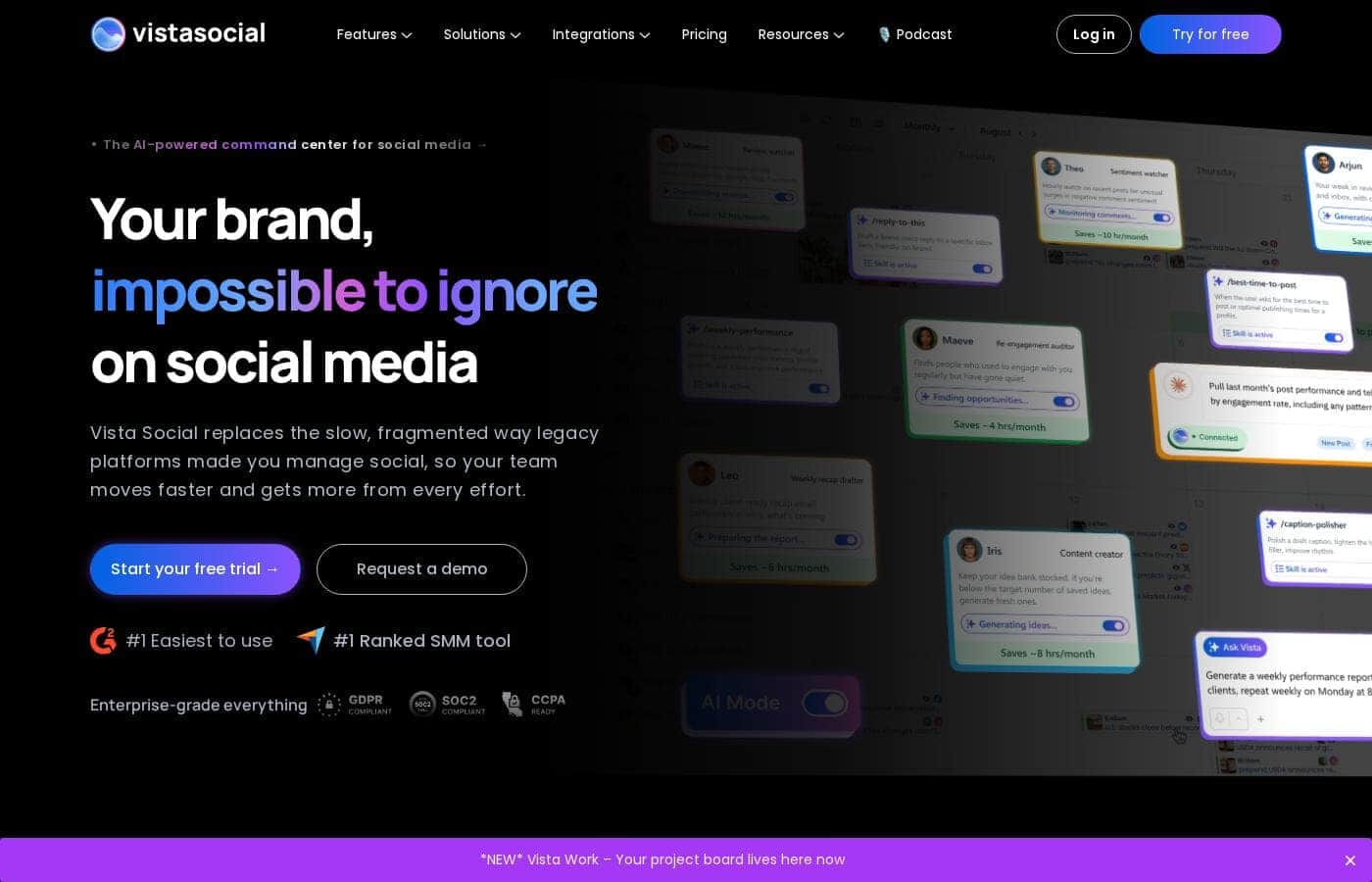
Скриншот главной страницы Vista Social

At a glance

Quick overview for Vista Social: rating, pricing summary, key features, and highlights.

Обзор Ciroapp

4.3
Powerful, scalable command center.

Vista Social delivers a robust, all-in-one platform that consolidates scheduling, analytics, and engagement for teams. We find its AI-powered workflow tools and broad channel support particularly strong for agencies and growing brands. Overall, it's a high-value solution for serious social media management.

Плюсы

  • Плюсы:Comprehensive all-in-one platform for publishing, analytics, listening, and engagement.
  • Плюсы:AI-powered features to automate tasks and provide insights.
  • Плюсы:Designed for team collaboration and agency workflows with white-label options.

Минусы

  • Минусы:Refund policy is not explicitly stated in the provided pricing information.
  • Минусы:Full external review data was inaccessible, limiting our independent sentiment analysis.
  • Минусы:Complex feature set may present a learning curve for very small teams or beginners.
Диапазон: $0–$1000/monthFree plan, Monthly subscription, Yearly subscription, Usage-based pricing
This section is a summary. Detailed sections about features, use cases, pricing, and reviews follow below.
Disclosure: This page may contain affiliate links for Vista Social. If you click these links and make a purchase, Ciroapp may earn a commission at no additional cost to you.

Обзор Vista Social, цены, функции, плюсы и минусы

Juggling multiple social media channels and endless tasks can feel impossible. 💫 You're stuck in a cycle of manual posting, scattered data, and missed engagement. Vista Social steps in as your AI-powered command center. It brings all your channels, workflows, and tools into one place, so your team can focus on creating, not just scheduling.

Что такое Vista Social?

Vista Social is a comprehensive, AI-powered platform for social media management. 🤖 It's built for teams—like agencies or in-house marketing groups—who need to handle everything from publishing and analytics to engagement and listening across every major social channel. Think of it as your all-in-one hub, designed to replace a stack of separate tools and make your social workflow smoother.

Compare Vista Social with similar tools and browse the full category before choosing.

View all Social Media Management tools

Vista Social Ключевые функции

🗓️ Unified Publishing & AI Scheduling

Vista Social's core is its powerful publishing engine. You can create, schedule, and auto-post content across every major social platform from a single, visual calendar. The AI Assistant helps you generate and refine posts, so your team spends less time writing and more time strategizing.

This all-in-one hub eliminates the need for multiple login tabs and disconnected tools.

✨ Deep Analytics & Performance Insights

Move beyond basic metrics. Vista Social provides detailed analytics that track your growth, engagement, and content performance across channels. You can build custom reports and dashboards to visualize what's working.

The platform helps you understand your data, turning numbers into actionable insights for your next campaign.

✨ Real-Time Social Listening & Reputation

Stay tuned into conversations about your brand. The listening tools monitor mentions, keywords, and sentiment across social networks. You can track trends and see what's being said in real time.

This feature is essential for managing your online reputation and finding opportunities to engage with your audience more meaningfully.

💬 Streamlined DM Automations & Inbox

Manage all your direct messages from one unified social inbox. For common inquiries, you can set up DM automations to handle initial data collection or point users to resources. This saves your team time and ensures you never miss a lead or a customer question.

It's a smart way to scale your engagement.

✨ Team Collaboration & Client Workflows

Built for teams, Vista Social includes robust collaboration features. You can set up approval workflows, assign tasks, and manage access for different team members or clients. Agencies will find the client management and white-label options especially useful for maintaining a professional, organized process across all accounts.

✨ Review Management & Employee Advocacy

Protect and grow your brand's reputation. Vista Social helps you monitor and respond to reviews on key platforms like Facebook and Google. It also offers employee advocacy tools, making it easy for your team to share approved content and amplify your brand's reach through their personal networks.

Варианты использования

🎨 Solo Creator Consistency

You're a one-person show creating content for TikTok and Instagram. You dread the daily grind of posting and tracking results. With Vista Social, you schedule a week's worth of posts in one sitting. The AI Assistant helps generate captions, and you see all your analytics in one dashboard. This frees up hours each week to brainstorm your next big idea, not just manage the last one.

Tip: Use the built-in Canva integration to design visuals without leaving the platform.

🤝 Agency Client Onboarding

You run a small marketing agency and just signed a new client. Onboarding used to be a scramble across different logins and spreadsheets. Now, you add their Facebook, LinkedIn, and Instagram accounts to a shared calendar in Vista Social. You set up an approval workflow so the client can sign off on posts. Your team collaborates in one place, and you deliver a professional first impression.

  1. Add the client's social profiles to a shared calendar.
  2. Assign team roles and set up an approval workflow.
  3. Schedule and publish the first campaign together.

🎯 Lead Generation via DM

Your brand runs a LinkedIn campaign to generate leads. The goal is to collect contact info from interested commenters. Instead of manually copying replies into a spreadsheet, you use Vista Social's DM Automation.

It automatically replies to specific comments, asks for an email, and logs the data. This turns engagement into actionable leads without any manual data entry.

⭐ Brand Reputation & Review Management

Your retail brand gets a mix of glowing and critical reviews on Facebook and Google. Manually checking each platform is inefficient. Vista Social's Review Management pulls all reviews into a single inbox.

You can respond to praise and address concerns promptly from one screen. This consistent monitoring helps you protect your brand reputation and build customer trust.

👥 Scaling with Employee Advocacy

You want to amplify your company's reach beyond the official brand page. Vista Social's Employee Advocacy tool lets you share pre-approved content with your team. Employees can then easily share these posts to their personal networks.

This extends your marketing reach authentically and turns your staff into brand ambassadors, all managed from your central hub.

🔍 Multi-Channel Strategy Testing

Your team wants to test if Reddit and Threads are worth the effort. You use Vista Social's Listening tools to monitor brand mentions and sentiment on these new platforms. You see real conversations and compare engagement levels to your established channels.

The data helps you decide whether to invest time and content into expanding your presence there.

📊 Agency White-Label Reporting

Your agency needs to send performance reports to 10 different clients. Creating custom-branded reports for each is a time sink. With Vista Social's White Label features (on the Scale plan), you can generate reports with your agency's logo.

You pull analytics from the platform and deliver professional, on-brand insights to each client, saving your team hours of manual design work.

Обзор цен для Vista Social

Диапазон цен
$0–$1000/month
Типы цен
Free plan, Monthly subscription, Yearly subscription, Usage-based pricing

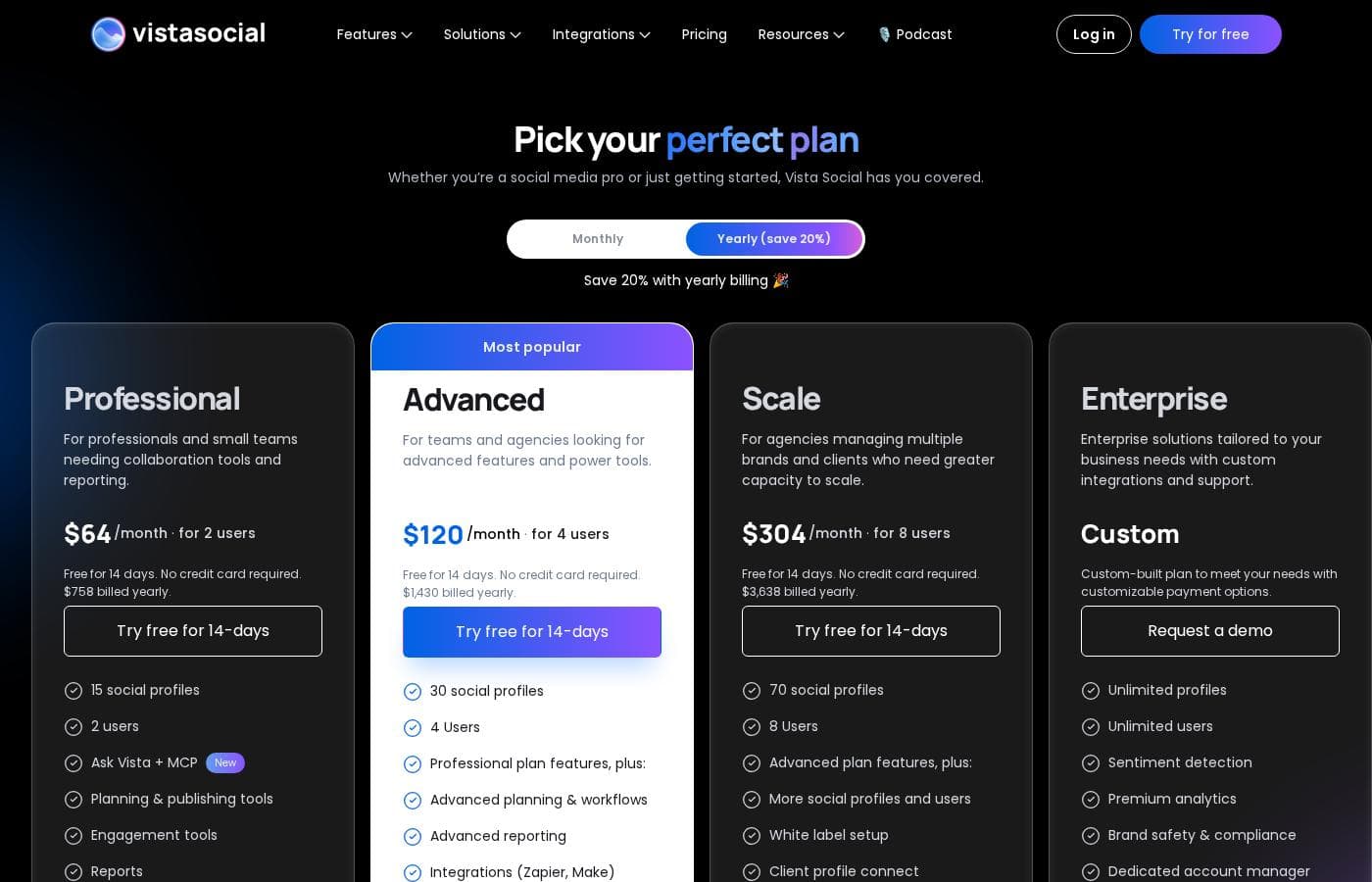
Vista Social offers flexible social media management plans starting at $64/month when billed annually. Every plan includes a 14-day free trial and features that scale with your team's growth and client needs.

Check out the full breakdown below to find the best fit for your social strategy.

Vista Social Pricing Overview

Professional

Price: $64/month billed annually Websites Supported: 15 social profiles Best For: Professionals and small teams needing collaboration tools Refund Policy: Not explicitly stated Other Features: Unlimited scheduling, Canva integration, AI Assistant (2,500 credits), social inbox, and basic reporting.

This plan is a great entry point for small teams or solo creators. It helps you stay organized with a clear calendar and simple publishing tools.

Advanced

Price: $120/month billed annually Websites Supported: 30 social profiles Best For: Agencies looking for advanced features and power tools Refund Policy: Not explicitly stated Other Features: 6 users, 10,000 AI credits, advanced workflows, DM automations, and zapier integrations.

Choose this tier if your team is growing and needs more hands on deck. The advanced workflows help larger groups manage approval processes smoothly.

Scale

Price: $304/month billed annually Websites Supported: 70 social profiles Best For: Agencies managing multiple brands and high-capacity clients Refund Policy: Not explicitly stated Other Features: 10 users, unlimited AI assistant, white label setup, and 100 shared calendars.

This is the most popular choice for established agencies with big goals. It provides the scale you need to handle complex client portfolios without limits.

Enterprise

Price: Custom Websites Supported: Customizable Best For: Enterprises tailored to specific business needs Refund Policy: Not explicitly stated Other Features: Unlimited profiles/users, custom integrations, 1-on-1 training, and dedicated account manager.

Large corporations should pick this for personalized support and security. It offers the most hands-on experience with dedicated training and quarterly reviews.

Every Vista Social plan comes with a 14-day free trial that requires no credit card. This lets you test the tools risk-free before deciding which subscription fits your workflow best. 🚀

Pricing

Vista Social pricing: Vista Social offers flexible social media management plans starting at $64/month when billed annually. Every plan includes a 14-day free trial and features that scale with your team's growth and client needs.

Check out the full breakdown below to find the best fit for your social strategy.

Vista Social Pricing Overview

Professional

Price: $64/month billed annually Websites Supported: 15 social profiles Best For: Professionals and small teams needing collaboration tools Refund Policy: Not explicitly stated Other Features: Unlimited scheduling, Canva integration, AI Assistant (2,500 credits), social inbox, and basic reporting.

This plan is a great entry point for small teams or solo creators. It helps you stay organized with a clear calendar and simple publishing tools.

Advanced

Price: $120/month billed annually Websites Supported: 30 social profiles Best For: Agencies looking for advanced features and power tools Refund Policy: Not explicitly stated Other Features: 6 users, 10,000 AI credits, advanced workflows, DM automations, and zapier integrations.

Choose this tier if your team is growing and needs more hands on deck. The advanced workflows help larger groups manage approval processes smoothly.

Scale

Price: $304/month billed annually Websites Supported: 70 social profiles Best For: Agencies managing multiple brands and high-capacity clients Refund Policy: Not explicitly stated Other Features: 10 users, unlimited AI assistant, white label setup, and 100 shared calendars.

This is the most popular choice for established agencies with big goals. It provides the scale you need to handle complex client portfolios without limits.

Enterprise

Price: Custom Websites Supported: Customizable Best For: Enterprises tailored to specific business needs Refund Policy: Not explicitly stated Other Features: Unlimited profiles/users, custom

Отзывы пользователей

We were unable to access the full review content from Trustpilot and Capterra due to access restrictions (403 errors and security verifications). Therefore, we cannot synthesize a specific sentiment summary from those external sources based on the provided snippets.

The URLs are listed for reference.

Обзоров пока нет.

Написать обзор

Написать отзыв для Vista Social
0/100 символов
0/2000 символов

Почему использовать Vista Social?

Ready to stop settling for clunky, scattered social tools? 🚀 Here’s why teams choose Vista Social to run their entire operation:

  • Saves you serious time with AI. ⏰ It's not just for scheduling. AI works in the background to automate tasks and provide insights, helping you do more while you sleep.
  • Truly all-in-one power. You get one platform for publishing, deep analytics, social listening, review management, and even employee advocacy. No more switching between apps.
  • Built for serious teamwork. Whether you're an agency managing 50+ client accounts or a brand team scaling marketing, it offers the workflow, collaboration, and white-label features you need.
  • Covers every channel you use. From Instagram and LinkedIn to TikTok, Reddit, and YouTube, it connects to all the places your audience lives. Plus, it’s highly rated as the #1 easiest tool to use.
  • Turns data into action. The analytics and listening tools don't just show numbers—they help you understand your performance and test new strategies based on real results.

Готовы трансформировать свой рабочий процесс с Vista Social?

Другие инструменты в категории Social Media Management

Popular comparisons

KoalaWriter
KoalaWriter vs Vista Social
AI Content generator
SEOWriting
SEOWriting vs Vista Social
AI Content generator
ClosersCopy
ClosersCopy vs Vista Social
AI Content generator

Similar tools

Readymode
Readymode
Call Center4.1/5

Readymode is a cloud based all-in-one predictive dialer software that intelligently connects sales and call center agents with more leads in less time. Make more connections, and maximize agent productivity - all at an affordable cost.

KoalaWriter
KoalaWriter
AI Content generator2.7/5

KoalaWriter is presented as the premier tool for creating SEO marketing content using artificial intelligence. It focuses entirely on outputting content ready for search engines. It's a key part of the larger Koala AI ecosystem of content tools. These specialized tools help you create better content. The underlying goal is to make your content creation process dramatically faster and more efficient. ✅

SEOWriting
SEOWriting
AI Content generator4.5/5

SEO WRITING is an AI writing tool for 1-click SEO-optimized articles, blog posts & affiliate content. Available in 48 languages, auto-posted to WordPress with **AI Images**. 🤖

ClosersCopy
ClosersCopy
AI Content generator2.3/5

ClosersCopy is an advanced platform designed to help you leverage the power of AI copywriting immediately. It moves beyond simple text generation by providing specialized AI modules like BlogAI, SalesAI, and StoryAI. This tool is built for teams, easily supporting collaboration seats so you can work efficiently with colleagues. It's a robust solution for global content creators, supporting writing in 128 different languages. **It's engineered to keep your content flowing, not just started.** 💡

Часто задаваемые вопросы

What social media platforms can I connect to Vista Social?

Vista Social integrates with all major channels, including Facebook, Instagram, LinkedIn, Reddit, Snapchat, Threads, TikTok, X (Twitter), and YouTube.

How does the 14-day free trial work?

Every plan includes a 14-day free trial with no credit card required. You can test all the features risk-free before choosing a subscription.

Is there a limit on how many users can be on my account?

Yes, each plan has a set number of included users: 3 for Professional, 6 for Advanced, and 10 for Scale. The Enterprise plan offers custom user limits.

Can I add more social profiles if I need them?

You can purchase extra profiles beyond what's included in your plan. The option to add more is available for Professional, Advanced, and Scale tiers.

What payment methods do you accept?

Not explicitly stated on the official site. You can likely find this information during the checkout process when starting your free trial.

Do you offer refunds if I cancel my subscription?

The official site does not explicitly state a refund policy. For clarification, you should contact Vista Social support directly before purchasing.

What does the Enterprise plan include that others don't?

The Enterprise plan offers unlimited profiles and users, custom integrations, 1-on-1 training, a dedicated account manager, and quarterly account reviews.

How many AI credits are included in each plan?

Professional includes 2,500 monthly credits, Advanced includes 10,000, and Scale includes unlimited credits for the AI Assistant.

Can I use Vista Social for client accounts?

Yes, Vista Social is built for agencies. Features like white-label setup, multi-stage approvals, and shared calendars are designed for managing multiple client brands.

Is there a mobile app available?

Yes, Vista Social offers a mobile app for managing your social media on the go, in addition to its desktop platform.

What kind of customer support is included?

Professional and Advanced plans include email and video call support. Scale gets priority email and video support, while Enterprise includes dedicated account management.

Can I switch between monthly and yearly billing?

Yes, you can choose between monthly billing or yearly billing, which saves you 20% on your subscription cost.

Готовы попробовать Vista Social? Посетите официальный сайт или узнайте цены.