Полный перевод скоро — детали продукта на английском, навигация локализована.
ClickUp

Обзор ClickUp

One workspace for tasks, docs, goals, and chat, built to cut app sprawl for growing teams

ClickUp стоит от 7 $/мес · Тарифов: 9 · Есть бесплатный тариф · цены проверены 13 окт. 2026 г.

Автор: Ciroapp Editorial Team · Обновлено 16 сент. 2026 г.

Может применяться комиссия без доплаты

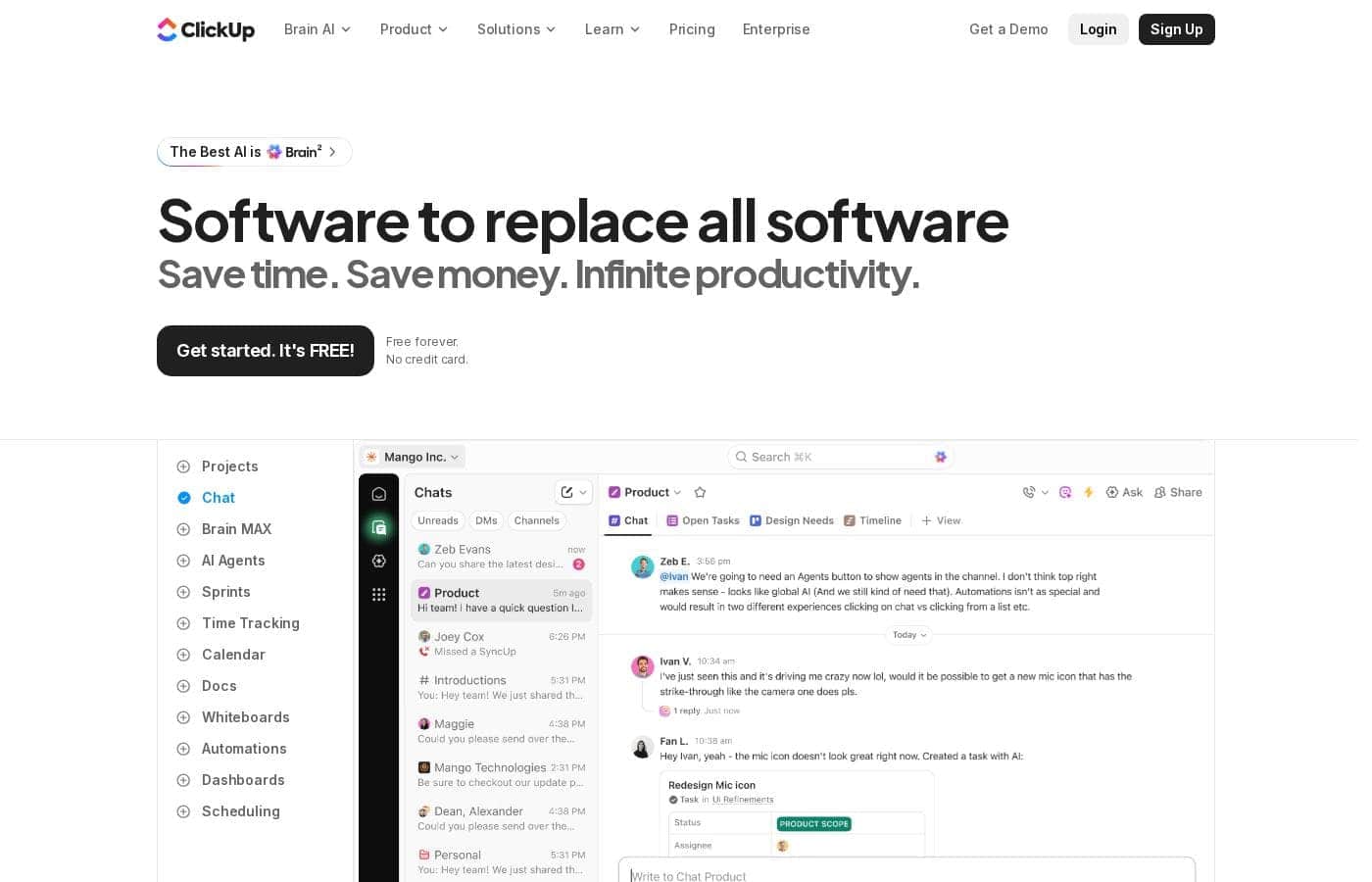
Скриншот главной страницы ClickUp

Кратко

Краткий обзор ClickUp: рейтинг, цены, ключевые функции и основные преимущества.
Цены проверены 13 окт. 2026 г.

Оценка Ciroapp

4.1/ 5

ClickUp bundles tasks, docs, goals, dashboards, whiteboards, and chat into one subscription, with 15-plus views, no-code automations, and a free plan that supports unlimited tasks and members. The trade-offs are real: a steep learning curve, noisy notifications, and a mobile app that trails desktop. Overall, it's a strong pick for teams that will invest in proper setup.

Плюсы

  • Плюсы:Consolidates tasks, docs, goals, chat, and whiteboards into one subscription, cutting both tool costs and the context switching between separate apps
  • Плюсы:Highly flexible workflow modeling — custom statuses, custom fields, and 15+ view types let most teams replicate their existing process without add-ons
  • Плюсы:Free plan supports unlimited tasks and members, so small teams can run real work on it before any purchasing decision

Минусы

  • Минусы:Steep learning curve — the depth of configuration means onboarding takes real time, and poorly structured workspaces become messy quickly
  • Минусы:Notifications can be overwhelming by default and require deliberate per-user tuning to stay useful
  • Минусы:Mobile and offline experiences lag behind the desktop web app, which hurts users who work away from their desk
Лучше всего подходит
  • Growing startups that want to consolidate task management, docs, and team chat into one paid tool instead of three
  • Marketing and content teams that need campaign calendars, briefs, and approval workflows connected in a single system
  • Software teams running agile sprints that want backlog, roadmap, and bug tracking without a separate dev-focused subscription
Этот раздел является кратким резюме. Ниже представлены подробности о функциях, сценариях использования, ценах и отзывах.

Что такое ClickUp?

ClickUp is an all-in-one work management platform that combines task tracking, documents, goals, whiteboards, and chat under a single subscription. The vendor positions it as a replacement for the 50-plus point tools many teams juggle, from standalone to-do apps to spreadsheets. This review examines where that consolidation genuinely pays off, what the platform costs, and where it falls short for certain types of teams.

ClickUp is a cloud-based project management and productivity workspace. Work is organized into spaces, folders, and lists, and the same tasks can be displayed as a list, Kanban board, Gantt chart, calendar, timeline, workload chart, or table. Beyond task management, the platform bundles ClickUp Docs for collaborative writing, custom dashboards for reporting, native chat, goal and OKR tracking, and a no-code automation builder.

A template library and integrations with tools like Slack, GitHub, and Google Drive extend it into a general operating layer for company-wide work.
Стоит ли выбрать ClickUp?

Краткие советы перед сравнением тарифов или переходом на сайт.

Выбирайте, если

  • Growing startups that want to consolidate task management, docs, and team chat into one paid tool instead of three
  • Marketing and content teams that need campaign calendars, briefs, and approval workflows connected in a single system
  • Software teams running agile sprints that want backlog, roadmap, and bug tracking without a separate dev-focused subscription
  • Agencies and client-service firms that need per-client spaces, guest permissions, and billable time tracking

Не выбирайте, если

  • Individuals or very small teams that just want a simple, fast to-do app, since ClickUp's configuration depth becomes overhead rather than value
  • Teams requiring deep developer-specific tooling such as advanced code hosting workflows and CI/CD integration, where purpose-built platforms remain stronger
  • Field or offline-heavy workers whose primary device is a phone, given the mobile app lacks parity with the desktop experience

Следующие шаги перед покупкой

  1. 1Create a free account at clickup.com, name your workspace, and use the built-in import center to bring in existing projects from Trello, Asana, Jira, or a CSV file
  2. 2Start from a template matching your use case, such as sprint management, a content calendar, or a CRM pipeline, instead of building a structure from scratch
  3. 3Set up one pilot project with custom statuses and fields, invite a small group, and run it for two weeks before restructuring your entire operation
  4. 4Tune notification settings per user early, then test a few automations on repetitive steps to judge whether a paid plan justifies itself before upgrading

ClickUp Ключевые функции

✨ Task Management With 15+ View Types

Every ClickUp task supports subtasks, checklists, assignees, priorities, dependencies, and custom fields, and the same work can be rendered as a list, board, Gantt chart, calendar, timeline, workload chart, or table. Managers and contributors can therefore look at identical data in whichever format suits them: a product team plans on a timeline while an individual contributor works from a filtered daily list.

✨ Docs, Whiteboards, and Centralized Knowledge

ClickUp Docs lets teams write and collaborate on briefs, specs, and SOPs with nested pages, and documents can be linked directly to tasks so context stays connected. Whiteboards provide a freeform canvas for brainstorming and diagramming, with the ability to turn elements into real tasks. This reduces the need for a separate wiki, since documentation lives next to the work it describes.

✨ Dashboards, Goals, and Reporting

Customizable dashboards aggregate data across projects using widgets for burndown, time tracked, workload, and portfolio status. Goals and OKRs can be tied directly to tasks so progress updates automatically as work completes. For leadership, this replaces manually assembled status reports with live rollups across teams.

✨ Automations and ClickUp AI

No-code automations handle repetitive actions such as assignments, status changes, and due-date shifts when defined triggers fire. ClickUp Brain adds AI assistance for drafting documents, summarizing long task threads, and generating subtasks. Both reduce manual coordination, though AI capabilities are tied to paid tiers.

✨ Integrations and Template Library

ClickUp connects to common tools including Slack, GitHub, Google Drive, and Zoom, with Zapier support for anything else, plus email-in task creation. A large template library covers sprint planning, content calendars, CRM pipelines, and more, so most teams can start from a proven structure rather than a blank workspace.

Варианты использования

💡 Software and Product Development

Engineering teams run sprints with dedicated sprint views, manage backlogs with story points and custom statuses, and track bugs through intake forms. GitHub and GitLab integrations link commits and pull requests to tasks, while roadmap timelines show stakeholders what is shipping and when.

💡 Marketing and Content Teams

Marketing teams plan campaigns on shared calendars, run content through draft-review-publish pipelines, and collect asset approvals in one place. Docs hold briefs and messaging guides next to the tasks they relate to, and dashboards show campaign progress across channels without manual reporting.

💡 Agency and Client Work Management

Agencies create a space per client with separate permissions so guests see only their own projects. Time tracking feeds billing, workload views prevent over-allocating staff across accounts, and shareable dashboards give clients visibility without granting full workspace access.

💡 Operations and Remote Team Coordination

Operations teams centralize recurring processes as reusable templates and checklists, automate handoffs between departments, and track company-wide goals in one system. Remote teams lean on native chat, threaded comments, and clip recordings to reduce meeting load and keep decisions attached to the work they concern.

Цены ClickUp

От7 $/мес

  • Со страницы цен поставщика, проверено 13 окт. 2026 г.
  • Тарифов: 9
  • Есть бесплатный тариф

Цены проверены 13 окт. 2026 г. на странице цен ClickUp

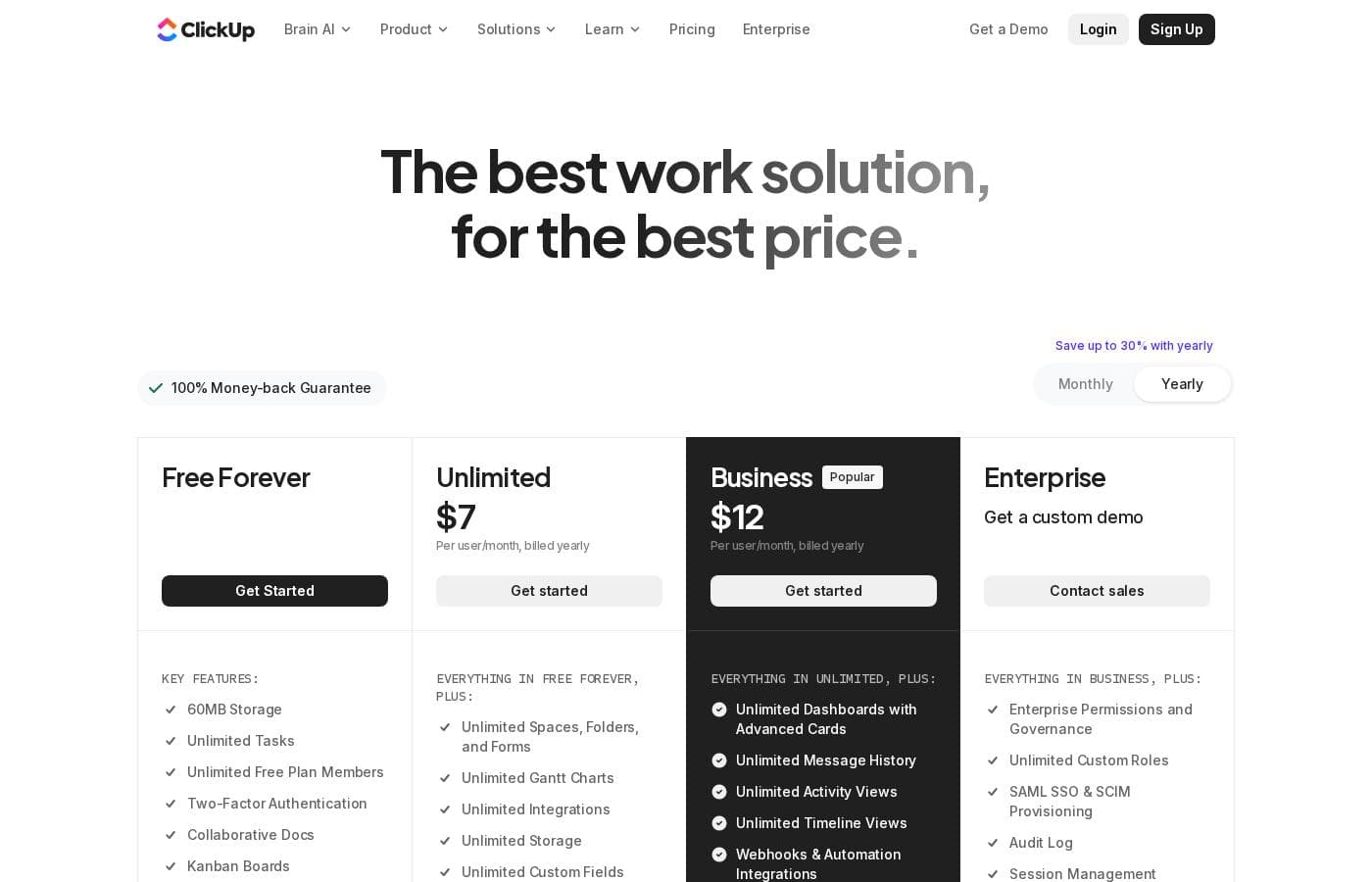
Скриншот страницы цен ClickUpСкриншот страницы цен
ТарифПомесячноЗа годВключено
unlimited
за пользователя
7 $/мес
—
per user
business
за пользователя
12 $/мес
—
per user
Free Forever
Бесплатно
—
Brain AI
за пользователя
9 $/мес
—
per user
Everything AI
за пользователя
28 $/мес
—
per user
Core
8 $/мес
—
MAX
100 $/мес
—
Free
Бесплатно
—
Max
Бесплатно
—

История цен

Отслеживаем цены с 1 окт. 2026 г.. Изменений пока нет.

Типы цен: Free plan, Monthly subscription, Per seat pricing, Usage-based pricing

Примечания к ценам

ClickUp pricing: Plans from $0/month Plans range: $0–$1000/month Billing options: Free plan, Monthly subscription, Per seat pricing, Usage-based pricing

Калькулятор стоимости

Оцените, сколько ClickUp стоит для вашей команды.

Оплата
В месяц
35 $
В год
420 $

unlimited оплачивается за пользователя: цена × 5 мест. Оценка по опубликованным прайс-листам, без налогов, дополнений и скидок.

Как платить за ClickUp меньше

  • Начните с бесплатного тарифа и переходите на платный, только когда упрётесь в лимиты.
  • Некоторые тарифы оплачиваются за пользователя: платите только за реально используемые места.
  • Более дешёвые инструменты в этой категории — от 5 $/мес.
Перейти на сайт ClickUp

Сообщить, когда ClickUp изменит цену

Одно письмо, когда мы заметим изменение на странице цен поставщика. Без рассылок и акций. Отписка в один клик.

Отзывы пользователей

Обзоров пока нет.

Написать обзор

Написать отзыв для ClickUp
0/100 символов
0/2000 символов

Почему использовать ClickUp?

The primary reason teams choose ClickUp is consolidation: instead of paying for and switching between separate tools for tasks, docs, and communication, everything lives in one system with shared context. Managers gain cross-team visibility through dashboards and workload views, while individual contributors keep all assignments in one place.

Custom fields, custom statuses, and multiple view types mean most workflows can be modeled without add-ons, and a functional free plan lets teams trial the platform on real work before committing budget.

Альтернативы ClickUp

Другие инструменты в категории Управление проектами

Смотреть все инструменты Управление проектами
Plutio

Plutio

Project Management3.9/5

Plutio is the helpful all-in-one solution built for running your entire business. It works whether you’re a solo professional, managing a team, or working primarily with clients. It centralizes essential tools like forms, project management, contracts, and proposals onto a single platform. This centralization means no more juggling between apps and fewer subscription payments. With Plutio, you're unifying your entire workflow to boost productivity and growth.

Backlog by Nulab Inc

Backlog by Nulab Inc

Project Management4/5

Backlog is the all-in-one project management platform built for teams that move fast. It helps small and mid-sized teams manage projects, track bugs, and collaborate across roles without the complexity of enterprise tools.

Notion

Notion

Project Management4.2/5

Ваше AI-приложение для всего. Больше продуктивности. Меньше инструментов.

Trello

Trello

Project Management4.2/5От 6 $/мес

Ваш центр управления продуктивностью для борьбы с беспорядком и хаосом.

Asana

Asana

Project Management4.2/5

Управляйте работой, проектами и задачами вашей команды онлайн.

Monday.com

Monday.com

Project Management4.1/5

Единая ИИ-платформа для работы с любыми задачами.

Teamwork

Teamwork

Project Management4.1/5

Управление проектами и ресурсами, превращающее головную боль в «пять!»

Flowith

Flowith

Mind Mapping4/5

Flowith (#3 of the Month on Product Hunt) is redefining AI creativity. With over 1M global users and more than 20M+ agent requests, Flowith empowers multi-threaded creation beyond chat. Trusted by top tech leaders like MIT Tech Review.

Самое дешёвое ПО (Управление проектами) для 1–25 пользователей

ClickUp: частые вопросы

Сколько стоит ClickUp?

Самый дешёвый платный тариф ClickUp, unlimited, стоит 7 $ в месяц. Платные тарифы стоят от 7 $ до 100 $ в месяц. Цены проверены 13 окт. 2026 г. на странице цен поставщика.

Есть ли у ClickUp бесплатный тариф?

Да. У ClickUp есть бесплатный тариф (Free Forever); платные тарифы — от 7 $ в месяц.

Менялась ли недавно цена ClickUp?

Нет. С начала отслеживания (1 окт. 2026 г.) изменений цены не обнаружено.

Can ClickUp actually replace tools like Trello, Asana, or Google Docs?

For many teams, largely yes: ClickUp covers Kanban boards, task lists, collaborative docs, and goal tracking in one place, and it provides importers for Trello, Asana, and Jira. However, highly specialized needs, such as engineering-specific functionality found in dedicated development tools, may still justify keeping a separate platform alongside ClickUp.

Is ClickUp suitable for individuals, or is it only for teams?

Individuals can use ClickUp on the free plan for personal task management and note-keeping, but the platform's main strengths, shared spaces, dashboards, chat, and automations, only pay off in a team setting. A single person who just wants a simple to-do list will likely find it heavier than necessary.

Готовы попробовать ClickUp? Посетите официальный сайт или узнайте цены.

Вы представляете ClickUp? Заявить права на страницу · Получить значок