Pełne tłumaczenie wkrótce — szczegóły produktu po angielsku, nawigacja zlokalizowana.
Backlog by Nulab Inc

Recenzja Backlog by Nulab Inc

Flat-rate project management with built-in code hosting and an AI assistant.

Backlog by Nulab Inc kosztuje od 35 USD (≈ 137,26 zł)/mies. · Planów: 5 · Dostępny darmowy plan · ceny sprawdzone 13 paź 2026

Autor: Ciroapp Editorial Team · Zaktualizowano 16 wrz 2026

Prowizja możliwa bez dodatkowych kosztów

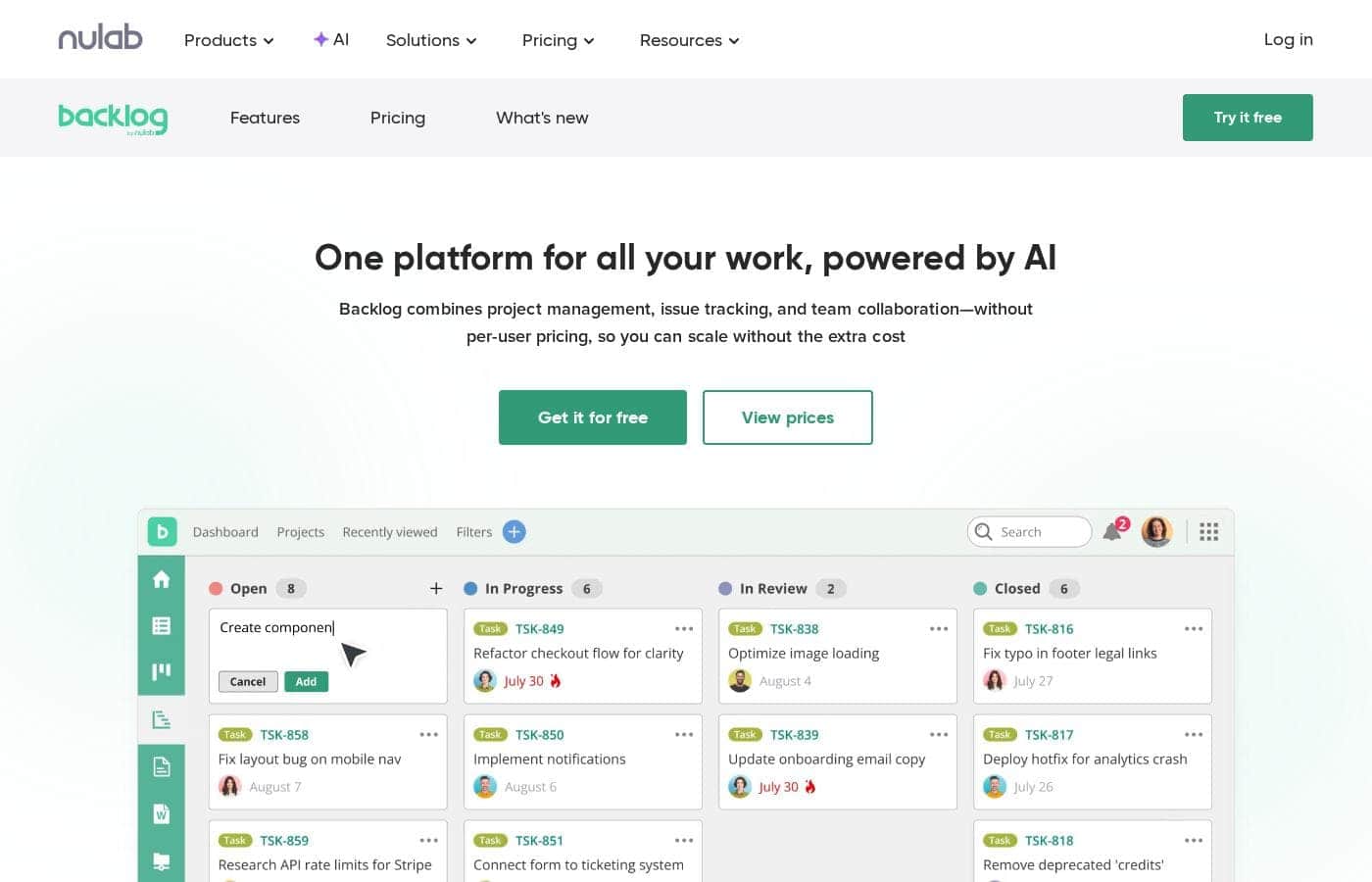
Zrzut ekranu strony głównej Backlog by Nulab Inc

W skrócie

Szybki przegląd Backlog by Nulab Inc: ocena, podsumowanie cen, kluczowe funkcje i najważniejsze informacje.
Ceny sprawdzone 13 paź 2026

Wynik Ciroapp

4.0/ 5

Backlog bundles task tracking, Gantt and Kanban views, docs, and built-in Git and SVN behind flat-rate pricing that never climbs with headcount. The AI Assistant, unlimited Gantt views, and enterprise SSO sit on pricier tiers, though, and storage caps run tight. Overall, it's a solid pick for growing teams that want projects and code on one predictable bill.

Zalety

  • Zalety:Flat-rate team pricing instead of per-seat fees — the $35/month Starter plan covers up to 30 users, and Standard and above support unlimited users, so adding teammates never raises the bill
  • Zalety:Built-in Git and Subversion hosting inside the platform—developers can manage repositories, review pull requests, and link commits directly to tasks without switching between a code host and a project tracker
  • Zalety:A working AI Assistant (included on Premium and Enterprise) that builds daily to-do lists, summarizes documents and project progress, flags blockers, and pulls up files and deadlines on demand

Wady

  • Wady:The AI Assistant is locked behind the $175/month Premium tier or custom-priced Enterprise, and heavy AI usage requires paid credit top-ups ($60–$210/month for 2,000–9,000 additional credits), which erodes the flat-rate value proposition
  • Wady:Storage limits are tight at every tier—100 MB on Free, 1 GB on Starter, 30 GB on Standard, and 100 GB on Premium—so file-heavy teams may hit ceilings well before user limits
  • Wady:The Starter plan caps at 30 users and 5 projects, forcing a jump to the $100/month Standard tier for teams just over that line, and Standard restricts Gantt charts to a 6-month view (unlimited views require Premium)
Najlepsze dla
  • Software teams that want issue tracking and code hosting under one roof
  • Agile teams that plan with Kanban boards or Gantt charts
  • Small businesses that want project management without a steep learning curve
Ta sekcja jest podsumowaniem. Szczegóły dotyczące funkcji, zastosowań, cen i recenzji znajdują się poniżej.

Czym jest Backlog by Nulab Inc?

Per-user pricing gets expensive fast when your team grows. Backlog by Nulab takes a different route: flat-rate plans, with the Starter tier covering up to 30 users. You also get project tracking, built-in Git and SVN, and an AI assistant in one place—so your team can scale without watching the bill climb.

Backlog is a project management platform from Nulab Inc. It combines task tracking, Agile boards, Gantt charts, bug tracking, and team documentation in one tool. Developers can manage Git and SVN code without leaving the app, and an AI assistant summarizes updates and drafts documents.

Nulab says more than 4 million users worldwide rely on it. It's built for software, design, and marketing teams, plus small businesses.

Czy warto wybrać Backlog by Nulab Inc?

Krótka wskazówka zakupowa przed porównaniem planów lub przejściem na stronę.

Wybierz, jeśli

  • Teams frustrated by per-seat pricing that rises with every hire
  • Developers who want commits, pull requests, and tasks linked in one platform
  • Teams that want AI help summarizing updates, drafting docs, and building to-do lists
  • Companies that want documents and files centralized instead of scattered across tools
  • Teams already using chat and file storage apps, since Backlog integrates and offers a robust API

Pomiń, jeśli

  • Buyers who need exact prices upfront—this page shows plan structure but no dollar figures, so confirm current costs directly
  • Teams just over 30 users on a tight budget, since the Starter plan caps there and bigger plans are flat-rate, not free
  • Organizations expecting SSO or provisioning on lower tiers—those features appear tied to the Enterprise bundle with Nulab Pass
  • Teams dependent on niche tools—the page mentions chat apps and file storage generally, so verify your stack connects or plan to use the API
  • Shoppers comparing trial or refund terms—those details aren't visible on this page

Następne kroki przed zakupem

  1. 1Check current plan pricing and the 30-user Starter cap against your team size before comparing totals
  2. 2List the tools your team depends on—chat, file storage, Git hosting—and confirm Backlog supports them, or plan around the API
  3. 3Compare Backlog with two alternatives at your headcount to see what flat-rate pricing actually saves you
  4. 4Look for a free trial or demo, and review any trial or refund terms before you commit
  5. 5If you need SAML SSO or provisioning, ask sales how the Nulab Pass bundle is priced for your organization

Łatwość użycia

Nulab positions Backlog as simple enough for small teams to adopt without a learning curve, and customer quotes on the page praise its user-friendly design. Enterprise buyers get personalized 1:1 training. The page doesn't detail onboarding steps, so expect some initial time structuring projects and inviting your team.

Backlog by Nulab Inc Kluczowe funkcje

✨ Plan work your way

Big-picture timelines or daily task lists—Backlog handles both. Use Gantt charts to map project timelines, or Kanban boards to visualize progress as work moves forward. The AI Assistant helps you create and update tasks quickly, so planning doesn't slow you down.

It's a good fit when your team mixes long-term planning with day-to-day execution.

🤖 Your AI teammate for smarter project management

Backlog's AI Assistant works like an extra teammate. It organizes data, creates summaries, and flags what's important, so your team spends time executing instead of searching. Each day, it can:

  • Build your daily to-do list
  • Summarize documents and project progress
  • Highlight blockers and key updates

Reach for it whenever you need context, files, or deadlines pulled up in seconds.

✨ Manage code where your work lives

Developers can manage Git and SVN repositories right inside Backlog. Review pull requests, link commits to tasks, and keep code next to the work it belongs to—no tool switching. AI adds instant project updates and summarizes progress, so everyone stays aligned without digging through threads.

It's handy when you want tasks and code in one view.

🗂️ Keep everything in one place

Project knowledge shouldn't live in scattered apps. Backlog centralizes documents, project documentation, and a file repository, with AI on hand to summarize, review, and improve them. You can also track bugs from reporting to resolution and visualize timelines with AI-assisted summaries, charts, and reports.

When you need to check project health, the answers are already there.

Przypadki użycia

🔄 Run Agile sprints without the guesswork

Plan work on Kanban boards and track progress with burndown charts. The AI assistant flags blockers and builds daily to-do lists, so standups stay short.

Tip: Ask the AI for a progress summary before each standup.

💻 Keep code and tasks in one place

Developers manage Git and SVN repos inside Backlog. They link commits to tasks, review pull requests, and track bugs from report to resolution—no switching apps.

Expected outcome: developers stay focused without bouncing between tools.

📣 Coordinate marketing campaigns and deadlines

Marketers plan campaigns, assign deliverables, and map timelines on Gantt charts. Designers and other teams gather feedback in one place, so launches stay on schedule. AI summaries keep everyone aligned.

📈 Grow your team without growing the bill

You're hiring, but per-user fees keep stacking up. Backlog's flat rate covers the whole team—30 users on Starter, unlimited on higher plans. Add teammates anytime; your price doesn't change.

Backlog by Nulab Inc cennik

Od35 USD/mies.≈ 137,26 zł

  • Planów: 5
  • Dostępny darmowy plan

Ceny sprawdzone 13 paź 2026 na stronie cennika Backlog by Nulab Inc

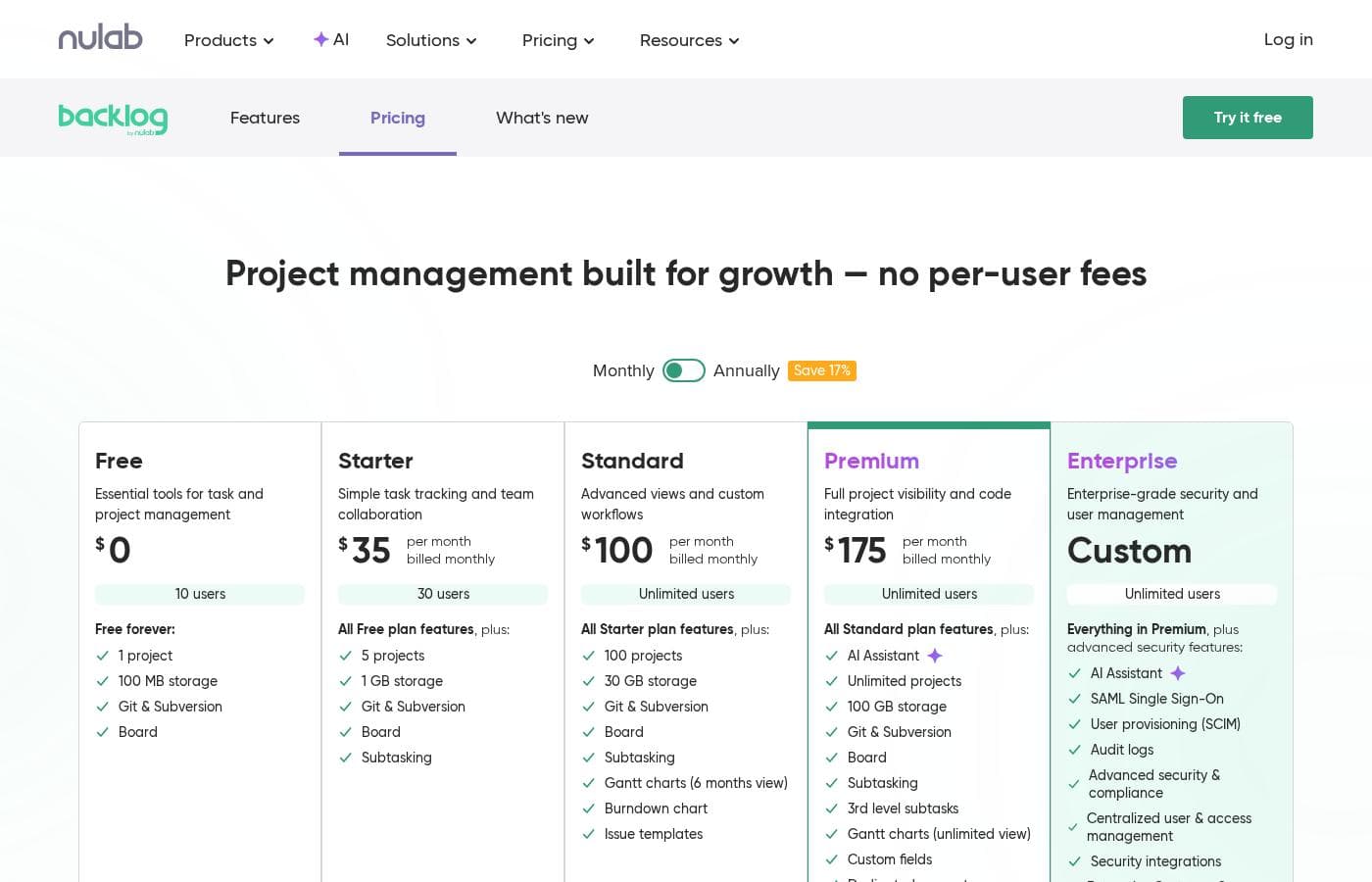
Zrzut ekranu cennika Backlog by Nulab IncZobacz zrzut ekranu cennika
PlanMiesięcznieRocznieZawiera
Free
Za darmo
Za darmo
10 users
  • 1 project
  • 100 MB storage
  • Git & Subversion
  • Kanban-style Board view
  • Free forever
Starter
35 USD/mies.
≈ 137,26 zł
—
30 users
  • Everything in Free
  • 5 projects
  • 1 GB storage
  • Subtasking
  • Board, Git & Subversion
Standard
100 USD/mies.
≈ 392,18 zł
—
Unlimited users
  • Everything in Starter
  • 100 projects
  • 30 GB storage
  • Gantt charts (up to 6 months view)
  • Burndown chart
  • +1
Premium
175 USD/mies.
≈ 686,32 zł
—
Unlimited users
  • Everything in Standard
  • AI Assistant
  • Unlimited projects
  • 100 GB storage
  • 3rd level subtasks
  • +3
Enterprise
Zobacz stronę dostawcy
Unlimited users
  • Everything in Premium
  • AI Assistant
  • SAML Single Sign-On
  • User provisioning (SCIM)
  • Audit logs
  • +2

Przeliczono po kursie referencyjnym EBC z 12 paź 2026; dostawca może stosować inną cenę lokalną.

Historia cen

Śledzimy ceny od 9 wrz 2026. Na razie bez zmian.

Typy cen: Free plan, Monthly subscription, Yearly subscription

Uwagi do cennika

Backlog offers a free plan plus four paid tiers starting at $35/month. Every plan uses flat team pricing with no per-user fees, and annual billing saves 17%.

Backlog by Nulab Inc costs between $0 and $175 per month with 5 plans: Free at $0, Starter at $35/month, Standard at $100/month, Premium at $175/month, and Enterprise at custom pricing. Every plan is a flat team rate, so there are no per-user fees as your team grows.

Free

Price: $0 Best For: Small teams that need essential task and project management tools Other Features:

  • Free forever for up to 10 users
  • 1 project and 100 MB storage
  • Built-in Git & Subversion and a Kanban-style Board

This plan works well for tiny teams or anyone testing the waters. You get core task tracking with no time limit. If your needs grow, moving up a tier is simple.

Starter

Price: $35 per month, billed monthly Best For: Simple task tracking and team collaboration Other Features:

  • Up to 30 users
  • 5 projects and 1 GB storage
  • Everything in Free, plus subtasking

Starter fits growing teams that need more room than the Free plan gives. The flat price covers the whole team, so adding a colleague costs nothing extra. Small businesses often find this tier is enough.

Standard

Price: $100 per month, billed monthly Best For: Teams that want advanced views and custom workflows Other Features:

  • Unlimited users
  • 100 projects and 30 GB storage
  • Gantt charts (up to 6 months view)
  • Burndown chart and issue templates

Standard is the sweet spot for most project teams. You get timeline planning and sprint tracking without jumping to the top tier. Agile teams tend to appreciate the burndown charts here.

Premium

Price: $175 per month, billed monthly Best For: Teams that need full project visibility and code integration Other Features:

  • Unlimited users and unlimited projects
  • 100 GB storage
  • AI Assistant included
  • Unlimited Gantt views, custom fields, and 3rd level subtasks
  • Dedicated support

Premium suits larger teams juggling many projects at once. The AI Assistant summarizes progress and helps flag blockers for you. If you want unlimited Gantt timelines and dedicated support, pick this one.

Enterprise

Price: Custom Best For: Organizations that need enterprise-grade security and user management Other Features:

  • Everything in Premium
  • SAML Single Sign-On and SCIM user provisioning
  • Audit logs plus advanced security & compliance
  • Enterprise Customer Success Manager

Enterprise is built for large organizations with strict security and compliance needs. A dedicated success manager helps with strategy and training. Contact Nulab's sales team for a tailored quote.

A quick note on AI credits: Premium and Enterprise include 2,000 complimentary AI credits. Teams that need more can add packages — Light at $60/month (2,000 credits), Basic at $130/month (5,000 credits), or Advanced at $210/month (9,000 credits).

Backlog's free plan is genuinely free — you can start a project today without a trial clock or a credit card. Annual billing saves 17% compared to paying monthly, which adds up over a year. Before you commit, check that a tier's project and storage limits match your workload, since those vary quite a bit between plans.
Kalkulator kosztów

Oszacuj, ile Backlog by Nulab Inc kosztuje dla Twojego zespołu.

Rozliczenie
Miesięcznie
35 USD≈ 137,26 zł
Rocznie
420 USD≈ 1647,17 zł

Starter ma stałą cenę: liczba stanowisk nie zmienia sumy. Szacunek na podstawie opublikowanych cen katalogowych, bez podatków, dodatków i rabatów.

Przeliczono po kursie referencyjnym EBC z 12 paź 2026; dostawca może stosować inną cenę lokalną.

Jak płacić mniej za Backlog by Nulab Inc

  • Zacznij od darmowego planu i przejdź wyżej dopiero po osiągnięciu limitów.
  • Tańsze narzędzia w tej kategorii zaczynają się od 5 USD/mies.
Odwiedź Backlog by Nulab Inc

Powiadom mnie, gdy Backlog by Nulab Inc zmieni cenę

Jeden e-mail, gdy wykryjemy zmianę na stronie cennika dostawcy. Bez newslettera i promocji. Rezygnacja jednym kliknięciem.

Recenzje użytkowników

Brak recenzji.

Napisz recenzję

Napisz recenzję dla Backlog by Nulab Inc
0/100 znaków
0/2000 znaków

Dlaczego używać Backlog by Nulab Inc?

Here's the problem most tools create: every new teammate raises your bill. Backlog flips that model. You pay a flat rate while your whole team works in one place—projects, code, documents, and AI support included.

  • Flat-rate pricing that scales with you. The Starter plan covers up to 30 users, and other plans support unlimited users—no per-seat fees as you grow.
  • Code and tasks in one tool. Built-in Git and SVN let developers link commits to tasks and review pull requests without switching apps.
  • An AI teammate, not a gimmick. The AI assistant builds daily to-do lists, summarizes documents and progress, flags blockers, and pulls up files and deadlines in seconds.
  • Plan the way your team thinks. Use Gantt charts for big-picture timelines or Kanban boards for day-to-day flow—Backlog adapts to both.
  • Knowledge stays put. Documents, project documentation, and a file repository live inside the platform, with AI on hand to summarize and improve them.
  • Enterprise options when you need them. SAML authentication, user provisioning, and 1:1 training are available through the Enterprise bundle with Nulab Pass.

If headcount-based pricing has been holding your team back, Backlog's model deserves a serious look.

Alternatywy dla Backlog by Nulab Inc

Inne narzędzia w kategorii Zarządzanie projektami

Zobacz wszystkie narzędzia Zarządzanie projektami
Plutio

Plutio

Project Management3.9/5

Plutio is the helpful all-in-one solution built for running your entire business. It works whether you’re a solo professional, managing a team, or working primarily with clients. It centralizes essential tools like forms, project management, contracts, and proposals onto a single platform. This centralization means no more juggling between apps and fewer subscription payments. With Plutio, you're unifying your entire workflow to boost productivity and growth.

Ora

Ora

Project Management3.6/5Od 5,99 USD/mies. (≈ 23,49 zł)

Ora is a powerful platform designed for productive individuals and collaborative teams. It serves as your daily planner and central hub for managing work. The core Agenda Calendar helps you organize your time and be more effective. Instead of dealing with separate tools, all your critical information, tracked time, and completed tasks appear directly on your calendar. You can quickly view both your tasks and those of your teammates, ensuring smooth collaboration.

ClickUp

ClickUp

Project Management4.1/5Od 7 USD/mies. (≈ 27,45 zł)

ClickUp is reliably described as the essential all-in-one workspace for modern teams. It’s designed to align, collaborate, and boost productivity across your entire organization. This platform helps eliminate app sprawl by converging over 50+ different applications into one centralized hub. Teams managing operations, campaigns, or product development use ClickUp to get more done faster, together.

Trello

Trello

Project Management4.2/5Od 6 USD/mies. (≈ 23,53 zł)

Wizualne tablice, które zamieniają rozproszone zadania w uporządkowaną, zautomatyzowaną pracę.

Notion

Notion

Project Management4.2/5

Twoja aplikacja AI do wszystkiego. Więcej produktywności. Mniej narzędzi.

Asana

Asana

Project Management4.2/5

Zarządzaj pracą, projektami i zadaniami swojego zespołu online.

Monday.com

Monday.com

Project Management4.1/5

Jedna platforma AI do pracy przy każdym rodzaju zadań.

Teamwork

Teamwork

Project Management4.1/5

Zarządzanie projektami i zasobami, które zamienia frustrację w sukces.

Najtańsze oprogramowanie Zarządzanie projektami dla 1–25 użytkowników

Backlog by Nulab Inc: najczęstsze pytania

Ile kosztuje Backlog by Nulab Inc?

Najtańszy płatny plan Backlog by Nulab Inc, Starter, kosztuje 35 USD (≈ 137,26 zł) miesięcznie. Płatne plany kosztują od 35 USD do 175 USD miesięcznie. Ceny sprawdzone 13 paź 2026 na stronie cennika dostawcy.

Czy Backlog by Nulab Inc ma darmowy plan?

Tak. Backlog by Nulab Inc ma darmowy plan (Free); płatne plany zaczynają się od 35 USD (≈ 137,26 zł) miesięcznie.

Czy cena Backlog by Nulab Inc ostatnio się zmieniła?

Nie. Od początku śledzenia (9 wrz 2026) nie wykryliśmy zmiany ceny.

Does Backlog offer a free trial?

There's no timed trial, but you can use the Free plan forever. It covers 10 users, 1 project, 100 MB of storage, Git, and a Kanban board—no credit card required.

Is Backlog secure enough for larger organizations?

Every plan includes two-factor authentication, access controls, and secure hosting on backlog.com. For SAML single sign-on, SCIM provisioning, and audit logs, you'll need the Enterprise bundle with Nulab Pass.

Does Backlog integrate with other tools?

Yes—it connects to chat apps and file storage services, and its API supports custom integrations. Git and Subversion are built in, so developers can link code to tasks without switching apps.

What support and training does Backlog include?

All plans get email support. Premium adds a dedicated customer success associate, and Enterprise includes a success manager plus 1:1 online training to help your team get set up.

Gotowy, aby wypróbować Backlog by Nulab Inc? Zobacz oficjalną stronę lub cennik.

Reprezentujesz Backlog by Nulab Inc? Przejmij ten wpis · Pobierz odznakę