Trello vs Wrike
Trello and Wrike both manage projects incredibly well, but they target different users. Trello excels at visual simplicity and quick adoption for smaller teams. Wrike is built for complex enterprise workflows and deep resource management. You need to choose between flexibility and comprehensive control.
Best for: Solo entrepreneurs or freelancers needing reliable task capture, Small teams (under 15 people) running simple marketing campaigns
Best for: Enterprise organizations needing 360° reporting and executive oversight, Creative agencies managing high-volume file and video proofing workflows
Simple Project Management, Complex Login
We find Trello delivers exceptional value quickly due to its easy operation. Its Kanban visual organization is highly flexible for team workflows. Overall, Trello is a powerful tool, but stability issues and frustrating administrative friction points like the Atlassian login do hold it back.
Pros
- The simple, visual Kanaban board design offers great ease of use.
- A permanent Free plan is available and suitable for small teams or personal use.
- The platform is effective for team management and sharing context quickly.
- Supports extensive customization and functionality upgrades via Power-Ups.
Cons
- Users frequently report difficulty and friction with the Atlassian login process.
- Accessing billing information and invoices can be surprisingly complicated.
- The interface occasionally suffers from lag and server downtime.
- Key views like Calendar or Map require a paid Premium subscription.
Enterprise Power Meets Complex Commitment.
We find Wrike is an exceptionally versatile project solution, noted for scaling efficiently across corporate environments up to 3000 users and unifying communication across highly complex workflows. Overall, the software offers a powerful feature set for advanced visibility and customization, but we caution users regarding the rigid annual subscriptions and documented difficulties with managing auto-renewal and pricing increases.
Pros
- Transforms and streamlines complex corporate workflows efficiently.
- Highly customizable for various methodologies (e.g., Holacracy, OKR).
- Excellent collaborative transparency and 360° project visibility.
- Provides fast and helpful customer support regarding implementation and bugs.
Cons
- Pricing practices are reported as aggressive, often resulting in significant renewal increases.
- Subscriptions are difficult to cancel, and users report trouble stopping automatic renewal.
- Some teams report challenging adoption and setup processes.
- Users report instances of being oversold on features bundles they did not need.
AboutTrello
Trello is designed to keep you at the top of your game by ensuring every to-do or idea, regardless of size, finds its proper place. The system helps you stay organized and efficient using three key components: Inbox, Boards, and Planner.
The Inbox quickly captures tasks as soon as they are on your mind, whether you are in the office or on the go. You manage your tasks using flexible Boards, where long lists become manageable by tracking items from “to-dos to tackle” to “mission accomplished!” Use the Planner to simply drag and drop your top tasks right into your calendar, ensuring you make time for what truly matters. 💡
AboutWrike
Wrike is a trusted end-to-end enterprise work management solution. It's designed for organizations ready to transform manual processes into interconnected, automated workflows. Teams from 20 to 20,000 thrive here because Wrike is highly adaptable to any industry or size. It brings multiple teams into the same place for game-changing visual collaboration. Wrike is where you can easily align strategy and effectively execute your projects and programs. 💡
Highlights
Feature Comparison
Features Overview
We highlight the main differences and pick a winner for each feature.
User Interface & UX
Trello is pure visual Kanban ease; Wrike offers many highly flexible views.
Trello's design is immediately intuitive, relying on the visual Kanban structure. New users adopt Trello instantly due to its visual simplicity. It organizes everything clearly using cards, lists, and boards easily. Wrike is feature-rich but requires much more customization across multiple views. It offers Lists, Boards, Gantt Charts, and Tables for diverse viewing needs. If your team hates clicking through tutorials, Trello's lower learning curve is a massive benefit. Wrike provides complexity necessary for advanced project oversight from the start, which increases setup time.
Project Visibility
Wrike gives 360° visibility; Trello focuses visibility on specific boards.
Trello Premium includes Dashboard, Timeline, and Table views. Card Mirroring allows tracking cards across different boards effectively. Wrike provides robust 360° visibility across all projects and departments. It uses Gantt Charts and resource tools for deep organizational oversight. Trello optimizes visibility for the individual project or team level. Wrike is engineered for cross-departmental executive visibility. Large program managers tracking resources across 50+ projects prefer Wrike's systemic view.
Pricing & Commitment
Trello is flexible monthly/annual; Wrike demands rigid annual commitments.
Trello offers a generous permanent Free plan for small teams. Paid plans are available monthly or yearly for increased flexibility. The Standard plan starts at $5/user/month annually. Wrike's paid plans require a mandated annual subscription commitment. This inflexible structure carries risk upon renewal or cancellation. Trello is ideal for budget-conscious teams who need maximum flexibility. User reviews strongly caution against Wrike's aggressive renewal pricing practices.
Resource Management
Wrike specializes in resource allocation; Trello lacks dedicated resource tools.
Trello focuses purely on task management and visual workflow. It does not include native tools for optimizing team member capacity planning. Wrike's Business plan includes powerful Resource and Capacity Planning tools. Managers see team utilization across all projects instantly. If you need to strategically allocate human resources, Wrike is the clear choice. Wrike helps large organizations keep all deadlines on track by preventing over-allocation.
Automation Scalability
Trello uses simple rules; Wrike provides higher volume, per-user quotas.
Trello includes powerful, built-in no-code automation on every board. The Free plan starts with 250 command runs per month. Premium users benefit from unlimited Workspace command runs. Wrike offers automation quotas that scale substantially per user count. The Business plan provides 200 automation actions per user monthly. Trello focuses on automating simple board actions like card movement. Wrike supports deeper, high-volume, cross-functional automation and sync. If your team relies on sophisticated rule chains, Wrike's scale is necessary.
AI Integration
Trello uses AI for task capture; Wrike uses AI for advanced analysis.
Trello uses Atlassian Intelligence (AI) to transform forwarded emails into organized tasks. This feature quickly generates summaries and needed links. Wrike integrates advanced AI capabilities into every work management layer. AI-driven analytics predict risk and optimize resource allocation proactively. Trello's AI is about productivity and getting tasks into the system faster. Wrike's AI is about data-driven decision-making and forecasting. Project managers needing to forecast scope creep or risk mitigation will find Wrike's analysis more valuable.
Review Workflow
Wrike provides built-in file proofing; Trello needs Power-Ups or external tools.
Trello lacks a native, dedicated module for content asset proofing. Users must rely on attachments and comments for feedback loops. This process is adequate for text-based tasks. Wrike Business offers built-in File and Video Proofing for over 30 formats. It includes options for seamless external guest approvals. Teams handling large volumes of visual or video assets must choose Wrike. Agencies use Wrike to save hours by drastically speeding up client feedback loops.
Security & Governance
Both compliant, but Wrike offers more customizable enterprise user controls.
Trello is SOC2 Type 2 and ISO certified for security reliability. Enterprise customers get free SSO using Atlassian Guard for central control. Security features are generally strong across Trello’s paid tiers. Wrike also holds SOC2 Type II and multiple ISO certifications. It offers custom access roles and customizable user types in higher plans. Wrike supports advanced security features like Locked Spaces for secure collaboration. Heavily regulated industries often prefer Wrike for its detailed permission control and granular roles.
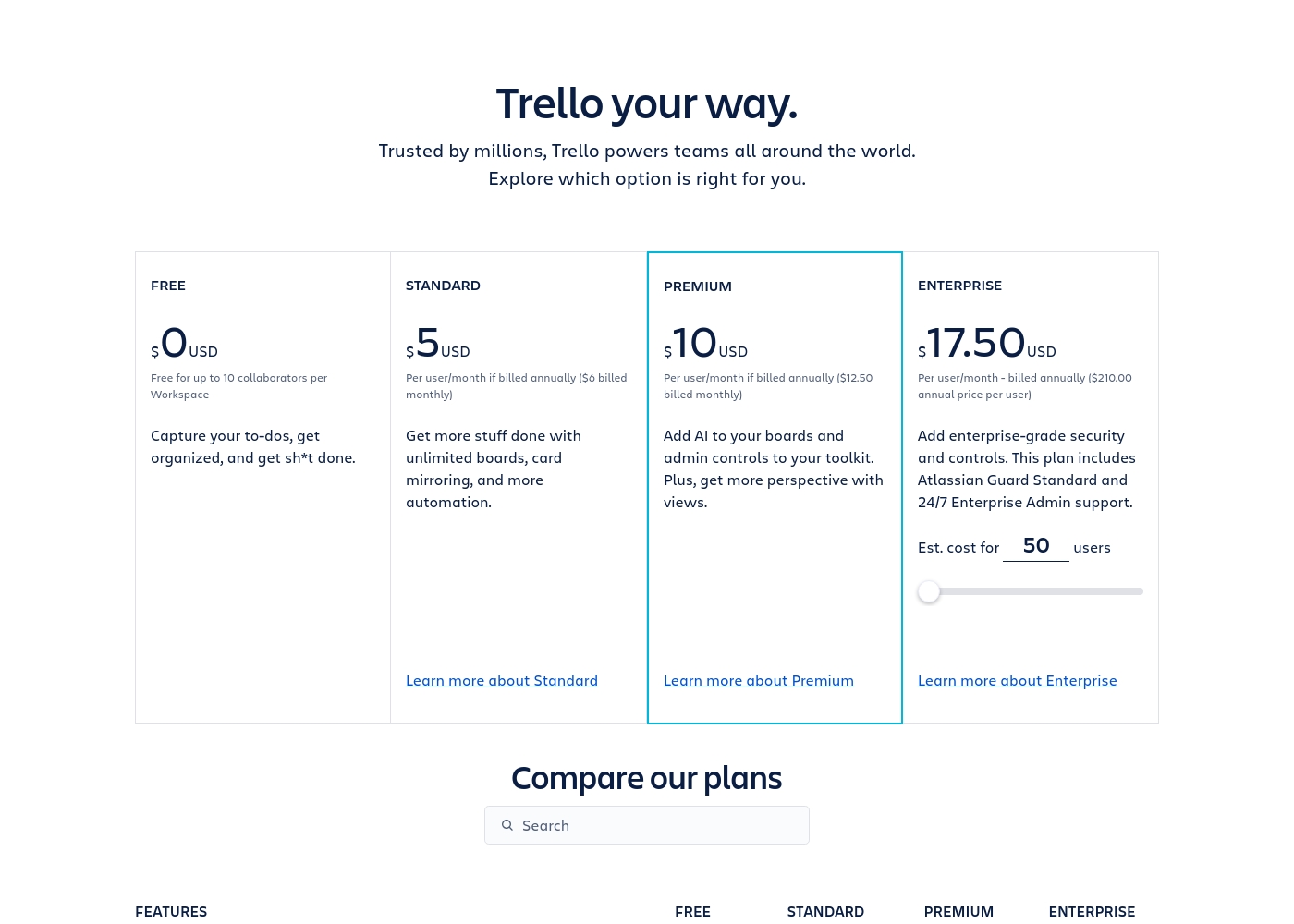
Trello costs between $0 and $17.50 per user/month, offering four plans: Free at $0, Standard at $5/user/month (annually), Premium at $10/user/month (annually), and Enterprise at $17.50/user/month (annually).
Trello offers flexible plans for individuals and large organizations. Let’s look closer at what each plan provides, based on annual pricing options.
Free
Price: $0 USD Best For: Capturing to-dos, fundamental organization Other Features:
- Unlimited cards
- Up to 10 boards per Workspace
- Unlimited Power-Ups per board
- 250 Workspace command runs per month
- 2-factor authentication
- Unlimited cards
- Unlimited Power-Ups per board
- Unlimited storage (10MB/file)
- 2-factor authentication
- Unlimited activity log
- Unlimited boards
- Card mirroring
- Advanced checklists
- Custom Fields
- Quick capture powered by AI
- Atlassian Intelligence (AI)
- Views: Calendar, Timeline, Table, Dashboard, and Map
- Admin and security features
- Workspace-level templates
- Simple data export
- Unlimited Workspaces
- Organization-wide permissions
- Free SSO and user provisioning with Atlassian Guard
- 24/7 Enterprise Admin support
- Public board management
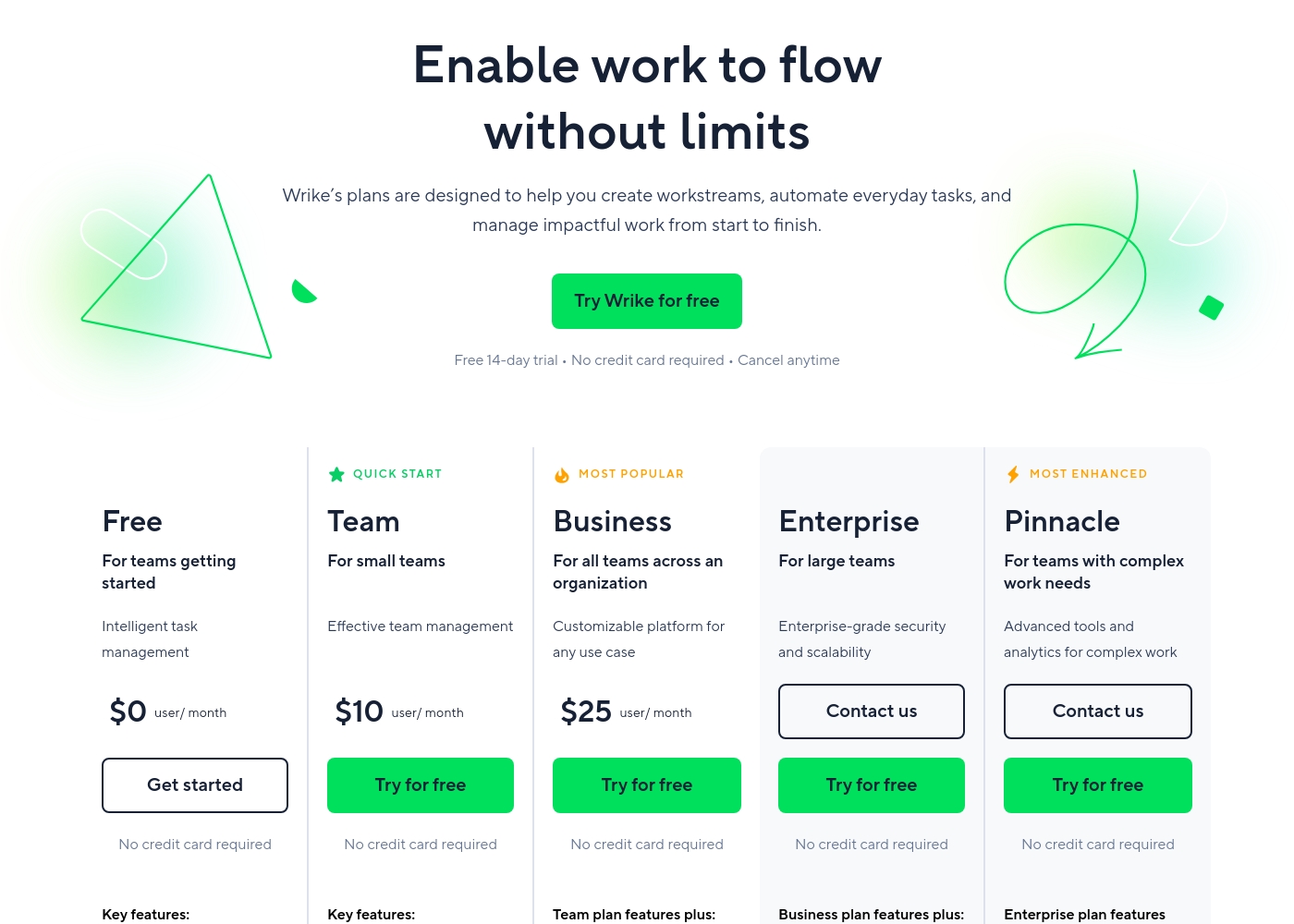
Wrike costs between $0 and $25 per user/month, with five plans: Free at $0/user/month, Team at $10/user/month, Business at $25/user/month, and Enterprise and Pinnacle which require users to contact sales.
- Web, desktop, and mobile apps
- Project and task management
- Board view (Kanban)
- Table view (spreadsheet format)
- Folders structure & nested projects
- Unlimited projects, tasks, & subtasks
- Gantt charts, Calendar & Chart view
- Generative AI, 2 GB storage per user
- Project Blueprints and Unlimited request forms
- Approvals & guest approvals
- Resource & Capacity Planning
- File and video proofing (30+ file formats)
- Real-time reports
- SAML-based SSO and Two-Factor Authentication (2FA)
- Password policies and custom access roles
- Customizable user types and Admin permissions
- User audit reports
Pricing Notes
- Trello offers fully flexible monthly payments for paid plans (Standard and Premium).
- Wrike requires an annual commitment for all paid plans (Team and higher).
- Trello provides a very generous, permanent Free plan suitable for up to 10 users.
- Wrike users often complain about aggressive renewal pricing and difficulties attempting to cancel their subscriptions.
- Wrike’s pricing for larger organizations is often sold in fixed seat batches, increasing minimal user count requirements.
Pricing Head-to-Head
User Reviews
Trello receives mixed but generally favorable external feedback, often lauded as an amazing app for personal and team organization. Users consistently praise its simple design and exceptional ease of use, which makes it perfect for startups and small businesses utilizing the generous free plan.
The core utility, including dynamic block control and strong real-time syncing, is highly appreciated. However, recurring pain points are frequently mentioned, stemming largely from the Atlassian acquisition.
Trello is a great tool for starting out, especially for small businesses. It has a robust free plan you can use for organization before deciding to go premium. It’s an excellent option for startups working with a limited budget.
Users consistently praise Wrike's powerful capabilities in transforming workflow management and driving organizational efficiency. Many reviewers, including team leads and large enterprise users, call it one of the best project management systems available, noting its strong suitability for high-level customization for specific methodologies like OKR.
Its ability to centralize communication, provide 360° visibility, and manage collaboration across large global teams is frequently highlighted as second to none. Furthermore, customer support is often described as exemplar, particularly regarding implementation and quick bug fixes.
Using Wrike for three years has completely changed how we manage our workflows. The biggest transformation is how streamlined and fast our operations have become. It's truly efficient for our large team.
Our Verdict
Trello and Wrike represent two distinct project philosophies for your team. Trello is the flexible, easy-to-use visual powerhouse perfect for fast action. Wrike is the robust, complex machine built for deep organizational control and large scale. Teams must choose between friendly simplicity or high-octane engineering. Trello’s superpower is its phenomenal ease of use and low barrier to entry. New teams can start managing tasks in Trello within minutes using the beloved Kanban view. The permanent Free plan makes Trello the ultimate choice for small teams watching their budget closely. Trello's AI transforms emails into actionable tasks, making quick capture simple. Wrike's superpower lies in its enterprise-grade features and ability to handle complexity. Wrike provides critical resource planning tools to prevent systematic team overload. Wrike also crushes Trello in review workflows, offering built-in file and video proofing. Managers get 360° visibility across every department using Wrike's advanced analytics. The deciding factor is whether you need flexibility or deep governance and oversight. If you lead a small team and value quick adoption, Trello is your clear winner. If you manage large, cross-functional programs and require mandatory annual commitment, Wrike provides the necessary controls. Pick Wrike for predictable complexity and Trello for visual simplicity.
Frequently Asked Questions
Which is better for small teams: Trello or Wrike?
Trello is generally better for small teams and startups. Trello offers a generous Free plan and a very low learning curve for fast adoption. Wrike's paid tiers require a rigid annual subscription commitment.
Does Wrike offer a true Free version like Trello?
Yes, Wrike has a permanent Free plan with basic features like Board and Table views. The Trello Free plan is often more robust, allowing up to 10 boards per Workspace. Wrike is typically optimized for scaling enterprises.
Is Wrike worth the extra cost over Trello?
Wrike is worth the cost if you need advanced features Trello lacks natively. This includes Resource Planning, deep analytics, and dedicated file proofing. Trello is cheaper but trades off complexity and high-end functionality.
How do Trello's project views compare to Wrike's?
Trello focuses mainly on the Kanban board, with extra views locked behind Premium. Wrike offers native Gantt Charts, Tables, and Calendars, allowing superior project oversight. Wrike offers more viewing flexibility across plans.
Which platform offers better integration and automation?
Wrike offers superior custom automation and data syncing via Wrike Integrate. Trello relies on community Power-Ups and simpler no-code rules. Wrike supports much higher volumes of integrated automation actions per user.
Which tool handles creative asset approvals better: Trello or Wrike?
Wrike is significantly stronger for creative teams. Wrike has built-in proofing for video and 30+ file formats with guest approval capabilities. Trello requires a clumsy manual process or relying on external tools.
Ready to Choose?
Both tools have their strengths. Choose based on your specific needs.