Techinline vs Viewabo
Techinline and Viewabo are both remote support tools, but they solve different problems. Techinline excels at secure, unattended device management for IT teams. Viewabo shines with instant visual guidance for customer support. Your choice depends on whether you need to manage servers or troubleshoot physical products visually.
Best for: IT professionals managing unattended servers and desktops, MSPs needing centralized device management
Best for: Customer support teams troubleshooting physical products, Global teams needing asynchronous support across time zones
Solid remote support with scalable pricing.
We found Techinline SetMe to be a capable and secure remote access solution, especially for IT professionals and small teams needing reliable unattended and on-demand support. Its tiered pricing offers flexibility, but the lack of a clear refund policy is a notable gap for potential buyers.
Pros
- Simple, instant client connections via a set.me link.
- Scalable plans from individual use to enterprise-level team management.
- Stable connections with auto-reconnect and multi-monitor support.
- Centralized dashboard for managing all devices and permissions.
Cons
- Limited public user reviews made independent sentiment analysis impossible.
- No explicit refund policy is detailed on the website.
- Advanced team features require upgrading to higher-tier, per-seat plans.
- The 'Core' plan for individual use lacks on-demand support features.
Visual support without the download.
Viewabo offers a compelling solution for support teams needing instant visual context via an app-free connection. We appreciate the dual approach of live streaming (STREAM) and convenient asynchronous recording (CAPTURE) for global support. Overall, the platform appears highly effective, though the required custom consultation and lack of public user feedback create initial barriers to assessment.
Pros
- Eliminate customer friction using app-free connections (SMS/email link).
- Resolve issues quickly with real-time video guidance and annotations (STREAM).
- Support customers across time zones using asynchronous video capture (CAPTURE).
- Session recording automates training, coaching, and quality assurance.
Cons
- Pricing models are custom and not publicly transparent.
- Requires contacting sales for a consultation and tailored quote.
- Free trial and public plan descriptions are unavailable.
- Complete absence of third-party user reviews (Trustpilot/Capterra/etc.).
AboutTechinline
SetMe is a remote support and management tool 🛠️ designed for IT professionals, support teams, and managed service providers. It lets you instantly connect to any computer, whether you’re providing live help or managing unattended servers and desktops from a central dashboard.
AboutViewabo
Viewabo is a modern visual support platform designed for innovative customer care teams. It gives your staff instant visual context without needing complicated technology. The core idea is simple: you visualize the issue, so you can diagnose and resolve problems with confidence. It’s like being there, but you never leave your desk. This tool is trusted by forward-thinking companies, from fast-moving startups to established global brands. It empowers teams to modernize their support and improve customer satisfaction.💡
Highlights
Feature Comparison
Features Overview
We highlight the main differences and pick a winner for each feature.
Connection Experience
Techinline uses a simple link for remote control. Viewabo uses app-free links for visual support.
Techinline lets you connect instantly via a set.me link. Clients just visit the URL with no downloads needed. Viewabo also uses app-free links, but via SMS or email for visual sessions. No account or app is required for the customer. Both are frictionless, but Techinline focuses on desktop control while Viewabo focuses on camera sharing. For IT support, Techinline's link is perfect for quick fixes. For product troubleshooting, Viewabo's link is ideal.
Unattended Access
Techinline excels with unlimited unattended devices. Viewabo has no unattended access feature.
Techinline's Business plan offers unlimited unattended devices. You can manage servers from anywhere via a dashboard. Viewabo is designed for live or async support, not unattended access. It doesn't manage devices in the background. Techinline is clearly better for IT teams needing constant device access. Viewabo is not an option for this use case. If you manage remote servers, Techinline is the only choice here.
Visual Troubleshooting
Viewabo dominates with live video guidance and annotations. Techinline has basic screen sharing.
Techinline provides remote desktop control with multi-monitor support. It's great for fixing software issues on a screen. Viewabo STREAM lets customers share their phone camera in real-time. Agents can annotate and pause the video to guide them. Viewabo is built for visual, physical troubleshooting. Techinline is built for remote desktop access. If you need to see a customer's physical setup, Viewabo is the clear winner.
Asynchronous Support
Viewabo offers async video recording for global support. Techinline doesn't support this.
Techinline focuses on live, real-time remote sessions. There's no option for customers to submit issues later. Viewabo CAPTURE lets customers record videos asynchronously. They can submit issues anytime, perfect for global teams. This is a huge difference for teams supporting customers across time zones. Techinline requires live connections. Viewabo's async feature saves time and improves convenience for customers.
Session Recording
Both tools record sessions, but Viewabo's is automatic for training.
Techinline includes session recording in its plans. It's useful for documentation or compliance. Viewabo automatically records every session. These recordings are stored for coaching and quality review. Viewabo's recordings are more integrated into team learning. Techinline's are more for reference. For building a training library, Viewabo's automatic approach is more efficient.
Team Management
Techinline has structured plans for teams. Viewabo has flexible guest access.
Techinline's Professional plan adds user management and team reports. It's designed for growing teams. Viewabo uses a GUESTS feature for collaboration. Team members can view recordings without starting sessions. Techinline's approach is more formal and plan-based. Viewabo's is more flexible but less structured. For scaling a support team, Techinline's plans offer clearer progression.
Pricing Transparency
Techinline has public pricing. Viewabo requires custom quotes.
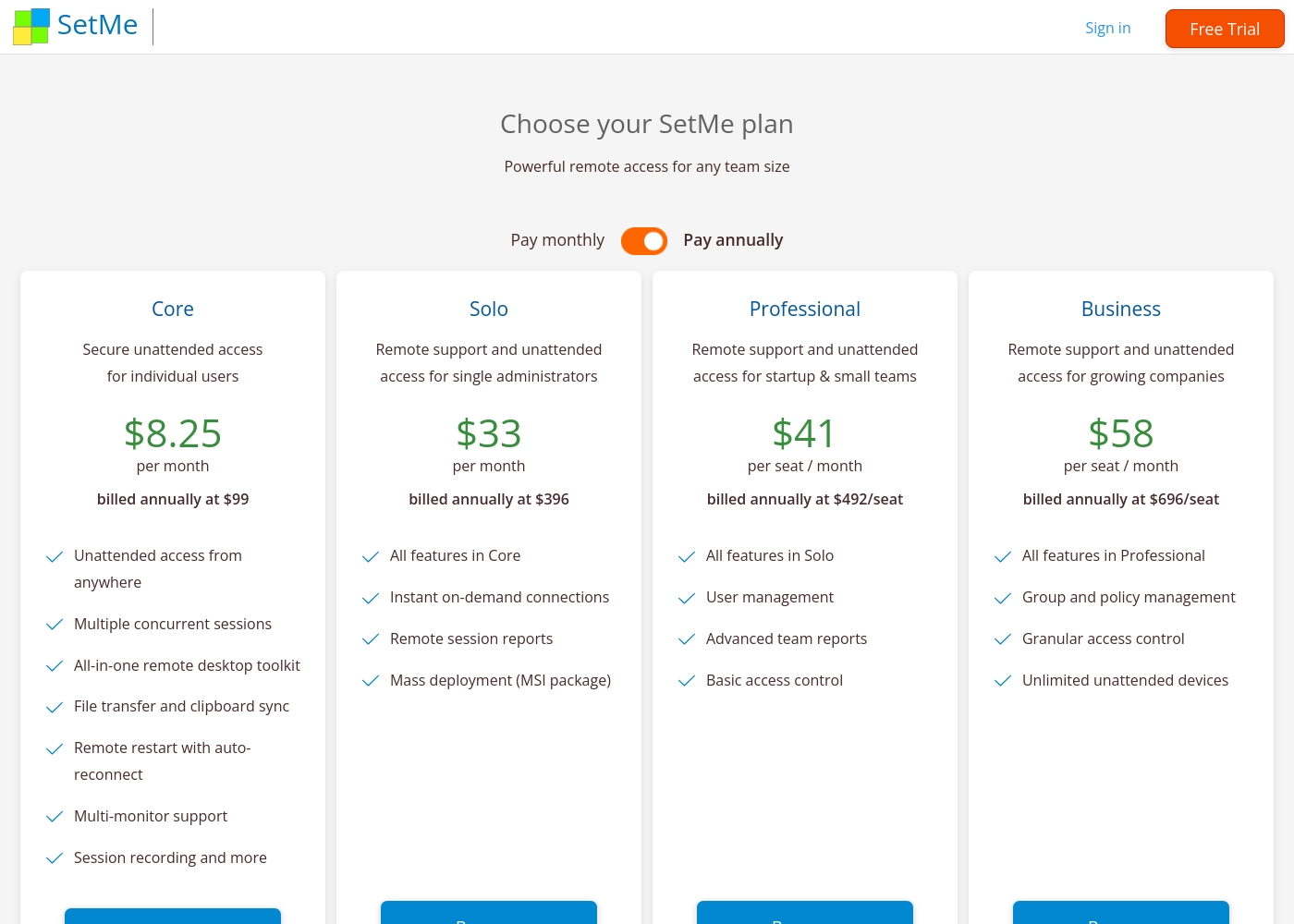
Techinline lists all plans with clear prices. The cheapest is $8.25/month annually. Viewabo doesn't publish pricing. You must contact sales for a custom quote. Techinline's transparency makes it easier to budget. Viewabo's custom model might suit large enterprises. For small teams, Techinline's clear pricing is a big advantage.
Free Trial
Techinline offers a 15-day free trial. Viewabo has no public trial.
Techinline's 15-day trial requires no credit card. You can test all features risk-free. Viewabo's pricing is custom, so there's no public trial. You must contact sales for access. Techinline's trial lets you evaluate before buying. Viewabo's approach is less accessible for quick testing. If you want to try before you buy, Techinline is the better option.
Security Features
Techinline emphasizes end-to-end encryption. Viewabo's security details are limited.
Techinline uses end-to-end encryption for all sessions. It's designed for secure remote access. Viewabo doesn't publicly detail security protocols or compliance. Sessions are recorded but security isn't highlighted. Techinline is better for IT teams with strict security needs. Viewabo's security is less transparent. If data protection is critical, Techinline's encryption is a key advantage.
Customer Support
Both offer support, but Techinline's details are clearer.
Techinline mentions support but details are limited. The trial provides a way to test reliability. Viewabo also offers support but doesn't specify response times. Pricing requires sales consultation. Neither tool has robust public support info. Techinline's trial gives more direct access. For support quality, you'd need to test both tools personally.
Techinline pricing: Techinline offers four SetMe plans starting at $8.25 per month (billed annually) for individual unattended access. Pricing scales based on features like on-demand support, seat count, and team management tools, with both monthly and yearly billing available for most tiers.
Core
Price: $8.25 per month (billed annually at $99) Best For: Individual users needing secure unattended access Other Features: Multiple concurrent sessions, File transfer and clipboard sync, Remote restart with auto-reconnect, Multi-monitor support, Session recording
This plan is perfect for individuals who only need to manage their own remote machines. It's a reliable choice if you don't need to provide instant on-demand support to new clients.
To explore how Viewabo visual support tools can benefit your business, you'll need to reach out directly to their sales team for a consultation. Public-facing plan details, trials, and specific pricing tiers are not currently available online.
Viewabo provides powerful visual support capabilities designed to streamline troubleshooting and speed up resolution times. The core of the platform includes two major components: Viewabo STREAM and Viewabo CAPTURE. These features allow your support team to eliminate guesswork and provide clear, visual guidance efficiently.
The Viewabo STREAM feature helps you see what your customer sees, in real time, through their phone camera. This is initiated via a simple text message, email, or link (SENDS), requiring no app download. During real-time sessions, agents can use ANNOTATIONS and PAUSING functionality to highlight specific details and guide customers step-by-step. All completed sessions are automatically saved using the RECORDINGS and STORAGE features for quality review and team coaching purposes.
Pricing Head-to-Head
User Reviews
External reviews for Techinline SetMe were not accessible during this review. The provided Trustpilot URL returned a 403 error, preventing access to user feedback. Consequently, the review relies solely on the product's website information and our independent analysis of its features and pricing structure.
Viewabo presents a powerful platform promising to transform complex customer support by providing instant visual context. The core features, Viewabo STREAM (real-time video guidance) and Viewabo CAPTURE (asynchronous video recording), suggest high potential for operational efficiency.
The major selling point is the zero-friction connection, enabling customers to share their view instantly via a link without downloading an app or creating an account. This design eliminates common pain points in troubleshooting.
Our Verdict
Techinline and Viewabo are built for different worlds. If you need to manage remote devices and servers, Techinline wins. If you need to visually troubleshoot customer issues, Viewabo is better. Techinline's superpower is unattended access. You can manage unlimited devices from one dashboard. It's stable, secure, and great for IT teams. Viewabo's superpower is visual support. You can see customers' phone cameras and guide them with annotations. It cuts resolution times dramatically. The deciding factor is your primary need. Choose Techinline if you manage IT assets remotely. Choose Viewabo if you support customers with physical products. For IT pros, Techinline is the clear choice. For customer support, Viewabo offers unique visual tools. Both are solid, but for different jobs.
Frequently Asked Questions
Which is better for small teams: Techinline or Viewabo?
Techinline is better for small IT teams with clear budgets. Viewabo suits small customer support teams needing visual guidance. Techinline's pricing is transparent, while Viewabo requires custom quotes.
Does Techinline have visual annotations like Viewabo?
No, Techinline focuses on remote desktop control, not visual annotations. Viewabo's STREAM feature includes on-screen drawing and pausing for visual guidance.
Is Viewabo worth the extra cost over Techinline?
Viewabo's pricing is custom and not publicly known. It may cost more, but it's designed for different use cases. Techinline is better for unattended access, while Viewabo is for visual support.
Can I migrate from Techinline to Viewabo easily?
Migration isn't straightforward since they serve different purposes. Techinline is for remote device management, while Viewabo is for visual customer support. They're not direct competitors for the same workflows.
Which tool has a free trial?
Techinline offers a 15-day free trial with no credit card required. Viewabo does not have a public free trial; you must contact sales for access.
Does Viewabo support unattended access to devices?
No, Viewabo is designed for live or asynchronous visual support, not unattended device management. Techinline's Business plan offers unlimited unattended access.
Ready to Choose?
Both tools have their strengths. Choose based on your specific needs.