Viewabo

Viewabo

Stop guessing, start seeing: instant visual support without the app.

#1 dans Remote Support
2 min read · Updated 10/3/2025
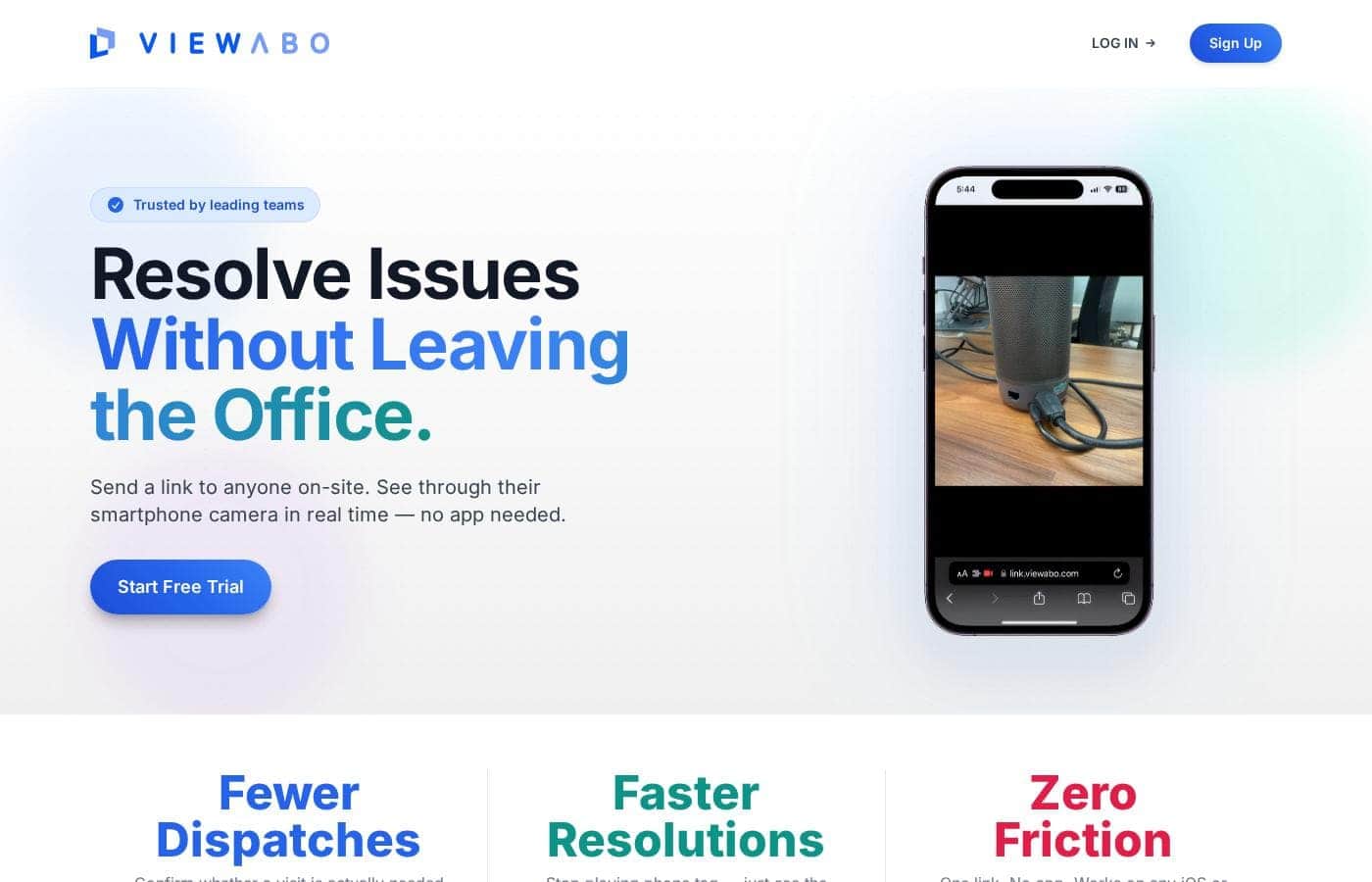
Viewabo homepage screenshot

At a glance

Quick overview for Viewabo: rating, pricing summary, key features, and highlights.

Ciroapp review

3.8
Visual support without the download.

Viewabo offers a compelling solution for support teams needing instant visual context via an app-free connection. We appreciate the dual approach of live streaming (STREAM) and convenient asynchronous recording (CAPTURE) for global support. Overall, the platform appears highly effective, though the required custom consultation and lack of public user feedback create initial barriers to assessment.

Pros

  • Pro:Eliminate customer friction using app-free connections (SMS/email link).
  • Pro:Resolve issues quickly with real-time video guidance and annotations (STREAM).
  • Pro:Support customers across time zones using asynchronous video capture (CAPTURE).
  • Pro:Session recording automates training, coaching, and quality assurance.

Cons

  • Con:Pricing models are custom and not publicly transparent.
  • Con:Requires contacting sales for a consultation and tailored quote.
  • Con:Free trial and public plan descriptions are unavailable.
  • Con:Complete absence of third-party user reviews (Trustpilot/Capterra/etc.).
Range: Not explicitly statedFree plan
This section is a summary. Detailed sections about features, use cases, pricing, and reviews follow below.

Viewabo review, pricing, features, pros & cons

It's frustrating when troubleshooting feels like detective work. Are you tired of endless guesswork and receiving vague, confusing descriptions from customers? Those frustrating situations often slow down your service team.

Viewabo solves this frustration instantly. It lets you see exactly what your customers see through their smartphone camera. This speeds up resolutions and makes delivering support feel truly effortless. ✨

What is Viewabo?

Viewabo is a modern visual support platform designed for innovative customer care teams. It gives your staff instant visual context without needing complicated technology. The core idea is simple: you visualize the issue, so you can diagnose and resolve problems with confidence.

It’s like being there, but you never leave your desk. This tool is trusted by forward-thinking companies, from fast-moving startups to established global brands. It empowers teams to modernize their support and improve customer satisfaction.💡

Viewabo Key Features

✨ Zero-Friction Connections (App-Free)

It's crucial that connecting is effortless for both your team and your customer. Viewabo ensures immediate access by operating entirely without applications or required accounts. There are zero downloads or customer signups needed to begin a support session.

You simply invite the customer instantly via an SMS text, an email, or a direct link using the SENDS feature. This app-free approach removes technical hurdles, allowing you to quickly get the visual clarity you need to resolve problems right away.

✨ Real-Time Visual Assistance (Viewabo STREAM) 💡

Viewabo STREAM provides a dynamic, live view of the customer's environment using their smartphone camera. This capability eliminates stressful guesswork by instantly giving your team clear visual context.

You can diagnose complex problems, streamline troubleshooting, and guide customers efficiently, making it feel like you are standing right there beside them. This real-time visibility helps agents identify and fix issues swiftly, dramatically increasing customer satisfaction.

✨ Instant Guidance and Precision Tools

When troubleshooting live, clarity and accuracy are vital. Viewabo provides tools designed for precise guidance, helping you direct the customer step-by-step.

You can draw directly onto the customer’s live screen using Annotations, clearly pointing out exact details they need to examine. For complex moments, you can instantly use Pausing to freeze the video feed.

This ability to slow things down or highlight specific information helps you gain a clearer understanding of the situation and ensures nothing gets missed. These small precision features significantly speed up resolution times.

✨ Effortless Asynchronous Support (Viewabo CAPTURE)

Not every issue requires immediate, real-time attention. Viewabo CAPTURE lets you provide support that is flexible and unbounded by staff schedules or global time differences.

You can invite customers to record a quick video rundown of their problem when it is convenient for them yet still share crucial visual context with your team. This is done through a simple link, eliminating the need for frustrating file uploads or complicated email attachments.

This simple option is perfect for on-demand support, ensuring a streamlined interaction that prioritizes customer convenience.

✨ Automated Archiving and Team Collaboration

Every support session is automatically saved using the Recordings feature. This creates a valuable, permanent archive that supports continuous learning and quality improvement within your organization.

This valuable library of real-world examples is accessible on demand using Storage. You can use these archived sessions easily for playback, staff coaching, and quality reviews, ensuring high standards are consistently maintained.

The Guests feature further enhances collaboration. It allows reviewers and other team members to view past video sessions without needing to interrupt workflow or start a new support interaction.

Use Cases

🛠️ Real-Time Physical Troubleshooting

When a customer struggles with a complex setup, verbal guidance often fails. Instead of relying on vague descriptions, the support agent sends a simple text message link instantly.

The customer clicks the link and shares their live camera view using Viewabo STREAM. The agent can use ANNOTATIONS to clearly draw arrows on the customer’s screen, guiding them step-by-step through the wiring or assembly process.

Expected outcome: Support that previously took 30 minutes of frustrating discussion can be resolved visually in seconds. The clarity prevents misdiagnosed issues right away.

📹 Convenient Asynchronous Issue Reporting

Not all issues require an immediate live connection, and global time differences can complicate scheduling. Viewabo CAPTURE provides a simple solution for this.

  1. The agent sends the customer an easy link via email or chat.
  2. The customer uses the link to record a video rundown of their issue at any time, using their smartphone camera.
  3. The visual evidence is sent instantly to the team without complex file uploads or app installations.

Tip: Use CAPTURE for out-of-hours coverage or to manage high support volumes efficiently.

⏸️ Precision Guidance with Frozen Frames

Problem: Troubleshooting intricate details in a moving video stream can lead to confusion. You need the customer to focus on one specific small part immediately.

Approach: The agent uses Viewabo STREAM and PAUSES the video when the customer points their camera at the critical area. While the image is frozen, the agent employs ANNOTATIONS to highlight or circle the exact component that needs attention.

Outcome: This technique ensures everyone maintains focus on the moment that matters. It guides customers with increased precision, making sure essential details aren't missed during the resolution process.

📚 Building a Valuable Training Archive

Every support session handled through Viewabo is automatically recorded and archived. This ensures agents have a complete visual log for every case.

The team can leverage these RECORDINGS for powerful internal coaching and quality control. New staff members gain exposure to real-world examples of complex problems and successful solutions, speeding up their expertise.

Managers can use the GUESTS feature to easily share archived sessions with reviewers or collaborators. This constant review process continually raises the standard for quality customer support.

✨ Effortless Connection for All Customers

Support should not require customers to download third-party software or struggle with account signups. This is especially true when assisting users who are less comfortable with technology.

Viewabo relies on SENDS via text, email, or a link for connection. Since it’s app-free for the end-user, the barrier to entry is eliminated completely.

This simple access ensures that even customers who feel technically challenged can connect immediately. The fast, seamless process reduces initial setup friction and speeds up the time it takes to start helping.

Pricing Overview for Viewabo

Pricing range
Not explicitly stated
Pricing types
Free plan

The specific pricing structure for Viewabo is not publicly disclosed. Potential customers are encouraged to contact the sales team directly to receive a customized quote tailored to their business size and specific visual support needs.

Pricing

Viewabo pricing details, including plan names and associated costs, are Not explicitly stated.

To explore how Viewabo visual support tools can benefit your business, you'll need to reach out directly to their sales team for a consultation. Public-facing plan details, trials, and specific pricing tiers are not currently available online.

Viewabo provides powerful visual support capabilities designed to streamline troubleshooting and speed up resolution times. The core of the platform includes two major components: Viewabo STREAM and Viewabo CAPTURE. These features allow your support team to eliminate guesswork and provide clear, visual guidance efficiently.

The Viewabo STREAM feature helps you see what your customer sees, in real time, through their phone camera. This is initiated via a simple text message, email, or link (SENDS), requiring no app download. During real-time sessions, agents can use ANNOTATIONS and PAUSING functionality to highlight specific details and guide customers step-by-step. All completed sessions are automatically saved using the RECORDINGS and STORAGE features for quality review and team coaching purposes.

For support that doesn't require immediate live interaction, Viewabo CAPTURE allows customers to record a quick video rundown of their issue. This is also done through a simple link, which prevents frustrating file uploads or requiring app installation. This asynchronous option is excellent for supporting customers across different time zones or managing high-volume support requests efficiently.

Because specific pricing, trial periods, and refund policies are proprietary and determined after a consultation, we unfortunately cannot provide details on fixed costs, plan tiers, or included usage limits. We cannot confirm if they offer monthly or annual billing terms, or if a free plan is available. Costs are highly tailored to your organization's specific size and functional requirements, ensuring the solution is perfectly scaled for your operational needs.

Since the pricing reflects a custom quote structure, the single best path forward is to click the "Contact Us" or consultation prompt available on the Viewabo website. This specialized approach ensures your team gets the exact mix of features needed, such as STREAM and CAPTURE functionalities, without paying for features you won't use.

User Reviews

Viewabo presents a powerful platform promising to transform complex customer support by providing instant visual context. The core features, Viewabo STREAM (real-time video guidance) and Viewabo CAPTURE (asynchronous video recording), suggest high potential for operational efficiency.

The major selling point is the zero-friction connection, enabling customers to share their view instantly via a link without downloading an app or creating an account. This design eliminates common pain points in troubleshooting.

Every session is automatically saved, building a valuable library for coaching and quality review. However, a significant gap exists in public verification.

As of this review, we found no external reviews on Trustpilot or Capterra. This means we cannot synthesize real-world performance data points regarding support responsiveness, actual system reliability, or how users perceive the value of the non-transparent custom pricing model.

Customers should plan a thorough evaluation during the required sales consultation. 🚀

No reviews yet.

Write a Review

Write a Review for Viewabo
0/100 characters
0/2000 characters

Why use Viewabo?

The best support happens when you stop interpreting words and start instantly seeing the issue clearly. Viewabo rapidly shifts the focus from managing frustration to creating standout customer experiences. This clarity results in huge operational benefits and much happier customers.

Zero Friction Connection: Connecting is incredibly simple for everyone involved. You invite the customer instantly via SMS, email, or a link. Since it’s app-free, there are no downloads or account signups needed—just click, connect, and start helping.

Resolve Issues in Real-Time: Use Viewabo STREAM to view their environment through the mobile camera. You can freeze the video during the session or draw directly on their screen to guide them with precision. This use of on-screen markers speeds up guidance and resolution.

Power Your Async Support: Speed is not always the main factor. Viewabo CAPTURE lets customers record a video rundown of their issue at their convenience. This effortless, streamlined interaction is perfect for support that isn't bounded by staff schedules or global time differences.

Create a Training Library: Every session is automatically recorded, providing your team with a valuable archive. You and your team can use these recordings for easy playback, staff coaching, and quality review, continually raising the bar for great support.

Achieve Clear ROI: Teams report drastic improvements in service time, citing reductions from 40 minutes down to just 3–5 minutes. Preventing misdiagnosed parts and improving team productivity means the service often pays for itself quickly. Choose clarity, choose speed, and keep your customers happier today.🚀

Ready to transform your workflow with Viewabo?

Frequently Asked Questions

Does Viewabo offer a free trial or public demo?

We cannot find details about a standard free trial or public demo on the official site. Because pricing is customized, you must reach out to the sales team directly for access. This consultation will determine how the platform fits your specific operational needs.

How can prospective customers learn about pricing and subscription options?

Viewabo utilizes a custom quote structure based on your business size and required features. Public pricing tiers, fixed costs, or plan names are not disclosed online. You must contact sales directly to secure a consultation and receive a specific quote tailored to your organization.

Is the custom pricing based on the number of agents (per-seat) or on usage volume (per-session/storage)?

Not explicitly stated on the official site. Custom pricing models often factor in several variables. Your final investment amount is typically determined by team size, the usage volume of sessions (STREAM and CAPTURE), and the required storage capacity during the consultation.

With what customer support systems or third-party tools does Viewabo integrate?

Not explicitly stated on the official site. The system emphasizes its frictionless connection method (link via SMS or email) as the primary way to initiate support. Integration capabilities with existing CRM or ticketing systems are not detailed publicly.

What happens to video sessions after a live call is finished?

All Viewabo STREAM sessions are automatically captured using the RECORDINGS feature. They are stored securely using the STORAGE functionality. You can access these recordings on demand for easy playback, team coaching, and quality management.

Are there limits on usage, such as maximum storage capacity or session length?

Not explicitly stated on the official site. As the pricing model is custom, quotas for storage, the number of 'SENDS' (invitations), or session length are likely determined and agreed upon during your specific sales consultation.

How does Viewabo handle data security and compliance for recorded sessions?

Every session is automatically recorded and then stored in your archive for reference and review. Specific security protocols, data protection standards, or compliance details (like GDPR or HIPAA certification) are not publicly detailed on the website.

What is the primary benefit for the customer receiving the visual support?

The main benefit is the zero-friction experience: they don’t need to download any apps or create accounts. They instantly connect their camera via a simple link and receive rapid, precise visual guidance from the agent.

Who benefits most from adopting the Viewabo platform?

It is best for teams supporting complex products that require visual diagnosis and movement away from guesswork. Teams using Viewabo report significant operational improvements, sometimes reducing resolution times from 40 minutes down to just 3–5 minutes.

Can I allow reviewers or collaborators to access recordings without starting a new session?

Yes, using the GUESTS feature, you can grant team members access. This allows them to view archived session recordings and collaborate without needing to initiate a new live session.

Does Viewabo support global customers or international teams?

The asynchronous Viewabo CAPTURE feature is explicitly noted as excellent for supporting customers across global time differences. However, the specific languages supported by the user interface or annotation tools are not publicly listed.

Are contract terms, billing frequency, or cancellation policies available?

Not explicitly stated on the official site. Details regarding contract length, billing frequency (monthly or annual), and specific cancellation or refund policies are private and negotiated during your custom sales agreement.

Ready to try Viewabo? Check out the official site or pricing.