Teamwork vs Wrike
Teamwork and Wrike are top-tier project management tools. Teamwork focuses on maximizing client work profitability and resources. Wrike excels at enterprise scaling and complex, centralized workflows. Use this comparison to pick your perfect match.
Best for: Marketing and advertising agencies managing diverse client portfolios., Consulting firms needing to track billable hours accurately.
Best for: Large enterprise organizations (200+ users) needing cross-functional visibility., Creative teams requiring advanced file and video proofing features.
Powerful features and frustrating business practices.
We found Teamwork offers robust, unified project and resource management tools essential for professional services needing deep profitability tracking and resource forecasting. Overall, the software's powerful feature set is unfortunately being undermined by confusing, opaque upgrade paths and extremely restrictive feature limits in lower tiers.
Pros
- Unified platform combining PM, time tracking, resource forecasting, and budgeting.
- Specifically built to manage complex client work and track project profitability.
- Real-time visibility into staff availability prevents common overbooking issues.
- Simple interface with TONS of functionality and detailed project data scope.
Cons
- Upgrade processing and pricing for Scale plan are opaque and require sales engagement.
- Artificially restrictive feature limits (like budgeting caps) force expensive, premature upgrades.
- Recent new interfaces and UI changes have broken essential functions for some users.
- Customer support availability seems limited primarily to UK business work hours.
Enterprise Power Meets Complex Commitment.
We find Wrike is an exceptionally versatile project solution, noted for scaling efficiently across corporate environments up to 3000 users and unifying communication across highly complex workflows. Overall, the software offers a powerful feature set for advanced visibility and customization, but we caution users regarding the rigid annual subscriptions and documented difficulties with managing auto-renewal and pricing increases.
Pros
- Transforms and streamlines complex corporate workflows efficiently.
- Highly customizable for various methodologies (e.g., Holacracy, OKR).
- Excellent collaborative transparency and 360° project visibility.
- Provides fast and helpful customer support regarding implementation and bugs.
Cons
- Pricing practices are reported as aggressive, often resulting in significant renewal increases.
- Subscriptions are difficult to cancel, and users report trouble stopping automatic renewal.
- Some teams report challenging adoption and setup processes.
- Users report instances of being oversold on features bundles they did not need.
AboutTeamwork
Teamwork.com is project and resource management software specifically built for client work and powered by AI. It goes beyond traditional project tools by combining essential functions like resource forecasting, cost control, and profitability reporting into a single platform.
This platform is trusted by professional services businesses globally. These include agencies, consulting firms, IT service providers, and accounting teams. Teamwork helps them efficiently schedule resources, manage billable hours, and track project profitability from start to finish. ✅
AboutWrike
Wrike is a trusted end-to-end enterprise work management solution. It's designed for organizations ready to transform manual processes into interconnected, automated workflows. Teams from 20 to 20,000 thrive here because Wrike is highly adaptable to any industry or size. It brings multiple teams into the same place for game-changing visual collaboration. Wrike is where you can easily align strategy and effectively execute your projects and programs. 💡
Highlights
Feature Comparison
Features Overview
We highlight the main differences and pick a winner for each feature.
Resource Management
Teamwork offers deeper resource forecasting for agencies. Wrike focuses on resource capacity planning across large departments.
Teamwork’s strength is deep resource analysis using the Workload Resource Planner. It uses tentative project scenarios to model future staffing needs accurately. This is vital for agencies to prevent staff overbooking and meet client demands. Teamwork focuses intensely on optimal utilization. Wrike offers core Resource & Capacity Planning starting slightly higher up. Their goal is 360° visibility over real-time resource allocation within departments. Wrike ensures complex corporate teams are not overloaded. Teamwork provides superior forecasting tools necessary for successful billable work management. Wrike is better for balancing workloads across massive internal corporate organizations. Teamwork shines when managing profitability depends on predicting resource hours precisely.
Financial Tracking
Teamwork centrally tracks budget and profitability for clients. Wrike reserves financial tools for top-tier enterprise plans.
Teamwork embeds essential budgeting and cost control tools in its popular Grow plan. It features profitability reports to track project financial health from the start. Teamwork is purpose-built to help agencies manage client budgets. Wrike offers budgeting and billable hours tracking only in the advanced Pinnacle plan. Project financial reporting is clearly not Wrike's primary focus. Smaller teams using Wrike will lack key financial insights. If tracking client billable hours and profit margins is essential, choose Teamwork. Wrike treats granular financial control as a premium enterprise add-on function.
Workflow Automation
Wrike’s per-user automation scales efficiently for large teams. Teamwork offers higher organizational volume but with restrictive limits.
Teamwork’s Scale plan offers up to 100,000 monthly automation actions organization-wide. However, Teamwork imposes restrictive limits on lower tiers, like just 100 actions on the Free plan. These caps can force rapid, expensive upgrades. Wrike calculates automation quota per user, reaching 1,500 actions per user per month. This system scales linearly and clearly for growing organizations. Wrike Integrate also simplifies building complex custom workflows. Wrike’s per-user model is generally more transparent and scales better with team growth. Teamwork's large organizational cap might be suitable but feels artificially restricted in lower paid tiers.
Scalability
Wrike is optimized for scaling to massive enterprise size. Teamwork scales brilliantly for high-volume client services.
Teamwork’s scaling focuses on managing growing client capacity and resource demands. It supports unlimited projects and resources in its highest Scale plan. Teamwork is perfect for rapidly expanding professional services firms. Wrike is explicitly designed for teams from 20 to 20,000 users across departments. It offers custom user types and SAML-based SSO for demanding corporate environments. Wrike unifies highly complex, multi-layered corporate workflows. Teamwork handles substantial resource scaling for agency needs exceptionally well. Wrike is the powerful choice for scaling across highly complex, regulated enterprise landscapes.
Advanced Approvals
Wrike provides dedicated proofing for creative assets. Teamwork focuses on resource allocation, not multimedia review.
Teamwork concentrates on project logistics and staff utilization rates. Its primary tools are Workload Planners and Utilization Reports. Teamwork does not specifically detail robust file or video review capabilities. Wrike offers dedicated proofing and approval features starting in its Business plan. It supports review cycles for over 30 file formats, including video proofing. Wrike includes guest approvals for seamless external client feedback. Teams handling significant creative deliverables will find Wrike far superior. Wrike’s proofing tools accelerate design and marketing review cycles substantially.
AI Integration
Teamwork offers AI access even on the Free plan. Wrike uses AI for deeper analytics and enterprise risk prediction.
Teamwork AI is available immediately, including the permanent Free tier. Teamwork focuses on using AI to simplify essential project management features right away. It aims to accelerate decision-making faster. Wrike includes Generative AI features starting in the $10 Team plan. Wrike AI integrates advanced analytics to predict project risk. Wrike helps management empower cleaner, data-driven strategy. Teamwork provides excellent AI value immediately for all users, regardless of budget. Wrike offers AI features that are more tailored to complex organizational intelligence and risk assessment.
Security & Compliance
Wrike offers robust, standard enterprise-grade security. Teamwork requires a custom add-on for basic security features.
Teamwork reserves advanced security like Single Sign-On (SSO) for an expensive add-on. This dedicated security option requires purchasing a custom Enterprise plan. Security features are not core to Teamwork's lower tiers. Wrike offers SAML-based SSO and 2FA included in its Enterprise plan. Wrike maintains SOC2 Type II and GDPR compliance as standard practice. Wrike is built with reliable 99.9% platform uptime. For organizations requiring high compliance and advanced security controls, Wrike is the clear favorite. Teamwork users must purchase a costly add-on for similar security safeguards.
User Experience
Teamwork is praised for providing a simple, intuitive interface. Wrike's complexity sometimes leads to initial adoption challenges.
Teamwork users highly rate the simple interface despite its broad functionality. New customers often find Teamwork intuitive for internal staff and clients. The uncluttered design aids faster day-to-day use. Wrike offers immense power and customization, making initial setup challenging. Some teams report higher friction during adoption and complex configuration requirements. Wrike prioritizes flexibility over immediate simplicity. For quick staff onboarding and client-friendly access, Teamwork is notably easier. Wrike is for teams willing to invest more time in setup for maximum long-term customization.
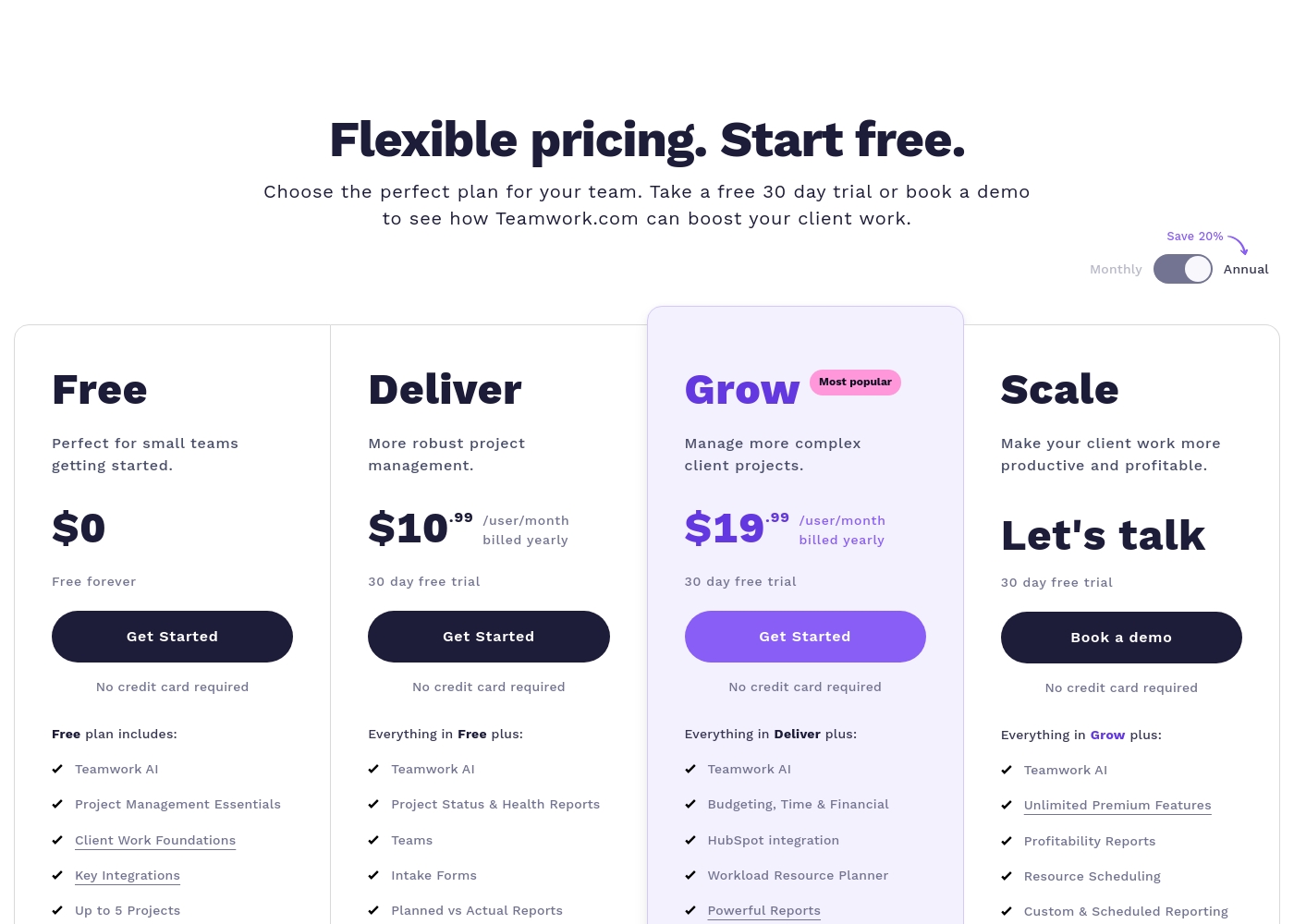
Teamwork costs between $0 and Talk to Sales per month with 4 plans: Free at $0, Deliver at $10.99/user/month, Grow at $19.99/user/month, and Scale at Talk to Sales.
Teamwork offers flexible pricing tailored to your team's size and complexity needs. You can choose to pay monthly or save 20% by selecting an annual subscription.
Free
Price: $0 (Free forever) Best For: Perfect for small teams getting started. Other Features:
- Teamwork AI and Project Management Essentials
- Built-in Time Tracking and Client Work Foundations
- Key Integrations including Slack, Zapier, and MS Teams
- Up to 5 Users and 5 Projects; 100 Automations monthly
- Teamwork AI
- Project Management Essentials
- Client Work Foundations
- Built-in Time Tracking
- Key Integrations (Slack, Zapier, MS Teams)
- Project Status & Health Reports
- Teams
- Intake Forms
- Planned vs Actual Reports
- Integrations (Quickbooks, Harvest and many others)
- Budgeting, Time & Financial
- HubSpot integration
- Workload Resource Planner
- Powerful Reports (Utilization, Time Spent)
- 50 Project Templates
- Unlimited Premium Features
- Profitability Reports
- Resource Scheduling
- Custom & Scheduled Reporting
- Retainer Management (beta)
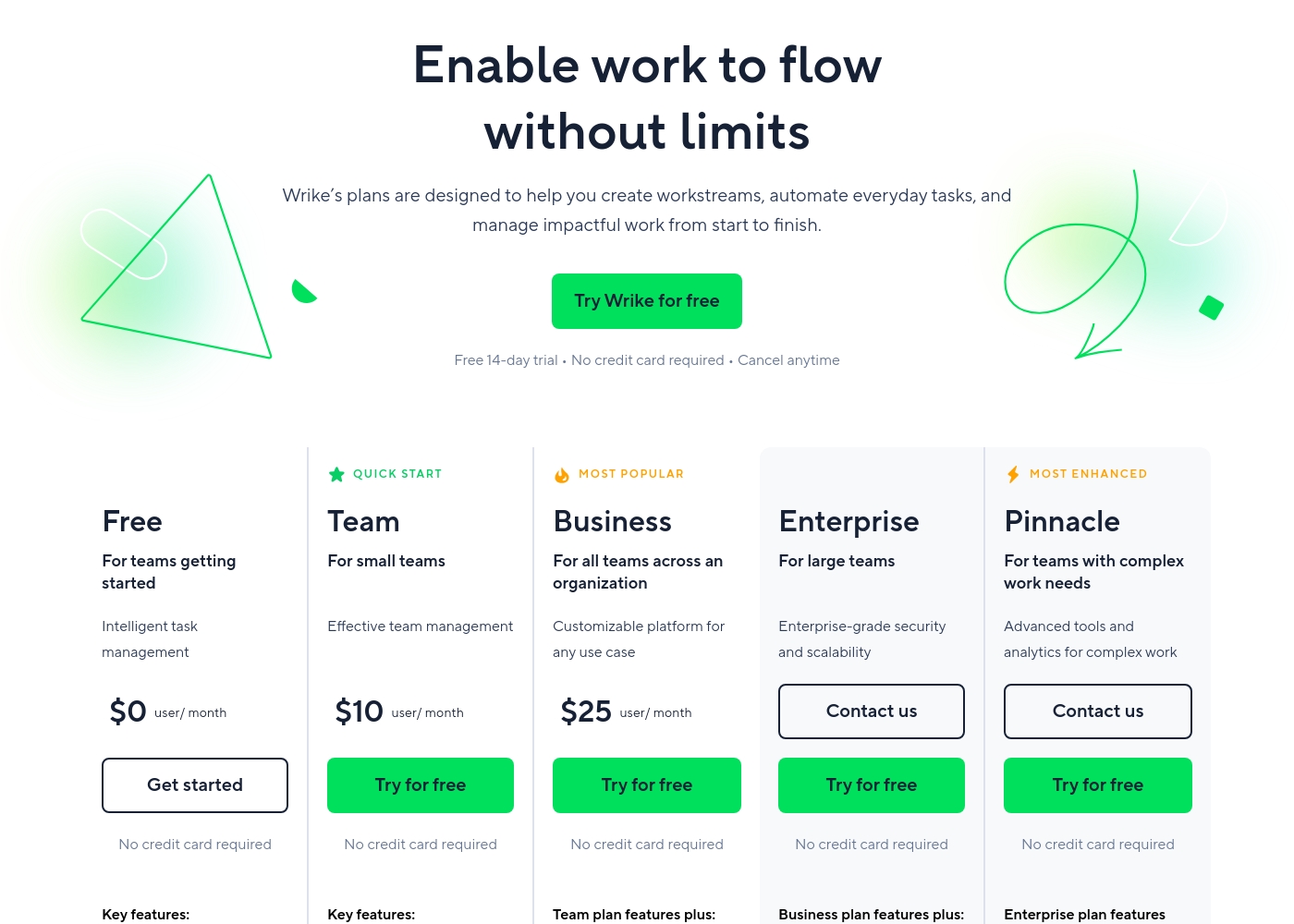
Wrike costs between $0 and $25 per user/month, with five plans: Free at $0/user/month, Team at $10/user/month, Business at $25/user/month, and Enterprise and Pinnacle which require users to contact sales.
- Web, desktop, and mobile apps
- Project and task management
- Board view (Kanban)
- Table view (spreadsheet format)
- Folders structure & nested projects
- Unlimited projects, tasks, & subtasks
- Gantt charts, Calendar & Chart view
- Generative AI, 2 GB storage per user
- Project Blueprints and Unlimited request forms
- Approvals & guest approvals
- Resource & Capacity Planning
- File and video proofing (30+ file formats)
- Real-time reports
- SAML-based SSO and Two-Factor Authentication (2FA)
- Password policies and custom access roles
- Customizable user types and Admin permissions
- User audit reports
Pricing Notes
- Both Teamwork and Wrike use a per-user, per-seat pricing model for all paid subscriptions.
- Paid plans for both Wrike and Teamwork typically require an annual commitment, leading to difficult cancellations.
- Teamwork's paid plans start slightly higher at $10.99/user/month compared to Wrike's Team plan at $10/user/month.
- Wrike lists definitive pricing up to the $25/user/month Business plan. Teamwork shifts to custom pricing sooner with its top Scale plan.
- Users report aggressive price increases at renewal for Wrike and restrictive feature limits forcing upgrades in Teamwork.
- Teamwork offers a generous 30-day free trial; Wrike offers a shorter 14-day trial.
Pricing Head-to-Head
User Reviews
Teamwork's external feedback presents a sharp contrast. Users consistently praise the core software for its powerful functionality, describing it as having a simple interface and a broad scope of data that is essential for running a business.
Clients reportedly appreciate the transparency it offers. However, positive sentiment is heavily outweighed by severe criticism directed at business practices and pricing.
Teamwork is an excellent tool with an extremely simple interface and TONS of functionality. As a former project manager, the level of detail and broad scope of data available sets this tool apart easily.
Users consistently praise Wrike's powerful capabilities in transforming workflow management and driving organizational efficiency. Many reviewers, including team leads and large enterprise users, call it one of the best project management systems available, noting its strong suitability for high-level customization for specific methodologies like OKR.
Its ability to centralize communication, provide 360° visibility, and manage collaboration across large global teams is frequently highlighted as second to none. Furthermore, customer support is often described as exemplar, particularly regarding implementation and quick bug fixes.
Using Wrike for three years has completely changed how we manage our workflows. The biggest transformation is how streamlined and fast our operations have become. It's truly efficient for our large team.
Our Verdict
This is a tough match between two heavy hitters: Teamwork and Wrike. The bottom line depends entirely on your organizational structure. If you run a professional services firm, Teamwork is your champion. If you need a corporate powerhouse for thousands of internal users, Wrike takes the crown. Teamwork’s superpower is its deep focus on client work and measurable profitability. It combines time tracking, resource forecasting, and detailed profit reports in one spot. If you must know precisely which projects are generating profit, Teamwork provides the clearest data. Its Workload Resource Planner helps agencies stop overbooking staff and optimize billable time perfectly. Wrike's superpower lies in its enterprise-level scalability and complexity management. Wrike brings genuine 360° visibility to departments ranging from 20 to 20,000 users. Teams needing robust creative review cycles will love Wrike’s specialized file and video proofing. Wrike also offers the advanced administrative customization and security required by large corporations. The deciding factor is the core use case and price commitment. Teamwork is best for agencies who live and die by resource utilization and profit margins. Wrike is superior for large, internal corporate deployments that need flexibility and advanced security. Both Teamwork and Wrike require rigid annual commitments for paid tiers, so choose carefully. Wrike’s higher 4.1 user rating suggests better long-term reliability. Choose Teamwork if your firm relies on granular financial tracking for all client projects. Opt for Wrike if you need complexity management and scalability for a massive corporate workforce.
Frequently Asked Questions
Which is better for small teams: Teamwork or Wrike?
Both Teamwork and Wrike offer permanent Free plans for small or starting teams. Teamwork’s Free tier includes built-in time tracking and AI features. Teamwork also provides a longer 30-day free trial on its paid plans.
Does Teamwork have dedicated video and file proofing like Wrike?
No, Wrike is superior for creative teams needing advanced visual review cycles. Wrike offers dedicated file and video proofing features. Teamwork focuses primarily on resource and project delivery management.
Which software is better for tracking agency client profitability?
Teamwork is explicitly designed for professional services and client profitability tracking. Its Grow plan includes required budgeting tools and utilization reports. Wrike reserves similar financial tools for its highest plan.
Is Wrike worth the extra cost and complexity over Teamwork?
Wrike is worth the investment if your organization needs enterprise security and massive scalability up to 20,000 users. Teamwork is generally easier and faster to adopt for agencies. Wrike handles complex, custom corporate workflows better.
Which platform provides better feature availability for free users?
Teamwork provides more specific features, including built-in time tracking and AI support, in its Free plan. Wrike's Free plan offers essential PM views like Board and Table. Teamwork offers more immediate functionality value.
How difficult is it to cancel subscriptions with Teamwork and Wrike?
Paid plans for both Teamwork and Wrike require annual commitments and are difficult to exit. User reviews suggest Wrike has particularly aggressive renewal and cancellation policies. Always read the subscription terms carefully before purchase.
Ready to Choose?
Both tools have their strengths. Choose based on your specific needs.