Synthesia vs Visla
Synthesia and Visla revolutionize video creation using powerful AI avatars. This comparison helps you decide between high-quality security and drafting flexibility. Synthesia is focused on scalable enterprise communications and compliance. Visla aims to rapidly generate video drafts from diverse existing documents.
Best for: Large Enterprise organizations requiring SOC 2/GDPR compliance, Teams needing instant localization into 140+ languages
Best for: Creators focused on quick drafting from varied source material, Teams that frequently repurpose PowerPoint or PDF files into video
Elite AI Video Creation for Scaling Teams.
We find Synthesia excels at providing an enterprise-grade solution for AI video generation, combining ease of use with essential security features like SOC2 and API access. Overall, this platform is a market leader for businesses prioritizing professional quality and scalability in internal communications and training.
Pros
- Exceptional ease of use, making professional video creation highly intuitive.
- Unbelievable video quality with realistic AI avatars and natural lip-sync.
- Strong security and compliance features (SOC2, GDPR) for enterprise use.
- Rapid content localization with one-click translations into 140+ languages.
Cons
- Monthly video minute caps restrict usage for high-volume creators.
- Reported minor technical bugs and occasional slowdowns during extended use.
- Content guidelines can be unclear, leading to workflow interruptions.
Pros
Cons
AboutSynthesia
Synthesia is a powerful AI video generation platform trusted by over 50,000 teams. It allows businesses to create polished, on-brand videos without needing complex filming or specialized editing skills. You simply provide text, and the platform generates content using expressive, customizable AI Avatars. The entire video workflow—from creation to publishing—is housed in a single, secure environment. It’s built for enterprise use, satisfying tough legal and security requirements. ✅
AboutVisla
Highlights
Feature Comparison
Features Overview
We highlight the main differences and pick a winner for each feature.
Localization & Dubbing
Synthesia offers massive localization into 140+ languages with advanced lip-sync. Visla offers multi-language synthesis, but without detailed scale.
Synthesia specializes in instant global reach for your video content. It supports translation and lip-sync AI Dubbing in over 140 languages. Enterprise users get 1-Click Translations into 80+ languages. Visla also offers synthetic voiceovers and full video translation capabilities. However, Visla does not specify the enormous language count that Synthesia provides. If global scale and perfect localization quality are critical, Synthesia is the undeniable choice. Visla is suitable for basic multilingual creation but cannot compete on sheer volume or technology. This feature saves thousands in external translation costs for organizations scaling internal training internationally.
User Reliability & Trust
Synthesia enjoys high user satisfaction and strong trust ratings. Visla suffers from serious, repeated reports of billing problems and unreliability.
Synthesia maintains consistently positive reviews, praising quality and support. Users cite only minor bugs and the limitation of monthly video minutes. The platform is viewed as professional and dependable. Visla has very mixed reviews, including multiple reports of unauthorized charges. Users criticize an exploitative “no refund policy” and unresponsive financial support. Multiple reports also cite technical generation failures or comical visual inaccuracies. Reliability is the biggest difference; Synthesia excels at technical consistency. Users must approach Visla with extreme caution due to the pervasive billing concerns raised in public reviews. The financial risk associated with Visla significantly outweighs its potential workflow benefits for many enterprise users.
Pricing Transparency
Synthesia provides clear, explicit monthly and annual dollar costs. Visla uses a credit system but does not disclose dollar pricing on its public plans.
Synthesia transparently lists plan costs, such as the Creator plan annual rate of $64/month. This clarity allows for easy budgeting and ROI calculations for teams. Synthesia's Starter plan costs $18/month when billed annually. While Visla details its credit allocation (e.g., 20,000 assigned credits for Business), it fails to state the associated dollar prices. This pricing opacity can complicate procurement and finance approvals. Synthesia's approach significantly simplifies the buying process by being financially explicit upfront. Visla's lack of transparent pricing information is a major hurdle for corporate adoption. Predictable SaaS invoicing is essential for large organizations, favoring Synthesia's explicit subscription model immediately.
Input Flexibility
Visla accepts a wider variety of starting assets like PDFs and PPTs. Synthesia focuses primarily on script input or linking external documents.
Synthesia uses its AI Video Assistant to convert documents or links into video structures. The core workflow usually begins with a refined text script. It also includes an AI screen recorder. Visla allows you to upload existing PDF, PPT, images, and raw audio files directly. The platform's AI agent then builds a draft from these disparate elements. Visla’s flexibility is ideal for repurposing older materials. Visla wins slightly here by natively handling presentation files for conversion. Synthesia is more focused on generating content from polished, finished scripts. If your archive consists mostly of static presentations, Visla helps turn those into engaging videos faster.
Enterprise Compliance
Synthesia provides broader compliance certifications, including GDPR and ISO42001. Both tools offer SOC 2 Type II compliance in their top tiers.
Synthesia is built for Fortune 100 standards, adhering to SOC 2 Type II, GDPR, and ISO42001. These cover global data handling and security protocols. SAML/SSO is standard in their Enterprise plan. Visla provides SOC 2 Type II reports for Business and Enterprise tiers. It also supports Single Sign-On (SSO) exclusively within the top Enterprise tier. Visla meets baseline corporate security needs. Synthesia's explicit mention of GDPR and ISO 42001 offers greater legal assurance for international corporate clients. Visla's compliance scope seems narrower and less explicitly stated. For highly regulated industries or global organizations, Synthesia offers a more comprehensive security assurance package.
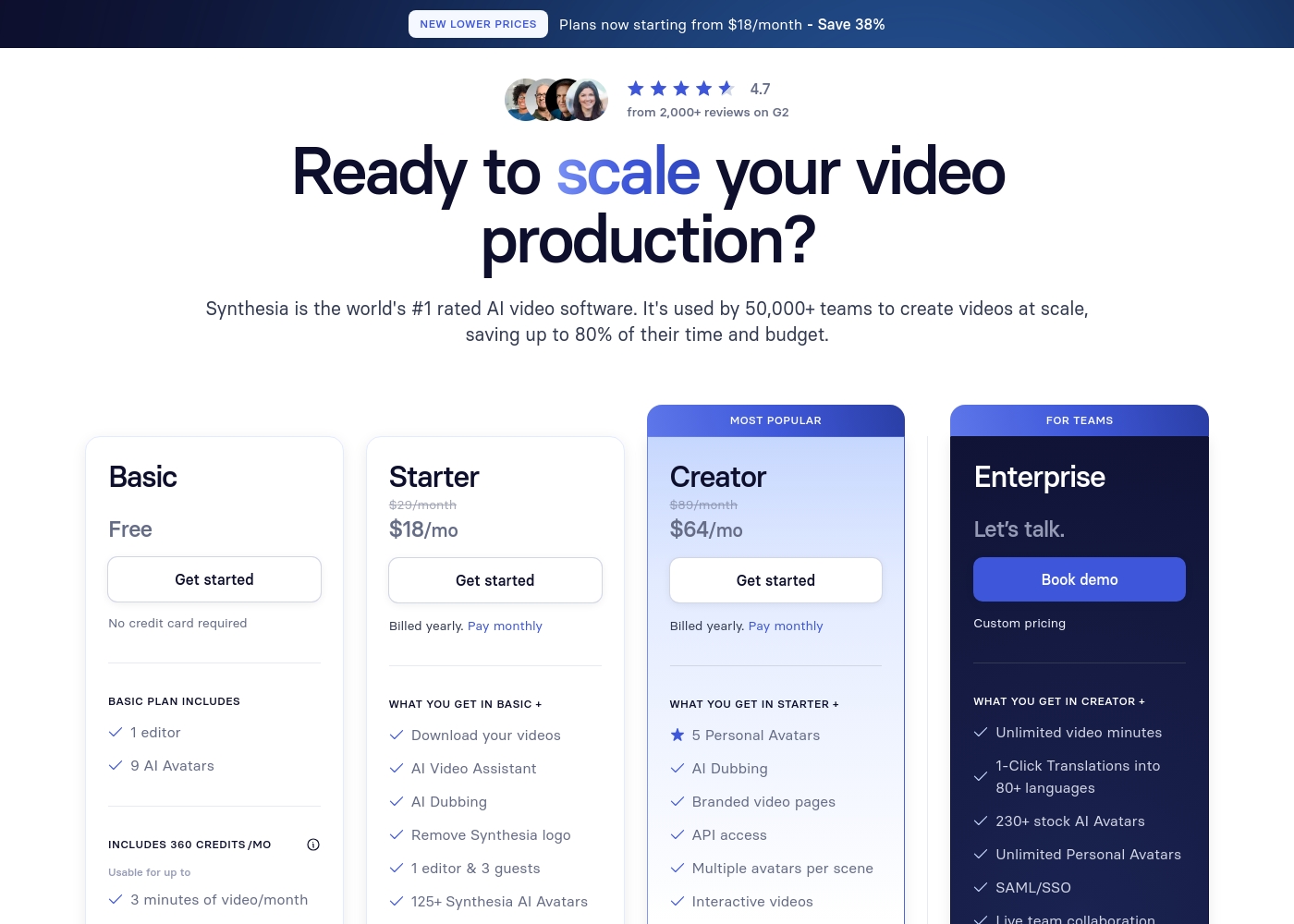
Synthesia costs between $0 and $64 per month with four plans: Basic at $0, Starter at $18, Creator at $64, and Enterprise with Custom pricing.
Here’s a closer look at what each plan provides.
Basic
Price: Free ($0/month) Best For: Users needing minimal video output (3 minutes/month) Other Features:
- 1 editor
- 9 AI Avatars
- Videos up to 3 min
- 360 credits / mo (3 minutes of video)
- 1 editor
- 9 AI Avatars
- Videos up to 3 min
- 36 minutes of video / year (3 minutes/month)
- Download your videos
- AI Video Assistant
- AI Dubbing
- Remove Synthesia logo
- 1 editor & 3 guests
- 5 Personal Avatars
- Branded video pages
- API access
- Multiple avatars per scene
- Interactive videos
- Unlimited video minutes
- 1-Click Translations into 80+ languages
- 230+ stock AI Avatars
- Unlimited Personal Avatars
- SAML/SSO
Pricing Notes
- Synthesia provides clear, documented pricing starting at $18 per month (billed annually).
- Visla's pricing model relies heavily on assigned monthly credits; the explicit dollar cost of plans is not publicly specified.
- Synthesia limits usage by output video minutes; Visla limits usage based on accumulated credit consumption.
- Synthesia offers a substantial discount for annual billing, reducing the Creator plan from $89 to $64 per month.
- Visla has faced numerous user complaints regarding unauthorized charges and a rigid, unforgiving 'no refund policy'.
Pricing Head-to-Head
User Reviews
Synthesia users consistently praise the platform's exceptional ease of use and intuitive design, making professional video creation straightforward even for beginners. Many reviewers highlight the high-quality output, noting the realistic AI Avatars and natural lip-syncing that result in credible training and presentation videos.
The consensus is that Synthesia is a massive time-saver, allowing users to rapidly scale content creation. Customer support and specialized training, especially through live webinars, are highly regarded; users find the presenters knowledgeable and responsive.
It was incredibly easy to create professional videos. I just type my script, pick an AI avatar, and the process is complete—no specialized editing skills are required. The result is a video where the lip-sync looks completely natural.
Our Verdict
Choosing between Synthesia and Visla comes down to reliability and feature depth. Synthesia is the superior, safer choice for serious businesses. Visla offers unique drafting speed but faces major performance and financial trust issues. Synthesia’s superpower is its enterprise scalability and global reach. It offers superior security with SOC 2, GDPR, and ISO42001 compliance. You can localize content into 140+ languages instantly with flawless lip-sync dubbing. Visla excels at input flexibility, converting PDFs, PPTs, or audio files into video drafts. Its AI Video Agent handles the foundational assembly work quickly for non-editors. However, Visla's opaque credit pricing is a budgeting risk. The deciding factor is user trust and financial risk, which heavily favors Synthesia. Visla’s frequent reports of unauthorized charges and technical failures are difficult to overlook. Synthesia provides predictable pricing and reliable high-quality output. Choose Synthesia if you are a large team focused on secure enterprise training and global localization. Opt for Visla only if rapid PDF conversion is your primary need and you are willing to accept the widely reported platform inconsistencies.
Frequently Asked Questions
Which software is better for security and compliance: Synthesia or Visla?
Synthesia is the clear winner for corporate security and trust compliance. Synthesia offers SOC 2 Type II, GDPR, and ISO42001 certifications. Visla only explicitly mentions SOC 2 Type II in its Business and Enterprise tiers.
Which tool has more transparent pricing structure: Synthesia or Visla?
Synthesia uses clear, explicit dollar pricing for all its monthly and annual plans. Visla relies on an opaque credit system where the specific dollar costs are not publicly stated. This makes budgeting easier with Synthesia.
Does Visla support the SCORM video export needed for Learning Management Systems?
Synthesia explicitly supports SCORM export for seamless LMS integration and automatic updates. Visla does not currently list SCORM export as a supported feature. This favors Synthesia for internal L&D teams.
Which software offers better AI video localization capabilities?
Synthesia offers industry-leading localization features into 140+ languages with advanced lip-sync. While Visla supports multi-language creation, its scale and dubbing capability are not detailed. Synthesia is built for global content scaling.
Can I import existing presentations or PDFs directly into Synthesia?
Visla allows direct upload of PDF or PPT files to generate video drafts. Synthesia uses an 'AI Video Assistant' to convert documents or web links. Visla offers slightly better direct input flexibility.
Why do user reviews for Visla look significantly worse than Synthesia's reviews?
Synthesia maintains excellent reliability and support ratings (4.3/5). Visla’s lower rating (2.8/5) stems from widespread complaints about technical failures and significant unauthorized billing problems. It is vital to consider this trust gap.
Ready to Choose?
Both tools have their strengths. Choose based on your specific needs.