Storyblocks vs Unsplash
Storyblocks and Unsplash both offer huge libraries of visual content, but they target different users. Storyblocks is designed for heavy media users needing comprehensive video and audio access. Unsplash is the leading source for free, high-quality static photography. Your primary media needs should guide your decision.
Best for: Professional video editors needing unlimited 4K footage, Marketing agencies producing dozens of videos monthly

Best for: Bloggers needing high-quality imagery at zero cost, Individual creators prioritizing static imagery
Unlimited stock media with exceptional support.
We find Storyblocks excels by offering true unlimited access to a massive and constantly updated library of high-quality assets. The company combines flexible pricing with exceptionally praised customer support, making it a reliable resource for professional creators.
Pros
- Offers true unlimited downloads in top subscription tiers.
- Massive library includes 4K video, audio, sound effects, and templates.
- Customer support is highly responsive and praised for efficiency.
- Licensing rules are straightforward and royalty-free.
Cons
- Individual plans must be billed annually, not monthly.
- Some users initially reported difficulty contacting live support.
- Clarity on the initial refund process can be inconsistent.

Best Free Visuals, Buyer Beware on Premium.
We find Unsplash offers an extensive, high-quality free image library that remains vital for creators worldwide. Overall, Unsplash is highly recommended for its free content, but we advise caution before subscribing to Unsplash+ due to recurring user reports of billing errors and unreliable customer support.
Pros
- Access to a massive library of professional, high-resolution visuals.
- The core content remains free and is available for commercial use.
- Unsplash+ provides enhanced legal protections and useful image editing tools.
- The platform is widely praised for its variety and good categorization.
Cons
- Reported failures in customer support and billing reliability for Plus subscribers.
- Recurring user reports of reduced content diversity and representation in search results.
- The perceived quality of the free image library has declined since the Unsplash+ plan launched.
- A lack of a required safe filter means explicit content can appear.
AboutStoryblocks
Storyblocks is recognized as the most-loved stock media platform currently available for creators. It is a comprehensive service designed to streamline your production process. Instead of managing individual purchases, you pay for a subscription that grants wide access to millions of assets. Whether you work with video, audio, or images, the system is built to support your creative vision efficiently. ✅
AboutUnsplash
Unsplash is defined as the internet’s key source for visuals. It provides beautiful, free images and pictures across a wide range of topics. These categories cover subjects like Nature, Animals, Film, and 3D Renders. The entire extensive library is powered by creators worldwide who contribute their work. It's a vast platform for anyone needing stunning, accessible imagery for their projects. 💡
Highlights
Feature Comparison
Features Overview
We highlight the main differences and pick a winner for each feature.
Core Media Assets
Storyblocks is a full media hub; Unsplash excels primarily at still photography.
Storyblocks is an all-inclusive platform built for diverse creation needs. It offers 4K footage, music, sound effects, templates, and static images. This massive collection totals over 4 million assets in various formats. Unsplash focuses almost entirely on high-quality photographs and 3D renders. It hosts millions of beautiful images contributed by creators worldwide. Unsplash does not include video, music, or audio assets in its current offerings. If you produce video content, you must choose Storyblocks for its essential motion and sound media. Unsplash is better suited if you only require compelling blog or social media imagery. Storyblocks supports complex projects like independent films; Unsplash supports visual marketing needs.
Free Access
Unsplash wins by offering powerful high-quality free images; Storyblocks requires payment.
Storyblocks does not offer a free plan or a complimentary trial period. You must purchase an annual subscription to gain any access. The Starter plan requires an upfront commitment. Unsplash built its reputation on providing millions of high-resolution professional images for free. The core Unsplash library is available for commercial use at zero cost. This model is ideal for users with zero budget. Unsplash is the obvious winner if your project requires only static imagery and no financial outlay. Storyblocks is a paid subscription service for professional volume users. For budget-conscious bloggers, Unsplash provides immediate value that Storyblocks cannot match.
Unlimited Downloads
Both tools offer unlimited downloads in paid plans, eliminating per-asset costs.
Storyblocks offers true unlimited downloads starting at the Unlimited All Access plan. This feature encourages creators to experiment freely with many clips. Heavy users benefit immensely from Storyblocks' uncapped access. Unsplash+ also provides unlimited royalty-free downloads for its subscribers. This lets designers test dozens of images without fearing credit limits. Users of Unsplash+ download as much high-quality static content as they need. Both Storyblocks and Unsplash eliminate the anxiety of asset limits for paying customers. The unlimited feature is standard for high-volume content creators. This freedom means higher productivity regardless of whether you choose Storyblocks or Unsplash+.
Workflow Integration
Storyblocks integrates into professional editing tools; Unsplash offers basic web-based image editing.
Storyblocks includes the useful Maker workflow tool in all plans. The Unlimited Pro plan adds a dedicated Adobe Creative Cloud plugin. This helps professionals access assets without leaving Premiere Pro or After Effects. Unsplash+ offers basic creative tools like integrated image cropping. It also includes background removal capabilities directly within the platform. Unsplash's tools are helpful for quick, final adjustments before export. Storyblocks is built to seamlessly support complex, time-sensitive professional workflows. Unsplash focuses on convenience for basic graphic tasks. If you rely on Adobe products daily, the Storyblocks plugin offers a significant time-saving advantage.
Team & Business Scaling
Storyblocks supports teams with Admin controls; Unsplash+ is strictly a single-user license.
Storyblocks offers custom Business plans tailored for organizations and multiple users. These plans include essential Admin controls and organization-wide licensing. Storyblocks is explicitly designed to scale legally and operationally. Unsplash+ is licensed only for a single user per subscription seat. It strictly prohibits storing content on Digital Asset Management (DAM) systems for sharing. Team plans are only available via separate, custom quotes outside Unsplash+. Storyblocks provides structured team solutions out of the box for collaboration ease. Unsplash requires proprietary workarounds or separate negotiations for teams to use Unsplash+ assets legally. Agencies and large teams must choose Storyblocks for reliable multi-user access and proper controls.
Customer Support Reliability
Storyblocks support is highly praised and effective; Unsplash paid support is currently problematic.
Storyblocks boasts overwhelmingly positive reviews for swift support, rated 4.7/5 overall. Users frequently mention rapid resolution of copyright claims (often within the hour). Storyblocks maintains high trust for its billing structure. Unsplash reviews show severe dissatisfaction regarding its paid Unsplash+ support. Users report continuous billing charges even when accounts are locked. Attempts to contact support often result in bounced emails and no resolution. Storyblocks offers peace of mind with verifiable, responsive customer service. Unsplash poses a significant risk regarding billing and account security for paying users. Trust in the system strongly favors Storyblocks for professional reliability and accountable support.
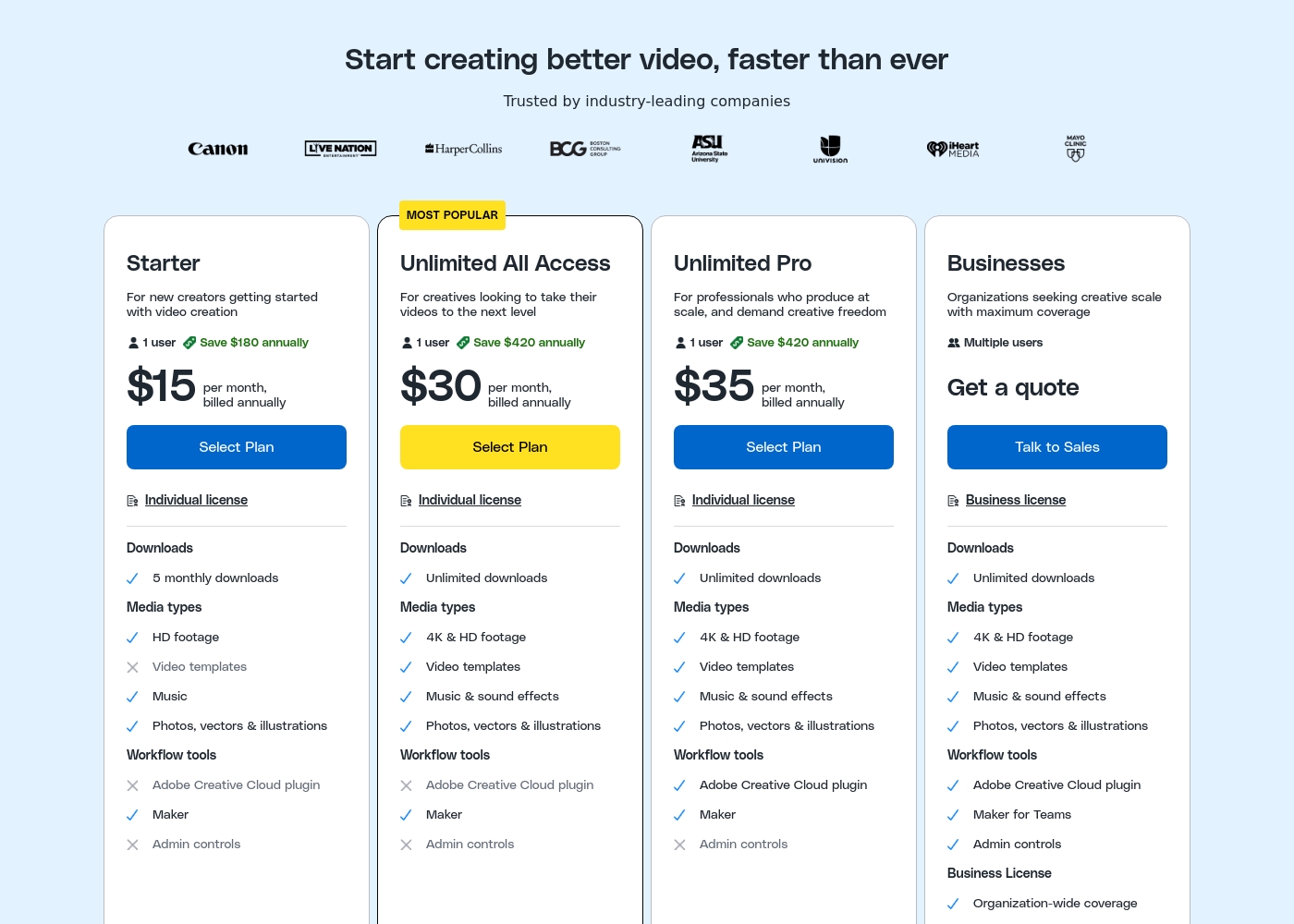
Storyblocks costs between $15 and $35 per month (billed annually) with three defined individual subscription plans: Starter, Unlimited All Access, and Unlimited Pro, plus a custom plan for Businesses.
Let's dive into the details of what each plan offers.
Starter
Price: $15 per month, billed annually Best For: New creators getting started with video creation Other Features:
- 5 monthly downloads
- HD footage, music, photos, vectors & illustrations
- Includes the Maker workflow tool
- Individual license for one user
- Individual license (1 user)
- HD footage
- Music
- Photos, vectors & illustrations
- Includes Maker workflow tool
- Individual license (1 user)
- Unlimited downloads
- 4K & HD footage
- Video templates, Music & sound effects
- Photos, vectors & illustrations
- Individual license (1 user)
- Unlimited downloads
- 4K & HD footage
- Video templates, Music & sound effects
- Includes Adobe Creative Cloud plugin
- Multiple users
- Business license with organization-wide coverage
- Unlimited downloads
- Includes Adobe Creative Cloud plugin, Maker for Teams, and Admin controls
- Up to $1 million indemnification
While the Unsplash platform maintains a massive free library, the paid subscription unlocks exclusive features and content. Let's explore what Unsplash+ includes for individual creators.
Unsplash+
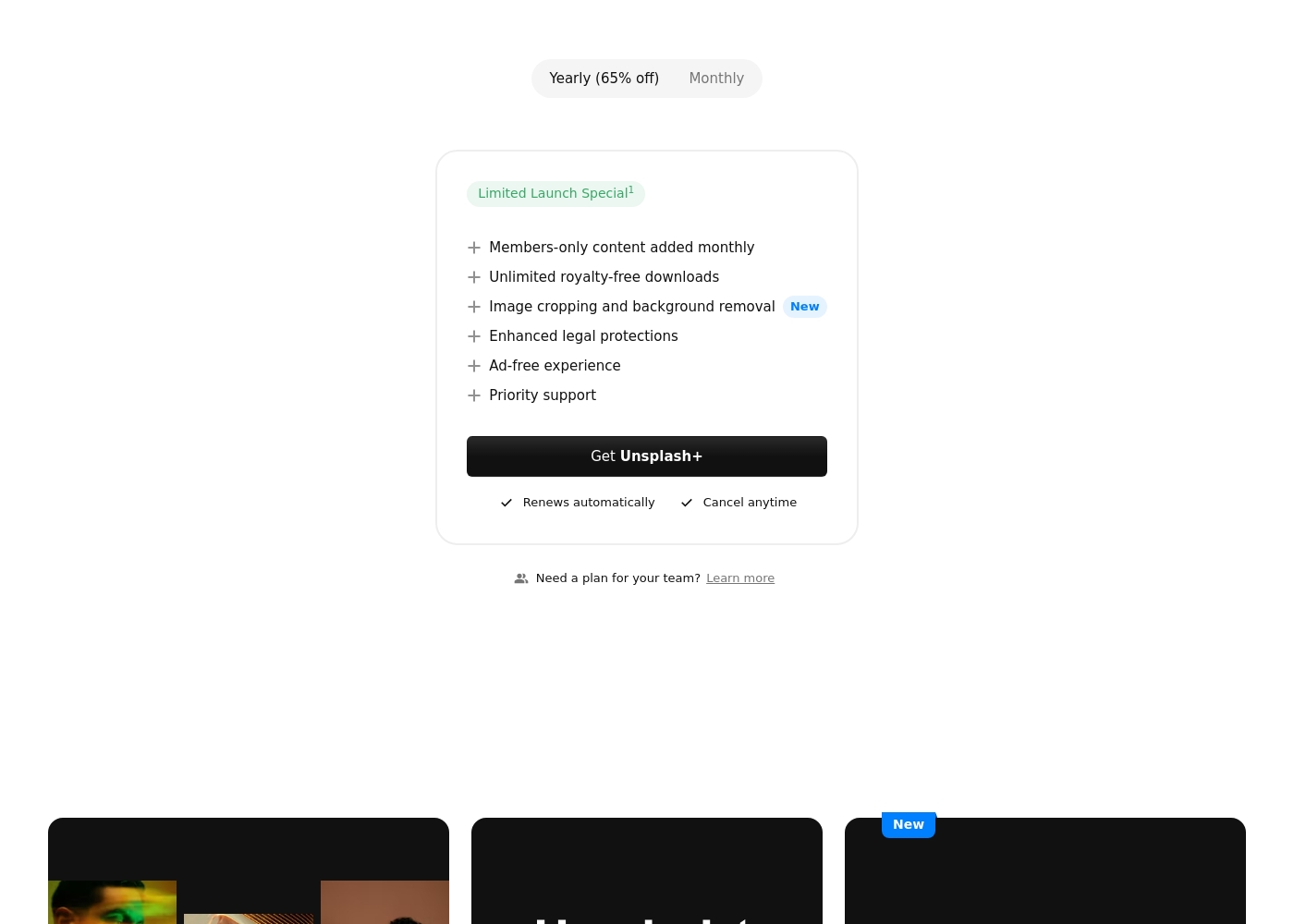
Best For: Individual creators needing enhanced legal protection and exclusive, unlimited stock content. Other Features:
- Members-only content added monthly
- Unlimited royalty-free downloads
- Image cropping and background removal
- Enhanced legal protections
- Ad-free experience
- Priority support
This subscription is designed for single users who frequently download stock images and require specialized content. If you prioritize solid legal protection and want access to powerful new tools like image cropping, Unsplash+ is a superb choice. Remember, this is a single seat license, meaning it is not intended for broad organizational sharing.
- Members-only content added monthly
- Unlimited royalty-free downloads
- Image cropping and background removal
- Enhanced legal protections
- Ad-free experience
Pricing Notes
- Storyblocks individual plans are advertised monthly but require annual billing upfront.
- Unsplash offers an enormous, permanently free image library, eliminating costs for basic users.
- Storyblocks' Starter plan is limited to 5 monthly downloads at $15/month (annual commitment).
- Unsplash+ paid pricing is not publicly disclosed, making direct cost comparison difficult.
- The $35/month Storyblocks Unlimited Pro includes the Adobe Creative Cloud plugin, a huge workflow advantage.
Pricing Head-to-Head
User Reviews
Storyblocks enjoys overwhelmingly positive external feedback, maintaining an impressive 4.7/5 rating on Trustpilot across thousands of reviews. Users consistently highlight the platform's high value, noting that the subscription saves significant time and money compared to creating content independently.
Creators appreciate the massive, high-quality, and frequently updated library of royalty-free media—covering video, audio, and images—and its easy integration into various projects. The clarity of licensing is a major selling point, giving users confidence when publishing on platforms like YouTube where copyright claims are resolved quickly, often within the hour.
The website has one simple step to handle copyright claims, and I filled it out easily. It was resolved within the hour—AMAZING! I didn't have to follow up or write my own dispute. This reliability is critical.
Users praise Unsplash for its high-quality, professional images and amazing variety, confirming it is an easy-to-use, commercial-free source for content creators and artists. The satisfaction level decreases substantially among those who utilized the new paid subscription, Unsplash+.
Many long-time users feel that the platform broke its promise to remain entirely free, leading to a noticeable decline in the quality of the non-paid content. The most serious complaints target customer support and reliability: several users report being charged monthly for Unsplash+ despite having locked accounts or being unable to access downloads.
I’ve been using Unsplash for a while now, and it’s honestly my go-to for high-quality, free stock images. The variety is amazing, helping me find the perfect photo for blog posts or social media campaigns. Plus, the fact that it’s free makes it a total win.
Our Verdict
Deciding between Storyblocks and Unsplash depends entirely on your media format needs. If video, audio, and professional workflow are required, Storyblocks is the undeniable winner. Unsplash remains the undefeated champion for high-quality, zero-cost static photography. Both tools offer unlimited downloads in their paid tiers. Storyblocks' superpower is delivering expansive, unconstrained video production resources. Subscriptions remove download caps on essential 4K footage and sound effects. Storyblocks is built for serious scaling and offers clear legal protection for businesses. Unsplash's superpower is its completely free, massive library of stunning images. Millions of photos are free for commercial use for individuals. Unsplash is the perfect solution for anyone running a blog or personal site on a budget. Your primary content type is the deciding factor between Storyblocks and Unsplash. If you budget for professional video, choose reliable Storyblocks. If you need static images only, choose the accessible free library of Unsplash. Choose Storyblocks if you are a professional needing guaranteed 4K video, audio, and team features. Stick with Unsplash for accessible, no-cost images for simple marketing and social posts.
Frequently Asked Questions
Which tool is better for video production: Storyblocks or Unsplash?
Storyblocks is specifically designed for video production needs. It includes 4K footage, music, sound effects, and video templates. Unsplash focuses purely on static visual images and offers no motion media.
Does Unsplash offer video footage or music assets?
No, Unsplash does not offer video footage, music, or sound effects currently. The Unsplash library is focused solely on static high-resolution photographs. Storyblocks is necessary if you require motion or audio assets.
Which platform is completely free to use, Storyblocks or Unsplash?
Unsplash offers millions of high-quality images free for commercial use. Storyblocks does not provide any free plan or trial period. You must purchase a subscription for access to Storyblocks assets.
Does Storyblocks offer a free plan or trial period?
No, Storyblocks does not offer a free plan or trial period based on current public information. All individual plans require purchasing an annual subscription to access the media library.
Can my team share assets easily using Storyblocks or Unsplash?
Storyblocks is better for teams, offering specific Business plans with multiple users and admin controls. Unsplash+ is strictly a single-user license and disallows broad sharing via DAM systems.
Which subscription is cheaper: Storyblocks or Unsplash+?
Storyblocks starts at $15/month (billed annually) for its Starter plan. Unsplash+ pricing is not explicitly stated, making a direct cost comparison impossible. Unsplash is certainly cheaper if you use the free tier.
Ready to Choose?
Both tools have their strengths. Choose based on your specific needs.
