Shade vs Unsplash
Shade is for storing your team's media. Unsplash is for finding new images to use. They solve very different problems.
Best for: Creative teams of 5-50 managing large volumes of video/photo assets, Marketing departments needing to centralize and find brand assets quickly

Best for: Solo content creators, bloggers, and freelancers needing free stock photos, Social media managers sourcing diverse visuals for posts and ads
Smart search, but pricing is opaque.
We find Shade offers a compelling centralized hub for media teams, with standout AI search and intelligent file streaming. Overall, it's a strong workflow tool, but the lack of public pricing for team plans is a significant drawback for prospective buyers.
Pros
- All-in-one platform for storage, review, and approval
- Intelligent file streaming for fast access to large files
- Powerful AI search and automated metadata
- Secure archiving for long-term project storage
Cons
- Team and enterprise pricing is not publicly disclosed
- Requires a sales demo for detailed quotes and scalability
- Limited external review data for deep validation

Best Free Visuals, Buyer Beware on Premium.
We find Unsplash offers an extensive, high-quality free image library that remains vital for creators worldwide. Overall, Unsplash is highly recommended for its free content, but we advise caution before subscribing to Unsplash+ due to recurring user reports of billing errors and unreliable customer support.
Pros
- Access to a massive library of professional, high-resolution visuals.
- The core content remains free and is available for commercial use.
- Unsplash+ provides enhanced legal protections and useful image editing tools.
- The platform is widely praised for its variety and good categorization.
Cons
- Reported failures in customer support and billing reliability for Plus subscribers.
- Recurring user reports of reduced content diversity and representation in search results.
- The perceived quality of the free image library has declined since the Unsplash+ plan launched.
- A lack of a required safe filter means explicit content can appear.
AboutShade
💡 Shade is an all-in-one platform for media storage and management. It's designed for creative and media teams who handle large files daily. It combines intelligent file streaming, review tools, and smart search in a single place.
AboutUnsplash
Unsplash is defined as the internet’s key source for visuals. It provides beautiful, free images and pictures across a wide range of topics. These categories cover subjects like Nature, Animals, Film, and 3D Renders. The entire extensive library is powered by creators worldwide who contribute their work. It's a vast platform for anyone needing stunning, accessible imagery for their projects. 💡
Highlights
Feature Comparison
Features Overview
We highlight the main differences and pick a winner for each feature.
Core Purpose
Shade manages your team's files. Unsplash provides new images to use.
Shade is an all-in-one hub for your team's media. It stores, searches, and shares your own assets. Unsplash is a source for finding external visuals. It offers millions of free and premium stock photos.\n\nShade helps teams organize chaos. Unsplash helps creators find inspiration. They serve opposite ends of the content workflow.
Search & Discovery
Shade's AI finds files in your library. Unsplash helps you browse a global collection.
Shade uses AI-powered search to find your own files. You can describe what you need, and it uses automated metadata. It's like having a smart assistant for your library.\n\nUnsplash offers diverse categories and trending searches. You can browse topics like Nature or Film. It's designed for discovery within its vast creator-contributed library.\n\nThe key difference is scope: Shade searches your private data. Unsplash searches a public, curated collection.
File Handling
Shade streams large files. Unsplash downloads standard images.
Shade features intelligent file streaming. You can preview massive 4K/8K videos in your browser without downloading. This keeps creative momentum going.\n\nUnsplash is for downloading photos. The process is simple: find an image and save it. Unsplash+ allows unlimited royalty-free downloads.\n\nShade solves slow, cumbersome file access. Unsplash solves the need for fresh visual content.
Collaboration
Shade has built-in review tools. Unsplash is a single-user resource.
Shade includes review and approval tools. Team members can comment directly on media. This streamlines feedback and keeps projects moving.\n\nUnsplash+ is strictly a single-user license. There are no collaboration features for sharing within a team. Its focus is individual access.\n\nFor teams needing to work together on assets, Shade is the clear choice.
Pricing Model
Shade has a free plan and custom enterprise pricing. Unsplash+ is a fixed subscription.
Shade offers a free plan to test core features. Paid Team/Enterprise plans require a custom quote. This can be good for scaling teams.\n\nUnsplash+ is a straightforward monthly or yearly subscription. The yearly plan advertises a 65% discount. It's a clear cost for an individual.\n\nShade's pricing scales with your team. Unsplash+'s pricing is fixed per user seat.
Legal & Safety
Unsplash+ provides enhanced legal protection. Shade's terms aren't detailed.
Unsplash+ includes enhanced legal protections. All images are model and property released. This gives peace of mind for commercial use.\n\nShade's public materials don't detail its legal terms. For questions about licensing your stored files, you'd need to contact their team.\n\nIf legal clearance for visuals is your top concern, Unsplash+ explicitly addresses it.
Ecosystem & Integrations
Both have limited stated integrations with other software.
Shade's official site doesn't list specific third-party integrations. Users may need to check compatibility with their tech stack directly.\n\nUnsplash also does not state specific integrations with design software on its pricing page. Both platforms appear to operate as standalone tools.\n\nNeither tool currently positions itself as a deeply integrated part of a larger software stack.
Ideal User
Shade fits media teams. Unsplash fits individual creators.
Shade is built for media teams and creative departments. It centralizes assets for collaboration. Its features are designed for group workflows.\n\nUnsplash+ is licensed for single users. It's perfect for freelancers, bloggers, or solo marketers. It's not intended for broad team sharing.\n\nYour team size and collaboration needs should heavily influence your choice.
Shade costs an undisclosed amount with at least 1 plan: Start for Free at $0.
Finding the right plan depends on your team's specific media storage and workflow needs.
Start for Free
Price: $0 Best For: Individuals or small teams exploring AI search Other Features: Intelligent file streaming, review and approval, automated metadata, AI search, media archiving
- Intelligent file streaming
- Review and approval
- Automated metadata
- AI search
- Archive
While the Unsplash platform maintains a massive free library, the paid subscription unlocks exclusive features and content. Let's explore what Unsplash+ includes for individual creators.
Unsplash+
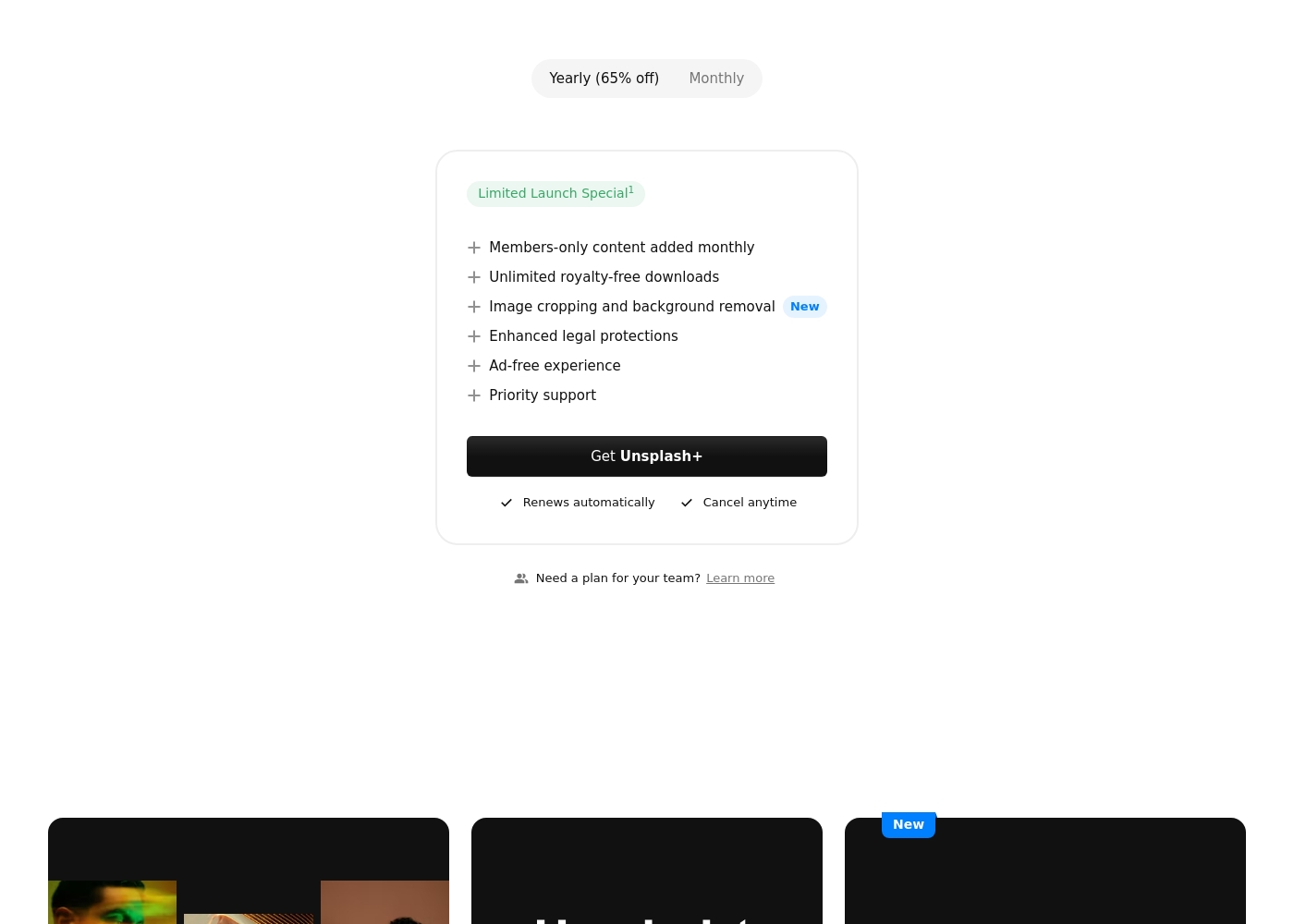
Best For: Individual creators needing enhanced legal protection and exclusive, unlimited stock content. Other Features:
- Members-only content added monthly
- Unlimited royalty-free downloads
- Image cropping and background removal
- Enhanced legal protections
- Ad-free experience
- Priority support
This subscription is designed for single users who frequently download stock images and require specialized content. If you prioritize solid legal protection and want access to powerful new tools like image cropping, Unsplash+ is a superb choice. Remember, this is a single seat license, meaning it is not intended for broad organizational sharing.
- Members-only content added monthly
- Unlimited royalty-free downloads
- Image cropping and background removal
- Enhanced legal protections
- Ad-free experience
Pricing Notes
- Shade's free plan lets you test AI search and core features indefinitely.
- Shade's paid Team/Enterprise pricing is not public; you must contact sales.
- Unsplash+ pricing is not shown, but it offers monthly or yearly billing with a 65% discount on yearly.
- Unsplash+ is a strict single-user license, making it costly for full teams.
- Neither platform explicitly states a money-back guarantee or free trial period for paid plans.
Pricing Head-to-Head
User Reviews
External reviews for Shade show a generally positive sentiment, though the sample size appears small. Users on Capterra highlight the platform's ease of use and its strong AI-powered search functionality, which helps teams quickly find files.
Some reviewers note that the onboarding process was smooth and the customer support was responsive. A few mentions point to the value of the centralized media hub for collaboration.
The AI search is a game-changer. We can locate any footage in seconds without digging through endless folders. It has saved our team so much time on projects.
Users praise Unsplash for its high-quality, professional images and amazing variety, confirming it is an easy-to-use, commercial-free source for content creators and artists. The satisfaction level decreases substantially among those who utilized the new paid subscription, Unsplash+.
Many long-time users feel that the platform broke its promise to remain entirely free, leading to a noticeable decline in the quality of the non-paid content. The most serious complaints target customer support and reliability: several users report being charged monthly for Unsplash+ despite having locked accounts or being unable to access downloads.
I’ve been using Unsplash for a while now, and it’s honestly my go-to for high-quality, free stock images. The variety is amazing, helping me find the perfect photo for blog posts or social media campaigns. Plus, the fact that it’s free makes it a total win.
Our Verdict
Shade and Unsplash aren't really competitors. They solve completely different problems. Choosing between them is simple once you know your need.\n\nShade's superpower is organizing chaos. It's a single hub for your team's media. With AI search, you can find any file in seconds. Intelligent streaming lets you review huge videos without downloading.\n\nUnsplash's superpower is providing inspiration. It's a vast, free library of stunning photos. You can browse by category or trend. Unsplash+ adds legal protection and simple editing tools.\n\nThe deciding factor is your workflow. Do you need to manage files you already have? Pick Shade. Do you need to find new images for a project? Pick Unsplash.\n\nFor media teams drowning in files, Shade is the answer. For creators needing fresh visuals, Unsplash is the go-to. They might even work great together.
Frequently Asked Questions
Which is better for small teams: Shade or Unsplash?
For managing your own team's files, choose Shade. It offers collaboration tools and centralized storage. Unsplash is for individuals finding stock images.
Does Shade have stock photos like Unsplash?
No. Shade is for storing and sharing your team's own media. Unsplash is a source for discovering new stock images from creators worldwide.
Is Unsplash+ worth it over the free plan?
Unsplash+ is worth it for individual creators needing unlimited downloads, legal protection, and editing tools. The free plan is sufficient for casual use.
Can I use Unsplash images for my company's marketing?
Yes, Unsplash's free license allows commercial use. Unsplash+ provides enhanced legal protections for even greater peace of mind in commercial projects.
Which platform has better customer support?
Unsplash+ subscribers get priority support. Shade's support receives mixed reviews, with reports of slow response times from users.
How does pricing compare for a team of 10?
Shade's Team plan requires a custom quote. Unsplash+ is licensed per individual seat, so you'd need 10 separate subscriptions, which may not be cost-effective.
Ready to Choose?
Both tools have their strengths. Choose based on your specific needs.
