Shade vs Storyblocks
Shade and Storyblocks solve two different problems for creative teams. Shade is your team's private media library. Storyblocks is a public stock media marketplace. The choice depends on whether you need to organize your own files or source new ones.
Best for: Creative teams managing large volumes of their own video/audio files, Marketing departments needing a centralized asset hub
Best for: YouTubers and social media creators needing stock footage and music, Video production agencies requiring unlimited, royalty-free assets
Smart search, but pricing is opaque.
We find Shade offers a compelling centralized hub for media teams, with standout AI search and intelligent file streaming. Overall, it's a strong workflow tool, but the lack of public pricing for team plans is a significant drawback for prospective buyers.
Pros
- All-in-one platform for storage, review, and approval
- Intelligent file streaming for fast access to large files
- Powerful AI search and automated metadata
- Secure archiving for long-term project storage
Cons
- Team and enterprise pricing is not publicly disclosed
- Requires a sales demo for detailed quotes and scalability
- Limited external review data for deep validation
Unlimited stock media with exceptional support.
We find Storyblocks excels by offering true unlimited access to a massive and constantly updated library of high-quality assets. The company combines flexible pricing with exceptionally praised customer support, making it a reliable resource for professional creators.
Pros
- Offers true unlimited downloads in top subscription tiers.
- Massive library includes 4K video, audio, sound effects, and templates.
- Customer support is highly responsive and praised for efficiency.
- Licensing rules are straightforward and royalty-free.
Cons
- Individual plans must be billed annually, not monthly.
- Some users initially reported difficulty contacting live support.
- Clarity on the initial refund process can be inconsistent.
AboutShade
💡 Shade is an all-in-one platform for media storage and management. It's designed for creative and media teams who handle large files daily. It combines intelligent file streaming, review tools, and smart search in a single place.
AboutStoryblocks
Storyblocks is recognized as the most-loved stock media platform currently available for creators. It is a comprehensive service designed to streamline your production process. Instead of managing individual purchases, you pay for a subscription that grants wide access to millions of assets. Whether you work with video, audio, or images, the system is built to support your creative vision efficiently. ✅
Highlights
Feature Comparison
Features Overview
We highlight the main differences and pick a winner for each feature.
Core Functionality
Shade is a media asset management system. Storyblocks is a stock content subscription service.
Shade provides a centralized platform for teams to store, search, and share their own media files. It handles the entire lifecycle from upload to archive. Storyblocks offers an all-inclusive subscription for downloading millions of royalty-free stock assets. It's designed to source new content for projects. The key difference is that Shade organizes what you have. Storyblocks provides what you need to create from scratch. For example, a marketing team would use Shade to manage all campaign assets. A YouTuber would use Storyblocks to find B-roll footage.
Search & Discovery
Shade uses AI to find files in your own library. Storyblocks searches its massive public catalog.
Shade's AI-powered search and automated metadata let you find assets even without perfect file names. It's built for complex, internal libraries. Storyblocks offers standard search across 4+ million assets. The library is curated and tagged for discoverability. Shade's search is more advanced for your specific files. Storyblocks's strength is the sheer volume of pre-tagged content. A video editor searching for a specific clip from last year's project would prefer Shade. Someone needing generic 'city skyline' footage would use Storyblocks.
Collaboration & Review
Shade has built-in review tools. Storyblocks focuses on individual asset access.
Shade includes review and approval tools. Teams can share links and leave time-stamped feedback directly on media files. Storyblocks is primarily for downloading assets. It doesn't have tools for team review of your own projects. This makes Shade a workflow hub. Storyblocks is more of a content source. A creative director getting client sign-off would use Shade. A solo creator downloading a music track would use Storyblocks.
Pricing & Access
Shade has a free plan and custom enterprise pricing. Storyblocks has clear, tiered annual subscriptions.
Shade offers a free plan to start, with paid tiers requiring a custom quote. This can lack transparency. Storyblocks has three public tiers ($15-$35/mo billed annually) and a custom business plan. All costs are upfront. Storyblocks is more predictable for budgeting. Shade may offer better value for large teams but requires a sales call. A freelancer on a budget might try Shade's free plan. A production agency would appreciate Storyblocks's clear unlimited pricing.
Content Library
Storyblocks has a massive stock library. Shade's library is only what you upload.
Storyblocks provides access to over 4 million stock videos, music, sound effects, and images. New content is added daily. Shade does not provide stock content. It is a storage and management system for your team's own assets. You cannot find stock footage on Shade. You cannot manage your team's project files on Storyblocks. Need a royalty-free song for a podcast intro? Use Storyblocks. Need to find your company's official logo file? Use Shade.
File Handling & Performance
Shade streams large files for instant access. Storyblocks requires downloads.
Shade features intelligent file streaming. You can preview and work with large 4K/8K files without full downloads. Storyblocks operates on a download model. You get the file and then work with it locally. Streaming is faster for collaborative review. Downloads are better for offline, intensive editing. A remote team reviewing a rough cut would benefit from Shade's streaming. An editor working offline on a plane would prefer Storyblocks downloads.
Licensing & Rights
Storyblocks includes royalty-free licensing. Shade manages your own file permissions.
Storyblocks includes industry-leading licensing with its subscriptions. This protects projects from copyright claims. Shade's licensing concerns are about internal access control. You manage who can see or use your own files. Storyblocks solves legal worries for stock content. Shade solves access chaos for your team. A YouTuber avoiding copyright strikes needs Storyblocks. A film studio protecting unreleased footage needs Shade.
User Reviews & Satisfaction
Storyblocks has higher overall ratings. Shade gets praise for core function but critiques on support.
Storyblocks maintains a stellar 4.6/5 rating, with users praising library quality and fast support. Shade has a solid 3.8/5 rating. Users love the AI search but note slow support and limited integrations. Storyblocks users are generally more satisfied. Shade's praise is focused on specific features. Comparing reviews, Storyblocks delivers a more consistently positive experience.
Shade costs an undisclosed amount with at least 1 plan: Start for Free at $0.
Finding the right plan depends on your team's specific media storage and workflow needs.
Start for Free
Price: $0 Best For: Individuals or small teams exploring AI search Other Features: Intelligent file streaming, review and approval, automated metadata, AI search, media archiving
- Intelligent file streaming
- Review and approval
- Automated metadata
- AI search
- Archive
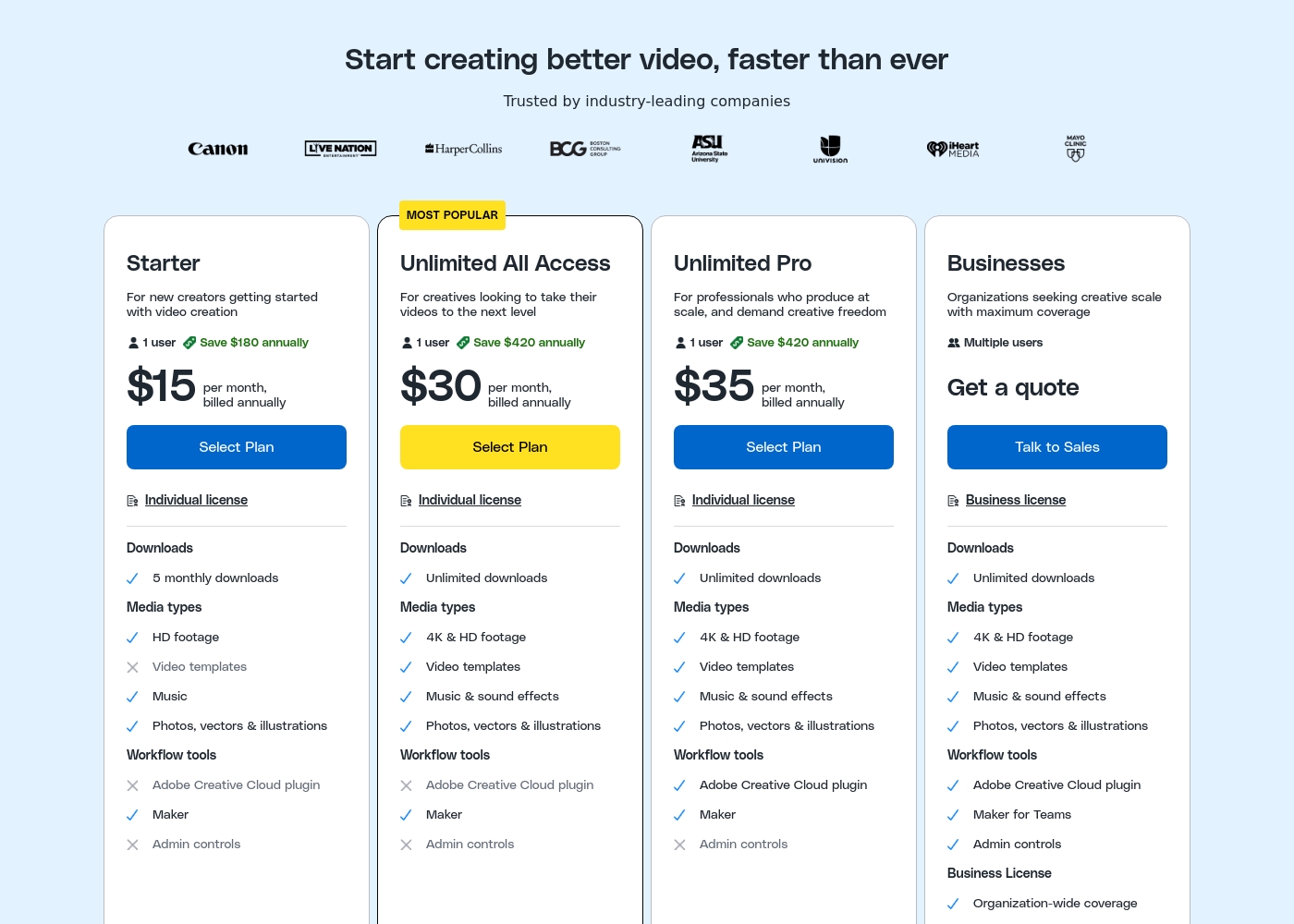
Storyblocks costs between $15 and $35 per month (billed annually) with three defined individual subscription plans: Starter, Unlimited All Access, and Unlimited Pro, plus a custom plan for Businesses.
Let's dive into the details of what each plan offers.
Starter
Price: $15 per month, billed annually Best For: New creators getting started with video creation Other Features:
- 5 monthly downloads
- HD footage, music, photos, vectors & illustrations
- Includes the Maker workflow tool
- Individual license for one user
- Individual license (1 user)
- HD footage
- Music
- Photos, vectors & illustrations
- Includes Maker workflow tool
- Individual license (1 user)
- Unlimited downloads
- 4K & HD footage
- Video templates, Music & sound effects
- Photos, vectors & illustrations
- Individual license (1 user)
- Unlimited downloads
- 4K & HD footage
- Video templates, Music & sound effects
- Includes Adobe Creative Cloud plugin
- Multiple users
- Business license with organization-wide coverage
- Unlimited downloads
- Includes Adobe Creative Cloud plugin, Maker for Teams, and Admin controls
- Up to $1 million indemnification
Pricing Notes
- Shade's free plan is a genuine no-cost entry point, while Storyblocks requires a paid subscription from the start.
- Storyblocks's pricing is transparent and tiered. Shade's paid pricing is opaque and requires contacting sales.
- Storyblocks bills annually upfront, which can be a large initial cost. Shade's free plan has no commitment.
- Storyblocks's Unlimited Pro plan ($35/mo) adds the Adobe plugin, which is a key workflow upgrade for professionals.
Pricing Head-to-Head
User Reviews
External reviews for Shade show a generally positive sentiment, though the sample size appears small. Users on Capterra highlight the platform's ease of use and its strong AI-powered search functionality, which helps teams quickly find files.
Some reviewers note that the onboarding process was smooth and the customer support was responsive. A few mentions point to the value of the centralized media hub for collaboration.
The AI search is a game-changer. We can locate any footage in seconds without digging through endless folders. It has saved our team so much time on projects.
Storyblocks enjoys overwhelmingly positive external feedback, maintaining an impressive 4.7/5 rating on Trustpilot across thousands of reviews. Users consistently highlight the platform's high value, noting that the subscription saves significant time and money compared to creating content independently.
Creators appreciate the massive, high-quality, and frequently updated library of royalty-free media—covering video, audio, and images—and its easy integration into various projects. The clarity of licensing is a major selling point, giving users confidence when publishing on platforms like YouTube where copyright claims are resolved quickly, often within the hour.
The website has one simple step to handle copyright claims, and I filled it out easily. It was resolved within the hour—AMAZING! I didn't have to follow up or write my own dispute. This reliability is critical.
Our Verdict
For most creators needing stock media, Storyblocks is the clear winner. It delivers unlimited assets with fantastic support. Shade's superpower is organizing your own files. Its AI search and streaming make managing a huge team library easy. Storyblocks's superpower is its massive, ever-growing stock library. The unlimited downloads and Adobe plugin save professionals real time. The deciding factor is your source material. Do you need to manage your own assets or acquire new ones? Choose Shade if you're a creative team drowning in files. Choose Storyblocks if you're a creator who needs fresh, licensed content on demand.
Frequently Asked Questions
Can I use Shade to find stock footage like Storyblocks?
No. Shade is for storing and managing your team's own media files. It does not provide a public library of stock assets. Storyblocks is the platform for sourcing royalty-free stock content.
Which is better for a small YouTube channel: Shade or Storyblocks?
Storyblocks is better for a solo YouTuber. Its Unlimited plan gives you unlimited downloads of video clips, music, and sound effects. Shade is designed for teams managing their own large libraries.
Does Storyblocks have team collaboration tools like Shade?
Not in the same way. Shade has built-in review and approval tools for teams. Storyblocks's Business plan offers multi-user access and admin controls, but not workflow collaboration features.
Is Shade really free to use?
Yes, Shade offers a free plan that includes core features like AI search, streaming, and review tools. You can use this to test the platform. Paid features require contacting their sales team.
Which has better customer support: Shade or Storyblocks?
Storyblocks consistently receives praise for fast, effective customer support. Reviews for Shade often mention that support responsiveness can be slow.
If I'm an editor using Adobe Premiere, which integrates better?
Storyblocks integrates directly with Adobe Creative Cloud via a plugin in its Pro plan. Shade does not list specific Adobe integrations, so you'd likely manage files separately.
Ready to Choose?
Both tools have their strengths. Choose based on your specific needs.