Sender vs SMTP.com
Sender and SMTP.com are both email tools, but they solve very different problems. Sender is a full marketing platform with a generous free plan. SMTP.com is a specialized delivery service focused on getting emails to the inbox.
Best for: Small businesses and startups with limited budget, Bloggers and content creators building an email list
Best for: Developers and SaaS companies sending transactional emails, High-volume senders (500k+ emails/month)
Simple, free, and effective for basics.
We found Sender to be a solid, no-frills tool for core email marketing tasks. Its free plan is a major draw for startups and small businesses. Overall, it delivers good value with a straightforward interface, though it may lack some advanced features for power users.
Pros
- Extremely generous free plan (2,500 contacts, 15k emails/month).
- Clean, user-friendly interface that's easy to learn.
- Transparent, affordable pricing with no hidden fees.
- Includes essential automation features from the start.
Cons
- Advanced features and segmentation are limited on lower tiers.
- Some users report occasional email deliverability issues.
- Integrations can be inconsistent with certain platforms.
- Free plan lacks SMS marketing capabilities.
Solid email deliverability with mixed reviews.
SMTP.com aims to ensure reliable email delivery with solutions tailored for various business sizes. However, user reviews reveal some inconsistencies. Overall, we think that SMTP.com provides features, but the delivery and support experiences may need improvement.
Pros
- Simple setup
- Good email delivery in some cases
- Detailed reporting
- Dedicated IP options
Cons
- Inconsistent deliverability
- Customer service responsiveness varies
- 30-day cancellation policy
- Intermittent failures reported
AboutSender
Sender is an email marketing platform designed for businesses of all sizes. It helps you build, automate, and send email campaigns that people actually want to read. Think of it as your straightforward tool for staying in touch with your audience and driving sales. 🚀
AboutSMTP.com
SMTP.com provides a complete email delivery suite designed to get your emails into subscriber inboxes. ✨ They offer solutions for everyone from small businesses to high-volume senders. With over 20 years of experience, SMTP.com focuses on deliverability and expert support.
Highlights
Feature Comparison
Features Overview
We highlight the main differences and pick a winner for each feature.
Core Purpose & Interface
Sender is an all-in-one marketing platform. SMTP.com is a technical email delivery service.
Sender provides a complete dashboard for creating campaigns, automations, and landing pages. It's built for marketers. SMTP.com provides an API and simple relay interface focused solely on sending emails. It's built for developers. The key difference is scope: Sender helps you grow and engage an audience. SMTP.com ensures your technical emails get delivered.
Free Plan & Pricing
Sender offers a robust free tier. SMTP.com has no free option.
Sender's Free Forever plan includes 2,500 subscribers and 15,000 emails per month. It includes automation and support. SMTP.com's Essential plan starts at $25/month for 50,000 emails. There is no free trial mentioned. For budget-conscious startups, Sender's free plan is a massive advantage.
Email Automation
Sender includes built-in automation. SMTP.com relies on external triggers via API.
Sender lets you build automated sequences like welcome series and cart reminders right in the platform. SMTP.com sends emails when your system tells it to. You need to build the automation logic yourself. Sender is ready-to-use for marketing automation. SMTP.com requires development work.
Deliverability Focus
SMTP.com is engineered for inbox placement. Sender focuses on marketing tools.
SMTP.com offers dedicated IPs and a Reputation Defender add-on to protect your sender score. Sender uses shared IPs and standard deliverability practices. Some users report occasional issues. If deliverability is your #1 concern, SMTP.com's specialized tools are superior.
Scalability for High Volume
SMTP.com scales to billions of emails. Sender is for marketing lists.
SMTP.com offers custom solutions for sending 250 million+ emails per month. Infrastructure is their core product. Sender's plans top out at a list size of 200,000 subscribers. It's not designed for pure transactional volume. For massive scale, SMTP.com is the clear choice.
User Experience & Learning Curve
Sender is intuitive for beginners. SMTP.com assumes technical knowledge.
Sender's interface is designed for simplicity. Most users report setting up their first campaign in minutes. SMTP.com's onboarding is quick, but using the API requires coding skills. It's a developer tool. If you want to point-and-click, Sender wins. If you're comfortable with code, SMTP.com is efficient.
Integration Ecosystem
Sender offers marketing tool integrations. SMTP.com offers API-based connections.
Sender connects with WordPress, WooCommerce, and Zapier for marketing workflows. SMTP.com provides an Email Relay API and helps with custom integrations. Sender integrates with platforms you use. SMTP.com integrates with code you write.
Customer Support
Both offer support, but plans and focus differ greatly.
Sender gives all users, including free ones, access to 24/7 live support. SMTP.com offers 'Expert Support' to all, with a dedicated account manager for high-volume clients. Sender's support is more accessible for beginners. SMTP.com's scales with your business.
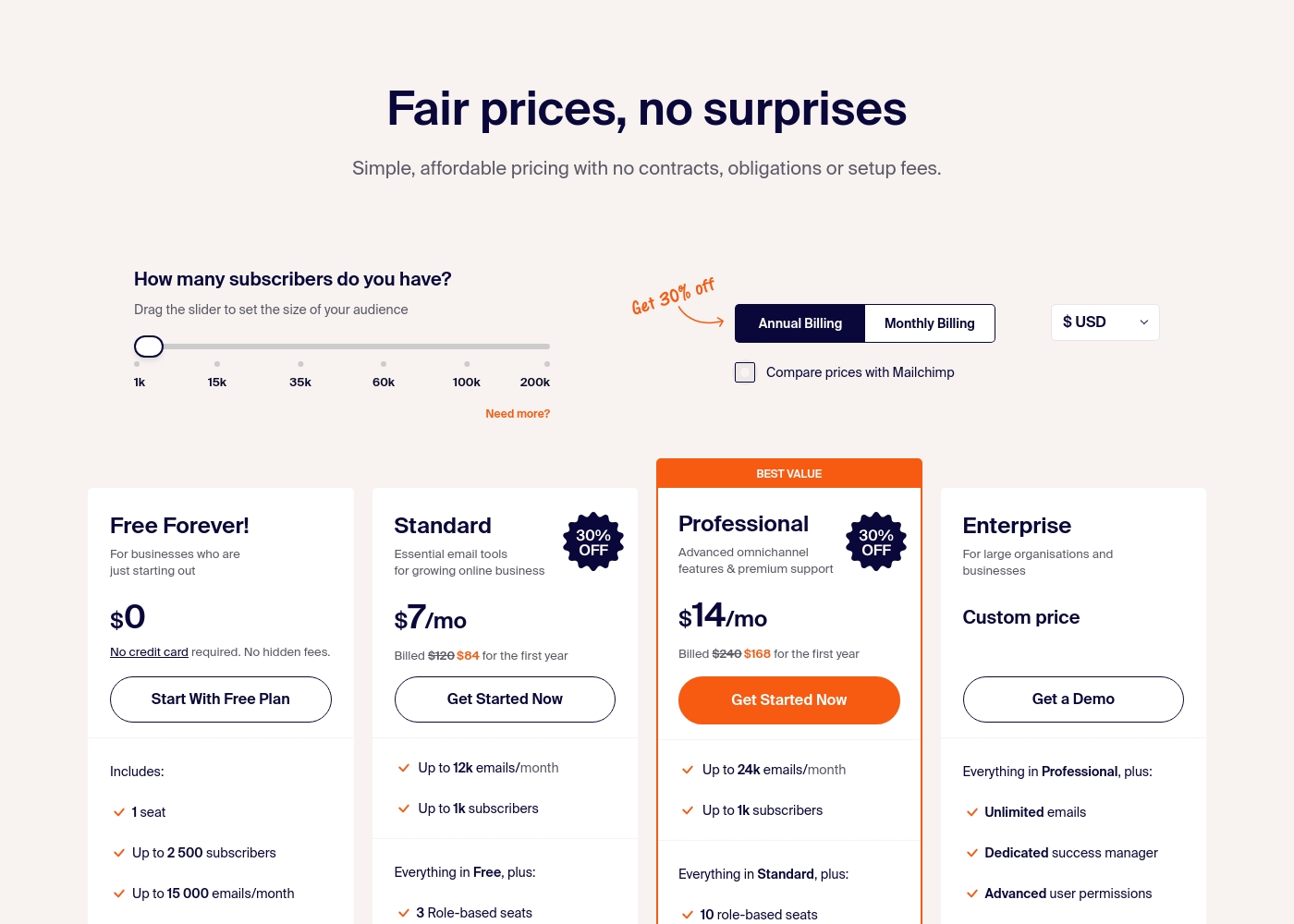
Sender costs between $0 and a custom price per month with 4 plans: Free Forever at $0, Standard at $7, Professional at $14, and Enterprise at Custom price.
Take a look at the specific features and limits included in each plan tier below.
Free Forever!
Price: $0 monthly Best For: Businesses who are just starting out Other Features: 1 seat, up to 2,500 subscribers, 15,000 emails/month, 24/7 live support, email automation.
- 1 seat
- Up to 2,500 subscribers
- Up to 15,000 emails/month
- 24/7 live support
- Email automation
- Up to 12k emails/month
- Up to 1k subscribers
- 3 Role-based seats
- Automated sequences
- Up to 24k emails/month
- Up to 1k subscribers
- 10 role-based seats
- Premium support
- Unlimited emails
- Dedicated success manager
- Advanced user permissions
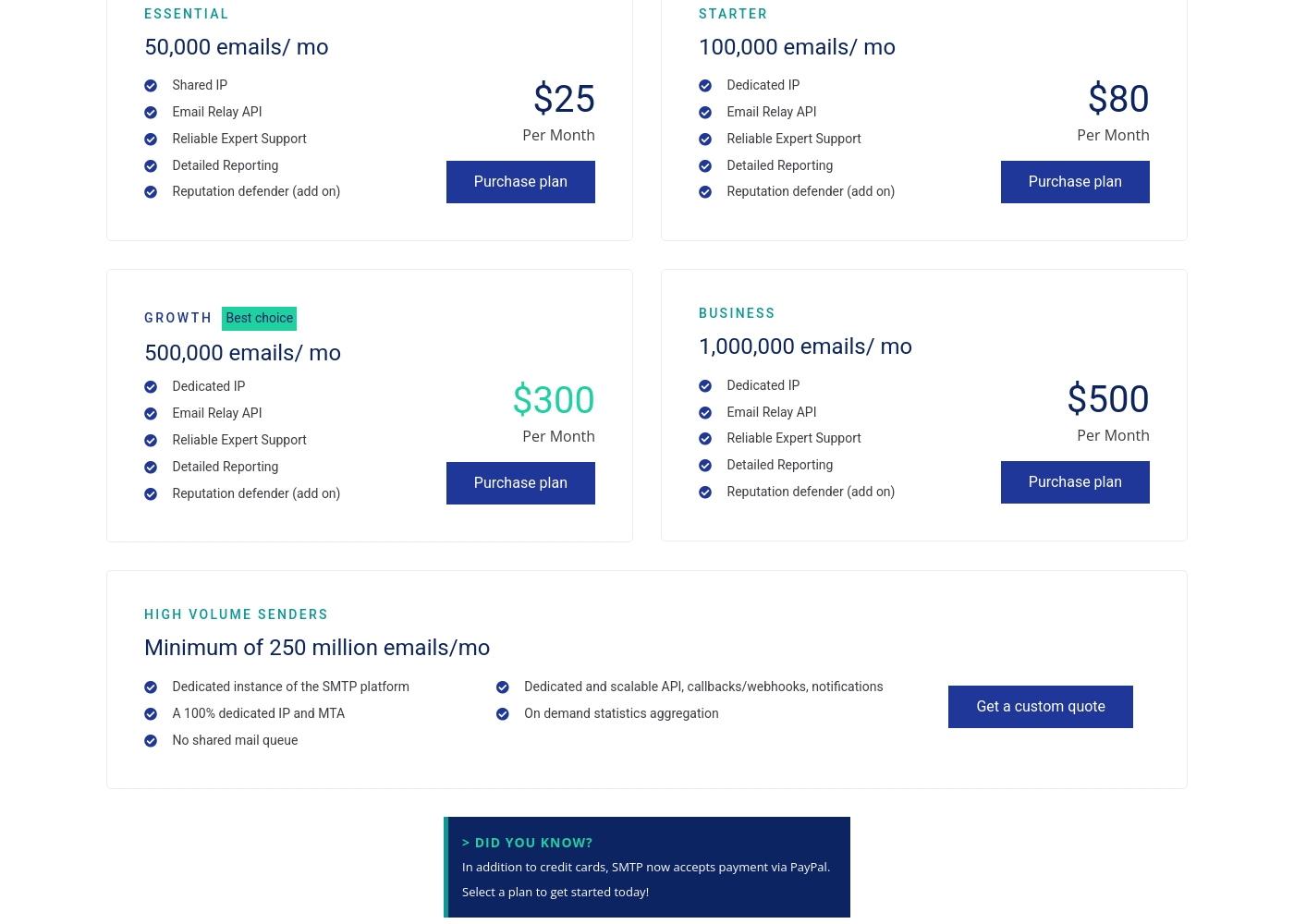
SMTP.com costs between $25 and $500 per month and has four plans: Essential at $25, Starter at $80, Growth at $300, and Business at $500.
Let's explore the details of each plan.
Essential
Price: $25 per month Other Features: Shared IP, Email Relay API, Reliable Expert Support, Detailed Reporting, optional Reputation Defender add-on
- Shared IP
- Email Relay API
- Reliable Expert Support
- Detailed Reporting
- Reputation defender (add on)
- Dedicated IP
- Email Relay API
- Reliable Expert Support
- Detailed Reporting
- Reputation defender (add on)
- Dedicated IP
- Email Relay API
- Reliable Expert Support
- Detailed Reporting
- Reputation defender (add on)
- Dedicated IP
- Email Relay API
- Reliable Expert Support
- Detailed Reporting
- Reputation defender (add on)
Pricing Notes
- Sender offers a permanent Free Forever plan, making it the clear choice for testing or very small lists.
- SMTP.com's pricing is purely usage-based, scaling with email volume. This can be cheaper or more expensive than Sender depending on your list size vs. send frequency.
- Sender's paid plans add team seats and premium support. SMTP.com's plans primarily add volume and dedicated IPs.
- Both platforms exclude VAT from their listed prices.
Pricing Head-to-Head
User Reviews
User sentiment on Trustpilot and Capterra highlights Sender's generous free plan and ease of setup as major positives. Many praise the intuitive interface and reliable automation.
😊 However, some note occasional deliverability hiccups and a learning curve for advanced features. Customer support is frequently mentioned as responsive, though a few users report slow responses during peak times.
The free plan is unbeatable for a new business. I set up my first automation in minutes. The platform is simple and gets the job done without fuss.
SMTP.com's reviews are mixed. 😔 While some users have praised the service for its email delivery returns and simple setup, others express concerns.
Some users report great reporting and a powerful/simple UI, while others mention issues with deliverability, intermittent failures, and account suspension due to spam concerns. Support experiences also vary, with some users citing helpful and responsive support, while others feel the team is lacking.
We used SMTP.com as our external email sending provider for many years without incident. They offer great reporting, a simple but powerful UI, competitive rates, and prompt, knowledgeable support. As an infrastructure engineer with 20 years of experience, I would recommend their service.
Our Verdict
For most businesses, Sender is the smarter starting point. It gives you a full marketing toolkit for free. SMTP.com is a specialist for when email delivery is mission-critical. Sender's superpower is its simplicity and generosity. You can automate campaigns and grow your list without spending a dime or writing code. SMTP.com's superpower is raw deliverability at scale. It's built to ensure your transactional emails—like receipts and alerts—always reach the inbox. The deciding factor is your goal. If you need to nurture leads and run promotions, Sender is your friend. If you need a reliable pipe for system-generated emails, SMTP.com is your engine. Choose Sender if you want affordable email marketing with automation. Choose SMTP.com if you're a developer or high-volume sender who needs bulletproof delivery infrastructure.
Frequently Asked Questions
Which is better for small teams: Sender or SMTP.com?
Sender is generally better for small teams. Its free plan and intuitive interface make it easy to start without cost or training. SMTP.com requires a budget and technical setup.
Does Sender have transactional email capabilities like SMTP.com?
Yes, Sender supports transactional emails. However, SMTP.com is a dedicated service optimized for high-volume transactional delivery with tools like dedicated IPs.
Is SMTP.com worth the extra cost over Sender?
It depends on your needs. If deliverability and high volume are critical, SMTP.com's specialized infrastructure may be worth it. For marketing emails, Sender's value is unbeatable.
Can I migrate from Sender to SMTP.com easily?
Migration paths differ. Moving marketing campaigns from Sender would require rebuilding them. Integrating SMTP.com as a new delivery service for your app involves API changes.
Which platform offers better analytics and reporting?
SMTP.com mentions 'detailed reporting' as a feature. Sender's reviews suggest its analytics are more basic. For in-depth email performance data, SMTP.com may have an edge.
Do I need coding skills to use SMTP.com?
Yes, you generally need coding skills to use SMTP.com's Email Relay API effectively. Sender is designed for non-technical users with a drag-and-drop interface.
Ready to Choose?
Both tools have their strengths. Choose based on your specific needs.