Presentory vs SlidesAI
Presentory and SlidesAI both generate killer presentation slides using powerful AI. The core difference is integration versus dedicated software functionality. Presentory is a robust standalone app that produces polished decks. SlidesAI lives entirely inside your existing Google Slides or PowerPoint workflow.
Best for: Educators needing high-quality lessons with recording/streaming capacity., Users prioritizing a specialized dedicated content creation environment.
Best for: Global teams requiring translation into over 100 languages., Users deeply embedded in Google Slides/PowerPoint ecosystems.
Pros
Cons
Seamless AI integration, critical support issues.
We see SlidesAI offers powerful Google Slides and PowerPoint integration, enabling users to generate presentations quickly from text. Overall, while the core technology promise is strong, we must caution potential users about the confirmed reports of extremely poor customer support responsiveness and difficult, non-transparent subscription cancellation procedures.
Pros
- Works natively with Google Slides and PowerPoint.
- A permanent Basic free plan is available for testing the service.
- Paid plans include document upload capability.
- Premium tier offers unlimited presentation generation.
Cons
- Extremely difficult and convoluted subscription cancellation process.
- Users report highly mixed quality for generated slide aesthetics and design.
- Suggested images and visuals are often irrelevant to the topic content.
- Customer service demonstrates significant unresponsiveness on refund requests.
AboutPresentory
💡 Presentory is an AI-powered presentation maker that transforms your topics, notes, or outlines into visually engaging slide decks. It's designed for professionals, educators, and creators who want to save time and produce high-quality work.
The tool handles the heavy lifting: generating content, suggesting layouts, creating matching images, and offering themes to match your brand. It streamlines the entire process from idea to a shareable PPT or PDF.
AboutSlidesAI
SlidesAI is an intuitive AI presentation maker developed to integrate seamlessly into your favorite tools. You don't need to learn a brand new platform! It works directly inside Google Slides and PowerPoint, making the setup simple and fast. ✅
To start, you just input a topic, document, or link. SlidesAI then processes this input, creates structured slide outlines, and applies a professionally designed theme. This powerful process helps Educators, Professionals, and Students create slides up to 10X faster.
Highlights
Feature Comparison
Features Overview
We highlight the main differences and pick a winner for each feature.
Platform Integration
SlidesAI integrates natively into host apps; Presentory is a dedicated software download.
SlidesAI works directly inside Google Slides and Microsoft PowerPoint workflows. You never need to leave your familiar presentation tool or export files. This simple connection minimizes workflow friction and maximizes productivity. Presentory is a dedicated standalone application for creating and editing presentations. It handles all creation steps within its own focused environment. You must use Presentory to create, then export the final work to formats like .PPT or PDF. The choice is simple: Do you want an extension (SlidesAI) or a powerful, independent program (Presentory)? Teams already reliant on Google Workspace will find SlidesAI highly convenient for daily use.
Pricing & Licensing
Presentory offers competitive pricing and a unique Perpetual License option.
Presentory is budget-friendly, featuring a Premium annual plan for just $48 yearly. It offers a unique $68 Perpetual license for V1.X for a one-time purchase. All Presentory paid plans include a reassuring 30-day money-back guarantee. SlidesAI uses a subscription-only model starting at $100 per year for the Pro plan. The Premium plan costs $200 annually for truly unlimited generation. SlidesAI does not explicitly state a refund or guarantee policy. Presentory offers greater purchasing flexibility, especially with the lifetime ownership option. SlidesAI requires ongoing subscription payments for access. For users who hate recurring fees, the Presentory Perpetual license is a highly appealing alternative.
AI Content Quality
Presentory explicitly uses GPT-4; SlidesAI focuses on post-generation content refinement.
Presentory leverages the advanced power of the GPT-4 model for content generation. Users can refine their copy’s tone to ensure text is contextually perfect. This focus emphasizes a higher baseline quality for initially generated text. SlidesAI focuses specifically on text editing tools once the slide content exists. Tools like 'Shorten' instantly eliminate filler content to increase conciseness. You can also 'Rephrase' sentences if the clarity or style needs adjustment. If raw generation quality from the topic is your priority, Presentory has the upper hand. SlidesAI is excellent for condensing overly verbose content rapidly. Presentory aims to get the text right the first time; SlidesAI helps you fix drafts quickly.
Multimedia Delivery
Presentory offers built-in streaming/recording; SlidesAI offers video export 'Coming Soon.'
Presentory is built for delivery, featuring built-in recording and streaming capabilities. The Premium plan allows for unlimited recording and sharing sessions. This makes Presentory ideal for educators delivering live lectures. SlidesAI currently lacks active video or recording functionality within its platform. Video export is listed only as a ‘Coming Soon’ feature on its paid plans. It focuses purely on generating static slides for host applications. This difference means Presentory is ready for creating and delivering dynamic video content today. SlidesAI users must rely on external tools for capturing motion or live delivery. If you plan on creating video lessons or recorded presentations, Presentory provides immediate, integrated functionality.
Language and Localization
SlidesAI supports over 100 languages, making it ideal for international use.
SlidesAI provides exceptional utility for multinational teams or global content creation. It enables seamless content translation into over 100 different global languages. You can convert entire slide decks quickly and effortlessly. Presentory does not publish specific details regarding content generation or interface localization capabilities. It appears currently better suited for users operating in a single language environment. If reaching a diverse, global audience is a core business requirement, SlidesAI is the clear winner here. Presentory simply cannot match this multilingual support scope. Translating a master training deck for multiple international offices is simple and fast with SlidesAI.
Input Processing
SlidesAI easily summarizes long documents or links; Presentory uses topics and outlines.
SlidesAI offers superior input flexibility, accepting documents and external links for processing. Its highest tier can handle up to 12,000 characters per presentation summary. This feature is great for instantly condensing verbose source material. Presentory focuses on generating presentations from concise topics, existing notes, or outlines. It is highly effective when you already have structured text ready for visualization. It does not advertise summarizing entire documents via upload. If your primary pain point is turning massive notes or research into slides, SlidesAI is the solution. Presentory works better when you are generating slides from shorter, defined concepts. SlidesAI saves time by eliminating manual summarization of lengthy source material.
User Experience & Support
Presentory offers better financial transparency; SlidesAI reviews report severe cancellation issues.
Presentory maintains a transparent policy including a 30-day money-back guarantee on paid products. Its support promises a response within 24 hours via live chat or email. No major negative support feedback is reported in the available data. SlidesAI users have documented severe frustration regarding subscription cancellation management. Reports cite unresponsive support for refund requests and a lack of clear policy. This suggests potential risks related to billing and customer service. Presentory offers clarity and financial security with its guarantee and stated support response time. SlidesAI users face significant friction when managing their paid subscriptions. Transparency and ease of exit are critical factors where Presentory leads strongly.
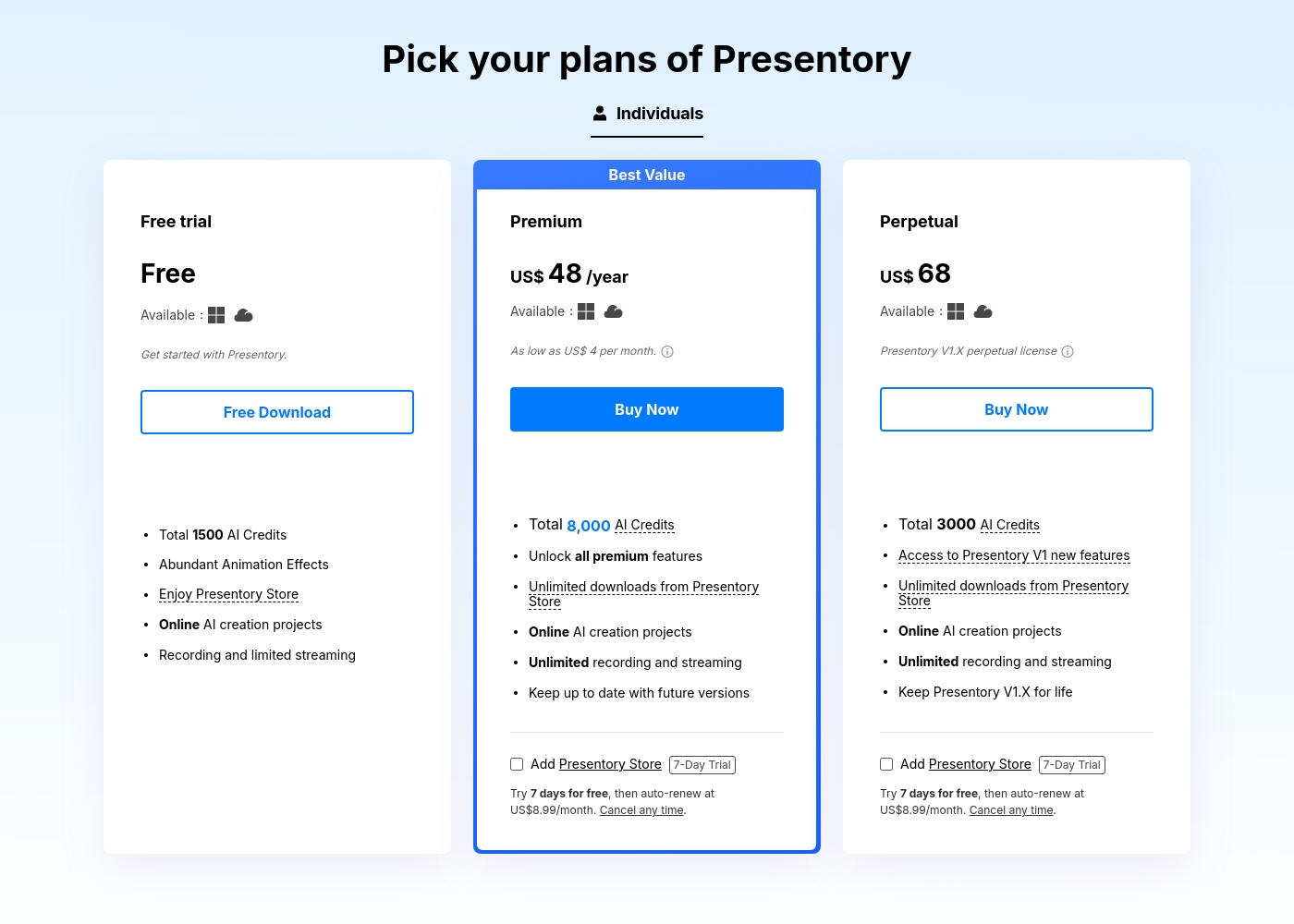
Presentory costs between Free and $68 with 4 plans: Free at $0, Premium at $48 per year, Perpetual at $68 once, and Quarterly at $24.
Here is a breakdown of the specific options available for your projects.
Free
Price: Free Websites Supported: Not explicitly stated Best For: Beginners testing the AI creation tools Refund Policy: Not explicitly stated Other Features: 1500 AI Credits, animation effects, 5-minute recording limit, and online project support.
- 1500 AI Credits
- Abundant Animation Effects
- Online AI creation projects
- Recording and limited streaming
- 5 minutes per recording
- 8,000 AI Credits
- Unlock all premium features
- Unlimited downloads from Store
- Unlimited recording and streaming
- Remove Watermarks
- 3000 AI Credits
- Access to V1 new features
- Keep Presentory V1.X for life
- Unlimited recording and streaming
- Online AI creation projects
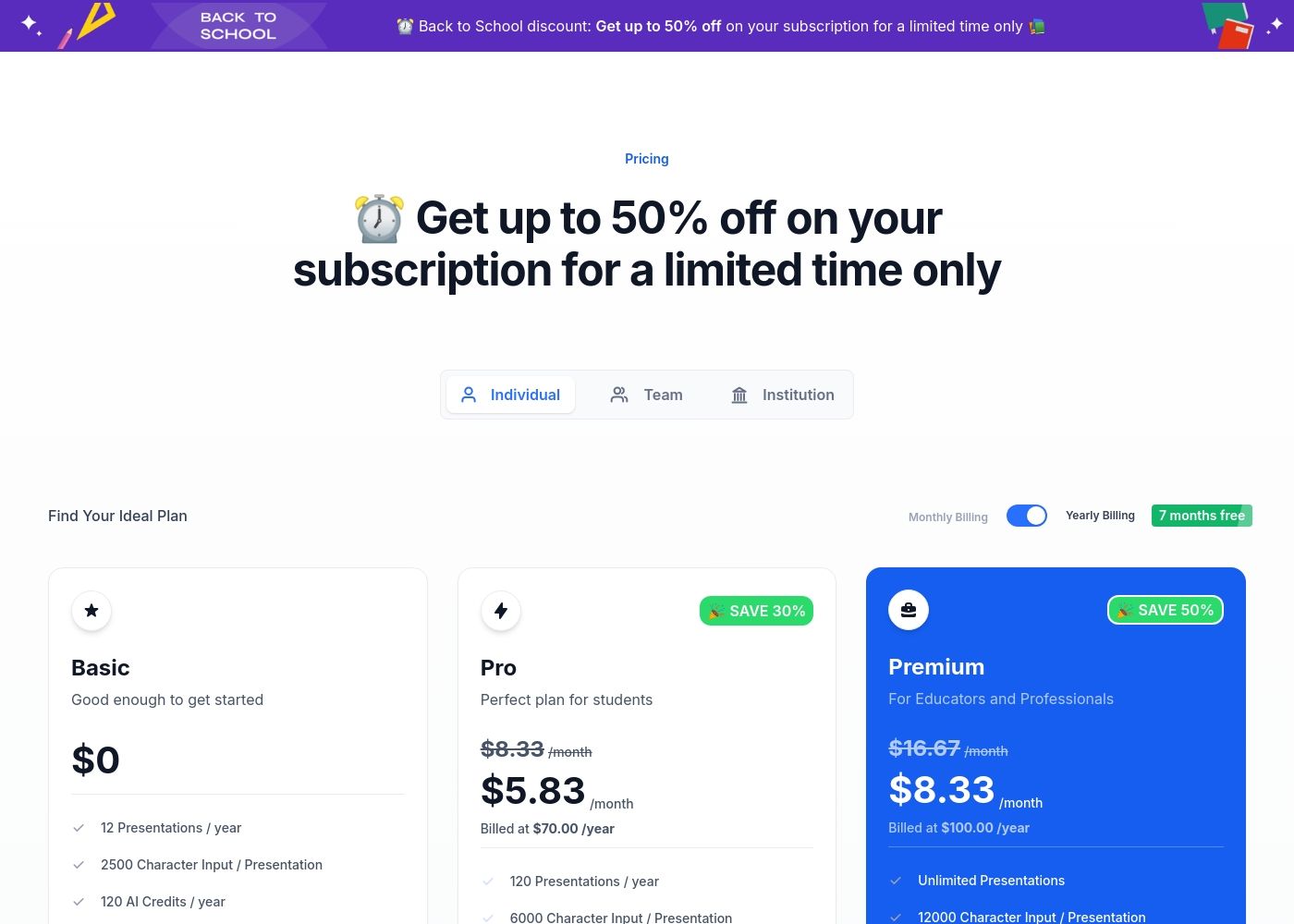
SlidesAI costs between $0 and $200 per year with 3 plans: Basic at $0, Pro at $100/year, and Premium at $200/year.
Now, let's explore what each individual plan offers when you choose annual billing.
Basic
Price: $0 /month Best For: Good enough to get started Other Features:
- 12 Presentations / year
- 2500 Character Input / Presentation
- 120 AI Credits / year
- 12 Presentations / year
- 2500 Character Input / Presentation
- 120 AI Credits / year
- 120 Presentations / year
- 6000 Character Input / Presentation
- 600 AI Credits / year
- Document Upload
- 120 Video Export / year (Coming Soon)
- Unlimited Presentations
- 12000 Character Input / Presentation
- 1200 AI Credits / year
- Document Upload
- 240 Video Export / year (Coming Soon)
Pricing Notes
- Presentory offers highly flexible pricing, including a unique $68 Perpetual license for V1.X ownership.
- SlidesAI pricing starts higher, with the Pro plan being $100 per year compared to Presentory's $48 Premium plan.
- All Presentory paid plans are backed by a clear 30-day money-back guarantee.
- SlidesAI operates on subscriptions only and lacks an explicitly stated refund policy, which has led to user complaints.
- Both Presentory and SlidesAI offer permanent Free/Basic plans for testing core features.
Pricing Head-to-Head
User Reviews
SlidesAI currently faces severe criticism regarding customer service and ease of use, reflected primarily by a low Trustpilot rating. The most frequently cited issue across multiple reviews is the highly complicated and non-transparent cancellation process, often requiring users to navigate confusing chatbot interfaces or contact the developer directly after receiving little help from the payment processor (Paddle).
Users report canceling is nearly impossible without special instructions. Furthermore, several reviewers criticize the core performance.
I purchased the product and requested a refund the next day because I was very dissatisfied. Despite following the policy, I have received no response or acknowledgment from the company after a week. This lack of communication is unacceptable.
Our Verdict
The decision between Presentory and SlidesAI hinges entirely on workflow preference. This isn't a feature battle as much as a choice between seamless integration and application power. If you rarely stray from Google Slides or PowerPoint, SlidesAI offers maximum convenience. If you need a fully featured, dedicated tool for creation and delivery, Presentory is the better pick. Presentory’s superpower is delivering high-quality, polished presentations with assurance. It uses advanced GPT-4 for superior content generation and unique tone refinement features. Presentory is also crucial for live delivery, offering unlimited recording and streaming capabilities baked right in. SlidesAI excels at native integration and managing substantial input volume. It lives entirely inside your existing presentation tools, eliminating annoying file exports. SlidesAI also supports localization, translating content into over 100 languages for global teams. The critical deciding factor is cost transparency and user confidence. Presentory gives budget control with its clear pricing and a 30-day money-back guarantee. SlidesAI users face documented risks regarding unresponsive support and difficult subscription cancellation management. Choose Presentory if your priority is design quality, a low annual price, and stability with a refund guarantee. Select SlidesAI if your business demands instant document summarization and vast multilingual translation capabilities within the Google Slides/PowerPoint environment.
Frequently Asked Questions
Which tool is better for integrating with my existing workflow: Presentory or SlidesAI?
SlidesAI is the winner for integration, working directly inside Google Slides and PowerPoint. Presentory is a powerful standalone application for creation. If you never want to leave your host application, SlidesAI provides a smoother experience.
Does Presentory offer a cheaper paid option than SlidesAI?
Yes, Presentory is more affordable overall for paid tiers, starting at $48 yearly. SlidesAI starts its paid subscription at $100 per year. Presentory also offers a unique $68 one-time Perpetual license for permanent ownership of V1.X.
Can I summarize long documents and papers easily with SlidesAI and Presentory?
SlidesAI is superior here, capable of summarizing lengthy external links and uploaded documents. Its Premium plan handles up to 12,000 characters of input seamlessly. Presentory focuses on generating presentations from defined topics and concise outlines.
Which tool is better for creating and delivering recorded or live presentations?
Presentory wins easily here, providing built-in unlimited recording and streaming features. SlidesAI currently lists video export functionality only as 'Coming Soon.' Presentory is ready for dynamic content creation today.
How does customer security and guarantee differ between Presentory and SlidesAI?
Presentory provides a clear 30-day money-back guarantee on all paid products. SlidesAI lacks a stated refund policy, and user reports cite major difficulties closing subscriptions. Presentory offers better user security and transparency.
Which tool supports the most global languages for content translation?
SlidesAI offers superior global reach, providing content translation into over 100 widely used languages. Presentory's documentation does not specify its language capabilities. SlidesAI is the best choice for translating presentations.
Ready to Choose?
Both tools have their strengths. Choose based on your specific needs.