Presentory

Presentory

AI Presentation Creator: Smart Design, Engaging Content.

#3 dans AI Presentation Maker
2 min read · Updated 11/21/2025
Presentory homepage screenshot

At a glance

Quick overview for Presentory: rating, pricing summary, key features, and highlights.
Free trial
Yes — 7 days
Money-back guarantee
Yes — 30 days
Range: Free–$68Free plan, Free trial, Monthly subscription, Yearly subscription, One-time payment, Usage-based pricing
This section is a summary. Detailed sections about features, use cases, pricing, and reviews follow below.

Presentory review, pricing, features, pros & cons

Are you tired of presentation software demanding serious design skills? It often feels impossible to create professional decks quickly. Presentory solves this by using AI to generate content and stunning visuals instantly.

You get smart design and engaging content with zero design skills necessary! ✨

What is Presentory?

Presentory is an intuitive AI PowerPoint generator built to boost your efficiency and precision. It leverages the power of the GPT-4 language model to create natural and contextually appropriate text. This makes it perfect for educators, sales teams, and marketers looking to share knowledge quickly.

You can convert basic notes, outlines, or existing content into a polished presentation in mere seconds. It’s truly a smart way to enhance learning and communication. 💡

Presentory Key Features

✨ Instant Content Generation Powered by GPT-4

Creating professional presentations is fast when you start with AI-generated content. You simply enter a topic, outline, or existing notes, and the AI immediately generates a complete PPT structure. This capability is built on the advanced GPT-4 language model.

GPT-4 ensures the text is contextually appropriate, natural, and easily understandable for your specific audience. It fundamentally boosts your efficiency and precision during the initial creation phase.

While editing, you can leverage GPT-4 capabilities to refine your copy's tone and enhance the quality of your text. The AI also handles essential grammar and spelling verification, meaning you don't need a separate tool to polish your message.

✨ Flexible Visual Design and One-Click Themes

Achieving visual excellence is simple, even if you have zero design skills. You can transform your entire slide aesthetic instantly by choosing a theme from the library. We offer over 20 versatile theme styles to suit diverse presentation needs.

Change your slide deck's look with just one click to perfectly match your unique brand identity. You also gain access to over 20 flexible layout styles, ranging from classic and modern to minimal designs, ensuring you find the perfect layout for every slide.

✨ Smart Image Generation and Text Matching

Eliminate the endless hours spent searching for the right visuals. The integrated AI Image Generator instantly creates high-quality images tailored to your specific content, helping you accumulate visual materials quickly.

Our smart algorithm analyzes the text already present on your slides. Based on this analysis, the tool recommends accurate, text-matching image suggestions that integrate seamlessly between your blocks of text. This precise content and image matching saves significant time, making your slide preparation efficient and highly effective.

✨ Responsive Layouts and Flexible Component Editing

You get ultimate flexibility and control through component-based editing. You can easily edit individual elements like text boxes, images, and colors to create dynamic, eye-catching slide decks. Rich text editing tools are also available for convenient operations.

The PPT maker handles complex design adjustments automatically using responsive layouts. The AI adjusts the formatting, styling, and layout to fit any content structure, even as you add new information. This ensures your presentations always look polished and professional across different screens and formats.

🚀 Seamless Sharing Across Multiple Formats

When your presentation is done, sharing the final product is instantaneous and versatile. You can distribute your beautiful slides to colleagues, clients, or a broad audience with just one click.

Presentory allows you to save and share your work in essential formats:

✨ The Simple 5-Step Creation Workflow

Presentory simplifies the entire process, allowing you to convert text into a polished presentation efficiently. The workflow includes five clear steps you can follow.

First, input your topic to allow the AI to generate the presentation content structure. Next, select a theme from the library and click “Generate” to build the initial slideshow. After generation, you can adjust the details, images, and layout using the editing area to match the presentation on the left.

Finally, use the AI features for content optimization and relevant image suggestions to boost quality, then click “Share” to finalize and output the presentation in your desired format.

Use Cases

🚀 Creating High-Impact Sales Presentations Instantly

When a sales representative needs a deck for a last-minute client meeting, wasting hours on formatting isn't an option. The user simply enters a topic, and the AI instantly generates a professional PPT structure and relevant content. The AI Image Generator provides high-quality, text-matching visuals right away, preventing time wasted searching through stock photo libraries.

This rapid creation process allows the representative to focus only on practicing their core message. They can expand product reach quickly by crafting smart, engaging slideshows featuring product benefits and features, delivered with precision and speed.

💡 Streamlining Employee Training Materials

HR managers frequently update training materials, and design consistency is often a challenge. Presentory makes employee development easier by using GPT-4 to generate and refine accurate content, ensuring perfect grammar and professionalism. The user leverages responsive layouts and component-based editing for ultimate flexibility in updating text boxes, images, and colors.

They can easily share the finished, polished training modules with teams by saving them instantly as a native .PPT file. This helps streamline the employee training schedule by providing accurate, ready-to-use materials.

✏️ Converting Notes and Outlines into Visual Excellence

Many professionals already have their content written down as notes or outlines, but transforming it into a beautiful presentation is tedious. The user takes their existing content and pastes it into the platform. Presentory converts the basic text into a stunning presentation in mere seconds, tailored specifically to the target audience.

Tip: Use the ChatGPT-4 integration to refine your copy's tone before generating the final slides, ensuring the text is professional and engaging.

🎨 Maintaining Strict Brand Identity and Consistency

Marketers need presentations that align perfectly with their brand aesthetic but without spending hours on design. The user accesses over 20 versatile theme styles and can change the whole design with just one click. This ensures the slides resonate immediately with their unique brand identity.

They also discover more than 20 flexible layout styles, from classic to minimal designs, choosing the perfect setup for dynamic and eye-catching slides. Final decks can be instantly shared as online slideshow links for easy viewing across the organization.

🎓 Educators Creating Diverse and Engaging Lessons

Teachers must cater to diverse learning styles, requiring varied layouts and strong visuals. The educator inputs the lesson topic or notes and lets the AI create the foundational content. They then utilize the range of layout options to create visually pleasing styles that support diverse learning.

The smart algorithm analyzes the lesson text and recommends accurate, text-matching images from its vast library. This saves time searching, ensuring the visual materials enhance the learning experience effectively.

🤝 Rapid International Sharing and Collaboration

A consultant or project manager needs to share drafts with teammates and deliver the final product to a client in different formats. The user finishes adjusting all the details—text, images, and layout—using the component-based editing tools.

They export the presentation to PDF to preserve formatting for professional records. For quick review, they share the slideshow instantly online via a single link. Collaborators can also receive the presentation in native .PPT format for easy viewing and further editing.

Pricing Overview for Presentory

Pricing range
Free–$68
Pricing types
Free plan, Free trial, Monthly subscription, Yearly subscription, One-time payment, Usage-based pricing
Money-back guarantee
Yes — 30 days

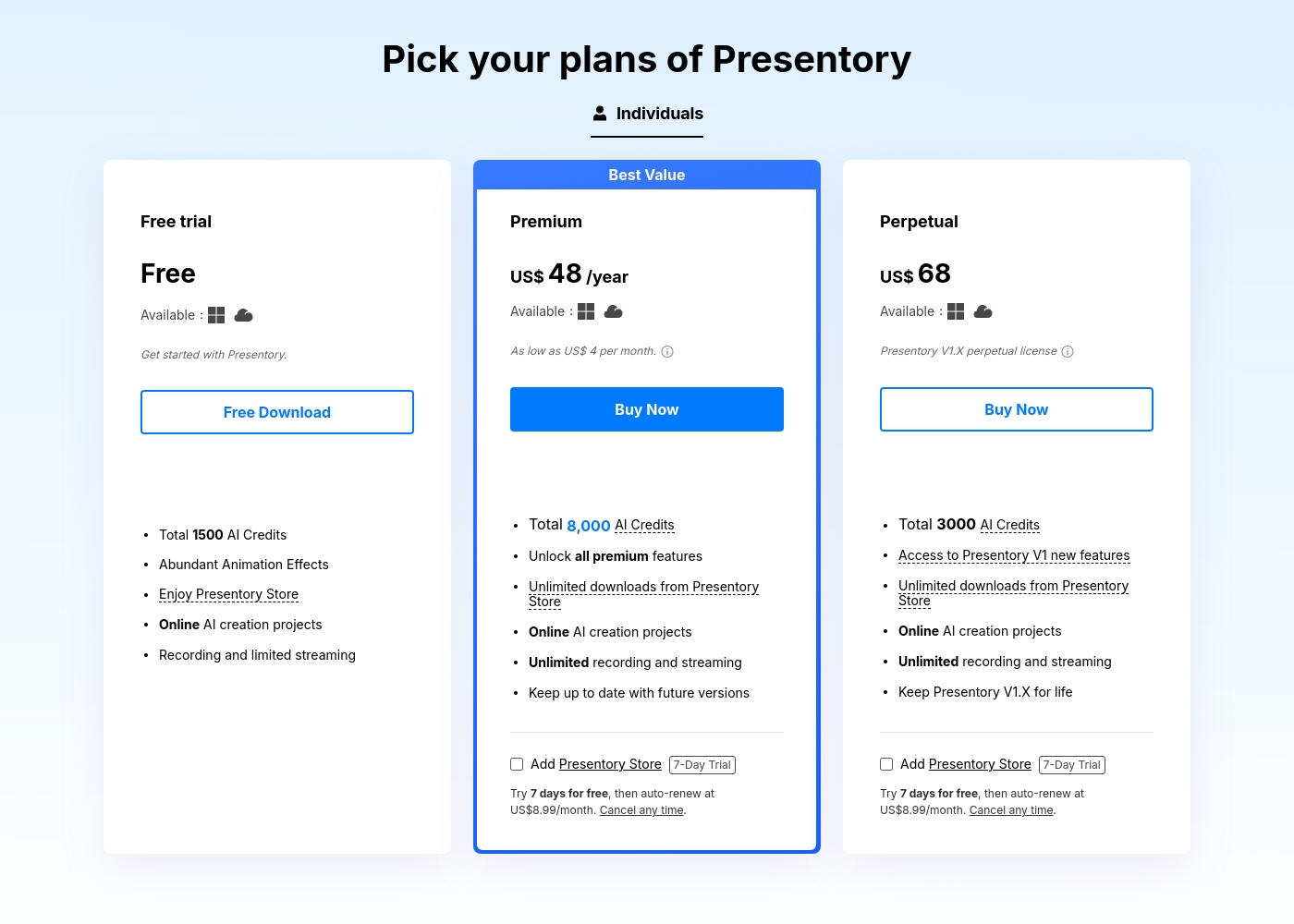
Presentory offers a Free plan and two distinct paid options for individuals: a renewable annual subscription and a one-time perpetual license. The Premium subscription costs US$48 per year and provides unlimited usage and increased AI credits.

Plans & Pricing

Free

Monthly$0
Yearly$0
Recording and limited streaming; 4 styles available for AI Template Design; 5 minutes each video recording; 30 minutes each streaming.
  • Total 1500 AI Credits
  • Abundant Animation Effects
  • Enjoy Presentory Store
  • Online AI creation projects

Premium

Monthly$4
Yearly$48
Not explicitly stated
  • Total 8,000 AI Credits/year
  • Unlock all premium features
  • Unlimited downloads from Presentory Store
  • Unlimited recording and streaming
  • Keep up to date with future versions

Perpetual

Contact for pricing
One-time purchase $68.
  • Total 3000 AI Credits
  • Access to Presentory V1 new features
  • Unlimited downloads from Presentory Store
  • Unlimited recording and streaming
  • Keep Presentory V1.X for life

Presentory costs between Free and US$ 68 (one-time) with 3 plans: Free at Free, Premium at US$ 48/year, and Perpetual at US$ 68.

Below are detailed summaries of the plans to help you compare features.

Free

Price: Free Websites Supported: Not explicitly stated Best For: Getting started with Presentory Refund Policy: Not explicitly stated Other Features:

  • Total 1500 AI Credits
  • Abundant Animation Effects
  • Enjoy Presentory Store
  • Online AI creation projects
  • Recording and limited streaming

This plan is great if you want to explore the platform's basic AI creation features. You get 1500 AI credits right away to start building your presentations. Remember that streaming and recording capabilities are limited here, but it's a fantastic place to begin your journey.

Premium

Price: US$ 48 /year (As low as US$ 4 per month) Websites Supported: Not explicitly stated Best For: Not explicitly stated (Marked 'Best Value') Refund Policy: 30-day money-back guarantee Other Features:

  • Total 8,000 AI Credits annually
  • Unlock all premium features
  • Unlimited downloads from Presentory Store
  • Unlimited recording and streaming
  • Keep up to date with future versions

The Premium plan offers the best value for regular users needing full feature access. You receive 8,000 AI credits each year and gain unlimited streaming and recording capability. This annual subscription ensures you always have the latest software updates available as they release.

Perpetual

Price: US$ 68 (One-time purchase) Websites Supported: Not explicitly stated Best For: Presentory V1.X perpetual license Refund Policy: 30-day money-back guarantee Other Features:

  • Total 3000 AI Credits
  • Access to Presentory V1 new features
  • Unlimited downloads from Presentory Store
  • Unlimited recording and streaming
  • Keep Presentory V1.X for life

Choose the Perpetual option for a single, one-time purchase that locks in the current version (V1.X). This plan includes 3000 AI credits and gives you unlimited use of advanced recording and streaming. It is perfect if you prefer a lump sum payment over a recurring subscription. 🎉

Presentory offers a completely free plan so you can effortlessly begin creating AI projects. Additionally, all paid products come with a 30-day money-back guarantee, giving you ample time to ensure satisfaction. Paid plans also offer an optional 7-day free trial for the separate Presentory Store subscription.

User Reviews

No reviews yet.

Write a Review

Write a Review for Presentory
0/100 characters
0/2000 characters

Why use Presentory?

Stop wasting time worrying about formatting and start focusing on your core message. Presentory leverages advanced AI to streamline your entire creation workflow, delivering high-quality results quickly and efficiently.

Here’s how Presentory maximizes your impact:

  • Generate Content Instantly: Simply enter a topic, and the AI generates a professional PPT structure and relevant content for you.
  • Harness GPT-4 Power: Use ChatGPT-4 capabilities to refine your copy’s tone and generate professional, engaging text tailored to your audience. This includes important grammar and spelling verification. ✅
  • Achieve Visual Excellence: Discover over 20 flexible layout styles and more than 20 versatile theme styles. You can change your whole design with just one click to match your unique brand identity.
  • Get Perfect Visuals: The integrated AI Image Generator instantly creates high-quality visuals for your content. The smart algorithm also analyzes your text and recommends accurate, text-matching images, saving you hours of searching.
  • Enjoy Seamless Editing and Sharing: Edit elements easily using component-based editing for ultimate flexibility. Share your final product instantly as a native .PPT, PDF file, or an online slideshow link.

This tool offers immense value to anyone needing high-impact presentations, from HR managers streamlining employee training to consultants expanding product reach. If you require speed, precision, and an intuitive way to produce professional slides, Presentory is essential. Start creating captivating presentations with confidence right away. 🚀

Ready to transform your workflow with Presentory?

Presentory Alternatives

Other tools in the AI Presentation Maker category

Frequently Asked Questions

Is Presentory priced per user seat, or is it based on usage?

Presentory offers individual licenses, including Free, Premium, and Perpetual plans. While the plans cover unlimited feature usage, the core AI features are consumption-based, meaning they deduct from your included AI credits.

What happens if I run out of the included AI credits, and how do I purchase more?

If you are running low on credits for a project, the system will remind you. You can purchase additional credits immediately by clicking the purchase button in the pop-up or the persistent purchase option available in the AI dialogue.

How exactly is the cost of AI content generation calculated?

The deduction of AI credits is not based on a flat fee per session. Instead, the calculation is explicitly based on the actual amount of generated presentation content the AI produces for your project.

If I purchase a paid plan, is there a money-back guarantee?

Yes, for peace of mind, all paid products, including the Premium subscription and the Perpetual license, come with a robust 30-day money-back guarantee.

How do I cancel my subscription, and can I do it anytime?

You can cancel your subscription plan whenever you need to. You will receive an email notification seven days before your renewal date, providing instructions to either renew or cancel your purchase.

What are the limitations on recording and streaming in the Free plan?

The Free plan has specific time constraints for live functions. You are limited to five minutes for each video recording and a maximum of 30 minutes for each streaming or remote presentation session.

What does the Perpetual license cover regarding software updates?

The Perpetual license is a single, one-time purchase that locks you into keeping version V1.X for life. It includes access to new features released within the V1 scope.

Does Presentory offer cloud storage or integration with tools like Google Drive or Dropbox?

Not explicitly stated on the official site. The product is designed to share finished presentations by exporting them as .PPT or PDF files or generating an online slideshow link.

Is there a separate free trial available for the resource store content?

Yes. Beyond the primary Free plan, the optional Presentory Store subscription offers a separate 7-day free trial. After the trial, it auto-renews at US$8.99 per month if you do not cancel.

How fast is the customer support response if I have an issue?

Presentory commits to providing support through instant live chat and email. They assure customers that they will receive a response within 24 hours of submitting a request via the Support Center.

What security measures are used to protect my payment information?

The company places a high value on your privacy. They protect your financial and personal details during transactions using advanced encryption and fraud protection methods.

What kind of user is Presentory best suited for?

Presentory is optimized for individuals needing high-impact presentations quickly. This includes educators sharing knowledge, sales professionals expanding reach, and HR managers streamlining employee training.

Can I import presentation files from other tools to finish editing in Presentory?

Not explicitly stated on the official site. The available content focuses on converting simple text, notes, or outlines into new presentations using the AI generator.

Does the platform support real-time presentation or remote sharing capabilities?

Yes. You can share your presentations online. This allows you to showcase your slideshow to a wider audience in real-time using a simple shared link.

Ready to try Presentory? Check out the official site or pricing.