Presentations.AI vs SlidesAI
These two AI tools promise to instantly generate professional presentations from simple text or documents. SlidesAI integrates directly into Google Slides and PowerPoint, adapting to your existing workflow. Presentations.AI uses its own proprietary platform focusing on guaranteed speed and corporate brand control. The choice depends mainly on whether you prioritize integration or a dedicated, feature-rich presentation environment.
Best for: Enterprise organizations needing strict visual consistency via Brand Sync., Users who must convert existing documents (PDF, Word) into presentations instantly.
Best for: Students and educators frequently creating lesson plans from notes or scripts., Users who live primarily inside Google Slides and refuse to switch platforms.
Promises high performance, delivers instability.
We find the platform's core premise—instant, professional presentation creation—to be undermined by critical failures in execution. Widespread customer complaints focus mainly on problematic billing practices and a perceived lack of support for refund and cancellation requests. Overall, we cannot recommend a service where the basic user experience and reliability are so heavily disputed by paying customers.
Pros
- Promises rapid creation (50x faster) from simple text input.
- Features proprietary Brand Sync designed for visual consistency.
- Offers advanced Anti-fragile Templates that adapt to content shifts.
- Current limited-time STARTER plan is available for free testing.
Cons
- Numerous users report unauthorized charges after subscription cancellation.
- Customer support is consistently unresponsive regarding billing or technical issues.
- Paid features like file export are often reported as broken or extremely delayed.
- The editor exhibits instability, sometimes randomly changing layouts or text.
Seamless AI integration, critical support issues.
We see SlidesAI offers powerful Google Slides and PowerPoint integration, enabling users to generate presentations quickly from text. Overall, while the core technology promise is strong, we must caution potential users about the confirmed reports of extremely poor customer support responsiveness and difficult, non-transparent subscription cancellation procedures.
Pros
- Works natively with Google Slides and PowerPoint.
- A permanent Basic free plan is available for testing the service.
- Paid plans include document upload capability.
- Premium tier offers unlimited presentation generation.
Cons
- Extremely difficult and convoluted subscription cancellation process.
- Users report highly mixed quality for generated slide aesthetics and design.
- Suggested images and visuals are often irrelevant to the topic content.
- Customer service demonstrates significant unresponsiveness on refund requests.
AboutPresentations.AI
Presentations.AI is often called the ChatGPT for Presentations, and it's designed to bring your ideas to life instantly. This intuitive platform is a powerful AI slide maker that creates stunning PPTs at the speed of thought. 💡 It allows you to transform simple ideas, outlines, or even documents into complete, professional decks with virtually zero design work required. It’s built for busy presenters, ensuring seamless editing and creation across all your devices.
AboutSlidesAI
SlidesAI is an intuitive AI presentation maker developed to integrate seamlessly into your favorite tools. You don't need to learn a brand new platform! It works directly inside Google Slides and PowerPoint, making the setup simple and fast. ✅
To start, you just input a topic, document, or link. SlidesAI then processes this input, creates structured slide outlines, and applies a professionally designed theme. This powerful process helps Educators, Professionals, and Students create slides up to 10X faster.
Highlights
Feature Comparison
Features Overview
We highlight the main differences and pick a winner for each feature.
Integration Strategy
SlidesAI integrates natively with host apps; Presentations.AI is a unique proprietary platform.
Presentations.AI is a powerful standalone web application. It requires you to use its dedicated environment for all creation. Exporting finished work to PowerPoint is the only integration method. SlidesAI works as a seamless add-in that lives directly within Google Slides or PowerPoint. You never need to switch applications or learn a new user interface. This reduces friction significantly for daily users accustomed to G-Suite or Microsoft Office. The biggest trade-off is control versus convenience; Presentations.AI offers more features, but SlidesAI is more accessible. If you hate learning new tools, SlidesAI fits better and feels more comfortable instantly.
Brand Consistency
Presentations.AI uses Brand Sync; SlidesAI uses standard templates.
Presentations.AI features a proprietary 'Brand Sync' system. This feature instantly guarantees visual compliance across all presentations created. The ENTERPRISE plan also includes dedicated company templates for high governance. SlidesAI generates slides using professional themes and layouts. These are functional but lack Presentations.AI’s centralized enforcement capability. For global marketing teams, Brand Sync in Presentations.AI is a necessary feature for regulatory compliance. If your brand guidelines are strict, Presentations.AI offers the superior control mechanism.
Content Refinement
SlidesAI offers dedicated text editing tools; Presentations.AI focuses solely on generation.
Presentations.AI focuses heavily on transforming complete complex documents into a first draft. Further editing requires manual adjustments or re-prompting the AI. The tool’s strength is document conversion (PDF → PPT). SlidesAI includes powerful built-in text refinement tools. You can use 'Shorten' to instantly cut out filler or 'Rephrase' to adjust tone or clarity. These tools save valuable post-generation editing time. The refinement features make SlidesAI’s generated output easier and faster to polish for the final delivery.
Initial Creation Speed
Presentations.AI claims a remarkable 50x speed increase over manual drafting.
Presentations.AI boldly promises a 50x time reduction getting to your first draft. This speed is achieved through its dedicated AI platform. You can simply chat your ideas into existence quickly. SlidesAI promotes itself as being 10X faster by using your input text within G-Slides/PPoint. It is extremely fast at digesting long inputs up to 12,000 characters. While both are fast, Presentations.AI relies on its proprietary method for the highest speed claim. Speed is useless without stability, and both tools have user reports of broken exports.
Content Adaptation
Presentations.AI uses advanced 'Anti-fragile Templates' for automatic layout shifts.
Presentations.AI utilizes unique 'Anti-fragile Templates' built specifically for adaptation. These templates automatically adjust the layout when content or text length changes drastically. This maintains design integrity effortlessly. SlidesAI offers a 'Remix Slides' option to try different static layouts. However, this feature requires the user to manually select a suitable new design option. For dynamic content where visuals often shift, Presentations.AI minimizes manual labor. This automated adaptation from Presentations.AI is a huge time-saver for iterative teams.
Performance Analytics
Presentations.AI includes built-in tracking; SlidesAI leaves this to external tools.
Presentations.AI features integrated Analytics and Tracking tools. This allows users to gather insights on audience engagement and presentation performance. This data helps in refining future executive reports. SlidesAI focuses purely on creating the slides and does not offer internal tracking features. Users must rely on third-party tools or host platform analytics. For sales and L&D teams needing data-driven refinement, Presentations.AI is the only option here.
Pricing Structure
SlidesAI uses clear presentation limits; Presentations.AI uses confusing credits and seats.
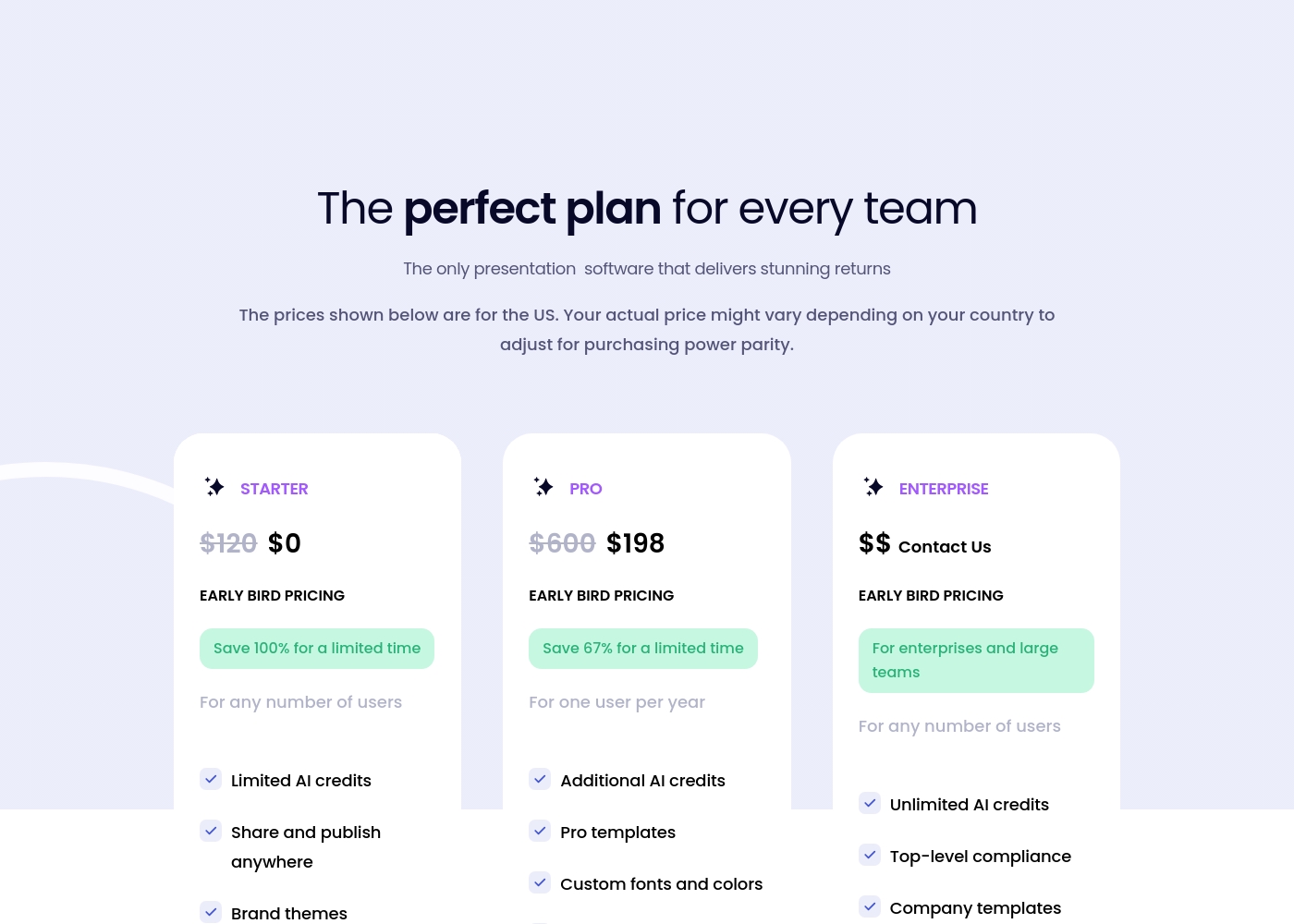
Presentations.AI employs a confusing hybrid of limited 'AI credits' and per-seat pricing (PRO plan). The STARTER plan is currently free under limited-time Early Bird pricing. SlidesAI uses predictable annual presentation allowances (12, 120, or Unlimited). Their Basic free plan is permanent, offering better long-term reliability. SlidesAI's clear usage limits are easier to budget than trying to track Presentations.AI's nebulous AI credit consumption.
User Reliability
Both have poor ratings, but Presentations.AI's issues are significantly more critical.
Presentations.AI has a very low 1.5-star user rating. Reviewers cite severe issues including unauthorized charges and broken export functionality. Support is consistently reported as unresponsive to billing complaints. SlidesAI receives criticism for complicated cancellation processes and inconsistent design quality. Its 2.5-star rating suggests marginally better operational stability. If reliability and customer service are primary concerns, SlidesAI shows a slight advantage over Presentations.AI.
Presentations.AI costs between $0 and "Contact Us" per year with 3 plans: STARTER at $0, PRO at $198/year, and ENTERPRISE at Contact Us.
This pricing reflects special Early Bird Pricing options available right now.
STARTER
Price: $0 per year (Early Bird Pricing: Save 100% for a limited time) Best For: Any number of users Other Features:
- Limited AI credits
- Share and publish anywhere
- Brand themes
- Limited AI credits
- Share and publish anywhere
- Brand themes
- Additional AI credits
- Pro templates
- Custom fonts and colors
- Unlimited AI credits
- Top-level compliance
- Company templates
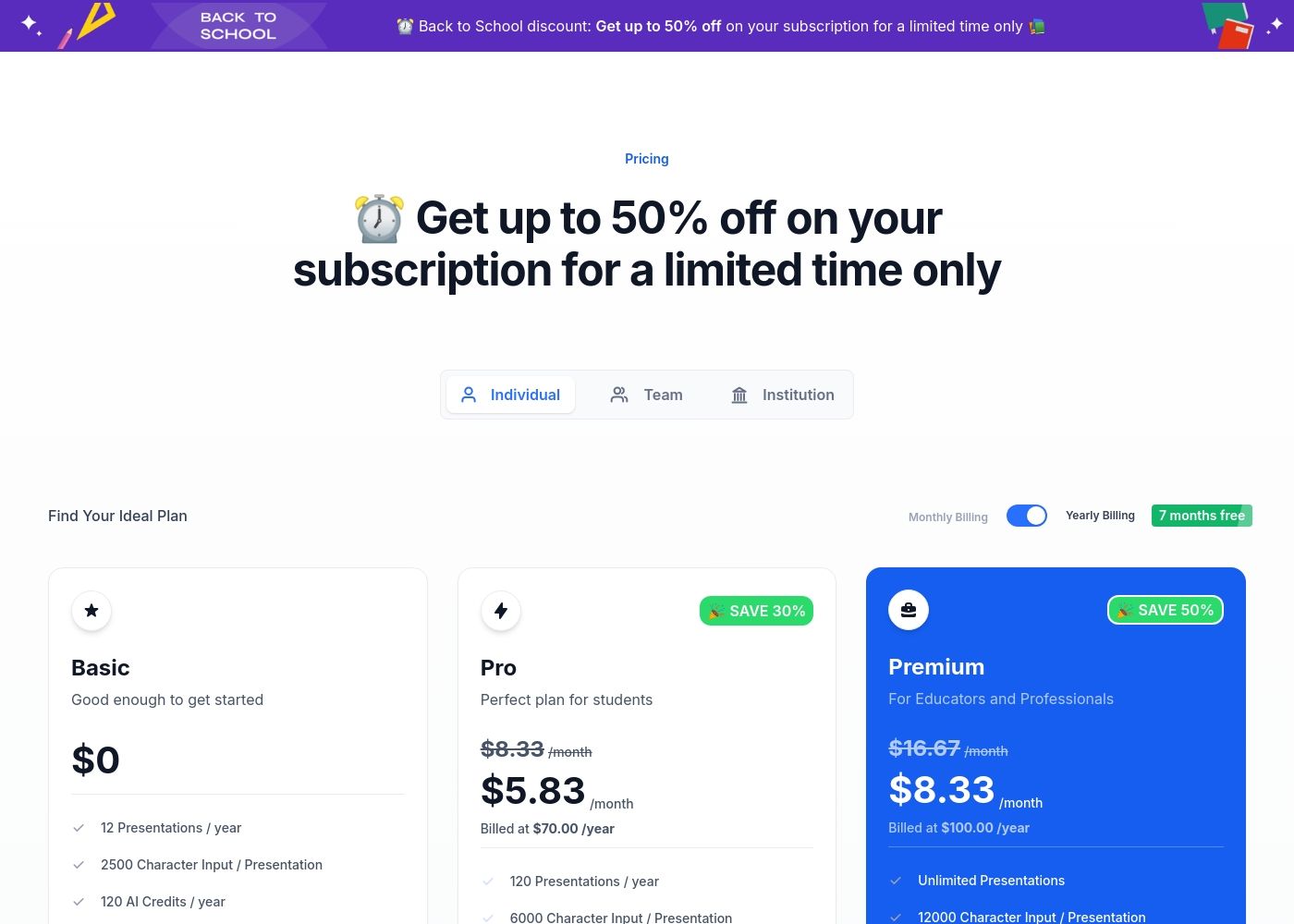
SlidesAI costs between $0 and $200 per year with 3 plans: Basic at $0, Pro at $100/year, and Premium at $200/year.
Now, let's explore what each individual plan offers when you choose annual billing.
Basic
Price: $0 /month Best For: Good enough to get started Other Features:
- 12 Presentations / year
- 2500 Character Input / Presentation
- 120 AI Credits / year
- 12 Presentations / year
- 2500 Character Input / Presentation
- 120 AI Credits / year
- 120 Presentations / year
- 6000 Character Input / Presentation
- 600 AI Credits / year
- Document Upload
- 120 Video Export / year (Coming Soon)
- Unlimited Presentations
- 12000 Character Input / Presentation
- 1200 AI Credits / year
- Document Upload
- 240 Video Export / year (Coming Soon)
Pricing Notes
- Presentations.AI's STARTER plan is free, but this is a temporary 'Early Bird Pricing' offer, making its future price uncertain.
- SlidesAI provides a permanent Basic free plan, allowing 12 presentations annually without commitment.
- SlidesAI uses clear presentation count limits; Presentations.AI uses potentially restrictive and confusing 'AI credits.'
- The PRO plan for Presentations.AI is strictly per user ($198/year), while SlidesAI plans cover usage limits regardless of seat count.
Pricing Head-to-Head
User Reviews
Reviews for Presentations.AI on Trustpilot paint a challenging picture, resulting in a low 2.0-star rating. While the product promises exceptional speed and 50x time savings through AI-powered creation, the majority of user feedback focuses heavily on recurring issues with billing and support.
Many users report being unexpectedly charged high annual fees ($170 to $250) after attempting to cancel subscriptions or during free trials, leading to frequent accusations of the service being a scam. Additionally, user experiences highlight systemic reliability problems.
I was hesitant after reading the negative reviews, but the Pro plan worked well for me. I needed a PowerPoint export, and it was delivered to my email quickly in just 4 minutes. The export quality was identical to what I had created on the site, which was a huge relief.
SlidesAI currently faces severe criticism regarding customer service and ease of use, reflected primarily by a low Trustpilot rating. The most frequently cited issue across multiple reviews is the highly complicated and non-transparent cancellation process, often requiring users to navigate confusing chatbot interfaces or contact the developer directly after receiving little help from the payment processor (Paddle).
Users report canceling is nearly impossible without special instructions. Furthermore, several reviewers criticize the core performance.
I purchased the product and requested a refund the next day because I was very dissatisfied. Despite following the policy, I have received no response or acknowledgment from the company after a week. This lack of communication is unacceptable.
Our Verdict
Choosing between Presentations.AI and SlidesAI means deciding where you want the AI magic to happen. If seamless workflow is critical, SlidesAI integrates directly into Google Slides and PowerPoint beautifully. Presentations.AI requires using its dedicated platform, but it packs some serious enterprise punch. Presentations.AI's superpower is brand governance and high-level control. Its proprietary Brand Sync guarantees visual consistency across your organization. It also includes built-in Analytics & Tracking, vital for data-driven teams refining their material. This focus makes Presentations.AI attractive for larger, compliance-heavy organizations. SlidesAI excels by providing a native, comfortable creation experience. You never leave your host app, and the powerful Shorten/Rephrase tools are invaluable for editing AI output. SlidesAI uses a simpler, presentation-count-based pricing model, offering a permanent free Basic plan for testing. The deciding factor is control versus convenience, especially considering the stability issues reported for both. You should pick SlidesAI if native integration and cleaner text editing are paramount. You must select Presentations.AI if Brand Sync and its advanced content adaptation features are non-negotiable. Final verdict: For individual users, students, and SMBs prioritizing workflow, SlidesAI is the safer, more user-friendly bet. If you run a large enterprise and need the Brand Sync assurances, you may reluctantly choose Presentations.AI despite its concerning user reviews about stability and support.
Frequently Asked Questions
Which tool provides better features for corporate brand consistency?
Presentations.AI offers the superior solution with its proprietary Brand Sync feature. SlidesAI applies professional themes but lacks this centralized control. Large organizations needing visual compliance must choose Presentations.AI's advanced features.
Can I use either Presentations.AI or SlidesAI directly inside Google Slides?
SlidesAI offers dedicated, native integration as an add-in for Google Slides. You create and edit inside Google’s environment. Presentations.AI is a separate web platform that exports to PowerPoint, meaning it does not integrate with Google Slides.
Which software has the better free plan: Presentations.AI or SlidesAI?
SlidesAI provides a permanent Basic free plan allowing 12 full presentations per year. Presentations.AI’s free STARTER plan is limited-time 'Early Bird Pricing,' meaning it might become paid soon. SlidesAI is the safer permanent choice.
Does SlidesAI offer advanced features like performance analytics, similar to Presentations.AI?
No, SlidesAI focuses on slide creation inside the host environment. Presentations.AI includes built-in Analytics and Tracking to measure viewing engagement. This makes Presentations.AI better for post-presentation insight gathering.
Which tool is more stable or reliable according to user reviews?
User reviews are poor for both, but SlidesAI (2.5 stars) is marginally more reliable than Presentations.AI (1.5 stars). Presentations.AI users report more critical failures, like broken exports and unauthorized billing issues.
Is SlidesAI worth the extra cost over Presentations.AI’s free STARTER plan?
Since Presentations.AI's free plan is temporary, SlidesAI offers a more stable long-term value starting at $0 perpetually. If you need powerful text refinement or native G-Slides integration, SlidesAI's paid plans (starting at $100/year) offer better structural value.
Ready to Choose?
Both tools have their strengths. Choose based on your specific needs.