Polylang vs Translatepress
Polylang and Translatepress are WordPress translation heavyweights, but their fundamental approaches differ. Polylang prioritizes speed and backend efficiency using native WordPress tools. Translatepress offers a revolutionary visual front-end editing experience right on the page. Here is how to choose the right solution for your global strategy.
Best for: Agencies prioritizing site speed and Core Web Vitals scores., E-commerce sites needing synchronized inventory and pricing (WooCommerce).
Best for: Freelancers and small businesses focused on user-friendly visual translation., Translation teams needing dedicated Translator Accounts and collaboration tools.
High Performance, Agency-Ready Multilingual Tool
We find Polylang to be an exceptionally strong technical solution built directly into the WordPress core. Its focus on performance and robust multilingual SEO features makes it ideal for scaling agency needs and serious e-commerce platforms. Overall, Polylang is a premium choice for speed-conscious global projects.
Pros
- Optimized for high performance, maintaining Core Web Vitals and avoiding bloat.
- Offers significant volume discounts (up to 80%) for agencies with multiple sites.
- Comprehensive integration with WooCommerce, synchronizing products and attributes.
- Automatic technical SEO implementation, including required `hreflang` tags.
Cons
- No explicit money-back guarantee or free trial for the Pro features.
- Dedicated support is strictly reserved for customers purchasing a Pro license.
- Community support through forums may be unresponsive for free users.
Visual, reliable translation for WordPress.
We find TranslatePress provides one of the simplest translation workflows available for WordPress users, leveraging visual front-end editing and powerful automatic translation. Overall, the combination of seamless integration, robust features, and outstanding customer support establishes TranslatePress as a top-tier choice for multilingual site development.
Pros
- Front-end visual editing (WYSWIG) is highly intuitive and efficient.
- Exceptional and highly responsive customer support team.
- Seamlessly integrates with WooCommerce, complex themes, and site builders.
- Strong SEO features for optimizing multilingual content.
Cons
- Reported instances of yearly renewal pricing increasing without prior notification.
- Translating extremely long texts paragraph-by-paragraph can be challenging for some users.
- Agency users occasionally noted complex issues beyond basic integration (though resolved by support).
AboutPolylang
Polylang is the trusted solution designed to make your WordPress website truly multilingual. It helps businesses, agencies, bloggers, and e-commerce stores speak to a global audience with ease. With over 800,000 sites already using it, it’s a widely recognized and proven tool.
The setup process is remarkably fast; you simply use the installation wizard to add your required languages and the language switcher. Polylang’s interface is designed to align perfectly with standard WordPress workflows, allowing you to start translating directly from your familiar admin screens. ✅
AboutTranslatepress
TranslatePress is the friendly translation plugin designed specifically for your WordPress site. Instead of digging through confusing backend code, you translate everything live from the front-end of your site. This means what you see is what you get when switching languages. The plugin is built to work seamlessly, so you won't have compatibility issues with your preferred site builders and complex themes. ✅
Highlights
Feature Comparison
Features Overview
We highlight the main differences and pick a winner for each feature.
Translation Workflow
Translatepress uses a powerful visual front-end editor; Polylang uses the familiar WordPress backend.
Polylang utilizes the standard WordPress backend for managing translations. You work side-by-side on the traditional post edit screen. This method is efficient for managing bulk text entries quickly. Translatepress allows you to translate content immediately on the front-end (WYSWIG). You simply click on any text and edit the translation live. This prevents visual errors on complex themed pages. Trade-off: Translatepress provides unmatched visual accuracy and is beginner-friendly. Polylang might feel faster for dedicated, high-volume content entry translators. Winner: B
Performance & Speed
Polylang is engineered for performance longevity; Translatepress is noted for being lightweight.
Polylang ensures superior site performance by using only WordPress core features. This meticulously designed, bloat-free approach protects your Core Web Vitals. It avoids adding extra database tables or custom shortcodes. Translatepress is also noted for its lightweight architecture and compatibility with major systems. It focuses on seamless integration with complex themes and builders. The goal is making translation easy without compatibility headaches. Trade-off: Polylang focuses specifically on technical speed metrics and database efficiency. If site performance is your primary technical concern, Polylang has a measurable advantage. Winner: A
WooCommerce E-commerce
Polylang automatically synchronizes product data; Translatepress offers full visual editing compatibility.
Polylang automatically synchronizes critical product details like stock levels, prices, and attributes. This synchronization feature is vital for complex international sales logistics. It provides comprehensive integration for WooCommerce users. Translatepress seamlessly supports WooCommerce translation via its visual editor. You translate product descriptions, checkout fields, and attributes by clicking them live. It works perfectly with no extra, confusing compatibility add-ons. Trade-off: Both work great, but Polylang streamlines inventory management automatically. Polylang's automation saves significant time and prevents errors for store owners. Winner: A
Customer Support
Translatepress support is exceptional and widely praised; Polylang support is strong, but strictly paid-only.
Polylang provides professional support from experienced developers. However, this premium support is strictly reserved for customers with a paid Pro license. Free users reported finding the community forums unresponsive. Translatepress includes premium support with all annual plans, regardless of tier. User reviews consistently describe their support team as highly responsive and professional. They quickly solve complex technical issues. Trade-off: Translatepress wins for reliable, consistently acclaimed customer focused service. If paid support is a necessity, Translatepress offers a higher quality experience. Winner: B
Automatic Translation
Translatepress bundles annual word quotas; Polylang offers integration but detailed quotas are not listed.
Polylang integrates with DeepL Machine Translation for machine-assisted results. It supports machine translation but specific bundled word limits are not publicly detailed. Users likely pay for the external service use. Translatepress includes a generous annual quota of AI Translated Words (50K to 500K). This quota includes services like Google Translate and DeepL on higher tiers. The bundled words make initial translation costs predictable. Trade-off: Translatepress makes automatic translation a core feature with a fixed, included allowance. This simplifies budgeting for initial site localization. Winner: B
Agency & Scalability
Translatepress supports unlimited sites; Polylang is developer-focused with REST API access.
The Translatepress Developer plan allows installation on an unlimited number of websites. This provides maximum flexibility for large agencies managing many client projects. They also offer dedicated Translator Accounts. Polylang’s Pro plans cap out at 25 site licenses, but it offers deep technical flexibility. It features full integration with the WordPress REST API for content portability. Developers can extend functionality using flexible hooks. Trade-off: For maximum site count and team collaboration, Translatepress is better. Polylang is superior for deep technical integrations with external systems. Winner: B
Pricing Value
Translatepress is cheaper at the top end and offers a guarantee; Polylang offers a better renewal discount.
Polylang Pro pricing ranges up to 495€/year but includes agency discounts up to 80%. After the first year, users receive a substantial 50% renewal discount. No money-back guarantee is explicitly stated for Polylang. Translatepress ranges up to €349/year for unlimited sites (cheaper top-tier). All annual plans come with a valuable 15-day money-back guarantee. Pricing includes an annual quota for AI words. Trade-off: Translatepress is lower risk to try and costs less for unlimited sites. Polylang offers superior long-term savings via its high renewal discount. Winner: B
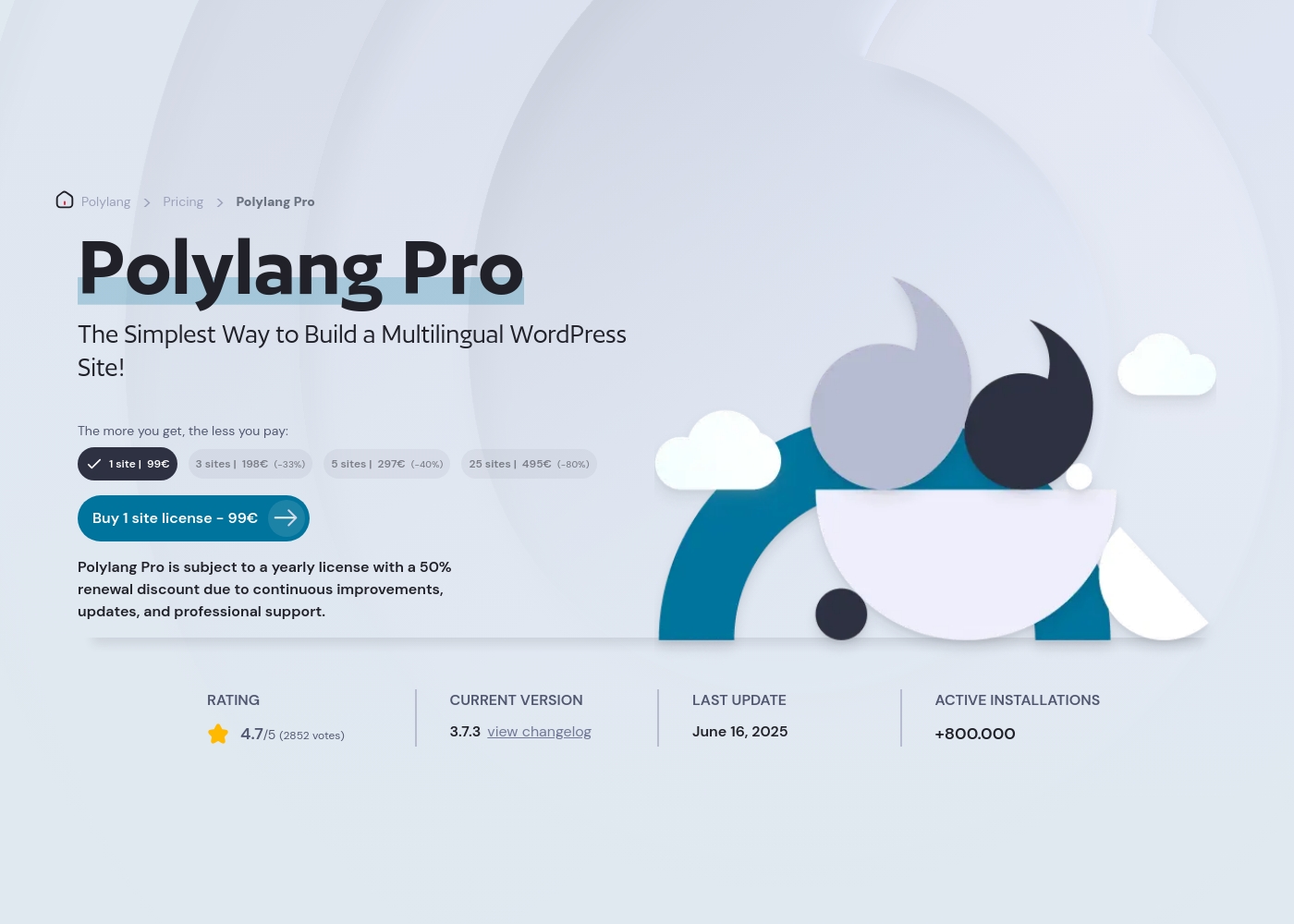
Polylang Pro costs between 99€ and 495€ per year with four main plans: the 1-site license at 99€, the 3-site license at 198€, the 5-site license at 297€, and the 25-site license at 495€.
Since pricing scales directly with your usage, getting the Pro license is incredibly simple. This structure lets you choose the perfect fit for your specific website development requirements.
1-Site License
Price: 99€/year Websites Supported: 1 site Best For: Beginners or single-project business owners Other Features: DeepL Machine Translation, Multilingual SEO, Professional Support, XLIFF Import/Export capabilities
- 1 site license
- DeepL Machine Translation integration
- Multilingual SEO
- Professional Support
- 3 site license
- DeepL Machine Translation integration
- Multilingual SEO
- Professional Support
- 33% discount
- 5 site license
- DeepL Machine Translation integration
- Multilingual SEO
- Professional Support
- 40% discount
- 25 site license
- DeepL Machine Translation integration
- Multilingual SEO
- Professional Support
- 80% discount
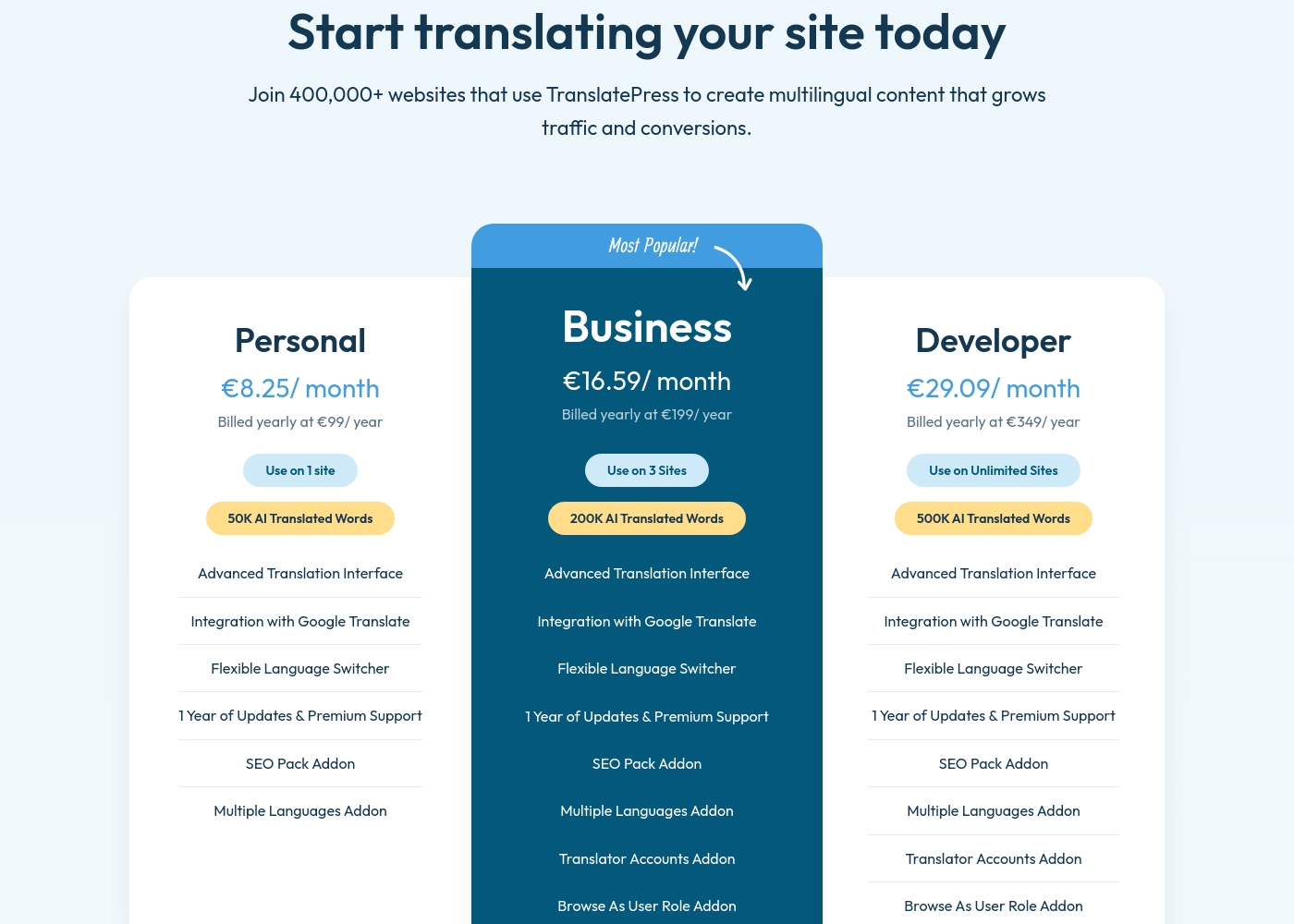
Translatepress costs between €99 and €349 per year with 3 plans: Personal at €99/year, Business at €199/year, and Developer at €349/year.
Here’s a closer look at what each TranslatePress subscription includes.
Personal
Price: €99 / year Websites Supported: 1 site Best For: Single website owners, bloggers, or small projects Refund Policy: 15-day money-back Other Features:
- 50K AI Translated Words
- Advanced Translation Interface
- Integration with Google Translate
- Flexible Language Switcher
- SEO Pack Addon, Multiple Languages Addon
- Advanced Translation Interface
- Integration with Google Translate
- Flexible Language Switcher
- 1 Year of Updates & Premium Support
- SEO Pack Addon
- All Personal features
- Translator Accounts Addon
- Browse As User Role Addon
- Navigation Based on Language Addon
- DeepL Automatic Translation Addon
- All Business features
Pricing Notes
- Polylang is priced higher at the top tier (€495 vs €349) but offers extreme volume discounts up to 80%.
- Translatepress includes a valuable 15-day money-back guarantee, eliminating initial risk for buyers.
- Polylang provides a generous 50% renewal discount, potentially cheaper long-term for single-site users.
- Translatepress pricing includes an annual quota of 50K–500K AI translated words in the subscription fee.
Pricing Head-to-Head
User Reviews
Polylang currently possesses minimal public feedback on Trustpilot, registering only one review, resulting in a 3.2-star average. While there isn't enough data for a broad consensus on overall reliability or usability, the sole review highlights a critical concern regarding customer service structure.
The user, trying to implement the tool for a charity organization, reported being very disappointed because professional support was only accessible to paying customers. This user felt they were directed toward an unresponsive forum, implying that support for the free tier or community users is sorely lacking or ineffective.
I am very disappointed trying to use Polylang for my charity organization. Support is non-existent unless you pay for it. We were sent towards a community forum where no one even replies.
Users overwhelmingly praise TranslatePress for its ease of use and intuitive, front-end visual translation interface. This approach makes content localization simple and fast, enabling users to see exactly what they're translating, and saves significant time compared to competitor solutions.
Reviewers consistently highlight that the plugin is light, efficient, and integrates seamlessly with complex themes and popular systems like WooCommerce. A major recurring theme is the exceptional quality of support; the team is frequently described as responsive, professional, and quick to resolve complex issues, often going the “extra mile.” The platform’s reliability and strong SEO optimization features are noted as key advantages for growing international traffic.
I've been using TranslatePress for a couple of years now and I'm very happy with it. It’s intuitive, and the paid version supports multiple languages easily. Simply the best solution I’ve found.
Our Verdict
The decision between Polylang and Translatepress often comes down to internal workflow and technical priorities. Polylang is built as a WordPress performance powerhouse, engineered for minimal bloat. Polylang maintains site speed by strictly adhering to WordPress core features, protecting critical Core Web Vitals. If technical SEO and speed are paramount, Polylang is your choice. However, Translatepress revolutionizes the actual translation experience for non-developers. Translatepress uses a visual front-end editor so you translate exactly what users see live. This WYSWIG method simplifies localization and ensures visual perfection on complex themes. Translatepress also stands out with exceptional customer support and robust unlimited-site scaling for agencies. Translatepress offers superior value with its lower top-tier pricing and 15-day money-back guarantee. If you run a large WooCommerce site where inventory synchronization is key, Polylang’s automation is unmatched. Ultimately, choose Polylang for technical performance and REST API access, but pick Translatepress for the simplest visual workflow and better team collaboration tools.
Frequently Asked Questions
Which is better for small teams: Polylang or Translatepress?
Translatepress is generally better for teams due to its collaborative features. Translatepress offers Translator Accounts in its higher-tier plans. Polylang requires external systems or manual workarounds for team translation workflows.
Does Polylang offer a money-back guarantee like Translatepress?
No, Polylang Pro does not explicitly advertise a money-back guarantee or trial period. Translatepress offers a risk-free 15-day money-back guarantee on all annual plans. You can try Translatepress with greater confidence.
Which provides faster performance: Polylang or Translatepress?
Polylang has the edge in raw, technical performance and speed optimization. Polylang is engineered to be 'bloat-free' and avoids adding extra database tables. This focus helps maintain excellent Core Web Vitals scores.
Can I use automatic translation with quota limits in Polylang?
Translatepress provides a clear, bundled annual quota of 50K to 500K AI translated words. Polylang integrates DeepL, but it does not specify an included word quota in its pricing tiers. This difference affects predictable budgeting.
Which plugin is better suited for managing unlimited client sites?
Translatepress is better suited for managing an unlimited portfolio of sites. The Developer plan covers unlimited sites for €349 annually. Polylang's largest specified plan covers 25 sites at a higher price.
How does Polylang's WooCommerce sync compare to Translatepress?
Polylang offers superior e-commerce functionality with automatic synchronization. Polylang ensures that product stock and prices are synced across all language versions. Translatepress relies more on the visual editor for these elements.
Ready to Choose?
Both tools have their strengths. Choose based on your specific needs.