Plesk vs VMmanager
Choosing between Plesk and VMmanager is like picking between a multi-tool and a dedicated machine. Plesk is a versatile control panel for managing websites and servers. VMmanager is built specifically for automating large-scale virtualization and hosting businesses.
Powerful panel, check the support.
Plesk is a feature-rich control panel that excels at centralizing server and website management, especially for WordPress. We found it robust and cloud-compatible, but the overall experience can be inconsistent due to reported customer support challenges. Overall, it's a strong contender for technical users who value its toolkit, but we'd advise trying the free trial to test support responsiveness firsthand.
Pros
- Unified dashboard for managing multiple sites and servers
- Powerful, automated WordPress Toolkit for updates and staging
- Broad security features built-in at the OS and app level
- Compatible with all major cloud platforms (AWS, Azure, Google Cloud)
Cons
- Customer support responsiveness is frequently criticized in reviews
- Pricing can be opaque, and some users report billing surprises
- May present a learning curve for users unfamiliar with server admin
- Not ideal for single, simple websites or fully managed, hands-off services
Powerful automation for serious scale.
VMmanager is a robust platform for automating large-scale virtualization for hosting providers and enterprises. We find it highly capable for managing complex infrastructures and provisioning VPS services. Overall, it's a strong choice for organizations needing deep automation and scalability, but its custom pricing and mixed support feedback mean it's best for those who can navigate enterprise sales.
Pros
- Proven stability for managing thousands of VMs across hundreds of servers.
- Strong automation for VPS provisioning, billing integration, and self-service portals.
- High availability features like failover clusters and distributed load balancing.
- Flexible licensing for both hosting businesses and corporate internal clouds.
Cons
- Pricing is not public, requiring custom quotes which can lack transparency.
- External reviews report issues with aggressive price increases and licensing terms.
- Support responsiveness is inconsistent, with some users reporting slow second-line help.
- May be overly complex for small businesses needing only a few virtual machines.
AboutPlesk
Plesk is a comprehensive server management platform built for developers, IT admins, and hosting providers. It acts as a centralized control panel for building and managing multiple sites. You get tools for security, performance monitoring, and onboarding new clients from a single place.
AboutVMmanager
VMmanager is a platform for automating virtual infrastructure rental businesses. 💡 It's built for hosting providers and IT teams who need to manage hardware and container virtualization. The platform helps you provision IaaS and SaaS services automatically, giving users a self-service dashboard to manage their own machines.
Highlights
Feature Comparison
Features Overview
We highlight the main differences and pick a winner for each feature.
Core Purpose
Plesk manages websites on servers. VMmanager manages the servers themselves.
Plesk is a control panel you install on a server to manage websites, databases, and apps. It's perfect for running WordPress, setting up email, and handling SSL certificates from one dashboard. VMmanager is a virtualization platform. It lets you create and sell entire virtual machines (VPS) to customers. It's the engine behind a hosting business, not the website manager. The key difference is scope. Plesk works *on* a server. VMmanager works *to create* servers. You wouldn't use Plesk to sell virtual machines, and you wouldn't use VMmanager to install WordPress.
WordPress Management
Plesk's WP Toolkit is a powerhouse. VMmanager has no equivalent.
Plesk includes a specialized WordPress Toolkit. It can install, update, clone, and stage sites with one click. It even runs automated AI tests to catch errors before you go live. VMmanager doesn't focus on WordPress. Its job is the underlying virtual infrastructure. Any WordPress sites would run *inside* the VMs it creates. For agencies managing 50+ client WordPress sites, Plesk's toolkit is a massive time-saver. VMmanager isn't even in this conversation.
Scalability & Performance
Both scale, but for different things. Plesk scales sites; VMmanager scales infrastructure.
Plesk scales by letting you manage more domains on a single server. The Web Host edition supports unlimited domains on one license. It also works well across cloud providers like AWS and Azure. VMmanager is built for massive scale. A single installation can manage 22,000+ virtual machines, 50 clusters, and 350 physical servers. It's designed for growth at the infrastructure level. The trade-off is clear. Need to manage 1,000 WordPress sites? Plesk is your tool. Need to manage the 50 physical servers those sites run on? That's VMmanager's job.
Automation & Self-Service
VMmanager automates server creation. Plesk automates website tasks.
Plesk automates website operations. The WP Toolkit handles updates and security patches. It can also manage subscriptions for resellers, but it's not for creating new servers. VMmanager's core strength is automation. It can provision a new VPS in 4 seconds, assign IPs, and connect to networks automatically. It provides a self-service portal for clients to manage their own VMs. This is the defining difference. Plesk automates daily website chores. VMmanager automates the entire business of selling and managing virtual machines.
High Availability & Fault Tolerance
VMmanager has enterprise-grade HA built-in. Plesk requires add-ons.
Plesk focuses on single-server management. While it can integrate with other tools for redundancy, it doesn't have built-in failover clusters or load balancing between servers. VMmanager is designed for uptime. It supports failover clusters where VMs automatically move to healthy servers if one fails. It includes built-in load distribution (DRS) and backup capabilities. For critical applications where downtime costs money, VMmanager's architecture is far more robust. Plesk is better for standard website uptime needs.
Ease of Use
Plesk is simpler for website tasks. VMmanager has a steeper learning curve.
Plesk aims for a user-friendly dashboard. Tasks like installing WordPress or setting up an email account are straightforward. Some users report it can get complex with advanced features. VMmanager has a powerful but complex interface. It's designed for sysadmins managing virtual infrastructure. Reviews mention an intuitive interface, but the subject matter is inherently more technical. If you're a web developer or content manager, Plesk will feel natural. If you're a systems administrator, VMmanager's power will appeal to you, but expect a learning curve.
Pricing Transparency
Plesk shows clear prices. VMmanager requires a custom quote.
Plesk publishes clear pricing tiers: $15.57 to $57.74 per month. You know exactly what you'll pay before signing up. There's also a Partner Plan for larger businesses. VMmanager does not list public prices. You must contact sales for a quote based on your physical core count. This can make budgeting harder and feel less transparent. For straightforward budgeting and small to medium projects, Plesk wins. For large-scale deployments, the custom pricing of VMmanager might offer better value, but you have to negotiate.
Customer Support
Both have mixed support reviews. Plesk offers 24/7 plans; VMmanager's responsiveness varies.
Plesk includes 24/7 support on standard plans. Partners get priority support with a dedicated manager. However, reviews frequently complain about slow or unhelpful responses for complex issues. VMmanager's support is also reportedly inconsistent. Some users praise helpful support, while others mention slow second-line help. The quality seems to depend on the specific issue and plan. Neither tool has stellar support reputations. Both may require you to be somewhat self-sufficient. Plesk's structured support tiers offer more predictability, though.
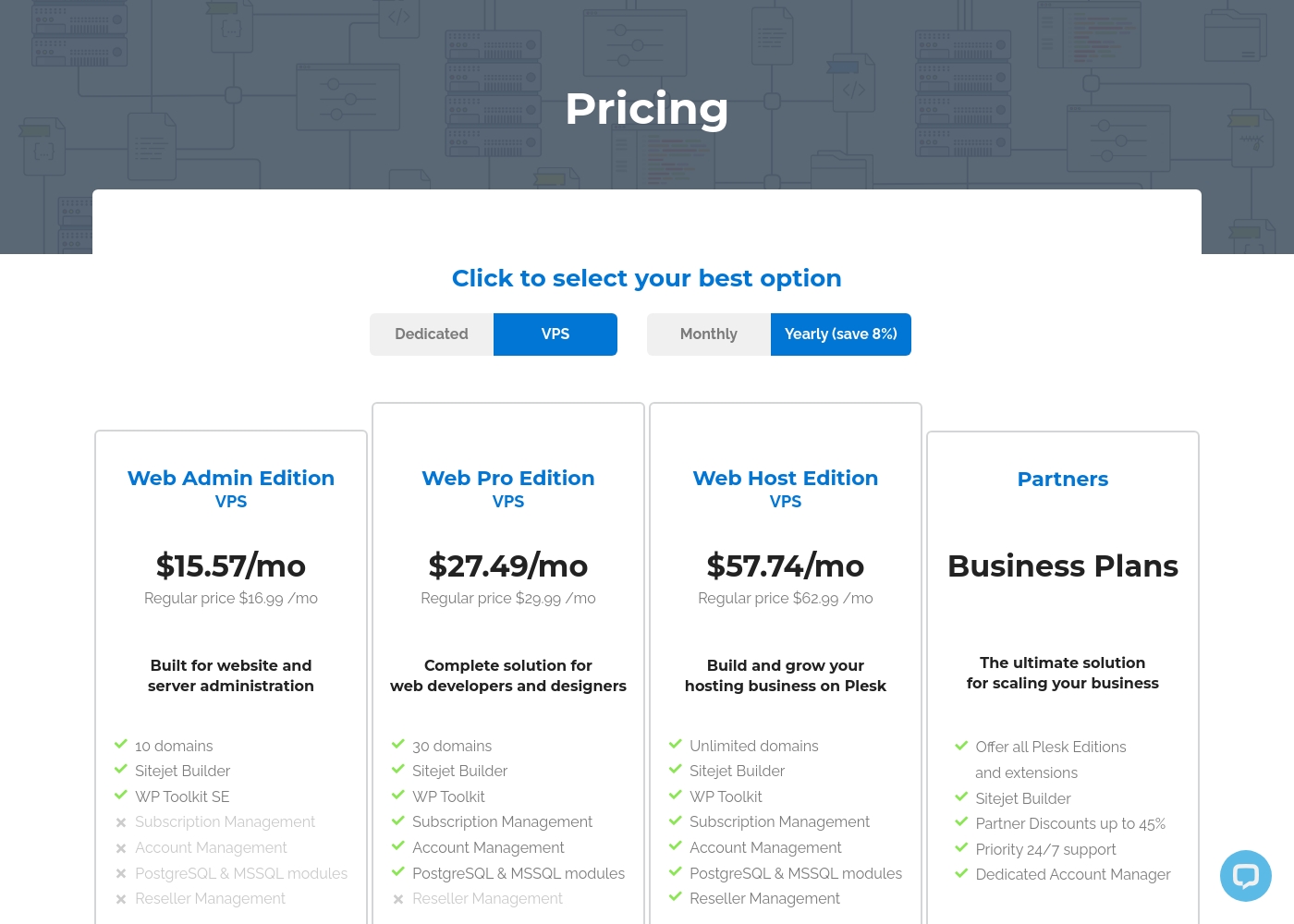
Plesk costs between $15.57 and $57.74 per month with 4 plans: Web Admin Edition at $15.57/mo, Web Pro Edition at $27.49/mo, Web Host Edition at $57.74/mo, and Partners at $250/mo minimum.
You can see how the specific licenses break down below to find the right fit for your server.
Web Admin Edition
Price: $15.57 per month billed annually Websites Supported: 10 domains Best For: Basic website and server administration Refund Policy: Not explicitly stated Other Features: Sitejet Builder, WP Toolkit SE
- 10 domains
- Sitejet Builder
- WP Toolkit SE
- 30 domains
- Sitejet Builder
- WP Toolkit
- Subscription Management
- Account Management
- Unlimited domains
- Sitejet Builder
- WP Toolkit
- Subscription Management
- Account Management
- Offer all Plesk Editions
- Sitejet Builder
- Partner Discounts up to 45%
- Priority 24/7 support
- Dedicated Account Manager
VMmanager costs between Not explicitly stated and Not explicitly stated per year with 2 plans: VMmanager Hosting starting with custom core pricing, and VMmanager Infrastructure at custom corporate rates.
Let's look at each option below to find the perfect fit for your setup. We will break down what makes each plan unique for your team.
VMmanager Hosting
Price: Custom quote based on physical cores Websites Supported: Contact sales to confirm individual system and VM limits Best For: Hosting and service providers Refund Policy: Contact sales to confirm trial terms or refund options Other Features: Automatic VPS provisioning, Multi-tenant architecture, KVM virtualization, LXC/LXD containers, Built-in self-service portal
- Automatic provisioning of VPS from 4 seconds
- Multi-tenant architecture
- KVM virtualization
- Lightweight LXC/LXD containers
- Built-in self-service portal
- All features of the VMmanager Hosting plan
- Automatic load distribution capability (DRS)
- Ability to work with NAS
- Distributed switch
- Ability to work with linked clones

Pricing Notes
- Plesk has transparent, fixed pricing tiers (Admin, Pro, Host). VMmanager requires a custom quote, which lacks upfront clarity.
- Plesk offers a 14-day free trial. VMmanager offers a 30-day free trial to test on your own infrastructure.
- Plesk's pricing is predictable but can feel opaque on renewal according to reviews. VMmanager's custom pricing is criticized for aggressive increases.
- For a small agency (10-30 sites), Plesk Pro at ~$30/month is a known cost. VMmanager is not designed for this use case.
- For a hosting provider (1000+ VMs), VMmanager's core-based pricing may offer better value, but you must negotiate with sales.
Pricing Head-to-Head
User Reviews
We found that user sentiment for Plesk is quite mixed. On Trustpilot, many users praise its user-friendly interface and reliable server management tools, especially the WordPress toolkit.
🛠️ However, a significant number of reviews complain about unresponsive customer support and billing issues, particularly after contract renewals. Some find the software intuitive for basic tasks, while others report it can be unreliable and cause server downtime.
Plesk makes managing my WordPress sites a breeze. The dashboard is intuitive, and the one-click updates save me hours every week. It's the most reliable panel I've used.
External reviews for VMmanager are mixed. On Trustpilot, the overall rating is low (2.4/5) 😕, with users citing concerns about aggressive price increases, unresponsive support for some issues, and perceived billing problems.
However, positive reviews praise the software's core functionality and helpful support team. One user noted, "really enjoying VMmanager...
Been using VMmanager now for over a month and have been really impressed, the support team is on hand and helpful with any issues. The software itself makes up for it, especially with new features and bug fixes that get rolled out monthly.
Our Verdict
It's not a close race—it's a different race. For managing websites and WordPress sites, Plesk is the clear winner. For automating the sale and management of virtual servers, VMmanager is the specialist. Plesk's superpower is its WordPress Toolkit. It turns hours of site maintenance into minutes. Agencies managing dozens of client sites will save massive time on updates, cloning, and security. VMmanager's superpower is automation at scale. It can create a new VPS in 4 seconds and manage over 22,000 VMs from one installation. It's built for the high-volume hosting business. The deciding factor is your core need. Are you managing websites on servers, or are you managing the servers themselves? That question points you directly to the right tool. Pick Plesk if you're a web agency, developer, or IT admin focused on website performance and WordPress. Pick VMmanager if you're a hosting provider or enterprise architect building and selling virtual infrastructure.
Ready to Choose?
Both tools have their strengths. Choose based on your specific needs.