Pixpa vs Ycode
Pixpa and Ycode build excellent websites, but they target very different users. Pixpa excels at simple portfolios backed by world-class customer service. Ycode offers deep design autonomy and CMS power for serious web builders. You need to decide if support or technical prowess matters more for your project.
Best for: Visual artists and photographers needing integrated client galleries., Users who prioritize immediate, 24/7 human customer support.
Best for: Designers needing total visual autonomy and complex interaction controls., Teams requiring unlimited free collaborators and real-time teamwork.
Exceptional Support, Inconsistent Reliability
We find Pixpa offers genuinely responsive, world-class customer support and highly affordable plans, positioning it well for artists and simple portfolio users. However, we noted persistent issues with core functionality like mobile responsiveness and integrated store reliability which impede professional use. Overall, Pixpa is a solid choice for lightweight portfolios, but scaling businesses might experience frustrating technical limits.
Pros
- World-class customer service is remarkably responsive 24/7.
- Very affordable, all-inclusive pricing tiers start at $5/month.
- Intuitive design environment praised over competitors like Squarespace.
- Support agents often create step-by-step videos to resolve issues.
Cons
- Reports of poor mobile optimization and image scaling problems.
- E-commerce functions (like the "add to basket" option) are often buggy.
- Website reliability is inconsistent, with recurring monthly downtime reported.
- Performance issues when hosting extensive high-resolution galleries for sale.
Powerful visual editor with smart pricing.
We see Ycode successfully bridges the gap between powerful design tools and affordability, offering extensive features like an integrated CMS and team collaboration without excessive cost. Overall, this platform presents a compelling alternative for designers and founders seeking complete control over their complex projects.
Pros
- Extremely competitive pricing structure beginning at $5/month annually.
- Comprehensive Free plan perfect for development and testing new projects.
- Total design autonomy via an intuitive visual editor, requiring no code.
- Integrated CMS simplifies content structuring and data management.
Cons
- Custom code integration is restricted to Basic and Pro plans.
- The Mini plan is significantly limited in scope (only 5 published pages).
- No explicit refund policy or money-back guarantee is provided.
AboutPixpa
Users describe Pixpa as a top-notch web service that just works. Its primary focus is on usability, offering design tools and a consistent User Interface (UI) that is intuitive. Designs are simple and clean, making site creation approachable. Furthermore, the service carries the distinction of being Top Rated for 11+ Years, reflecting proven quality and reliability. ✅
AboutYcode
Ycode is a comprehensive, all-in-one website builder and integrated CMS. It's built specifically for designers, creators, and founders who want professional results without relying on code. Using its intuitive visual editor, you gain complete design control to craft beautiful, fully responsive websites. You can publish your creations instantly and manage everything easily from one reliable platform. ✅
Highlights
Feature Comparison
Features Overview
We highlight the main differences and pick a winner for each feature.
Customer Support
Pixpa provides genuine 24/7 live support; Ycode uses standard email responses and community help.
Pixpa built its reputation on unbelievably responsive 24/7 expert support. Agents offer quick resolutions via live chat and email assistance. Pixpa often creates step-by-step videos to resolve complex user issues promptly. Ycode relies on email support and community resources for troubleshooting. Its focus is more on documentation and self-service. If you need immediate human help, Pixpa is the undisputed victor.
Design Control
Ycode grants total design freedom and complex interactions; Pixpa uses simple, template-based structures.
Pixpa provides an intuitive, template-driven experience for quick site setup. Its design UI is simple and consistent across all pages. Ycode features a powerful visual editor for total design autonomy. You can build advanced interactions like scroll effects without writing code using Ycode. Ycode is necessary for complicated or highly custom visual layouts.
Team Collaboration
Ycode allows unlimited collaborators for free; Pixpa's plans focus primarily on single users.
Ycode is structured for seamless real-time teamwork and instant publishing. You can invite unlimited collaborators to projects on Ycode without paying user seat fees. This makes Ycode exceptionally budget-friendly for agencies and large teams. Pixpa does not focus specifically on this type of team collaboration structure. Ycode is clearly superior for any project demanding extensive teamwork.
Content Management
Ycode has a high-capacity, integrated CMS; Pixpa is more focused on static portfolio content and galleries.
Ycode’s integrated CMS easily structures and organizes content collections. The Pro plan supports up to 12,000 CMS items for dynamic sites. Pixpa's core features emphasize client galleries and simple e-commerce setup. Ycode is built to handle complex, data-heavy modern web applications. If your website needs dynamic content management, choose Ycode.
Platform Reliability
Ycode is built for stability and scalability; Pixpa users report technical bugs and recurring downtime.
Pixpa reviews frequently mention inconsistent reliability and buggy e-commerce functions. Users also report recurring monthly downtime that disrupts business. Ycode is built on a scalable cloud platform, promising fast hosting and better stability. Ycode minimizes the risk of sudden technical failures impacting your online presence. Technical users will find Ycode more trustworthy.
Custom Code Limits
Ycode allows custom HTML/CSS/JS injection; Pixpa supports only standard no-code building.
Ycode allows users on the Basic or Pro plans to integrate custom code. This provides essential flexibility for advanced web developers and designers. Pixpa focuses on being an all-in-one, no-code portfolio service. Pixpa keeps the environment simple but lacks deep modification options. Choose Ycode if your project requires technical customization.
Niche Tools
Pixpa deeply integrates client galleries; Ycode offers advanced localization features.
Pixpa’s platform is tailor-made for visual artists and photographers. It deeply integrates tools for secure client sharing (Galleries) and proofing. Ycode is built to scale globally, offering unlimited localization on its Pro plan. Pixpa wins if your primary focus is managing high-resolution client assets. Ycode wins if global reach is your priority.
Entry Cost
Ycode offers a permanent Free plan; Pixpa starts paid tiers at $5/month annually.
Ycode's permanent Free plan lets you build and test complex sites indefinitely. This is perfect for those who want to learn the platform first. Pixpa starts its paid tiers at a highly affordable $5/month annually. Pixpa also protects your investment with a 30-day money-back guarantee. Ycode offers better long-term development value for zero dollars.
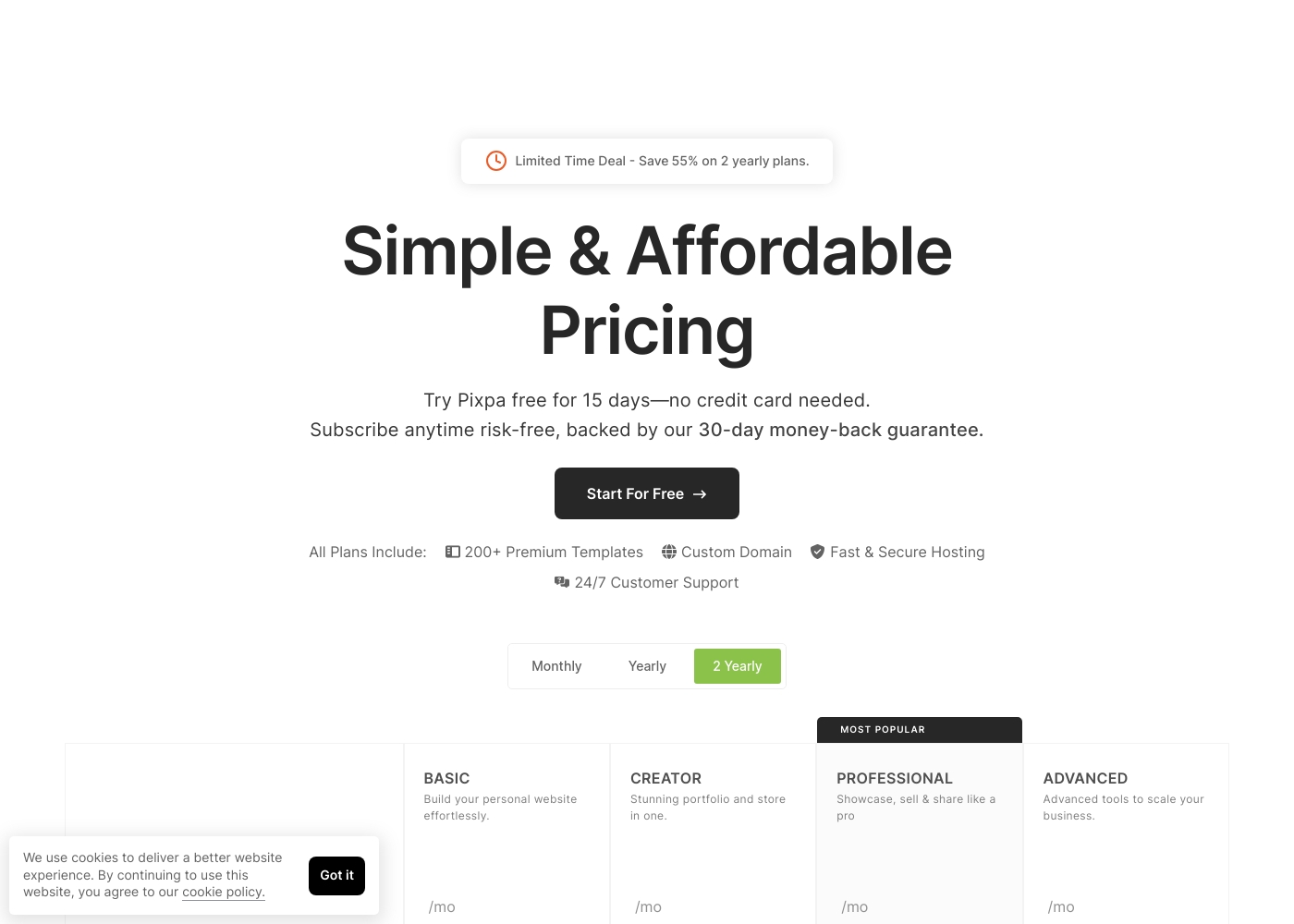
Pixpa costs between $5 and $21 per month (when billed annually) with four main plans: Basic at $5/mo, Creator at $12/mo, Professional at $18/mo, and Advanced at $21/mo.
Pixpa offers all-inclusive, affordable plans to handle your full website, store, blog, and client galleries in one place.
Basic
Price: $5/month (billed yearly) or $8/month (billed monthly) Best For: Building your personal website effortlessly Refund Policy: 30-day money-back guarantee Other Features: 200+ Premium Templates, Custom Domain, 24/7 Customer Support
- Build your personal website effortlessly
- Includes 200+ Premium Templates
- Custom Domain support
- 24/7 Customer Support
- Stunning portfolio and store in one
- Includes 200+ Premium Templates
- Custom Domain support
- Fast & Secure Hosting
- Showcase, sell & share like a pro
- Most Popular plan
- Includes 200+ Premium Templates
- 24/7 Customer Support
- Advanced tools to scale your business
- Includes 200+ Premium Templates
- Custom Domain support
- Fast & Secure Hosting
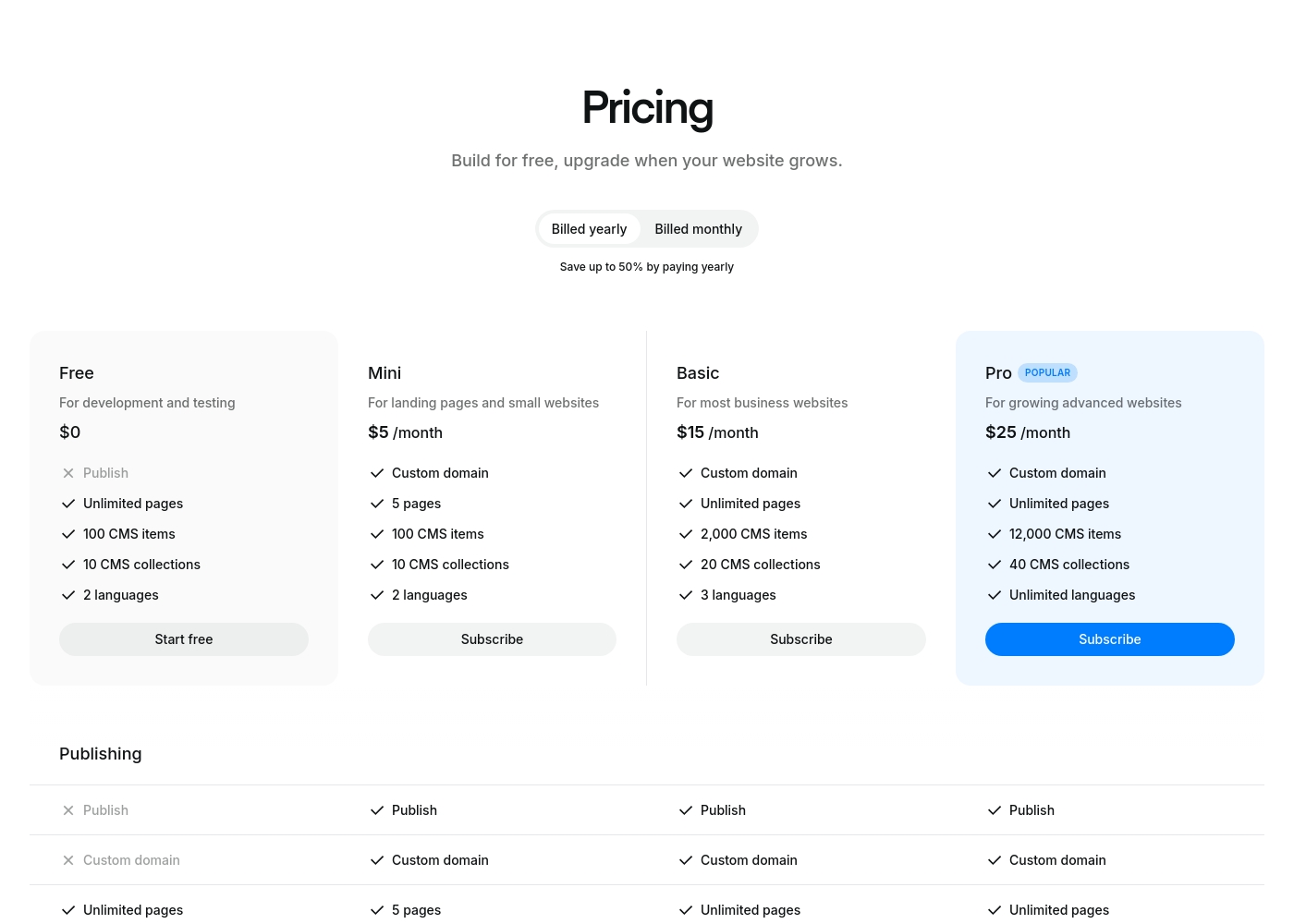
Ycode costs between $0 and $30 per month, with four plans: Free at $0, Mini at $5/month (billed yearly), Basic at $15/month (billed yearly), and Pro at $25/month (billed yearly).
Here’s a breakdown of what each tier offers so you can choose the best fit for your project.
Free
Price: $0 Best For: development and testing Other Features: Unlimited pages on a ycode.site domain, 100 CMS items, 10 CMS collections, 2 languages, 1K monthly visits.
- Publish to ycode.site
- Unlimited pages
- 100 CMS items
- 10 CMS collections
- 2 languages
- Custom domain
- 5 pages
- 100 CMS items
- 10 CMS collections
- 2 languages
- Custom domain
- Unlimited pages
- 2,000 CMS items
- 20 CMS collections
- 3 languages
- Custom domain
- Unlimited pages
- 12,000 CMS items
- 40 CMS collections
- Unlimited languages
Pricing Notes
- Pixpa offers a traditional 15-day free trial plus a strong 30-day money-back guarantee.
- Ycode includes a permanent Free plan that allows indefinite development and testing using a ycode.site domain.
- Ycode offers exceptional value by allowing unlimited collaborators for free across all paid plans.
- Pixpa offers significant education discounts, sometimes up to 55% off any plan.
Pricing Head-to-Head
User Reviews
Pixpa’s external feedback demonstrates a clear split between its stellar customer service and technical reliability issues. Many users consistently praise the support staff, describing the team as “truly remarkable” and incredibly responsive via simultaneous live chat and email. They often provide quick, effective resolutions, with some agents creating step-by-step video guides to solve complex problems.
However, users frequently cite significant technical shortcomings. The most recurring complaints revolve around necessary mobile optimization, with reports of uploaded images becoming stretched or badly rendered on phones. Reliability is also a key concern, as some users experienced their websites breaking down monthly or having downtime that was dismissed by initial support responses. E-commerce functionality also needs improvement. Shoppers struggle with buggy “add to basket” options, especially on mobile, rendering the shop useless for some. While the pricing is affordable (as low as $5/month), reviewers noted performance limitations when dealing with extensive high-resolution galleries and poor SEO indexing help. It’s a platform with amazing support but noticeable technical shortcomings 🛠️.
Customer service is truly remarkable. They quickly find a resolution to your issue and go out of their way to help. Their website is much more fluid and easier to use than Squarespace.
Ycode is strongly positioned as a high-value and professional alternative to established web development platforms, frequently emphasizing user satisfaction and powerful design capabilities. The company maintains that thousands of users worldwide praise its innovation and supportive environment.
This platform aims to cut through complexity by combining powerful features with an intuitive, user-friendly interface. Key themes promoted internally include superior user interface design and competitive pricing compared to rivals like Webflow, alongside strong functionality for animation and visual effects.
Our Verdict
This comparison truly pits specialized support against raw technical power. Pixpa is the clear winner if your priority is an effortless, supported experience. However, Ycode takes the crown for highly customized design and seriously scalable projects. Ycode’s high user sentiment (4.3 rating) suggests better overall technical execution. Pixpa built its success on dedicated customer service and niche creative tools. Pixpa proudly provides unbelievably responsive 24/7 live chat support to everyone. It’s perfect for visual artists needing an all-in-one solution for client galleries and e-commerce. Pixpa provides a simple, template-based approach that is easy for beginners to master quickly. Ycode is a total powerhouse for design customization and team scaling. Ycode gives you total design autonomy using its advanced visual editor. You can build advanced interactions and dynamic sites with its robust integrated CMS. Ycode is also highly collaborative, allowing you to include unlimited team members for free. Technical reliability is the biggest practical trade-off between them. Pixpa users frequently report frustrating technical issues, like inconsistent mobile optimization and e-commerce bugs. Ycode focuses heavily on performance and stability, necessary features for scaling professionals. Choose Ycode if high performance and deep customization are mandatory requirements. Go with Pixpa if world-class 24/7 support and integrated client galleries are non-negotiable. Opt for Ycode if you need deep design control, a powerful CMS, and plan to scale with a functional, collaborative team. Ycode is the superior choice for high-end, data-driven web development.
Frequently Asked Questions
Which has better customer support: Pixpa or Ycode?
Pixpa is the undisputed winner for customer support quality. Pixpa offers 24/7 expert coverage via live chat and email. Ycode provides standard email support and relies more on community resources. Pixpa support agents are known for providing proactive, quick resolutions.
Is Ycode worth the extra cost over Pixpa?
Pricing is largely similar, but Ycode provides significantly more technical power. Ycode includes unlimited collaborators and a full CMS for free or highly discounted rates. You get better scaling and design control features with Ycode. Pixpa offers more peace of mind with its 30-day money-back guarantee.
Does Pixpa offer a Free plan like Ycode?
No, Pixpa only offers a 15-day free trial period for its paid plans. Ycode offers a permanent Free plan suitable for indefinite development and site testing. You can build a complete, complex site on Ycode without any initial financial commitment.
Which is better for team collaboration, Pixpa or Ycode?
Ycode is significantly better engineered for team collaboration and agencies. Ycode allows you to invite unlimited collaborators for free with flexible roles. Pixpa's focus is on individual users and portfolio owners. Ycode streamlines team efficiency without added seat costs.
Which platform is more reliable: Pixpa or Ycode?
Ycode is technically more reliable and is built on a scalable cloud platform. Pixpa users report recurring problems with website downtime and frustrating mobile optimization issues. For mission-critical stability, Ycode holds the technical advantage.
Can I use custom code (HTML/CSS) with Pixpa or Ycode?
Ycode specifically allows custom code injection on its Basic and Pro plans. Pixpa does not explicitly advertise custom code integration on its main plans. Choosing Ycode gives developers deep flexibility for technical modifications.
Ready to Choose?
Both tools have their strengths. Choose based on your specific needs.