Pinnacle Studio vs Viddyoze
Choosing between Pinnacle Studio and Viddyoze is a classic editor versus generator decision. Pinnacle Studio is a robust, timeline-based editor for deep creative control. Viddyoze offers instant, high-quality videos using thousands of professional templates. One is for detailed craft, the other for rapid content delivery.
Best for: Versatile creators needing deep, frame-accurate editing., Users who require MultiCam editing for tutorials or events.
Best for: Solopreneurs needing to create high-volume, branded content fast., Marketing agencies using video for client social media advertisements.
Powerful features, critical flaws.
We found that Pinnacle Studio 26 advertises excellent advanced features like 8K video support and extensive creative bundles, often appealing through affordable one-time pricing. However, overwhelmingly negative user feedback regarding pervasive instability and completely absent customer support casts serious doubt on its usability. Overall, we cannot recommend this software until the severe stability and support issues reported by the user base are definitively addressed.
Pros
- Offers sophisticated, multi-track editing features (MultiCam, 8K support).
- Pricing model is an affordable one-time purchase (especially upgrade bundles).
- Includes comprehensive utility and asset bundles in higher-tier packages.
- Interface is considered user-friendly by some long-time users.
Cons
- Extremely frequent crashing and freezing are reported across multiple versions.
- Customer support is consistently described as non-existent and unhelpful.
- Users experience major issues with rendering, artifacts, and export failures.
- The software can fail to uninstall properly, requiring complex manual steps.
Quick, Quality Video Creation with Billing Friction.
We find Viddyoze delivers excellent, professional video templates that are genuinely easy to customize and use. The platform significantly speeds up production for branding elements, allowing unlimited creation capacity for $47 per month. Overall, this is a highly functional tool marred by concerning reports of subscription transparency issues and difficult trial cancellation polices.
Pros
- Access to 5,000+ high-quality, professional templates.
- Extremely quick and easy to use, even for beginners.
- Unlimited creation capacity included in the monthly price.
- Commercial rights provided for client work.
Cons
- Free trial cancellation process is reported as confusing and deliberately difficult.
- Users report being incorrectly charged after attempting to cancel the trial.
- Requires caution regarding subscription monitoring and cancellation guidelines.
- The web interface is described as ‘cranky’ by some users.
AboutPinnacle Studio
Pinnacle Studio 26 provides a welcoming, intuitive workspace designed for sophisticated video creation. It is a comprehensive tool that includes video editing, screen recording, and DVD authoring capabilities. Whether you are new to video editing or already an experienced producer, this software has a tier that meets your goals. Use it professionally for vlogging, creating channel content, or powerful business video production. Pinnacle Studio helps you achieve professional results while taking your edits to the next level. 💡
AboutViddyoze
Viddyoze is an intuitive, easy-to-use video creator designed for business owners and professionals. Over 180,000 creators trust this platform.
It’s been called the “Swiss Army Knife” for corporate branding video media because it allows you to brand content using your own colors and logos effortlessly. The best part?
You don’t need any video editing experience to start. If you can click a mouse, you can create amazing videos in minutes.
Highlights
Feature Comparison
Features Overview
We highlight the main differences and pick a winner for each feature.
Core Video Editing
Pinnacle Studio offers deep control; Viddyoze focuses on simple template generation.
Pinnacle Studio is a full editor supporting frame-accurate editing and complex timelines. You get professional tools like MultiCam editing and Green Screen compositing. Viddyoze is designed for speed, not deep editing complexity. It takes templates and lets you apply branding in three clicks. The limited editing depth in Viddyoze suits rapid content creation better. Pinnacle Studio is best for complex, original video production.
Speed & Output Volume
Viddyoze is lightning-fast template output; Pinnacle Studio requires hands-on editing time.
Viddyoze uses cutting-edge rendering for fast creation; projects take seconds, not hours. The template-driven workflow ensures immediate results. Pinnacle Studio, despite performance improvements, still involves a traditional editing process. Pinnacle Studio users often contend with reported stability and rendering reliability concerns. If efficiency is your top metric, Viddyoze delivers immediate speed.
Multi-Camera Support
Pinnacle Studio handles MultiCam streams; Viddyoze has no multi-camera functionality.
Professional editors use Pinnacle Studio for MultiCam editing across multiple camera angles. This feature is crucial for interviews and event coverage. Viddyoze is purely a template platform for branding shorts and animations. It does not handle source footage composition. If you shoot with more than one camera, Pinnacle Studio is the clear professional choice. Pinnacle Studio allows you to create continuous, engaging narratives.
Template & Asset Library
Viddyoze provides 5,000+ templates and millions of assets; Pinnacle Studio requires manual asset sourcing.
Viddyoze includes a massive library of 5,000+ professional templates ready for branding. Subscribers also get millions of royalty-free stock assets included. Pinnacle Studio offers a 10-day StudioBacklot pass with limited royalty-free training content. Viddyoze is designed around using pre-built, licensed components quickly. The sheer volume and immediate access in Viddyoze make asset sourcing seamless.
AI Assistance
Viddyoze includes the ViddyBot AI assistant; Pinnacle Studio uses traditional editing structures.
Viddyoze offers the ViddyBot AI assistant for 24/7 creation and idea assistance. This helps users structure content within the editor. Pinnacle Studio relies on the human editor's skill and included tutorials for process guidance. ViddyBot can be invaluable for marketers facing creative blocks. Pinnacle Studio's focus is truly on mastering the craft manually.
Commercial Rights
Viddyoze explicitly grants commercial rights; Pinnacle Studio rights are standard/implied.
Viddyoze's subscription explicitly includes commercial rights for video creation for paying clients. This is essential for marketing agencies and freelancers. Pinnacle Studio is generally used for commercial projects but doesn't highlight it as a subscription benefit. If your primary use is client work, Viddyoze removes all licensing ambiguity. Viddyoze makes turning a profit easier and less complicated immediately.
Stability & Reliability
Both face issues; Pinnacle Studio struggles with crashing, Viddyoze struggles with billing.
Pinnacle Studio users report frequent crashes, resulting in unstable editing and disrupted workflows. Reliability issues during rendering are often reported with Pinnacle Studio. Viddyoze users mainly report issues linked to a 'cranky' web interface and painful billing or cancellation experiences. Pinnacle Studio’s problems affect the output quality. Viddyoze's issues affect signup and access reliability.
Learning Curve
Viddyoze is beginner-friendly; Pinnacle Studio requires mastering deeper tools.
Viddyoze’s 3-click customization means absolutely no prior video editing expertise is required. You can start creating professional videos within minutes using Viddyoze. Pinnacle Studio is user-friendly but involves mastering timelines, color correction, and effects. Pinnacle Studio offers built-in tutorials to aid learning. Viddyoze is significantly faster to master for its specific use case.
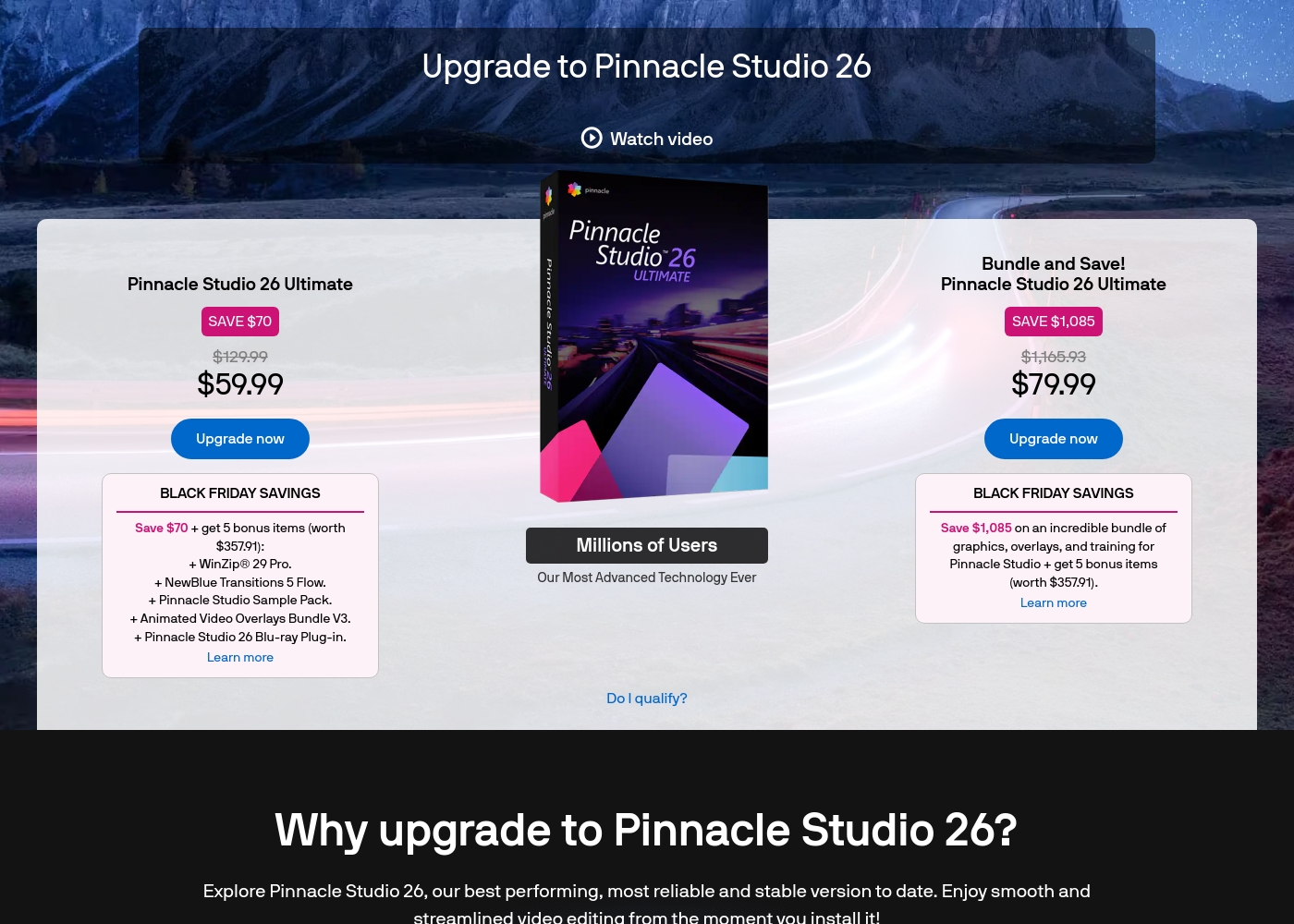
Pinnacle Studio 26 Ultimate acquisition costs range between $59.99 and $79.99 as a one-time upgrade purchase, with two main options: Pinnacle Studio 26 Ultimate at $59.99, and the Bundle and Save! version at $79.99.
These prices represent special Black Friday upgrade offers for users looking to access the latest features. Here is how the deals compare:
Pinnacle Studio 26 Ultimate
Price: $59.99 (One-time Upgrade Price) Best For: Current users who want the latest, most stable software version and specific utility tools. Other Features:
- Saves you $70 off the regular $129.99 price.
- Includes a total of 5 bonus items worth $357.91.
- Comes with WinZip® 29 Pro and NewBlue Transitions 5 Flow.
- Features the Pinnacle Studio 26 Blu-ray Plug-in.
- Includes the Pinnacle Studio Sample Pack and Animated Video Overlays Bundle V3.
- One-time price of $59.99 (was $129.99)
- 5 bonus items included (worth $357.91)
- Includes WinZip® 29 Pro
- Includes NewBlue Transitions 5 Flow
- Includes Pinnacle Studio 26 Blu-ray Plug-in
- One-time price of $79.99 (was $1,165.93)
- Includes all 5 bonus items (worth $357.91)
- Includes training, graphics, and overlays bundle
- Save $1,085 on the total package
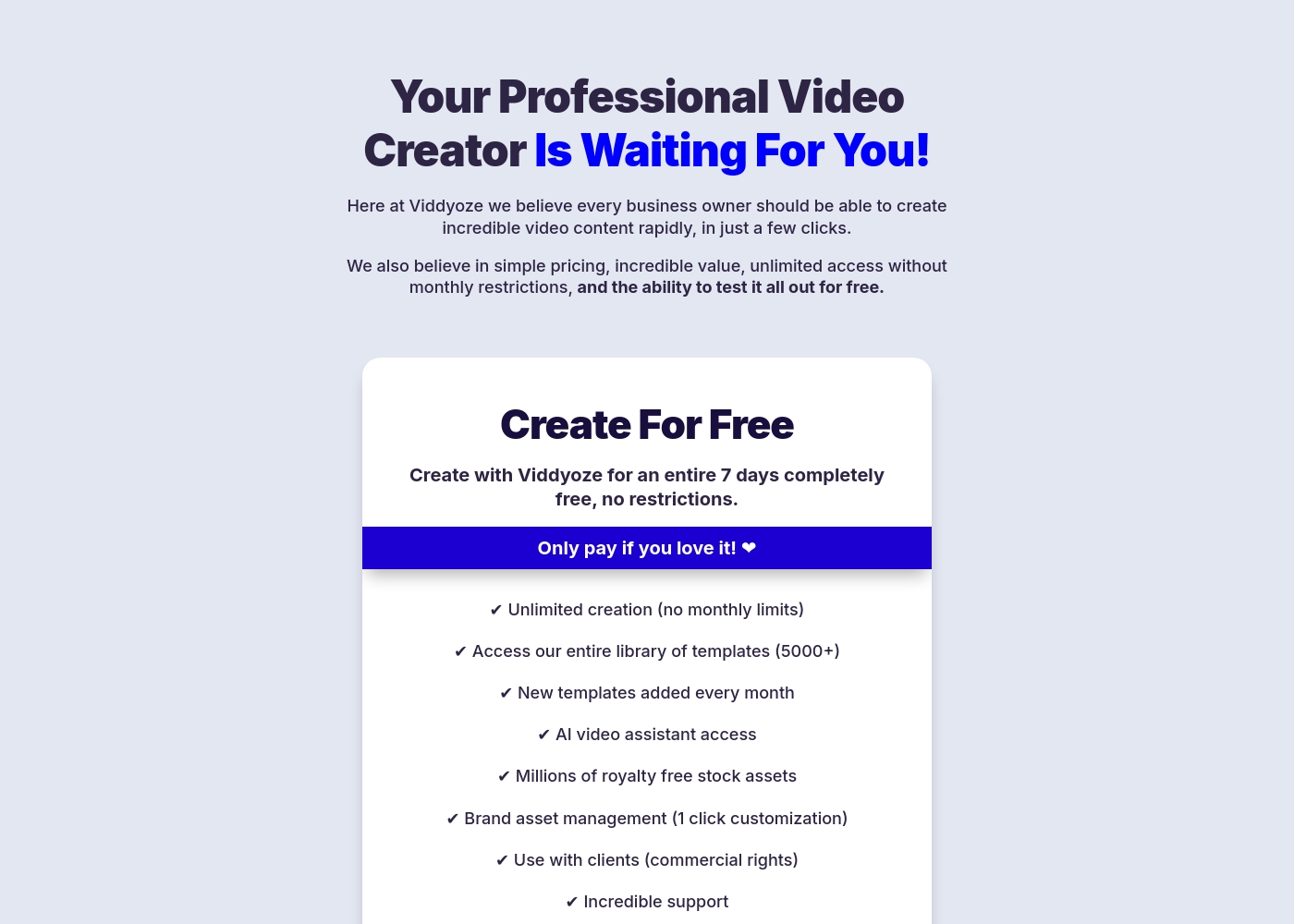
Viddyoze costs $47 per month with one plan: Monthly Subscription at $47/month.
We believe in simple pricing, so Viddyoze focuses on providing unlimited value within a single monthly fee. Here is a closer look at what the subscription includes.
Monthly Subscription
Price: $47/month Best For: Users needing unlimited video creation capacity and commercial rights Refund Policy: Cancel anytime (after the 7-day trial) Other Features:
- Unlimited creation (absolutely no monthly limits).
- Access to our massive library of over 5000+ templates.
- Includes full access to the AI video assistant (ViddyBot).
- Commercial rights for creating videos for your clients.
- Millions of royalty-free stock assets are included.
- Unlimited video creation (no monthly limits)
- Access to entire template library (5000+)
- New templates added every month
- AI video assistant access (ViddyBot)
- Millions of royalty free stock assets
Pricing Notes
- Pinnacle Studio requires a higher potential initial investment ($26–$200), likely a tiered one-time license.
- Viddyoze is a single, fixed recurring cost ($47/month) offering unlimited creation capacity.
- Viddyoze frequently receives complaints about difficult cancellation processes and trial charge issues.
- Viddyoze includes necessary commercial rights and millions of stock assets in its monthly fee.
- Pinnacle Studio only offers a 10-day StudioBacklot pass for training, not a full editing trial.
Pricing Head-to-Head
User Reviews
User feedback for Pinnacle Studio is exceptionally poor, primarily focusing on extreme frustrations with the software's reliability and performance. Despite newer versions claiming improved stability, many users report constant crashing, freezing, and issues with rendering, even when using high-spec computers.
This instability leads to lost progress and wasted time. The second overwhelmingly negative theme is customer support.
I’ve been using this product for several years because it is user friendly and features many nice tools. However, the tech support when there is an issue is not good at all. I was extremely disappointed and uninstalled the software despite owning it.
Users frequently praise Viddyoze for its exceptional ease of use and high-quality templates, noting it's a great tool for quickly creating professional intros, outros, and branding materials. Many long-term users call it the “best investment” and value the simplicity of customizing animations in just a few clicks.
The tool is celebrated for helping content stand out and serving as a powerful secret weapon for marketing. However, external feedback reveals serious inconsistencies regarding billing and customer support reliability, particularly around the 7-day free trial.
I have been using Viddyoze for years. I love the ease of use and the quality of the projects it delivers. This tool has gotten me out of many creative jams quickly!
Our Verdict
The choice between Pinnacle Studio and Viddyoze hinges entirely on your production demands. Pinnacle Studio is professional editor software; Viddyoze is a high-volume content generator. The critical decision is whether you need deep creative control or instant, branded assets. Pinnacle Studio’s superpower is its professional, comprehensive toolset for creators. You get key features like MultiCam editing, Green Screen compositing, and 8K video import support. Pinnacle Studio demands more user skill but provides necessary creative control for complex, long-form storytelling. It is the tool for fully custom, refined video projects. Viddyoze excels at lightning-fast, unlimited template-driven output for marketers. Viddyoze offers a massive library of 5,000+ templates and the helpful ViddyBot AI assistant. Marketing professionals love Viddyoze because content takes minutes, not hours, using simple three-click customization. Viddyoze also explicitly includes commercial rights for profitable client work. The deciding factor is complexity versus volume and speed. If your projects involve multiple camera angles, tutorials, and fine-tuned audio, Pinnacle Studio is necessary. If you need 50 branded social media videos this month, Viddyoze is dramatically faster and easier. Both Pinnacle Studio and Viddyoze have reported reliability pain points you must consider. Final Verdict: For deep creative editing of original footage, Pinnacle Studio is the clear winner despite its stability reputation. Choose Viddyoze for unlimited, client-ready, template-generated branding materials and quick social media output.
Frequently Asked Questions
Which is better for complex editing: Pinnacle Studio or Viddyoze?
Pinnacle Studio is a full non-linear editor built for complex projects. It handles MultiCam, Green Screen, and 8K footage imports. Viddyoze is template-based and lacks the deep editing controls needed for complexity. Choose Pinnacle Studio for serious, nuanced editing work.
Does Viddyoze offer a free trial like Pinnacle Studio?
Viddyoze offers a risk-free, 7-day full access free trial immediately. Pinnacle Studio does not offer a free editing trial. Instead, Pinnacle Studio provides a 10-day StudioBacklot pass for training tutorials.
Which software is faster for creating social media content?
Viddyoze is significantly faster, built for rapid social media content creation. Its lightning-fast rendering and 5,000+ templates produce results in seconds. Pinnacle Studio requires manually importing, editing, and rendering traditional video projects.
Should I worry about stability when using Pinnacle Studio?
Yes, historical user reviews frequently cite stability concerns and unreliable rendering in Pinnacle Studio. This can disrupt professional editing workflows. Viddyoze’s stability issues are primarily related to its web interface being ‘cranky’.
Which tool is better for creating videos for paying clients?
Viddyoze is better because it explicitly includes commercial rights with its monthly subscription. This allows you to legally use Viddyoze output for paying clients. With Pinnacle Studio, commercial rights are not highlighted as a subscription benefit.
How does Viddyoze's ViddyBot compare to Pinnacle Studio's features?
Viddyoze includes ViddyBot, an AI assistant for 24/7 idea generation and content structuring assistance. Pinnacle Studio does not feature any comparable AI writing or idea assistance. ViddyBot uniquely helps marketers facing creative block directly within Viddyoze.
Ready to Choose?
Both tools have their strengths. Choose based on your specific needs.