Pinnacle Studio vs Powtoon
Pinnacle Studio and Powtoon represent completely different paths to video creation. Pinnacle Studio focuses on powerful, traditional desktop tools for high-fidelity video editing. Powtoon focuses on speed, accessibility, and AI generation for business presentations and animations. Your specific goals will determine the clear winner here.
Best for: Hobbyists or enthusiasts focused on traditional, desktop video editing, Videographers needing MultiCam editing for events or interviews
Best for: Marketing teams needing rapid, consistent social media videos, Corporate trainers needing engaging, animated policy explainers
Powerful features, critical flaws.
We found that Pinnacle Studio 26 advertises excellent advanced features like 8K video support and extensive creative bundles, often appealing through affordable one-time pricing. However, overwhelmingly negative user feedback regarding pervasive instability and completely absent customer support casts serious doubt on its usability. Overall, we cannot recommend this software until the severe stability and support issues reported by the user base are definitively addressed.
Pros
- Offers sophisticated, multi-track editing features (MultiCam, 8K support).
- Pricing model is an affordable one-time purchase (especially upgrade bundles).
- Includes comprehensive utility and asset bundles in higher-tier packages.
- Interface is considered user-friendly by some long-time users.
Cons
- Extremely frequent crashing and freezing are reported across multiple versions.
- Customer support is consistently described as non-existent and unhelpful.
- Users experience major issues with rendering, artifacts, and export failures.
- The software can fail to uninstall properly, requiring complex manual steps.
AI power, five-star support, pricing caution.
Powtoon provides a powerful, AI-accelerated video platform that makes complex content creation accessible to anyone. We found the combination of vast asset libraries and the stated 24/7 priority support to be impressive. Overall, the product is strong, but we advise caution regarding the ambiguous subscription structures and extra charges for specific features.
Pros
- Customer support is exceptionally responsive, friendly, and professional.
- Support staff quickly resolves complex technical and account issues.
- Vast resource library includes over 4 million stock media assets.
- AI tools streamline workflow (scriptwriting, text-to-video, translation).
Cons
- Users report unexpected charges and difficulties canceling subscriptions.
- Lower-tier plans often require extra spending for 'Premium features.'
- AI features use a non-refundable, separate, usage-based credit system.
AboutPinnacle Studio
Pinnacle Studio 26 provides a welcoming, intuitive workspace designed for sophisticated video creation. It is a comprehensive tool that includes video editing, screen recording, and DVD authoring capabilities. Whether you are new to video editing or already an experienced producer, this software has a tier that meets your goals. Use it professionally for vlogging, creating channel content, or powerful business video production. Pinnacle Studio helps you achieve professional results while taking your edits to the next level. 💡
AboutPowtoon
Powtoon is an accessible online video maker designed for everyone, regardless of skill level. It helps you easily create amazing videos and presentations.
This platform is trusted by over 50 million users, including 96% of Fortune 500 companies. Powtoon focuses on making storytelling simple and impactful.
You can use it to transform static documents or fresh ideas into crisp, engaging videos right away. It's often called "the Canva for Video" for its simplicity and power.
Highlights
Feature Comparison
Features Overview
We highlight the main differences and pick a winner for each feature.
AI & Automation
Powtoon automates content generation heavily; Pinnacle Studio focuses on hands-on editing control.
Powtoon offers powerful AI tools like scriptwriting, video assistance, and document-to-video conversion. This streamlines creation significantly for marketers and businesses. Pinnacle Studio focuses on feature robustness for traditional editing tasks like color correction and frame accuracy. It requires the user to manually craft the story. For maximum speed and automated first drafts, Powtoon is the clear choice.
Customer Support
Powtoon's support is exceptionally praised; Pinnacle Studio's support is frequently criticized as slow.
Powtoon users report outstanding 24/7 priority support, often solving complex issues within hours or minutes. The support staff are frequently named and praised in reviews for professionalism. Pinnacle Studio users mention slow response times and unhelpful tech support when reporting rendering or stability issues. This difference is critical for maintaining a reliable workflow. Powtoon offers far higher reliability simply by having responsive help standing by.
Learning Curve
Powtoon's online interface has zero learning curve; Pinnacle Studio is moderately easy for a desktop editor.
Powtoon uses a visual, drag-and-drop online interface that is extremely intuitive, like 'Canva for Video.' Users can create polished content instantly using vast templates and assets. Pinnacle Studio maintains an accessible, user-friendly interface typical of desktop NLEs. However, mastering MultiCam and 8K workflows requires moderate training time. If ease and speed are your top priority, Powtoon wins hands down.
Technical Editing Power
Pinnacle Studio offers MultiCam and 8K support; Powtoon is not designed for detailed video file manipulation.
Pinnacle Studio supports advanced features like MultiCam editing for up to six angles and importing high-detail 8K footage. This is essential for professional tutorial and event videography. Powtoon is an animated content generator, not a high-fidelity video editor for raw files. If you are shooting on a DSLR and need precise cuts, choose Pinnacle Studio. For corporate training videos based on animation, Powtoon is faster.
Performance & Stability
Pinnacle Studio users cite reliability issues; Powtoon is cloud-based and generally stable in the workflow.
Pinnacle Studio has focused on stability, fixing crashes across 200+ user-identified scenarios in its latest version. Despite fixes, user reviews still frequently cite rendering, export, and stability issues, disrupting workflows significantly. As a specialized cloud platform, Powtoon generally maintains high stability and smooth operation. For mission-critical reliability based on user reports, Powtoon reduces the risk of project failure.
Pricing Clarity
Pinnacle Studio uses clear upfront pricing; Powtoon's subscription costs are opaque and use extra credit fees.
Pinnacle Studio uses a purchased license model, with initial costs ranging from $26 to $200, which is generally clear upfront. Powtoon does not explicitly state its core monthly subscription costs in its plan overview. Furthermore, Powtoon uses a non-refundable, usage-based credit system for advanced features starting at $25. Potential subscribers should scrutinize Powtoon’s billing practices very carefully.
Global Reach Tools
Powtoon offers instant translation and localization features; Pinnacle Studio requires manual external localization.
Powtoon helps ensure messages reach a worldwide audience with dedicated AI translation for scripts, voiceovers, and captions. It even offers localized, lip-syncing AI avatars for authenticity. Pinnacle Studio is focused purely on the local editing and production of the video track. If international content is your target, Powtoon provides powerful inherent capabilities. Powtoon dramatically speeds up multilingual content rollouts.
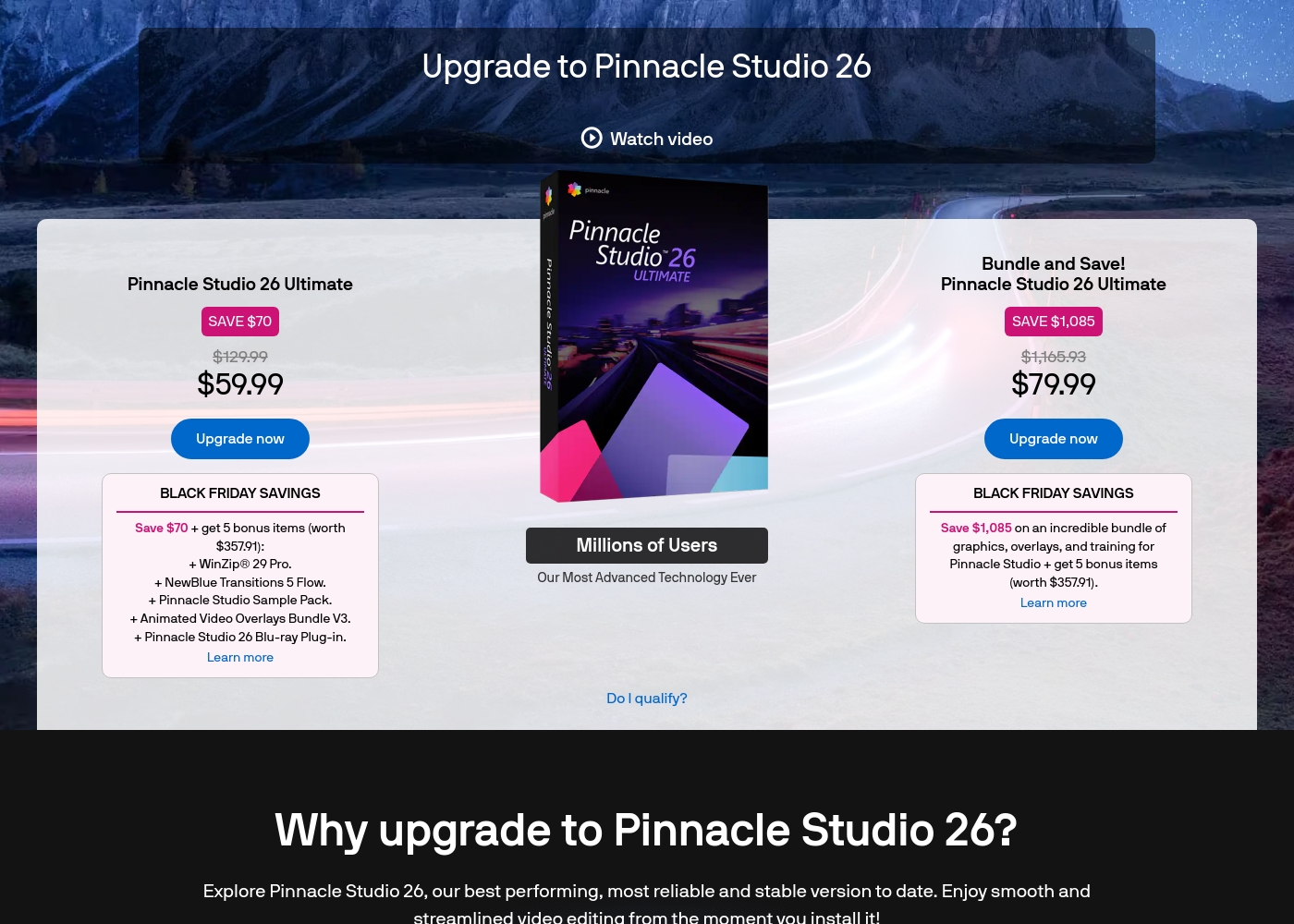
Pinnacle Studio 26 Ultimate acquisition costs range between $59.99 and $79.99 as a one-time upgrade purchase, with two main options: Pinnacle Studio 26 Ultimate at $59.99, and the Bundle and Save! version at $79.99.
These prices represent special Black Friday upgrade offers for users looking to access the latest features. Here is how the deals compare:
Pinnacle Studio 26 Ultimate
Price: $59.99 (One-time Upgrade Price) Best For: Current users who want the latest, most stable software version and specific utility tools. Other Features:
- Saves you $70 off the regular $129.99 price.
- Includes a total of 5 bonus items worth $357.91.
- Comes with WinZip® 29 Pro and NewBlue Transitions 5 Flow.
- Features the Pinnacle Studio 26 Blu-ray Plug-in.
- Includes the Pinnacle Studio Sample Pack and Animated Video Overlays Bundle V3.
- One-time price of $59.99 (was $129.99)
- 5 bonus items included (worth $357.91)
- Includes WinZip® 29 Pro
- Includes NewBlue Transitions 5 Flow
- Includes Pinnacle Studio 26 Blu-ray Plug-in
- One-time price of $79.99 (was $1,165.93)
- Includes all 5 bonus items (worth $357.91)
- Includes training, graphics, and overlays bundle
- Save $1,085 on the total package
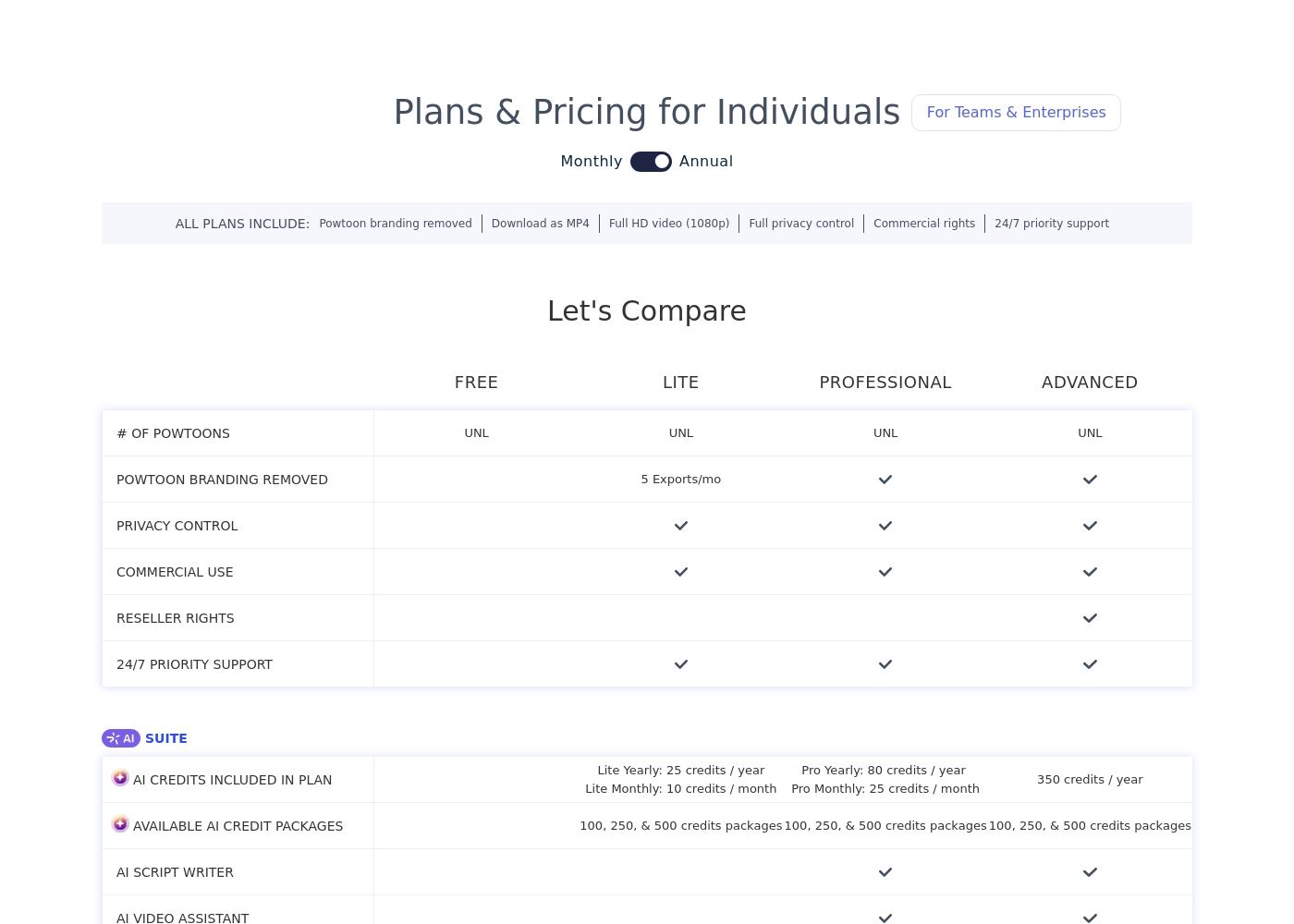
We can compare the features of these plans to help you decide which level of service best matches your needs for video creation.
FREE
Other Features: Unlimited (UNL) Powtoons
The Free plan is perfect if you want to try Powtoon's core features and start making videos right away. It includes unlimited creations, letting you explore the various tools before committing to a paid subscription.
- Unlimited Powtoons
- Unlimited Powtoons
- Powtoon branding removed
- Full HD video (1080p) download
- Full privacy control
- Commercial rights
- Unlimited Powtoons
- Powtoon branding removed
- Full HD video (1080p) download
- Full privacy control
- Commercial rights
- Unlimited Powtoons
- Powtoon branding removed
- Full HD video (1080p) download
- Full privacy control
- Commercial rights
Pricing Notes
- Pinnacle Studio offers clearer, upfront pricing, typically a one-time license fee between $26 and $200.
- Powtoon’s core subscription fees are not openly published on the pricing overview, leading to confusion among users.
- Powtoon uses non-refundable AI credits for advanced features, starting at $25 for 100 credits, mandatory on paid plans.
- Users report unexpected automatic renewals and difficulty canceling Powtoon subscriptions or securing refunds.
- Pinnacle Studio users benefit from a 10-day StudioBacklot trial included for learning and assets.
Pricing Head-to-Head
User Reviews
User feedback for Pinnacle Studio is exceptionally poor, primarily focusing on extreme frustrations with the software's reliability and performance. Despite newer versions claiming improved stability, many users report constant crashing, freezing, and issues with rendering, even when using high-spec computers.
This instability leads to lost progress and wasted time. The second overwhelmingly negative theme is customer support.
I’ve been using this product for several years because it is user friendly and features many nice tools. However, the tech support when there is an issue is not good at all. I was extremely disappointed and uninstalled the software despite owning it.
Powtoon consistently earns overwhelmingly positive praise for customer support responsiveness. Users describe the support team as professional, quick, and highly effective.
Reviewers frequently mention support staff by name, noting how they solve technical problems swiftly, sometimes even over weekends, or help transfer extensive work between accounts. 💪 This high level of service suggests a strong commitment to existing customers.
Top-notch responsiveness from the Powtoon support team. Volodymyr wrote back almost immediately regarding a technical problem with text color. The development team actually fixed my issue within just a few hours. This timely communication and swift action made all the difference.
Our Verdict
This comparison pits the past and future of video against each other, offering very distinct tools. If you need a versatile platform for business communication, **Powtoon** is the smarter choice for most users today. However, **Pinnacle Studio** remains essential for deep, technical control over raw video files. **Pinnacle Studio's** superpower is its technical editing prowess and advanced control. It supports impressive features like MultiCam editing and importing massive 8K footage files. Choose **Pinnacle Studio** if you are a camera operator or traditional editor managing high-fidelity video projects. It costs $26–$200 and offers tools for complex manual manipulation. **Powtoon's** superpower is speed and accessibility, driven by potent generative AI capabilities. It transforms complex documents into professional, engaging animated videos, often in mere minutes. **Powtoon** offers world-class, 24/7 priority customer support and a massive 4 million asset library, perfect for corporate content. The decisive factor is your primary content type: cinematic footage or animated communication. If stability and clear pricing matter, choose **Pinnacle Studio**, despite its mixed support record. If ultra-fast content and professional customer service are critical, choose **Powtoon**, but be aware of its opaque subscription terms. Ultimately, **Powtoon** is superior for corporate communication and rapid content generation needed by businesses.
Frequently Asked Questions
Which software is better for creating animated explainer videos: Pinnacle Studio or Powtoon?
Powtoon is specifically designed for animated explainer content, using AI and templates for speed. Pinnacle Studio focuses on editing traditional video footage, not animated presentation styles. Powtoon provides a much better framework for animated business communication.
Does Pinnacle Studio offer the same advanced AI features as Powtoon?
No, Pinnacle Studio focuses on non-linear editing tools like MultiCam and color correction. Powtoon excels with dedicated AI tools for scriptwriting, instant translation, and avatar generation. The advanced production steps are automated more by Powtoon.
Which tool has better and more responsive customer support?
Powtoon consistently receives rave reviews for its professional and quick 24/7 priority customer support. Pinnacle Studio users frequently report slow reply times and inconsistency when reporting technical issues. Powtoon is the clear winner for reliable support.
Should I choose Pinnacle Studio if I need to work with 8K video files?
Yes, Pinnacle Studio supports both importing and editing high-resolution 8K footage, a key feature for high-definition projects. Powtoon is an online, asset-heavy tool and is not designed for handling such large video files.
Is Powtoon significantly more expensive than Pinnacle Studio?
Pinnacle Studio's pricing is transparent, typically a one-time license cost between $26 and $200. Powtoon’s subscription prices are not public, and you must purchase extra AI credits. This usage model can make the total cost for Powtoon difficult to predict.
Which software is recommended for maintaining consistent brand assets across a large team?
Powtoon is built for teams and enterprises, offering powerful features like custom templates and brand locking controls. Pinnacle Studio is primarily designed for individual, local editing workflows. Powtoon ensures greater brand consistency management.
Ready to Choose?
Both tools have their strengths. Choose based on your specific needs.