PageCloud vs Ycode
PageCloud is built for total design freedom and quick lead generation tools for marketers. Ycode delivers powerful structure via an integrated CMS and highly affordable pricing. Their key difference is PageCloud focuses on pure design while Ycode prioritizes content structure and scaling. Pick wisely based on your project's technical needs and team size.
Best for: Solo entrepreneurs launching a professional, visually unique website quickly., Marketers focused on maximizing conversions using advanced popups and exit-intents.
Best for: Web designers prioritizing structure, responsiveness, and complex interactions., Startups or agencies needing affordable scaling with unlimited free team members.
Unrestricted design power for simple websites.
We found PageCloud delivers impressive design flexibility, allowing designers and novices to create unique sites without writing code. The intuitive drag-and-drop editor enables full creative control beyond standard template constraints. Overall, we note repeated user feedback citing significant backend bugs and potential limitations, which suggest it might best serve users focused on straightforward design requirements.
Pros
- Provides total design freedom, avoiding typical template restrictions.
- Highly effective and intuitive drag-and-drop website editor.
- Excellent, responsive, and constantly available customer support.
- Ideal for non-technical users who want to avoid HTML or widgets.
Cons
- Reports of frequent bugs where edited elements shift or change unexpectedly.
- May be limited or frustrating for complex website requirements.
- Exact pricing details for premium subscriptions are not explicitly published.
- Some older feedback references support being unresponsive or immature.
Powerful visual editor with smart pricing.
We see Ycode successfully bridges the gap between powerful design tools and affordability, offering extensive features like an integrated CMS and team collaboration without excessive cost. Overall, this platform presents a compelling alternative for designers and founders seeking complete control over their complex projects.
Pros
- Extremely competitive pricing structure beginning at $5/month annually.
- Comprehensive Free plan perfect for development and testing new projects.
- Total design autonomy via an intuitive visual editor, requiring no code.
- Integrated CMS simplifies content structuring and data management.
Cons
- Custom code integration is restricted to Basic and Pro plans.
- The Mini plan is significantly limited in scope (only 5 published pages).
- No explicit refund policy or money-back guarantee is provided.
AboutPageCloud
PageCloud is a comprehensive platform designed to help you create and grow your online presence. You can easily build standard websites, specialized landing pages, and even dedicated Link-in-Bio pages. 💡
The platform also offers powerful tools to create customized popups, including slide-ins, exit-intents, and banners. This suite of tools is an excellent fit for small business owners, professional services, marketers, and agencies managing client projects who need to streamline their growth process.
AboutYcode
Ycode is a comprehensive, all-in-one website builder and integrated CMS. It's built specifically for designers, creators, and founders who want professional results without relying on code. Using its intuitive visual editor, you gain complete design control to craft beautiful, fully responsive websites. You can publish your creations instantly and manage everything easily from one reliable platform. ✅
Highlights
Feature Comparison
Features Overview
We highlight the main differences and pick a winner for each feature.
Integrated CMS & Data
Ycode offers a robust, integrated CMS for powerful data structuring and organization. PageCloud lacks these specific native tools, focusing on general content volume.
PageCloud emphasizes scaling content with unlimited posts and integrated SEO tools for visibility. Data structuring details are not clearly defined in PageCloud's core features. Ycode includes a user-friendly integrated CMS for structuring content collections. The Ycode Pro plan supports 12,000 CMS items, ideal for technically complex sites. For any project needing defined data relationships, Ycode is vastly superior to PageCloud.
Pricing & Transparency
Ycode provides clear, low, and highly affordable pricing starting at $5/month. PageCloud's premium costs are not publicly visible, creating poor transparency.
PageCloud offers a free tier to build your site; you pay only when you are ready to publish. However, premium costs for PageCloud are not explicitly displayed on the official website. Ycode provides four transparent tiers, ranging from $0 up to $25/month when billed annually. Ycode's clear structure lets users budget and scale without hidden costs or surprises. Ycode offers exceptionally better value and budget predictability than PageCloud.
E-commerce & Sales
PageCloud provides strong, multi-channel e-commerce integration for retailers. Ycode does not prominently feature these retail-specific selling tools.
PageCloud offers specialized E-commerce Add-ons to build a comprehensive custom storefront. It supports selling across popular platforms like TikTok, Amazon, and Instagram simultaneously. Ycode focuses primarily on service-based and informational sites and lacks these social commerce integrations. If your business model heavily relies on selling physical products, PageCloud is the necessary choice. PageCloud simplifies managing inventory and sales across multiple digital channels effectively.
Collaboration & Teamwork
Ycode sets itself apart by allowing unlimited collaborators for free across all plans. PageCloud requires specialized plans for strong developer collaboration.
Ycode allows users to invite unlimited team members to work in real-time without extra seat fees. This makes Ycode incredibly cost-effective for growing teams and agencies. PageCloud supports team collaboration, but strong features like developer source code access are restricted. PageCloud mentions these advanced features mainly within their specialized Agency plans. Ycode reduces overhead and streamlines workflow for any organization focused on cost efficiency.
AI Content Integration
PageCloud includes an integrated AI tool for faster content writing and refinement. Ycode does not offer native AI tools and relies on third-party solutions.
PageCloud utilizes AI to help users scale content simply by speeding up the writing process. This feature strongly benefits marketers needing high content volume. Ycode manages content through its integrated CMS but requires users to input original text. If generating and refining blog posts quickly is a critical need, PageCloud saves significant time. Users must rely on external AI tools if they choose to build with Ycode.
Zero-Code Interactions
Ycode provides native tools for complex zero-code interactions like scroll effects, enhancing site dynamism. PageCloud focuses more on utility elements like popups.
Ycode enables easy implementation of sophisticated visual effects like scroll-into-view triggers and hover states. Designers gain total control over the site's dynamic behavior without writing code. PageCloud focuses on conversion tools like exit-intent popups and custom animated buttons. The platform's dynamic capabilities appear more limited than Ycode's native interaction system. If modern, visually dynamic sites are essential, Ycode offers superior built-in functionality.
Design Flexibility
PageCloud offers true 'total design freedom' with its highly praised unique drag-and-drop editor. Ycode also provides great control but operates with high structure.
PageCloud supports a unique, intuitive drag-and-drop experience, allowing pixel-perfect placement. This is often described as liberating for creative designers avoiding code. Ycode's visual editor provides total design autonomy for crafting fully responsive websites. Some PageCloud users report bugs, where elements shift unexpectedly after editing. However, for pure creative control over layout, PageCloud is often cited as the winner. Ycode prioritizes responsiveness and reliable architecture beneath the design layer.
Learning Curve
PageCloud provides the absolute gentlest learning curve for non-technical users and novices. Ycode is easy but requires adapting to its integrated CMS system.
PageCloud is explicitly engineered for users who want to avoid anything technical, including HTML and widgets. Its simplicity is a core value proposition for small businesses. Ycode is very user-friendly but rapidly immerses the user in data structuring concepts like 'CMS collections.' For simple landing pages or portfolio sites, PageCloud is perhaps slightly easier to master initially. Ycode encourages professional structure from the start, demanding more focus during setup.
All premium plans automatically include key features like the website builder, robust hosting, and expert support. Review the options below to figure out which approach is right for your project whether you DIY or choose a custom-built solution.
Premium Subscription
Best For: Small businesses, Professional services, Artists & Designers, SaaS, Non-profit, Personal Other Features:
- No code website builder
- Advanced Analytics (GDPR compliant)
- AI tools for writing and refinement
- Free custom domain and email (with annual subscription)
- SEO tools including keyword research by Semrush
- Unlimited draft sites and pages
This core subscription level is great if you want to build and manage a new, high-performing website yourself. It gives you immediate access to powerful tools like the AI writer and shared team collaboration features, helping you focus entirely on your online growth.
- No code website builder
- Advanced Analytics
- AI tools for copy
- Search engine optimization (SEO)
- Blog and unlimited posts
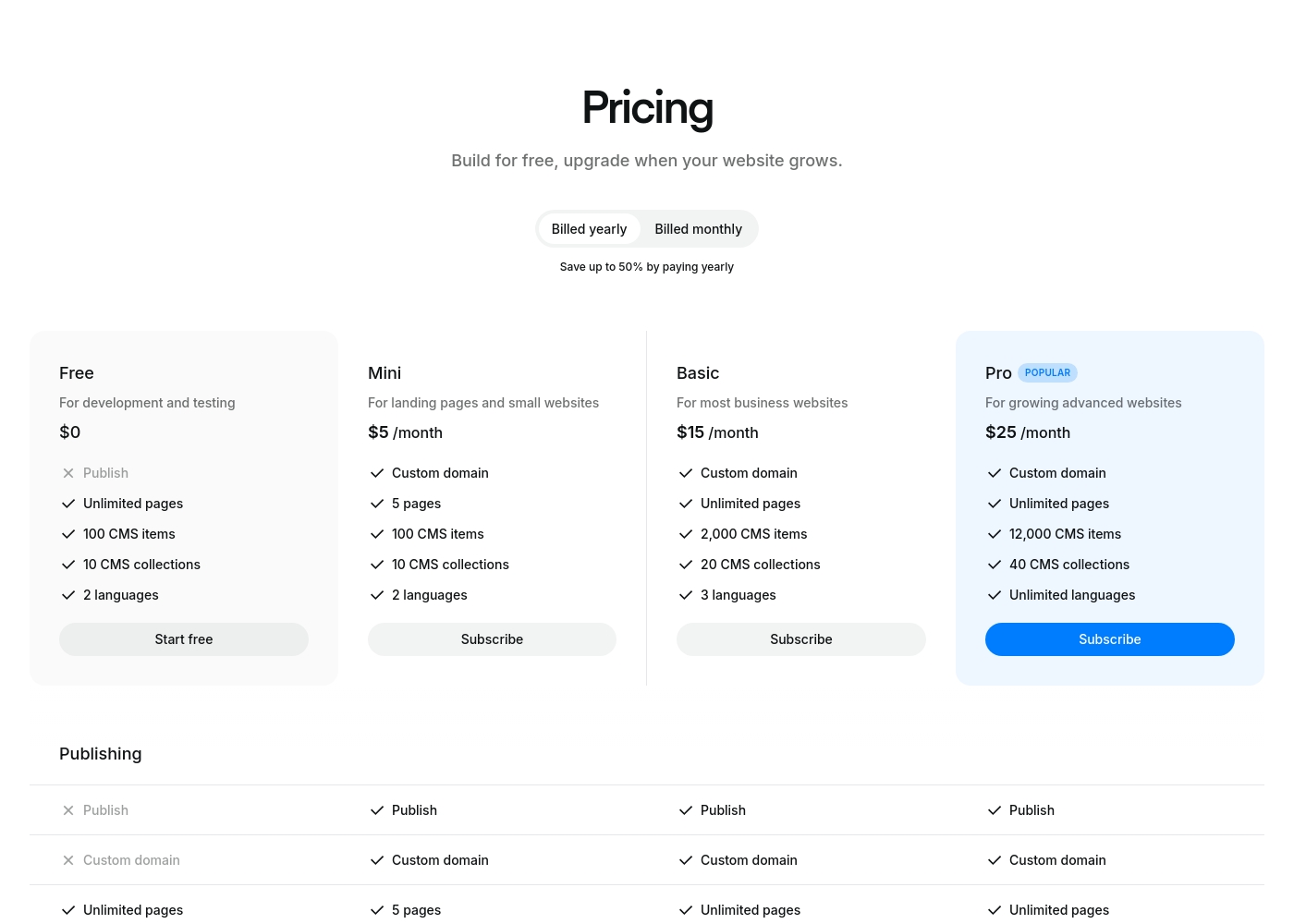
Ycode costs between $0 and $30 per month, with four plans: Free at $0, Mini at $5/month (billed yearly), Basic at $15/month (billed yearly), and Pro at $25/month (billed yearly).
Here’s a breakdown of what each tier offers so you can choose the best fit for your project.
Free
Price: $0 Best For: development and testing Other Features: Unlimited pages on a ycode.site domain, 100 CMS items, 10 CMS collections, 2 languages, 1K monthly visits.
- Publish to ycode.site
- Unlimited pages
- 100 CMS items
- 10 CMS collections
- 2 languages
- Custom domain
- 5 pages
- 100 CMS items
- 10 CMS collections
- 2 languages
- Custom domain
- Unlimited pages
- 2,000 CMS items
- 20 CMS collections
- 3 languages
- Custom domain
- Unlimited pages
- 12,000 CMS items
- 40 CMS collections
- Unlimited languages
Pricing Notes
- Ycode offers extremely transparent pricing, starting at $5/month when billed annually for the Mini plan.
- PageCloud's premium subscription costs are not publicly disclosed, creating uncertainty for budget planners.
- Ycode provides substantial discounts (often 50%) when users opt for annual billing over monthly payments.
- Both PageCloud and Ycode offer robust permanent free plans for development and testing projects.
Pricing Head-to-Head
User Reviews
PageCloud receives polarized feedback, though many users appreciate its core value: total design flexibility without coding. The drag-and-drop editor is highly praised, providing creative freedom often missing in template-driven platforms.
Users frequently highlight the exceptional customer support, describing the team as responsive, approachable, and truly helpful, even calling it "second to none." However, the platform faces criticism regarding reliability. Some early reviewers reported significant technical instability and complained the editor can be "buggy," causing elements to jump or change themselves.
The platform is simple to use and very designer friendly, capable of so many cool things like animated buttons. They also have the best customer support around. The team is always available and happy to help customers.
Ycode is strongly positioned as a high-value and professional alternative to established web development platforms, frequently emphasizing user satisfaction and powerful design capabilities. The company maintains that thousands of users worldwide praise its innovation and supportive environment.
This platform aims to cut through complexity by combining powerful features with an intuitive, user-friendly interface. Key themes promoted internally include superior user interface design and competitive pricing compared to rivals like Webflow, alongside strong functionality for animation and visual effects.
Our Verdict
Choosing between PageCloud and Ycode comes down to structure versus creative freedom. If you need simple design and lead capture, PageCloud is ready for you. For professional teams managing data, Ycode provides superior architecture and value. Both tools excel, but Ycode offers better long-term scalability. PageCloud’s superpower is its unique, highly intuitive drag-and-drop editor for total design control. Marketers love PageCloud for powerful conversion tools like embeddable exit-intent popups and custom forms. You also gain integrated AI writing tools and strong multi-channel e-commerce capabilities. PageCloud is ideal if quick launch speed and raw design freedom are your top priorities. Ycode shines with its powerful, integrated CMS for structuring heavy content and data. Its pricing is highly affordable and transparent, starting at just $5/month when billed annually. Ycode simplifies collaboration by allowing unlimited team members for free on all accounts. It's the smarter choice for professional, scalable web applications. The deciding factor should be complexity: Pick PageCloud if you need the easiest entry point for simple, visually stunning static sites. Choose Ycode if your project involves data, requires robust architecture, and must accommodate unlimited free team collaboration. Ycode is technically better for demanding growth. For most growing teams and data-focused sites, Ycode is the clear overall winner. If you are a solo entrepreneur focused purely on design and lead collection, PageCloud makes the building phase effortless.
Frequently Asked Questions
Which is better for e-commerce needs: PageCloud or Ycode?
PageCloud is better due to its specialized e-commerce Add-ons and management tools. PageCloud supports selling across major external channels like Amazon and TikTok. Ycode focuses on site structure and content, lacking dedicated retail sales features.
Which tool is cheaper for a small business: PageCloud or Ycode?
Ycode is significantly cheaper and more transparent in its pricing model. Ycode's paid plans start at just $5/month when billed annually. PageCloud does not publicly disclose the cost of its premium plans.
Does Ycode offer AI writing tools like PageCloud?
No, Ycode does not offer native integrated AI writing tools for content creation. PageCloud includes an integrated AI feature to help users write and refine content faster. If AI assistance is crucial, PageCloud is the better choice for you.
Can I collaborate with unlimited team members on PageCloud?
Ycode allows for unlimited free collaborators on every plan, which is a major benefit for teams. PageCloud supports collaboration, but robust features and source code access are geared toward expensive agency plans. Ycode is more cost-effective for large teams.
Which tool is better for managing large content sections (CMS)?
Ycode is far superior for content management due to its integrated, powerful CMS. The Ycode CMS helps structure and organize large data collections easily. PageCloud is better suited for simple, high-volume blog posting rather than structured data.
Is PageCloud suitable for technically complex websites?
Based on user feedback, PageCloud is best recommended for the simplest of websites. Complex requirements might be better handled by Ycode's robust structure and higher traffic limits. PageCloud users sometimes report bugs that affect complex element placement.
Ready to Choose?
Both tools have their strengths. Choose based on your specific needs.