PageCloud

PageCloud review

Build websites, popups, and stores your way—no code required.

PageCloud costs from $1.67/mo · 5 plans · prices checked Oct 12, 2026

By Ciroapp Editorial Team · Updated Sep 16, 2026

Commission may apply at no extra cost

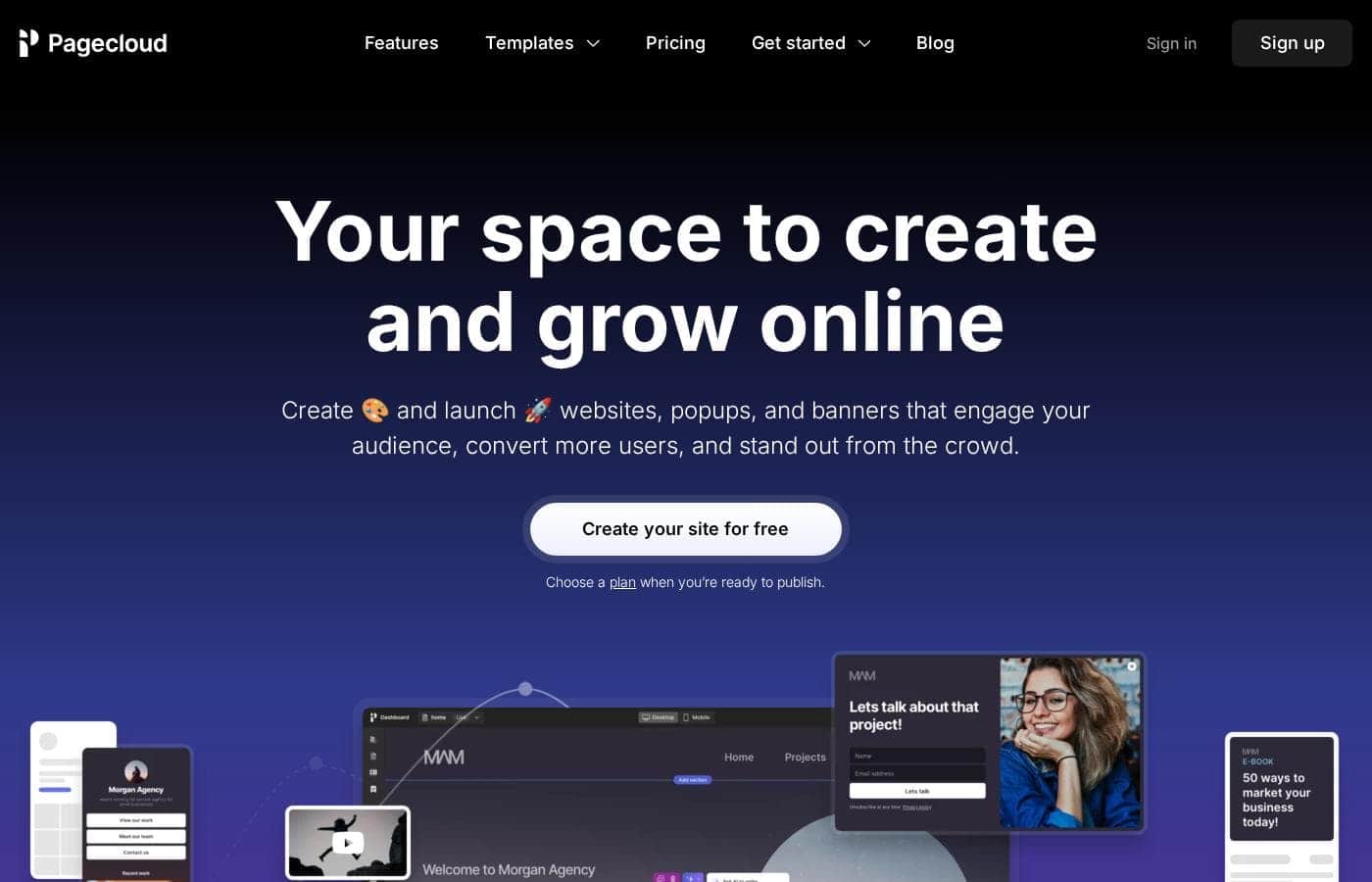
PageCloud homepage screenshot

At a glance

Quick overview for PageCloud: rating, pricing summary, key features, and highlights.
Pricing verified Oct 12, 2026

Ciroapp score

3.7/ 5

PageCloud's drag-and-drop editor gives you real design freedom, plus built-in popups, privacy-first analytics, and multichannel selling. But exact plan prices aren't shown, and moving an existing site means rebuilding. Overall, it's a solid pick for design-focused small businesses and agencies who check rates and limits before they commit.

Pros

  • Pros:The drag-and-drop editor lets you customize any element—text, images, video, layout—rather than squeezing your brand into a rigid template, with no code required.
  • Pros:Popups, banners, slide-ins, and exit-intents are built in and can be published on any website, so lead capture doesn't require a separate tool.
  • Pros:Privacy-first, GDPR-compliant analytics track visits, clicks, form submissions, and even broken links in one dashboard without storing personal visitor data.

Cons

  • Cons:Exact plan prices aren't shown on the reviewed pages—everything is billed in USD, so you must check the live pricing table before budgeting.
  • Cons:There's no direct import for full websites or code; migrating means rebuilding in the drag-and-drop editor, following switching guides, or hiring a Pagecloud Pro.
  • Cons:Building is free, but publishing a live site requires a paid plan—there's no permanently free published tier.
Best for
  • Small business owners who want a DIY website without hiring a developer
  • Marketers who need landing pages, popups, and lead capture without relying on a dev
  • Agencies that design, launch, and manage client sites with a team
This section is a summary. Detailed sections about features, use cases, pricing, and reviews follow below.

What is PageCloud?

Getting a website that actually looks like your brand is frustrating. Many builders lock you into rigid templates. PageCloud takes another path: a drag-and-drop editor you can try free, templates where you can customize anything, and popups plus analytics built in to help you turn visitors into customers.

PageCloud is a no-code website builder for creating websites, landing pages, link-in-bio pages, popups, and banners. You design with drag-and-drop editing, track results with privacy-first analytics, and can sell across channels like Instagram and Amazon. Based on the company's site, it targets small businesses, marketers, and agencies—anyone who wants full design control without hiring a developer.

You start building free and choose a plan when you're ready to publish.

Should you choose PageCloud?

Quick buyer guidance before you compare plans or click through.

Choose it if

  • You want to customize every design detail, not just swap colors and text
  • You need popups and forms you can publish on any website
  • You want analytics—visits, clicks, forms, broken links—in one dashboard
  • You plan to sell across social channels and marketplaces like Instagram, TikTok, and eBay
  • You want to blog without page limits and write faster with AI

Skip it if

  • You need full pricing details upfront—the homepage confirms paid plans exist but doesn't show costs, so check the pricing page first
  • You want a permanently free published site—building is free, but you'll pick a plan when it's time to publish
  • You're a large enterprise—site messaging centers on small businesses, marketers, and agencies
  • You'd rather hand off the entire build—the default is DIY, though a paid 'Crafted by Pagecloud' service exists
  • You rely on specific app integrations—the site mentions connecting favorite apps generically, so confirm yours before committing

Next steps before buying

  1. 1Review the pricing page to confirm which plan fits your budget and publishing needs
  2. 2Browse templates in your category—restaurant, photography, events, and more—to judge the design fit
  3. 3Confirm the apps and selling channels you rely on, including Instagram, TikTok, Amazon, Facebook, and eBay
  4. 4Sign up free—no credit card—and test the drag-and-drop editor on a draft page
  5. 5If you're switching platforms, check PageCloud's switching resources, or compare one or two alternatives first

Ease of use

The signals point to a beginner-friendly tool. The editor is drag-and-drop with no code required. Signup is free with no credit card, and PageCloud offers getting-started guides, switching-platform resources, and done-for-you services. Customer quotes on the site repeatedly mention ease of use and customization. This is source-based analysis, not hands-on testing, but the onboarding materials suggest a gentle learning curve.

PageCloud Key Features

🎨 Design anything, code nothing

Your brand shouldn't have to squeeze into a rigid template. With PageCloud's drag-and-drop editor, you start from a template and then customize anything—text, images, video, and layout. Use it when you want your site to look exactly the way you picture it.

You get full control without writing a single line of code.

✨ Turn visitors into leads

Popups, banners, and custom forms help you capture attention and convert new users faster. Pick a format, match it to your brand, and publish it on any website. Use them for lead capture, promotions, or announcements when you want more from your traffic. Your options include:

  • Exit-intent popups
  • Modals and slide-ins
  • Banners and lead forms

📊 See what's actually working

Growth needs feedback. PageCloud's privacy-first analytics track visits, clicks, form submissions, and broken links—all in one dashboard. Check it after you launch a page or publish a popup to see what engages people.

Then adjust your design and content based on real numbers, not guesses.

✨ Content that keeps earning

Publish unlimited blog posts and web pages to bring in organic traffic. AI tools help you draft and edit content faster, while SEO tools and keyword research help people find it. Add your custom domain, keep publishing, and your content keeps working for you long after it's live.

✨ Sell where your customers shop

Build a custom storefront and manage your inventory from one place. Then extend your reach by selling on channels like Instagram, TikTok, Amazon, Facebook, and eBay. It's a simple way to meet customers where they already browse and buy—without juggling separate tools for each channel.

Use Cases

🏪 Build your small business site yourself

No developer needed. Start with a template, drag elements where you want them, and customize anything. Build free with no credit card, then publish when you're ready.

Expected outcome: a site that looks exactly like your brand, not a rigid template.

Tip: Browse templates in your category—restaurant, photography, events—before you start.

🎯 Capture leads without waiting on a dev

Launch landing pages, custom forms, and popups—exit-intents, modals, slide-ins, banners—that match your brand. Publish them on any website, then watch visits, clicks, and form submissions in one dashboard.

Expected outcome: more conversions you can measure, without a ticket to engineering.

🤝 Run client projects with your team

Agencies can design, launch, and manage client sites in one place. Add team members, share draft pages, and keep unlimited drafts for reviews. Source code access (HTML, CSS, JavaScript) is there when you need it.

Expected outcome: a smoother client workflow from first draft to launch.

🛒 Sell where your customers already shop

Create a custom storefront, manage your inventory, and sell on Instagram, TikTok, Amazon, Facebook, and eBay. Pair it with a link-in-bio page to route followers straight to your products.

Expected outcome: one store, multiple channels.

Tip: Confirm your sales channels are supported before you commit.

PageCloud pricing

From$1.67/mo

  • From the vendor's pricing page, checked Oct 12, 2026
  • 5 plans

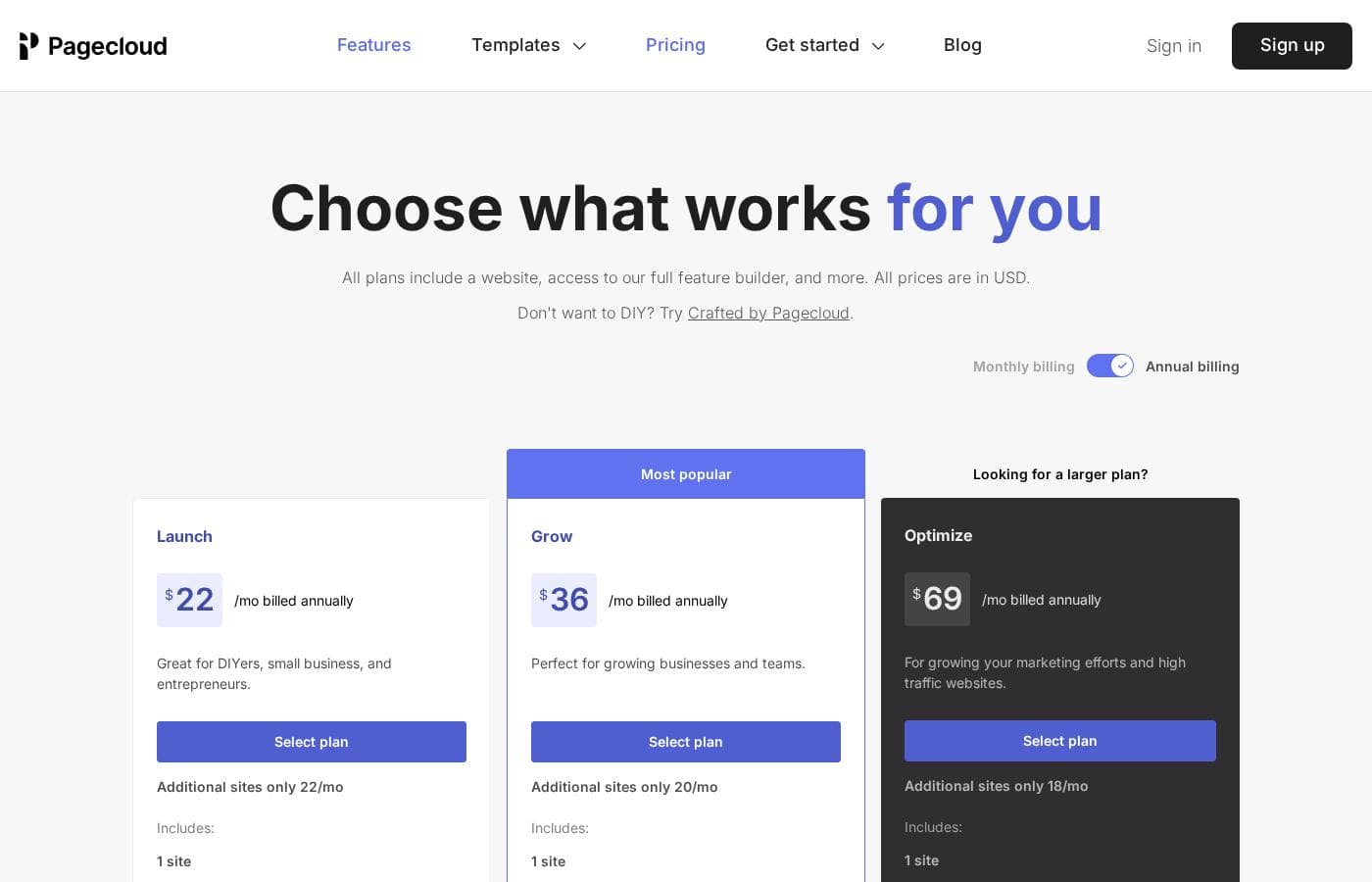
Prices checked on Oct 12, 2026 from PageCloud's pricing page

PageCloud pricing page screenshotView pricing page screenshot
PlanBilled monthlyBilled annuallyIncludes
Launch
$22/mo
—
Grow
$36/mo
—
Optimize
$69/mo
—
A free custom domain
—
$1.67/mo
$20 per year
A year of Google Workspace
—
$6.83/mo
$82 per year

Price history

Tracking prices since Oct 9, 2026. No price change detected yet.

Pricing types: Free plan, Yearly subscription

Pricing notes

PageCloud offers subscription plans billed in USD, with every premium plan including the full no-code website builder, hosting, analytics, and AI tools. You can start building for free, and annual subscriptions add a free custom domain and custom email for the first year.

PageCloud offers several subscription plans priced in USD, and annual plans include a free custom domain and custom email for the first year — you can even start building for free.

Here's what PageCloud confirms about its plans and what's included at every paid tier.

Premium website plans

Other Features:

  • Full no-code website builder with managed hosting and automatic SSL
  • GDPR-compliant analytics plus Pagecloud AI for writing and editing copy
  • SEO tools with Semrush keyword research and unlimited blog posts
  • Form builder, galleries, 100+ app integrations, and team collaboration
  • Source code access (HTML, CSS, JavaScript) and unlimited draft sites

Every premium plan carries the same core toolkit, so you're choosing scale rather than features. That makes these plans a solid fit for small businesses, marketers, freelancers, and agencies managing client sites. If you publish one site and keep it simple, a standard premium tier should cover you — larger volume plans exist for heavier needs.

Crafted by Pagecloud

Price: Custom — rates vary by project and Pro Other Features: done-for-you website design and management, hire a Pagecloud Pro to build or maintain your site, custom services and e-commerce add-ons available on request

Prefer to skip the DIY route? This option pairs you with a professional who builds and manages the site for you. It's a good match if you're short on time or want expert polish, though you'll need to request a quote since pricing depends on your project.

Beyond these, PageCloud also offers larger volume plans and e-commerce add-ons for growing stores.

You can start for free — the site makes it clear: "No code. No credit card. No trial." 💡 Switching plans is prorated right from your dashboard, cancellation takes just a few clicks, and all major credit cards (including AMEX, VISA, and MasterCard) are accepted. One tip: confirm current plan prices and license limits at checkout before you buy.
Cost calculator

Estimate what PageCloud costs for your team.

Billing
Per month
$22
Per year
$264

Launch states no user limit: shown as one price for the whole account. Check the price for 5 users with the vendor. Estimate based on published list prices, before taxes, add-ons and discounts.

How to pay less for PageCloud

  • Cheaper tools in this category start at $1.17/mo.
Visit PageCloud

Email me when PageCloud changes price

One email when we detect a price change on the vendor's pricing page. No newsletter, no deals. Unsubscribe in one click.

User Reviews

No reviews yet.

Write a Review

Write a Review for PageCloud
0/100 characters
0/2000 characters

Why use PageCloud?

If you want a site that looks exactly the way you picture it—not whatever a template allows—PageCloud is built for that kind of control.

  • Design freedom without code. Start from a template, then customize anything with drag-and-drop editing.
  • Growth tools included. Build popups, banners, custom forms, and lead capture pages to convert more visitors.
  • Privacy-first analytics. Track visits, clicks, form submissions, and even broken links from one dashboard.
  • Sell where your customers shop. Create a storefront and sell on Instagram, TikTok, Amazon, Facebook, and eBay.
  • Content that compounds. Publish unlimited blog posts and pages, draft with AI, and use SEO tools like keyword research.
  • Free to explore. Sign up with no code, no credit card, and no trial clock—pick a plan only when you publish.

PageCloud alternatives

Other tools in the Website Builder category

View all Website Builder tools
Webydo

Webydo

Website Builder3.9/5

Webydo is a professional platform built specifically for creative designers and agencies. It helps you create high-quality, custom websites quickly and efficiently. Over 246,000 designers and agencies already use this tool. You can craft custom experiences for your clients faster than ever.

Wizishop

Wizishop

Website Builder3.9/5

WiziShop is an ecommerce platform designed to help people launch and automate online stores. It emphasizes an intuitive, self-serve setup and AI-powered automation, so you can focus on sales and your customers. It also highlights dropshipping and affiliate-store options for faster starts.

UENI.com

UENI.com

Website Builder4/5

UENI gives small businesses and independent professionals a chance to reach a broader audience and increase sales by building their new website for them without the need to settle for expensive agencies or complicated DIY web design builders.

Squarespace

Squarespace

Website Builder4.1/5

Squarespace is an all‑in‑one website builder and online store platform that lets you publish a professional site, sell products, take bookings, and collect donations. It’s aimed at entrepreneurs, creatives, consultants, designers, event organizers, and other service providers who want a polished, functional web presence. The platform combines hosting, templates, a design editor, domain registration, payments, and marketing tools in one place.

Zenfolio

Zenfolio

Website Builder4.1/5

Zenfolio is a powerful, yet simple, complete platform favored by photographers for nearly two decades. It's designed specifically for professionals needing to organize, showcase, and sell their work efficiently. This solution offers simplicity meeting power. It is a unified solution, making it easy to manage specialty areas like portrait, wedding, and even volume photography—all in one place. Zenfolio is built to grow with you, providing tools no matter the current size of your business or your future goals.

Duda

Duda

Website Builder4.1/5

Duda is the AI-Ready Website Platform built exclusively for professionals. This includes digital marketing agencies, SaaS companies, and freelance builders. Its workflow is designed to help you build and offer better sites much faster. You'll work within an intuitive no-code editor that uses drag-and-drop simplicity. It leverages built-in AI tools for superior productivity. The infrastructure is rock-solid, too. Sites run on ultra-reliable AWS hosting with enterprise-grade security and automatic backups. You never worry about ongoing technical maintenance again.

Carrd

Carrd

Website Builder4.1/5From $1.17/mo

Carrd offers a straightforward solution for building single-page websites. It's designed to be simple and highly accessible to anyone. You can begin with one of many available templates, or choose a clean blank page instead. This flexibility lets you quickly make the site your own. The sites you create are fully responsive right out of the box. This means they automatically look great on phones, tablets, and desktops alike. You can even build up to three sites using all of Carrd’s core features for free! That makes it an excellent tool for anyone needing a fast launch.

Framer

Framer

Website Builder4.1/5

Framer is a powerful visual design tool made for crafting and publishing modern websites. It empowers you to build exactly what you imagine using smooth effects, animations, and interactions. You can craft responsive layouts visually, eliminating the need to write code. The platform helps you skip the blank canvas entirely. Integrated AI can generate sophisticated page layouts and advanced components right away. Collaboration is built in, meaning updates are seamless, and the entire process is completely handoff-free.

Cheapest Website Builder software for 1 to 25 users

PageCloud FAQ

How much does PageCloud cost?

PageCloud's cheapest paid plan, A free custom domain, costs $1.67 per month. Paid plans range from $1.67 to $69 per month. Prices checked on Oct 12, 2026 from the vendor's pricing page.

Has PageCloud's price changed recently?

No. We have not detected a price change since we started tracking on Oct 9, 2026.

Can I import my existing site into Pagecloud?

You can import certain blogs, but there's no direct import for full websites or code. Plan to rebuild with the drag-and-drop editor, use the switching-platform guides, or hire a Pagecloud Pro.

How does Pagecloud handle security and visitor data?

Every plan includes fully managed hosting with automatic SSL. Pagecloud's analytics are GDPR-compliant and don't store personal information, so visitor tracking stays privacy-first.

How do I get help if I run into a problem?

You can chat with Pagecloud's support team in-app or email [email protected]. The site doesn't promise response times, so ask about availability if quick support matters to you.

Are there limits on pages, posts, or drafts?

Premium plans include unlimited blog posts, web pages, and draft sites. The site doesn't spell out other caps like traffic or storage, so confirm limits at checkout before you buy.

Ready to try PageCloud? Check out the official site or pricing.

Are you PageCloud? Claim this listing · Get the badge