Pabbly Connect vs Sender
Pabbly Connect and Sender are both powerful tools, but they solve completely different problems. Pabbly Connect is a backend automation wizard, while Sender is a front-end email marketing champion. Choosing between them is like picking between a Swiss Army knife and a professional chef's knife.
Best for: Automation specialists and technical teams, Businesses needing to connect 5+ different apps
Best for: Small businesses and startups, Bloggers and content creators
Advanced Automation, Risky Support Structure
We found Pabbly Connect delivers robust, powerful automation, especially benefiting from unlimited operations and excluding internal steps from task counts. However, external feedback consistently highlights catastrophic customer support and administrative issues, creating a high-risk user environment. Overall, this is a strong technical tool hampered severely by company governance.
Pros
- Unlimited operations (checks) are included at no extra cost.
- Internal steps (filters, routers) do not count toward monthly task limits.
- Offers a clear, cost-effective Unlimited Task plan for $69/month.
- Supports advanced workflow logic, including custom scripts (JS/Python).
Cons
- Customer support is overwhelmingly reported as slow, unhelpful, or ineffective.
- The 30-day money-back guarantee is frequently difficult or impossible to reclaim.
- Users report major inflexibility regarding account management (e.g., changing email addresses).
- Automations may occasionally break, leading to platform instability for some users.
Simple, free, and effective for basics.
We found Sender to be a solid, no-frills tool for core email marketing tasks. Its free plan is a major draw for startups and small businesses. Overall, it delivers good value with a straightforward interface, though it may lack some advanced features for power users.
Pros
- Extremely generous free plan (2,500 contacts, 15k emails/month).
- Clean, user-friendly interface that's easy to learn.
- Transparent, affordable pricing with no hidden fees.
- Includes essential automation features from the start.
Cons
- Advanced features and segmentation are limited on lower tiers.
- Some users report occasional email deliverability issues.
- Integrations can be inconsistent with certain platforms.
- Free plan lacks SMS marketing capabilities.
AboutPabbly Connect
Pabbly Connect is an integration application that connects tools so you can send data from one place to another. Setting up an automation workflow is straightforward.
💡 First, you select a Trigger application. This is the starting point when data is received.
Next, you choose an Action step to transfer that data to the destination application. When you enable the workflow, it runs automatically around the clock.
AboutSender
Sender is an email marketing platform designed for businesses of all sizes. It helps you build, automate, and send email campaigns that people actually want to read. Think of it as your straightforward tool for staying in touch with your audience and driving sales. 🚀
Highlights
Feature Comparison
Features Overview
We highlight the main differences and pick a winner for each feature.
Core Purpose
Pabbly Connect automates tasks between apps. Sender automates email marketing campaigns.
Pabbly Connect is a general automation platform. It connects apps like Salesforce, Slack, and Google Sheets. You build workflows where a trigger in one app causes actions in others. Sender is a dedicated email marketing tool. It helps you build lists, design emails, and send automated campaigns. Its focus is entirely on email communication. The key difference is scope. Pabbly Connect is for connecting your entire tech stack. Sender is for mastering one critical channel: email.
Automation Power
Pabbly Connect offers deep, multi-app workflow logic. Sender provides simpler email sequence automation.
Pabbly Connect lets you build complex, multi-step automations. You can use filters, routers, and custom code to create intricate logic across many apps. Sender's automation is powerful for email. You can create welcome series, drip campaigns, and abandoned cart reminders. It's effective but scoped to email sequences. Pabbly Connect's automation is more versatile. Sender's automation is more specialized and easier to use for email-specific tasks.
Ease of Use
Sender is designed for quick setup. Pabbly Connect has a steeper learning curve for complex tasks.
Sender's interface is clean and intuitive. You can set up your first campaign in about 5 minutes. The platform is built for beginners. Pabbly Connect's interface is functional but more technical. Building complex workflows requires understanding triggers, actions, and data mapping. It's not difficult, but it's more involved. For pure email marketing, Sender is simpler. For building app integrations, Pabbly Connect's complexity is necessary and well-managed.
Pricing & Value
Sender offers a killer free plan. Pabbly Connect's value is in its transparent, unlimited task model.
Sender's Free Forever plan is exceptional. You get 2,500 contacts and 15,000 emails per month at no cost. Paid plans start at just $7/month. Pabbly Connect's Unlimited Plan costs $69/month for unlimited tasks. Its value comes from not charging for triggers or internal steps like filters and routers. Sender wins for starting out cheaply. Pabbly Connect wins for high-volume automation where its task counting saves real money.
Integration Ecosystem
Pabbly Connect connects to thousands of apps via APIs. Sender integrates with key marketing platforms.
Pabbly Connect's core strength is its vast integration library. It connects to thousands of apps via pre-built modules and custom API support. You can connect virtually anything. Sender focuses on marketing integrations. It works well with WordPress, WooCommerce, and PrestaShop. It also connects via Zapier for broader reach. Pabbly Connect has a broader integration ecosystem. Sender's integrations are perfectly curated for email marketing workflows.
Customer Support
Sender provides reliable 24/7 live support. Pabbly Connect's support is frequently reported as slow and unhelpful.
Sender offers 24/7 live support on all plans, including the free tier. Users generally report responsive and helpful assistance. Pabbly Connect's customer support is a major pain point in user reviews. Many describe it as slow, unhelpful, and difficult to reach. The 30-day guarantee is also hard to claim. This is a clear win for Sender. Reliable support can be crucial when you're stuck on a technical issue or billing problem.
Advanced Features
Pabbly Connect offers custom code and deep logic. Sender provides strong email-specific features like templates and landing pages.
Pabbly Connect includes advanced tools for developers. You can run JavaScript or Python scripts directly in workflows. It also has powerful data routers and iterators. Sender's advanced features are email-focused. It offers over 100 templates, landing pages, and transactional email support. Its Professional plan adds omnichannel capabilities. Pabbly Connect wins for technical customization. Sender wins for ready-to-use marketing tools and creative assets.
Reporting & Analytics
Sender provides standard email campaign analytics. Pabbly Connect's reporting is more about workflow execution logs.
Sender includes analytics for opens, clicks, and campaign performance. Some users note the reports could be more detailed, but they cover essentials. Pabbly Connect's reporting focuses on task execution. You can see which workflows ran, succeeded, or failed. It's operational data, not marketing metrics. They serve different needs. Sender tells you how your emails performed. Pabbly Connect tells you if your automations worked.
Before you dive into the details, remember that Pabbly Connect operates on a task-based system. Triggers and internal steps like filters or routers do not count towards your monthly task limit, which is a major benefit.
Standard Plan (Tier 1)
Best For: Users new to automation or those with small volume needs. Refund Policy: 30-day money-back guarantee Other Features: 10,000 Tasks every month, eligibility for future integrations and updates.
This plan is ideal for individuals or small operations just starting their automation journey. It provides a solid foundation with 10,000 tasks per month to figure out your workflow needs.
- Unlimited Tasks every month
- Access All Features with No Restrictions
- All premium apps
- Routers and advanced features included

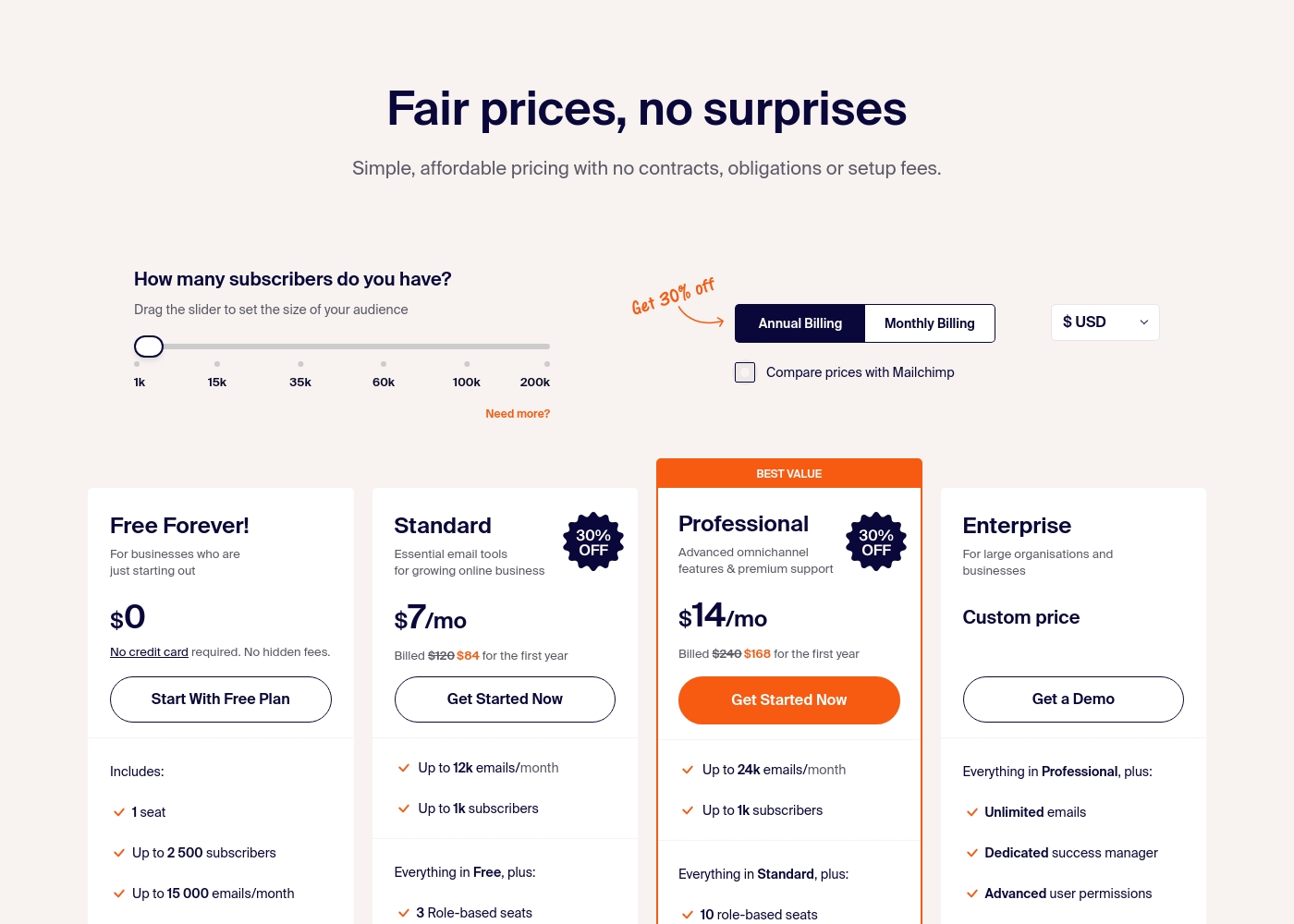
Sender costs between $0 and a custom price per month with 4 plans: Free Forever at $0, Standard at $7, Professional at $14, and Enterprise at Custom price.
Take a look at the specific features and limits included in each plan tier below.
Free Forever!
Price: $0 monthly Best For: Businesses who are just starting out Other Features: 1 seat, up to 2,500 subscribers, 15,000 emails/month, 24/7 live support, email automation.
- 1 seat
- Up to 2,500 subscribers
- Up to 15,000 emails/month
- 24/7 live support
- Email automation
- Up to 12k emails/month
- Up to 1k subscribers
- 3 Role-based seats
- Automated sequences
- Up to 24k emails/month
- Up to 1k subscribers
- 10 role-based seats
- Premium support
- Unlimited emails
- Dedicated success manager
- Advanced user permissions
Pricing Notes
- Pabbly Connect's Unlimited Plan is $69/month with no task limits. Lower-tier plans exist but pricing isn't public.
- Sender's Free Forever plan includes 2,500 contacts and 15,000 emails per month, which is exceptionally generous.
- Pabbly Connect only counts action tasks, not triggers or internal steps like filters, which saves you money.
- Sender's paid plans scale with subscriber count, starting at $7/month for 1,000 contacts.
- Pabbly Connect offers up to 25% savings on annual plans. Sender's annual pricing is shown as a discount.
Pricing Head-to-Head
User Reviews
Pabbly Connect receives highly polarized external feedback. While some users describe the product as technically superior and incredibly fast, noting advanced features that surpass major competitors, the overall customer rating is severely affected by corporate and support issues.
The majority of reviewers describe customer service as 'diabolical,' 'useless,' and extremely slow, frequently failing to resolve tickets properly or in a timely manner. Recurring themes involve difficulty processing the advertised 30-day money-back guarantee, with users alleging the company actively tries to deny refunds.
Pabbly Connect has the absolute worst customer service. They don't read email tickets correctly and take days to reply, if they reply at all. This lack of responsiveness makes advanced troubleshooting impossible.
User sentiment on Trustpilot and Capterra highlights Sender's generous free plan and ease of setup as major positives. Many praise the intuitive interface and reliable automation.
😊 However, some note occasional deliverability hiccups and a learning curve for advanced features. Customer support is frequently mentioned as responsive, though a few users report slow responses during peak times.
The free plan is unbeatable for a new business. I set up my first automation in minutes. The platform is simple and gets the job done without fuss.
Our Verdict
For most people looking for simple email marketing, Sender is the clear winner. Its free plan is unbeatable, and the platform is a joy to use. You can be sending campaigns in minutes, not hours. Pabbly Connect's superpower is backend automation. It's the king of connecting your entire tech stack with unlimited operations and transparent task counting. If you need to link Salesforce to Slack to Google Sheets, this is your tool. Sender's superpower is making email marketing easy and affordable. It handles automation sequences, landing pages, and even transactional emails without a steep learning curve. You get 24/7 support on every plan. The deciding factor is your core need. Are you trying to connect apps and automate business processes? Choose Pabbly Connect. Are you trying to build an email list and send marketing campaigns? Choose Sender. Final verdict: Pick Sender if email marketing is your primary goal. You'll save money and time. Pick Pabbly Connect only if you have complex, multi-app automation needs that go beyond email.
Frequently Asked Questions
Which is better for small teams: Pabbly Connect or Sender?
Sender is better for small teams focused on email marketing. Its free plan and easy collaboration features are ideal. Pabbly Connect is better if your small team needs to automate complex workflows across many apps.
Can I use Sender for workflow automation like Pabbly Connect?
Not really. Sender automates email sequences. Pabbly Connect automates tasks between any connected apps, like updating a CRM when a form is submitted. They serve different purposes.
Is Pabbly Connect's $69/month Unlimited Plan worth it over Sender's free plan?
It depends on your needs. Pabbly Connect's plan is for unlimited automation tasks across many apps. Sender's free plan is for email marketing to 2,500 contacts. They aren't direct competitors.
Which tool has better customer support?
Sender has significantly better support. It offers 24/7 live support on all plans, including free. Pabbly Connect's support is frequently described as slow and unhelpful in user reviews.
Does Sender integrate with the same apps as Pabbly Connect?
No. Pabbly Connect has a much larger integration library with thousands of apps. Sender focuses on key marketing platforms like WordPress and WooCommerce.
Can I run custom code in Sender like I can in Pabbly Connect?
No. Sender does not offer custom code execution. Pabbly Connect allows you to run JavaScript and Python scripts directly in your automation workflows.
Ready to Choose?
Both tools have their strengths. Choose based on your specific needs.