Ora vs Trello
Ora and Trello are the top contenders in visual task management, but they serve different needs. Ora is a true productivity command center with robust built-in features. Trello focuses purely on ultimate simplicity, leveraging the classic Kanban board style. We'll show you which platform provides the best toolset for your team.
Best for: Small teams (under 10) who need robust built-in features for free, Project managers requiring native time tracking and estimates
Best for: Startups prioritizing ultimate visual simplicity and quick adoption, Managers needing advanced visual views like Timeline and Map (Premium)
The Modern, User-Friendly Command Center
We found Ora provides an impressive balance between comprehensive features and usability, positioning itself as a strong alternative to established systems. Its generous free tier and unique calendar-focused organization greatly benefit small, growing teams and individuals. Overall, we recommend Ora highly for collaborative organizations seeking a focused, effective project management solution.
Pros
- Generous free plan available for small teams (up to 10 users) forever.
- Exceptional user-friendliness; users prefer it over competitors like Trello.
- Comprehensive task cards support RTF, Markdown, and custom code highlights.
- Agenda Calendar helps users achieve better focus and plan dedicated work time.
Cons
- External review volume is currently very limited (only 3 Trustpilot reviews).
- File size limit is restrictive on the Basic (free) tier (a maximum of 10mb).
Simple Project Management, Complex Login
We find Trello delivers exceptional value quickly due to its easy operation. Its Kanban visual organization is highly flexible for team workflows. Overall, Trello is a powerful tool, but stability issues and frustrating administrative friction points like the Atlassian login do hold it back.
Pros
- The simple, visual Kanaban board design offers great ease of use.
- A permanent Free plan is available and suitable for small teams or personal use.
- The platform is effective for team management and sharing context quickly.
- Supports extensive customization and functionality upgrades via Power-Ups.
Cons
- Users frequently report difficulty and friction with the Atlassian login process.
- Accessing billing information and invoices can be surprisingly complicated.
- The interface occasionally suffers from lag and server downtime.
- Key views like Calendar or Map require a paid Premium subscription.
AboutOra
Ora is a powerful platform designed for productive individuals and collaborative teams. It serves as your daily planner and central hub for managing work. The core Agenda Calendar helps you organize your time and be more effective. Instead of dealing with separate tools, all your critical information, tracked time, and completed tasks appear directly on your calendar. You can quickly view both your tasks and those of your teammates, ensuring smooth collaboration. 💡
AboutTrello
Trello is designed to keep you at the top of your game by ensuring every to-do or idea, regardless of size, finds its proper place. The system helps you stay organized and efficient using three key components: Inbox, Boards, and Planner.
The Inbox quickly captures tasks as soon as they are on your mind, whether you are in the office or on the go. You manage your tasks using flexible Boards, where long lists become manageable by tracking items from “to-dos to tackle” to “mission accomplished!” Use the Planner to simply drag and drop your top tasks right into your calendar, ensuring you make time for what truly matters. 💡
Highlights
Feature Comparison
Features Overview
We highlight the main differences and pick a winner for each feature.
Ease of Use
Trello is famously simple, but Ora is universally praised for its modern interface.
Ora is consistently noted by reviewers for being exceptionally user-friendly. Users find Ora’s visual layout intuitive and easy to manage daily work. Ora's built-in Agenda Calendar consolidates work into one centralized view. Trello is the gold standard for simple, drag-and-drop Kanban visualization. Its interface is minimal, making Trello incredibly fast to adopt and implement across teams. Trello’s simplicity is ideal for those who fear complex software. While Ora is friendlier to deep tracking, Trello focuses on board simplicity and quick task movement. Ora provides centralized context; Trello provides visual process flow. However, Trello's users complain about the complicated Atlassian login process creating friction.
Built-in Features
Ora delivers far more essential features built-in, avoiding extra costs or Power-Ups.
Ora includes essential project management tools that are native to the application. This includes built-in time tracking and advanced task relationships (blocking/dependent). Ora also features collaborative tools like PDF and image annotation natively. Trello offers a simplified core experience, pushing most advanced features to paid Power-Ups. To achieve time tracking or detailed dependencies in Trello, you often need these Power-Ups or external tools. Trello keeps the core board free of clutter and complexity. Ora bundles these productivity tools, giving you immediate value and depth for focused work. Trello is simpler but requires add-ons or upgrades for deeper functionality. Ora is ideal if you value an all-in-one approach. The ability in Ora to annotate shared files directly streamlines the crucial feedback process significantly.
Task Documentation
Ora allows rich documentation, supporting code and Markdown within task cards.
Ora task cards are comprehensive documentation centers for complex projects. Ora supports rich task description formatting, including RTF, Markdown, and even specific code highlighting. Teams can consolidate specifications, attachments, and context with one click in Ora. Trello tasks rely on standard text descriptions for simplicity and speed of entry. Detailed documentation in Trello often requires external linked documents or additional Power-Ups. Trello prioritizes quick capture over detailed internal context creation. For technical teams or those requiring precise specifications, Ora provides superior documentation flexibility. Trello is efficient for simple, quick checklists or brief descriptions. Ora’s 1 GB file size limit on paid plans also greatly exceeds Trello’s 250 MB cap for attachments.
Task Capture & AI
Trello uses Atlassian Intelligence (AI) to transform messages into organized tasks easily.
Trello excels at turning unstructured communication quickly into actionable tasks. Trello lets you forward emails to your Inbox, where AI transforms them into organized to-do cards with links and summaries. This feature speeds up action item creation dramatically. Ora supports standard task creation, focusing on detailed planning through the Agenda Calendar view. Ora relies on traditional integrations or manual entry for tasks originating outside the app. Ora’s focus is on task execution, not ingestion. Trello's modern AI approach reduces friction between communication apps and the work board. Ora requires a more deliberate process to move items from email into the platform. If your team gets many requests via email or Slack, Trello’s AI feature delivers immediate productivity gains.
Workflow Automation
Trello's built-in Butler is the superior automation engine for rule-based workflows.
Trello provides powerful, built-in no-code automation using Butler on every board. Trello allows you to configuration rules to automate card movement and assignment, even on the Free plan. Premium users get unlimited command runs per month. Ora utilizes 'List actions' for workflow automation to streamline repetitive processes. These list actions are available starting on the Professional plan. Ora excels at managing relationships using blocking or dependent tasks. While both offer automation, Trello’s Butler system is more widely known and utilized for complex, rule-based workflows. Ora is perhaps better for managing sequential dependencies between tasks. For teams needing high-volume automation, Trello Premium offers unlimited commands, a major advantage over Ora's functionality.
Project Views
Trello Premium provides extensive advanced views that Ora simply does not offer.
Trello Premium unlocks multiple powerful visual views for advanced project management. Users gain access to Calendar, Timeline, Table, Dashboard, and Map views in Trello. This flexibility is essential for managers tracking complex, multi-faceted projects. Ora features the standard Kanban and List views, plus the unique Agenda Calendar view. The Agenda Calendar is tailored for individual focus and planning, showing tracked time and completed tasks. If broad managerial oversight requiring multiple visual dashboards is key, Trello Premium is the clear winner here. Ora is focused more on individual and team productivity flow. Trello's Card Mirroring also helps managers view one task across multiple boards, simplifying complex, company-wide process tracking.
Free Tier Value
Ora’s free plan is robust, offering free observes and unlimited projects for 10 users.
Ora offers a very generous Basic plan that supports up to 10 users entirely for free, forever. This plan provides unlimited projects, tasks, and attachments (up to 10MB per file). Ora is an excellent choice for a team consolidating projects onto one tool. Trello also provides a permanent Free plan, supporting 10 collaborators per workspace. However, Trello limits users to just 10 boards per workspace. This limit can feel restrictive when managing many smaller projects. Ora wins on overall generosity and flexibility regarding project counts for smaller teams. Its free observer feature starts on the Professional tier, adding flexibility for client viewing. If your small team needs deep features without paying, Ora provides built-in time tracking immediately that Trello does not.
Pricing Structure
Trello offers slightly cheaper entry points, but Ora's upper Enterprise tier is simpler.
Ora’s Professional plan begins at $5.99/user/month (annual billing), slightly higher than Trello Standard. Ora offers two clean paid tiers: Professional and Enterprise ($27.99/month annually). Ora adjusts billing automatically for members added or removed mid-cycle. Trello’s Standard plan entry point is $5.00/user/month (annual billing), making it cheaper to start. Trello’s Premium plan is $10.00/user/month, and Enterprise is $17.50/user/month annually. Trello provides four price points. Ora's upper-tier pricing is significantly higher than Trello Enterprise ($27.99 vs $17.50). Trello provides better pricing for large organizations needing maximal scale. However, Ora’s inclusion of advanced features like free observers and time tracking at competitive rates still offers better value for money in the mid-range.
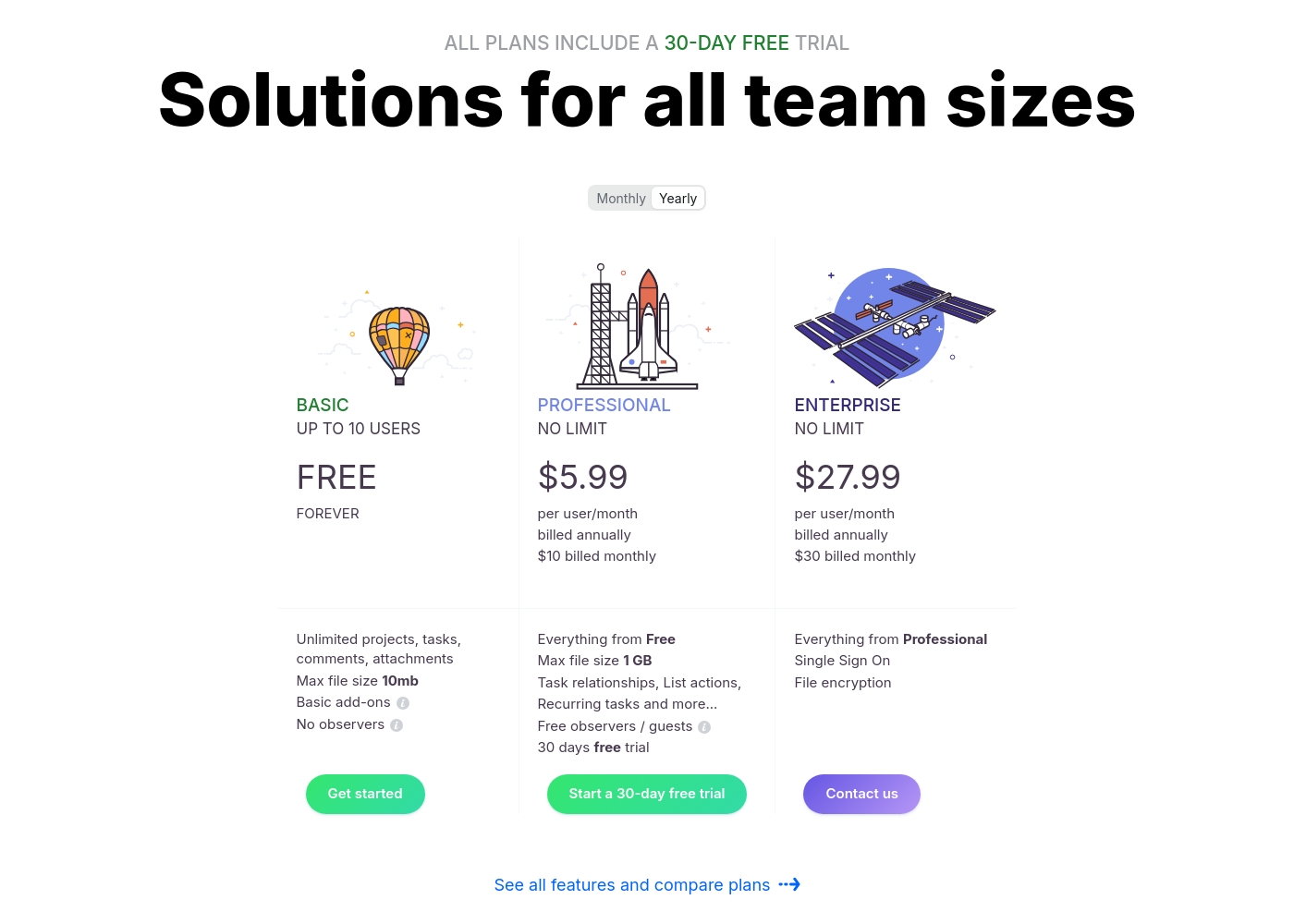
Ora costs between $0 and $30 per user/month with three plans: Basic at $0, Professional starting at $5.99 per user/month, and Enterprise starting at $27.99 per user/month.
We provide solutions for all team sizes, ensuring you only pay for the features and scale you truly need.
Ora Basic
Price: $0.00 / month (Free Forever) Best For: Teams of up to 10 users needing core project management and collaboration. Other Features:
- Unlimited projects, tasks, comments, and attachments
- Max file size is 10mb
- Includes Basic add-ons
- Supports up to 10 organization members
- Unlimited projects
- Unlimited tasks, comments, attachments
- Web, desktop, iOS, and Android apps
- Max file size 1 GB
- Task relationships
- Recurring tasks
- List actions (automation)
- Free observers / guests
- Single Sign On (SSO)
- File encryption
- Everything from Professional tier
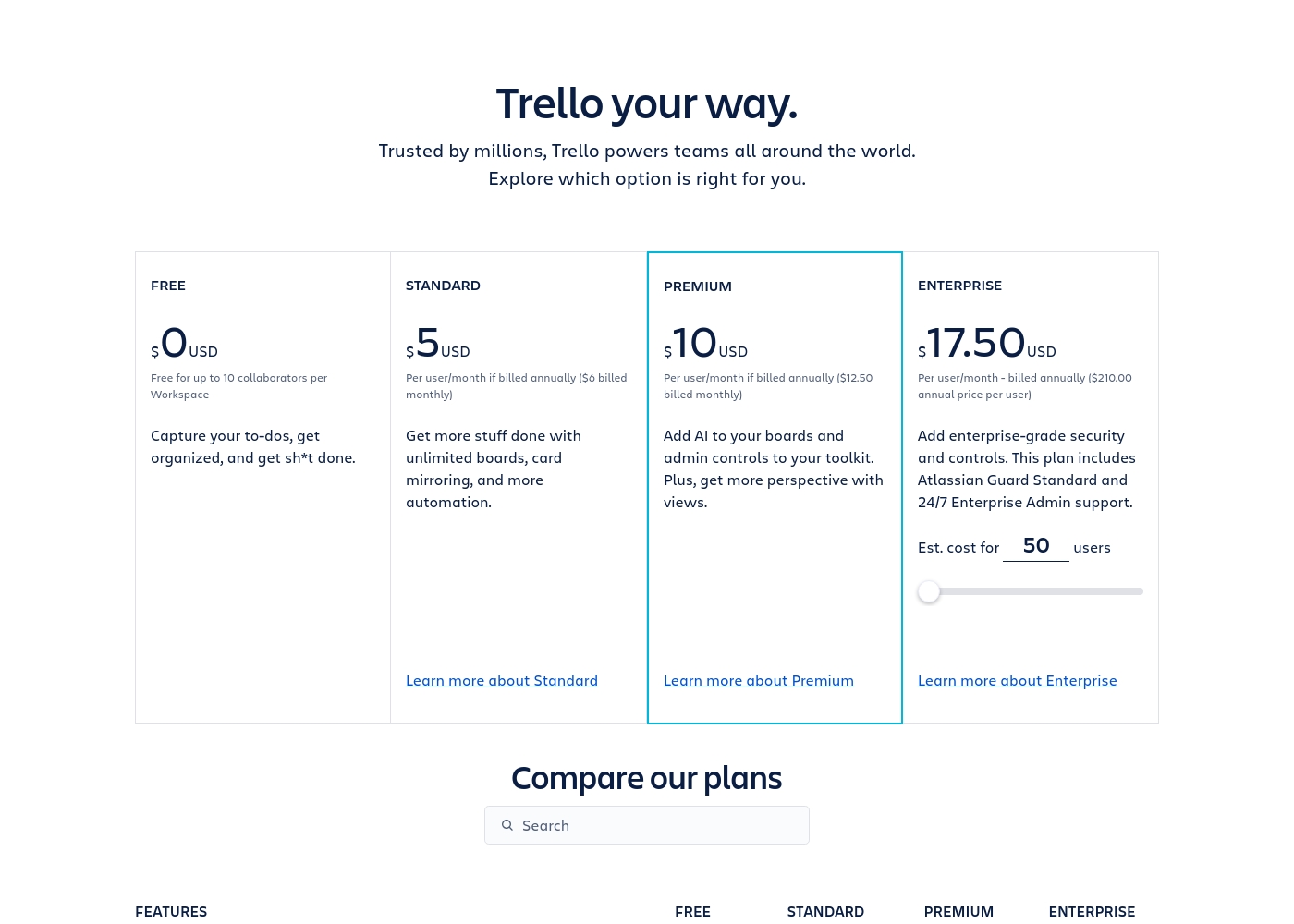
Trello costs between $0 and $17.50 per user/month, offering four plans: Free at $0, Standard at $5/user/month (annually), Premium at $10/user/month (annually), and Enterprise at $17.50/user/month (annually).
Trello offers flexible plans for individuals and large organizations. Let’s look closer at what each plan provides, based on annual pricing options.
Free
Price: $0 USD Best For: Capturing to-dos, fundamental organization Other Features:
- Unlimited cards
- Up to 10 boards per Workspace
- Unlimited Power-Ups per board
- 250 Workspace command runs per month
- 2-factor authentication
- Unlimited cards
- Unlimited Power-Ups per board
- Unlimited storage (10MB/file)
- 2-factor authentication
- Unlimited activity log
- Unlimited boards
- Card mirroring
- Advanced checklists
- Custom Fields
- Quick capture powered by AI
- Atlassian Intelligence (AI)
- Views: Calendar, Timeline, Table, Dashboard, and Map
- Admin and security features
- Workspace-level templates
- Simple data export
- Unlimited Workspaces
- Organization-wide permissions
- Free SSO and user provisioning with Atlassian Guard
- 24/7 Enterprise Admin support
- Public board management
Pricing Notes
- Ora’s Basic plan is free forever for up to 10 users; Trello's Free plan limits users to 10 boards per workspace.
- Trello offers a lower starting paid price at $5.00/user/month for its Standard plan (annual).
- Ora’s maximum price ($30/user/month) is substantially higher than Trello’s maximum ($17.50/user/month annually).
- Ora offers a 30-day free trial for Professional plans, and Trello offers a free trial for Premium (duration not specified).
Pricing Head-to-Head
User Reviews
Customer sentiment for Ora is strongly positive, emphasizing its robust capabilities and outstanding usability. Several reviewers highlight that Ora is exceptionally user-friendly and superior to competitors like Trello, even though it is a relatively younger product.
Users rely on the platform daily for managing diverse projects, and one reviewer called it simply "the best platform for PM." While the current feedback volume is low, the recurring themes suggest high satisfaction regarding core functionality and daily reliability. The enthusiasm indicates that users find the platform’s functional depth combined with its ease of use provides strong value for teams seeking a productive command center.
Ora is one of my favorite daily web services for managing various tasks. It’s exceptionally user-friendly and handles diverse projects easily. I recommend it as a superior option compared to Trello.
Trello receives mixed but generally favorable external feedback, often lauded as an amazing app for personal and team organization. Users consistently praise its simple design and exceptional ease of use, which makes it perfect for startups and small businesses utilizing the generous free plan.
The core utility, including dynamic block control and strong real-time syncing, is highly appreciated. However, recurring pain points are frequently mentioned, stemming largely from the Atlassian acquisition.
Trello is a great tool for starting out, especially for small businesses. It has a robust free plan you can use for organization before deciding to go premium. It’s an excellent option for startups working with a limited budget.
Our Verdict
Deciding between Ora and Trello depends entirely on whether you value depth or native simplicity. Ora wins if you need a comprehensive, built-in productivity suite for your daily work. Trello is the best choice if you prioritize visual simplicity and fast task capture. Ora excels as your true centralized command center and daily planner. The Agenda Calendar helps users organize time and block dedicated focused work periods. Ora includes powerful native tools like time tracking and direct file annotation on its affordable paid plans. Trello is the undisputed champion of simple, visual workflow management via Kanban boards. Trello’s powerful AI transformation captures emails and creates structured tasks instantly. Trello also offers many advanced managerial views like Timeline and Map (Premium) for complex projects. The core difference is native features versus add-ons. Trello handles most advanced features via extensive Power-Ups requiring setup or cost. Ora ships with robust items like task dependencies and documentation flexibility natively. Choose Ora if you run a focused team of 10 or less needing deep features without paying for upgrades. Pick Trello if you are a manager who demands simple visualization, easy scaling, and powerful AI-driven task capture.
Frequently Asked Questions
Which is better for small teams: Ora or Trello?
Ora is arguably better for small teams due to its generous free tier. Ora supports up to 10 users with unlimited projects and tasks for free. Trello's free plan restricts you to only 10 boards per workspace.
Does Ora have advanced project views like Trello Premium?
No, Ora focuses on Kanban, List, and the Agenda Calendar for management. Trello Premium offers a wider range of views, including Timeline, Table, Dashboard, and Map views.
Which tool offers built-in time tracking: Ora or Trello?
Ora includes time tracking and estimates as a core, built-in feature. Trello users must rely on external tools and apps or require a Power-Up for time tracking functionality.
Is Trello worth the higher Enterprise cost compared to Ora?
Surprisingly, Trello’s Enterprise plan is significantly cheaper at $17.50/user/month annually. Ora's Enterprise tier is $27.99/user/month annually. Trello provides a better price point for major corporations.
Which tool provides better task documentation capabilities?
Ora is better for comprehensive documentation and technical teams. Ora supports Markdown, RTF, and code highlighting right within the task description. Trello uses standard text formatting.
Can I invite external clients or guests to view projects in Ora and Trello?
Yes, but Ora is superior; its Professional plan allows you to invite observers for free. Trello typically requires paid seats or complex administrative controls for external guest access.
Ready to Choose?
Both tools have their strengths. Choose based on your specific needs.