Opus Clip vs Vizard.ai
Opus Clip and Vizard.ai both generate powerful short video clips instantly. Opus Clip is the reliable partner with transparent pricing and stable tech for varied content. Vizard.ai promises extreme velocity but comes with significant pricing and support red flags.
Best for: Solo creators or small agencies requiring high reliability and accurate content generation., Creators whose video content includes fast action, gaming, or moving subjects needing perfect framing.
Best for: Content marketers demanding the absolute fastest output (10x speed claim)., Teams needing to localize captions for content in 100+ different global languages.
Essential AI tool for viral short content.
We found Opus Clip to be an exceptional tool for streamlining content creation workflows, automating the difficult task of transforming long-form content into polished vertical shorts with high accuracy and speed. Overall, this AI editor delivers on its promise to maximize social media output and reach for both budget-conscious creators and growing agencies.
Pros
- Drastic speed increase (clips created up to 5x faster).
- Highly accurate automatic captioning and dynamic text.
- Permanent Free plan and affordable paid tiers starting at $15/mo.
- Watermark-free export available on the Starter plan.
Cons
- Media storage is temporary, expiring rapidly on lower tiers.
- All Free tier exports include a watermark.
- Fixed storage and unlimited advanced AI B-Roll require the Pro plan.
Powerful AI, Proceed With Caution.
We found Vizard.ai offers powerful and efficient AI clipping tools that greatly speed up short-form video production. Overall, while the core technology is impressive, the platform’s reported lack of pricing transparency and significant customer support issues warrant user caution.
Pros
- Superior AI clipping technology accurately identifies and extracts video highlights.
- Successfully processes content in non-native and multiple languages.
- The interface design is simple and facilitates an easy workflow.
- The developer offers tiered plans, including a permanent free starting option.
Cons
- Trustpilot has issued a guideline breach warning for the company.
- The "free" transcription tier is often misleading, requiring payment for export.
- Users report dealing with unresponsive, automated customer support.
- Some individuals experienced technical glitches that block clip creation (e.g., timezone errors).
AboutOpus Clip
OpusClip is an advanced AI editor built to automate your video workflow. It analyzes your long video and uses big data to identify the most viral-worthy moments.
The AI then re-arranges those moments into high-quality shorts. These clips are automatically polished with dynamic captions and smooth transitions.
You can take full editing control or let the AI take over; either way, it's made effortless. Team workspaces are also available to help your business scale creative output without scaling overhead.
AboutVizard.ai
Vizard.ai is an intelligent tool that automates video clipping. It turns your long-form video content into short, ready-to-post clips for channels like TikTok, Instagram, and YouTube Shorts.
This platform is built for a wide range of users, including creators, podcasters, successful coaches, marketers, and busy agencies. The process is simple: upload your video, and Vizard handles the transcription, speaker cutout, and processing using its proprietary AI. You just click “Get AI clips,” and the work is done. 💡
Highlights
Feature Comparison
Features Overview
We highlight the main differences and pick a winner for each feature.
Speed & Velocity
Vizard.ai promises 10x creation speed; Opus Clip is highly reliable at 5x speed.
Opus Clip claims it creates and publishes video output up to five times faster. This speed is combined with exceptional stability and accurate AI clip selection. Vizard.ai dramatically claims speeds up to 10x faster than traditional clipping methods. Vizard.ai focuses on generating a massive volume, advertising 30+ clips from a single upload. While Opus Clip is fast and reliable, Vizard.ai targets maximum output velocity. For sheer volume and maximum theoretical speed, Vizard.ai takes the quantifiable edge.
Video Compatibility
Opus Clip handles all video types using its unique ClipAnything model.
Opus Clip uses its robust 'ClipAnything' model to process all video genres successfully. This includes complex motion like gaming, sports, or fast-paced vlogging content. Vizard.ai primarily emphasizes high output from standard long-form content like podcasts and webinars. Opus Clip provides specific AI object tracking using 'ReframeAnything' to ensure moving subjects stay centered. Opus Clip is explicitly safer and better equipped for handling diverse and visually complex video styles.
Pricing Transparency
Opus Clip shows all prices; Vizard.ai hides the cost of its paid plans.
Opus Clip has four clearly priced tiers, with the top feature-rich plan costing $29 per month. Vizard.ai shows its $0 Free tier but obscures the actual costs of its ‘Most Popular’ and ‘Business’ plans. Opus Clip allows users to budget confidently, knowing exactly what their payments will be monthly. Vizard.ai’s lack of transparency, combined with review complaints, suggests potential hidden hurdles. Opus Clip is significantly more trustworthy in its financial dealings.
Global Reach
Vizard.ai supports 100+ languages for instant caption translation.
Opus Clip supports over 20 different global languages for transcription and clipping. Opus Clip is recognized for maintaining extremely high caption accuracy in its supported languages, often over 97%. Vizard.ai offers powerful caption translation capabilities supporting over 100 different global languages instantly. If your strategy relies on localizing content for a massive global audience, Vizard.ai is the unrivaled choice.
Editing Workflow
Vizard.ai offers superior 'Edit by Text' functionality for quick refinement.
Opus Clip provides a comprehensive web application allowing full editing control post-generation. Vizard.ai features an intuitive 'Edit by Text' workflow in its Vizard Editor Plus environment. You can quickly trim Vizard.ai video clips by deleting corresponding text from the automatically generated transcript. Both offer refinement, but Vizard.ai’s text-based method streamlines ultra-fast production for volume users.
Customer Reliability
Opus Clip is highly reliable; Vizard.ai users report significant support failures.
Opus Clip users report high satisfaction with general stability and responsive support in professional tiers. The tool maintains a strong 4.6 rating across user reviews for consistent performance. Vizard.ai users frequently complain about unresponsive robotic support and difficulty resolving issues like team seat management. Opus Clip is the safe choice offering reliable daily stability essential for professional creators. The risk of major downtime or unresolved glitches is significantly lower with Opus Clip.
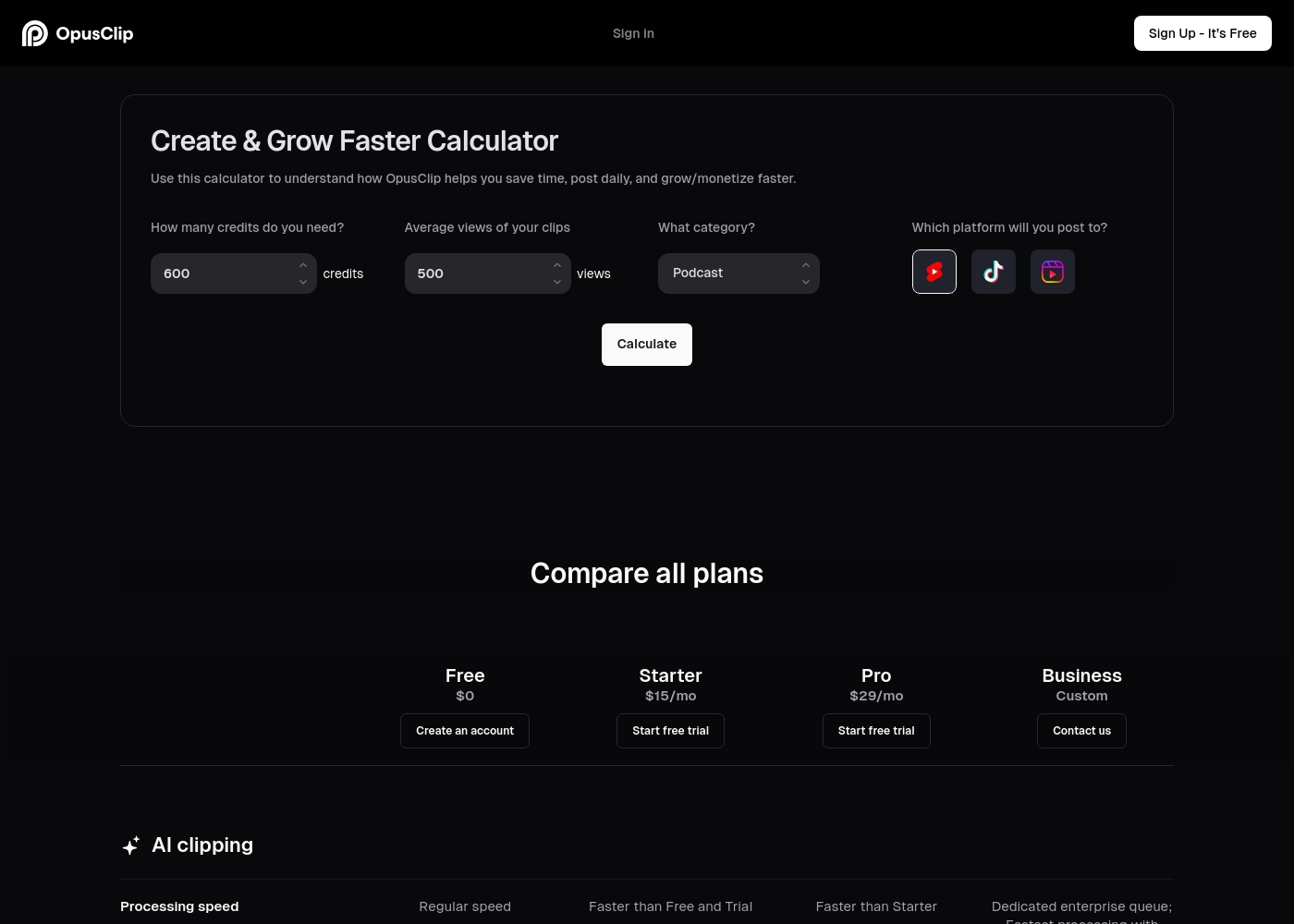
Opus Clip costs between $0 and a custom price per month with four plans: Free at $0, Starter at $15/mo, Pro at $29/mo, and Business (Custom).
If you're ready to select an option, here is a detailed breakdown of what is included in each plan.
Free
Price: $0/mo Best For: New users or small-scale content creators Other Features:
- Regular AI clipping processing speed
- Local video import up to 10GB
- Animated caption templates (with watermark)
- 60 minutes of video processing time refreshed monthly
- Regular AI clipping processing speed
- Local video import (Up to 10GB)
- Animated captions with watermark
- Export limited to 1080p rendered clips
- Faster processing than Free and Trial
- Watermark-free video export
- AI B-Roll Generator (3 clips/month)
- 20 AI Voice-overs per day
- Auto video import from verified YouTube account
- Faster processing than Starter
- 100GB fixed storage
- 2 users/pack, up to 4 users total
- Unlimited stock B-Roll; 50 AI B-Roll clips per day
- Export in bulk
- Dedicated enterprise queue; Fastest processing
- Unlimited member seats and storage
- Single-Sign On (SSO) and SOC II Type 2 compliant
- Priority customer support with dedicated Slack channel
Vizard.ai offers subscriptions starting at $0 per month with 3 main plans: Free, Most Popular, and Business.
The user interface shows several options to help manage your content creation workflow.
Free
Price: $0/month Best For: New users, testing the platform, light content creation needs. Other Features: Video creation, Auto subtitling, AI clipping, Download transcript.
- Video creation
- Auto subtitling
- AI clipping
- Watermark removal
- Monthly credits
- Custom templates
- AI features (clipping, reframe, keywords)
- API access
- Shared workspace
- Brand kit
- Custom fonts
- Live chat support

Pricing Notes
- Opus Clip offers transparent pricing, clearly listing $0, $15, and $29 monthly tiers.
- Vizard.ai hides the current monthly prices for its 'Most Popular' and 'Business' tiers.
- Users report Vizard.ai's Free plan is misleading, often requiring payment to export transcripts or clips.
- Opus Clip provides a generous 7-day Pro plan free trial before demanding payment.
- Opus Clip’s entry-level Starter plan ($15/mo) removes watermarks and offers foundational AI B-Roll generation.
Pricing Head-to-Head
User Reviews
Users consistently praise Opus Clip for its remarkable ease of use and its ability to drastically speed up content production. The core functionality—turning lengthy videos into viral shorts—is highly effective, with many creators reporting time savings of up to 5x.
Reviewers frequently highlight the accuracy of the automated caption generation and the practical utility of the
ReframeAnythingI used to spend hours manually editing one long video. Opus Clip changes that completely. Now, I upload my content and have tons of high-quality clips ready in minutes. It’s truly revolutionized my weekly workflow.
Vizard.ai receives highly mixed feedback from users, which is complicated by an ongoing Trustpilot warning regarding a breach of guidelines. Positive sentiment centers strongly on the core product's superior AI clipping ability, with multiple users praising the high-quality output and noting that it successfully clips foreign language content where other tools failed. Users find the workflow intuitive and the design easy to understand, making content creation manageable. However, major recurring complaints surround transparency regarding the "Free" plan, which many users report requires a paid subscription prompt just to export transcripts or completed clips, leading to frustration and wasted time.
Furthermore, reliability and support are major pain points for paid users. Some encountered bizarre technical failures, like a time zone error preventing clip creation. Others reported poor customer support, described as dealing with an unresponsive "robot" when trying to resolve issues like managing team seats. While the AI features are powerful generators of content, users should exercise caution given the reports of pricing deception and the lack of reliable support 🚧.
I didn't think this service would be this good; it's genuinely much better than I expected. The design is easy to understand and work with, and it fully gets the job done for me at a high level.
Our Verdict
This comparison between Opus Clip and Vizard.ai isn't about features; it’s about risk versus reliability. Both tools transform long videos into viral shorts instantly using powerful AI. The correct decision hinges on consistency, support, and financial transparency. Opus Clip is the safe, dependable winner for consistent professional creators. Its pricing is transparent, maxing out professionally at $29/month for Pro plan features. The unique ClipAnything and ReframeAnything features handle *any* video type, even fast-moving action footage. Opus Clip review scores are high (4.6), confirming great reliability and focused support quality. Vizard.ai promises unmatched velocity, claiming content creation is up to 10x faster than manual clipping. Its 'Edit by Text' feature is fantastic for fast clip refinement and translation in 100+ languages. However, Vizard.ai struggles with basic operations like transparent pricing and responsive customer support, creating friction. The biggest deciding factor is transparency and trust for high-volume work. You know exactly what you get and what you will pay for with Opus Clip every single month. Choose Opus Clip if you value a professional, predictable partner that delivers reliable, high-quality footage. If you run a large agency focused solely on global outreach, explore Vizard.ai's language capabilities, but be cautious of the support risks. For sustainable scaling, quality output, and best overall value, Opus Clip is clearly the superior professional platform right now.
Frequently Asked Questions
Which is better for complex video genres: Opus Clip or Vizard.ai?
Opus Clip is explicitly designed for this using its powerful ClipAnything model. It handles diverse content like gaming and sports easily. Opus Clip's ReframeAnything ensures perfect tracking and centering of moving subjects. Vizard.ai focuses heavily on efficient output from simpler content like interviews.
Does Vizard.ai have better language support than Opus Clip?
Yes, Vizard.ai offers caption translation support for over 100 languages for maximum global reach. Opus Clip supports over 20 languages but is known for achieving extremely high caption accuracy (>97%). For localizing content, Vizard.ai is the leader.
How do the pricing models differ between Opus Clip and Vizard.ai?
Opus Clip pricing is fully transparent, clearly listing $0, $15, and $29 monthly tiers. Vizard.ai hides the current prices for its paid plans, only showing a deep discount banner. Opus Clip offers a more predictable and clear budget structure for users.
Which tool has better customer service reliability?
Opus Clip is the clear winner, maintaining a strong 4.6 overall rating reflecting stable service. Vizard.ai users report significant customer support failures and automated, unresponsive robotic replies. Choose Opus Clip for reliable assistance.
Can Vizard.ai truly outperform Opus Clip in speed?
Opus Clip claims 5x faster production, focusing on quality and tracking features. Vizard.ai claims 10x speed and optimizes for pure clip volume (30+ clips per video). Speed claims differ, but both offer massive efficiency gains over manual editing.
Which is safer for enterprise data, Opus Clip or Vizard.ai?
Opus Clip offers enterprise-level security features, including SOC II Type 2 compliance, available in its Business plan. Vizard.ai does not publicly list specific security compliance standards for comparison. Opus Clip is the safer choice for highly regulated environments.
Ready to Choose?
Both tools have their strengths. Choose based on your specific needs.