Notion vs Trello
Notion and Trello are productivity heavyweights, but they serve very different internal needs. Notion tries to be your consolidated, AI-powered 'everything app' and team wiki. Trello excels at visualizing simple, reliable workflows using its iconic Kanban boards. Choosing depends on your priority: consolidation or straightforward task management.
Best for: Teams focused on building a centralized, structured knowledge base, Organizations needing to consolidate specialized SaaS tools into one platform
Best for: Small teams or startups prioritizing visual, simple task tracking, Users who want immediate value and a very low learning curve
Powerful software, risky provider.
We found Notion is an exceptionally flexible and powerful productivity tool, praised globally for its block-based editor and ability to consolidate diverse workflows. However, external evidence highlights significant failures in subscription management and support responsiveness. Overall, we advise extreme caution regarding billing procedures due to recurring reports of unauthorized charges and cancellation difficulties.
Pros
- Exceptionally powerful and versatile block-based editor.
- Effective for personal knowledge management and team use.
- Consolidates multiple specialized tools (wikis, CRMs, project management).
- Strong native AI assistance integrated throughout the workspace.
Cons
- Widespread reports of deceptive or confusing billing practices.
- Extremely poor and unresponsive customer support experiences.
- Users report app is often slow and unreliable.
- Difficulty canceling subscriptions and obtaining timely refunds.
Simple Project Management, Complex Login
We find Trello delivers exceptional value quickly due to its easy operation. Its Kanban visual organization is highly flexible for team workflows. Overall, Trello is a powerful tool, but stability issues and frustrating administrative friction points like the Atlassian login do hold it back.
Pros
- The simple, visual Kanaban board design offers great ease of use.
- A permanent Free plan is available and suitable for small teams or personal use.
- The platform is effective for team management and sharing context quickly.
- Supports extensive customization and functionality upgrades via Power-Ups.
Cons
- Users frequently report difficulty and friction with the Atlassian login process.
- Accessing billing information and invoices can be surprisingly complicated.
- The interface occasionally suffers from lag and server downtime.
- Key views like Calendar or Map require a paid Premium subscription.
AboutNotion
Notion is your dedicated AI workspace and everything app. It is built to replace multiple specialized tools with one powerful platform. This centralized space lets teams consolidate project management, internal wikis, and basic CRM functions. Notion is trusted broadly; over 100 million users worldwide use it, and 62% of the Fortune 100 are customers. You can use it right in your browser or download specialized tools like Notion Mail and Notion Calendar to keep time and work together. ✅
AboutTrello
Trello is designed to keep you at the top of your game by ensuring every to-do or idea, regardless of size, finds its proper place. The system helps you stay organized and efficient using three key components: Inbox, Boards, and Planner.
The Inbox quickly captures tasks as soon as they are on your mind, whether you are in the office or on the go. You manage your tasks using flexible Boards, where long lists become manageable by tracking items from “to-dos to tackle” to “mission accomplished!” Use the Planner to simply drag and drop your top tasks right into your calendar, ensuring you make time for what truly matters. 💡
Highlights
Feature Comparison
Features Overview
We highlight the main differences and pick a winner for each feature.
Core Structure
Notion is a versatile database platform; Trello is a focused Kanban board.
Notion uses flexible databases and nested pages, powered by a block-based editor. This structure allows Notion to function as a complex wiki, CRM, and project manager. Users can link data across different pages using relations and rollups in Notion. Trello is built around the intuitive Kanban board method: lists of cards moved left to right. This simple layout makes Trello instantly understandable for visualizing workflows and task progression. The core philosophy of Trello is simplicity for action tracking; Notion focuses on content and data creation. If you need a robust wiki, Notion is the clear choice for extensive documentation needs. If rapid process visualization is key, Trello offers unbeatable clarity for your teams.
Ease of Use
Trello offers immediate clarity; Notion requires more effort to master.
Notion offers powerful customization but suffers a steeper learning curve for teams. New users need time to understand databases, relations, and permissions in Notion. Trello is praised for its exceptional ease of use and delivers business value quickly. Customers report that 75% of organizations using Trello see value within just 30 days. The simple visual workflow of Trello ensures high team adoption and minimal training required. Notion’s blank canvas approach grants flexibility but can feel initially overwhelming to less technical users.
Knowledge Management
Notion is a dedicated wiki; Trello uses task cards for documentation.
Notion is officially recognized as the #1 knowledge base for three years running. Its native block editor and hierarchy are perfect for creating comprehensive, interlinked team wikis. Organizations frequently use Notion to consolidate all scattered internal knowledge into a single source of truth. Trello is not designed for deep knowledge management or organizing vast documentation libraries. Teams use Trello cards to hold task-related documents or brief notes instead of structured pages. If centralizing institutional knowledge is a project goal, Notion is the undisputed champion for your organization.
Automation Tools
Trello uses built-in no-code robotics; Notion relies on integrations and forms.
Trello features powerful, built-in, no-code automation on every single board. These rules allow robots to handle moving cards or assigning tasks, even on the Free plan. Premium Trello users benefit from unlimited Workspace command runs for continuous efficiency. Notion uses conditional forms logic and database rules for some automation flows. However, Notion’s core focus is content, not built-in workflow robotics like Trello offers. Trello users can automate steps to focus on meaningful work rather than manual administrative upkeep.
Integrated AI
Notion offers powerful writing AI; Trello uses AI for task capture.
Notion provides every team member with a built-in AI writing and research assistant. It is recognized by G2 as the #1 rated AI writing tool available today. Notion AI can generate drafts, summarize documents, and perform complex searches across the workspace. Trello uses Atlassian Intelligence (AI) mainly to turn unstructured emails and chats into organized task cards. The AI in Trello adds summaries and necessary links to ensure swift conversion of communication into action. Notion offers a much broader and deeper scope of AI functionality within the workspace itself.
Scalability & Security
Notion offers deeper compliance controls; Trello relies on the Atlassian ecosystem.
Notion provides comprehensive features for large organizations, starting at the Business tier. This includes advanced security features like Audit logs and Domain Verification. Notion’s Enterprise plan adds SCIM user provisioning and specialized security integration support (DLP/SIEM). Trello Enterprise offers free SSO and user provisioning using Atlassian Guard for central administrative control. Both tools scale well, but Notion emphasizes deeper administrative and compliance controls for highly regulated environments. Trello focuses its Enterprise support on 24/7 admin assistance for global teams.
Task Oversight
Trello simplifies oversight across boards; Notion relies purely on database views.
Trello offers Card Mirroring, which allows a single task card to appear on multiple boards. Managers can gain a bird’s-eye view of a single task across different departmental workflows easily. Notion requires building complex database relations and rollups to track overlapping tasks effectively. While Notion is powerful, creating multi-project oversight can be difficult for non-technical managers. Trello’s visual approach makes simultaneous cross-project tracking much simpler out of the box.
File Handling
Notion offers much higher file sizes; Trello has unlimited storage.
Notion allows high file sizes with unlimited storage on paid plans (up to 5GB per file). This accommodates large media files, making Notion a better asset repository. Trello offers unlimited storage but caps individual file uploads at 250MB on paid plans. This limit is sufficient for most documents but may restrict video or large creative files. Notion offers a more robust file-handling capacity for organizations managing large assets.
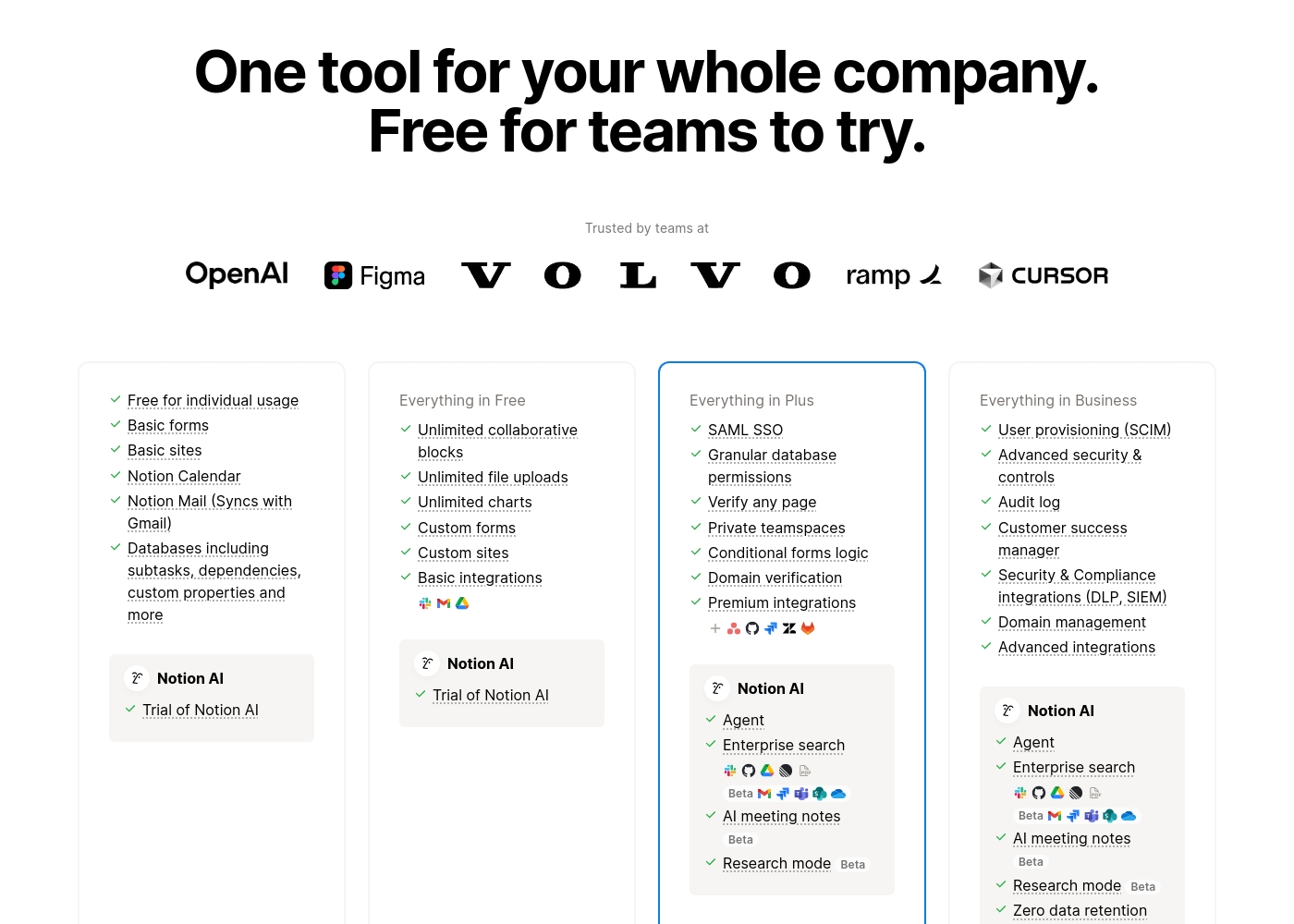
Notion costs between $0 and $20 per seat/month with four plans: Free at $0/seat/month, Plus at $10/seat/month, Business at $20/seat/month, and Enterprise (custom pricing).
Here’s a detailed look at the core features included in each subscription level.
- Unlimited pages and blocks for individuals
- Web publishing with 1 custom subdomain
- Basic forms and sites
- Notion Calendar and Mail synchronization
- Databases with subtasks and dependencies
- Unlimited blocks and file uploads
- 30 days of page history
- Basic SAML SSO
- Granular database permissions
- Access to unlimited charts
- 90 days of page history
- Advanced security controls and Audit log
- Conditional forms logic
- Domain verification
- Advanced page analytics (includes editor list)
- Unlimited page history and workspace analytics
- SCIM user provisioning
- Zero data retention with LLM providers for Notion AI
- Customer Success Manager support
- Security & Compliance integrations (DLP, SIEM)
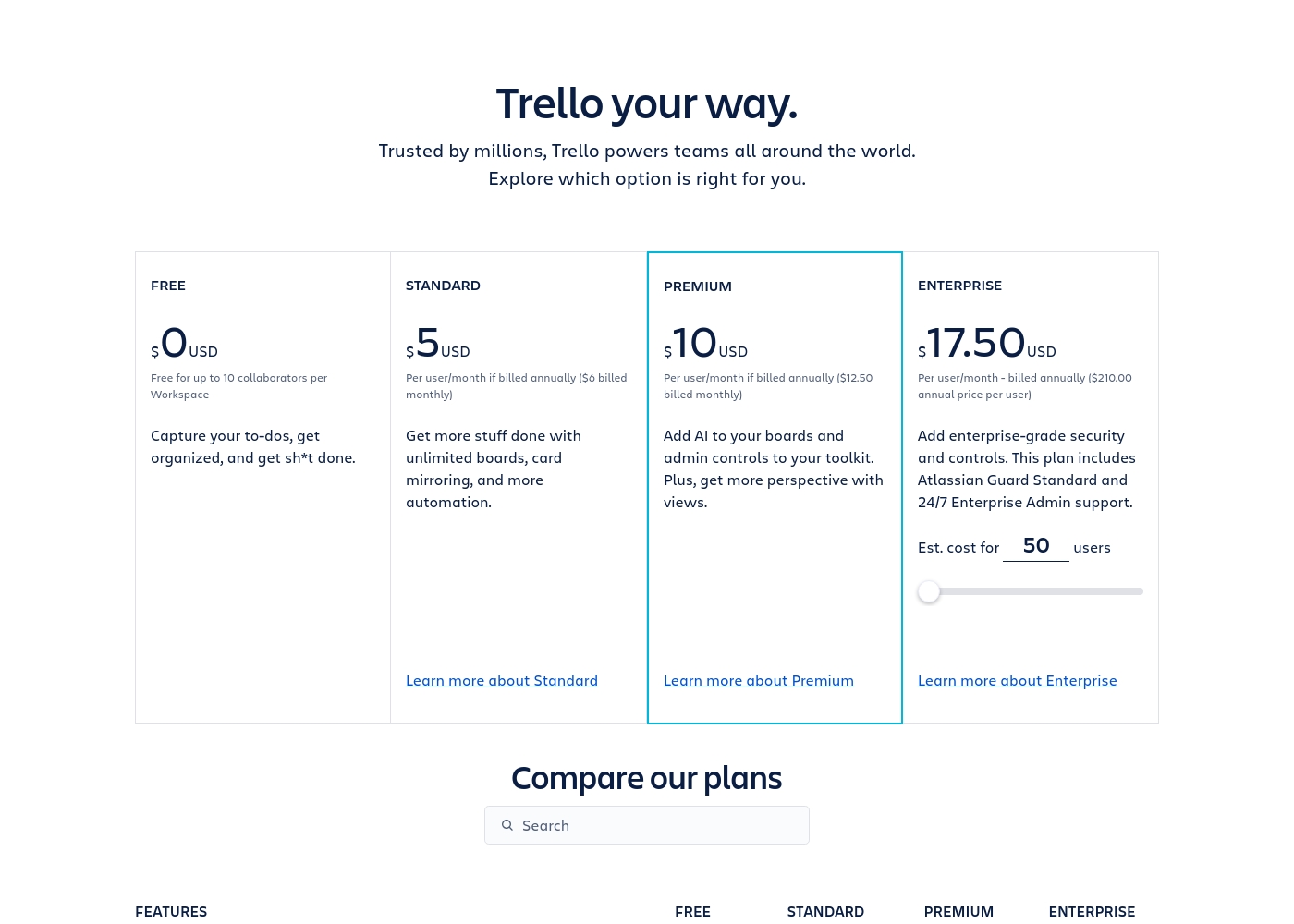
Trello costs between $0 and $17.50 per user/month, offering four plans: Free at $0, Standard at $5/user/month (annually), Premium at $10/user/month (annually), and Enterprise at $17.50/user/month (annually).
Trello offers flexible plans for individuals and large organizations. Let’s look closer at what each plan provides, based on annual pricing options.
Free
Price: $0 USD Best For: Capturing to-dos, fundamental organization Other Features:
- Unlimited cards
- Up to 10 boards per Workspace
- Unlimited Power-Ups per board
- 250 Workspace command runs per month
- 2-factor authentication
- Unlimited cards
- Unlimited Power-Ups per board
- Unlimited storage (10MB/file)
- 2-factor authentication
- Unlimited activity log
- Unlimited boards
- Card mirroring
- Advanced checklists
- Custom Fields
- Quick capture powered by AI
- Atlassian Intelligence (AI)
- Views: Calendar, Timeline, Table, Dashboard, and Map
- Admin and security features
- Workspace-level templates
- Simple data export
- Unlimited Workspaces
- Organization-wide permissions
- Free SSO and user provisioning with Atlassian Guard
- 24/7 Enterprise Admin support
- Public board management
Pricing Notes
- Both Notion and Trello use per-seat pricing models for paid subscriptions.
- Notion's free plan is robust, but team pages are limited unless upgrading to Plus ($10/seat/month).
- Trello offers highly discounted annual pricing, making Standard only $5/user/month.
- The Trello Premium plan is required to unlock essential visual views, costing $10/user/month annually.
- Notion users frequently report confusing billing and difficulty obtaining timely refunds, warranting caution.
Pricing Head-to-Head
User Reviews
Trustpilot feedback paints a sharply divided picture of Notion. While many users praise the platform as a terrific tool—highlighting its power, versatility, and unique block-based editor for personal and professional organization—these compliments are often eclipsed by grave concerns regarding management and billing practices.
A recurring major theme across many reviews details frustrating experiences with unexpected charges, deceptive auto-upgrades (especially relating to annual plans and new members), and significant challenges when trying to cancel subscriptions or obtain timely refunds. Furthermore, support responsiveness is frequently described as unsatisfactory, unhelpful, or even condescending, often failing to resolve billing errors or login issues.
Enjoy using Notion a lot for my daily work interface. It helps me set up my employees and assign tasks with no issue at all. We upgraded from the free plan and will absolutely continue using the platform.
Trello receives mixed but generally favorable external feedback, often lauded as an amazing app for personal and team organization. Users consistently praise its simple design and exceptional ease of use, which makes it perfect for startups and small businesses utilizing the generous free plan.
The core utility, including dynamic block control and strong real-time syncing, is highly appreciated. However, recurring pain points are frequently mentioned, stemming largely from the Atlassian acquisition.
Trello is a great tool for starting out, especially for small businesses. It has a robust free plan you can use for organization before deciding to go premium. It’s an excellent option for startups working with a limited budget.
Our Verdict
Notion and Trello are tackling productivity from opposite ends of the spectrum. Trello offers immediate, visual task clarity using its iconic Kanban boards. Notion provides limitless flexibility to build a truly massive, consolidated workspace. Deciding between Notion and Trello is easier than you think: define your primary workflow goal first. Notion is the ultimate consolidation tool, aiming to replace half a dozen apps you currently use. It turns complicated documentation into crystal-clear knowledge bases, rated #1 by G2. Every user gets an advanced AI writing assistant built into their workflow with Notion. Choose Notion when flexibility and consolidating deep documentation are paramount. Trello nails visual project management with exceptional simplicity and ease of use. It successfully helps teams share context quickly, boosting team communication globally. Trello’s built-in, no-code automation saves time on repetitive tasks, delivering value fast. Trello shines when clarity, stability, and speed of adoption matter most. The biggest difference lies in structure: Notion is a blank slate database; Trello is a visual board. If you need a company wiki and a database-driven CRM, Notion handles that power. If you only need to manage a marketing pipeline and delegate tasks easily, Trello is faster and more intuitive. Pick Trello for focused, straightforward project workflows and superior billing stability. Choose Notion if you are aggressively consolidating tools and want a powerful, AI-driven single source of truth. Just proceed with caution regarding annual financial commitments on Notion due to user reports.
Frequently Asked Questions
Which is better for building a company wiki: Notion or Trello?
Notion is drastically better, as it’s rated the #1 knowledge base tool today. Notion provides the structure necessary for extensive, linked documentation. Trello's focus on cards and visual flow makes it unsuitable for complex organizational wikis.
Which tool offers better automation features out of the box?
Trello offers superior, built-in, no-code automation that works on every board. Trello's Premium plan provides unlimited automated command runs. Notion's automation relies more on complex database rules and integrations.
How do the free plans of Notion and Trello compare for small teams?
Notion's free plan is robust for individuals but restricts collaborative pages for teams. Trello’s free plan allows up to ten boards and ten collaborators per Workspace. Trello is slightly better for small collaborative teams starting with a Kanban focus.
Is Notion more powerful for Enterprise security than Trello?
Notion offers deeper compliance features crucial for Enterprise, like SCIM and Audit Logs. Trello relies on its parent company, Atlassian Guard, for Enterprise security needs. Both scale, but Notion builds more controls into its highest tiers.
Can I easily capture external tasks in Notion like I can in Trello?
Trello excels here, instantly converting forwarded emails or chat messages into organized task cards using AI. Notion requires syncing external apps like Notion Mail or using complex third-party integrations.
Why are user reviews for Notion significantly lower than Trello?
Notion's user rating (2.9) reflects widespread, recurring complaints about billing and poor customer support. Trello (3.8) receives high marks for simplicity, despite some friction points related to the Atlassian login process.
Ready to Choose?
Both tools have their strengths. Choose based on your specific needs.