Notion vs Success.co
Notion and Success.co are both powerful platforms, but they serve very different purposes. Notion is an all-in-one workspace for projects, wikis, and AI, while Success.co is built exclusively for the EOS® operating system. Choosing between them depends on whether you need a flexible productivity hub or a dedicated EOS® implementation tool.
Best for: Teams needing a single platform for projects, wikis, and CRM, Organizations looking for built-in AI writing and search tools
Best for: Leadership teams implementing the EOS® framework, Small to mid-sized businesses (10-100 users) needing alignment
Powerful software, risky provider.
We found Notion is an exceptionally flexible and powerful productivity tool, praised globally for its block-based editor and ability to consolidate diverse workflows. However, external evidence highlights significant failures in subscription management and support responsiveness. Overall, we advise extreme caution regarding billing procedures due to recurring reports of unauthorized charges and cancellation difficulties.
Pros
- Exceptionally powerful and versatile block-based editor.
- Effective for personal knowledge management and team use.
- Consolidates multiple specialized tools (wikis, CRMs, project management).
- Strong native AI assistance integrated throughout the workspace.
Cons
- Widespread reports of deceptive or confusing billing practices.
- Extremely poor and unresponsive customer support experiences.
- Users report app is often slow and unreliable.
- Difficulty canceling subscriptions and obtaining timely refunds.
Fast, intuitive, true-to-EOS software.
We find Success.co to be a focused and polished platform for teams committed to the EOS framework. It delivers on its promise of speed and simplicity with a licensed, integrated toolset. Overall, it's a strong choice for implementing the process correctly, provided the pricing model fits your team size.
Pros
- Truly fast, offline-capable interface using proprietary technology.
- Clean, intuitive design with a very short learning curve.
- Officially licensed EOS software built with Implementer feedback.
- Free concierge migration and onboarding support included.
Cons
- Per-user pricing can become costly for larger teams.
- Free Forever plan has limited features and unspecified limits.
- No native integrations for project management tools mentioned.
AboutNotion
Notion is your dedicated AI workspace and everything app. It is built to replace multiple specialized tools with one powerful platform. This centralized space lets teams consolidate project management, internal wikis, and basic CRM functions. Notion is trusted broadly; over 100 million users worldwide use it, and 62% of the Fortune 100 are customers. You can use it right in your browser or download specialized tools like Notion Mail and Notion Calendar to keep time and work together. ✅
AboutSuccess.co
Success.co is an officially licensed EOS® software solution. 💡 It's built in collaboration with experienced EOS Implementers® to stay 100% true to the EOS Model®. The platform puts all your EOS® tools—like your V/TO, Level 10 Meetings, Rocks, and Scorecards—in one place. It's designed for any leadership team that wants to implement and run EOS® the right way, with clarity and efficiency.
Highlights
Feature Comparison
Features Overview
We highlight the main differences and pick a winner for each feature.
Core Platform Focus
Notion is a flexible workspace for any team. Success.co is built solely for the EOS® framework.
Notion lets you build custom workflows for projects, wikis, and CRM. It replaces multiple tools with one platform. Success.co is licensed by EOS® to run the V/TO, Rocks, and Scorecards. It's designed for teams implementing that specific process. The key difference is scope. Notion is a general-purpose workspace. Success.co is a specialized tool for EOS® practitioners. If your team doesn't use EOS®, Success.co won't be useful. If you need a flexible wiki or project tool, Notion is the better fit.
User Interface & Speed
Notion offers a powerful but sometimes slow editor. Success.co uses proprietary tech for instant saves.
Notion's block-based editor is incredibly flexible. However, users report the app can be slow and unreliable at times. Success.co uses BlitzSync™ technology for zero load times and instant saves. It's designed to feel like a fast desktop app. Notion's interface is great for custom builds, but speed can suffer. Success.co's speed is a major advantage for daily EOS® tasks. Teams needing fast, reliable updates may prefer Success.co's performance.
AI Integration
Notion has a built-in AI assistant for all users. Success.co does not offer AI features.
Notion includes a powerful AI assistant for every team member. G2 rates it the #1 AI writing tool. You can use Notion AI to generate drafts, summarize docs, and search across your workspace. It's integrated throughout the platform. Success.co does not mention any AI capabilities. It focuses on core EOS® tools and speed. If AI assistance is critical, Notion is the clear choice. Success.co is not built for that.
Customer Support
Notion has mixed reviews on support. Success.co users praise fast, helpful support.
Notion's support is often criticized for being unresponsive. Users report billing issues and difficulty getting help. Success.co's support is consistently praised as fast and knowledgeable. It's included with all plans. Notion's support experience can be frustrating. Success.co feels like a true partnership. For teams needing reliable support, Success.co is the better choice.
Migration & Onboarding
Success.co offers free concierge migration. Notion has no similar service.
Success.co includes free concierge migration to move your data from another tool. They handle setup and training. Notion does not mention any migration assistance. You're on your own to set up and transfer data. Switching to Success.co is smooth. Moving to Notion requires more manual effort. If you're switching from another EOS® tool, Success.co makes it easy.
Collaboration & Team Use
Notion scales for large teams. Success.co is built for leadership teams implementing EOS®.
Notion works for teams of any size. It has granular permissions and scales well. Success.co is designed for leadership teams. It's ideal for companies running EOS® with 10-100 users. Notion is more flexible for general collaboration. Success.co is specialized for EOS® alignment. Large, non-EOS® teams should pick Notion. EOS® teams should pick Success.co.
Mobile Experience
Both offer mobile apps. Success.co's offline mode is a key differentiator.
Notion has mobile apps for iOS and Android. You can work on the go, but need an internet connection. Success.co also has mobile apps. Its offline mode lets you work anywhere and sync later. Success.co's offline capability is a big advantage for remote or travel-heavy teams. If you work offline often, Success.co is better.
Learning Curve
Notion is powerful but complex. Success.co is simple and intuitive for EOS® users.
Notion has a steep learning curve. Its flexibility means many ways to build workflows. Success.co is designed for instant adoption. The interface is clean and follows EOS® terms perfectly. Notion requires time to master. Success.co is easy to learn for EOS® teams. Teams new to EOS® will find Success.co faster to adopt.
Pricing & Value
Notion offers a free plan for individuals. Success.co's free plan is limited to core EOS® tools.
Notion's free plan is robust for individuals. Paid plans start at $10 per seat. Success.co's free plan includes V/TO and Accountability Chart. Paid plans start at $11 per user (annual). Notion gives more features for free. Success.co's paid plan is cheaper for small teams. For general use, Notion's free plan is better. For EOS®, Success.co's pricing is fair.
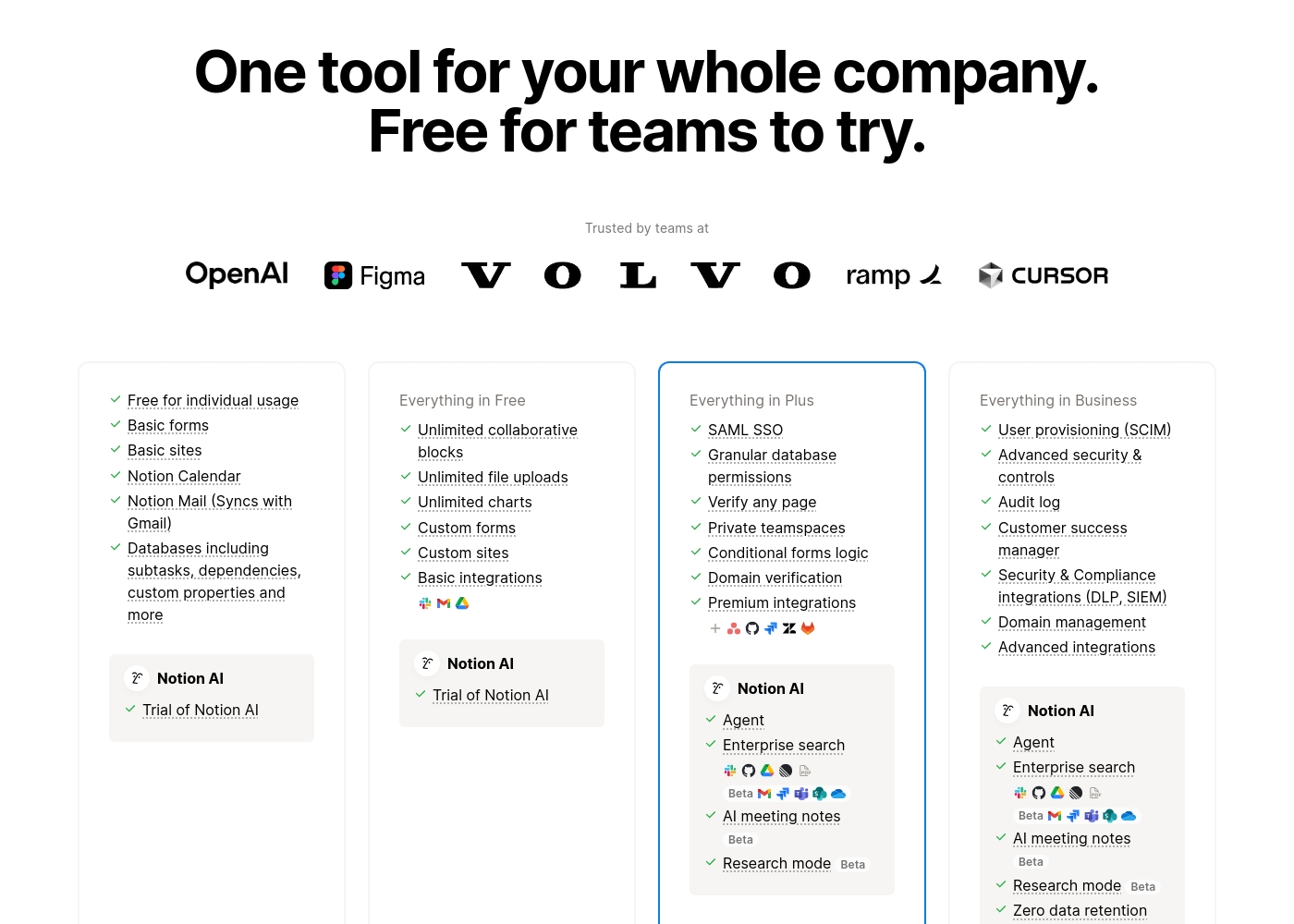
Notion costs between $0 and $20 per seat/month with four plans: Free at $0/seat/month, Plus at $10/seat/month, Business at $20/seat/month, and Enterprise (custom pricing).
Here’s a detailed look at the core features included in each subscription level.
- Unlimited pages and blocks for individuals
- Web publishing with 1 custom subdomain
- Basic forms and sites
- Notion Calendar and Mail synchronization
- Databases with subtasks and dependencies
- Unlimited blocks and file uploads
- 30 days of page history
- Basic SAML SSO
- Granular database permissions
- Access to unlimited charts
- 90 days of page history
- Advanced security controls and Audit log
- Conditional forms logic
- Domain verification
- Advanced page analytics (includes editor list)
- Unlimited page history and workspace analytics
- SCIM user provisioning
- Zero data retention with LLM providers for Notion AI
- Customer Success Manager support
- Security & Compliance integrations (DLP, SIEM)
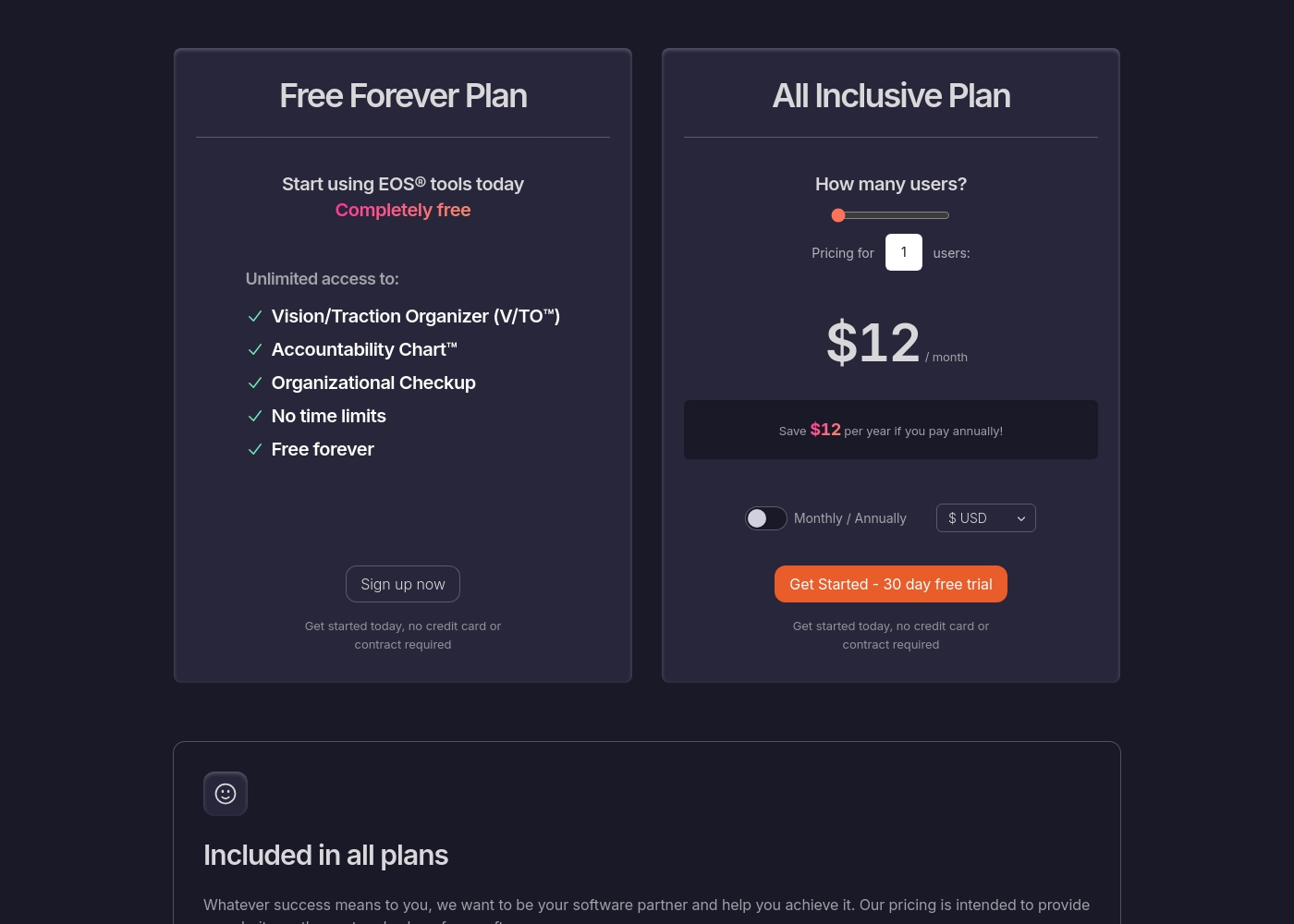
Success.co pricing: Success.co offers a free forever tier for foundational tools and a scalable All Inclusive Plan starting at $12 per month. Pricing adjusts based on your user count with options for monthly or annual billing to suit your team's needs. 🚀
- Free Forever: $0
- All Inclusive: $12/mo/user (paid monthly) or $11/mo/user (paid annually)
- Nonprofits: 50% discount with 501(c)(3) status
- Concierge Migration: Included for free
- 30-Day Free Trial: Available, no credit card required
Success.co costs between $0 and $12 per month with 2 plans: Free Forever at $0 and All Inclusive starting at $11 per month.
Pricing Head-to-Head
User Reviews
Trustpilot feedback paints a sharply divided picture of Notion. While many users praise the platform as a terrific tool—highlighting its power, versatility, and unique block-based editor for personal and professional organization—these compliments are often eclipsed by grave concerns regarding management and billing practices.
A recurring major theme across many reviews details frustrating experiences with unexpected charges, deceptive auto-upgrades (especially relating to annual plans and new members), and significant challenges when trying to cancel subscriptions or obtain timely refunds. Furthermore, support responsiveness is frequently described as unsatisfactory, unhelpful, or even condescending, often failing to resolve billing errors or login issues.
Enjoy using Notion a lot for my daily work interface. It helps me set up my employees and assign tasks with no issue at all. We upgraded from the free plan and will absolutely continue using the platform.
Unfortunately, the Trustpilot page returned a verification error, and Capterra was not available. Therefore, we cannot synthesize any specific user sentiment or recurring themes from external reviews for this finalization. Our assessment is based solely on the website-provided information. 📉
Our Verdict
This isn't a fair fight—it's a choice between an everything app and a specialized EOS® tool. Notion's superpower is its flexibility. It replaces 6+ tools for projects, wikis, CRM, and AI. It's the best choice for teams that need one platform to do everything. Success.co's superpower is its focus. It's built exclusively for EOS® and is incredibly fast and intuitive. If you're running EOS®, it's the perfect tool. The deciding factor is your operating system. If you use EOS®, pick Success.co. If you don't, pick Notion. For most teams not on EOS®, Notion is the better choice. But for EOS® implementers, Success.co is the clear winner.
Frequently Asked Questions
Which is better for small teams: Notion or Success.co?
If your small team uses EOS®, Success.co is better. It has a free plan and is built for EOS® alignment. If you need a flexible workspace, Notion's free plan is more powerful.
Does Notion have EOS® tools like Success.co?
No. Notion is a general workspace. It doesn't have official EOS® tools like V/TO or Level 10 Meetings. Success.co is the only officially licensed EOS® software.
Is Success.co worth the extra cost over Notion?
Success.co's paid plan starts at $11 per user (annual). It's cheaper than Notion's paid plans. If you're implementing EOS®, it's worth it. If not, Notion's free plan is better.
Can I migrate from Notion to Success.co easily?
Success.co offers free concierge migration. They handle moving your data and setting up your structure. Notion doesn't have a similar service.
Which tool has better customer support?
Success.co's support is fast and helpful. Notion's support is often criticized as slow and unresponsive. Success.co wins here.
Does Success.co work offline?
Yes. Success.co has a full offline mode with BlitzSync™ technology. Notion requires an internet connection.
Ready to Choose?
Both tools have their strengths. Choose based on your specific needs.