Notion vs Plutio
Notion and Plutio both aim to be your central workspace, but they serve different masters. Notion is unmatched for internal knowledge management and integrated AI writing. Plutio excels at professional client-facing work like proposals and contracts. Deciding is about internal knowledge power versus external business functions.
Best for: Building and maintaining the company's centralized team wiki or knowledge base., Remote teams prioritizing integrated AI assistance and modern work tools.
Best for: Freelancers and solo professionals managing client projects end-to-end., Marketing and Design agencies needing branded proposals and contracts.
Powerful software, risky provider.
We found Notion is an exceptionally flexible and powerful productivity tool, praised globally for its block-based editor and ability to consolidate diverse workflows. However, external evidence highlights significant failures in subscription management and support responsiveness. Overall, we advise extreme caution regarding billing procedures due to recurring reports of unauthorized charges and cancellation difficulties.
Pros
- Exceptionally powerful and versatile block-based editor.
- Effective for personal knowledge management and team use.
- Consolidates multiple specialized tools (wikis, CRMs, project management).
- Strong native AI assistance integrated throughout the workspace.
Cons
- Widespread reports of deceptive or confusing billing practices.
- Extremely poor and unresponsive customer support experiences.
- Users report app is often slow and unreliable.
- Difficulty canceling subscriptions and obtaining timely refunds.
Flexible all-in-one business management platform.
We found Plutio delivers exceptional value by unifying critical business tools like invoicing, project management, and proposals into one customizable platform. The pricing model is flexible for freelancers and agencies seeking to reduce their subscription costs significantly. Overall, we recommend Plutio for growing teams that prioritize feature depth and centralized workflow management.
Pros
- Replaces multiple tools (proposals, PM, time tracking) for high value.
- Highly customizable interface and workflow settings.
- Flexible pricing tiers scale easily for solo users to agencies.
- Includes professional tools such as contracts and branded invoicing.
Cons
- Some users reported significant bugs impacting client trust and reliability.
- Development consistency has been questioned by a few long-term users.
- The foundational Solo plan does not include collaborator seats.
- No refunds are issued upon cancellation of service.
AboutNotion
Notion is your dedicated AI workspace and everything app. It is built to replace multiple specialized tools with one powerful platform. This centralized space lets teams consolidate project management, internal wikis, and basic CRM functions. Notion is trusted broadly; over 100 million users worldwide use it, and 62% of the Fortune 100 are customers. You can use it right in your browser or download specialized tools like Notion Mail and Notion Calendar to keep time and work together. ✅
AboutPlutio
Plutio is the helpful all-in-one solution built for running your entire business. It works whether you’re a solo professional, managing a team, or working primarily with clients. It centralizes essential tools like forms, project management, contracts, and proposals onto a single platform. This centralization means no more juggling between apps and fewer subscription payments. With Plutio, you're unifying your entire workflow to boost productivity and growth.
Highlights
Feature Comparison
Features Overview
We highlight the main differences and pick a winner for each feature.
Integrated AI Capabilities
Notion integrates powerful AI; Plutio does not offer comparable AI tools.
Notion provides a full AI assistant built right into every user's workspace. It is recognized as a top-rated AI writing tool for productivity and content creation. Large organizations using Notion can utilize zero data retention for AI providers. This ensures enhanced security for sensitive data. Plutio focuses entirely on core business management tools and project workflows. The platform does not natively include any integrated AI writing or summarization features. Teams using Plutio will need to rely on external AI tools. Notion offers superior productivity from AI, seamlessly integrated into document creation. Plutio relies purely on human input and organization. If generating content drafts quickly is vital, Notion is the obvious winner. Plutio users must manage AI outside the platform.
Client Management & Contracts
Plutio specializes in client interaction; Notion focuses internally on teams.
Plutio is designed for professional client-facing business operations. It includes tools for building professional proposals and legally binding contracts. The platform helps streamline client onboarding with electronic signature functionality built-in. Notion uses its flexible database system for basic customer relationship management (CRM). It does not offer dedicated client contract or proposal generation capabilities. Notion's focus is firmly set on internal team projects and knowledge. Plutio provides a seamless, branded experience intended to impress clients. Getting documents signed and organized is quick and simple within Plutio. Notion users need to integrate or use outside software for these crucial functions. Freelancers or agencies will find Plutio essential for securing new business efficiently. Notion requires significant manual setup to simulate a client portal.
Knowledge & Wiki Power
Notion is the superior centralized knowledge base; Plutio's strength is workflows.
Notion has been rated the #1 knowledge base for three consecutive years. Its powerful block editor allows for deeply nested, interconnected team wikis. Notion's unified search scans across all internal documents and integration data. Plutio handles documents within projects but is optimized for task management, not long-form knowledge retention. It lacks the deep architecture and linking features needed for a corporate wiki. Plutio's primary purpose is coordinating work and finances, not documentation. If centralized organizational knowledge is critical, Notion's features are unmatched. Notion enables seamless self-onboarding for new hires using complete documentation. Plutio is best for tracking client projects and associated files. Teams needing a single source of truth for procedures should choose Notion.
Invoicing & Time Tracking
Plutio has built-in finance tools; Notion requires third-party applications.
Plutio includes native time tracking directly linked to project budgets. It features a responsive drag-and-drop editor for professional, branded invoices. Over $316 million has been paid using Plutio's secure finance suite. Notion does not feature native time tracking or dedicated capabilities for generating invoices. Users rely on Notion's database functions for tracking, but billing requires integration. Notion is focused on content creation and project organization. Plutio unifies project work with the financial side of running a business. This consolidation saves subscriptions and simplifies accurate billing. Notion requires you to pay for and manage additional finance tools. For service providers who bill clients hourly, Plutio offers essential, integrated functionality.
Pricing Model & Scaling Costs
Notion has a great Free plan; Plutio is cheaper when scaling teams past 10 users.
Notion's team plans start at $10 per seat/per month and rely on strict per-user pricing. This model can become expensive quickly for large teams requiring full access. The costs increase significantly for advanced security controls. Plutio's paid plans start at $19/month, but extra contributor seats cost only $5 per person. This flexible model is highly valuable for agencies that need many seats without high per-user prices. Plutio includes up to 30 seats in the $99 Agency plan. Notion offers strong value for individuals with the robust Free plan and Enterprise security features. Plutio offers better cost predictability and lower prices for growing teams and agencies. Plutio handles up to 100 total contributors effectively. If you need a large number of internal collaborators, Plutio is significantly more cost-effective.
User Satisfaction & Support
Plutio users report better satisfaction; Notion is plagued by billing complaints.
Plutio maintains a solid user rating around 4.1, praising its unified feature set and value. Users frequently highlight that Plutio's support team is actively engaged and communicative. Despite reported bugs, sentiment remains positive overall. Notion's overall rating is low at 2.9, heavily impacted by customer support issues. Users repeatedly report confusing billing, unauthorized charges, and difficulty canceling subscriptions. Functionally, Notion is great, but the service experience is poor. Notion's excellent product design is undermined by critical business process failures. Plutio delivers reliability and communication that builds client trust. Plutio provides a safer, more predictable experience regarding financial management and support responsiveness.
Global Readiness & Localization
Plutio supports international business fully; Notion's global support is not specified.
Plutio is trusted worldwide and supports localization effectively for international businesses. It supports over 25 languages for the platform interface. Plutio also manages multi-currency transactions for simplified global invoicing. Notion's documentation does not explicitly detail multi-currency or extensive language support beyond core features. Its primary focus is on team collaboration and knowledge sharing. Notion's payment structure is less flexible globally. Plutio is clearly designed to handle the complexities of international client work and billing. This feature set makes securing payments from global clients much easier. Notion users may face more friction in diverse geographical markets. If your business serves clients across borders, Plutio is technologically more ready to adapt.
Enterprise Security
Notion offers specialized corporate security; Plutio relies on standard bank security.
Notion offers robust features necessary for large corporate environments starting in the Business plan. These include Advanced Security controls and the essential Audit log. Enterprise users get SCIM user provisioning for advanced identity management. Plutio protects user data using security measures comparable to those employed by major banks. However, it does not detail specific corporate governance features like SCIM or Audit logs. Plutio is generally designed for agencies, not massive enterprises. Notion is built to meet high-level security compliance required by Fortune 100 companies. This makes it suitable for organizations with stringent security mandates. Plutio's security is reliable but more generalized. Organizations needing complex integration into existing security protocols should select Notion.
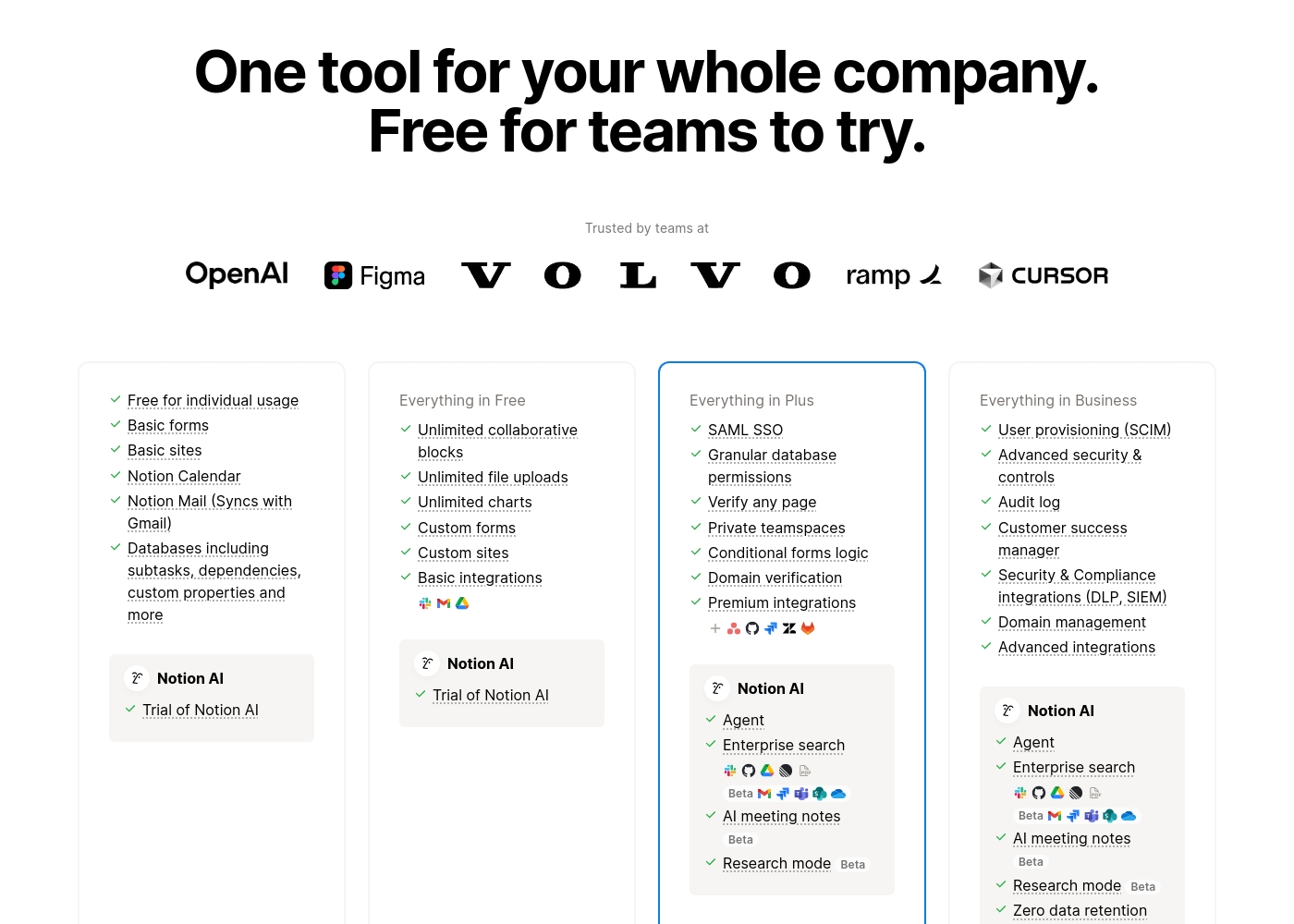
Notion costs between $0 and $20 per seat/month with four plans: Free at $0/seat/month, Plus at $10/seat/month, Business at $20/seat/month, and Enterprise (custom pricing).
Here’s a detailed look at the core features included in each subscription level.
- Unlimited pages and blocks for individuals
- Web publishing with 1 custom subdomain
- Basic forms and sites
- Notion Calendar and Mail synchronization
- Databases with subtasks and dependencies
- Unlimited blocks and file uploads
- 30 days of page history
- Basic SAML SSO
- Granular database permissions
- Access to unlimited charts
- 90 days of page history
- Advanced security controls and Audit log
- Conditional forms logic
- Domain verification
- Advanced page analytics (includes editor list)
- Unlimited page history and workspace analytics
- SCIM user provisioning
- Zero data retention with LLM providers for Notion AI
- Customer Success Manager support
- Security & Compliance integrations (DLP, SIEM)
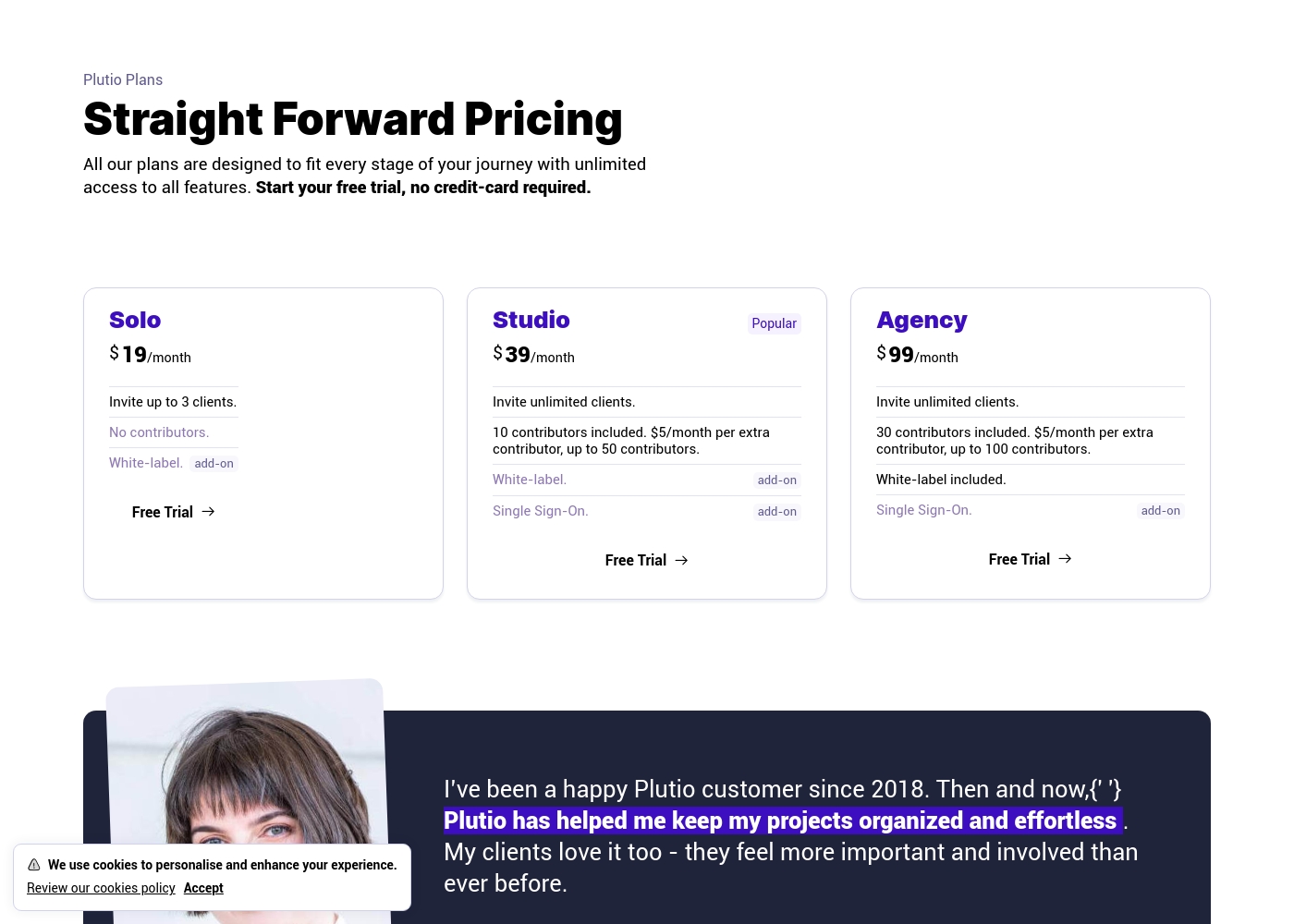
Plutio costs between $19 and $99 per month with three main plans: Solo at $19/month, Studio at $39/month, and Agency at $99/month.
All Plutio plans are built to provide unlimited access to every single feature, ensuring you have the complete toolkit regardless of your business size. You can easily upgrade or downgrade your plan anytime as your needs change.
Solo
Price: $19/month (or $190/year) Best For: Solopreneurs and freelancers Refund Policy: Cancellation possible, but no refund issued Other Features:
- Invite up to 3 clients
- No included contributors
- White-label available as an add-on ($9/month)
- Unlimited access to all features
- Invite up to 3 clients
- Unlimited access to all features
- Invite unlimited clients
- 10 contributors included
- Unlimited access to all features
- Invite unlimited clients
- 30 contributors included
- White-label included
Pricing Notes
- Notion offers a robust Free plan, while Plutio only offers a free trial.
- Plutio subscriptions grant the equivalent of two months free when paying annually.
- Notion pricing is strictly per-seat ($10-$20/month), making it potentially more expensive for large organizations than Plutio.
- Plutio only charges $5/month for extra contributors beyond the included base seats on Studio and Agency plans.
- Plutio does not issue refunds upon cancellation; access is retained until the end of the paid billing period.
- Notion offers a 30-day money-back guarantee for initial annual subscription payments.
Pricing Head-to-Head
User Reviews
Trustpilot feedback paints a sharply divided picture of Notion. While many users praise the platform as a terrific tool—highlighting its power, versatility, and unique block-based editor for personal and professional organization—these compliments are often eclipsed by grave concerns regarding management and billing practices.
A recurring major theme across many reviews details frustrating experiences with unexpected charges, deceptive auto-upgrades (especially relating to annual plans and new members), and significant challenges when trying to cancel subscriptions or obtain timely refunds. Furthermore, support responsiveness is frequently described as unsatisfactory, unhelpful, or even condescending, often failing to resolve billing errors or login issues.
Enjoy using Notion a lot for my daily work interface. It helps me set up my employees and assign tasks with no issue at all. We upgraded from the free plan and will absolutely continue using the platform.
Users generally see Plutio as a highly effective all-in-one solution that successfully replaces multiple point systems, like dedicated proposal and time tracking software. The external sentiment is largely positive, with users praising its impressive feature depth, which includes proposals, robust invoicing, and customizable project workflows.
Many reviewers confirm that the system is easy for teams to adopt 🚀. Pricing is consistently cited as a major value driver, especially for small business owners and agencies seeking centralized control.
Plutio is an outstanding piece of software. We were able to combine multiple expensive tools, like our proposal software, into this single platform. This unification offers massive savings and better workflow efficiency.
Our Verdict
This comparison is simple: choose your business focus. Notion is an internal knowledge powerhouse and AI workspace. Plutio is built for client-facing business operations. You must decide if you need a wiki or a finance suite more. Notion’s core strength is organizational knowledge and integrated intelligence. It provides every team member with a top-rated AI writing assistant. Notion is consistently rated the world's best team wiki due to its power. It also offers serious Enterprise security features and SCIM provisioning for large companies. Plutio is the clear winner for business owners working directly with clients. It seamlessly combines proposals, contracts, invoicing, and native time tracking. The platform adapts completely to your preferred workflow and branding. Agencies love Plutio because additional team seats are very affordable, costing only $5 per month. The deciding factor is your current pain point in workflow. If disorganized information and scattered documents slow you down, pick Notion. If managing contracts, invoicing, and client communication is your struggle, choose Plutio. Plutio users also report much higher satisfaction with support staff. Plutio is best for agencies and freelancers needing a complete client management system. Notion is the better choice for large internal organizations focused on knowledge centralization. Both will help your team ditch their scattered subscriptions for good.
Frequently Asked Questions
Which is better for small teams: Notion or Plutio?
Notion offers a robust Free plan perfect for individual users starting out. Plutio starts at $19/month but becomes great value for growing teams. Its Studio plan includes 10 contributors and inexpensive extra seats. Choose Plutio if you plan to scale beyond a few collaborators quickly.
Does Notion have native invoicing and time tracking like Plutio?
No, Notion does not include native time tracking or dedicated invoicing tools. Plutio is designed with these financial features built right into every plan. Notion users must rely on integrating separate third-party applications for billing and time collection. Plutio excels at the entire client workflow, including getting paid.
Which platform offers better customization and branding?
Plutio offers total personalization, including custom interface colors and white-labeling. This helps agencies present a professional, branded client portal. Notion emphasizes structural customization of databases and pages. Plutio is better for polished aesthetic and professional presentation.
Is Notion's Free plan better than Plutio's free trial?
Yes, Notion offers an indefinite Free plan with limits, perfect for individual use. Plutio only provides a temporary free trial to test the features. Plutio requires a paid subscription to use the software long-term. Notion’s Free plan is a huge value proposition.
Which tool is better for documentation and knowledge management?
Notion is designed as the ultimate knowledge base and is recognized globally for this. It features unified search across all internal and integrated information. Plutio handles documents but focuses more on project and client files. For pure wiki power, Notion is the definitive superior choice.
What is the major customer complaint against Notion?
Notion receives widespread criticism for confusing, hard-to-cancel billing practices. Poor support responsiveness regarding billing errors contributes heavily to its low 2.9 rating. Plutio users generally report significantly better experiences with customer support. Users should approach Notion's payment plans with extreme caution.
Ready to Choose?
Both tools have their strengths. Choose based on your specific needs.