Ninja Tables vs wpDataTables
These two tools are top contenders for professional WordPress data tables. Ninja Tables focuses on maximum site speed and dedicated e-commerce features. wpDataTables is the clear champion for advanced charting and external database connections. Your choice depends on whether speed or visual data presentation is most critical.
Best for: E-commerce businesses needing dedicated WooCommerce product table optimization., Users displaying massive datasets (Big Data) where fast page loading is non-negotiable.
Best for: Users requiring advanced data visualization (80 chart types) and interactive dashboards., Developers needing true integration with external databases (MySQL, MSSQL, PostgreSQL).
Powerful tables, painless synchronization, great value.
We found Ninja Tables to be a highly competitive WordPress table builder, offering significant performance benefits, especially regarding loading speed and big data handling. Overall, we recommend it highly for users needing flexible licensing and efficient methods for live data synchronization.
Pros
- Extremely fast loading speed, even when managing big data.
- No coding required; uses an intuitive drag-and-drop table editor.
- Seamless data synchronization direct from Google Sheets.
- Dedicated features for deep WooCommerce product integration.
Cons
- Priority support and essential integrations are limited to Pro tiers.
- Introductory prices are significantly discounted off the renewal cost.
Flexible, powerful, and remarkably supported.
We find wpDataTables to be a robust solution that excellently bridges the gap between complex data sources and accessible WordPress presentation. Its strong data integration features and clear responsiveness are significant advantages. Overall, this is a top-tier performer supported by a highly praised customer service team.
Pros
- Outstanding, responsive, and effective technical support.
- Seamless integration with external databases (MySQL, PostgreSQL).
- Highly responsive design ensures tables look great on mobile.
- Advanced features like formula columns and conditional formatting.
Cons
- There is no direct free trial, only a limited free version.
- External database connection is not included in the entry-level Starter plan.
AboutNinja Tables
Ninja Tables is simply the best WordPress plugin for displaying your data clearly in a tabular format. It is designed to be the ultimate solution for anyone needing organized tables. 💡 The easy, intuitive interface means it’s built for everyone—whether you are a seasoned expert or a complete beginner. You can start with Simple Mode for basic drag-and-drop tables or switch to Advanced Mode for rich customization options.
This plugin helps a wide range of users achieve their goals. Small businesses and online stores use it to display unlimited product details and boost sales. Agencies rely on its smart display to manage employee or student data. Web developers and marketers use it to quickly craft comparison tables, pricing lists, or Amazon product listings.
AboutwpDataTables
wpDataTables is your reliable solution for building highly responsive data tables right inside WordPress. It is designed to make the entire process—from initial table creation to user interaction—quick, effective, and simple. This plugin greatly simplifies professional data visualization for all types of users. Whether you work in business, manage educational resources, or handle personal data projects, wpDataTables helps you organize and present your information beautifully. 💡
Highlights
Feature Comparison
Features Overview
We highlight the main differences and pick a winner for each feature.
Data Source Connections
wpDataTables supports true databases and APIs; Ninja Tables focuses on Sheets and WooCommerce.
Ninja Tables integrates strongly with Google Sheets for auto-syncing live data. The core focus is on easy imports and dedicated WooCommerce product tables. wpDataTables excels at connectivity, supporting MySQL, MSSQL, PostgreSQL, and JSON APIs. If you rely heavily on different external databases, wpDataTables offers much broader support. Ninja Tables is built more around high-speed display of static or Sheet-based data.
Charting and Visualization
wpDataTables is a visualization specialist with 80 chart types; Ninja Tables omits charting features.
wpDataTables provides incredible charting tools, offering 80 different chart types across five engines. You can create interactive visuals and dynamic dashboards directly from your data sources. Ninja Tables is primarily a table builder and does not list any dedicated chart creation functionality. If clear visual data storytelling is a requirement, wpDataTables is the obvious choice. Ninja Tables requires a separate plugin for any charting needs.
Performance and Speed
Ninja Tables prioritizes speed for massive Big Data; wpDataTables emphasizes general mobile responsiveness.
Ninja Tables boasts a "Fast Loading architecture" built specifically to handle 'Big Data' smoothly. It promises fast speeds even with unlimited rows or columns in your table data. wpDataTables generates responsive, mobile-friendly tables and charts quickly with its code-free setup. However, it doesn't market specific architecture for handling unlimited rows like Ninja Tables does. For pure speed displaying massive datasets, Ninja Tables has the specific technical advantage.
E-commerce Capabilities
Ninja Tables has dedicated WooCommerce tools; wpDataTables is optimized for general product displays.
Ninja Tables includes dedicated features for WooCommerce product tables designed to boost sales conversion rates. It helps easily create detailed, highly engaging product lists. wpDataTables is suitable for building general product catalogs or responsive pricing tables using its standard workflow. If your primary goal is maximizing e-commerce product display within WordPress, Ninja Tables offers superior targeted functionality. The specific WooCommerce tools give Ninja Tables a clear edge.
Pricing Model & Value
Ninja Tables offers lifetime plans; wpDataTables offers extremely low-cost annual subscriptions.
Ninja Tables provides flexible Lifetime licenses, starting at $247, which saves money long-term by avoiding annual fees. wpDataTables has an astonishingly low annual range, from $1 up to $60 per year. Ninja Tables' annual plan starts at $63, which is higher than the maximum price of the wpDataTables annual tier. If you prefer paying once, Ninja Tables is your choice. If you demand the lowest annual cost, wpDataTables wins easily.
User Experience
Both are code-free; Ninja Tables offers a layered approach for beginners and advanced users.
Ninja Tables provides a Simple drag-and-drop mode alongside an Advanced Mode for deeper functionality. This layered approach helps users manage complexity effectively. wpDataTables focuses on a single code-free setup for creating both tables and charts quickly. wpDataTables also helps organize tables and charts using folders and robust search functionality. For absolute ease of first use, Ninja Tables' Simple Mode is highly intuitive.
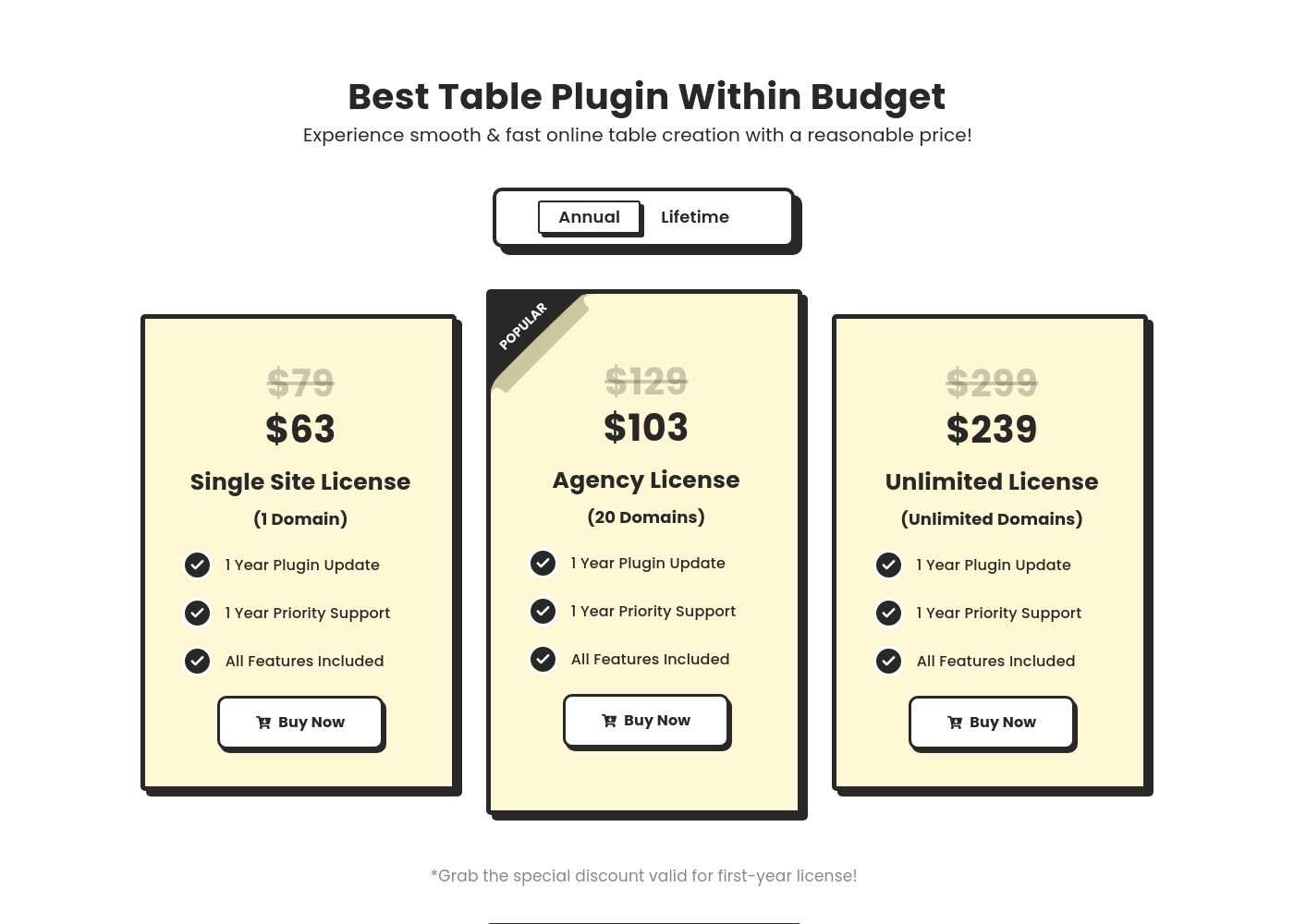
Ninja Tables costs between $63 and $599 with six primary Pro plans: Single Site Annual at $63, Agency Annual at $103, Unlimited Annual at $239, Single Site Lifetime at $247, Agency Lifetime at $399, and Unlimited Lifetime at $599.
Let's look closely at the details of the available licenses to find the best fit for your project. Remember that the listed full prices are currently discounted for the initial purchase.
Annual Single Site License (1 Domain)
Price: $63 per year (Discounted from $79) Websites Supported: 1 domain Best For: Individual users or bloggers needing powerful tables for one website. Refund Policy: 14-day money-back Other Features:
- 1 Year Plugin Update
- 1 Year Priority Support
- Access to All Features Included
- 1 Year Plugin Update
- 1 Year Priority Support
- All Features Included
- 1 Year Plugin Update
- 1 Year Priority Support
- All Features Included
- 1 Year Plugin Update
- 1 Year Priority Support
- All Features Included
- Lifetime Plugin Update
- Lifetime Priority Support
- All Features Included
Let’s explore what features are included with each plan.
Starter
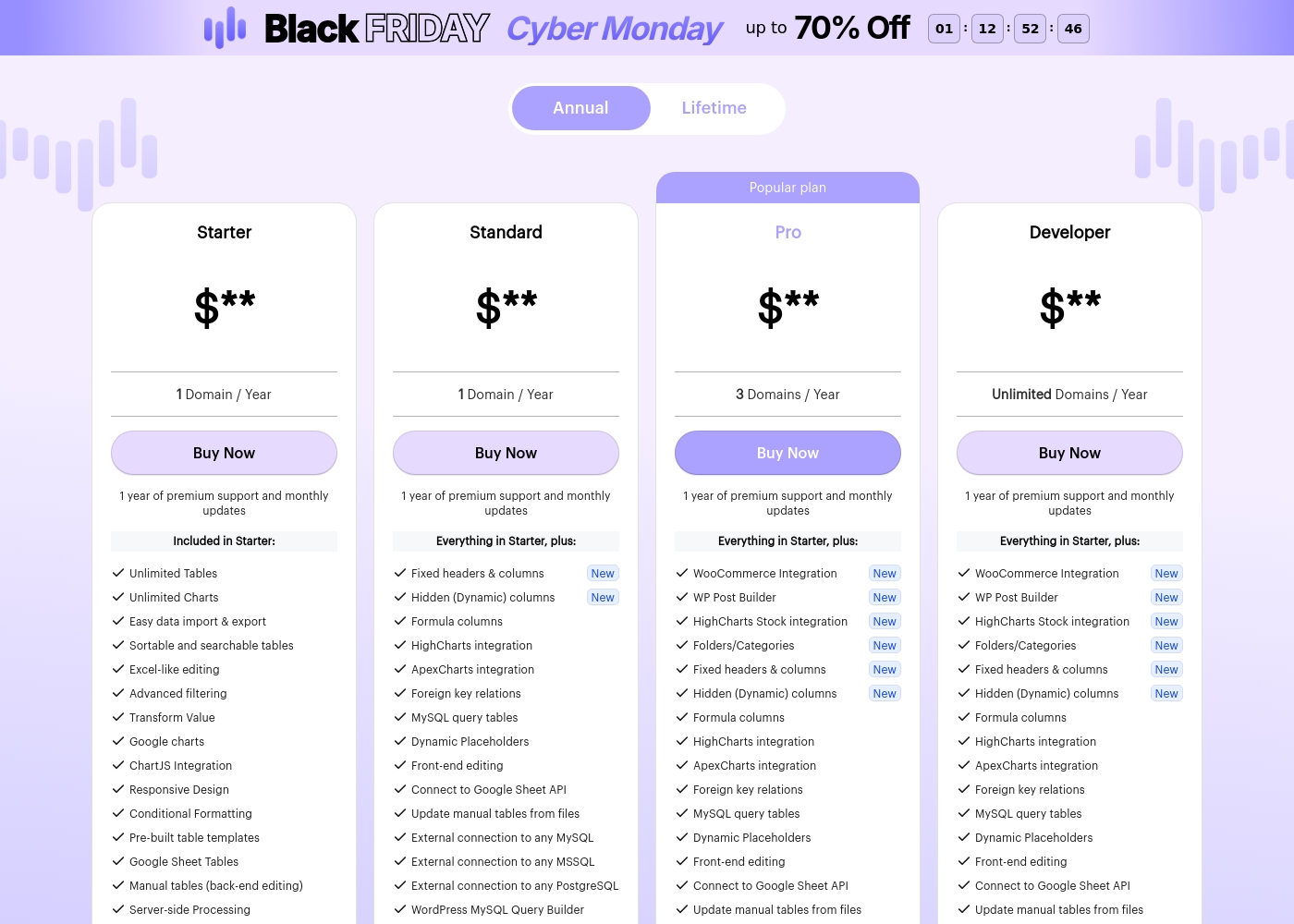
Price: $** / Year Websites Supported: 1 Domain Best For: Basic table creation and data visualization. Refund Policy: 15-day money-back guarantee Other Features: Unlimited Tables, Unlimited Charts, Excel-like editing, Advanced filtering, Conditional Formatting, Server-side Processing.
The Starter plan is ideal if you only manage a single website and need solid core functionality for creating responsive, searchable tables and charts. It covers all the essentials for handling data within a WordPress environment.
- Unlimited Tables and Charts
- Easy data import & export
- Excel-like editing
- Advanced filtering
- Conditional Formatting
- Everything in Starter
- Fixed headers & columns
- Formula columns
- Front-end editing
- External connection (MySQL, MSSQL, PostgreSQL)
- Everything in Starter
- WooCommerce Integration (New)
- WP Post Builder (New)
- HighCharts Stock integration (New)
- Folders/Categories (New)
- Everything in Starter
- Unlimited Domains support
- WooCommerce Integration (New)
- WP Post Builder (New)
- HighCharts Stock integration (New)
Pricing Notes
- wpDataTables’ annual price range ($1–$60/year) is substantially lower than Ninja Tables' starting annual price ($63/year).
- Ninja Tables offers flexible one-time Lifetime licenses, eliminating the need for yearly renewals.
- Both Ninja Tables (14 days) and wpDataTables (15 days) substitute a free trial with a money-back guarantee.
- Introductory annual prices for Ninja Tables are discounted and will renew at a higher rate.
Pricing Head-to-Head
User Reviews
We were supplied with the external review platform addresses for Capterra and Trustpilot. Specifically, the Capterra page link was provided for Ninja Tables.
However, no direct user feedback snippets were supplied from either source for synthesis. Consequently, we are currently unable to report on common user themes relating to accuracy, support responsiveness, or overall value delivered in the real world.
wpDataTables receives strong praise on Trustpilot, particularly for its comprehensive functionality and outstanding customer service. Users consistently describe the plugin as feature-rich and powerful, allowing them to create dynamic, complex tables and visualizations with relative ease.
Many reviewers noted that they could manage or generate data tables quickly, often in minutes, describing the software as one of the best WordPress plugins available. The most recurring theme is the quality of the technical support; users call the team "fantastic," "tireless," and "next to none," highlighting their responsiveness and willingness to solve complex problems.
This plugin is truly feature rich and works like a dream. I have been using it consistently for nearly five years now, which shows how reliable and excellent it is. The support team is absolutely fantastic to work with.
Our Verdict
The decision between Ninja Tables and wpDataTables is surprisingly straightforward, based on core strengths. You must decide if charting or sheer speed is your top priority. If raw speed and e-commerce optimization are essential, Ninja Tables is the superior choice. Its "Fast Loading architecture" handles unlimited data rows without slowing your WordPress site. Agencies will appreciate the one-time payment Lifetime licenses offered by Ninja Tables for long-term budget stability. wpDataTables is the undisputed king of data integration and visualization. It connects directly to external databases like MySQL, PostgreSQL, and JSON APIs. Plus, it offers an unbeatable 80 chart types across five engines for dynamic visual dashboards. The key choosing factor revolves around budget and complexity of data sources. If you must use multiple advanced databases and interactive charts, wpDataTables provides the needed flexibility. If you use Google Sheets/WooCommerce and demand high performance consistently, Ninja Tables is the best fit. Choose wpDataTables for low cost and maximum chart flexibility. Invest in Ninja Tables for the fastest Big Data display and the permanent security of a Lifetime license.
Frequently Asked Questions
Is wpDataTables cheaper than Ninja Tables?
Yes, annually, wpDataTables is significantly cheaper. Its annual range is listed between $1 and $60. Ninja Tables starts its annual price at $63, which is more than wpDataTables' maximum annual price. However, Ninja Tables offers one-time Lifetime payment options.
Does Ninja Tables offer advanced charts like wpDataTables?
No, Ninja Tables is strictly advertised as a table builder focusing on speed and display. wpDataTables is a visualization powerhouse offering 80 chart types across five built-in engines. If charting is required, you must select wpDataTables or use a separate charting plugin with Ninja Tables.
Which tool is better for integrating with external databases?
wpDataTables is better suited for integrating with external databases. It connects directly to MySQL, MSSQL, PostgreSQL, and JSON APIs. Ninja Tables' core focus for external data is limited to Google Sheets and its import functionality.
Which tool is better for WooCommerce?
Ninja Tables offers dedicated WooCommerce product table functionality out-of-the-box. These specific features are designed to help boost sales and display detailed product information. While wpDataTables can create product catalogs, Ninja Tables has the more specialized e-commerce tools.
Does either tool offer a one-time payment option?
Yes, Ninja Tables offers multiple Lifetime Licenses which provide permanent access and support. wpDataTables primarily uses monthly or yearly subscriptions. The Lifetime model of Ninja Tables is great for agencies seeking long-term value.
Which tool handles Big Data better?
Ninja Tables is explicitly designed with "Fast Loading architecture" to handle Big Data. It promises smooth performance with unlimited rows and columns. This specialized engineering gives Ninja Tables the edge in raw, scalable performance.
Ready to Choose?
Both tools have their strengths. Choose based on your specific needs.