Nifty vs Trello
Nifty and Trello both manage projects, but they target very different user needs. Nifty is an all-in-one OS for complex needs and true feature consolidation. Trello remains a simple, visual Kanban board powerhouse for quick flow. We decide which one should be your team's primary productivity hub.
Best for: Teams seeking true consolidation (replacing Chat, Docs, and task tracker), Client-facing agencies needing built-in File Proofing and client portals
Best for: Solopreneurs or small teams needing a simple, visual Kanban task tracker, Users who rely on quick task capture from email, Slack, or Microsoft Teams
Excellent All-in-One Project Management OS.
We find Nifty is remarkably successful at centralizing all required project elements into one single, easy-to-use platform, leveraging superior UI design. The pricing scales effectively from a generous Free plan to comprehensive Enterprise features, making it viable for any size team. Overall, we confidently recommend Nifty for organizations seeking true project consolidation and a superior user experience.
Pros
- Superior ease-of-use and clean user interface compared to competitors.
- Excellent for client-facing work via its built-in client portal functionality.
- Consolidates documentation, tasks, and team chat, effectively replacing other tools.
- Offers a fully featured Free plan ($0) and affordable, scalable pricing options.
Cons
- Public user feedback volume and verified third-party reviews are currently very limited.
- Advanced features like Custom SAML and IP Restriction are gated behind the high-tier Enterprise plan.
Simple Project Management, Complex Login
We find Trello delivers exceptional value quickly due to its easy operation. Its Kanban visual organization is highly flexible for team workflows. Overall, Trello is a powerful tool, but stability issues and frustrating administrative friction points like the Atlassian login do hold it back.
Pros
- The simple, visual Kanaban board design offers great ease of use.
- A permanent Free plan is available and suitable for small teams or personal use.
- The platform is effective for team management and sharing context quickly.
- Supports extensive customization and functionality upgrades via Power-Ups.
Cons
- Users frequently report difficulty and friction with the Atlassian login process.
- Accessing billing information and invoices can be surprisingly complicated.
- The interface occasionally suffers from lag and server downtime.
- Key views like Calendar or Map require a paid Premium subscription.
AboutNifty
Nifty serves as an all-in-one hub designed to supercharge productivity and streamline your workflows. It’s a powerful Operating System for managing projects at scale, used by over 20,000 highly productive teams. Instead of separating your roadmaps, tasks, docs, and discussions, Nifty puts everything into a central workspace. This makes team alignment and smarter decisions happen naturally. This centralized system is perfect for cross-functional collaboration, supporting roles from developers and designers to sales managers. 💡
AboutTrello
Trello is designed to keep you at the top of your game by ensuring every to-do or idea, regardless of size, finds its proper place. The system helps you stay organized and efficient using three key components: Inbox, Boards, and Planner.
The Inbox quickly captures tasks as soon as they are on your mind, whether you are in the office or on the go. You manage your tasks using flexible Boards, where long lists become manageable by tracking items from “to-dos to tackle” to “mission accomplished!” Use the Planner to simply drag and drop your top tasks right into your calendar, ensuring you make time for what truly matters. 💡
Highlights
Feature Comparison
Features Overview
We highlight the main differences and pick a winner for each feature.
Feature Consolidation
Nifty is an all-in-one OS; Trello focuses strictly on manageable tasks.
Nifty unifies Tasks, Docs, Discussions, and Roadmaps in its dedicated OS. Nifty specifically removes the need for several fragmented external tools. It includes native Forms for data capture within projects. Trello centers around its visual Kanban board system for task organization. It relies entirely on external Power-Ups for features beyond basic task cards. Trello excels at quick capture but lacks native documentation features. Nifty offers built-in features like team chat and File Proofing from the start. Trello achieves consolidation only through third-party integrations and add-ons. If switching between chat, docs, and tasks is your pain point, Nifty solves it natively and elegantly.
User Interface (UI)
Nifty provides a superior modern UI; Trello is highly celebrated for its simplicity.
Users consistently praise Nifty's extremely clean UI and superior aesthetic design. The system promotes easy navigation across different views and project scopes. Nifty staff and clients report immediate system adoption with minimal learning curve. Trello is renowned for its straightforward drag-and-drop Kanban methodology. The visual simplicity makes Trello incredibly fast to deploy for new users. However, many users report frustrating login friction due to mandatory Atlassian redirects. Trello wins on ultimate initial simplicity for Kanban users. Nifty provides a more modern, superior UI without the overhead friction. Nifty manages complex project data more elegantly while maintaining a professional and clean appearance.
Advanced Project Views
Nifty includes 5 core views for all paid plans; Trello gates multiple views behind Premium.
Nifty includes five powerful ways to view tasks: Kanban, List, Timeline, Calendar, and Swimlane. These comprehensive views are available from the Personal plan onward. Milestones automatically report progress across key project phases quickly. Trello's core is Kanban; advanced visual views are a Premium feature upgrade. Users must pay for Calendar, Timeline, Table, Dashboard, and Map views. This gating significantly increases the entry cost for advanced use cases. Nifty treats critical visual organization tools as essential components for project management. Trello treats these professional administrative views as high-tier add-ons. Teams requiring sophisticated scheduling (Timeline or Calendar) will find Nifty offers better feature access value.
Client Management
Nifty is built for clients; Trello focuses heavily on internal team collaboration.
Nifty is superior for client-facing work, offering dedicated portal functionality. The Business plan unlocks unlimited Guests & Clients for easier external collaboration. Nifty also includes essential File Proofing to expedite approval cycles. Trello manages guests but can bill them as full paid members if they access multiple boards. Trello lacks native features like File Proofing for external collaboration handoffs. Advanced client features require expensive, third-party Power-Ups. Nifty natively structures its platform to be a centralized hub for external collaborators and clients. Trello primarily optimizes efficiency for a strictly internal team. Use Nifty if you regularly work with clients, partners, or need approvals for creative deliverables.
Task Capture & Inbox
Trello excels at quick, AI-powered external message capture; Nifty focuses on in-platform workflows.
Trello’s Inbox captures tasks and ideas instantly from web and mobile interfaces. Atlassian AI automatically transforms forwarded emails into organized task cards. Incoming notes include summaries and all necessary links. Nifty features strong task management and internal workflow documentation with native Docs. Nifty’s focus is on complex project planning and internal prioritization via Orbit AI. Its task creation is workflow-focused, not capture-focused. Trello is the better choice if your team primarily receives tasks via disparate channels like email or chat. Trello centralizes external communication surprisingly well using AI automation. If you need to quickly record ideas or convert communication into actionable to-dos, Trello is faster.
Reporting and Oversight
Nifty provides integrated budget and time tracking; Trello relies on Power-Ups for metrics.
Nifty provides live, historical, and activity-based data for building custom dashboards. Detailed metrics like Budget Tracking and Time Tracking start in the Personal plan. Cross-Project Overviews ensure consistency across large portfolios. Trello only offers Dashboard, Table, and Map views in its Premium plan. Trello needs specialized task Power-Ups to provide time or budget tracking metrics. Reporting is not natively central to Trello's core design. Nifty is built for managers and leaders requiring full transparency and data-driven decisions. Trello is mainly built for team members tracking their progress across simple tasks. For managers requiring centralized cross-project portfolio reporting, Nifty offers a more robust solution.
Automation Capabilities
Trello offers basic automation in Free plan; Nifty scales automation for complex use cases.
Trello includes powerful no-code automation built into every board via simple Rule setup. The Free plan allows 250 Workspace command runs monthly for small tasks. Premium users benefit from unlimited automation commands per month. Nifty supports custom 'if/then' Workflow Automations starting with the Business plan tier. Nifty’s automation focus is on replacing large-scale administrative busy work. Native Forms automatically trigger workflow actions. If you need simple card movement automation, Trello is immediately accessible and free to start. For company-wide, complex automation, Nifty provides the necessary deep workflow rules. Both platforms are strong, but Trello is instantly accessible, giving it a slight edge in initial automation reach.
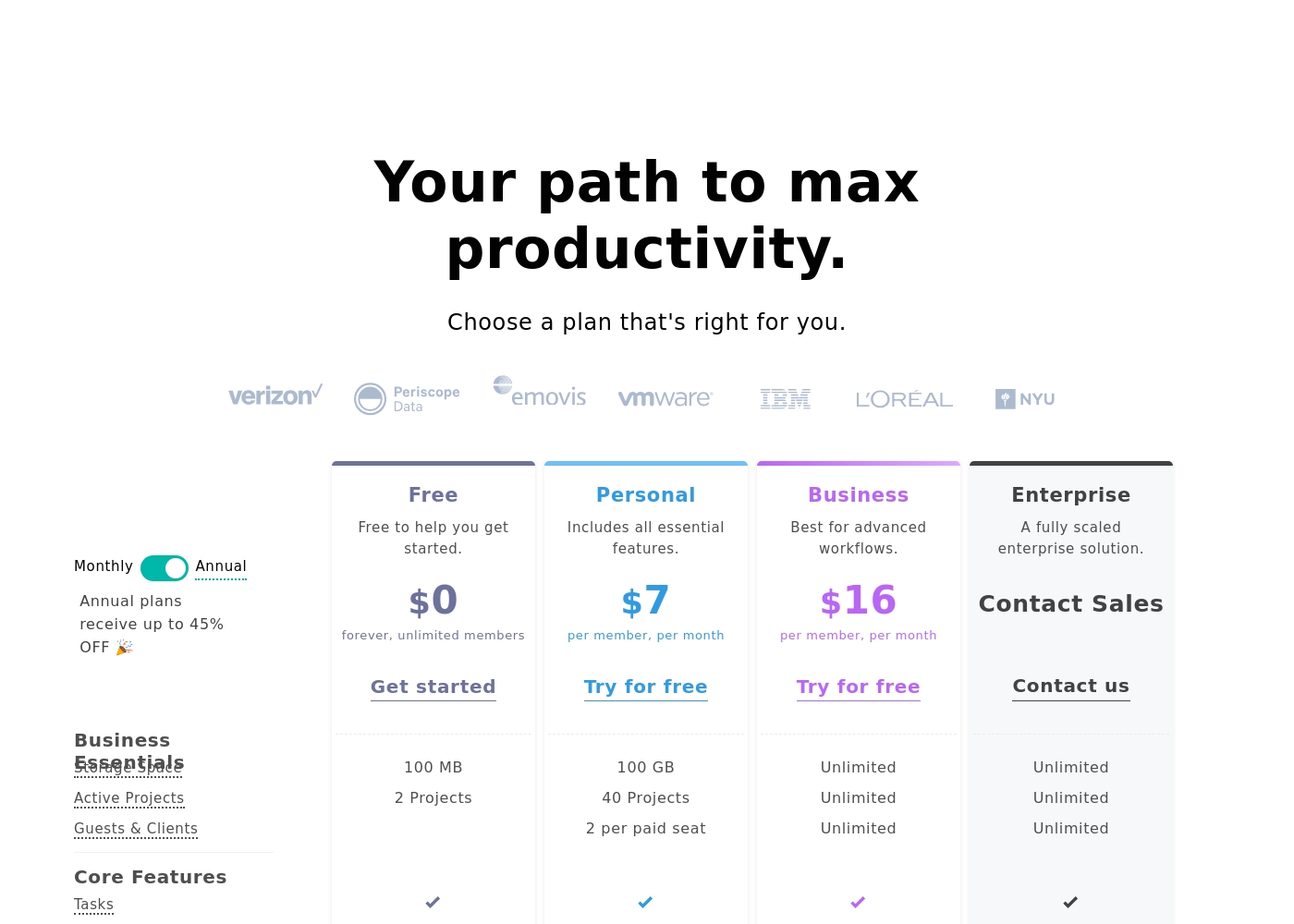
Nifty costs between $0 and $16 per month, featuring four plans: Free at $0, Personal at $7 per member, Business at $16 per member, and Enterprise requiring a quote.
We designed Nifty pricing to scale effortlessly with your team's needs. Here is a closer look at what each plan includes.
Free
Price: $0 per month Best For: Free to help you get started Other Features:
- 100 MB Storage Space
- 2 Active Projects
- Core features like Tasks, Docs, and Team Chat
- Task Dependencies and Portfolio overview
- 100 MB Storage Space
- 2 Active Projects
- Tasks, Milestones, Discussions, Docs, Files, Team Chat
- Portfolios and Recurring Tasks
- Two-Factor Authentication and Google SSO
- 100 GB Storage Space
- 40 Active Projects
- Custom Fields
- Budget Tracking
- Time Tracking & Reporting
- Unlimited Storage, Active Projects, and Guests & Clients
- Workflow Automations and File Proofing
- Cross-Project Overviews and Goals Tracking
- Team Workloads and Custom Roles & Permissions
- Priority Support and Microsoft SSO
- Native Forms
- Custom SAML
- IP Restriction
- Dedicated Success Manager
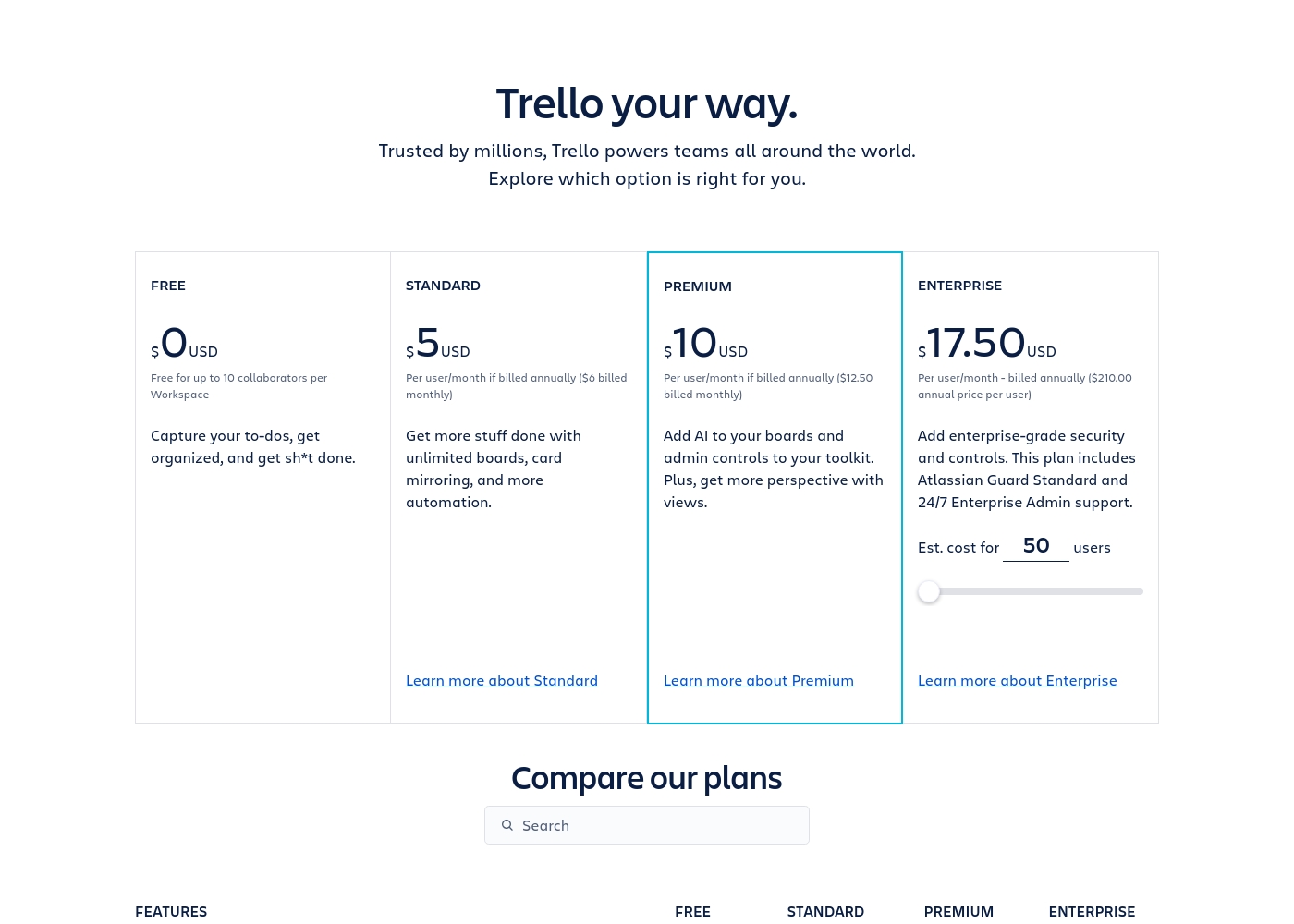
Trello costs between $0 and $17.50 per user/month, offering four plans: Free at $0, Standard at $5/user/month (annually), Premium at $10/user/month (annually), and Enterprise at $17.50/user/month (annually).
Trello offers flexible plans for individuals and large organizations. Let’s look closer at what each plan provides, based on annual pricing options.
Free
Price: $0 USD Best For: Capturing to-dos, fundamental organization Other Features:
- Unlimited cards
- Up to 10 boards per Workspace
- Unlimited Power-Ups per board
- 250 Workspace command runs per month
- 2-factor authentication
- Unlimited cards
- Unlimited Power-Ups per board
- Unlimited storage (10MB/file)
- 2-factor authentication
- Unlimited activity log
- Unlimited boards
- Card mirroring
- Advanced checklists
- Custom Fields
- Quick capture powered by AI
- Atlassian Intelligence (AI)
- Views: Calendar, Timeline, Table, Dashboard, and Map
- Admin and security features
- Workspace-level templates
- Simple data export
- Unlimited Workspaces
- Organization-wide permissions
- Free SSO and user provisioning with Atlassian Guard
- 24/7 Enterprise Admin support
- Public board management
Pricing Notes
- Nifty's generous Free plan supports unlimited members but limits active projects to two.
- Trello's Free plan allows 10 boards and 10 collaborators, but advanced views are gated behind Premium.
- Trello bills Multi-Board Guests as full paid members, which can lead to unexpected cost scaling.
- Nifty’s paid tiers start slightly higher monthly ($7 vs Trello Standard $6), but include more native features.
- Both Nifty (up to 45%) and Trello offer significant cost savings for annual subscriptions.
Pricing Head-to-Head
User Reviews
While the overall Trustpilot rating sits at 3.7, this score is based on sparse user feedback within the input provided (specifically, only one review snippet). Users who submit feedback, however, are highly satisfied.
The primary theme emphasized is unmatched ease of use and a clean, intuitive user interface (UI) that dramatically surpasses competitors. One reviewer specifically noted that Nifty serves effectively as a client portal, which adds significant value for client-facing organizations.
This is a great, simple project management system. The ease-of-use and UI are genuinely superior to other competitors we’ve tested. Our staff and clients adopted the system immediately.
Trello receives mixed but generally favorable external feedback, often lauded as an amazing app for personal and team organization. Users consistently praise its simple design and exceptional ease of use, which makes it perfect for startups and small businesses utilizing the generous free plan.
The core utility, including dynamic block control and strong real-time syncing, is highly appreciated. However, recurring pain points are frequently mentioned, stemming largely from the Atlassian acquisition.
Trello is a great tool for starting out, especially for small businesses. It has a robust free plan you can use for organization before deciding to go premium. It’s an excellent option for startups working with a limited budget.
Our Verdict
Choosing between Nifty and Trello means picking your underlying workflow philosophy. Nifty is the modern all-in-one OS designed for true feature consolidation. Trello remains the king of fast, visual, drag-and-drop task boards. Deciding your team’s core need dictates the clear winner here. Nifty excels when you need everything unified in one superior interface. It natively includes Docs, Roadmaps, built-in chat, and file approval tools. Nifty is the clear choice for agency work requiring seamless client handoffs and File Proofing. If you need to shed five different fragmented applications, choose Nifty right away. Trello’s superpower is its immediate visual simplicity and external task capture. Trello uses AI to turn stray emails and chat messages into structured task cards. It remains the fastest way to visualize a simple list-to-done workflow. The Trello Free plan is also remarkably generous for personal organization. The core factor is complexity: does your project require built-in budget tracking and custom roles? Nifty offers these features affordably in its lower paid tiers. Trello requires you to upgrade to Premium just to unlock essential visual timeline views. For deep project oversight and integrated features, Nifty offers better value. Choose **Nifty** if you run complex projects, manage external clients, or need a consolidated team hub. Stick with **Trello** if you require the ultimate simplicity of Kanban boards and reliable AI-powered task capture. Nifty wins for integrated team management; Trello wins for organization simplicity.
Frequently Asked Questions
Which is better for small teams: Nifty or Trello?
Trello is great for small teams wanting simple Kanban and the generous Free plan. The Trello Free plan supports 10 boards and 10 collaborators. Nifty's Free plan is robust but limits you to only two active projects. Nifty’s low-cost Personal plan offers deep features quickly.
Does Nifty provide visual timeline views like Trello?
Yes, Nifty includes Kanban, List, Timeline, Calendar, and Swimlane views natively. Trello only offers these valuable advanced views in its higher-priced Premium plan. Nifty provides comprehensive project views much sooner in its paid tiers.
Is Nifty better than Trello for client management and external use?
Nifty is definitively stronger for client management and external parties. Nifty’s Business plan offers unlimited clients and dedicated File Proofing tools. Trello typically requires billing Multi-Board Guests as full paid members for access.
Which tool has better AI features: Nifty or Trello?
The AI features serve different purposes in Nifty and Trello. Nifty uses Orbit AI for large-scale planning and project prioritization efforts. Trello leverages Atlassian AI to automatically structure captured tasks from forwarded emails.
Does Trello or Nifty have better centralized reporting for management?
Nifty offers superior centralized financial and workload reporting starting affordably. Trello forces essential advanced views like Dashboard and Timeline to the expensive Premium tier. For deeper project oversight, Nifty is better.
Can I easily migrate my existing data from Trello to Nifty?
Yes, Nifty supports seamless, instant data import and migration from Trello. Nifty also supports moving data from tools like Jira, Asana, and Wrike. This makes attempting a migration to Nifty extremely simple.
Ready to Choose?
Both tools have their strengths. Choose based on your specific needs.