Nifty vs Notion
Nifty and Notion both promise to centralize your work, but their core functions differ vastly. Nifty is a clean Project Management OS optimized for consistent execution and client work. Notion is a flexible, block-based workspace excellent for internal knowledge documentation and integrated AI.
Best for: Client-facing marketing agencies needing fast creative approvals and portals., Cross-functional teams prioritizing visual project roadmaps and clear execution.
Best for: Organizations seeking to build a centralized, self-serve internal knowledge base., Teams needing a highly customizable database framework for complex data tracking.
Excellent All-in-One Project Management OS.
We find Nifty is remarkably successful at centralizing all required project elements into one single, easy-to-use platform, leveraging superior UI design. The pricing scales effectively from a generous Free plan to comprehensive Enterprise features, making it viable for any size team. Overall, we confidently recommend Nifty for organizations seeking true project consolidation and a superior user experience.
Pros
- Superior ease-of-use and clean user interface compared to competitors.
- Excellent for client-facing work via its built-in client portal functionality.
- Consolidates documentation, tasks, and team chat, effectively replacing other tools.
- Offers a fully featured Free plan ($0) and affordable, scalable pricing options.
Cons
- Public user feedback volume and verified third-party reviews are currently very limited.
- Advanced features like Custom SAML and IP Restriction are gated behind the high-tier Enterprise plan.
Powerful software, risky provider.
We found Notion is an exceptionally flexible and powerful productivity tool, praised globally for its block-based editor and ability to consolidate diverse workflows. However, external evidence highlights significant failures in subscription management and support responsiveness. Overall, we advise extreme caution regarding billing procedures due to recurring reports of unauthorized charges and cancellation difficulties.
Pros
- Exceptionally powerful and versatile block-based editor.
- Effective for personal knowledge management and team use.
- Consolidates multiple specialized tools (wikis, CRMs, project management).
- Strong native AI assistance integrated throughout the workspace.
Cons
- Widespread reports of deceptive or confusing billing practices.
- Extremely poor and unresponsive customer support experiences.
- Users report app is often slow and unreliable.
- Difficulty canceling subscriptions and obtaining timely refunds.
AboutNifty
Nifty serves as an all-in-one hub designed to supercharge productivity and streamline your workflows. It’s a powerful Operating System for managing projects at scale, used by over 20,000 highly productive teams. Instead of separating your roadmaps, tasks, docs, and discussions, Nifty puts everything into a central workspace. This makes team alignment and smarter decisions happen naturally. This centralized system is perfect for cross-functional collaboration, supporting roles from developers and designers to sales managers. 💡
AboutNotion
Notion is your dedicated AI workspace and everything app. It is built to replace multiple specialized tools with one powerful platform. This centralized space lets teams consolidate project management, internal wikis, and basic CRM functions. Notion is trusted broadly; over 100 million users worldwide use it, and 62% of the Fortune 100 are customers. You can use it right in your browser or download specialized tools like Notion Mail and Notion Calendar to keep time and work together. ✅
Highlights
Feature Comparison
Features Overview
We highlight the main differences and pick a winner for each feature.
Clean UI & Adoption
Nifty offers superior ease-of-use and immediate adoption. Notion’s block-based system requires more initial setup time.
Nifty is praised for its clean, intuitive UI which staff and clients adopt instantly. Its structured operating system approach minimizes confusion. Notion offers immense functional potential but has a steeper learning curve for new users. Users must build their own organizational structure first. Nifty's pre-built structure ensures consistency across large project portfolios. It minimizes the time spent on tool configuration. Notion’s flexibility sometimes leads to fragmentation if teams don't establish clear, robust organizational rules first.
Toolkit vs Project OS
Nifty is a focused, all-in-one Project OS designed for clear execution. Notion is a versatile database replacing many specialized tools.
Nifty excels at true consolidation, unifying roadmaps, tasks, docs, and team discussions easily. It's built for consistency. Notion is the ultimate 'everything app,' used for wikis, CRMs, and project management setups. Teams have replaced up to six specialized apps. Nifty is highly effective for cross-functional teams needing immediate, structured alignment on goals and status. Notion focuses heavily on knowledge organization, being rated the #1 knowledge base for three years.
Integrated AI Tools
Notion provides a top-rated AI writing assistant for content creation. Nifty uses its Orbit AI for project planning and prioritization.
Nifty’s Orbit AI helps teams plan, prioritize, and execute work consistently and at scale. It focuses on project outcomes and workflow. Notion gives every user a built-in AI assistant, recognized by G2 as the #1 AI writing tool. It helps with drafting and research tasks. The core difference is purpose: Nifty uses AI for management, while Notion uses AI for production and content creation. Notion offers strong security for AI use, including zero data retention on its Enterprise plans for LLM providers.
Client Handoffs
Nifty is clearly superior for client work with built-in proofing and guest access. Notion offers only basic page sharing for external parties.
Nifty specializes in client-facing work, offering centralized File Proofing starting on the Business plan. Its client portal is a big bonus. Notion allows guests free access to specific pages, but lacks specialized closing tools like proofing workflows or dedicated portals. Nifty's Business plan includes unlimited guests and clients, streamlining external communication and handoffs significantly. Nifty helps shorten feedback cycles using instant messaging and one-click video meetings built right into the platform.
Project Views
Nifty offers five powerful, dedicated task tracking views including Swimlane. Notion relies solely on customizable database views.
Nifty provides dedicated task views: Kanban, List, Timeline, Calendar, and Swimlane for advanced scheduling. Milestones are native features. Notion uses its database structure, offering views like Table, Kanban, and Calendar that you must configure yourself fully. Nifty integrates time tracking, budget tracking, and custom fields smoothly starting on the Personal plan. Notion generally requires manual database setup or third-party integrations for detailed time and budget tracking features.
Pricing & Limits
Both use affordable per-seat billing, but Nifty offers unlimited capacity sooner and cheaper. Notion is focused on expensive security tiers.
Nifty pricing ranges from $0 to $16/member/month (Business), offering 100MB of storage free to start. Notion pricing ranges from $0 to $20/seat/month (Business), with only a 5MB per file limit on its Free plan. Nifty offers unlimited storage and active projects from the $16 Business plan, including unlimited guests. Notion frequently gates key administrative features behind the $20 Business tier, raising the price for robust team use.
Advanced Security
Notion offers superior, complex compliance features necessary for global enterprises. Nifty covers core security strongly.
Nifty offers Custom SAML and IP Restriction on its Enterprise tier for high-level control. Two-Factor Authentication is standard on all accounts. Notion’s Enterprise plan includes superior features like SCIM provisioning, DLP, and SIEM integrations, supporting massive scale. Notion also provides Advanced Security controls and a full Audit log even at the Business tier for regulatory requirements. Nifty focuses its highest security controls primarily on the Enterprise contact-sales level for personalized solutions.
User Reliability
Nifty users praise its clean UI and reliability. Notion users praise its power but report concerning billing and performance issues.
Nifty's users consistently call the UI superior and onboarding frictionless, noting high internal adoption rates. Notion users frequently report the app is slow and unreliable, citing significant performance regressions lately. Notion faces widespread, documented reports of confusing billing, difficulty canceling, and poor support experiences. Nifty has sparse public feedback volume but 100% positive functional feedback cited in the comparison data.
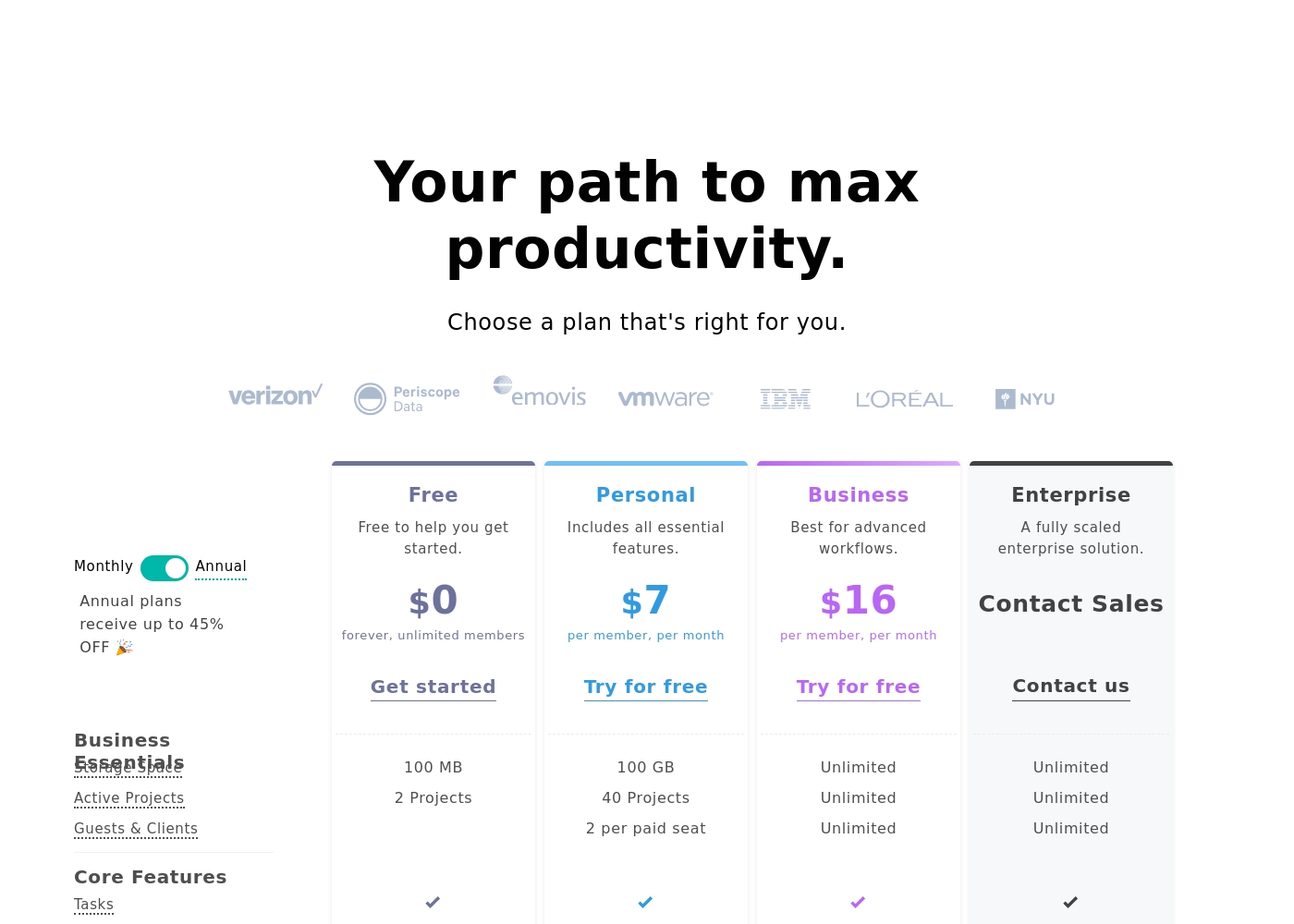
Nifty costs between $0 and $16 per month, featuring four plans: Free at $0, Personal at $7 per member, Business at $16 per member, and Enterprise requiring a quote.
We designed Nifty pricing to scale effortlessly with your team's needs. Here is a closer look at what each plan includes.
Free
Price: $0 per month Best For: Free to help you get started Other Features:
- 100 MB Storage Space
- 2 Active Projects
- Core features like Tasks, Docs, and Team Chat
- Task Dependencies and Portfolio overview
- 100 MB Storage Space
- 2 Active Projects
- Tasks, Milestones, Discussions, Docs, Files, Team Chat
- Portfolios and Recurring Tasks
- Two-Factor Authentication and Google SSO
- 100 GB Storage Space
- 40 Active Projects
- Custom Fields
- Budget Tracking
- Time Tracking & Reporting
- Unlimited Storage, Active Projects, and Guests & Clients
- Workflow Automations and File Proofing
- Cross-Project Overviews and Goals Tracking
- Team Workloads and Custom Roles & Permissions
- Priority Support and Microsoft SSO
- Native Forms
- Custom SAML
- IP Restriction
- Dedicated Success Manager
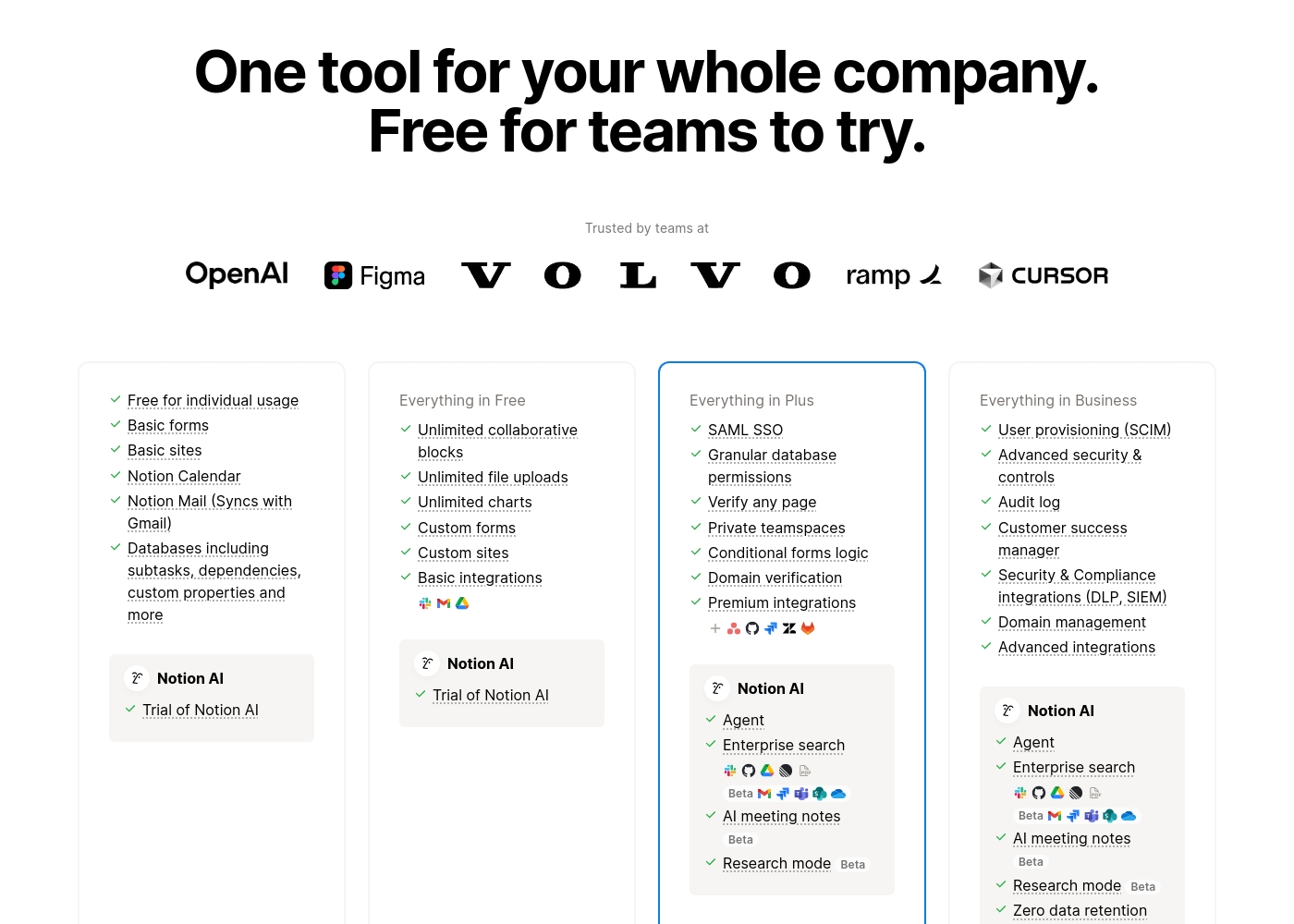
Notion costs between $0 and $20 per seat/month with four plans: Free at $0/seat/month, Plus at $10/seat/month, Business at $20/seat/month, and Enterprise (custom pricing).
Here’s a detailed look at the core features included in each subscription level.
- Unlimited pages and blocks for individuals
- Web publishing with 1 custom subdomain
- Basic forms and sites
- Notion Calendar and Mail synchronization
- Databases with subtasks and dependencies
- Unlimited blocks and file uploads
- 30 days of page history
- Basic SAML SSO
- Granular database permissions
- Access to unlimited charts
- 90 days of page history
- Advanced security controls and Audit log
- Conditional forms logic
- Domain verification
- Advanced page analytics (includes editor list)
- Unlimited page history and workspace analytics
- SCIM user provisioning
- Zero data retention with LLM providers for Notion AI
- Customer Success Manager support
- Security & Compliance integrations (DLP, SIEM)
Pricing Notes
- Nifty's Business plan ($16) includes unlimited storage, projects, and guests, offering great value consolidation.
- Notion offers a concrete 30-day refund window for annual plans, which Nifty does not explicitly state.
- Notion prorates charges immediately when a new member is added mid-cycle, which can create unexpected bills.
- Nifty provides robust time and budget tracking features for only $7 per member on the Personal plan.
- User reviews strongly caution about Notion's billing practices, citing difficulty canceling and unexpected charges.
Pricing Head-to-Head
User Reviews
While the overall Trustpilot rating sits at 3.7, this score is based on sparse user feedback within the input provided (specifically, only one review snippet). Users who submit feedback, however, are highly satisfied.
The primary theme emphasized is unmatched ease of use and a clean, intuitive user interface (UI) that dramatically surpasses competitors. One reviewer specifically noted that Nifty serves effectively as a client portal, which adds significant value for client-facing organizations.
This is a great, simple project management system. The ease-of-use and UI are genuinely superior to other competitors we’ve tested. Our staff and clients adopted the system immediately.
Trustpilot feedback paints a sharply divided picture of Notion. While many users praise the platform as a terrific tool—highlighting its power, versatility, and unique block-based editor for personal and professional organization—these compliments are often eclipsed by grave concerns regarding management and billing practices.
A recurring major theme across many reviews details frustrating experiences with unexpected charges, deceptive auto-upgrades (especially relating to annual plans and new members), and significant challenges when trying to cancel subscriptions or obtain timely refunds. Furthermore, support responsiveness is frequently described as unsatisfactory, unhelpful, or even condescending, often failing to resolve billing errors or login issues.
Enjoy using Notion a lot for my daily work interface. It helps me set up my employees and assign tasks with no issue at all. We upgraded from the free plan and will absolutely continue using the platform.
Our Verdict
The core decision between Nifty and Notion hangs on structure versus ultimate flexibility. Nifty is the clear winner if you require structured project management and client services. It provides a true Project Management OS designed for roadmaps, execution, and swift client handoffs. Nifty's clean UI ensures immediate adoption by your team and external collaborators, saving massive onboarding time. Notion, conversely, acts as a flexible database engine wrapped in a note-taking app design. Its superpower is the infinite customizability of its block-based editor and its powerful integrated AI assistant. Notion is peerless for building complex internal wikis and robust knowledge bases. The deciding factor should be your primary workflow control. If you need defined Project Management tools like native time tracking and File Proofing, choose Nifty. If you need to build intricate databases and highly customized structures, go with Notion. Use Nifty for reliable project execution and smooth client relationships. Select Notion if your goal is maximizing knowledge management and sheer functional flexibility, but proceed cautiously regarding billing.
Frequently Asked Questions
Which is better for large teams: Nifty or Notion?
Notion offers more robust enterprise features like SCIM provisioning and DLP integrations for compliance. Nifty covers core security like Custom SAML and IP Restriction on its highest tier. For maximum governance and scale, Notion is slightly ahead.
Does Nifty have specialized client tools like Notion?
Nifty focuses heavily on client work, offering dedicated tools like File Proofing and unlimited guest seats. Notion allows free, limited guest access to specific pages only. Nifty provides a much better client portal experience overall.
Which tool is better for time tracking and reporting: Nifty or Notion?
Nifty includes built-in Time Tracking and Budget Tracking starting on the Personal plan. Notion requires integrations or manual database input for detailed time reporting. Nifty provides better native project tracking capabilities.
Why is Notion rated higher for knowledge bases than Nifty?
Notion’s flexible block-based structure and unified search excel at organizing institutional data. G2 has rated Notion the number one knowledge base for three consecutive years.
Can I easily import my tasks from other PM tools into Nifty?
Yes, Nifty supports instant import from several competitors like Jira, Asana, Trello, and ClickUp. This seamless adoption allows your team to pick up exactly where you left off immediately.
Which platform has the cheaper entry point for unlimited use?
Nifty's Business plan grants unlimited storage, projects, and unlimited guests for $16 per member/month. Notion’s equivalent starts at $20 per seat/month, making Nifty slightly more affordable at scale.
Ready to Choose?
Both tools have their strengths. Choose based on your specific needs.