Netlify vs VMmanager
Netlify and VMmanager live in totally different worlds. Netlify is your fast lane to shipping websites. VMmanager is your command center for massive virtual machine fleets. Your choice depends on what you're actually building.
Best for: Developers and teams building modern web apps and Jamstack sites, Marketing teams launching campaign pages and microsites quickly
Best for: Hosting providers automating VPS/VDS rental businesses, IT teams building internal IaaS cloud platforms
Streamlined, powerful deployment.
We find Netlify is a top-tier choice for modern web projects. It excels at taking you from code to a live site with incredible speed and simplicity. Overall, it's a robust, developer-friendly platform that delivers on its promise of unified, fast deployments, though its credit system requires mindful usage.
Pros
- Extremely fast deployments, often under 30 seconds.
- Generous free tier perfect for side projects and experiments.
- Unified workflow: deploy from Git, API, or even AI prompts.
- Built-in features like HTTPS, forms, and image optimization.
Cons
- Credit-based billing can be complex to predict and manage.
- Support access and response times vary significantly by plan.
- Advanced customization may require workarounds or higher-tier plans.
- Pausing all sites on an account if one project hits its limit.
Powerful automation for serious scale.
VMmanager is a robust platform for automating large-scale virtualization for hosting providers and enterprises. We find it highly capable for managing complex infrastructures and provisioning VPS services. Overall, it's a strong choice for organizations needing deep automation and scalability, but its custom pricing and mixed support feedback mean it's best for those who can navigate enterprise sales.
Pros
- Proven stability for managing thousands of VMs across hundreds of servers.
- Strong automation for VPS provisioning, billing integration, and self-service portals.
- High availability features like failover clusters and distributed load balancing.
- Flexible licensing for both hosting businesses and corporate internal clouds.
Cons
- Pricing is not public, requiring custom quotes which can lack transparency.
- External reviews report issues with aggressive price increases and licensing terms.
- Support responsiveness is inconsistent, with some users reporting slow second-line help.
- May be overly complex for small businesses needing only a few virtual machines.
AboutNetlify
It's a modern web development platform for teams and solo creators. ✨ Whether you're building a marketing site, a fullstack app, or an internal tool, Netlify handles the infrastructure. You focus on creating, and it manages deployment, scaling, and security on a global network.
AboutVMmanager
VMmanager is a platform for automating virtual infrastructure rental businesses. 💡 It's built for hosting providers and IT teams who need to manage hardware and container virtualization. The platform helps you provision IaaS and SaaS services automatically, giving users a self-service dashboard to manage their own machines.
Highlights
Feature Comparison
Features Overview
We highlight the main differences and pick a winner for each feature.
Deployment Workflow
Netlify deploys your site globally in seconds. VMmanager automates the creation of virtual machines for your infrastructure.
Netlify gives you a single platform to go from code or AI prompt to a live site. You can deploy via Git, API, or drag-and-drop. Every change gets a unique preview URL for team review. VMmanager automates VPS provisioning for hosting businesses. It can create a new virtual machine, assign an IP, and configure the network in about 4 seconds. Clients get a self-service portal to manage their own machines. The key difference is the target: Netlify optimizes for web project speed. VMmanager optimizes for virtualization business automation. For example, a marketing team uses Netlify to launch a campaign page in minutes. A hosting provider uses VMmanager to automatically sell and set up hundreds of new customer servers.
Scalability
Netlify scales globally for web traffic. VMmanager scales massively for virtual machine density.
Netlify's global edge network handles traffic spikes automatically. It powers millions of sites with a 99.99% uptime SLA on enterprise plans. You never manage servers. VMmanager is built for extreme scale. A single installation can manage over 22,000 virtual machines, 50 clusters, and 350 physical servers. It adds new host resources automatically. Netlify scales your website's audience. VMmanager scales your business's capacity to sell and manage virtual infrastructure. If you're an e-commerce store expecting Black Friday traffic, Netlify scales for you. If you're a hosting provider adding new server hardware, VMmanager integrates it seamlessly.
Built-in Features
Netlify packs developer tools like HTTPS, forms, and AI. VMmanager provides virtualization tools like IPAM and load balancing.
Netlify includes automatic HTTPS, form handling, image optimization, and serverless functions with zero setup. You also get an AI Gateway to connect major models. These features save significant development time. VMmanager includes a built-in IP Address Management system, failover clusters, and automatic load distribution. It also has a library of 60+ OS and application templates for quick deployment. Netlify's features help you build and ship web apps faster. VMmanager's features help you manage complex virtual infrastructure reliably. A solo developer benefits from Netlify's free SSL and forms. A hosting company benefits from VMmanager's automated IP allocation and high-availability clusters.
Target Audience
Netlify is for developers and marketing teams. VMmanager is for hosting providers and IT infrastructure teams.
Netlify is ideal for developers, startups, and marketing teams building web presences. It supports teams from solo hobbyists to large enterprises deploying modern web apps and sites. VMmanager is designed specifically for hosting providers automating VPS rentals and IT teams building internal IaaS clouds. It's for organizations needing to manage hardware and sell virtualization services. The user base is completely different. Netlify serves the web development community. VMmanager serves the cloud infrastructure and hosting market. A freelance web developer chooses Netlify. A data center manager running a hosting business chooses VMmanager.
Pricing Model
Netlify has clear, public tiered pricing. VMmanager uses custom quotes based on your physical cores.
Netlify offers transparent plans: Free at $0, Personal at $9/month, Pro at $20/month, and custom Enterprise. Costs are driven by usage credits for bandwidth and builds. VMmanager's pricing is not public. It requires a custom quote based on the number of physical CPU cores in your infrastructure. There's a 30-day free trial available. Netlify's model is predictable and easy to start with. VMmanager's model is tailored but requires contacting sales for a price. For a small project, Netlify's free plan is a no-brainer. For a large data center, you must engage with VMmanager sales to get accurate costs.
Ease of Use
Netlify is famously simple for web deploys. VMmanager simplifies complex virtualization management.
Netlify is known for its intuitive interface. You can have a site live in seconds without deep infrastructure knowledge. The unified workflow reduces context switching. VMmanager aims to simplify administration for complex tasks. It uses automated host connections and a centralized dashboard to manage many servers from one place. Customer reviews mention a streamlined deployment process. Netlify lowers the barrier to entry for web projects. VMmanager lowers the operational complexity of running a large virtual farm. A content marketer can use Netlify without a developer. A system administrator uses VMmanager to tame infrastructure sprawl.
Customer Support
Netlify's support varies by plan. VMmanager support has mixed user reports.
Netlify offers priority email support on the Personal plan and 24/7 dedicated support for Enterprise. Users note that response times can be slower on lower-tier plans. VMmanager support is mentioned in user reviews. Some praise the helpful team, while others report inconsistent responsiveness and slow second-line help. Terms should be confirmed with sales. Both platforms have room for improvement in support consistency. Your experience may depend on your plan level and specific issue. A Netlify Pro user expects faster responses. A VMmanager customer should clarify support SLAs during the sales process.
Integration Ecosystem
Netlify integrates with web tools and AI models. VMmanager integrates with billing systems and other ISPsystem products.
Netlify connects with Git providers, headless CMSs, e-commerce platforms, and major AI models through its gateway. It supports all major web frameworks out of the box. VMmanager integrates primarily via a REST API. It connects well with other ISPsystem products like BILLmanager for billing. Integration with non-ISPsystem tools likely requires API development. Netlify has a rich, web-focused integration ecosystem. VMmanager's ecosystem is more specialized for the hosting and billing workflow. Connecting a Shopify store is easier with Netlify. Connecting a custom billing platform is a focus for VMmanager.
Netlify pricing: Netlify offers a flexible pricing model starting with a free tier and scaling through Personal at $9/month and Pro at $20/month. Costs are primarily driven by monthly usage credits for bandwidth, builds, and AI inference targets side projects to enterprise teams alike-it's a system built for growth without friction-where you only pay for what you actually use while your sites stay live and protected on their global network infrastructure. To get the most from our platform check out our diverse plans designed specifically for developers like yourself wishing for ease-of-use or advanced security controls tailored for massive scale operations today-you can even start building right now without spending a dime on our robust free-forever plan which includes deployments across any framework you prefer using our intuitive tools and lightning-fast developer experience with zero upfront commitment needed from you today-or if your project demands more power then simply upgrade to one of our premium plans which offer enhanced performance and priority support for all your needs-and rest assured that we have you covered every step of the way with our industry-leading platform features and support for all major frameworks used globally by millions of developers like yourself every single day because we care about your success and want to help you achieve your goals as quickly and efficiently as possible without any unnecessary delays or complications along the way-so why wait any longer-start your journey with Netlify today and see the difference for yourself-it's time to build better web experiences for everyone-join our community and start building the future of the web together with us right now-you won't regret it and we are excited to see what amazing things you will create next-good luck and happy building-it's going to be great-really great-believe us-it will be-you'll see-it's the best decision you could make for your business or personal projects today-a
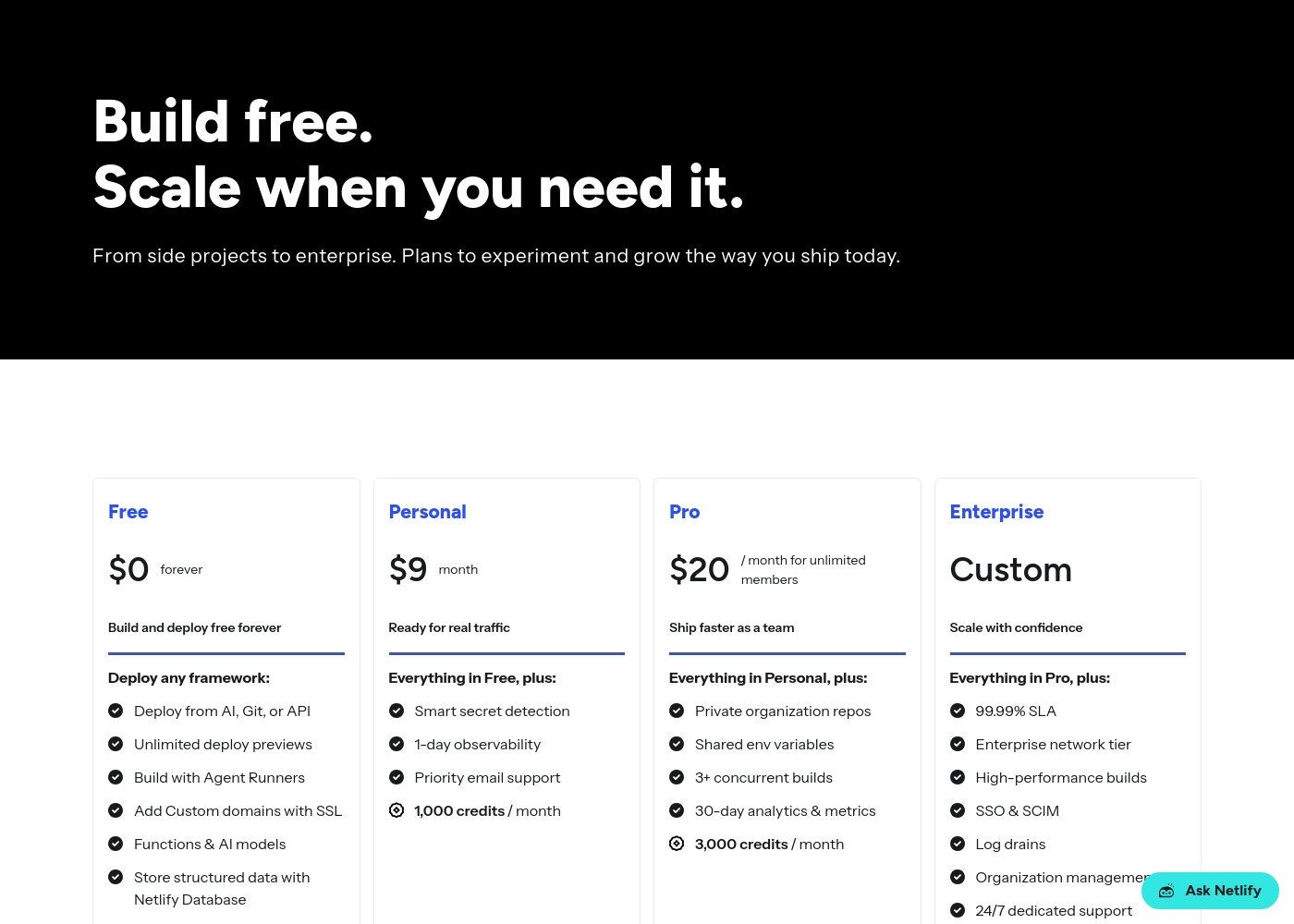
Let's look at each option below to find the perfect fit for your setup. We will break down what makes each plan unique for your team.
VMmanager Hosting
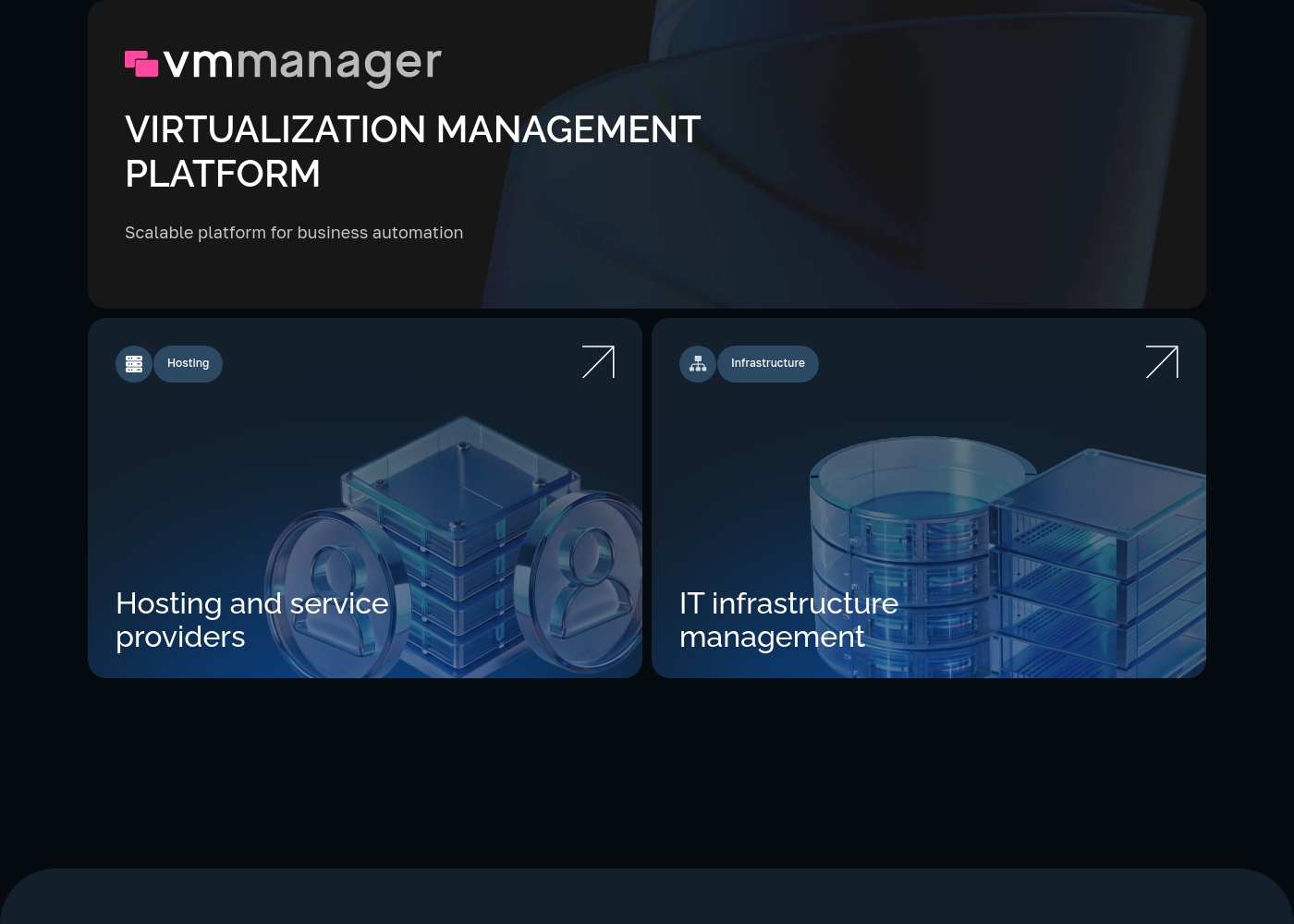
Price: Custom quote based on physical cores Websites Supported: Contact sales to confirm individual system and VM limits Best For: Hosting and service providers Refund Policy: Contact sales to confirm trial terms or refund options Other Features: Automatic VPS provisioning, Multi-tenant architecture, KVM virtualization, LXC/LXD containers, Built-in self-service portal
If you run an active virtual machine rental or hosting business, you'll love this tier. It helps you automate manual tasks like VPS provisioning and billing systems integration so you can focus on scale. You can customize services easily using the developer-friendly REST API. Automated host connection makes deployment simple and fast. Real-time metrics show exactly how your hardware performs every single day. 🚀
- Automatic provisioning of VPS from 4 seconds
- Multi-tenant architecture
- KVM virtualization
- Lightweight LXC/LXD containers
- Built-in self-service portal
- All features of the VMmanager Hosting plan
- Automatic load distribution capability (DRS)
- Ability to work with NAS
- Distributed switch
- Ability to work with linked clones
Pricing Notes
- Netlify has a transparent free tier and public paid plans. VMmanager requires contacting sales for pricing.
- Netlify's costs are predictable based on published credit rates. VMmanager's cost depends on your hardware scale.
- VMmanager offers a 30-day free trial. Netlify's free plan is available forever with hard limits.
- Netlify charges only for what you use on paid plans (auto-recharge off by default). VMmanager pricing is tied to your physical core count.
Pricing Head-to-Head
User Reviews
We couldn't pull live reviews from Trustpilot or Capterra due to access restrictions. However, based on common user feedback themes for platforms like Netlify, users often praise ease of use 🚀, fast deployments, and a generous free tier.
Many appreciate the unified workflow and global performance. Potential drawbacks can include confusion over credit-based billing and support response times on lower tiers.
Netlify makes deployment incredibly simple. Push to Git and it's live. The preview deployments for every branch are a game-changer for our team's review process.
External reviews for VMmanager are mixed. On Trustpilot, the overall rating is low (2.4/5) 😕, with users citing concerns about aggressive price increases, unresponsive support for some issues, and perceived billing problems.
However, positive reviews praise the software's core functionality and helpful support team. One user noted, "really enjoying VMmanager...
Been using VMmanager now for over a month and have been really impressed, the support team is on hand and helpful with any issues. The software itself makes up for it, especially with new features and bug fixes that get rolled out monthly.
Our Verdict
Netlify and VMmanager aren't really competing—they're solving completely different problems. Netlify's superpower is turning code into a live website in seconds. It bundles global CDN, HTTPS, forms, and AI tools into one frictionless workflow. Push to Git and watch it deploy worldwide. VMmanager's superpower is automating the business of selling virtual machines. It provisions servers in 4 seconds, provides a self-service portal, and manages fleets of 22,000+ VMs with built-in high availability. The deciding factor is your core need. If you build and ship websites or web apps, Netlify is your tool. If you run a hosting business or manage virtual infrastructure, VMmanager is your platform. For most web developers and marketing teams, Netlify is the obvious choice. For hosting providers and IT infrastructure teams building private clouds, VMmanager is the specialist tool. They excel in their own lanes.
Frequently Asked Questions
Is Netlify for websites or virtual machines?
Netlify is for building and deploying websites and web applications. VMmanager is for managing virtual machines and cloud infrastructure. They serve completely different purposes.
Can I use VMmanager to host my Next.js site?
No, VMmanager is not a web hosting platform. It manages the virtual infrastructure that might host servers. For deploying a Next.js site, Netlify is designed for that exact workflow.
Which is cheaper for a small project, Netlify or VMmanager?
Netlify has a free plan that's ideal for small projects. VMmanager requires a custom quote based on your hardware and is designed for larger-scale operations. For a small web project, Netlify is almost certainly cheaper.
Does Netlify manage servers like VMmanager?
No, Netlify is a managed platform. It handles all the server infrastructure for you automatically. VMmanager is software you use to manage your own physical servers and virtual machines.
Can I migrate my existing virtual machines to VMmanager?
Yes, VMmanager provides documentation for importing VMs from platforms like Hyper-V, VirtualBox, and VMware. It uses QEMU-KVM technology to handle the migration process.
Which has better support, Netlify or VMmanager?
Both have mixed user feedback. Netlify's support varies significantly by your paid plan tier. VMmanager's support has been noted as helpful by some users but inconsistent by others. Confirming SLAs is recommended for both.
Ready to Choose?
Both tools have their strengths. Choose based on your specific needs.