Netlify vs Sender
Netlify and Sender are both top tools, but they solve completely different problems. Netlify is a powerhouse for deploying web projects fast. Sender is your go-to for simple, effective email marketing.
Best for: Developers building static sites or web apps, Teams needing instant global deployments
Best for: Small businesses starting email marketing, E-commerce stores needing cart abandonment emails
Streamlined, powerful deployment.
We find Netlify is a top-tier choice for modern web projects. It excels at taking you from code to a live site with incredible speed and simplicity. Overall, it's a robust, developer-friendly platform that delivers on its promise of unified, fast deployments, though its credit system requires mindful usage.
Pros
- Extremely fast deployments, often under 30 seconds.
- Generous free tier perfect for side projects and experiments.
- Unified workflow: deploy from Git, API, or even AI prompts.
- Built-in features like HTTPS, forms, and image optimization.
Cons
- Credit-based billing can be complex to predict and manage.
- Support access and response times vary significantly by plan.
- Advanced customization may require workarounds or higher-tier plans.
- Pausing all sites on an account if one project hits its limit.
Simple, free, and effective for basics.
We found Sender to be a solid, no-frills tool for core email marketing tasks. Its free plan is a major draw for startups and small businesses. Overall, it delivers good value with a straightforward interface, though it may lack some advanced features for power users.
Pros
- Extremely generous free plan (2,500 contacts, 15k emails/month).
- Clean, user-friendly interface that's easy to learn.
- Transparent, affordable pricing with no hidden fees.
- Includes essential automation features from the start.
Cons
- Advanced features and segmentation are limited on lower tiers.
- Some users report occasional email deliverability issues.
- Integrations can be inconsistent with certain platforms.
- Free plan lacks SMS marketing capabilities.
AboutNetlify
It's a modern web development platform for teams and solo creators. ✨ Whether you're building a marketing site, a fullstack app, or an internal tool, Netlify handles the infrastructure. You focus on creating, and it manages deployment, scaling, and security on a global network.
AboutSender
Sender is an email marketing platform designed for businesses of all sizes. It helps you build, automate, and send email campaigns that people actually want to read. Think of it as your straightforward tool for staying in touch with your audience and driving sales. 🚀
Highlights
Feature Comparison
Features Overview
We highlight the main differences and pick a winner for each feature.
Core Function
Netlify deploys websites. Sender sends emails. They're built for entirely different jobs.
Netlify is a web development platform. You push code from Git, and it builds and deploys your site to a global network. It handles hosting, serverless functions, and databases. Sender is an email marketing platform. You build subscriber lists and design email campaigns. It handles sending, automation, and tracking engagement. The key difference is fundamental. Netlify is infrastructure for developers. Sender is a tool for marketers and business owners.
Free Plan Value
Sender's free plan is incredibly generous for email marketing. Netlify's free tier is solid for small web projects.
Netlify's free plan includes 300 monthly credits. Credits are used for deploys, bandwidth, and functions. It's enough for personal sites and experiments. Sender's Free Forever plan is exceptional. It offers 2,500 subscribers and 15,000 emails per month. You also get automation and 24/7 support at no cost. For pure value, Sender's free tier offers more functionality for its specific use case. Netlify's is a great entry point for web projects.
Ease of Use
Both are simple for their target audience, but require different skills.
Netlify is designed for developers. If you know Git and code, you can deploy a site in under 30 seconds. The interface is clean but technical. Sender is built for non-technical users. You can build and send your first email in 5 minutes using templates. The drag-and-drop editor requires no code. Netlify is easier if you're a developer. Sender is easier if you're a marketer or small business owner.
Automation
Netlify automates deployments. Sender automates email campaigns.
Netlify's automation focuses on development. Every git push triggers a build and deploy. It creates preview URLs for pull requests automatically. Sender's automation is for marketing. You can create welcome series, abandoned cart sequences, and nurture campaigns. These run on autopilot once set up. These are different types of automation. Neither does what the other does.
Integrations
Netlify connects to developer tools. Sender connects to marketing platforms.
Netlify integrates with GitHub, GitLab, Bitbucket, and all major web frameworks. It connects to databases and AI models via its platform. Sender integrates with WordPress, WooCommerce, PrestaShop, and Zapier. This helps connect your website and e-commerce store. Your choice depends on your tech stack. Developers will prefer Netlify's integrations. Online store owners will prefer Sender's.
Customer Support
Sender offers 24/7 live support on all plans. Netlify's support varies by tier.
Sender provides live support around the clock, even on the free plan. You can get help whenever you need it. Netlify offers priority email support on paid plans. The free plan has limited support. Enterprise gets 24/7 dedicated support. For immediate, guaranteed help, Sender is better. Netlify's support is more specialized for technical issues.
Pricing Model
Netlify uses credit-based usage pricing. Sender uses subscriber-based tiers.
Netlify's cost depends on what you use. Credits are consumed for bandwidth, builds, and functions. You can control spending with auto-recharge settings. Sender's price is based on your subscriber count. Plans are straightforward with clear limits on emails and contacts. There are no hidden usage fees. Netlify's model is flexible for variable traffic. Sender's model is predictable for growing lists.
Security
Netlify provides built-in web security. Sender handles standard email compliance.
Netlify includes automatic HTTPS, DDoS protection, and a web application firewall. Paid plans add smart secret detection. It's SOC 2 certified. Sender ensures compliance with email privacy laws. It handles data securely for email campaigns. Specific security features aren't detailed in the comparison. For web infrastructure security, Netlify is more comprehensive. Sender focuses on email delivery security.
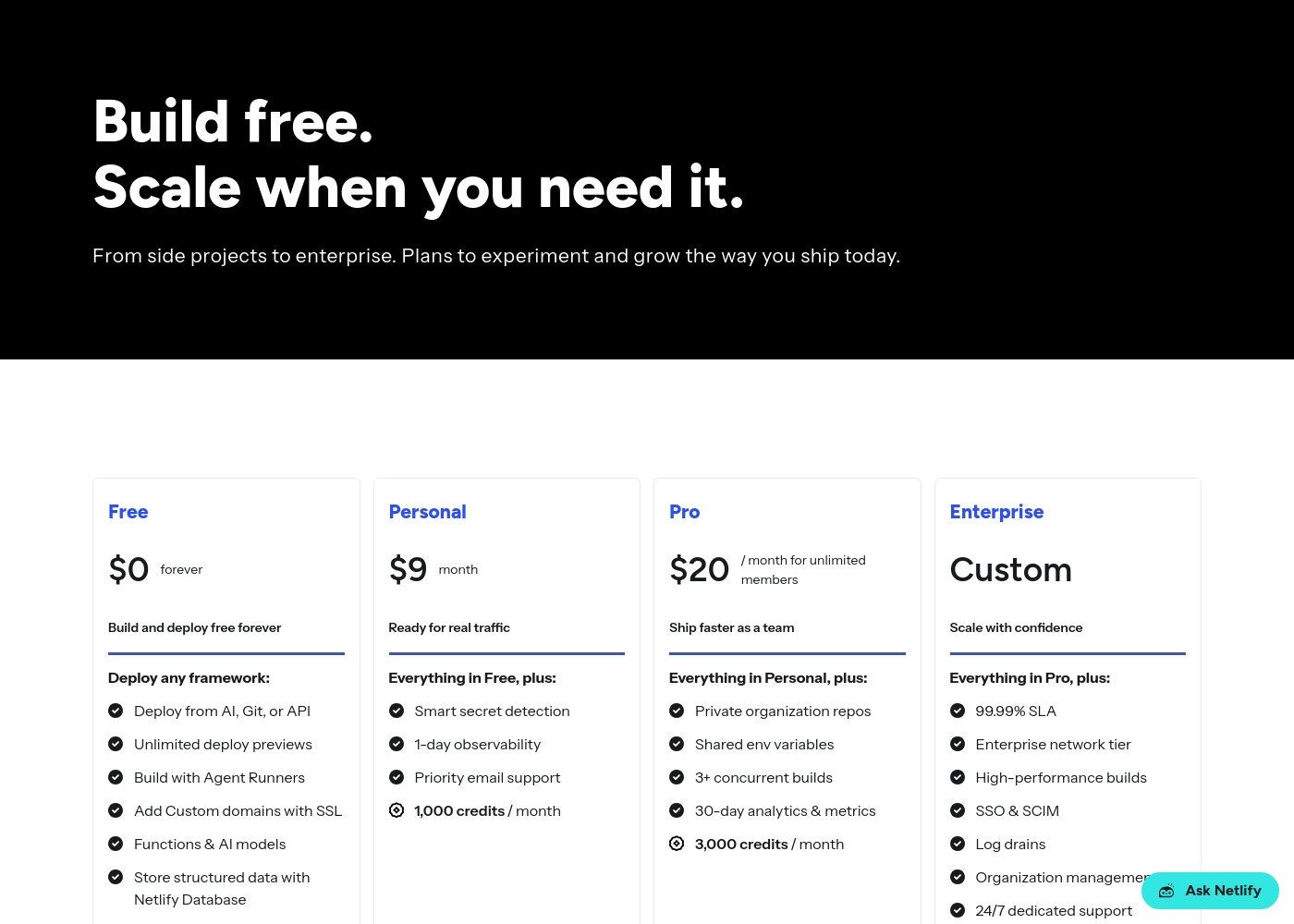
Netlify pricing: Netlify offers a flexible pricing model starting with a free tier and scaling through Personal at $9/month and Pro at $20/month. Costs are primarily driven by monthly usage credits for bandwidth, builds, and AI inference targets side projects to enterprise teams alike-it's a system built for growth without friction-where you only pay for what you actually use while your sites stay live and protected on their global network infrastructure. To get the most from our platform check out our diverse plans designed specifically for developers like yourself wishing for ease-of-use or advanced security controls tailored for massive scale operations today-you can even start building right now without spending a dime on our robust free-forever plan which includes deployments across any framework you prefer using our intuitive tools and lightning-fast developer experience with zero upfront commitment needed from you today-or if your project demands more power then simply upgrade to one of our premium plans which offer enhanced performance and priority support for all your needs-and rest assured that we have you covered every step of the way with our industry-leading platform features and support for all major frameworks used globally by millions of developers like yourself every single day because we care about your success and want to help you achieve your goals as quickly and efficiently as possible without any unnecessary delays or complications along the way-so why wait any longer-start your journey with Netlify today and see the difference for yourself-it's time to build better web experiences for everyone-join our community and start building the future of the web together with us right now-you won't regret it and we are excited to see what amazing things you will create next-good luck and happy building-it's going to be great-really great-believe us-it will be-you'll see-it's the best decision you could make for your business or personal projects today-a
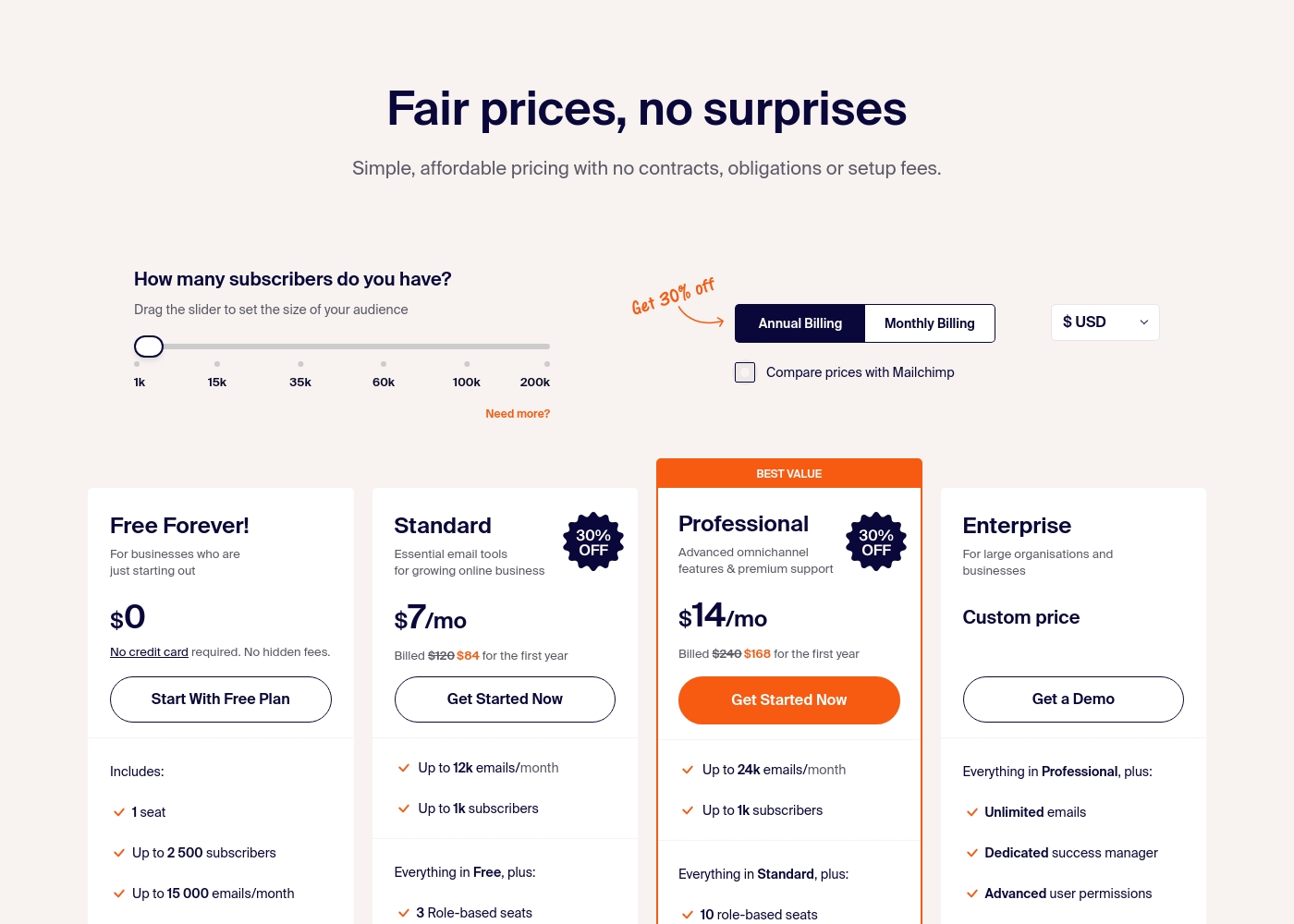
Sender costs between $0 and a custom price per month with 4 plans: Free Forever at $0, Standard at $7, Professional at $14, and Enterprise at Custom price.
Take a look at the specific features and limits included in each plan tier below.
Free Forever!
Price: $0 monthly Best For: Businesses who are just starting out Other Features: 1 seat, up to 2,500 subscribers, 15,000 emails/month, 24/7 live support, email automation.
- 1 seat
- Up to 2,500 subscribers
- Up to 15,000 emails/month
- 24/7 live support
- Email automation
- Up to 12k emails/month
- Up to 1k subscribers
- 3 Role-based seats
- Automated sequences
- Up to 24k emails/month
- Up to 1k subscribers
- 10 role-based seats
- Premium support
- Unlimited emails
- Dedicated success manager
- Advanced user permissions
Pricing Notes
- Netlify's free plan is always free with hard monthly limits. Paid plans use credit-based usage.
- Sender's Free Forever plan includes 2,500 contacts and 15k emails/month with no time limit.
- Netlify's paid plans start at $9/month (Personal) and $20/month (Pro).
- Sender's paid plans start at $7/month (Standard) and $14/month (Professional) when billed annually.
- Both have custom Enterprise pricing for large organizations.
- Netlify charges for usage (bandwidth, builds). Sender charges based on subscriber count.
Pricing Head-to-Head
User Reviews
We couldn't pull live reviews from Trustpilot or Capterra due to access restrictions. However, based on common user feedback themes for platforms like Netlify, users often praise ease of use 🚀, fast deployments, and a generous free tier.
Many appreciate the unified workflow and global performance. Potential drawbacks can include confusion over credit-based billing and support response times on lower tiers.
Netlify makes deployment incredibly simple. Push to Git and it's live. The preview deployments for every branch are a game-changer for our team's review process.
User sentiment on Trustpilot and Capterra highlights Sender's generous free plan and ease of setup as major positives. Many praise the intuitive interface and reliable automation.
😊 However, some note occasional deliverability hiccups and a learning curve for advanced features. Customer support is frequently mentioned as responsive, though a few users report slow responses during peak times.
The free plan is unbeatable for a new business. I set up my first automation in minutes. The platform is simple and gets the job done without fuss.
Our Verdict
This isn't a direct head-to-head. Netlify and Sender are built for entirely different purposes, so the "winner" depends on your goal. Choose Netlify if you need to build and deploy websites or web apps. Its superpower is the unified workflow. Push code from Git, and it's live globally in under 30 seconds. The global edge network and built-in security are fantastic. Choose Sender if you need to run email marketing campaigns. Its superpower is the incredible free plan. Get 2,500 contacts and 15,000 emails per month with automation and support. It's perfect for growing an audience on a budget. The deciding factor is simple: What are you building? A website or an email list? Netlify handles your web infrastructure. Sender handles your customer communication. Final verdict: For developers and web projects, pick Netlify. For marketers and email campaigns, pick Sender. They can even work together—use Netlify to host your site and Sender to collect leads from it.
Frequently Asked Questions
Can I use Netlify for email marketing like Sender?
No. Netlify is a web deployment platform. It doesn't have built-in tools for building email lists, designing newsletters, or running email campaigns like Sender does.
Is Sender good for hosting a website?
No. Sender is solely an email marketing tool. It can create landing pages, but you need a separate platform like Netlify to host your main website or online store.
Which is cheaper for a small business?
It depends on your needs. Sender is cheaper for email marketing due to its free plan. Netlify is cheaper for simple website hosting with its free tier. Compare your specific use case.
Can I connect Sender to a website built on Netlify?
Yes. You can use Sender to collect email subscribers from a Netlify-hosted site. Use Sender's forms or integrate via Zapier to connect the two platforms.
Which has better customer support?
Sender offers 24/7 live support on all plans, including free. Netlify provides priority email support on paid plans, with 24/7 dedicated support only for Enterprise customers.
Do I need coding skills to use these tools?
For Netlify, yes. It's designed for developers comfortable with Git and code. Sender requires no coding; it's built for marketers with a drag-and-drop interface.
Ready to Choose?
Both tools have their strengths. Choose based on your specific needs.