Net Nanny vs Webwatcher
Net Nanny and Webwatcher both promise digital safety, but their monitoring philosophies differ significantly. Net Nanny focuses on advanced content filtering and volume licensing for many devices. Webwatcher provides deep, discreet monitoring for tracking teens' communications and online activity.
Best for: Large families needing protection for 10-20 devices (PC, Mac, iOS)., Parents prioritizing robust, dynamic, real-time content filtering and blocking.
Best for: Parents needing deep, discreet monitoring of a single teenage Android device., Users requiring specific, detailed tracking of text messages, calls, and emails.
Unreliable protection paired with hidden costs.
We note Net Nanny boasts impressive dynamic filtering features and competitive volume pricing for large families. However, recent user feedback highlights critical operational failures, extreme difficulty managing subscriptions, and severely problematic customer service interactions. Overall, we advise prudence due to concerning reports regarding recurring billing practices and software reliability across platforms.
Pros
- Cost-effective protection for up to 20 devices annual plans.
- Includes dynamic filtering against adult content and sensitive material.
- Real-time alerts and visibility via the Family Feed feature.
- Full feature suite is included across all three annual pricing tiers.
Cons
- Software functionality is often unreliable (time limits fail, Mac freezing).
- Auto-renewal system is difficult or impossible to cancel online.
- Reports of severe bugs and inaccurate dashboard data tracking.
- Customer support is slow, unresponsive, and often unavailable.
Extreme risk due to billing and support issues.
We found Webwatcher markets itself strongly on guaranteed functionality and comprehensive support for parental monitoring needs. However, our review of public user feedback showed severe, concrete accusations of fraudulent billing, refusal to issue refunds, and complete non-response from customer support. Overall, the serious financial and reliability risks reported by consumers necessitate a very low rating.
Pros
- Advertised compatibility across major devices (Android, iPhone, PC, Mac).
- Unlimited data storage is included in the current subscription plan.
- Setup is claimed to be quick and easy (under five minutes).
- Functionality is officially guaranteed with a full refund if issues cannot be resolved.
Cons
- Users report being refused refunds despite the official money-back guarantee.
- Specific claims of fraudulent double billing and funds theft were reported.
- Customer support was reported as non-responsive or misleading ('runaround').
- Product allegedly failed to work properly for some customers.
AboutNet Nanny
Net Nanny is widely trusted parental control software. It is consistently ranked as the Best Parental Control App. ✅ Millions of parents have trusted this software since 1996.
It’s designed to keep your kids safe from adult content when they browse online. The system allows children to use the internet safely while still being protected. It offers the visibility parents need today.
AboutWebwatcher
WebWatcher is a specialized parental monitoring app. It is primarily aimed at supervising teenagers who may be involved in risky online behavior. The software gives parents necessary visibility into their child's digital footprint.
It works across major platforms including Android, iPhone, PC, and Mac devices. You can monitor everything seamlessly from anywhere using your secure, web-based online account. The application is designed to be discrete and tamper-proof once it's correctly installed. 💡
Highlights
Feature Comparison
Features Overview
We highlight the main differences and pick a winner for each feature.
Content Filtering
Net Nanny is the definitive filter; Webwatcher is mainly a tracker.
Net Nanny excels here, built on decades of expertise since 1996. It uses dynamic filtering to identify and block sensitive content instantly. Parents can rely on Net Nanny’s robust porn-blocking capabilities. Webwatcher's primary features focus on recording activity, not dynamic blocking. It tracks visited websites and search terms for later parental review. Webwatcher doesn't actively prevent access to harmful material. The difference is proactive prevention versus retrospective insight. Net Nanny stops access; Webwatcher records what was accessed. Net Nanny clearly prioritizes active blocking based on content categorization. If you absolutely must prevent exposure to adult content, Net Nanny is the decisive tool for safety.
Communication Monitoring
Webwatcher tracks texts and calls; Net Nanny tracks web activity.
Net Nanny focuses on web browsing and app visibility via the Family Feed. It does not list specific capabilities for tracking private phone calls or text messages. Its strength is activity reporting. Webwatcher shines in this area, capturing text messages, photos, and phone call logs. It provides key visibility into communication across email and instant messaging services. Webwatcher offers the deep communication access that Net Nanny does not provide. A parent wanting to know exactly who their teen is talking to needs Webwatcher’s specialized features. This deep surveillance is Webwatcher's primary strength for concerned parents.
Specialized Monitoring
Webwatcher supports Snapchat tracking; Net Nanny does not.
Net Nanny provides general visibility into which apps the children are using. Detailed monitoring of ephemeral messaging like Snapchat is not featured in Net Nanny’s stated capabilities. Webwatcher features specialized Snapchat monitoring for concerned parents. On Android, Webwatcher captures received messages and takes activity screenshots for deep insight. Webwatcher explicitly addresses the challenge of disappearing message apps that Net Nanny ignores. If monitoring high-risk social media is crucial, Webwatcher offers a specific, superior solution on Android. This focused approach gives Webwatcher a niche advantage.
Device Pricing & Value
Net Nanny is far cheaper for high-volume family use.
Net Nanny offers exceptional value for securing multiple devices. The 20 Devices plan costs only $89.99 annually, under $5 per device yearly. Licensing is annual and volume-based for maximum savings. Webwatcher is priced per device, starting around $19.98 monthly, billed quarterly. This becomes significantly more expensive per device than Net Nanny’s volume plans. Webwatcher focuses on intensive single-device coverage. Net Nanny is far more cost-effective if you need to secure many computers and smartphones. Families with more than two devices will find Net Nanny's volume pricing unbeatable.
Real-Time Intervention
Net Nanny provides instant safety alerts; Webwatcher provides logs.
Net Nanny provides critical real-time safety alerts to parents. It instantly warns parents about highly sensitive content searches, such as suicide or drug-related terms. This robust alert system enables immediate parental intervention in a crisis. Webwatcher's primary focus is recording data and activity history. Data is sent to a secure online account for remote checking at your convenience. Intervention relies on the parent checking the logs. Net Nanny provides immediate warnings for dangerous intent; Webwatcher provides records of past activities. For urgent, high-risk topics, Net Nanny offers a crucial protective layer.
Reported Billing Risk
Both companies have severe billing complaints; Webwatcher’s are catastrophic.
Net Nanny users frequently report critical difficulty canceling the service online. Reports state that auto-renewal systems lead to years of unwanted, unauthorized charges. Support is often described as slow or non-responsive. Webwatcher users report severe, fraudulent financial activity. Complaints cite double-billing, refusal to honor risk-free guarantees, and lying about refund status. Webwatcher's support allegedly disabled service upon payment dispute. Both tools show severe risks regarding financial integrity. Webwatcher has specific, focused accusations of monetary theft, which is a major red flag. Always use extreme caution when providing payment information to either company.
Net Nanny costs between $39.99 and $89.99 per year with three plans: 1 Desktop at $39.99, 5 Devices Family Protection Pass at $54.99, and 20 Devices Family Protection Pass at $89.99.
Let's explore which annual Net Nanny package works best for your family's needs.
1 Desktop
Price: $39.99 / Year (Currently discounted from $49.99) Best For: Single device use on PC or Mac Other Features:
- Protect one desktop device
- Includes all Net Nanny features
- Supports Windows and macOS
- Protect one desktop device (PC or Mac)
- Includes all Net Nanny features
- Supported on Windows 10 & 11 and macOS 10.13 to 11.x
- Protect up to 5 total devices
- Includes all Net Nanny features
- Supports PC, Mac, and iOS devices
- Costs $11 per device/year
- 30% Off For A Limited Time
- Protect up to 20 total devices
- Includes all Net Nanny features
- Supports PC, Mac, and iOS devices
- Costs less than $5 per device/year
- Labeled 'Best Value'
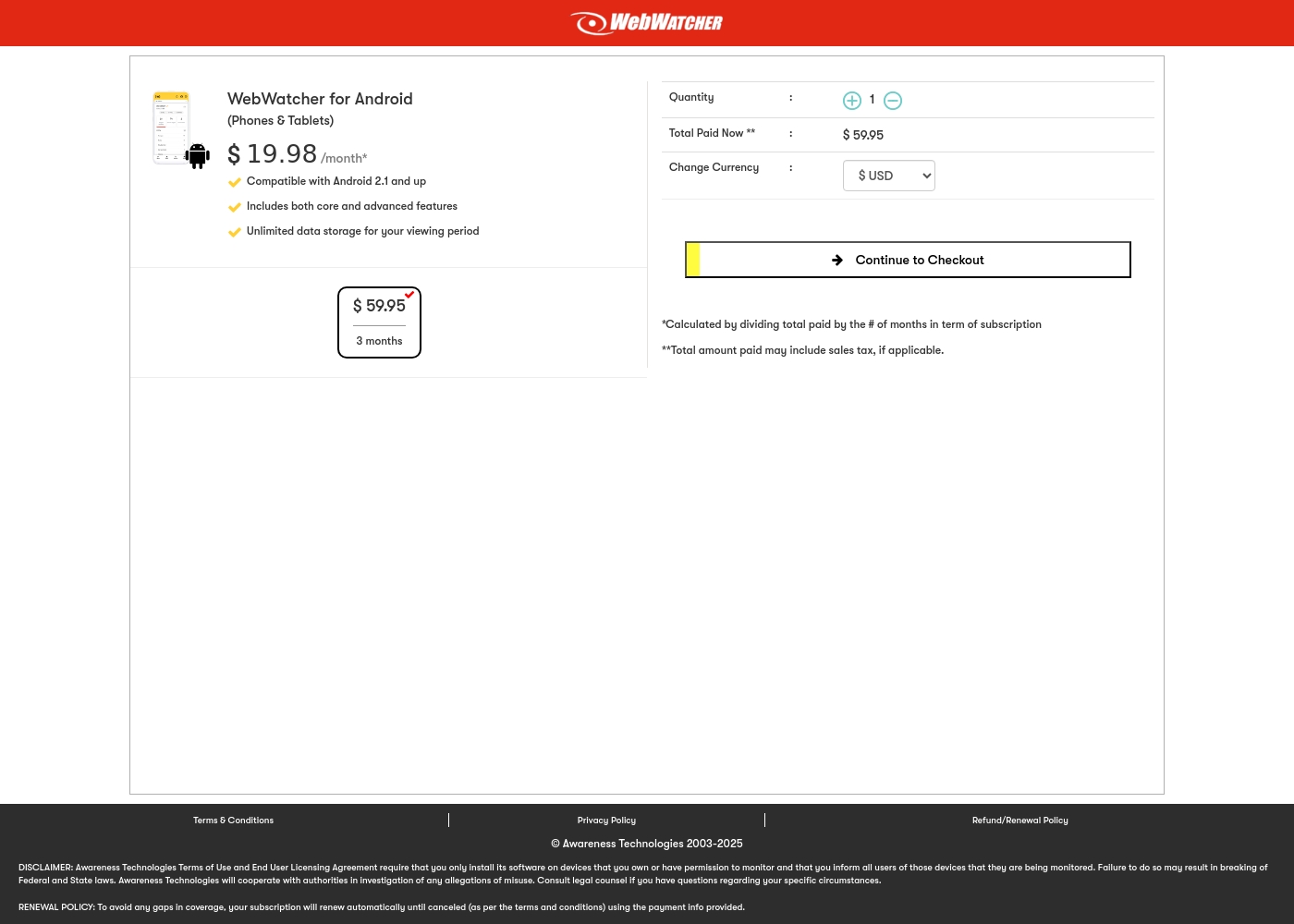
Webwatcher costs $19.98 per month with one explicitly priced plan: the 3-Month Android Subscription at $59.95 total.
Finding the right monitoring solution for your family is simple. Here is a detailed look at the pricing and features available in the current purchase flow.
3-Month Android Subscription
Price: $59.95 (paid every 3 months, calculated at $19.98/month) Best For: Parents monitoring Android phones and tablets Refund Policy: Full refund guaranteed if issues cannot be resolved Other Features:
- Compatible with Android 2.1 and newer versions
- Includes both core and advanced features
- Unlimited data storage for your full viewing period
- Compatible with Android 2.1 and up
- Includes both core and advanced features
- Unlimited data storage for your viewing period
Pricing Notes
- Net Nanny bases pricing on device volume, offering protection for up to 20 devices annually.
- Webwatcher charges per device with a shorter three-month commitment option, starting at $59.95 upfront.
- Net Nanny offers significantly cheaper per-device rates when protecting 5 or more devices.
- Both Net Nanny and Webwatcher face severe user complaints regarding fraudulent billing and refusing to honor cancellations or refunds.
Pricing Head-to-Head
User Reviews
Net Nanny currently holds a very poor 2.1 rating on Trustpilot, reflecting widespread customer dissatisfaction. Users frequently report critical failures in core functionality and serious concerns regarding billing practices.
Recurring complaints revolve around system reliability; many users state the software does not work properly on modern devices, citing issues like apps ignoring set time limits, device freezes, and wildly inaccurate dashboard reporting (e.g., usage times ticking up five minutes per second). Beyond technical faults, customers vehemently criticize Net Nanny’s handling of subscriptions and auto-renewal.
The software doesn't work consistently after a restart; I always have to sign in manually. Since installing it, my Mac freezes frequently during downloads. I have not yet received any response from customer service about these issues.
Webwatcher’s external feedback is extremely limited, stemming only from two reviews which resulted in a very low 2.9 TrustScore. While the platform advertises a strong 'risk-free' guarantee and promises excellent, responsive customer care, the limited user reports strongly contradict these claims.
Both reviewers cited severe issues primarily centered on billing and refunds. Users claim they were refused refunds entirely, even when requested within the advertised refund window, despite the monitoring product reportedly failing to work properly.
They refused to honor the risk-free money-back guarantee, even though I submitted the request properly. Furthermore, the product I purchased never actually worked for me as advertised. I absolutely feel like they are ripping me off.
Our Verdict
It’s extremely difficult to recommend either Net Nanny or Webwatcher due to serious risks. User reviews for both parental control tools are consistently and catastrophically bad. Both Net Nanny and Webwatcher face severe user complaints about billing fraud and non-existent customer support. Net Nanny is the preferred tool for robust preventative filtering and volume licensing. It provides top-rated, dynamic content blocking, which is great for younger children. If you need low-cost protection for 20 devices across your home, Net Nanny offers unmatched volume value. Webwatcher, conversely, excels at deep supervision and communication monitoring. It effectively tracks texts, phone calls, and even uses screenshots for Snapchat on Android. Webwatcher is designed for discreet, intensive tracking of risky teen behavior on single devices. The decision hinges purely on your specific prevention versus surveillance needs. Choose Net Nanny if content restriction is paramount across many operating systems. Choose Webwatcher if you need concrete logs of who your teen is texting for intervention purposes. Proceed with extreme caution, whichever tool you choose. Verify cancellation policies meticulously before subscribing to either Net Nanny or Webwatcher, due to the history of billing issues.
Frequently Asked Questions
Which is better for preventing adult content exposure: Net Nanny or Webwatcher?
Net Nanny is a dedicated internet filter renowned for its blocking capabilities. It uses dynamic filtering to stop exposure to inappropriate material. Webwatcher focuses more on recording browsing history rather than active content blocking.
Does Webwatcher track text messages like Net Nanny?
Webwatcher specializes in communication tracking, capturing text messages and phone call logs. Net Nanny’s primary focus is dynamic content filtering and web activity reports. Webwatcher offers superior communication surveillance features for parents.
Which software offers better value for large families with many devices?
Net Nanny is significantly better for volume pricing. Its 20 Devices plan costs less than $5 per device annually. Webwatcher charges much more per device with its three-month single-device subscriptions.
Is it easier to cancel Net Nanny or Webwatcher?
User reviews indicate both companies have severe, fraudulent issues with cancellations and billing. Customers report it is nearly impossible to cancel Net Nanny online. Webwatcher users claim refusal of refunds and unauthorized charges.
Which tool provides real-time alerts for dangerous searches?
Net Nanny provides critical real-time alerts for high-risk topics. This includes searches related to suicide, weapons, and drugs. Webwatcher provides activity logs for later parental review, not instant intervention alerts.
Can Webwatcher monitor Snapchat consistently on iPhone?
Webwatcher's deep Snapchat monitoring (screenshots) is primarily effective on Android devices. On iPhone, Webwatcher only confirms if the app has been downloaded. Net Nanny doesn't list specific Snapchat monitoring features.
Ready to Choose?
Both tools have their strengths. Choose based on your specific needs.