Moz vs Sitechecker Pro
Moz and Sitechecker Pro both offer serious SEO power and compete fiercely. Moz focuses on foundational metrics and deep research power. Sitechecker Pro is built for fast agency-scale site management. Choosing depends entirely on your specific team structure.
Best for: SEO consultants focused on backlink risk and authority metrics (DA/PA), Businesses needing centralized local listing and review management (Moz Local)
Best for: Growing digital agencies managing 10 to 50 client websites, Teams needing flexible collaboration without paying per user seat
Comprehensive SEO Research, High Learning Value
Moz maintains a position as a foundational SEO platform due to its trusted proprietary metrics and excellent educational resources like Moz Academy. We observe that core functionality is strong, but the recurring complaints about billing practices and inconsistent customer support are concerning. Overall, this is a strong platform for learning SEO fundamentals and site auditing, provided you check the free trial terms carefully.
Pros
- Trusted proprietary metrics like Domain Authority (DA) and Page Authority (PA).
- Excellent foundational SEO materials provided through Moz Academy courses.
- MozBar is a valuable tool, especially the free browser extension, for quick insights.
- Moz Local is highly rated as a robust tool for managing business listings efficiently.
Cons
- Significant user complaints about automatic recurring billing after free trials.
- Customer support responsiveness can be inconsistent regarding complex billing issues.
- Some users feel the service has gone downhill and that the strategies are outdated.
Robust SEO management for growing agencies.
We found Sitechecker Pro to deliver robust, agency-focused SEO management with exceptional technical auditing capabilities and powerful features like unlimited user seats. Overall, the software is excellent and highly effective, but its positive features are heavily compromised by serious, recurring user complaints regarding aggressive sales tactics and opaque subscription cancellation processes.
Pros
- Unlimited user seats included on all plans.
- Clean, intuitive interface suitable for beginners and experts.
- Daily Site Audit reports provide proactive issue alerts.
- Reported high data accuracy compared to competitors.
Cons
- Multiple unresolved complaints regarding subscription cancellation difficulties.
- Users widely report aggressive cold email practices.
AboutMoz
Moz offers a comprehensive suite of digital marketing and SEO solutions. Over 500,000 brands and agencies trust their data and tools every day.
They offer distinct platforms for specific needs. Moz Pro provides the essential all-in-one SEO toolkit. STAT handles large-scale rank tracking for high-volume users. Moz Local takes care of managing your business listings and reputation across many locations.
Moz also offers proprietary metrics, like Domain Authority and Brand Authority, which have shaped the SEO industry since 2004. You get clear data and insights that help you achieve measurable results. ✅
AboutSitechecker Pro
Sitechecker Pro is the centralized SEO & AI visibility control center primarily designed for digital agencies. It is trusted by full-service and vertical-focused agencies seeking reliable multi-site management. This robust platform monitors all important metrics in one unified dashboard, eliminating the need to log into many different tools. It integrates key data points from Search Console, GA4, and AI overview rankings to give you seamless control. 💡
Highlights
Feature Comparison
Features Overview
We highlight the main differences and pick a winner for each feature.
User Seats/Cost
Sitechecker Pro includes unlimited users on all plans. Moz charges $49/month for every extra user seat.
Moz includes 1-3 user seats depending on the plan you select. Adding more users costs $49 per person monthly. This cost adds up quickly for growing teams. Sitechecker Pro supports unlimited users per project at every plan level. This makes collaboration easier and keeps agency costs predictable. Sitechecker Pro is highly scalable for growing agency teams. Moz is better suited for smaller teams with fixed collaboration needs.
Proprietary Data
Moz established industry metrics like Domain Authority (DA) and Page Authority (PA). Sitechecker Pro focuses on combining raw GSC and GA4 data.
Moz leverages its trusted proprietary metrics like DA and PA. These scores predict ranking power based on link signals. Moz also uses Brand Authority and a Spam Score risk metric. Sitechecker Pro integrates deeply with Google Search Console data. It offers advanced metrics like Ranked Pages to supplement raw GSC data. If your strategy relies on comparing DA/PA scores, Moz is the clear choice here. Sitechecker Pro is better for agencies analyzing pure performance data.
Proactive Alerts
Sitechecker Pro provides proactive alerts in near real-time. Moz offers systematic status checks via Site Crawl audits.
Sitechecker Pro provides instant alerts via Slack or email integration. Its monitoring frequency goes up to every 12 hours on the Premium plan. Moz performs its Site Crawl audit for technical diagnosis. This check ensures site health but is not an instant alerting system. Sitechecker Pro helps you catch critical issues much faster, often before clients notice. This immediate detection is crucial for agency services.
Client Reporting
Sitechecker Pro offers full white labeling for agency reports. Moz provides branded reports and Looker Studio connectors.
Sitechecker Pro Premium allows complete app interface white labeling. You can use custom domains and branded emails for a professional look. Moz offers branded reports and robust flexible reporting options. This includes API access and Looker Studio connectors. Sitechecker Pro stands out for agencies that need fully brandable client deliverables. Moz is better if deep data access via API is more important than full branding.
Keyword Tracking Volume
Sitechecker Pro tracks more than double the keywords of Moz's top plan. Moz focuses on deep analysis of fewer terms.
Moz's highest Large plan tracks 3,000 keywords per month. Users can increase these limits incrementally for an extra fee. Sitechecker Pro's Premium plan tracks 8,000 keywords per month. This allows for broader competitive tracking and campaign analysis. Sitechecker Pro offers more tracking capacity out of the box for keyword volume. Moz handles significantly more page crawling volume instead (5M vs 200K).
Local SEO Tools
Moz offers Moz Local, a specific, highly rated tool for local listings. Sitechecker Pro does not have specialized local features.
Moz Local centralizes review management and manages business listings creation. It seamlessly syncs locations on Google, Facebook, and other directories. Sitechecker Pro focuses entirely on traditional organic website ranking factors. You would need a separate solution for managing local reputation and citations. Moz is the superior choice if local outreach and review management are critical needs.
API & Data Access
Moz provides API access for custom internal tools across all plans. Sitechecker Pro restricts API access to its highest tier.
Moz API powers custom data tools using proprietary Brand Authority metrics. This integration is available across all Moz plans. Sitechecker Pro restricts API access only to high-tier Premium clients. This access enables custom reporting and deep automation workflows. This provides flexibility for developers across Moz's entire ecosystem. Moz provides wider access to their proprietary data API across more plans.
GSC Data Analysis
Sitechecker Pro provides far deeper historical GSC insights and advanced data exporting. Moz offers standard GSC integration.
Sitechecker Pro allows users to export data beyond typical GSC limits. Premium users can access up to 36 months of historical GSC data seamlessly. Moz integrates with GSC to enhance its existing audits and analyses. Specific historical data access limits are not detailed for Moz. Sitechecker Pro is better for agencies that need granular, historical performance data for client baselines.
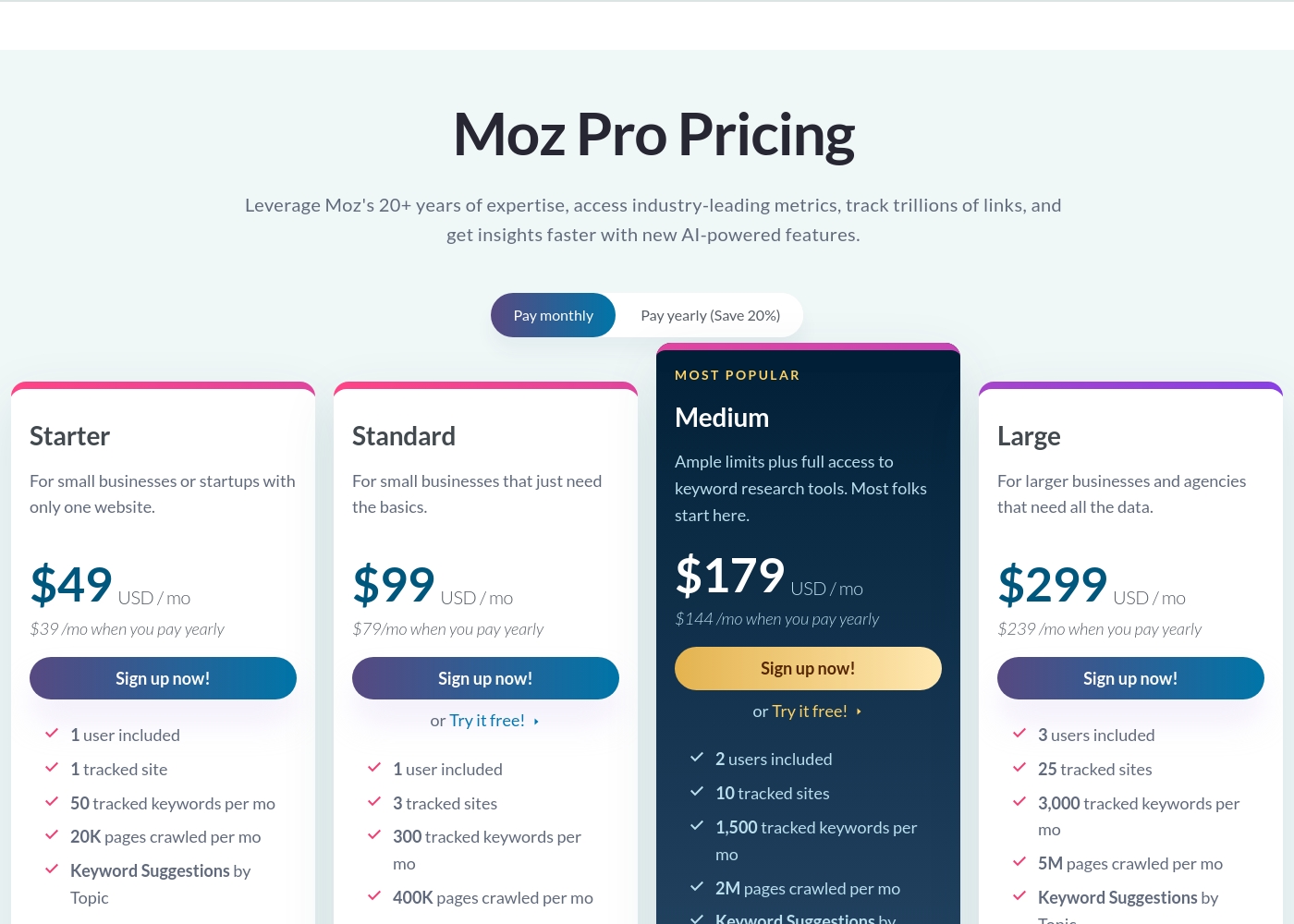
Moz costs between $39 and $299 per month with 4 plans: Starter at $39/month, Standard at $79/month, Medium at $144/month, and Large at $239/month (based on annual billing rates).
You can select annual billing to save 20% compared to monthly payments across all plans. Let's look closely at what each subscription level offers you and your team.
Starter
Price: $49/month or $39/month (billed yearly at $470) Websites Supported: 1 tracked site Best For: Small businesses or startups with only one website Other Features:
- 1 user included
- 50 tracked keywords per month
- 20K pages crawled per month
- Keyword Suggestions by Topic
- Starter SEO tools including MozBar Premium
- 1 user included
- 1 tracked site
- Keyword Suggestions by Topic
- Moz AI-powered tools
- 1 user included
- 3 tracked sites
- Backlink analysis
- Unlimited scheduled reports
- 2 users included
- 10 tracked sites
- Branded reports
- Report templates
- 3 users included
- 25 tracked sites
- All Medium features plus increased quotas
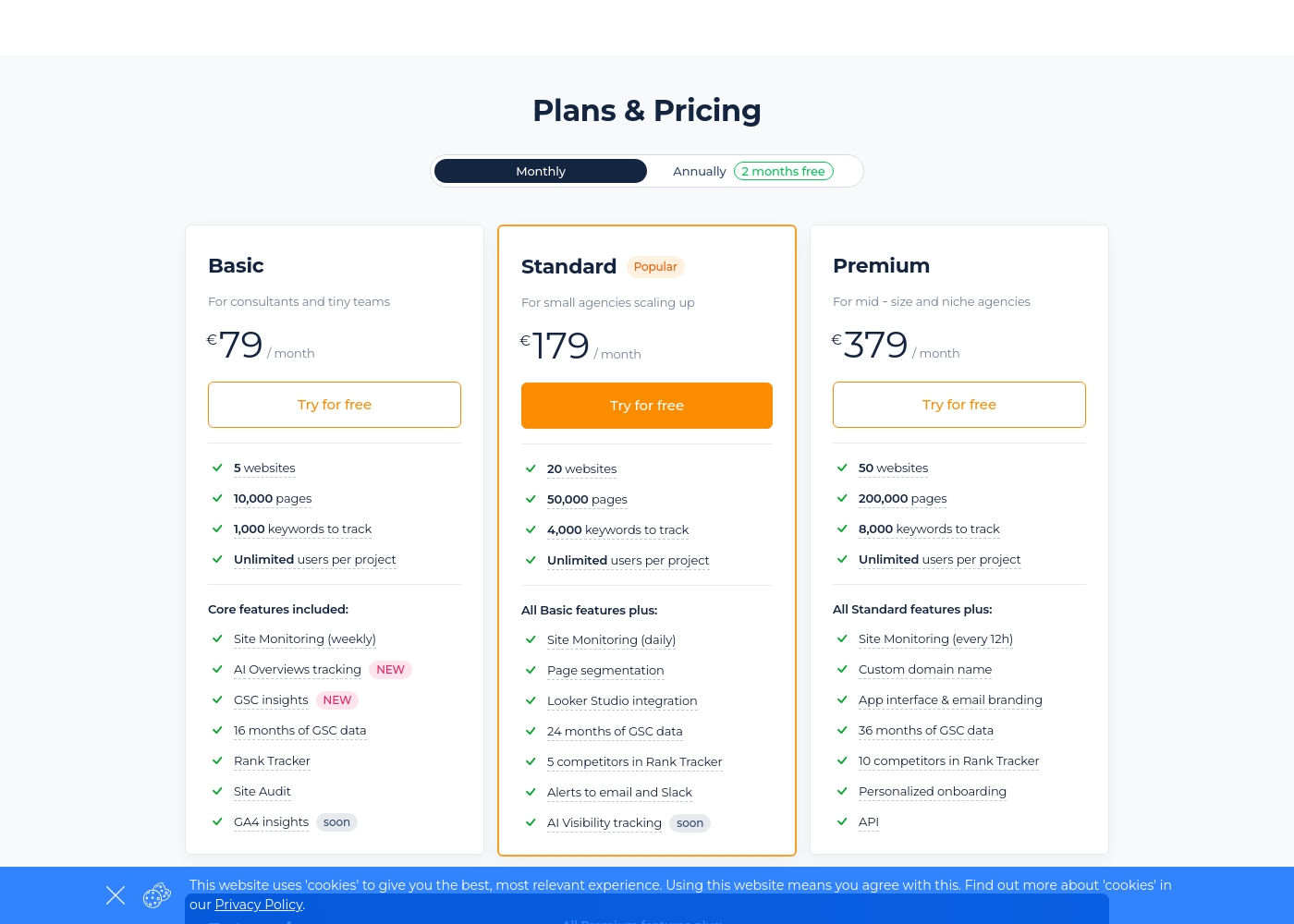
Sitechecker Pro costs between €79 and €379 per month with three main plans: Basic at €79, Standard at €179, and Premium at €379. When billed annually, you receive two months free.
Here is a detailed breakdown of what each subscription includes.
Basic
Price: €79/month Websites Supported: 5 Best For: Consultants and tiny teams Other Features: Site Monitoring (weekly), AI Overviews tracking, GSC insights, 16 months of GSC data, Rank Tracker, Site Audit
- 5 websites
- 10,000 pages
- 1,000 keywords to track
- Unlimited users per project
- Site Monitoring (weekly)
- 20 websites
- 50,000 pages
- 4,000 keywords to track
- Unlimited users per project
- Daily Site Monitoring
- 50 websites
- 200,000 pages
- 8,000 keywords to track
- Unlimited users per project
- Site Monitoring (every 12h)
Pricing Notes
- Moz pricing is based primarily on usage quotas, but charges an additional $49/user/month for extra user seats.
- Sitechecker Pro pricing scales by website/keyword volume and includes unlimited user seats on all plans.
- Sitechecker Pro offers a 14-day free trial that requires no credit card to start.
- Moz offers a free trial, but users frequently complain about automatic billing afterward, indicating a potentially required card.
- Sitechecker Pro is priced in Euros, while Moz uses US Dollars, complicating direct plan comparisons.
Pricing Head-to-Head
User Reviews
Moz receives deeply mixed public sentiment, resulting in a moderate 3.3-star average overall. Users frequently commend the quality of Moz Academy and the foundational metrics like Domain Authority (DA).
The MozBar extension is particularly popular, often cited as an excellent starting point for new SEO analysts. However, several themes related to pricing and customer management draw sharp criticism.
MozBar is a wonderful browser extension, simplifying competition checks on Google. It's a great tool for beginners, letting you check Domain and Page Authority quickly. It offers amazing value.
Users generally view Sitechecker Pro as a highly effective and comprehensive SEO tool (Trustpilot 4.4). Most reviewers praise the user-friendly interface and clean design, noting it is easy for both beginners and experienced marketers to navigate.
The proactive reporting, particularly the daily Site Audit reports, helps users quickly identify issues, making it a valuable system for site health management. One user even switched from a major competitor, citing Sitechecker's superior data accuracy.
We've been using Sitechecker for years and tracking over ten projects without issues. Switching from a major competitor was easy, and we actually find Sitechecker's data to be more accurate. They provide excellent monitoring for our client sites.
Our Verdict
Choosing between Moz and Sitechecker Pro depends heavily on your team structure. Moz is perfect for foundational SEO and large enterprises needing brand metrics. Sitechecker Pro is custom-built to support growing mid-sized agencies efficiently. Moz’s true strength lies in its proprietary data and trust level. Moz provides industry-standard metrics like Domain Authority (DA) and Page Authority (PA). Moz Local is essential if you manage many physical business listings. Moz also offers robust tools like STAT for complex, large-scale rank tracking needs. Sitechecker Pro streamlines agency pain points and simplifies pricing. The key feature is the unlimited users included on every plan, saving significant collaboration costs. Sitechecker Pro also provides faster proactive site health alerts every 12 hours. Sitechecker Pro offers full white-label branding, making client reports look hyper-professional. The critical deciding factor is how your team handles user costs and reporting needs. If you need 10+ people accessing data, Sitechecker Pro is financially smarter. If your strategy absolutely requires Moz’s DA metrics and advanced link analysis, you must choose Moz. Choose Sitechecker Pro if you run a client agency focused on technical health and scalability. Choose Moz if your strategy relies on trusted authority metrics and deep link research. Both software provide excellent SEO tools, but they serve different specialized needs effectively.
Frequently Asked Questions
Which is cheaper for a team of 10 users: Moz or Sitechecker Pro?
Sitechecker Pro is significantly cheaper for large teams. It includes unlimited user seats on all plans. Moz charges an expensive additional fee of $49 per user per month.
Does Sitechecker Pro offer proprietary metrics like Moz's DA/PA?
No, Sitechecker Pro does not offer proprietary DA or PA scores. Sitechecker Pro focuses on combining and enhancing raw GSC and GA4 data. Moz is the required choice for these unique authority metrics.
Which is better for Local SEO management: Moz or Sitechecker Pro?
Moz is far superior for Local SEO management with its dedicated Moz Local product. Moz Local centralizes review management and listing creation quickly. Sitechecker Pro does not offer specialized local features.
How does Sitechecker Pro handle its free trial compared to Moz?
Sitechecker Pro offers a generous 14-day free trial that requires no credit card. Moz also offers a trial, but users frequently complain about unclear cancellation terms and automatic post-trial charges.
Which tool has higher keyword tracking capacity: Moz or Sitechecker Pro?
Sitechecker Pro offers higher keyword capacity, tracking up to 8,000 keywords on its top plan. Moz maxes out at 3,000 keywords. However, Moz handles much larger page crawling volumes.
Is Sitechecker Pro better equipped for agency client reporting than Moz?
Yes, Sitechecker Pro is better for full agency reporting needs. Its Premium plan allows total white labeling of the app interface and domain. Moz offers branded reports but stops short of full white labeling.
Ready to Choose?
Both tools have their strengths. Choose based on your specific needs.