Sitechecker Pro

Sitechecker Pro

SEO & AI visibility control center for agencies

2 min read ยท Updated Oct 3, 2025
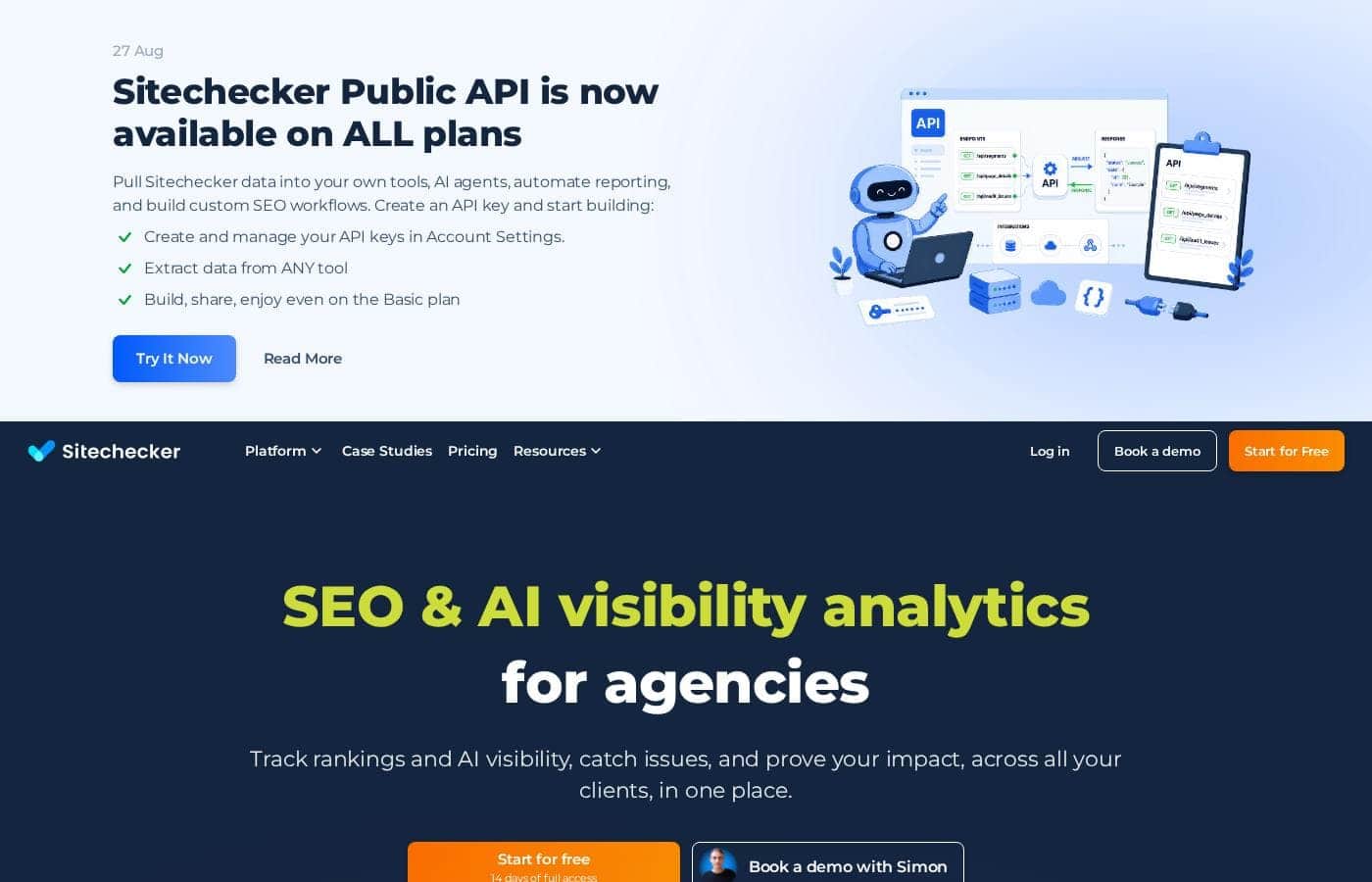
Sitechecker Pro homepage screenshot

At a glance

Quick overview for Sitechecker Pro: rating, pricing summary, key features, and highlights.

Ciroapp review

4.0
Robust SEO management for growing agencies.

We found Sitechecker Pro to deliver robust, agency-focused SEO management with exceptional technical auditing capabilities and powerful features like unlimited user seats. Overall, the software is excellent and highly effective, but its positive features are heavily compromised by serious, recurring user complaints regarding aggressive sales tactics and opaque subscription cancellation processes.

Pros

  • Pros:Unlimited user seats included on all plans.
  • Pros:Clean, intuitive interface suitable for beginners and experts.
  • Pros:Daily Site Audit reports provide proactive issue alerts.

Cons

  • Cons:Multiple unresolved complaints regarding subscription cancellation difficulties.
  • Cons:Users widely report aggressive cold email practices.
Free trial
Yes โ€” 14 days
Range: โ‚ฌ79โ€“โ‚ฌ379/monthFree trial, Monthly subscription, Yearly subscription
This section is a summary. Detailed sections about features, use cases, pricing, and reviews follow below.
Disclosure: this page may contain affiliate links for Sitechecker Pro. If you click these links and make a purchase, Ciroapp may earn a commission at no additional cost to you.

Sitechecker Pro review, pricing, features, pros & cons

It's frustrating when you find out too late that a critical ranking drop or issue has impacted your clientโ€™s site. Relying on Search Console or GA4 can mean working with limited features and poor interfaces. Sitechecker Pro addresses this core frustration by providing proactive alerts and blending crucial traffic and site health data into one solution.

Now you can easily manage client visibility and impress them with transparency. โœ…

What is Sitechecker Pro?

Sitechecker Pro is the centralized SEO & AI visibility control center primarily designed for digital agencies. It is trusted by full-service and vertical-focused agencies seeking reliable multi-site management. This robust platform monitors all important metrics in one unified dashboard, eliminating the need to log into many different tools.

It integrates key data points from Search Console, GA4, and AI overview rankings to give you seamless control. ๐Ÿ’ก

Compare Sitechecker Pro with similar tools and browse the full category before choosing.

View all SEO tools

Sitechecker Pro Key Features

โœจ Proactive Alerts: Spot Issues Before Clients Do

It is frustrating when you find out too late that a critical ranking drop has impacted a client's site. Sitechecker Pro solves this by providing proactive alerts that blend essential data in real-time. This system combines traffic data from Search Console and GA4 with site health metrics and content change monitoring. You will know about problems instantly, ensuring you are always the first to identify an issue.

The monitoring frequency scales with your plan, ranging from weekly checks to updates every 12 hours. Advanced plans allow you to receive instant alerts delivered straight to your email or Slack channels. This capability ensures quick response times, which is essential for managing clients' visibility and stability. The system confirms if a website is down or detects critical changes, giving you peace of mind.

๐Ÿ’ก Unified Visibility Control Center

Stop wasting time logging into many different native tools for client management. Sitechecker Pro provides one unified dashboard built specifically for agencies handling multiple sites. This centralized control center integrates key data points, including Google Search Console, GA4, and new AI overview rankings. You monitor performance across dozens of client websites without navigating messy external dashboards.

This centralized approach makes it easy to scale your operation without experiencing complexity or clutter. You get seamless control over crucial metrics, whether you are managing a handful of sites or up to 50. It saves significant time typically spent analyzing and checking different sources, allowing you to focus completely on SEO strategy instead.

โœจ Mastering Technical SEO with Site Audit

The powerful Site Audit feature acts as a core tool for ensuring technical SEO excellence. It thoroughly examines client sites, identifying detailed errors, warnings, and clear opportunities for improvement. This audit leverages a comprehensive database of SEO problems to provide accurate, actionable findings that form a strong foundation for content success.

Agencies found this feature invaluable for securing new customers by running audits on potential clients during the acquisition phase. After defining technical issues, you can easily assign necessary fixes to developers. By improving site speed or resolving complex crawl errors efficiently, you ultimately help clients achieve traffic growth.

โœจ Advanced Data Analysis Beyond GSC Limits

Sitechecker helps you bypass the data limitations often found in Google Search Console's native interface. You can now export key domain data, including lists of keywords and pages, exceeding the native toolโ€™s limits. This extra depth lets you investigate performance effectively and efficiently.

The platform provides advanced metrics that GSC usually lacks, such as Ranked Pages and Ranked Keywords. You benefit from sophisticated filtering options, allowing you to use multi-condition filters across dimensions and metrics. Depending on your plan, you can also access up to 36 months of crucial GSC historical data.

โœ… Agency-Ready Client Reporting and Branding

Reporting is effortless with Sitechecker Pro, allowing you to deliver impressive results in minutes. You can share clean, customizable reports that are easy for non-experts to fully understand. This transparency is key to building trust and quickly communicating the value you provide to your clients.

For maximum professionalism, higher-tier plans offer complete white labeling options. You gain the flexibility to brand the entire application interface, use a custom domain name, and apply specific email branding. You can also utilize Looker Studio integration to seamlessly manage and prepare complex reports for clients.

Use Cases

๐Ÿšจ Immediate Issue Detection and Prevention

It's frustrating when you learn about site problems too late. Sitechecker Pro acts as your early warning system, using proactive alerts that blend crucial data. We monitor actual traffic, site health, and recent content changes simultaneously.

This means youโ€™ll know instantly if a critical ranking drop happens or if a major technical error impacts a site. You can fix the issue quickly, often before your client even notices anything is wrong.

๐Ÿ”Ž Conducting Client Discovery and Technical Audits

When you onboard a new client, you need a clear baseline for your plan of action. Sitechecker helps you quickly gather the necessary insights.

Step 1: Connect Data. Start by linking the client's Google Search Console and GA4 accounts. Sitechecker imports up to 36 months of historical data, giving you a full picture of their track record.

Step 2: Run the Site Audit. Use the powerful Site Audit feature to identify detailed errors, warnings, and opportunities. This audit provides the foundation needed for successful technical SEO fixes.

Step 3: Define Strategy. Use the audit results to assign tasks to your web development team. As one user noted, following these fixes can lead to significant increases in traffic and leads.

๐Ÿ“ˆ Scaling Multi-Site Management Easily

Agencies often struggle to efficiently monitor many websites without complex dashboards or high costs. Sitechecker brings all performance metrics into one central, unified interface. You can track performance across dozens of client sites without logging into multiple native platforms.

Scaling is also simple because Sitechecker includes unlimited users on every project. As your agency grows, you won't incur extra fees just for adding team members to help monitor client portfolios.

๐Ÿ“Š Moving Beyond Native Search Console Limitations

Google Search Console is essential, but its data functionality is often limited. Sitechecker provides the deeper analysis you need to test sophisticated strategies and hypotheses. You can export more than 1,000 keywords and pages, avoiding the typical volume constraints.

The platform also utilizes advanced metrics like 'Ranked Pages' and 'Ranked Keywords' that GSC misses. You can apply multi-condition filters to this rich data set, allowing for much more precise analysis and strategic development.

โญ Delivering Professional, Branded Client Reporting

Client reporting needs to be clean, transparent, and easy for them to understand. Sitechecker allows you to generate customizable reports quickly.

This feature ensures your clients see your value clearly. For major agencies, the Premium plan lets you white label the entire application, including the custom domain and email branding. This provides a professional, fully branded experience that builds client trust.

๐Ÿ’ก Maintaining AI Visibility Control

As the SEO landscape evolves, tracking visibility in new formats is vital. Sitechecker Pro serves as an AI visibility control center. The platform includes dedicated tracking for AI Overview rankings.

Blending these new ranking insights with traditional GSC data puts you ahead of competitors. It ensures you impress clients by maintaining full control over their organic and emerging AI visibility.

Pricing Overview for Sitechecker Pro

Pricing range
โ‚ฌ79โ€“โ‚ฌ379/month
Pricing types
Free trial, Monthly subscription, Yearly subscription

Sitechecker Pro offers three tiersโ€”Basic, Standard, and Premiumโ€”starting at โ‚ฌ79 per month. All plans come with unlimited users per project and a 14-day free trial.

If you opt for annual billing, you receive two months of service free, enhancing value significantly.

Plans & Pricing

Basic

Monthlyโ‚ฌ79
Yearlyโ‚ฌ790
5 websites, 10,000 pages, 1,000 keywords
  • 5 websites
  • 10,000 pages
  • 1,000 keywords to track
  • Unlimited users per project
  • Site Monitoring (weekly)
  • AI Overviews tracking (New)
  • GSC insights (New)
  • 16 months of GSC data
  • + 2 more features

Standard

Monthlyโ‚ฌ179
Yearlyโ‚ฌ1,790
20 websites, 50,000 pages, 4,000 keywords
  • 20 websites
  • 50,000 pages
  • 4,000 keywords to track
  • Unlimited users per project
  • Daily Site Monitoring
  • Page segmentation
  • Looker Studio integration
  • 24 months of GSC data
  • + 2 more features

Premium

Monthlyโ‚ฌ379
Yearlyโ‚ฌ3,790
50 websites, 200,000 pages, 8,000 keywords
  • 50 websites
  • 200,000 pages
  • 8,000 keywords to track
  • Unlimited users per project
  • Site Monitoring (every 12h)
  • Custom domain name
  • App interface & email branding
  • 36 months of GSC data
  • + 3 more features
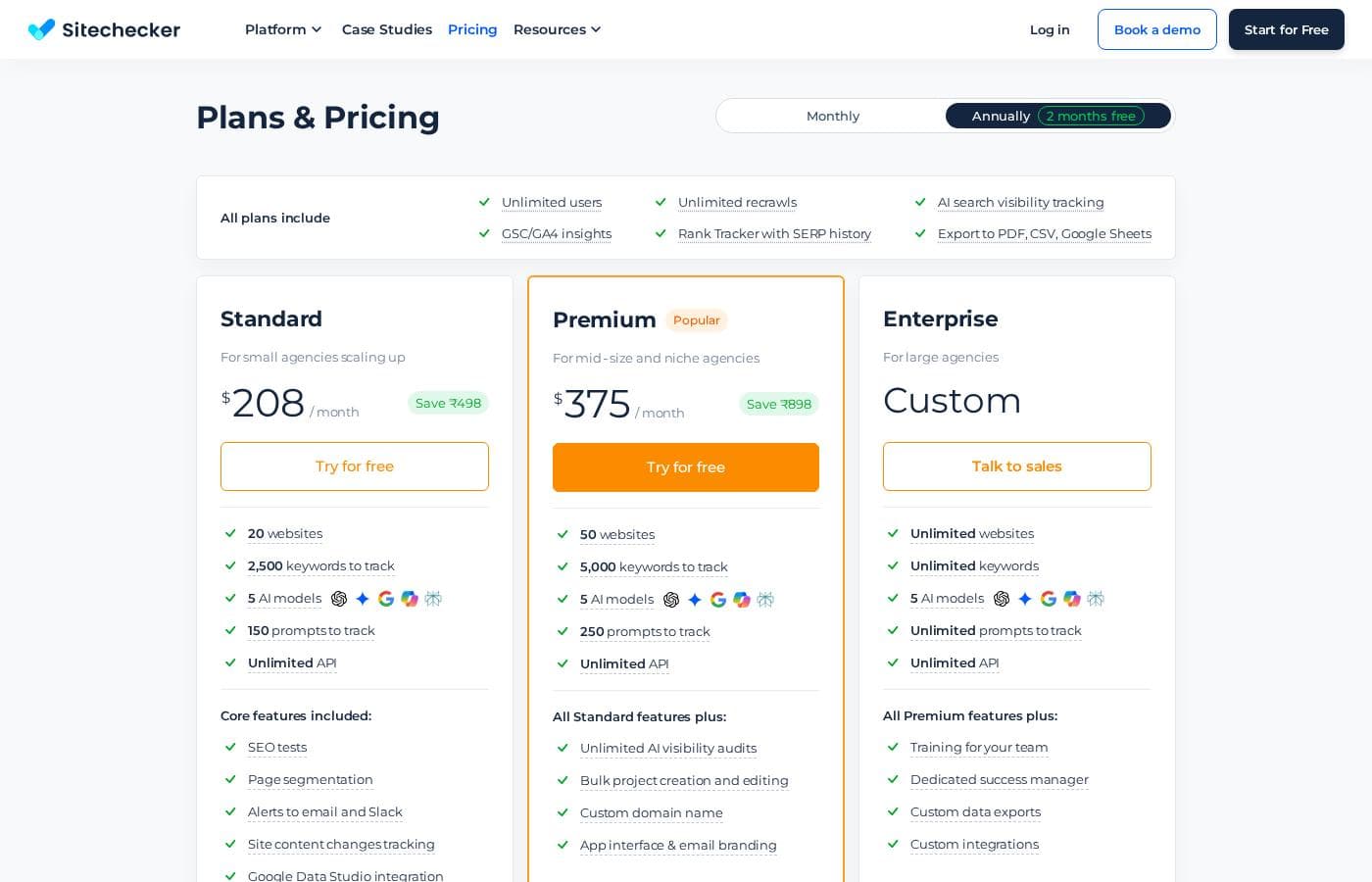
Pricing Screenshot
Pricing

Sitechecker Pro costs between โ‚ฌ79 and โ‚ฌ379 per month with three main plans: Basic at โ‚ฌ79, Standard at โ‚ฌ179, and Premium at โ‚ฌ379. When billed annually, you receive two months free.

Here is a detailed breakdown of what each subscription includes.

Basic

Price: โ‚ฌ79/month Websites Supported: 5 Best For: Consultants and tiny teams Refund Policy: Not explicitly stated Other Features: Site Monitoring (weekly), AI Overviews tracking, GSC insights, 16 months of GSC data, Rank Tracker, Site Audit

This plan is perfect if you are just starting or managing a small portfolio of client sites. It delivers all the core features needed for serious SEO work, including essential monitoring and valuable historical Google Search Console data.

Standard (Popular)

Price: โ‚ฌ179/month Websites Supported: 20 Best For: Small agencies scaling up Refund Policy: Not explicitly stated Other Features: All Basic features plus: Daily Site Monitoring, Page segmentation, Looker Studio integration, 24 months of GSC data, 5 competitors in Rank Tracker, Alerts to email and Slack

Many growing agencies choose the Standard plan because it offers a great balance of capacity and specialized features. You get significantly higher limits for pages and keywords, plus daily monitoring helps you catch issues much faster. Integrating with Looker Studio improves client reporting, too.

Premium

Price: โ‚ฌ379/month Websites Supported: 50 Best For: Mid-size and niche agencies Refund Policy: Not explicitly stated Other Features: All Standard features plus: Site Monitoring (every 12h), Custom domain name, App interface & email branding, 36 months of GSC data, 10 competitors in Rank Tracker, Personalized onboarding, API

For established agencies with many clients, Premium offers the highest level of detail and customization. The accelerated 12-hour monitoring means you are always ahead of potential problems. Plus, the custom domain and white-label branding options make your client deliverables look incredibly professional. โœจ

Sitechecker offers a 14-day free trial that requires no credit card to start. If you choose annual billing for any plan, you only pay for 10 months and receive 12 months of service, which provides excellent savings for long-term use.

User Reviews

Users generally view Sitechecker Pro as a highly effective and comprehensive SEO tool (Trustpilot 4.4). Most reviewers praise the user-friendly interface and clean design, noting it is easy for both beginners and experienced marketers to navigate.

The proactive reporting, particularly the daily Site Audit reports, helps users quickly identify issues, making it a valuable system for site health management. One user even switched from a major competitor, citing Sitechecker's superior data accuracy.

However, serious concerns frequently arise regarding the companyโ€™s business practices. Several users reported aggressive cold emailing tactics (spamy outreach), which caused them to avoid the product entirely.

More critically, multiple reviews mention significant issues with customer service and billing, specifically stating that the subscription cancellation button did not work, leading to frustration and perceived fraudulent billing. While the tool itself is highly lauded, the back-end administrative hurdles are a significant detractor.

โš ๏ธ

What users say elsewhere

Sam R.
Trustpilot

We've been using Sitechecker for years and tracking over ten projects without issues. Switching from a major competitor was easy, and we actually find Sitechecker's data to be more accurate. They provide excellent monitoring for our client sites.

Jessica M.
Trustpilot

As I am new to SEO, Sitechecker has been a brilliant resource. I receive updates every few days about what to improve on my site. The tool has taught me a lot about SEO best practices.

Mark S.
Trustpilot

I used Sitechecker to clean up and optimize my personal blog. The platform is truly easy to use and provides clear, actionable SEO recommendations. It helped me fix technical issues I definitely would not have caught otherwise.

Adam P.
Trustpilot

Sitechecker PRO is a really essential tool for managing my website health. It provides a detailed Site Audit report every day that clearly identifies my site's problems. I plan to continue my subscription because of this value.

No reviews yet.

Write a Review

Write a Review for Sitechecker Pro
0/100 characters
0/2000 characters

Why use Sitechecker Pro?

Why juggle inefficient native tools when you can use one unified dashboard built for scale? Sitechecker gives you the accurate, real-time insights competitive solutions often miss, helping you save valuable time analyzing and testing new hypotheses. Hereโ€™s how Sitechecker transforms your SEO workflow:

  • Be Proactive, Not Reactive: Spot issues and ranking drops instantly with proactive alerts that combine real traffic data, site health metrics, and content changes. Youโ€™ll know about problems before your clients do.
  • Deepen Your Data Analysis: Move beyond the limitations of Google Search Console to access crucial depth. You can export more than 1,000 keywords and pages, plus utilize advanced metrics like Ranked Pages.
  • Scale Without Cost Penalties: Monitor dozens of client sites from a single interface, eliminating messy, complex dashboards. The structure utilizes simple, scalable pricing and allows you to add unlimited users to every project. โœจ
  • Deliver Agency-Ready Reports: Share clean, customizable reports that are easy for clients to understand. If needed, you have the flexibility to white label the entire application for a fully branded experience.
  • Master Technical SEO: The powerful Site Audit feature acts as a 'godsend' for technical SEO, identifying detailed errors, warnings, and opportunities that are often difficult to detect and fix, providing a strong foundation for client content success.

Ready to transform your workflow with Sitechecker Pro?

Sitechecker Pro alternatives

View all SEO tools

Other tools in the SEO category

Popular comparisons

Serpstat
Serpstat vs Sitechecker Pro
SEO
SEOcrawl
SEOcrawl vs Sitechecker Pro
SEO
Diib
Diib vs Sitechecker Pro
SEO
MarketMuse
MarketMuse vs Sitechecker Pro
SEO

Similar tools

Serpstat
Serpstat
SEO2.8/5

Serpstat is a comprehensive marketing tool that simplifies SEO and content workflows. We aim to help you reach your goals faster by providing the right data when you need it. It's a reliable resource, trusted by over 1.1 million users, and built upon hundreds of positive reviews. To ensure you have ample resources, Serpstat holds massive data sets. This includes 1.50 billion domains and more than 8.62 billion keywords available for analysis. This scope guarantees you have a truly global view of the search landscape. ๐Ÿ’ก

SEOcrawl
SEOcrawl
SEO2.5/5

SEOcrawl is a powerful SEO solution recognized for its strength in Reporting and Business Intelligence. It functions as an interactive dashboard, designed specifically to help users maximize the utility of their Google Search Console data. This tool is built to accelerate analysis and bring simplicity to complex data sets. If you manage many projects or simply need quick, clear insights, SEOcrawl streamlines your entire workflow. ๐Ÿ’ก

Diib
Diib
SEO4.2/5

Diib is more than just an SEO checker; it's an overall growth tool designed to automate your success. It currently helps over 500k members in 160 countries improve their online presence. The core component is the **Diib Answer Engine**. ๐Ÿ’ก This engine works 24 hours a day. It combines your real analytics data with a deep study of your website, competitors, and industry benchmarks. This deep analysis tells you how to quickly grow online without needing coding skills or prior SEO experience.

MarketMuse
MarketMuse
SEO4.5/5

MarketMuse is powerful AI-powered software built by content practitioners. These SEOs and strategists wanted an easier way to evaluate content opportunities beyond basic keyword lists and cluttered spreadsheets. The platform uses patented AI technology, which has been in use for over ten years. This specialized AI carefully fetches and analyzes thousands of content pages to classify relevance. MarketMuse does not replace a Content Management System (CMS). Instead, it creates a crucial content inventory for you. This inventory offers critical data points needed to make effective content decisions. MarketMuse is trusted by professional content teams, including agencies, brands, and publishers. Its day-to-day users often include SEOs, writers, editors, and digital managers overseeing content strategy.๐Ÿ’ก

Frequently Asked Questions

Does Sitechecker Pro charge per user or seat?

The pricing structure is based purely on usage volume, such as the number of websites and keywords you track. All subscription tiers include unlimited users per project at no extra cost.

What is the primary difference in features between the Basic and Premium plans?

The main differences are volume and speed. Premium supports 50 websites and offers monitoring every 12 hours, while Basic supports 5 websites with weekly monitoring. Premium also unlocks features essential for agencies, like API access and app branding.

What happens if I exceed my usage limits for pages or keywords?

Not explicitly stated on the official site. Pricing scales based on expected volume, so you would likely need to upgrade your subscription if you consistently exceed the limits for websites, pages, or keywords.

Which third-party tools can Sitechecker Pro integrate with?

Sitechecker Pro is designed to integrate deeply with data from Google Search Console and Google Analytics 4. The Standard and Premium plans also offer integration with Looker Studio and alert notifications to Slack.

How long is the free trial, and does it require a credit card?

The free trial lasts 14 days. You can begin the trial immediately without needing to provide a credit card.

Is there a discount offered if I pay for my subscription annually?

Yes, annual billing is significantly discounted. If you choose to pay yearly, you receive two months of service for free.

Does Sitechecker Pro offer a money-back guarantee or refund policy?

The official site details regarding a money-back guarantee or refund policy are not explicitly stated.

How much historical Google Search Console (GSC) data can I access?

The amount varies by plan. You can access 16 months of GSC data on the Basic plan, 24 months on Standard, and up to 36 months on the Premium plan.

Is personalized onboarding or setup assistance available?

Yes, personalized onboarding is a specific feature included only for clients subscribed to the Premium plan.

Is API access included for automation and custom reports?

API access is available but only for customers on the highest tier, the Premium plan.

How fast are issues caught by site monitoring on different plans?

Issues are caught based on monitoring frequency: weekly for Basic, daily for Standard, and every 12 hours for the Premium plan.

What is the intended audience for the Basic tier (โ‚ฌ79/month)?

The Basic plan is designed for consultants and tiny teams who are managing a smaller portfolio, specifically up to five client websites.

Ready to try Sitechecker Pro? Check out the official site or pricing.
Sitechecker Pro Review, Pricing, Features, Pros & Cons