Motion vs Trello
Motion and Trello approach productivity tracking very differently. Motion sells a comprehensive AI workforce that handles logistics automatically. Trello offers exceptional visual management using flexible, simple Kanban boards.
Best for: Solo entrepreneurs needing intelligent auto-scheduling, Teams prioritizing context-driven AI automation
Best for: Small teams (under 10) requiring visual oversight, Startups with tight budgets needing a permanent Free plan
AI scheduling that manages your work.
We observed that Motion delivers on its promise of powerful, AI-driven task management and scheduling. Users consistently report massive time savings and reduced cognitive load, but the complex credit and seat pricing structure requires careful study. Overall, Motion is a transformative tool for dedicated users who commit to mastering its full capabilities.
Pros
- Reduces mental load using intelligent auto-scheduling and task prioritization.
- Integrates tasks, projects, and calendar into a single, cohesive productivity suite.
- Helps teams break down major goals into manageable, achievable steps for progress.
- High-quality AI note-taker joins meetings and summarizes them effectively.
Cons
- High price point ($50/month cited as excessive by some single users).
- Steep learning curve requires significant upfront time to fully master the system.
- Reported UX/UI glitches, such as obstructive task preview pop-ups.
- Users note that the mobile app and notification features need improvement.
Simple Project Management, Complex Login
We find Trello delivers exceptional value quickly due to its easy operation. Its Kanban visual organization is highly flexible for team workflows. Overall, Trello is a powerful tool, but stability issues and frustrating administrative friction points like the Atlassian login do hold it back.
Pros
- The simple, visual Kanaban board design offers great ease of use.
- A permanent Free plan is available and suitable for small teams or personal use.
- The platform is effective for team management and sharing context quickly.
- Supports extensive customization and functionality upgrades via Power-Ups.
Cons
- Users frequently report difficulty and friction with the Atlassian login process.
- Accessing billing information and invoices can be surprisingly complicated.
- The interface occasionally suffers from lag and server downtime.
- Key views like Calendar or Map require a paid Premium subscription.
AboutMotion
Motion transforms how teams work by offering the world's first AI workforce at your fingertips. ✨ This platform goes far beyond simple automation; it lets you create and deploy enterprise-grade AI Employees specifically built for your business needs. It merges an entire productivity suite—including AI Projects, AI Calendar, and AI Tasks—where all your work is managed and recorded. Motion is trusted by over a million top performers and teams who want a single, powerful platform for managing work efficiently.
AboutTrello
Trello is designed to keep you at the top of your game by ensuring every to-do or idea, regardless of size, finds its proper place. The system helps you stay organized and efficient using three key components: Inbox, Boards, and Planner.
The Inbox quickly captures tasks as soon as they are on your mind, whether you are in the office or on the go. You manage your tasks using flexible Boards, where long lists become manageable by tracking items from “to-dos to tackle” to “mission accomplished!” Use the Planner to simply drag and drop your top tasks right into your calendar, ensuring you make time for what truly matters. 💡
Highlights
Feature Comparison
Features Overview
We highlight the main differences and pick a winner for each feature.
AI Power & Automation
Motion is comprehensive AI workflow execution; Trello automates board movement.
Motion lets users build custom AI Employees using natural language instructions. The AI handles project logistics and task prioritization end-to-end. Trello utilizes Atlassian Intelligence to turn emails quickly into organized task cards. Trello also offers simple no-code automation for repetitive board actions. Motion's AI capabilities are far deeper for complex workflow execution. Trello automates board movement; Motion automates high-level decisions and planning.
Pricing & Accessibility
Trello has an incredible Free plan; Motion requires a significant annual investment commitment.
Trello offers a permanent Free plan suitable for small teams and individuals. Trello paid plans start at an affordable $5/user/month when billed annually. Motion prices start at $29/month, billed annually, focusing on specific usage. Motion is usage-based, costing more as your AI reliance increases significantly. Trello offers high upfront value via its robust, evergreen free tier.
Ease of Use
Trello is famously simple to start; Motion requires a steep commitment to master.
Trello is consistently praised for its simple visual Kanban design and low barrier to entry. Motion is described by users as having a steep learning curve needing significant upfront time. Users report Motion solves huge problems but demands patience to learn the system fully. Trello delivers business value extremely quickly, often within 30 days. Choose Trello for immediate adoption.
Scheduling & Prioritization
Motion automatically prioritizes tasks; Trello relies on the user to manually schedule.
Motion excels at intelligent, context-aware auto-scheduling and task prioritization instantly. The system constantly re-prioritizes work based on dependencies and deadlines. Trello uses the Planner feature for users to manually drag and drop tasks onto a calendar view. Trello's scheduling is intentional and user-driven, lacking AI oversight. Motion drastically reduces the cognitive load of organizing and prioritizing work daily.
Core Structure
Motion is an integrated suite; Trello uses visual boards for workflow management.
Motion operates as a fully integrated suite including AI Projects, Docs, Notes, and Calendar. The AI draws context from all these internal tools for maximum accuracy. Trello uses highly flexible Kanban Boards for visual task tracking. Trello adds features like the Inbox and Planner around the core board structure. Motion provides a central AI brain; Trello provides modular visual organization.
Review Sentiment
Motion users report higher satisfaction; Trello users complain about corporate friction.
Motion holds a higher average rating (4.1) compared to Trello (3.8). Motion users frequently praise the massive productivity boost and time savings achieved. Trello users struggle with the complicated Atlassian login process post-acquisition. Trello also faces reported issues with interface lag and server instability. Motion's focused solution appears to yield greater user devotion.
Mobile Experience
Trello has reliable syncing; Motion faces user feedback about app refinement needs.
Trello users consistently praise the platform's reliable real-time sync across all devices. Motion supports dedicated iOS and Android applications for users. However, users frequently note that Motion’s mobile app needs improvement and refinement. Trello ensures your work is seamlessly accessible and up-to-date on the go.
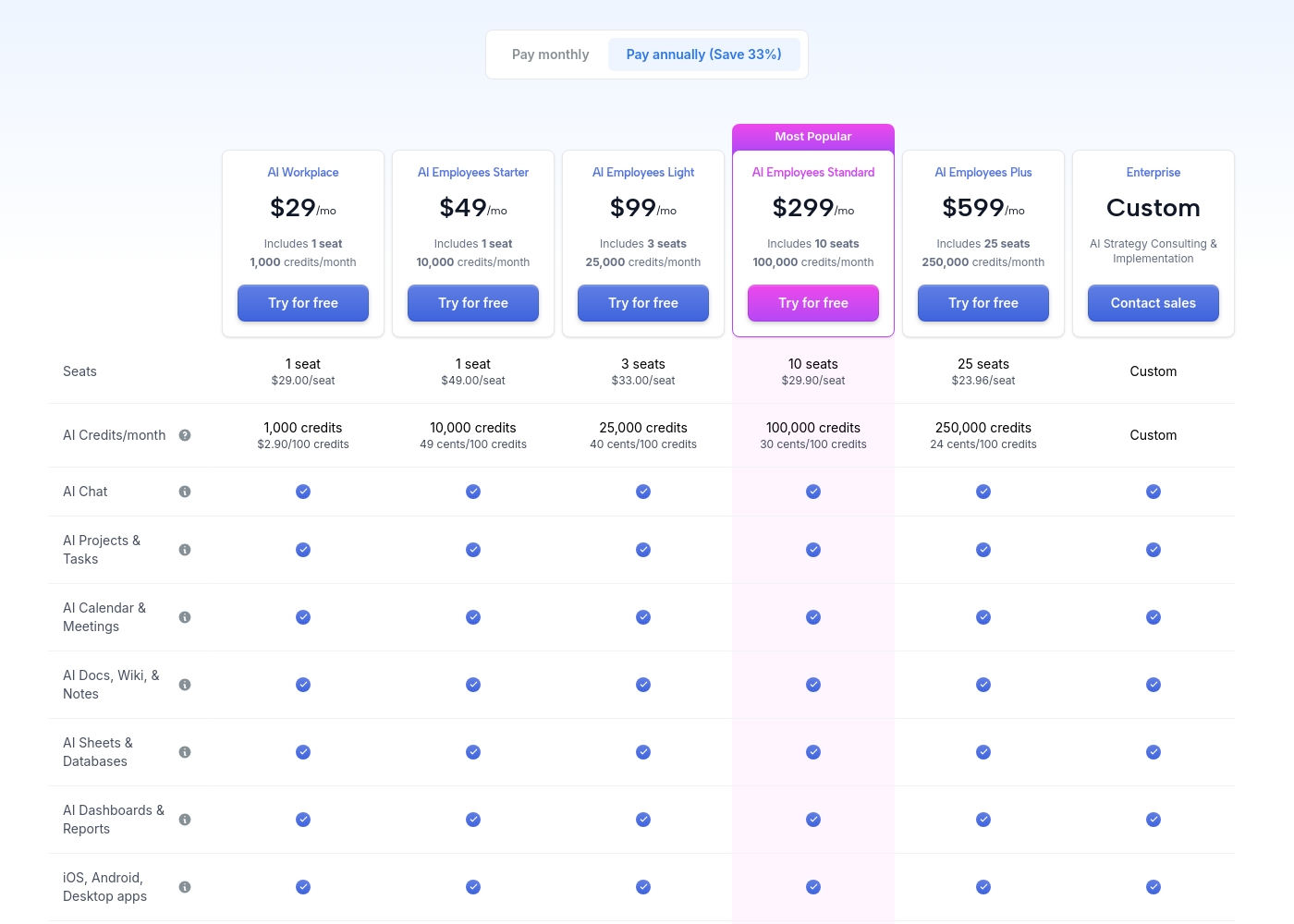
Motion costs between $29 and $599 per month (when billed annually) with 5 primary subscription plans: AI Workplace ($29/mo), AI Employees Starter ($49/mo), AI Employees Light ($99/mo), AI Employees Standard ($299/mo), and AI Employees Plus ($599/mo). There is also a custom Enterprise option.
The prices shown reflect annual billing, which gives you a savings of 33% compared to paying monthly. All plans offer a free trial period.
AI Workplace
Price: $29/mo (billed annually) Best For: Individuals and small startups starting AI integration Other Features:
- Includes 1 seat
- 1,000 credits/month ($2.90 per 100 credits)
- 3 integration connections
- Access to core AI tools (Chat, Projects, Calendar, Docs, Sheets, Dashboards)
- 1 seat
- 1,000 credits/month
- 3 integration connections
- AI Chat, Projects & Tasks, Calendar & Meetings, Docs, Wiki & Notes, Sheets & Databases, Dashboards & Reports
- iOS, Android, Desktop apps
- 1 seat
- 10,000 credits/month
- 5 integration connections
- Everything in AI Workplace
- 3 seats
- 25,000 credits/month
- 10 integration connections
- Everything in AI Employees Starter
- 10 seats (Most Popular)
- 100,000 credits/month
- 20 integration connections
- HTTP Blocks
- Everything in AI Employees Light
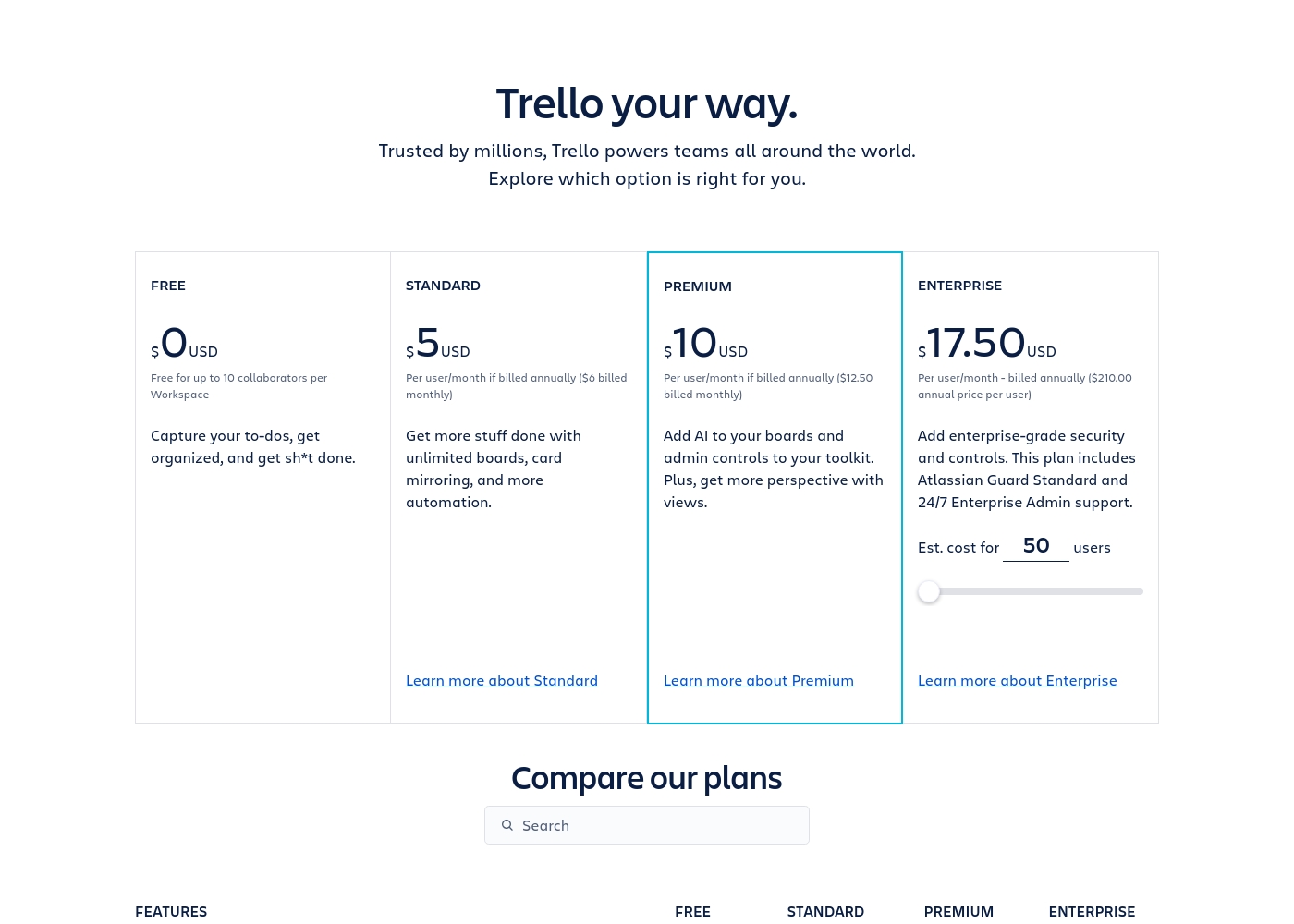
Trello costs between $0 and $17.50 per user/month, offering four plans: Free at $0, Standard at $5/user/month (annually), Premium at $10/user/month (annually), and Enterprise at $17.50/user/month (annually).
Trello offers flexible plans for individuals and large organizations. Let’s look closer at what each plan provides, based on annual pricing options.
Free
Price: $0 USD Best For: Capturing to-dos, fundamental organization Other Features:
- Unlimited cards
- Up to 10 boards per Workspace
- Unlimited Power-Ups per board
- 250 Workspace command runs per month
- 2-factor authentication
- Unlimited cards
- Unlimited Power-Ups per board
- Unlimited storage (10MB/file)
- 2-factor authentication
- Unlimited activity log
- Unlimited boards
- Card mirroring
- Advanced checklists
- Custom Fields
- Quick capture powered by AI
- Atlassian Intelligence (AI)
- Views: Calendar, Timeline, Table, Dashboard, and Map
- Admin and security features
- Workspace-level templates
- Simple data export
- Unlimited Workspaces
- Organization-wide permissions
- Free SSO and user provisioning with Atlassian Guard
- 24/7 Enterprise Admin support
- Public board management
Pricing Notes
- Motion's listed standard prices require commitment to annual billing for savings.
- Trello offers a permanent, generous Free plan, making it immediately accessible for basic use.
- Motion utilizes a unique usage-based model tied to monthly AI Credits and Seats.
- Trello's cost scales predictably per user, starting affordably at $5/user/month (annually).
- Trello offers monthly payment options; Motion does not explicitly state monthly rates for standard tiers.
Pricing Head-to-Head
User Reviews
Motion receives overwhelmingly positive feedback, primarily focused on its powerful auto-scheduling and prioritization features. Users frequently praise the application for reducing mental load and decision fatigue by automatically organizing tasks and project workflows.
Many reviewers, including those dealing with complex schedules or ADHD, state that Motion has revolutionized their workflow, saving significant time and boosting productivity. The ability to break down complex goals into achievable tasks is consistently highlighted as a major benefit, making Motion a game-changer for project management teams and individuals alike.
I was recently diagnosed with ADHD, and Motion has made a huge difference in how I structure my day. It removes the stress of figuring out what to do next. It has been well worth the time invested in learning the system, as the benefits are truly clear.
Trello receives mixed but generally favorable external feedback, often lauded as an amazing app for personal and team organization. Users consistently praise its simple design and exceptional ease of use, which makes it perfect for startups and small businesses utilizing the generous free plan.
The core utility, including dynamic block control and strong real-time syncing, is highly appreciated. However, recurring pain points are frequently mentioned, stemming largely from the Atlassian acquisition.
Trello is a great tool for starting out, especially for small businesses. It has a robust free plan you can use for organization before deciding to go premium. It’s an excellent option for startups working with a limited budget.
Our Verdict
The real decision between Motion and Trello centers on delegation versus control. This isn't really a tight competition; Motion and Trello serve fundamentally different needs. Motion wins if you need a futuristic, mostly hands-off productivity solution. Motion’s superpower is its context-driven AI that handles all coordination logistics automatically. It generates project plans, re-prioritizes tasks, and blocks time on your calendar. If you commit to the steep learning curve, Motion completely eliminates daily decision fatigue. Trello is the clear winner for visual clarity, simplicity, and accessibility for workflows. Trello’s superpower is its famous Kanban board design and incredibly gentle learning curve for teams. Most teams start getting value from Trello within 30 days, often using the generous permanent Free plan. The deciding factor is complexity versus cost. Trello costs almost nothing to start and handles visual organization perfectly. Motion starts at $29/month and is built for complex, high-effort automation and coordination logistics. Choose Motion if managing logistics drains your focus and you need maximum AI delegation. Stick with Trello if you love visual boards and need a straightforward, affordable tool for simple project management and team communication.
Frequently Asked Questions
Which is better for visual planning: Motion or Trello?
Trello excels at visual planning using flexible Kanban boards and various views. Motion focuses on automated task management within its integrated suite. Trello Premium unlocks key visual views like Timeline and Map.
Does Motion offer a free plan competitive with Trello's Free plan?
No, Motion does not offer a permanent free plan like Trello. Motion provides a free trial to test the system before purchasing a paid plan. Trello’s Free plan is robust for small teams.
Which tool is easier to learn: Motion or Trello?
Trello is significantly easier to learn and provides value quickly. Motion has a steep learning curve and requires investment to master the AI system. Trello is renowned for its straightforward design simplicity.
How do Motion and Trello handle enterprise-level security?
Both Motion and Trello are SOC 2 Type 2 compliant, ensuring high data security standards. Trello also holds ISO/IEC 27001 certification. Motion offers dedicated engineering support in its Enterprise plan.
Which tool has stronger automation capabilities?
Motion offers superior, context-driven automation using custom AI Employees that execute tasks end-to-end. Trello provides robust built-in no-code automation for simple rules and board movements.
Is Trello worth the switch if I need auto-scheduling like Motion?
Trello does not offer Motion's intelligent, auto-prioritizing scheduling features. Trello uses the Planner for manual drag-and-drop scheduling. If true dynamic auto-scheduling is critical, Motion is the better choice.
Ready to Choose?
Both tools have their strengths. Choose based on your specific needs.