Monday.com vs Notion
Monday.com and Notion offer radically different approaches to team productivity. Monday.com is a centralized, visual platform built for project execution and high-volume automation. Notion is a flexible, AI-powered knowledge base designed to replace all specialized tools. Choosing the right one depends entirely on your team's primary workflow needs.
Best for: Remote teams of 10-50 needing high visual tracking, Marketing agencies streamlining creative briefs and campaigns
Best for: Solo entrepreneurs and individuals needing a robust free tool, Startups highly focused on centralizing documentation and team wikis
Intuitive, Flexible Work Management Platform
We find Monday.com to be an extremely versatile AI work platform for unifying task management and enterprise execution. Its visual appeal and intuitive, no-code interface ensure rapid team adoption and customization for any complex workflow. Overall, we recommend Monday.com for mid-sized teams that need robust automation and detailed, company-wide project tracking capabilities.
Pros
- Visually appealing and intuitive user interface (UI) design.
- High flexibility and customization allow creation of unique workflows.
- Robust automations and integrations streamline processes efficiently.
- Effective tracking across multiple departments (e.g., CRM, marketing, IT).
Cons
- Base pricing model is perceived as too complex and costs quickly escalate with features.
- Mandatory minimum seat purchases increase expense for small teams.
- Users report occasional glitches and limits on data export functions.
- Canceling or unsubscribing from paid plans can be unexpectedly difficult.
Powerful software, risky provider.
We found Notion is an exceptionally flexible and powerful productivity tool, praised globally for its block-based editor and ability to consolidate diverse workflows. However, external evidence highlights significant failures in subscription management and support responsiveness. Overall, we advise extreme caution regarding billing procedures due to recurring reports of unauthorized charges and cancellation difficulties.
Pros
- Exceptionally powerful and versatile block-based editor.
- Effective for personal knowledge management and team use.
- Consolidates multiple specialized tools (wikis, CRMs, project management).
- Strong native AI assistance integrated throughout the workspace.
Cons
- Widespread reports of deceptive or confusing billing practices.
- Extremely poor and unresponsive customer support experiences.
- Users report app is often slow and unreliable.
- Difficulty canceling subscriptions and obtaining timely refunds.
AboutMonday.com
Monday.com is an AI work platform designed to unify your entire product suite. This system supports collaboration and execution for every team in your company. Whether you manage projects, accelerate sales, or handle IT support, tuesday.com offers specialized products for departmental needs. This comprehensive approach powers seamless operations across your whole organization.
It serves teams managing Projects, Sales, Marketing, IT & Ops, Product & Engineering, and Leadership. Leading brands and over 60% of the Fortune 500 trust this platform for enterprise execution. 💡
AboutNotion
Notion is your dedicated AI workspace and everything app. It is built to replace multiple specialized tools with one powerful platform. This centralized space lets teams consolidate project management, internal wikis, and basic CRM functions. Notion is trusted broadly; over 100 million users worldwide use it, and 62% of the Fortune 100 are customers. You can use it right in your browser or download specialized tools like Notion Mail and Notion Calendar to keep time and work together. ✅
Highlights
Feature Comparison
Features Overview
We highlight the main differences and pick a winner for each feature.
Core Philosophy
Monday.com is built for visual management and quick project execution. Notion is designed to be your single, flexible information hub and team wiki.
Monday.com is focused on unifying product suites across departments like IT, CRM, and Marketing. Teams use Monday.com to monitor projects with immediate visual feedback. Notion's core goal is consolidating multiple apps into one flexible workspace. It shines as a searchable knowledge base and repository for all company information. The choice is simple: Monday.com is for execution, and Notion is for information organization. If project dependencies are critical, Monday.com provides the necessary visual structure and features like Gantt charts standard.
Automation Power
Monday.com offers vastly superior, explicit automation capacity for complex workflows. Notion's automation focus is tied more closely to its AI tools.
Monday.com's Pro plan includes capacity for 25,000 automation and integration actions monthly. This is crucial for high-volume, streamlined operational processes. Notion integrates with key tools but does not publicly list a specific high action limit for its core automation features. Its strength lies in internal workflow streamlining. This difference is stark; Monday.com guarantees enterprise-level automation bandwidth. If automations across 10+ projects are essential, Monday.com provides guaranteed scaling limits and reporting.
Flexibility & Structure
Notion offers unmatched flexibility as a building block workspace. Monday.com provides necessary structure with powerful, pre-built no-code workflows.
Notion uses a versatile block-based system, letting you build custom dashboards, wikis, or even basic CRMs from scratch. This allows incredible creative freedom. Monday.com also features a flexible no-code interface but starts users with a defined board structure and strong templates. Customization supports organizational consistency. Notion requires more initial building and thinking; Monday.com provides immediate visual guidance and quick time to value. If your priority is consolidating fragmented information into highly customized views, Notion's deep flexibility delivers superior results.
Pricing Model
Monday.com is simpler but requires three paid seats minimum. Notion is priced per user but carries a reputational risk due to billing complaints.
Monday.com’s Basic and Standard plans require a commitment of at least three user seats, increasing cost for tiny teams or solos. Paid annual prices start at $9/seat/month. Notion starts at $10/seat/month for the Plus plan and is priced per member, allowing true growth from a single paid user. It has a robust free individual plan. Monday.com’s pricing involves high automation limits in higher tiers, offering explicit value for scaling processes. Notion users widely report unexpected charges and difficulties with billing and cancellations, which is a major factor against its overall value.
AI Capabilities
Monday.com leverages AI for management, risk, and workflow triage. Notion uses its AI fundamentally to generate content and assist with internal knowledge.
Monday.com employs AI to detect project risks early and automatically triage support tickets for service teams. Their CRM uses AI scoring for lead prioritization. Notion is recognized by G2 as the #1 rated AI writing tool, with an assistant built into every team member’s workspace. This handles drafting and summarization. Notion’s AI is fundamentally about content creation and refinement; Monday.com’s AI is about process optimization and risk mitigation. Teams focused on content marketing will get more immediate value from Notion’s generative AI features.
Customer Support
Monday.com offers prioritized support on paid plans. Notion's user reviews frequently complain about poor support and billing issues.
Monday.com ensures users on the Basic plan receive prioritized customer support when needed. Enterprise users receive dedicated 24/7 quality support. Notion’s stellar product functionality is overshadowed by reports of highly unresponsive customer service when problems arise. Users report issues resolving billing errors. Customer confidence is far higher with Monday.com due to its clear support structure. If rapid resolution of technical or billing issues is critical, Monday.com is the safer, more mature choice.
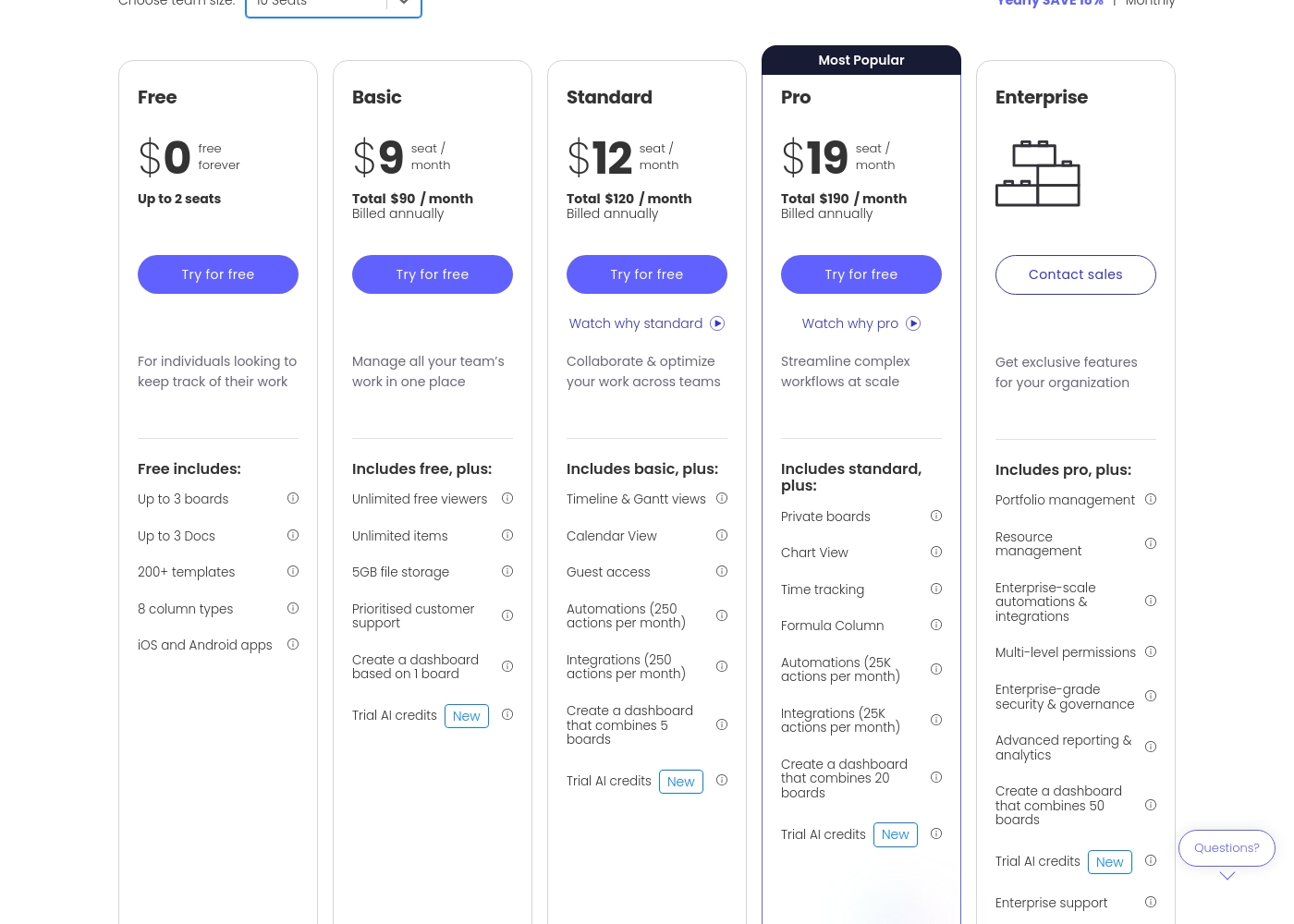
Monday.com costs between $0 and $19 per seat per month (billed annually) with five plans: Free at $0, Basic at $9, Standard at $12, Pro at $19, and Enterprise (contact sales).
Let's break down what's included in each plan to help you pick the best fit.
Free
Price: $0/month Best For: Individuals looking to keep track of their work Other Features:
- Up to 3 boards
- Up to 3 Docs
- 200+ templates
- iOS and Android apps
- Up to 3 boards
- Up to 3 Docs
- 200+ templates
- 8 column types
- iOS and Android apps
- Unlimited free viewers
- Unlimited items
- 5GB file storage
- Prioritised customer support
- Create a dashboard based on 1 board
- Timeline & Gantt views
- Calendar View
- Guest access
- Automations (250 actions per month)
- Integrations (250 actions per month)
- Private boards
- Chart View
- Time tracking
- Formula Column
- Automations (25K actions per month)
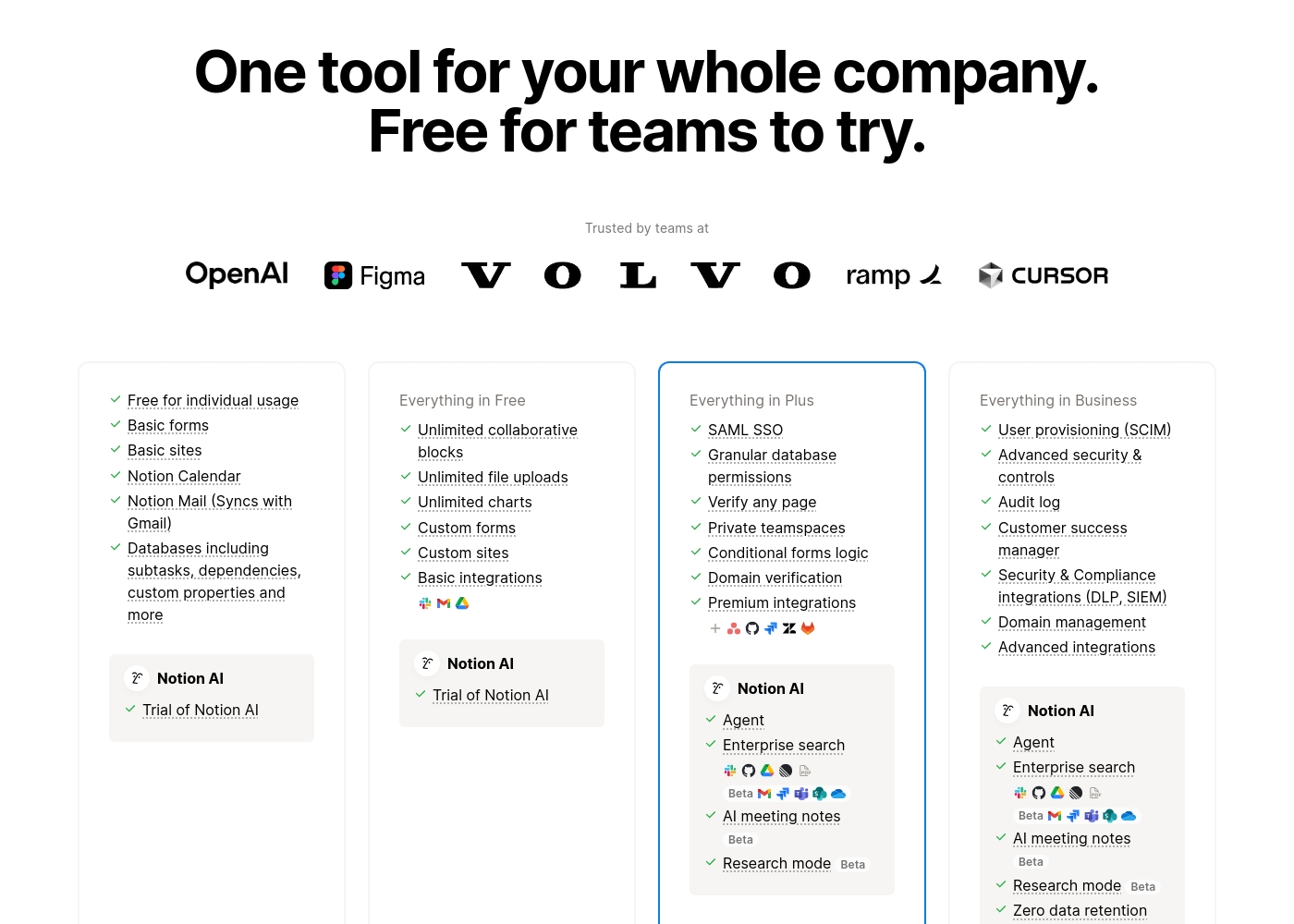
Notion costs between $0 and $20 per seat/month with four plans: Free at $0/seat/month, Plus at $10/seat/month, Business at $20/seat/month, and Enterprise (custom pricing).
Here’s a detailed look at the core features included in each subscription level.
- Unlimited pages and blocks for individuals
- Web publishing with 1 custom subdomain
- Basic forms and sites
- Notion Calendar and Mail synchronization
- Databases with subtasks and dependencies
- Unlimited blocks and file uploads
- 30 days of page history
- Basic SAML SSO
- Granular database permissions
- Access to unlimited charts
- 90 days of page history
- Advanced security controls and Audit log
- Conditional forms logic
- Domain verification
- Advanced page analytics (includes editor list)
- Unlimited page history and workspace analytics
- SCIM user provisioning
- Zero data retention with LLM providers for Notion AI
- Customer Success Manager support
- Security & Compliance integrations (DLP, SIEM)
Pricing Notes
- Monday.com requires a minimum of three paid seats for all Basic, Standard, and Pro plans, which affects costs for very small teams.
- Notion's Plus and Business plans are $10 and $20 per seat/month, aligning closely with Monday.com’s $12 and $19 tiers.
- Notion users report significant issues with deceptive billing practices and difficulty canceling subscriptions or resolving unexpected charges.
- Monday.com offers a 14-day free trial on the powerful Pro plan, whereas Notion offers a robust free plan for individuals and limited team trials.
- Monday.com's annual billing saves 18%, and Notion also offers discounts for annual commitment.
Pricing Head-to-Head
User Reviews
Users consistently praise Monday.com for its visually appealing and intuitive user interface, making complex project status easy to track. Many reviewers highlight the platform's incredible flexibility, allowing teams to build highly customized workflows for diverse needs, from project management to sales CRM.
Key features like robust automations and integrations are universally valued, helping teams streamline processes and drastically reduce time spent in meetings and emails. Onboarding is often described as quick and intuitive, proving fast time to value.
Monday.com is the best! This platform helps us track task management and employee productivity, ensuring the best outcome for our clients. Nothing falls through the cracks anymore, which is a massive improvement.
Trustpilot feedback paints a sharply divided picture of Notion. While many users praise the platform as a terrific tool—highlighting its power, versatility, and unique block-based editor for personal and professional organization—these compliments are often eclipsed by grave concerns regarding management and billing practices.
A recurring major theme across many reviews details frustrating experiences with unexpected charges, deceptive auto-upgrades (especially relating to annual plans and new members), and significant challenges when trying to cancel subscriptions or obtain timely refunds. Furthermore, support responsiveness is frequently described as unsatisfactory, unhelpful, or even condescending, often failing to resolve billing errors or login issues.
Enjoy using Notion a lot for my daily work interface. It helps me set up my employees and assign tasks with no issue at all. We upgraded from the free plan and will absolutely continue using the platform.
Our Verdict
Choosing between Monday.com and Notion is deciding between structure and pure flexibility. If your job requires visual project tracking and aggressive execution, choose Monday.com. If you mostly need a dynamic central brain for your company knowledge, Notion wins clearly. Monday.com is a true AI work platform built for proactive project managers. Its strength is visual clarity and massive automation limits, offering up to 25,000 actions monthly. Monday.com helps large teams track intricate dependencies and manage resources efficiently. You get instant visibility and AI-powered risk detection across massive portfolios using Monday.com. Notion’s superpower is consolidation, aiming to replace multiple specialized apps with one tool. It is the gold standard for knowledge management and team wikis, rated #1 on G2. Every user benefits from Notion's built-in AI assistant, excellent for drafting and summarizing content. Critically, the deciding factor is financial risk versus unlimited flexibility. Monday.com offers prioritized support and clear billing, despite the mandatory 3-seat minimum. Notion offers unmatched power but is associated with user warnings regarding complex billing and unresponsive support staff. If you lead a project team of 10+ focused on execution and delivery, Monday.com provides the professional structure needed. Solopreneurs and small startups prioritizing a foundational knowledge base should choose Notion's flexible system.
Frequently Asked Questions
Which is better for small teams: Monday.com or Notion?
Notion is better for small, flexible teams focused on documentation and wikis, especially since the individual plan is free. Monday.com is better if your team needs high-volume automation and clear visual project dashboards. Remember, Monday.com requires a minimum of three paid users.
Which tool is stronger for high-volume automation power?
Monday.com has significantly stronger, quantified automation power. Its Pro plan includes 25,000 automation actions per month. Notion’s strength is in AI-powered automation and content creation, not sheer volume of actions.
Does Notion have integrated time tracking like Monday.com?
No, Notion does not have native time tracking built into its core databases. Monday.com includes integrated time tracking features starting with its Pro plan. Notion relies on users utilizing its dedicated Notion Calendar app or other external integrations.
Why are the Trustpilot reviews for Notion sharply lower than Monday.com?
Notion’s lower review score stems almost entirely from widespread complaints regarding billing issues and poor customer support experiences. Users generally love the Notion product itself. Monday.com has much higher scores and more positive feedback on its support and account management.
Which platform offers better security features for large enterprises?
Monday.com offers robust Enterprise-grade security and advanced governance controls. Notion matches this and also offers SCIM user provisioning and zero data retention for Notion AI usage on its Enterprise plan. Both are strong, but Notion details zero AI data retention.
Which platform provides better file management and storage?
Notion offers unlimited file uploads on its paid plans, contrasting with the 5GB limit on Monday.com's Basic plan. If you handle large attachments and need unlimited storage, Notion has a better offering. Monday.com’s focus is on task visibility, not heavy file storage.
Ready to Choose?
Both tools have their strengths. Choose based on your specific needs.