Microsoft Azure vs VMmanager
Microsoft Azure and VMmanager are fundamentally different platforms. Azure is a global public cloud giant, while VMmanager is a specialized tool for automating virtual infrastructure. Your choice depends entirely on whether you need a hyperscaler or a virtualization management platform.
Best for: Enterprises needing global cloud infrastructure for AI and data transformation, Organizations migrating large legacy databases (SQL Server, SAP) to the cloud
Best for: Hosting providers automating VPS/VDS rental businesses, IT teams building and managing internal IaaS clouds on their own hardware
Powerful features, deeply problematic user experience.
Microsoft Azure offers powerful global infrastructure for AI, HPC, and large-scale data migration. However, external feedback reflects serious issues regarding customer support, billing transparency, and reliability protocols, especially concerning data retention. Overall, we see transformative technological potential, but the reported operational and service problems demand caution before heavy investment.
Pros
- Accelerates high-scale Generative AI solutions and deployment capabilities.
- Unmatched global reach across more worldwide regions than any other provider.
- Offers infrastructure flexibility through Azure Arc for hybrid environments.
- Streamlines migration for extensive legacy databases like SQL Server and SAP.
Cons
- Customer support is widely reported as unresponsive, slow, and purposefully difficult to access.
- Billing structure is confusing and often results in unexpected or deceptive hidden fees.
- Service unreliability causes downtime and high user stress.
- Policy allows automatic, permanent data deletion 90 days after an invoice is overdue.
Pros
Cons
AboutMicrosoft Azure
Azure is a comprehensive cloud platform designed for limitless innovation. It facilitates solutions across everything from application development to robust data transformation. The platform specifically serves developers, IT professionals, data analysts, and organizational leaders. Azure provides the global infrastructure needed to go beyond the limits of on-premises datacenters. It offers more worldwide regions than any other provider. 💡
AboutVMmanager
Highlights
Feature Comparison
Features Overview
We highlight the main differences and pick a winner for each feature.
Core Platform & Purpose
Azure is a massive public cloud. VMmanager is a specialized virtualization tool.
Microsoft Azure is a hyperscale public cloud platform. It offers a vast catalog of services from VMs to AI and databases. VMmanager is a platform for automating virtual infrastructure rental. It's designed for hosting providers and IT teams managing their own hardware. The key difference is scope: Azure is the cloud provider, while VMmanager manages virtualization on your own infrastructure. If you need global cloud services, Azure is the choice. If you need to automate your on-premises datacenter, VMmanager is the tool.
Scalability & Infrastructure
Azure scales globally. VMmanager scales within your own datacenter.
Microsoft Azure offers virtually unlimited scalability across its global network of regions. You can deploy resources worldwide in minutes. VMmanager is designed for massive scale on your own hardware. A single installation can manage over 22,000 VMs across 350 physical servers. Azure's scale is external and on-demand. VMmanager's scale is internal and requires you to own or rent the underlying hardware. For a global SaaS app, Azure's infrastructure is unmatched. For a large hosting business, VMmanager's management scale is purpose-built.
AI & Advanced Workloads
Azure is a leader in AI and HPC. VMmanager focuses on core virtualization.
Microsoft Azure provides industry-leading AI services through Azure AI Foundry. It supports generative AI, machine learning, and high-performance computing (HPC). VMmanager's feature set centers on virtual machine provisioning and management. It does not offer specialized AI or HPC services. If your projects require AI models, data analytics, or scientific computing, Azure is the clear platform. VMmanager is for building the virtual infrastructure layer. The trade-off is specialization: Azure offers advanced workloads as managed services, while VMmanager offers a foundation to build upon.
Automation & Provisioning
Both automate, but for different environments.
Microsoft Azure automates cloud resource deployment through Azure Resource Manager and scripts. Provisioning happens in the public cloud. VMmanager automates VPS provisioning in as little as 4 seconds on your own hardware. It includes a self-service portal for end-users. Azure automates cloud consumption. VMmanager automates a hosting business's core operations on-premises. The choice depends on where your infrastructure lives: in the public cloud (Azure) or in your own datacenter (VMmanager).
High Availability & Reliability
Both offer HA, but with different architectures.
Microsoft Azure achieves high availability through global redundancy, availability zones, and managed services. It's a cloud-native approach. VMmanager builds high availability using failover clusters and automated load distribution (DRS) on your physical servers. Azure's HA is managed and distributed across its infrastructure. VMmanager's HA is something you configure and manage on your own cluster. For cloud-native apps, Azure's design is robust. For critical on-premises workloads, VMmanager's clustering provides direct control.
Pricing & Cost Model
Azure uses transparent usage pricing. VMmanager uses custom quotes.
Microsoft Azure has published pricing. You pay for what you use, with options for reserved instances to save money. VMmanager requires a custom quote. Pricing is based on your physical CPU core count, which lacks public transparency. Azure's costs can be estimated upfront. VMmanager's costs require contacting sales and can feel less predictable. For budgeting certainty, Azure's published rates are clearer. For an enterprise purchase, VMmanager's custom model may be negotiable.
Management Interface
Both have web interfaces, focused on their respective environments.
Microsoft Azure provides a comprehensive web portal for managing all its cloud services globally. It's complex but powerful. VMmanager offers a centralized interface to manage multiple clusters across different locations from your own hardware. Azure's portal is a control plane for a public cloud. VMmanager's interface is a control plane for your private infrastructure. The learning curve differs: Azure for a vast service catalog, VMmanager for deep virtualization management.
Integration & Ecosystem
Azure has a huge ecosystem. VMmanager integrates via API.
Microsoft Azure has a massive ecosystem with thousands of integrated services and third-party solutions in its marketplace. VMmanager integrates primarily through its REST API, especially with ISPsystem products like BILLmanager. Its ecosystem is more niche. Azure's ecosystem is vast and pre-integrated. VMmanager's integrations are more custom and developer-focused. For out-of-the-box solutions, Azure wins. For custom automation in a hosting stack, VMmanager's API is key.
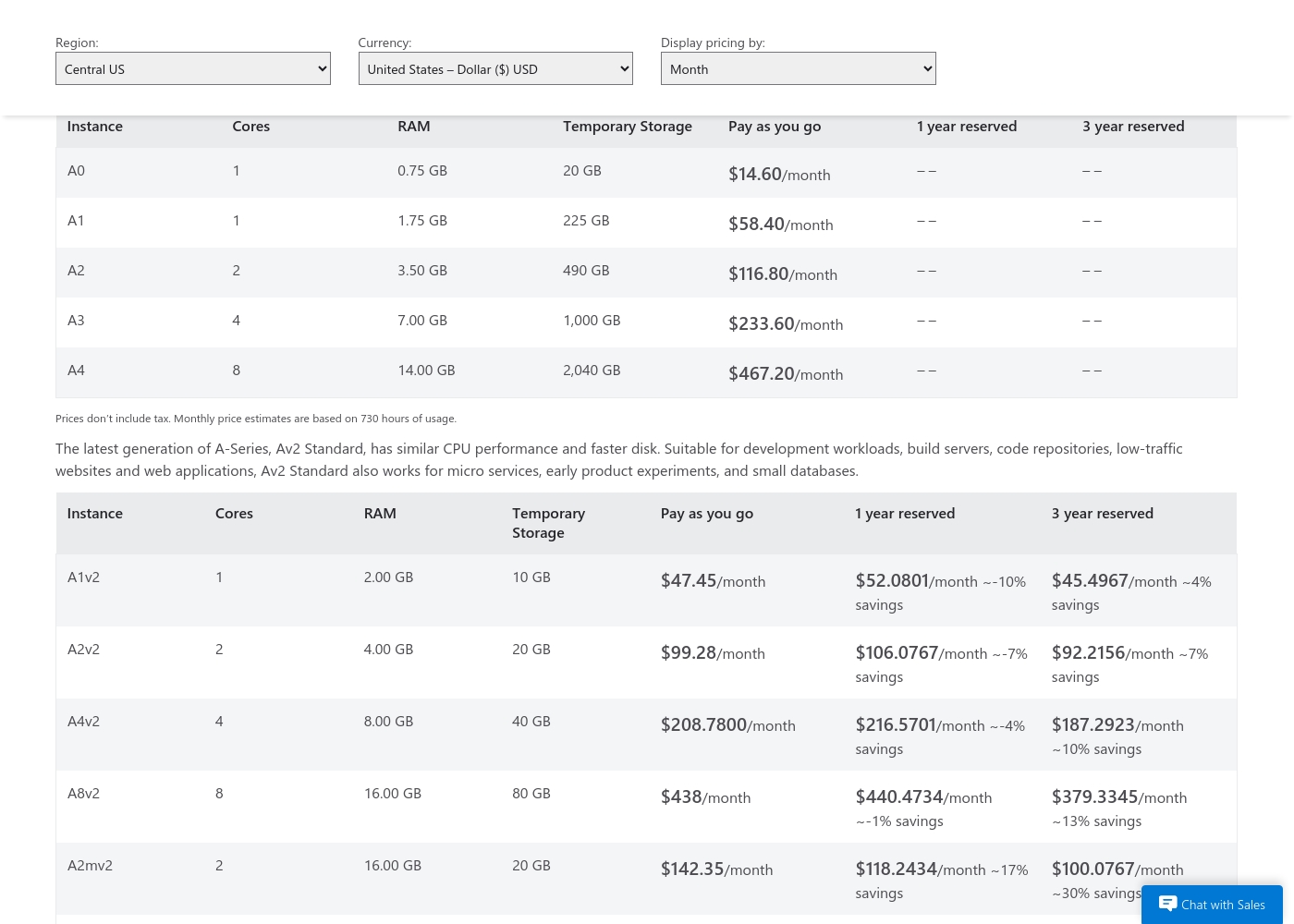
Microsoft Azure costs between $14.60/month and $467.20/month with four main instance categories: General Purpose A-Series, Av2 Standard, Memory Intensive, and Network Optimized.
We provide monthly price estimates based on 730 hours of usage. The cost you pay is determined by factors like instance size, region, and whether you choose reserved commitment or Pay as you go.
General Purpose (A-Series A0–A4)
Price: $14.60/month (A0) to $467.20/month (A4) Best For: Websites, small-to-medium databases, and other everyday applications Other Features:
- Instances range from 1 to 8 cores
- RAM options from 0.75 GB to 14.00 GB
- Temporary storage up to 2,040 GB
- 1 Core
- 0.75 GB RAM
- 20 GB Temporary Storage
- Best for everyday applications and testing
- 1 Core
- 2.00 GB RAM
- 10 GB Temporary Storage
- Similar CPU performance to A-Series
- Faster disk for low-traffic sites
- 8 Cores
- 56.00 GB RAM
- 2,040 GB Temporary Storage
- Ideal for large databases and high-throughput applications
- 16 Cores
- 224.00 GB RAM
- 2,000 GB Temporary Storage
- Designed for high performance computing (HPC)
- Uses Intel Xeon E5-2667 v3 processor
Pricing Notes
- Microsoft Azure uses transparent, published pay-as-you-go pricing based on resource consumption.
- VMmanager pricing is not public; it requires a custom quote based on your physical CPU core count.
- Azure's example prices do not include taxes or egress fees, which are additional costs.
- VMmanager offers a 30-day free trial on your own infrastructure to test before committing.
Pricing Head-to-Head
User Reviews
External feedback drawn exclusively from Trustpilot is overwhelmingly critical, resulting in a significantly low TrustScore of 1.5. The primary source of frustration is customer service, which users frequently describe as unresponsive, difficult to reach, and lacking competence, sometimes taking weeks to address urgent tickets.
Many customers report opaque pricing and billing practices, including unexpected fees and continuous charging even after they deleted services entirely. Serious issues related to reliability and data security also emerged: multiple users noted account data was automatically and permanently deleted due to an overdue 90-day invoice policy, even when they struggled to make the payment through the system.
Azure's pricing is completely deceptive, hitting me with totally unexpected fees. I strongly advise everyone to avoid it. It’s definitely going to rip you off eventually.
Our Verdict
This isn't a fair fight—it's a comparison of apples and oranges. Microsoft Azure is a global public cloud hyperscaler. VMmanager is a specialized tool for automating virtualization in your own datacenter. Azure's superpower is its limitless scale and advanced services. It offers a universe of tools from AI to global databases, all accessible on-demand from its 60+ worldwide regions. VMmanager's superpower is deep automation for on-premises infrastructure. It can provision a VPS in 4 seconds and manage over 22,000 VMs across your own physical servers. The deciding factor is where your infrastructure lives. Choose Microsoft Azure if you need public cloud services, global reach, or managed AI/HPC. Choose VMmanager if you need to automate a hosting business or manage a private cloud on your own hardware. If you're building a cloud-native SaaS, Azure is your platform. If you're running a hosting company with 500 physical servers, VMmanager is your command center. Know which problem you're solving, and the choice becomes clear.
Frequently Asked Questions
Can I use VMmanager to manage Microsoft Azure VMs?
No. VMmanager manages virtualization on your own physical hardware using KVM. Microsoft Azure VMs run on Microsoft's public cloud infrastructure.
Which is better for a small business with 5 virtual machines?
Microsoft Azure is likely better. You can run a few small VMs for a predictable monthly cost. VMmanager is designed for large-scale hosting and may be overkill.
Is VMmanager cheaper than Microsoft Azure?
It depends entirely on your scale. Azure costs are transparent but add up with usage. VMmanager requires a custom quote, which could be more cost-effective for a very large on-premises deployment.
Does Microsoft Azure offer better high availability than VMmanager?
They achieve it differently. Azure uses global cloud redundancy. VMmanager uses failover clusters on your own servers. For cloud apps, Azure is native. For your own datacenter, VMmanager gives you control.
Can I migrate my existing VMs from Hyper-V to VMmanager?
Yes, VMmanager provides documentation for importing VMs from Hyper-V, VMware, and other hypervisors. It uses QEMU-KVM technology for the migration.
Which platform has better customer support?
According to user reviews, VMmanager support is generally more responsive. Microsoft Azure support receives frequent complaints about being unresponsive and difficult to reach.
Ready to Choose?
Both tools have their strengths. Choose based on your specific needs.