Melio vs Quadient
Melio and Quadient both tackle bill pay and invoicing, but for totally different-sized companies. Melio is for small businesses wanting fast, simple payments. Quadient is for large enterprises needing complex workflow automation. The right pick depends on your team size and how deep you need to go.
Efficient financial management with stellar support.
We find Melio to be a highly effective platform for streamlining accounts payable and receivable across various business sizes. Its plans are scalable, ranging from a basic free option to an Unlimited tier offering unlimited ACH payments and dedicated support. Overall, the combination of user-friendly financial tools and consistently praised, responsive human support makes Melio a strong choice for payment automation.
Pros
- User-friendly interface simplifies bill management and payments.
- Dedicated staff offer exceptional and responsive customer support.
- Syncs automatically with QuickBooks and Xero, saving over 15 hours monthly.
- Flexible payment options, including paying vendors by card even if they require a check.
Cons
- Automated phone or chat systems can be frustrating before reaching a representative.
- Transaction fees apply for certain services (e.g., 2.9% for credit card payments).
- Occasional reported issues with payment processing or holds/accuracy.
- Users have noted dashboard confusion between setup date and pay date.
Powerful automation, but support concerns us.
We find Quadient offers robust tools for automating AP/AR and managing customer communications at scale. However, persistent user complaints about customer support and contract flexibility temper our recommendation. Overall, it's a capable suite for larger enterprises, but smaller teams should proceed with caution.
Pros
- Automates end-to-end AP and AR workflows.
- Strong omnichannel document creation and delivery.
- Empowers business users, reducing IT dependency.
- Scales well for high-volume, complex needs.
Cons
- Significant concerns about customer service and support responsiveness.
- Contracts and billing terms can be rigid or difficult.
- May be too complex or costly for small businesses.
- Onboarding and integration can present challenges.
AboutMelio
Melio is America’s fastest-growing solution for simplified bill pay and invoicing. It serves millions of businesses, vendors, and accounting firms directly and through existing platforms.
This is an all-in-one platform handling both accounts payable (AP) and accounts receivable (AR) management. You can ditch manual headaches and use flexible automation tools.
Melio helps you simplify complex operational tasks and maintain total control over your business finances. It’s designed to let your business run entirely on your terms.
AboutQuadient
Quadient is a suite of process automation solutions focused on two core areas: customer communications management (CCM) and financial workflow automation. It's designed for mid-to-large enterprises that need to design, manage, and deliver personalized documents and messages across digital, print, and mobile channels, while also automating key AP and AR processes. 💡
Highlights
Feature Comparison
Features Overview
We highlight the main differences and pick a winner for each feature.
Pricing & Value
Melio offers a free plan and transparent tiers. Quadient uses custom enterprise pricing only.
Melio's pricing is straightforward. It has a free 'Go' plan for basic needs. Paid plans start at $20/month (billed annually) and scale up to $80/month for unlimited users and ACH payments. You know exactly what you're paying for. Quadient's pricing is not public. You must contact sales for a custom quote based on your specific workflow needs. All plans include unlimited users, but the total cost is unknown until you engage with their team. The key difference is predictability. Melio lets you start for free and upgrade as you grow. Quadient requires a sales conversation and likely a significant annual commitment, making it inaccessible for quick, low-budget needs.
Ease of Use
Melio is designed for simplicity and quick setup. Quadient is a powerful but complex enterprise platform.
Melio focuses on a user-friendly experience. Its interface simplifies bill management and payments. Users praise it for saving time and being straightforward. Setup is self-service for most plans. Quadient aims to empower business users, but its enterprise nature means a steeper learning curve. Implementations can be complex and require significant internal resources. The platform is powerful but not plug-and-play. If you want to get started in minutes without training, Melio is the clear choice. Quadient is an investment in process transformation, not just a quick tool.
AP/AR Automation
Both automate AP/AR, but Melio focuses on payment execution while Quadient covers the entire workflow lifecycle.
Melio excels at the payment execution stage. It automates bill capture, payment scheduling, and syncs data to accounting software. You can pay vendors by card or ACH and create payment links to get paid faster. Quadient offers end-to-end AP automation from purchase orders to payment. It includes invoice matching, expense management, and cash application. For AR, it provides collections management to reduce Days Sales Outstanding. The trade-off is depth vs. speed. Melio is faster for day-to-day bill paying. Quadient provides more comprehensive, back-office process automation for larger teams.
Customer Communications
Quadient specializes in omnichannel document delivery. Melio does not offer this feature.
Melio's communication is limited to payment notifications and invoices. It's not designed for managing complex, multi-channel customer documents like statements or letters. Quadient's core strength is Customer Communications Management (CCM). It lets you design, personalize, and deliver documents across digital, print, and mobile channels from a central cloud platform. This is crucial for regulated industries. This is a major differentiator. If you need to manage personalized omnichannel communications at scale, Quadient is the only option here. Melio is purely a financial transaction tool.
Integrations
Melio integrates with key accounting software. Quadient's integration details are less public but targets enterprise ecosystems.
Melio provides reliable 2-way auto sync with QuickBooks Online, Desktop, and Xero. This keeps your financial data aligned automatically, saving hours of manual work. Quadient states it supports standard integration options but does not list specific pre-built connectors publicly. As an enterprise solution, it likely integrates with major ERP systems, but you must verify compatibility directly. Melio wins on transparency and ease for common small business tools. Quadient's integration story is for larger, custom tech stacks.
Scalability
Melio scales with tiered plans. Quadient is built for high-volume enterprise needs.
Melio scales from 1 user to unlimited users across its paid plans. The 'Unlimited' plan supports high transaction volumes without per-user fees. It's designed to grow with your business. Quadient is explicitly built for mid-to-large enterprises with high-volume needs. It handles over 2 trillion connections annually. The platform supports unlimited users and complex workflows from the start. For a small team growing to 50, Melio is more cost-effective. For a 500-person organization with global operations, Quadient's architecture is the better fit.
Customer Support
Melio receives praise for responsive, personalized support. Quadient's support is a frequent pain point.
Melio's support is highly rated. Users frequently mention helpful, patient staff members by name. Support varies by plan, from priority chat to a dedicated account manager. Quadient's support is a major complaint. Trustpilot reviews cite slow response times, unhelpful agents, and frustration. Standard support has a 16-hour response window. This is a critical real-world difference. When you need help, Melio's team is likely to resolve issues effectively. With Quadient, getting support can be a struggle itself.
Security & Compliance
Both emphasize security, but details differ. Melio lists specific safeguards; Quadient requires direct inquiry.
Melio uses industry-leading safeguards: multi-factor authentication, 24/7 monitoring, DDoS protection, and PCI compliance. These details are publicly stated. Quadient's website does not detail its security protocols or compliance certifications. As an enterprise platform handling sensitive data, it likely has robust measures, but you must request documentation. Melio provides upfront security reassurance. With Quadient, you'll need to do more due diligence during the sales process.
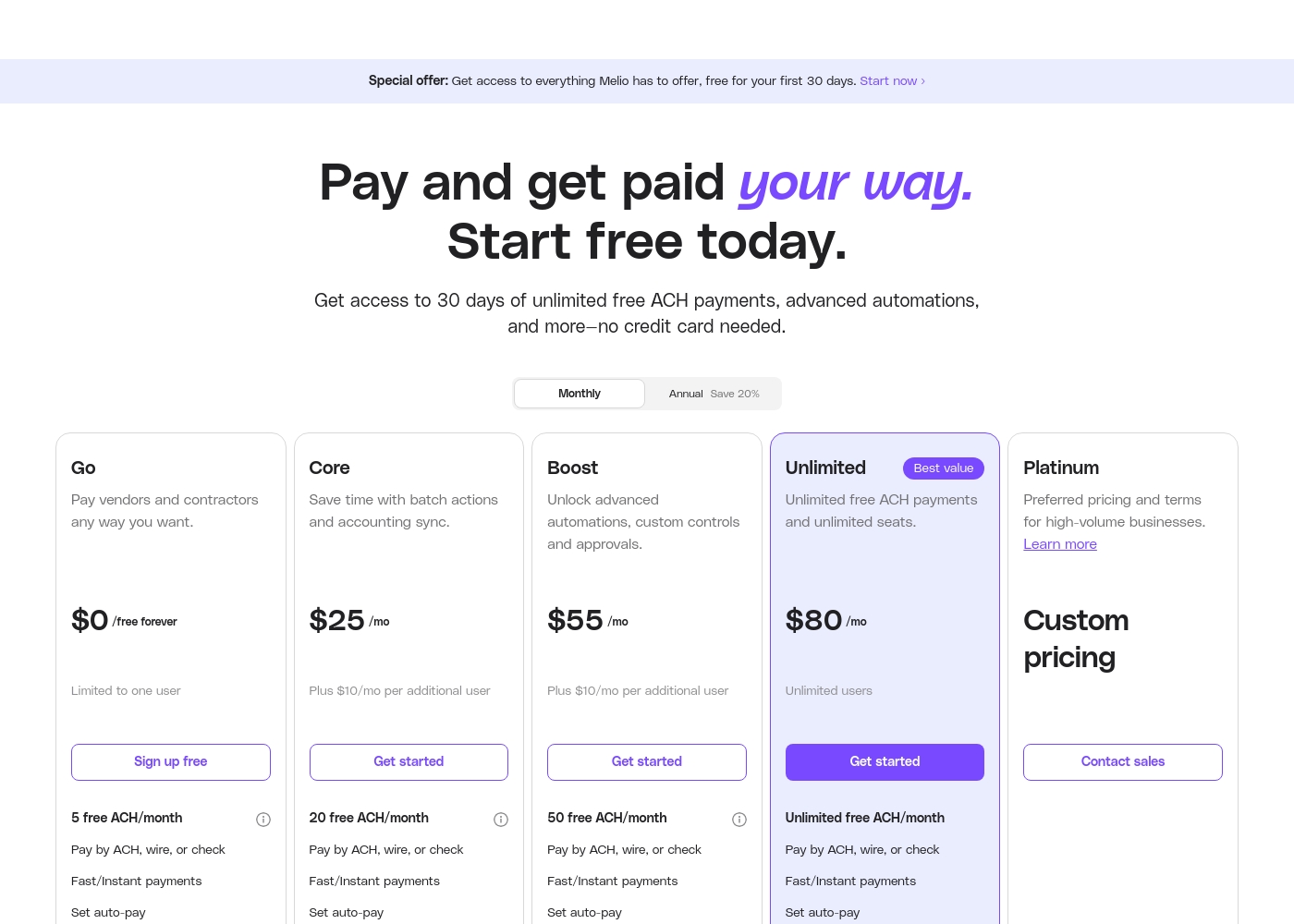
Melio costs between $0 and $64 per month with 5 plans: Go at $0, Core starting at $20/month annually, Boost starting at $44/month annually, Unlimited starting at $64/month annually, and Platinum (Custom Pricing).
Below, we break down what each plan offers to help you find the perfect fit for your business needs.
Go
Price: $0 /free forever Websites Supported: Not explicitly stated (10 free QuickBooks Online/Xero syncs) Best For: Simple, flexible tools to pay and get paid with no monthly subscription fees. Refund Policy: Not explicitly stated Other Features:
- Limited to one user
- 5 free ACH payments per month
- Pay vendors with credit/debit card, wire, or check
- Free AR & Invoicing, payment links
- 5 free ACH payments/month
- Pay by ACH, wire, or check
- Fast/Instant payments
- 10 free QuickBooks Online syncs
- Free AR & Invoicing
- 20 free ACH payments/month
- Batch payments
- Approval workflows
- W-9 collection & 1099 automation
- QuickBooks Online and Xero sync
- 50 free ACH payments/month
- Custom and gradual approval workflows
- Advanced user roles
- QuickBooks Desktop sync
- Premium phone support
- Unlimited free ACH payments
- Unlimited user seats
- Dedicated account manager
- White-glove onboarding
- Set classes & locations
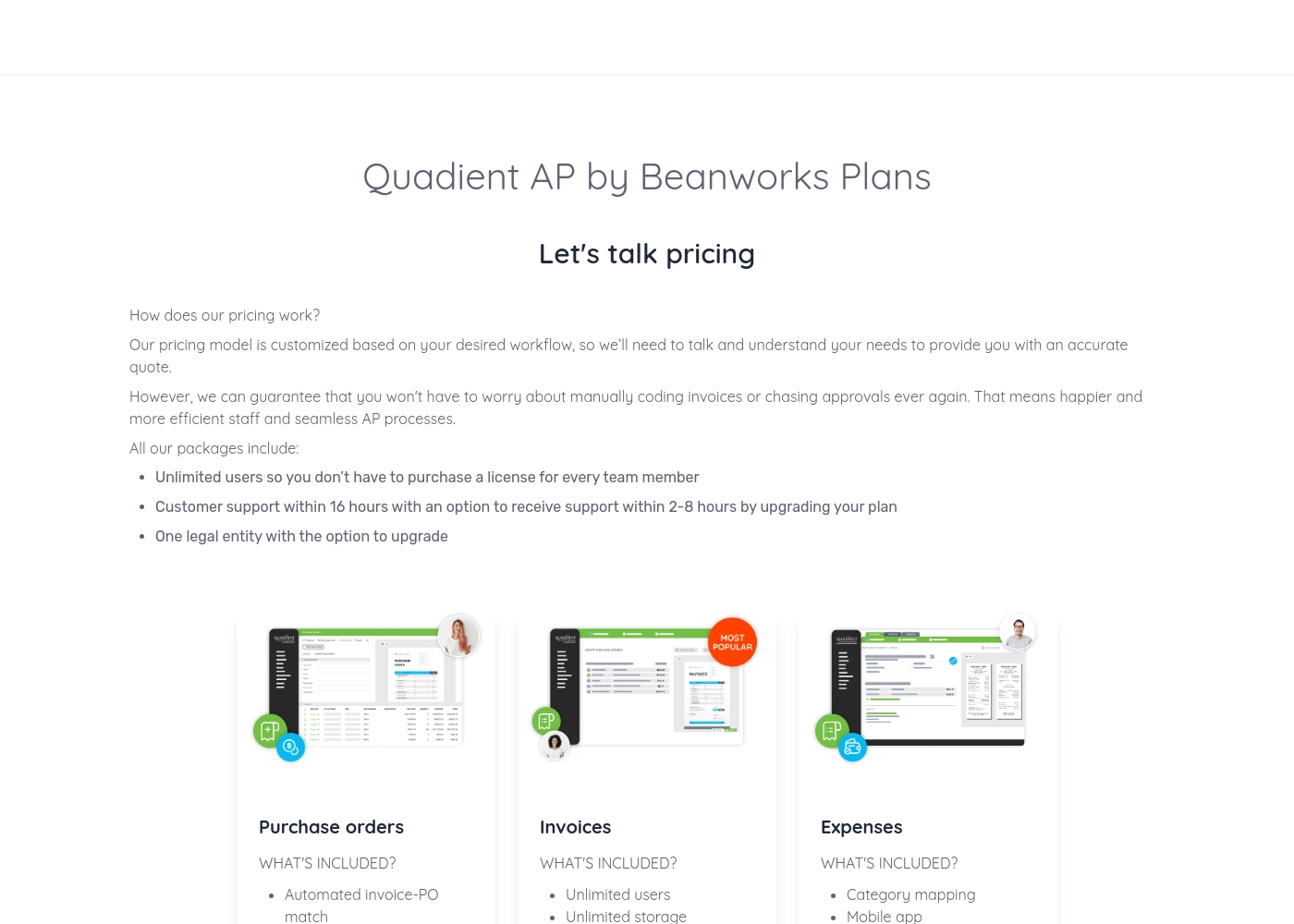
Quadient pricing: Quadient AP by Beanworks uses a custom pricing model based on your specific workflow and needs. They offer feature-specific packages for purchase orders, invoices, and expenses to ensure you only pay for what you use.
All plans include unlimited users and standard support, with the option to upgrade for faster response times or more entities. This tailored approach allows the platform to scale with your business while removing the burden of manual AP processes once and for all.
Contact them for a personalized quote today and discover how much you could save by automating your business's workflows. Their team of experts is ready to help you find the perfect solution for your accounts payable needs, whether you're a small business or a large corporation.
Pricing Notes
- Melio offers a 30-day free trial with full features and no credit card required.
- Melio's 'Go' plan is free forever with 5 ACH payments/month.
- Melio's paid plans charge $10/month per additional user (less if billed annually).
- Quadient AP pricing is customized based on workflow needs and includes unlimited users.
- Quadient does not publicly list a free trial; demos are available on request.
- External reviews suggest Quadient may have rigid, long-term contracts.
Pricing Head-to-Head
User Reviews
Melio garners generally positive feedback, particularly for its user-friendly interface and efficiency in managing bills and payments. Many users praise the platform for saving significant time and providing an inexpensive way to handle ACH transactions.
A major recurring theme is the exceptional quality of personalized customer support. Reviewers frequently mention staff members by name, highlighting their patience, knowledge, and quick resolution of complex issues, such as misrouted payments or account setup problems.
Starting my small business meant I needed an inexpensive way to send a few monthly ACH transactions. Melio was definitely what I needed. It is simple, effective, and works perfectly for my basic business needs.
External reviews for Quadient are mixed. On Trustpilot, users frequently complain about poor customer service, slow support, and billing issues, creating a frustrating experience.
💔 Some mention difficult contracts and a lack of responsiveness. However, on Capterra, the limited feedback for the Impress platform is more positive, with a user praising its document creation capabilities and template management as highly important features.
The software itself might work, but the customer service is a nightmare. Getting any help or a simple question answered takes forever. We've wasted so much time trying to get support.
Our Verdict
For most small businesses, Melio is the clear winner. It's free to start, incredibly simple, and the support is fantastic. You can be paying vendors in minutes. Melio's superpower is making business payments painless. You can pay anyone with a card, even if they don't accept them. The QuickBooks sync alone saves you 15+ hours a month. Quadient's superpower is deep, enterprise-grade automation. It handles everything from purchase orders to customer letters at massive scale. It's built for theFortune 500, not the local café. The deciding factor is your company size. If you have a team under 50 and need to move money fast, pick Melio. If you're an enterprise automating global financial workflows, start a conversation with Quadient. Final verdict: Go with Melio for speed, simplicity, and value. Choose Quadient only if you have the budget, complexity, and patience for a major enterprise implementation.
Frequently Asked Questions
Is Melio really free, and how does it compare to Quadient's pricing?
Yes, Melio has a free 'Go' plan with 5 ACH payments/month. Paid plans start at $25/month. Quadient has no public pricing; you must get a custom quote. Melio is vastly more transparent and affordable.
Which is better for a small team: Melio or Quadient?
Melio is better for small teams. It's designed for simplicity, has a free tier, and scales affordably with per-user pricing. Quadient is an enterprise solution that's likely overkill and too complex for small businesses.
Can I use a credit card to pay vendors with either tool?
Yes, Melio explicitly lets you pay vendors by credit card (with a 2.9% fee), even if they only accept checks. Quadient's payment methods focus on AP automation and may not offer the same flexibility for ad-hoc card payments.
Which tool has better customer support, Melio or Quadient?
Melio has far better support. Reviews consistently praise its responsive, personalized help. Quadient's support is a major pain point, with users reporting slow, unhelpful responses and frustration.
Does Melio integrate with QuickBooks like Quadient does?
Melio integrates seamlessly with QuickBooks Online, Desktop, and Xero with reliable 2-way sync. Quadient's integration details are not public; you'd need to verify QuickBooks compatibility directly with their sales team.
Can I try Melio before buying? What about Quadient?
Melio offers a 30-day free trial with all features, no credit card required. Quadient does not offer a public free trial; you can only request a demo through their sales process.
Ready to Choose?
Both tools have their strengths. Choose based on your specific needs.