Melio

Melio

The all-in-one platform for effortless AP and AR management.

#1 dans Accounts Payable
2 min read · Updated 11/17/2025
Melio homepage screenshot

At a glance

Quick overview for Melio: rating, pricing summary, key features, and highlights.

Ciroapp review

4.3
Efficient financial management with stellar support.

We find Melio to be a highly effective platform for streamlining accounts payable and receivable across various business sizes. Its plans are scalable, ranging from a basic free option to an Unlimited tier offering unlimited ACH payments and dedicated support. Overall, the combination of user-friendly financial tools and consistently praised, responsive human support makes Melio a strong choice for payment automation.

Pros

  • Pro:User-friendly interface simplifies bill management and payments.
  • Pro:Dedicated staff offer exceptional and responsive customer support.
  • Pro:Syncs automatically with QuickBooks and Xero, saving over 15 hours monthly.
  • Pro:Flexible payment options, including paying vendors by card even if they require a check.

Cons

  • Con:Automated phone or chat systems can be frustrating before reaching a representative.
  • Con:Transaction fees apply for certain services (e.g., 2.9% for credit card payments).
  • Con:Occasional reported issues with payment processing or holds/accuracy.
  • Con:Users have noted dashboard confusion between setup date and pay date.
Free trial
Yes — 30 days
Range: $0–$64/monthFree plan, Free trial, Monthly subscription, Yearly subscription, Per seat pricing
This section is a summary. Detailed sections about features, use cases, pricing, and reviews follow below.

Melio review, pricing, features, pros & cons

Tired of wasted hours managing bills and invoices manually? Dealing with disconnected accounts payable and receivable processes slows down your business growth. Melio solves this frustration.

It provides streamlined workflows and powerful automation so you can regain control and manage cash flow easily. ✨

What is Melio?

Melio is America’s fastest-growing solution for simplified bill pay and invoicing. It serves millions of businesses, vendors, and accounting firms directly and through existing platforms. This is an all-in-one platform handling both accounts payable (AP) and accounts receivable (AR) management.

You can ditch manual headaches and use flexible automation tools. Melio helps you simplify complex operational tasks and maintain total control over your business finances. It’s designed to let your business run entirely on your terms.

💡

Melio Key Features

✨ Optimize Your Cash Flow with Payment Flexibility

Melio helps you amplify your cash flow by letting you control how and when you pay your bills. You can select payment methods and speeds that fit your specific business needs. This ensures you optimize cash flow without changing how your vendors receive payment, so your business runs entirely on your terms.

Need to hold onto cash longer? Melio allows you to use your existing credit card, even if your vendor doesn't accept card payments directly. This is a great way to manage working capital and extend your payment timeline.

You can also choose to pay business bills over time using up to 12 monthly installments. Your vendor still receives their full payment on time, helping you maintain strong relationships while you keep cash in hand.

✨ Smart Automation for Accounts Payable

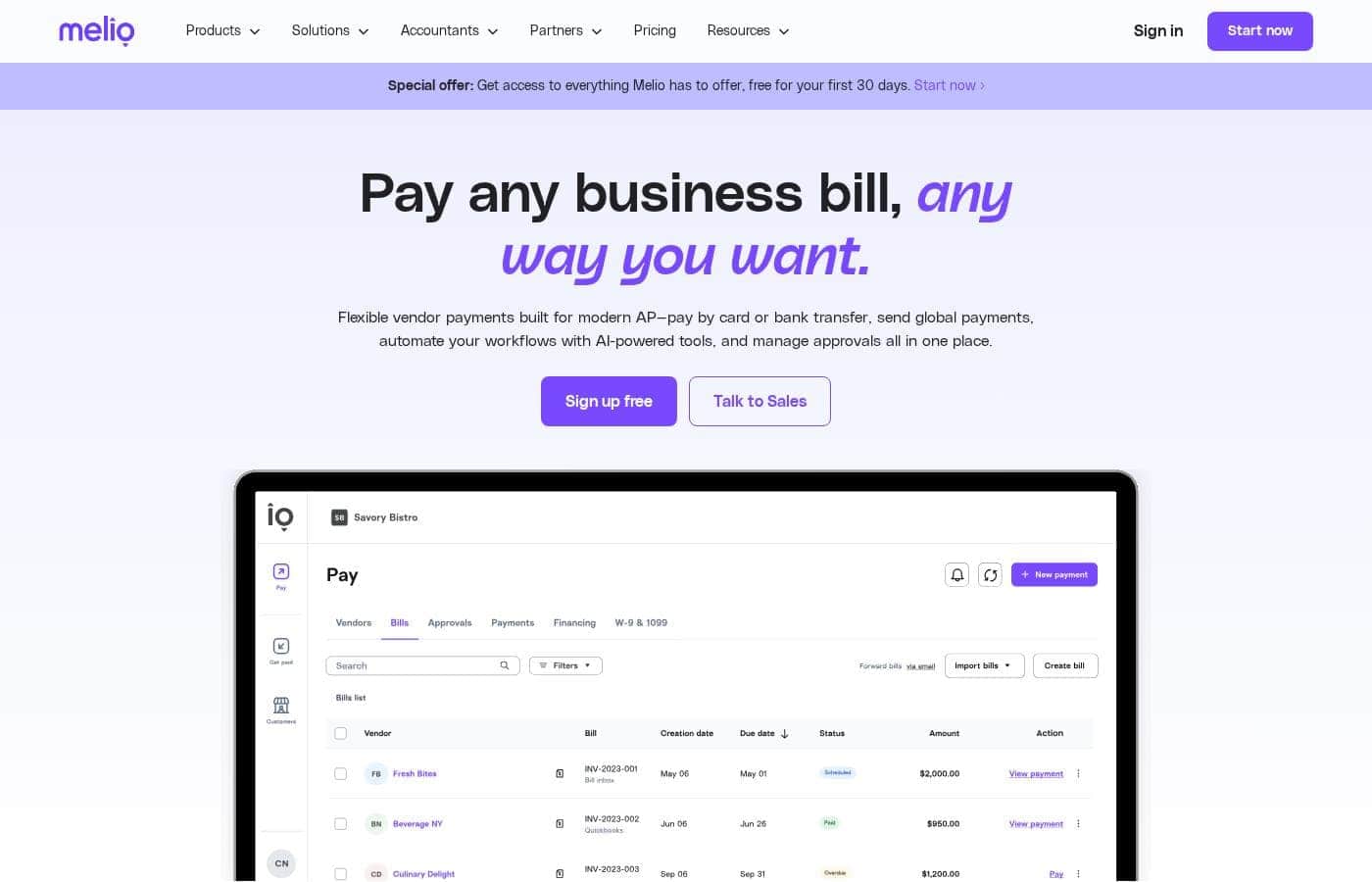
Save hours of manual work by easily digitizing your bill and payment processes. Melio offers powerful automation capabilities to streamline the often tedious task of bill management. This keeps your payment workflows efficient and frees up time for other critical business tasks.

Use the auto bill capture feature to manage incoming invoices effortlessly. You can scan physical documents or import invoices directly from your Gmail account. Just send documents to your Bills tab at once to immediately save time on manual entry.

The platform supports scheduled batch payments for highly efficient processing. You can collate multiple bills and quickly pay them with just a few clicks. If you owe a vendor several amounts, you can even combine those multiple bills into just one single transaction.

✨ Manage Accounts Receivable and Get Paid Quickly

Melio simplifies the entire Accounts Receivable process so you get paid faster every time. You can create unique, professional payment links in less than two minutes. These shareable links let customers pay you digitally using ACH or a card.

You maintain control by choosing who covers the card processing fees for these payments. Melio also supports Smarter AR flows, including automated collection processes, which saves you time. Plus, you can speed up payment delivery and receive funds in your bank account almost instantly.

✨ Maintain Control with Team Management and Approvals

You can easily delegate operational tasks without sacrificing crucial decision control over your finances. Melio lets you add team members to the platform with custom roles. This helps you determine specific permissions for each user for better internal security.

These features enable efficient approval workflows that keep you in charge of spending. Your team can run smoothly because everyone understands their specific responsibilities. You can feel secure knowing that all critical payment decisions always require proper authorization.

✨ Seamless Accounting Software Integration

Keep your financial data current and your books perfectly organized with seamless integration. Melio offers a reliable 2-way auto sync with major accounting platforms. This includes QuickBooks Online, QuickBooks Desktop, and Xero.

This automatic synchronization ensures that all your AP and AR data stays up to date across both systems. The live accounting sync keeps your books in check. This powerful connection gives you full cash flow control over all transactions from one simple dashboard.

✨ Simplify Tax Compliance and Mobile Access

Melio offers helpful compliance tools to simplify your year-end preparation. You can automatically collect W-9 forms directly from your contractors within the platform. This essential tax data can then easily sync with tax1099.com for smooth 1099 automation and filing.

Additionally, you can manage your finances even when away from your desk. Use the Melio mobile app to track, make, and approve payments. This functionality gives you crucial access and financial visibility wherever you go.

🌎 Effortless International Payments

Put your business on the map by simplifying payments to global vendors. You can pay international vendors just as easily as you would pay a local one. Melio uses one convenient hub to manage all your multi-currency transactions.

You simply pay the vendor in their preferred local currency. The platform provides transparent fees and highly competitive exchange rates. This makes paying global partners smooth and reliable, removing complexity from international finance management.

Use Cases

💳 Boost Your Cash Flow Using Credit

Need to pay a major supplier swiftly but want to hold onto your cash reserves longer? Melio solves this common dilemma. You can use your business credit card to pay any vendor, even if they only accept bank transfers or checks.

This simple action keeps your vendor satisfied because they get paid on time, often via ACH. Meanwhile, you gain valuable float time and accumulate credit card rewards. You can also break large bills into up to 12 monthly installments to further preserve working capital.

Expected outcome: The vendor is paid, and your cash remains in your account longer.

✅ Streamlining Internal Payment Approvals

Maintaining control is crucial as your team grows. You need assurance that important bills are reviewed before any money leaves the account. Melio helps you define roles so you can assign operational tasks while always maintaining final decision control.

Use this simple flow to ensure proper sign-off on payments:

  1. Add team members and define specific user roles and permissions.
  2. Set up detailed approval workflows within Melio.
  3. A bill is added, and the initial approver reviews it instantly from their device.
  4. Once approved, the payment is scheduled for delivery.

🌍 Simplifying Payments to Global Vendors

Expanding your business internationally shouldn't mean complex payment headaches. Melio allows you to pay global vendors with the same ease as paying a local one. Instead of relying on slow bank wires, you handle all international payments from one convenient hub.

You can pay vendors in their preferred currency and take advantage of competitive exchange rates. This transparent process removes payment friction and puts your business on the global map seamlessly. One entrepreneur reported saving several hours monthly on global payment processing alone.

🔗 Getting Paid Faster with Smart Links

Waiting weeks for client checks to arrive can stall your business growth. Melio helps you speed up your accounts receivable process dramatically. You can create unique payment links in under two minutes for rapid electronic collection.

Share this link instantly so clients can pay you via ACH or credit card. You can even choose who absorbs the card processing fees. You select faster delivery to receive those funds in your bank account extremely quickly, sometimes within minutes. Smart AR flows mean you get paid faster and maintain continuous cash flow.

✍️ Automating Tax Compliance for Contractors

Problem: Collecting proper W-9 forms and preparing 1099 reports manually is a significant end-of-year burden.

Approach: Melio simplifies essential compliance work. When you pay contractors, the system collects their required W-9 information directly.

Outcome: The platform automatically syncs this 1099 data to tax1099.com for easy processing. This integration saves your team valuable time and ensures your financial data stays accurate for tax filing.

⌚ Saving Time through Data Synchronization

Manual data entry and reconciliation waste countless hours every month. Melio features a reliable two-way auto sync with major accounting software, including QuickBooks Online, Desktop, and Xero. This means data is always up-to-date in both systems.

By leveraging these automation capabilities, business owners save an average of 15 or more hours monthly on bill pay tasks. You reduce manual effort and free up significant time to focus on strategic business growth instead.

Tip: Use auto bill capture features, like scanning or importing invoices from Gmail, to further minimize data entry.

Pricing Overview for Melio

Pricing range
$0–$64/month
Pricing types
Free plan, Free trial, Monthly subscription, Yearly subscription, Per seat pricing

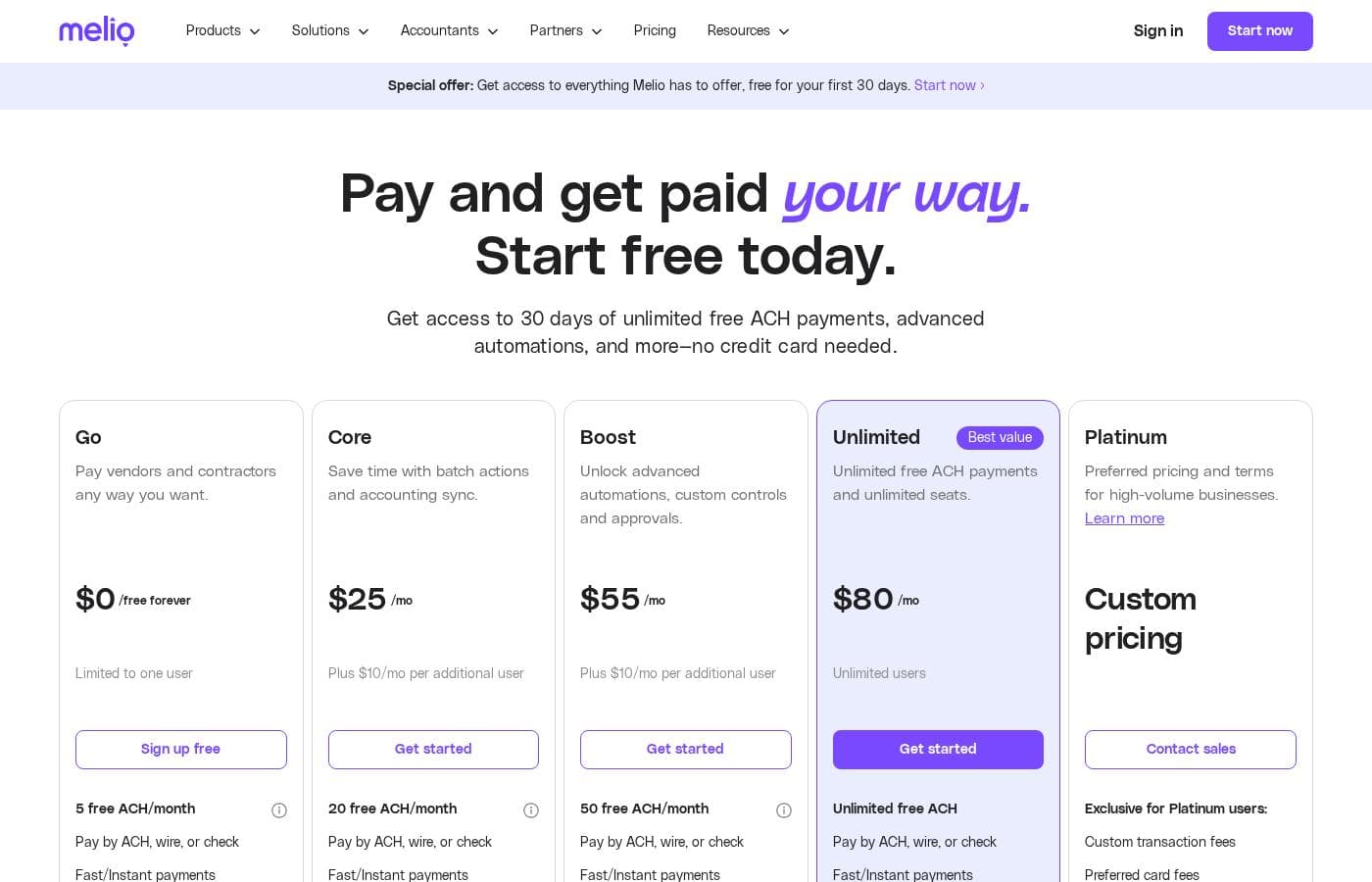
Melio offers five distinct plans ranging from a free tier ('Go') up to the 'Unlimited' plan, which costs $64/month when billed annually. Pricing for paid plans scales based on the features needed and the number of users, with discounts available for yearly commitments.

Plans & Pricing

Go

Monthly$0
Yearly$0
Limited to one user. $0.50 charge after free ACH limit.
  • 5 free ACH payments/month
  • Pay by ACH, wire, or check
  • Fast/Instant payments
  • 10 free QuickBooks Online syncs
  • Free AR & Invoicing

Core

Monthly$25
Yearly$20
Plus $10/mo per additional user ($8/mo annually). $0.50 charge after free ACH limit.
  • 20 free ACH payments/month
  • Batch payments
  • Approval workflows
  • W-9 collection & 1099 automation
  • QuickBooks Online and Xero sync

Boost

Monthly$55
Yearly$44
Plus $10/mo per additional user ($8/mo annually). $0.50 charge after free ACH limit.
  • 50 free ACH payments/month
  • Custom and gradual approval workflows
  • Advanced user roles
  • QuickBooks Desktop sync
  • Premium phone support

Unlimited

Monthly$80
Yearly$64
None stated for seats or ACH payments.
  • Unlimited free ACH payments
  • Unlimited user seats
  • Dedicated account manager
  • White-glove onboarding
  • Set classes & locations

Platinum

MonthlyCustom pricing
YearlyCustom pricing
Best for high-volume businesses processing over $300K/month in credit card payments.
  • Preferred pricing and terms
  • Custom solutions and enterprise-level integrations

Melio costs between $0 and $64 per month with 5 plans: Go at $0, Core starting at $20/month annually, Boost starting at $44/month annually, Unlimited starting at $64/month annually, and Platinum (Custom Pricing).

Below, we break down what each plan offers to help you find the perfect fit for your business needs.

Go

Price: $0 /free forever Websites Supported: Not explicitly stated (10 free QuickBooks Online/Xero syncs) Best For: Simple, flexible tools to pay and get paid with no monthly subscription fees. Refund Policy: Not explicitly stated Other Features:

  • Limited to one user
  • 5 free ACH payments per month
  • Pay vendors with credit/debit card, wire, or check
  • Free AR & Invoicing, payment links

This plan is perfect for freelancers or small businesses beginning to streamline their vendor payments. You definitely get great core tools without any monthly commitment. Just remember the $0.50 charge if you go over the 5 free ACH payments each month.

Core

Price: $25/mo or $20/mo (billed annually). Plus $10/mo per additional user ($8/mo annually). Websites Supported: Not explicitly stated (QuickBooks Online sync, Xero sync) Best For: Businesses ready to scale workflows and needing automations. Refund Policy: Not explicitly stated Other Features:

  • 20 free ACH payments per month ($0.50 charge afterward)
  • Batch payments and Approval workflows
  • W-9 collection and 1099 automation sync
  • Dedicated bills inbox and Priority chat support

The Core plan is built for growing teams who need better control and compliance features. If you are regularly managing subcontractors and need accounting syncs beyond the basic limit, this is a strong step up.

Boost

Price: $55/mo or $44/mo (billed annually). Plus $10/mo per additional user ($8/mo annually). Websites Supported: Not explicitly stated (Includes QuickBooks Desktop sync) Best For: Larger or more complex finance teams and accounting firms. Refund Policy: Not explicitly stated Other Features:

  • 50 free ACH payments per month ($0.50 charge afterward)
  • Custom and gradual approval workflows
  • Advanced user roles and ability to apply vendor credits
  • Premium phone support

Choose Boost if your operations are more complex or you manage client finances. The superior support and detailed approval controls ensure your team stays organized and compliant as your transaction volume increases.

Unlimited

Price: $80/mo or $64/mo (billed annually). Unlimited users. Websites Supported: Not explicitly stated Best For: Businesses needing maximum flexibility and high payment volume. Refund Policy: Not explicitly stated Other Features:

  • Unlimited free ACH payments and unlimited user seats
  • Dedicated account manager and White-glove onboarding
  • Custom approval workflows and QuickBooks Desktop sync
  • Premium phone support

This plan eliminates user and ACH transaction cost worries entirely. If you have a large team processing a high volume of vendor payments, the Unlimited plan provides the best value and resources, ensuring you can grow without restrictions. 🎉

Platinum

Price: Custom pricing Websites Supported: Not explicitly stated Best For: High-volume businesses processing over $300K/month in credit card payments. Refund Policy: Not explicitly stated Other Features: Preferred pricing and terms, API access, tailored solutions (implied).

If your business manages very large transaction volumes, the Platinum tier offers customized rates and enterprise features. Contact the sales team directly to see if this specialized plan is the right fit for your high-growth needs.

Melio currently offers a 30-day free trial giving you access to all features, including unlimited free ACH payments, with no credit card required. If you choose not to subscribe to a paid plan after the trial, your account will conveniently convert automatically to the limited free Go plan.

User Reviews

Melio garners generally positive feedback, particularly for its user-friendly interface and efficiency in managing bills and payments. Many users praise the platform for saving significant time and providing an inexpensive way to handle ACH transactions.

A major recurring theme is the exceptional quality of personalized customer support. Reviewers frequently mention staff members by name, highlighting their patience, knowledge, and quick resolution of complex issues, such as misrouted payments or account setup problems.

The responsiveness and overall helpfulness of the team often turn negative experiences into positive resolutions. While the platform is often lauded for being straightforward and easy to use, users sometimes report unhelpful automated systems before connecting with a live agent.

Reliability issues and payment processing errors occasionally surface, leading to short-term frustration, but the dedication of the Melio staff resolves most concerns promptly. Overall, users find Melio to be a professional, time-saving service for small business finance.

👍

What users say elsewhere

Mark T.
· Trustpilot
5.0 / 5

Starting my small business meant I needed an inexpensive way to send a few monthly ACH transactions. Melio was definitely what I needed. It is simple, effective, and works perfectly for my basic business needs.

Janice S.
· Trustpilot
4.0 / 5

We had a complicated issue with misrouted wire payments due to a small account error. Lulu from their support team went above and beyond the call of duty. She stayed on the case, coordinated services, and ensured the problem was completely resolved.

No reviews yet.

Write a Review

Write a Review for Melio
0/100 characters
0/2000 characters

Why use Melio?

Choosing Melio means prioritizing efficiency and speed for your company. You can achieve far greater financial control and amplify your cash flow almost immediately.

Here is why thousands of business owners trust Melio:

  • Maximize Time Savings: Save an average of 15+ hours monthly on bill pay by leveraging smart automation capabilities. Your financial data stays current with a reliable 2-way auto sync for QuickBooks Online, Desktop, and Xero.
  • Optimize Cash Flow: You can pay business bills at the pace that works best for you, including up to 12 monthly installments. Even better, you can use your card to pay vendors where cards aren’t accepted, allowing you to hold onto cash longer.
  • Global Payments Simplified: Put your business on the map with international payments. Pay global vendors as easily as a local, using their preferred currency. You enjoy competitive exchange rates, transparent fees, and the convenience of a single management hub.
  • Increase Team Control: Maintain crucial decision control even while assigning operational tasks. Add team members and easily determine user roles and permissions to create efficient approval workflows.
  • Get Paid Faster: Speed up payment collection with smart AR flows. Create unique payment links in under two minutes and choose to receive those funds in your bank account extremely quickly. ✅

Ready to transform your workflow with Melio?

Melio Alternatives

Other tools in the Accounts Payable category

Frequently Asked Questions

How is the subscription cost determined for paid plans like Core and Boost?

These plans use a hybrid subscription model. You pay a specific base rate monthly or annually, plus an extra fee for each additional user within that plan. Choosing annual billing provides a 20% discount on the base rate and user fees.

Does Melio integrate with accounting software besides QuickBooks and Xero?

Not explicitly stated on the official site. The platform supports strong 2-way sync with QuickBooks Online, QuickBooks Desktop, and Xero to keep your financial data current.

What happens to my premium data if I stop using Melio after the free trial?

If you do not subscribe to a paid plan after the 30-day trial, your account converts to the free 'Go' plan. You will lose access to premium features, and all associated data from those features will be deleted.

What kind of onboarding or migration assistance is available?

Users on the Unlimited plan receive 'White-glove onboarding,' indicating dedicated setup assistance. For lower-tier plans, the site implies self-service setup relying on available documentation and support channels.

Are there limits on how much I can transact or pay using Melio?

Quotas mainly apply to free ACH payments, which vary by plan level. The Platinum tier is designed for companies processing over $300,000 per month in credit card payments, suggesting very high volumes are supported at the enterprise level.

What is the fee if I exceed my monthly free ACH payment limit?

If you exceed the allowed free ACH payments (5, 20, or 50, depending on your plan), you will incur a charge of $0.50 per additional ACH transaction.

How does Melio protect my business's data and financial transactions?

Melio uses industry-leading safeguards for security. Protections include multi-factor authentication, 24/7 security monitoring, advanced DDoS protection, and adherence to the highest PCI data security standards.

Does Melio support businesses operating across different global regions?

Melio focuses on streamlining payments for US businesses, but it supports 'Global Payments.' This lets you easily pay international vendors in either USD or their preferred local currency.

If I pay a vendor using my credit card, how does the vendor receive the funds?

You can use your credit card even if the vendor does not accept cards directly. Melio processes the payment and then sends the vendor the money via their preferred method, often a check or bank transfer, using the funds Melio advanced.

What costs are involved when sending international payments through Melio?

Fees vary based on speed and currency. International payments in local currency often include conversion rates and a fee of 1% (with a minimum of $30 and maximum of $95).

How do I cancel my subscription or request a refund for an annual plan?

Not explicitly stated on the official site. Since Melio does not list a money-back guarantee, you should contact their support team for cancellation procedures or refund eligibility.

What level of customer support responsiveness should I expect?

Support varies by plan. Core users get Priority chat, Boost and Unlimited users get Premium phone support, and Unlimited users also receive a dedicated account manager. Guaranteed response times (SLAs) are not published.

Who should choose the Boost plan over the Core plan?

Boost is best for larger or more complex teams, including accounting firms, that need detailed control. It offers 50 free ACH payments monthly, advanced user roles, QuickBooks Desktop sync, and custom approval workflows.

Can I process payments entirely from my mobile device?

Yes, Melio provides a mobile app. You can make, track, and approve payments on the go directly from your phone, ensuring you can manage finances even away from your computer.

Ready to try Melio? Check out the official site or pricing.