Manychat vs Vista Social
Manychat and Vista Social solve very different problems. Manychat is a chat automation expert, turning DMs into sales. Vista Social is an all-in-one command center for your entire social media strategy. Your choice depends on whether you need a conversation engine or a management hub.
Best for: E-commerce brands using Instagram/Facebook to drive sales via DMs, Creators and influencers automating giveaway entries and FAQs
Best for: Social media agencies managing 5+ client accounts, Marketing teams needing a single hub for scheduling and analytics
Automation Powerhouse With Scaled Pricing Risk.
We recognize Manychat as an exceptionally powerful tool for scaling social media engagement and driving automated sales across major messaging platforms. Its visual flow builder makes sophisticated automation accessible, though users must carefully manage the platform’s contact-based pricing structure to avoid surprise costs. Overall, Manychat is highly effective for creators and businesses prioritizing rapid lead conversion.
Pros
- Exceptional for rapid lead generation and growing email subscriber lists.
- Powerful comment automation features (a significant game-changer for engagement).
- Intuitive drag-and-drop visual flow builder requires no coding expertise.
- Integrates well with other software for advanced functionality.
Cons
- Pricing model is complex and charges aggressively based on total contacts, not just active users.
- Reports of slow customer support response times and little access to live assistance.
- Outdated training videos can complicate the setup of advanced flows.
- Users report occasional technical glitches, such as message buttons not working.
Powerful, scalable command center.
Vista Social delivers a robust, all-in-one platform that consolidates scheduling, analytics, and engagement for teams. We find its AI-powered workflow tools and broad channel support particularly strong for agencies and growing brands. Overall, it's a high-value solution for serious social media management.
Pros
- Comprehensive all-in-one platform for publishing, analytics, listening, and engagement.
- AI-powered features to automate tasks and provide insights.
- Designed for team collaboration and agency workflows with white-label options.
- Supports all major social channels, including niche platforms.
Cons
- Full external review data was inaccessible, limiting our independent sentiment analysis.
- Complex feature set may present a learning curve for very small teams or beginners.
- Pricing starts at a mid-range point, which may be a consideration for budget-conscious users.
AboutManychat
Manychat delivers powerful automation tools specifically designed for platforms like Instagram, WhatsApp, TikTok, and Messenger. It's a key solution for creators, marketers, and brands looking to manage their massive influx of messages and comments. This platform helps you streamline your entire operation, ensuring you answer customer questions and convert leads immediately 24/7/365. The customizable platform is intuitive, meaning you don't need a computer science degree to start automating your selling and replying. 🤖
AboutVista Social
Vista Social is a comprehensive, AI-powered platform for social media management. 🤖 It's built for teams—like agencies or in-house marketing groups—who need to handle everything from publishing and analytics to engagement and listening across every major social channel. Think of it as your all-in-one hub, designed to replace a stack of separate tools and make your social workflow smoother.
Highlights
Feature Comparison
Features Overview
We highlight the main differences and pick a winner for each feature.
Core Purpose
Manychat automates conversations. Vista Social manages your entire social presence.
Manychat is laser-focused on automating chat interactions. It turns comments and DMs into automated sales funnels and FAQs. Its power is in converting social engagement into immediate action. Vista Social is an all-in-one command center. It handles scheduling, publishing, analytics, and listening across all platforms. Its goal is to streamline your entire social media workflow. The key difference is scope. Manychat deepens one interaction type. Vista Social widens your management capabilities across many.
AI Capabilities
Manychat's AI builds chat flows. Vista Social's AI creates content.
Manychat's AI focuses on conversation. It helps build automated flows and recognizes user intent within chats. This makes your chatbots smarter at handling queries. Vista Social's AI is a content assistant. It helps generate post ideas, captions, and even images. It also provides performance insights to guide your strategy. The difference is application. Manychat's AI is for backend automation. Vista Social's AI is for frontend content creation and planning.
Team Collaboration
Manychat suits small teams. Vista Social is built for agencies.
Manychat offers simple team seats: 1 for Free, 3 for Pro. Collaboration features are basic, focusing on shared access to flows. Vista Social is designed for teamwork. It includes approval workflows, task assignments, and role-based access. Agencies can manage multiple clients with shared calendars. For a team of 5+ managing complex campaigns, Vista Social offers far more robust tools for coordination and client work.
Publishing & Scheduling
Manychat doesn't schedule posts. Vista Social is a scheduling powerhouse.
Manychat is not a publishing tool. It does not schedule social media posts to your feed. Its function is entirely reactive and conversational. Vista Social excels here. You can create, schedule, and auto-publish content across all your channels from one visual calendar. It's a core feature of the platform. This is a clear gap. If posting is part of your needs, Vista Social is the only option.
Analytics & Reporting
Manychat tracks conversation metrics. Vista Social delivers deep performance reports.
Manychat's analytics focus on automation performance. You see how many leads were captured, keywords triggered, and messages sent. It's metrics for conversion. Vista Social provides comprehensive analytics. You track follower growth, engagement rates, and content performance. Custom dashboards help you report on specific KPIs for clients or your brand. For data-driven strategy and client reporting, Vista Social's reporting is significantly more advanced.
Pricing & Value
Manychat can get expensive with contacts. Vista Social has predictable tiers.
Manychat's pricing scales with your contact list. The Pro plan starts at $15/month for 500 contacts. Costs rise automatically as your audience grows. Vista Social uses fixed tiers based on profiles and users. Plans start at $64/month annually. The cost is predictable and scales with your team or client needs. A growing contact list can make Manychat costly. Vista Social's pricing is more straightforward for budget planning.
Channel Coverage
Manychat focuses on messaging apps. Vista Social covers all social networks.
Manychat is built for messaging: Instagram DMs, Facebook Messenger, WhatsApp, and TikTok comments. It's where direct conversations happen. Vista Social connects to every major platform. This includes LinkedIn, YouTube, Reddit, and X (Twitter). It manages both public posts and messages. If your strategy involves platforms like LinkedIn or YouTube, Vista Social offers the necessary coverage.
Learning Curve
Manychat is quick for basic flows. Vista Social has more to learn.
Manychat's visual builder is intuitive for creating chat flows. You can set up a basic automation in minutes. The focus is narrow, so the learning curve is gentle. Vista Social is a comprehensive suite. Mastering scheduling, analytics, listening, and reporting takes more time. It's powerful but has a broader scope to cover. For immediate chat automation, Manychat is faster. For full social management, Vista Social requires a bigger investment of time upfront.
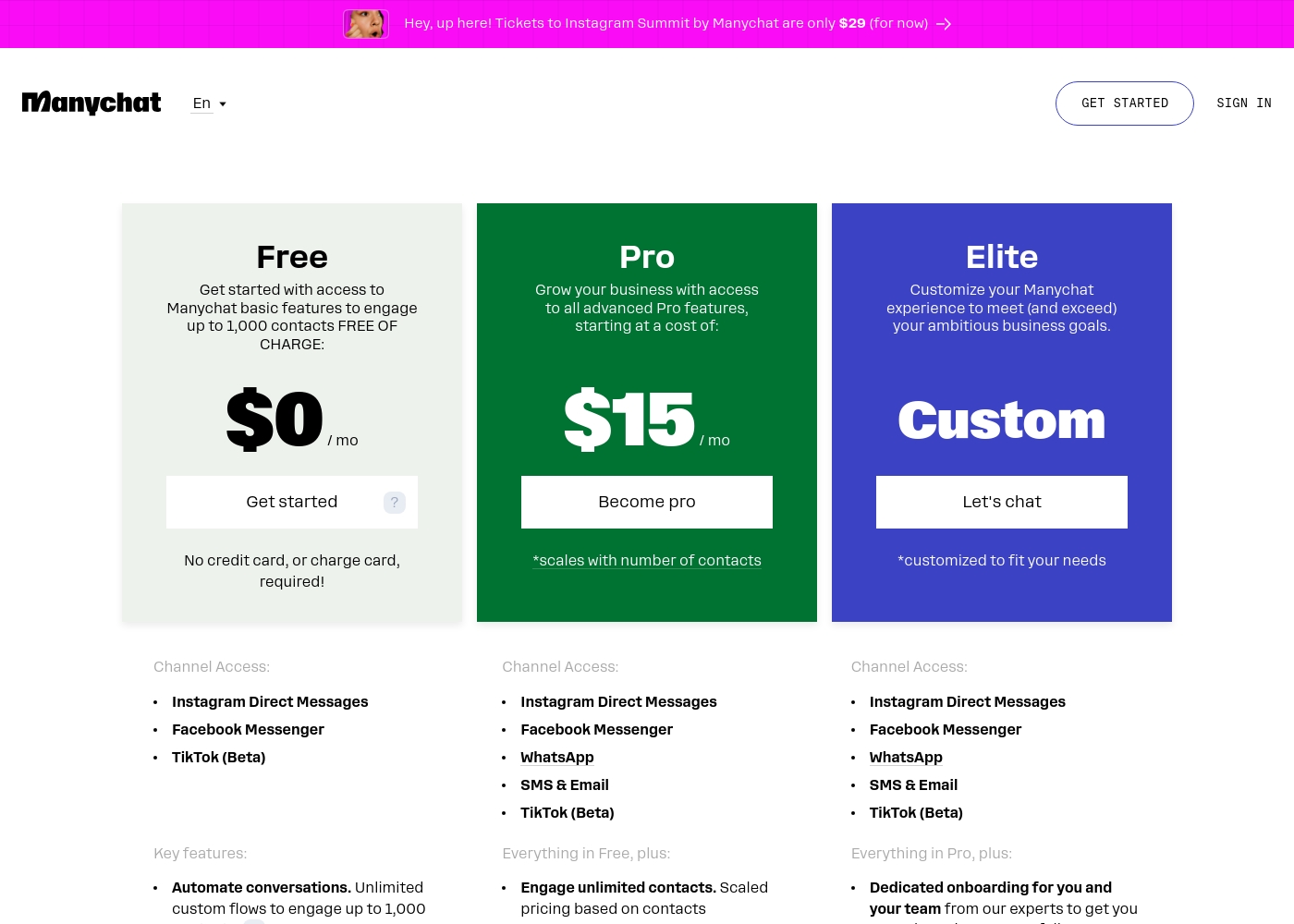
Manychat costs between $0 and a custom price per month with three plans: Free at $0/mo, Pro starting at $15/mo, and Elite at a Custom price.
Here’s a look at what each plan provides, so you can pick the perfect fit for your business needs.
Free
Price: $0 / mo Websites Supported: Instagram Direct Messages, Facebook Messenger, TikTok (Beta) Best For: Individuals, new businesses, or testing the platform Other Features:
- Unlimited custom flows (up to 1,000 contacts)
- Access basic Growth Tools to drive leads
- 10 customer Tags for segmentation
- 1 Team Member seat
- Automate conversations (Unlimited custom flows)
- Engage up to 1,000 contacts
- 10 customer Tags
- 1 Team Member seat
- Instagram Direct Messages, Facebook Messenger, TikTok (Beta) access
- Engage unlimited contacts (scaled pricing)
- Full AI Features (Intention Recognition, AI Step, etc.)
- No Manychat branding
- Unlimited Growth Tools and Keywords
- Manychat Analytics & Insights tools
- Dedicated onboarding and CSM strategic recommendations
- Priority support for technical questions
- Access to expert crafted automations
- Unlimited Team Members
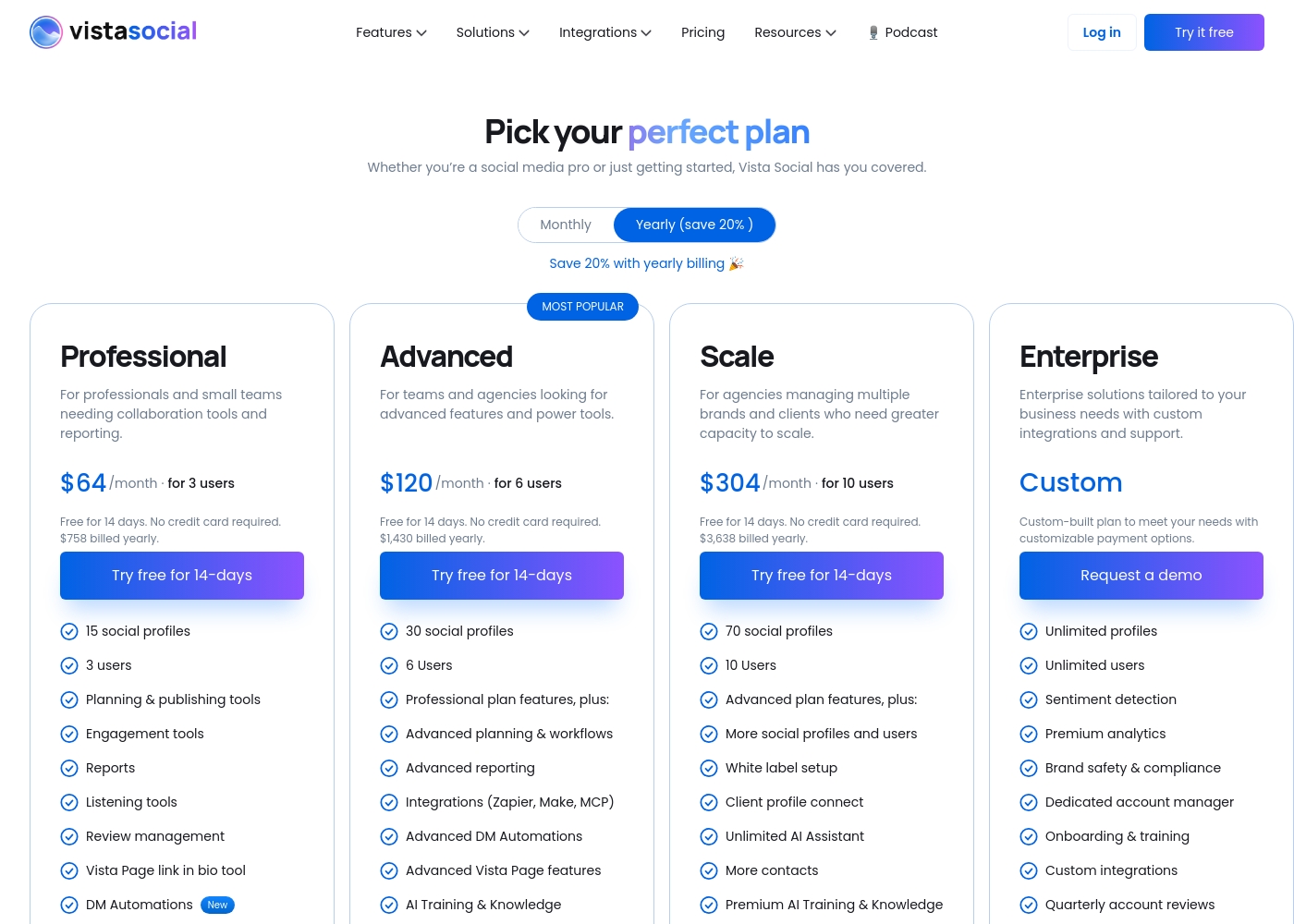
Vista Social pricing: Vista Social offers flexible social media management plans starting at $64/month when billed annually. Every plan includes a 14-day free trial and features that scale with your team's growth and client needs.
Check out the full breakdown below to find the best fit for your social strategy.
Professional
Price: $64/month billed annually Websites Supported: 15 social profiles Best For: Professionals and small teams needing collaboration tools Other Features: Unlimited scheduling, Canva integration, AI Assistant (2,500 credits), social inbox, and basic reporting.
Pricing Notes
- Manychat's Pro plan cost scales directly with your total contact count, which can lead to surprise increases.
- Vista Social offers a 14-day free trial, while Manychat has a permanent free plan up to 1,000 contacts.
- Vista Social's yearly billing saves 20%, making its effective monthly rate lower.
- Manychat's Elite plan and Vista Social's Enterprise plan require custom quotes for large-scale needs.
Pricing Head-to-Head
User Reviews
ManyChat receives mixed but generally positive feedback for its core automation product, maintaining a 3.4 average score on Trustpilot. Users overwhelmingly praise the platform’s powerful capabilities, frequently calling it a “game-changer” for scaling engagement, driving sales, and growing email lists.
Specifically, the intuitive nature of the drag-and-drop flow builder and effective comment automation features are highly valued, helping creators save significant time and focus on content creation. Ease of use is often mentioned, especially once users navigate the initial setup.
As a small business owner, ManyChat is incredibly helpful. I don't have to spend hours giving answers to thousands of followers anymore. I can set up automation in advance and check the app just maybe a couple times a day.
We were unable to access the full review content from Trustpilot and Capterra due to access restrictions (403 errors and security verifications). Therefore, we cannot synthesize a specific sentiment summary from those external sources based on the provided snippets. The URLs are listed for reference.
Our Verdict
For most people managing a full social media strategy, Vista Social is the more complete tool. It's a command center for publishing, analytics, and team collaboration. Manychat's superpower is turning conversations into conversions. It's unmatched at automating DMs and comments to capture leads and drive instant sales. Vista Social's superpower is unification. It replaces your scheduling, analytics, and listening tools with one streamlined platform for your entire team. The deciding factor is your primary need. Choose Manychat if your goal is to automate chat and boost direct engagement. Choose Vista Social if you need to manage content, track results, and collaborate across multiple social networks. For pure chat automation and lead capture, Manychat wins. For comprehensive social media management, Vista Social is the better fit.
Frequently Asked Questions
Which is better for small teams: Manychat or Vista Social?
Manychat is simpler for a solo user focusing on chat automation. Vista Social is better for a small team (3-5 people) needing to collaborate on scheduling and strategy across multiple channels.
Can I use Vista Social to automate DM replies like Manychat?
Vista Social has basic DM automations for common FAQs and lead capture. However, Manychat's visual flow builder and intent recognition offer more advanced, complex conversation automation.
Is Vista Social worth the extra cost over Manychat?
If you need all-in-one publishing, deep analytics, and team collaboration, yes. If your only goal is to automate chats and convert comments to DMs, Manychat's lower starting cost is more efficient.
Which tool has better analytics for my Instagram growth?
Vista Social provides more detailed, customizable analytics dashboards for tracking follower growth and content performance. Manychat's analytics focus on automation metrics like leads captured from chats.
Can I manage client accounts with Manychat?
Not effectively. Manychat is not designed for client management or agency workflows. Vista Social has dedicated features like client approvals, shared calendars, and white-label reporting for agencies.
Does Manychat work with LinkedIn or YouTube?
No, Manychat currently focuses on messaging platforms like Instagram, Facebook, Messenger, and TikTok. For LinkedIn and YouTube, you would need a tool like Vista Social.
Ready to Choose?
Both tools have their strengths. Choose based on your specific needs.