Mailchimp vs Sender
Mailchimp is the heavyweight champion of features, but Sender is the scrappy, free-tier hero. Mailchimp packs AI and deep analytics for growth-focused teams. Sender wins on simplicity and a generous free plan for startups.
Best for: Growing businesses with 10,000+ contacts, Marketing teams needing advanced automation and analytics
Best for: Startups and solopreneurs on a tight budget, Small businesses under 2,500 subscribers
Industry-Leading Features, Unstable Support Network
We find Mailchimp offers an industry-leading suite of email marketing features, backed by strong automation and valuable AI tools for content optimization. Overall, the platform is an excellent choice for businesses needing robust design and testing capabilities, provided they anticipate potential friction with customer service and complex billing structures.
Pros
- Intuitive UI and drag-and-drop builder simplify campaign design.
- Powerful automation features help save significant time for marketers.
- Valuable reporting tools offer insights and industry benchmarking.
- Generative AI features help improve content, including subject lines.
Cons
- Customer support is frequently cited as nonexistent, unhelpful, or slow to respond.
- Billing practices are reported as predatory, with unexpected charges for slight overages.
- Users often face technical access issues, especially with two-factor authentication.
- The interface is sometimes described as clunky or difficult to navigate.
Simple, free, and effective for basics.
We found Sender to be a solid, no-frills tool for core email marketing tasks. Its free plan is a major draw for startups and small businesses. Overall, it delivers good value with a straightforward interface, though it may lack some advanced features for power users.
Pros
- Extremely generous free plan (2,500 contacts, 15k emails/month).
- Clean, user-friendly interface that's easy to learn.
- Transparent, affordable pricing with no hidden fees.
- Includes essential automation features from the start.
Cons
- Advanced features and segmentation are limited on lower tiers.
- Some users report occasional email deliverability issues.
- Integrations can be inconsistent with certain platforms.
- Free plan lacks SMS marketing capabilities.
AboutMailchimp
Mailchimp is recognized as the leading platform focused on email marketing and advanced automations. It's built to help businesses boost income by mastering digital outreach. With over 11 million global users and 22 years of experience, it’s a trusted choice for selling more.
This robust platform is ideal for businesses seeking seamless conversion tools, including integrated SMS campaigns. You can start sending your first email risk-free, and you don't even need a credit card to begin. Users on Standard or Premium plans may access a personalized product tour to start confidently. 💡
AboutSender
Sender is an email marketing platform designed for businesses of all sizes. It helps you build, automate, and send email campaigns that people actually want to read. Think of it as your straightforward tool for staying in touch with your audience and driving sales. 🚀
Highlights
Feature Comparison
Features Overview
We highlight the main differences and pick a winner for each feature.
Free Plan Value
Sender's free plan crushes Mailchimp's, offering more contacts and emails at no cost.
Mailchimp's Free plan limits you to 500 contacts and 1,000 emails per month. It's good for testing, but you'll outgrow it quickly. Sender's Free Forever plan gives you 2,500 contacts and 15,000 emails monthly. It includes automation and 24/7 support from day one. The difference is massive. Sender lets a real business operate for free where Mailchimp is just a taste test.
Advanced Automations
Mailchimp's enhanced automations and optimization tools outshine Sender's core sequences.
Mailchimp's Standard plan includes 'enhanced automations' and suggests optimizations for more opens and clicks. It's built for revenue growth. Sender includes basic email automation from the start, like welcome series and abandoned cart emails. It's effective but simpler. Mailchimp is for marketers who want to fine-tune every touchpoint. Sender is for setting it and forgetting it.
Reporting & Analytics
Mailchimp provides deep, actionable analytics. Sender offers solid basics.
Mailchimp gives you funnel visualizations and industry benchmarking to see how you stack up. It's all about proving ROI. Sender's analytics are straightforward, showing opens, clicks, and growth. Users note they could be more detailed. If data-driven decisions are your game, Mailchimp is the clear winner. Sender is for keeping an eye on the big picture.
Ease of Use
Both are user-friendly, but Sender is faster to set up and simpler day-to-day.
Mailchimp has an intuitive drag-and-drop builder. Some users find the interface gets clunky as you explore deeper features. Sender is built for simplicity. You can set up your first campaign in about 5 minutes with no learning curve. Sender wins on pure ease. Mailchimp trades some simplicity for more powerful tools.
Customer Support
Sender offers 24/7 support to all users. Mailchimp's support quality is inconsistent.
Every Sender plan, including free, gets 24/7 live support. It's a reliable safety net for beginners. Mailchimp offers 24/7 support on paid plans, but reviews are mixed. Many report slow responses and unhelpful agents. Sender is more dependable here. Mailchimp's support can be a gamble.
Integrations
Mailchimp has a massive library. Sender focuses on essential, popular platforms.
Mailchimp boasts 300+ integrations, including deep connections with Shopify, Google Analytics, and QuickBooks. Sender integrates with key platforms like WordPress, WooCommerce, and Zapier. It covers the essentials well. Mailchimp is for complex tech stacks. Sender is for streamlined, website-first businesses.
Pricing Transparency
Sender's pricing is straightforward. Mailchimp's can have hidden overage costs.
Sender lists clear prices based on subscriber count with no hidden fees. You know what you'll pay. Mailchimp's pricing is usage-based, but it automatically charges you if you exceed contact or send limits. This surprises many users. Sender is predictable. Mailchimp can sting you if you're not careful with your list growth.
Scalability
Mailchimp is built for scaling with premium tiers. Sender scales affordably but has limits.
Mailchimp's Premium plan offers unlimited contacts (custom pricing), advanced roles, and dedicated onboarding for large teams. Sender's Professional plan maxes out at 10 seats and 200k subscribers. Enterprise is custom but less documented. Mailchimp is the choice for ambitious, scaling operations. Sender is for steady, cost-conscious growth.
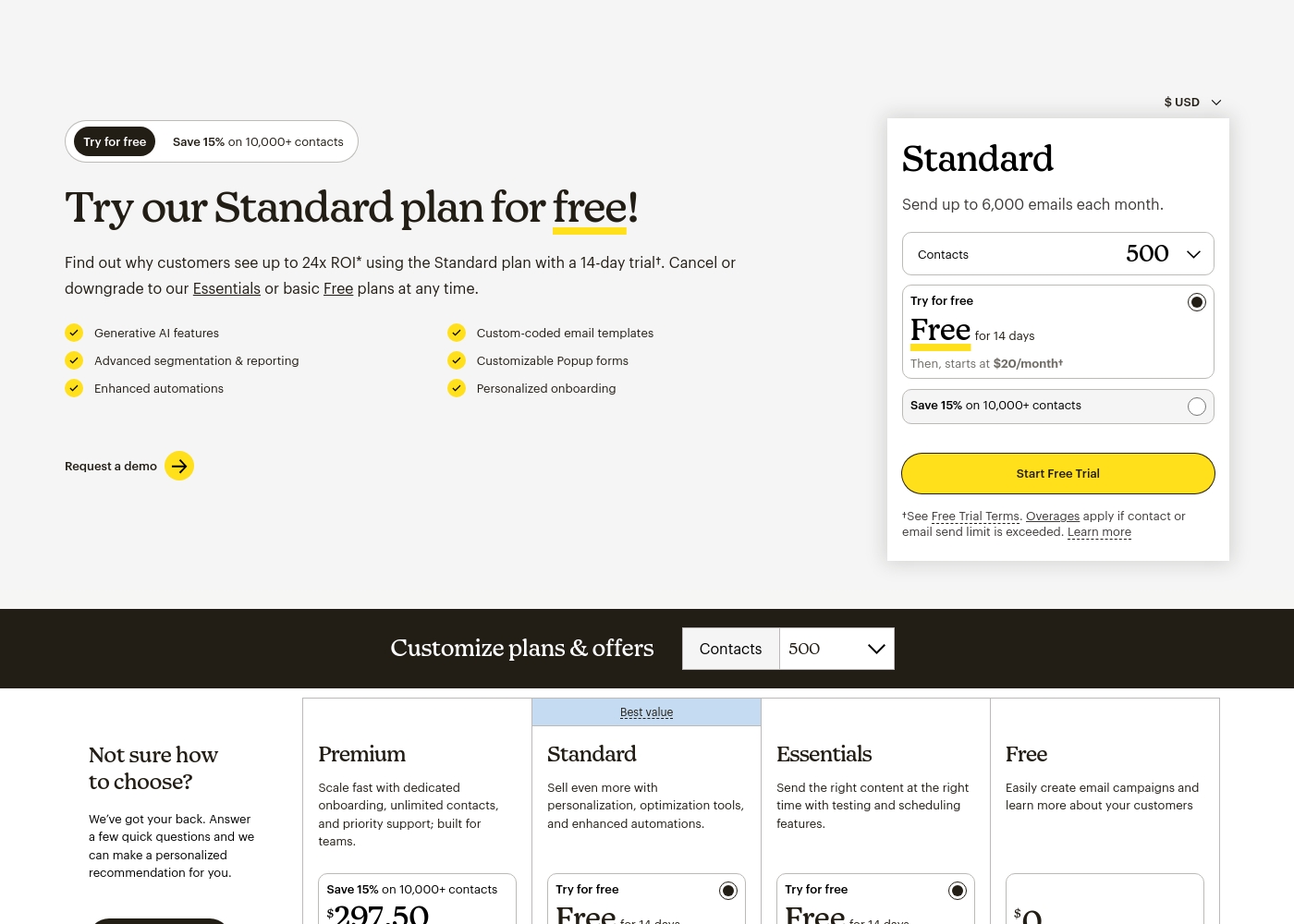
Mailchimp costs between $0 and $350 per month with four main plans: Free at $0, Essentials starting at $13/month, Standard starting at $20/month, and Premium requiring contact with sales for high volume quotes.
Here are the details about what each plan offers. Please note that prices shown here are typically for the minimum 500 contacts tier, or where noted, discounted rates for higher contact tiers.
Free
Price: $0/month Best For: Easily creating email campaigns and learning about your customers. Other Features:
- 1,000 emails per month maximum (500/day limit)
- 1 Seat (User)
- 1 Audience
- Email support for the first 30 days
- Easily create email campaigns
- Learn more about your customers
- Email support for first 30 days
- Send the right content at the right time
- Testing and scheduling features
- 24/7 Email & Chat Support
- Up to 3 users
- Sell even more with personalization
- Optimization tools
- Enhanced automations
- Generative AI features
- Custom-coded email templates
- Scale fast with dedicated onboarding
- Unlimited contacts
- Priority support; built for teams
- Generative AI Features
- Role-based Access (5 Roles)
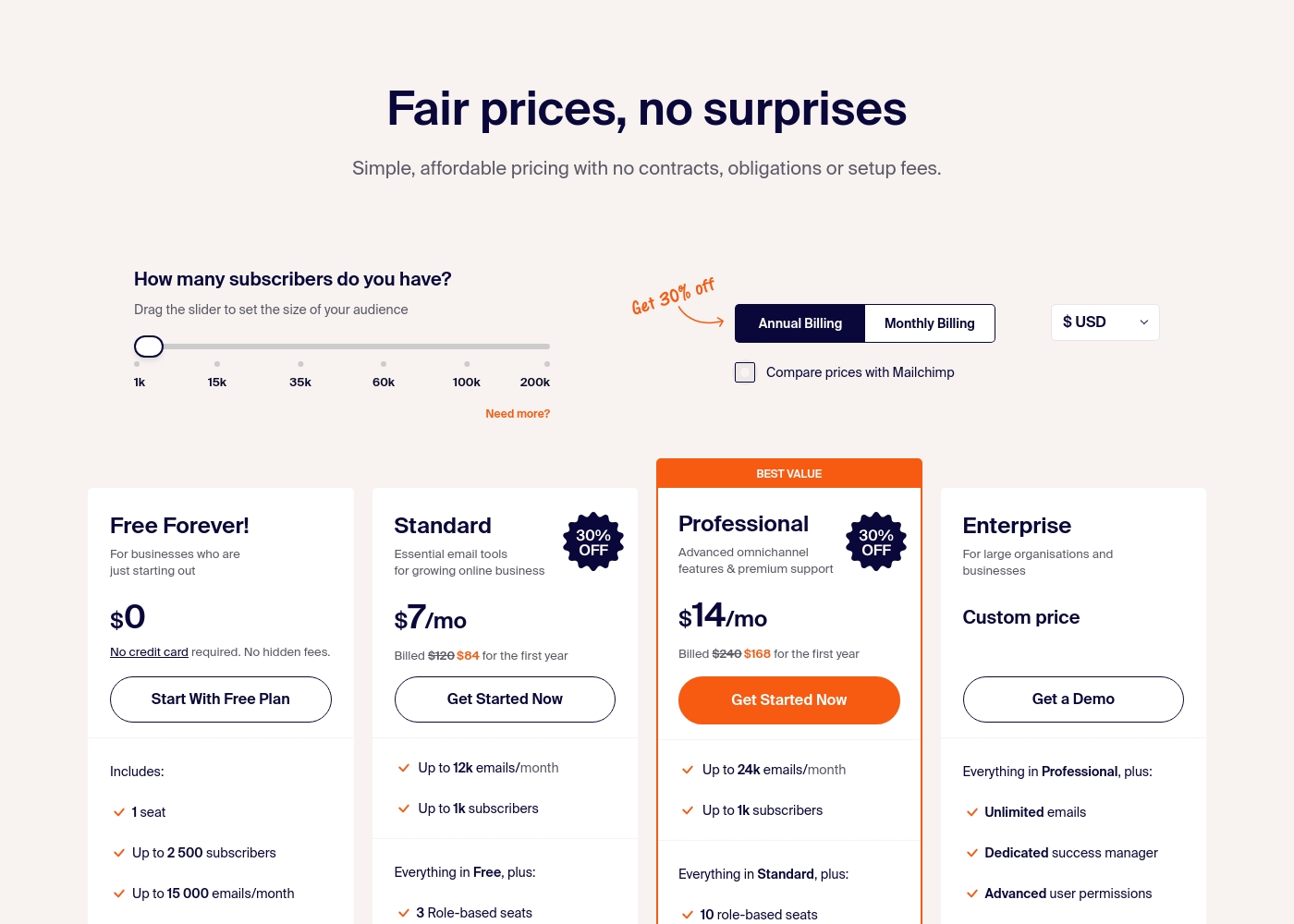
Sender costs between $0 and a custom price per month with 4 plans: Free Forever at $0, Standard at $7, Professional at $14, and Enterprise at Custom price.
Take a look at the specific features and limits included in each plan tier below.
Free Forever!
Price: $0 monthly Best For: Businesses who are just starting out Other Features: 1 seat, up to 2,500 subscribers, 15,000 emails/month, 24/7 live support, email automation.
- 1 seat
- Up to 2,500 subscribers
- Up to 15,000 emails/month
- 24/7 live support
- Email automation
- Up to 12k emails/month
- Up to 1k subscribers
- 3 Role-based seats
- Automated sequences
- Up to 24k emails/month
- Up to 1k subscribers
- 10 role-based seats
- Premium support
- Unlimited emails
- Dedicated success manager
- Advanced user permissions
Pricing Notes
- Mailchimp charges overages automatically if you exceed limits, which can lead to surprise bills.
- Sender's Free Forever plan is not a limited trial; it's a permanent free tier with generous limits.
- Mailchimp offers a 15% discount on Standard/Premium for lists over 250,000 contacts.
- Sender's pricing is purely based on subscriber count with no hidden fees.
- Mailchimp's Premium plan starts at $350/month for 10,000+ contacts, while Sender's top published tier is $20/month.
Pricing Head-to-Head
User Reviews
Mailchimp receives polarized external feedback, highlighting a split between excellent product features and frustrating support experiences. Users consistently praise the platform's intuitive interface and ease of use, confirming that the drag-and-drop builder and extensive automation features are significant time savers for growing businesses.
Reviewers often appreciate the quality of available templates and the platform's robust integrations with CRM and website systems. However, a major concern revolving around customer support is widely reported.
The UI is easy to navigate, and the drag-and-drop email building feature is extremely well designed and simple to use. We use Mailchimp for all our prospective and current customer campaigns. It saves us a lot of time in production.
User sentiment on Trustpilot and Capterra highlights Sender's generous free plan and ease of setup as major positives. Many praise the intuitive interface and reliable automation.
😊 However, some note occasional deliverability hiccups and a learning curve for advanced features. Customer support is frequently mentioned as responsive, though a few users report slow responses during peak times.
The free plan is unbeatable for a new business. I set up my first automation in minutes. The platform is simple and gets the job done without fuss.
Our Verdict
Here's the bottom line: **Sender wins for most small businesses and startups.** Its free plan is wildly generous, and the platform is refreshingly simple. But if you're past the startup phase, **Mailchimp becomes the powerful growth engine.** **Mailchimp's superpower is its depth.** The AI content tools, enhanced automations, and industry-benchmarking analytics are built to seriously optimize your campaigns. It's designed to turn marketing spend into measurable revenue. **Sender's superpower is its accessibility.** You get 2,500 contacts and 15,000 emails for free, forever. Setup is instant, pricing is transparent, and you get 24/7 support even on the zero-dollar plan. The deciding factor is your **stage and scale**. If you're validating an idea or have a list under 2,500, Sender is a no-brainer. If you're scaling, need advanced automation, and have the budget, Mailchimp is the serious tool. **Choose Mailchimp** if you're a growing e-commerce business or marketing team focused on ROI and optimization. **Choose Sender** if you're a startup, freelancer, or small business that needs reliability without the complexity or cost.
Frequently Asked Questions
Which is better for small teams: Mailchimp or Sender?
Sender is generally better for small teams, especially those on a budget. Its free plan supports up to 2,500 contacts and includes 24/7 support. Mailchimp's free plan is much more limited, and its useful features start at $13/month.
Is Sender's free plan really free forever?
Yes, Sender's Free Forever plan is not a time-limited trial. It includes 15,000 emails per month for up to 2,500 subscribers with no credit card required. It also includes basic automation and support.
Does Mailchimp have better automations than Sender?
Yes, Mailchimp's paid plans offer more advanced 'enhanced automations' and optimization suggestions. Sender includes solid basic automation sequences (like welcome series) on all plans, including free, but they are less sophisticated.
What are the hidden costs with Mailchimp?
The biggest surprise cost is overage fees. If your contact count or email sends exceed your plan limits, Mailchimp automatically charges you. Many users report being caught off guard by these charges.
Which platform is easier to set up and use?
Sender is easier and faster to set up, with claims of a 5-minute start time. Its interface is simpler. Mailchimp is user-friendly but has more features to navigate, which can feel overwhelming to beginners.
Can I migrate from Mailchimp to Sender easily?
While not explicitly detailed, both platforms support importing contact lists. The process typically involves exporting your contacts from Mailchimp (as a CSV file) and importing them into Sender. Check Sender's help documentation for step-by-step guides.
Ready to Choose?
Both tools have their strengths. Choose based on your specific needs.