Loom vs Snagit
Loom and Snagit are often compared for sharing fast visual communication, but they serve different masters. Loom focuses purely on speedy, asynchronous video messaging for team communication. Snagit is the desktop champion for detailed capture, precise annotation, and professional image documentation. Decide if you need communication velocity or documentation quality in your daily workflow.
Best for: Distributed teams needing asynchronous communication across time zones, Sales and support teams replacing live calls with instructional videos
Best for: Instructional designers creating detailed training manuals and tutorials, Individuals requiring professional, high-quality annotated screenshots
Essential Video Messaging, Challenging Service.
Loom offers a powerful solution for asynchronous video communication, helping teams replace excessive meetings and emails with personalized recordings. We appreciate the strong feature set, including the new AI suite, but we cannot overlook the severe, frequent complaints regarding billing issues and the failure of customer support to respond to essential inquiries. Overall, its technical promise is undermined by critical operational deficiencies.
Pros
- Excellent tool for asynchronous video communication and remote team briefs.
- Comprehensive AI features streamline editing, summarizing, and note generation.
- Starter plan is free and provides essential recording and sharing tools.
- Paid tiers remove recording limits and support unlimited video storage and 4K quality.
Cons
- Customer service is largely non-existent, unresponsive, and fails to handle billing issues.
- High subscription price felt unreasonable for features widely available for free elsewhere.
- Technical instability includes slow website speeds and loss of unstable 4K recordings.
- Basic features like video download often require an unexpected paid upgrade.
Industry-standard capture, marred by licensing.
We find Snagit is truly the industry standard for screen capture and annotation on both Mac and Windows, offering professional quality and great simplicity. Its powerful features dramatically simplify complex communication, making the tool invaluable for documentation. Overall, the software quality is exceptional, although recent mandatory subscription changes may frustrate long-term users.
Pros
- Dramatically simpler and easier to use than comparable desktop tools.
- Deep feature set supports complex projects and professional annotation.
- The software is considered an industry-standard, essential tool by users.
- Customer support is often reported as very good, responsive, and quick to resolve issues.
Cons
- Recent shift to a mandatory annual subscription frustrates long-time perpetual license holders.
- Individual licenses enforce a strict one-sign-in limit, making device switching cumbersome.
- Support experiences are inconsistent, with some users reporting unhelpful staff or long waits.
- Requires purchasing the more expensive 'Teams' license for flexible multi-device access.
AboutLoom
Loom is a communication tool built around asynchronous video. It allows millions of people across 400,000 companies to share detailed information quickly using recordings instead of text. Professionals use Loom to connect personally with others without needing constant live meetings. It provides a way to amplify your communication with the team like nothing else has. ✅
AboutSnagit
Snagit is hailed as the best snipping tool available for both Mac and Windows users. It’s a powerful application designed to simplify how you capture and share information. You get tools to quickly capture screenshots and record your screen directly. It's built for anyone who needs to clearly communicate processes or complex concepts. This unified approach makes your entire workflow much smoother. 💡
Highlights
Feature Comparison
Features Overview
We highlight the main differences and pick a winner for each feature.
Core Use Case
Loom replaces meetings; Snagit builds professional documentation.
Loom is built for instantly replacing endless email chains and scheduling headaches with video messages. It promotes personal connection and quick feedback loops for distributed teams. Loom is fundamentally a communication tool designed for speed and scale. Snagit is essential for creating high-quality, instantly understandable visual documentation. Snagit excels at capturing perfect screenshots and annotating complex flows precisely. It is viewed as an industry-standard desktop application for tutorials and guides. The tools tackle visual communication at entirely different ends of the workflow spectrum. Loom focuses on collaboration, while Snagit focuses on clear, exportable content creation. The best choice depends entirely on your project's main objective. Use Loom when speed is everything and you are talking internally across time zones.
Image vs. Video
Loom prioritizes video; Snagit provides professional image capture flexibility.
Loom lives in the world of asynchronous video; it records both your screen and camera feed easily. Its strength is fast sharing and embedding of these video messages via a link. Still image capture or robust image manipulation is not Loom's focus. Snagit is hailed as the best snipping tool for clear, high-quality still image capture and editing. Snagit offers deep control over the visual documentation process and also records simple videos. It delivers perfect visuals for formal materials. If you generate training manuals where screenshots are critical, Snagit is non-negotiable. If you need a personal message or quick video brief, Loom is the right direction. Snagit offers more versatile content creation paths for documentation. Loom's output is optimized for viewing; Snagit's output is optimized for presentation and teaching.
AI Capabilities
Loom offers powerful AI tools; Snagit does not include any explicit AI features.
Loom's Business + AI plan integrates powerful features like auto-summaries and auto-titles. The AI stream lines content creation by generating notes and enhancing videos automatically. This is ideal for maximizing efficiency and saving time polishing content. Snagit relies purely on manual user effort for annotation and content editing. The tool’s focus remains on precise, manual control over the captured visual elements. Users must generate all notes and documentation text themselves. Loom is leveraging AI to reduce the post-production workload dramatically. This makes Loom significantly more appealing for high-volume content creators. Snagit users must perform all polishing functions manually after capturing content.
Annotation & Editing
Snagit provides essential, detailed graphic annotation; Loom offers basic trimming.
Loom offers basic waveform editing and trimming tools to quickly clean recorded video messages. The editing serves the core goal of shortening an already effective video message. Complex graphic markup on the screen capture is not core to Loom. Snagit provides detailed, professional tools to annotate images and clarify complex process flows easily. Users apply robust markups directly to the captured screenshots and visuals. Snagit allows for professional output that clarifies procedural steps instantly. For creating formal, precise training materials, Snagit’s annotation depth is a clear winner. Loom’s editing is focused solely on cutting video slack, not graphic clarity. Snagit ensures every documented step is instantly understandable for the user.
Pricing & Scaling
Snagit is affordable for individuals, but Loom scales easily for large teams.
Loom starts free but quickly adopts a per-user subscription model, up to $20/user/month annually. Scaling a large team means costs rapidly increase since every seat must be paid for. However, Loom offers Enterprise plans with custom pricing and support. Snagit offers a very low, simple annual cost of $39.00 for an individual, non-transferable license. This is extremely attractive for single users or small budgets. Larger teams must move to the unpriced Teams and Business plan. Loom offers clearer tiers for organizational growth and security needs. Snagit’s simple pricing is best for productivity specialists and freelancers. Loom’s per-user cost quickly outpaces Snagit as team size increases past two or three users. Loom provides excellent free functionality, while Snagit requires payment after the 14-day trial period.
Free Usage Limits
Loom has a generous free tier; Snagit provides a 14-day trial only.
Loom’s Starter plan is free indefinitely for up to 50 members in a workspace. Recordings are capped at 25 per user, and each recording cannot exceed 5 minutes in length. This is perfect for individuals beginning to use video for communication. Snagit does not have a free tier for ongoing use after the initial 14-day period. Users must purchase the $39.00 annual license to continue using the software reliably. This focus ensures sustained access to the latest features. For users who rarely need video communication, Loom’s free plan provides sufficient functionality. Snagit’s reliance on a paid model means higher quality and consistency for professional users. The barrier to entry for Loom is essentially zero for individuals.
Platform Consistency
Snagit has unified compatibility; Loom relies more on the web and cloud access.
Loom operates through a dedicated desktop client but is heavily reliant on its cloud environment for sharing, analytics, and storage. The experience is optimized for instant web embedding and link sharing. Loom supports high-def up to 4K video quality. Snagit ensures full compatibility across both Mac and Windows operating systems seamlessly. It functions primarily as a powerful desktop application for capture and localized editing. Users enjoy the best snipping tool experience on either platform. If you frequently switch between Mac and Windows devices, Snagit offers better, unified consistency. Loom’s utility shines brightest when immediately sharing content to the cloud for team collaboration. Snagit focuses on local control and application stability across different operating systems.
User Sentiment
Snagit is loved, despite licensing issues; Loom has severe complaints about support and billing.
Loom has a very low external rating due to pervasive negative reviews regarding billing and support responsiveness. Users report unauthorized charges and inability to resolve issues efficiently. Technical problems, like slow speeds and unstable 4K recordings, also frustrate users. Snagit is consistently regarded as an essential, industry-standard tool with a great feature set and high simplicity. While licensing changes are unpopular, many users praise the quick and positive support experiences. The quality of the core application is highly rated by long-time users. If stability and customer service are paramount, Snagit is a much safer bet. Loom’s technical promise is unfortunately undermined by critical operational deficiencies. Snagit’s frustrations usually stem from the strict licensing model, not core product quality.
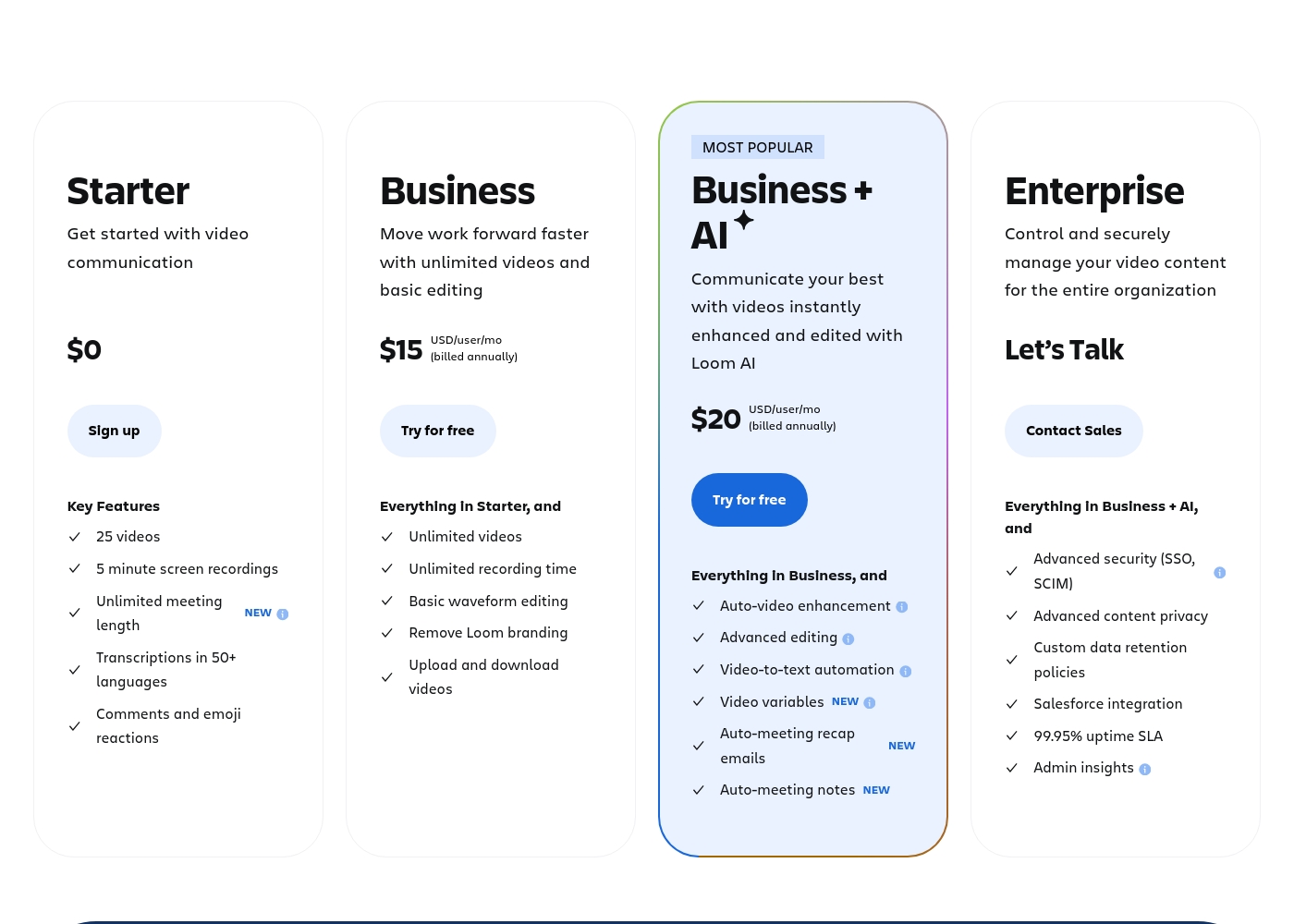
Loom costs between $0 and $20 per user per month (billed annually) with 4 plans: Starter at $0, Business at $15, Business + AI at $20, and Enterprise (custom pricing).
Here’s a breakdown of what each plan offers, helping you pick the right fit for your needs and your team.
Starter
Price: $0 Best For: Getting started with video communication Refund Policy: Not applicable (free) Other Features:
- 25 videos
- 5 minute screen recordings
- Unlimited meeting length
- Transcriptions in 50+ languages
- Up to 50 team members
- 5 minute screen recordings
- Unlimited meeting length
- Transcriptions in 50+ languages
- Up to 50 Workspace Members
- Unlimited videos and recording time
- Basic waveform editing
- Remove Loom branding
- High-def up to 4k video quality
- Auto-video enhancement and advanced editing
- Video-to-text automation and variables
- Auto-meeting notes and recap emails
- Comprehensive Loom AI Suite (Auto CTA, Titles, Summaries, etc.)
- Advanced security (SSO, SCIM)
- Advanced content privacy and custom data retention policies
- 99.95% uptime SLA
- Dedicated support and account manager
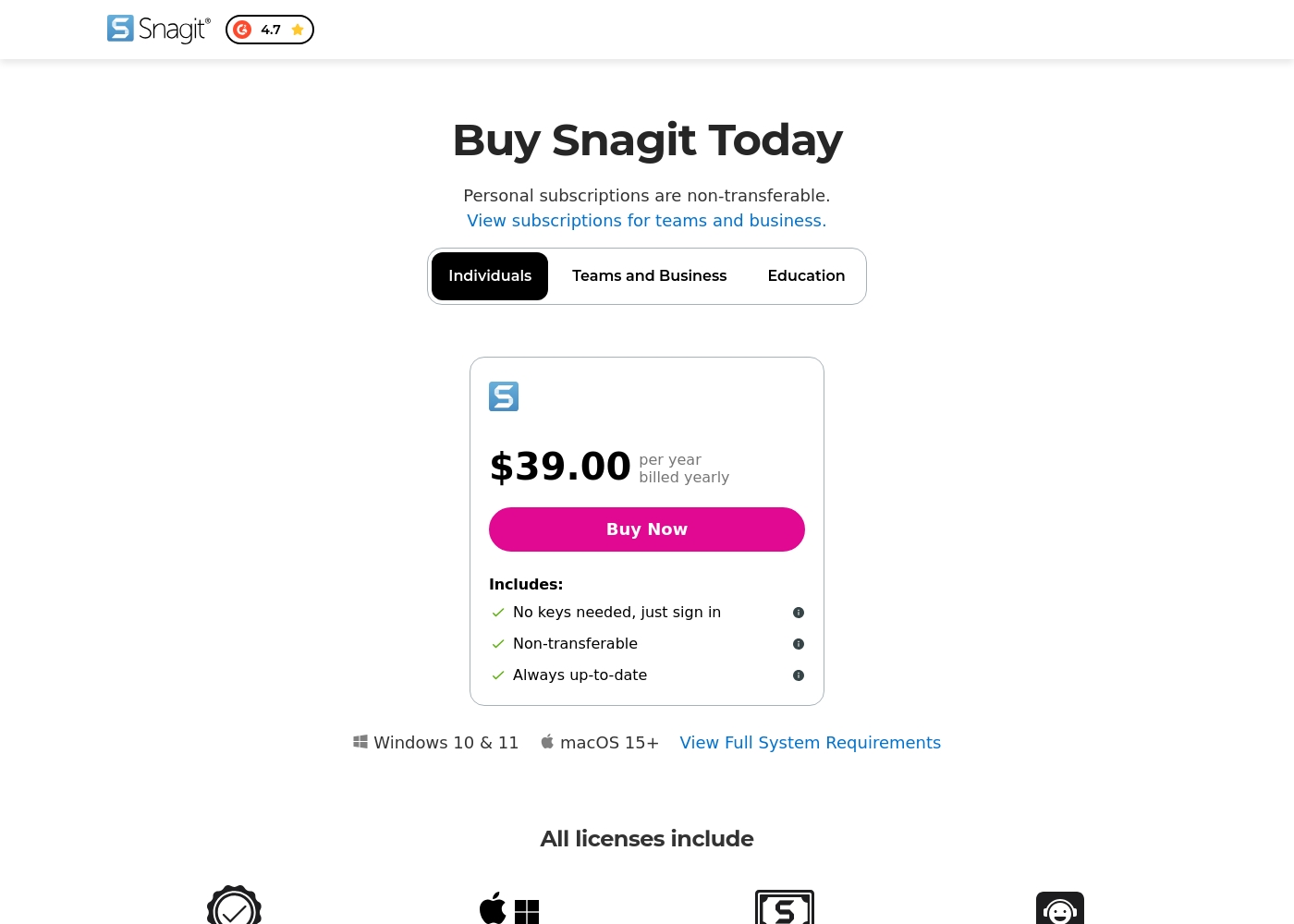
Snagit costs $39.00 per year with one explicitly priced plan visible: the Individuals subscription priced at $39.00 annually.
Here’s a deeper look at what is included in the available subscription options.
Individuals
Price: $39.00 per year, billed yearly Best For: Personal use Refund Policy: 14-day money-back guarantee Other Features:
- No physical keys needed; unlock software via account sign-in
- Always up-to-date access to the latest features and versions
- Compatibility for both Mac and Windows systems
- Includes Snagit Certification and Live support
- No keys needed, just sign in
- Always up-to-date software and features
- Mac and Windows compatibility
- Snagit Certification
- Live support
Pricing Notes
- Loom offers a powerful, permanent free Starter plan with limits of 25 videos per user and 5-minute recording length.
- Snagit does not have a free plan; it only offers a 14-day free trial and a 14-day money-back guarantee.
- Loom is priced per user, meaning team costs scale rapidly; the Business plan is $15/user/month billed annually.
- Snagit’s $39.00 Individual license is extremely affordable but cannot be transferred between team members.
- The Enterprise option for both Loom and Snagit requires contacting sales for custom pricing and dedicated support.
Pricing Head-to-Head
User Reviews
The external feedback for Loom is starkly divided, reflected in a very low Trustpilot rating (1.8). While some long-term Pro users find it reliable and essential for team briefs, the overwhelming negative sentiment focuses heavily on pricing and customer support responsiveness.
Many users feel the value is low, noting that Loom charges a high annual price for basic recorder features available for free elsewhere. The company also faces strong criticism regarding billing, with multiple reports of unauthorized charges continuing after cancellation and prices allegedly changing without warning.
We canceled our account several months ago, but the charges kept appearing. Despite multiple attempts, customer service never responded. This lack of support is how good products eventually fail.
Reviewers consistently recognize Snagit as an industry-standard tool. Users frequently praise the software's deep feature set, clarity, and ease of use, noting that it is much faster and simpler than comparable, more complex alternatives. Long-time customers, however, express significant frustration over the shift from perpetual licenses to a mandatory annual subscription model. This change is seen as an unnecessary profit driver that introduces considerable overhead, especially for professionals needing to switch between multiple devices.
The new licensing structure strictly limits individual subscriptions to one sign-in at a time, requiring users to repeatedly sign out and sign in, or forcing expensive upgrades to the 'Teams' tier for flexible access. Customer support also receives mixed reviews; while many customers report positive experiences, noting quick fixes and responsive staff within 24 hours (sometimes via live chat), others complain about unhelpful service, lack of follow-up, and receiving generic, automated-sounding answers. Despite these operational headaches, the general consensus remains that Snagit is an awesome, essential piece of software that many users 'can't live without.' 🤩
This is a great product. It's dramatically simpler than comparable capture tools like those from Adobe, yet it has a deep feature set. We use the product for complex projects all the time and love the functionality.
Our Verdict
Loom and Snagit offer unique approaches to visual communication, making the choice straightforward. Loom is the clear winner if communication velocity is your highest priority. Snagit is the definite master if you need professional documentation and precise annotation tools. Loom’s superpower is making asynchronous video messaging feel immediate and personal. It provides a generous free plan and robust professional tiers, including powerful AI features. Loom simplifies scaling collaboration, helping remote teams replace time-consuming meetings effectively. Use Loom if you need to quickly record and track video updates across a large team. Snagit’s specialty is world-class screen capture and essential, detailed annotation capability. It is the industry standard tool for creating crystal-clear images and documented procedural flows. The low $39 annual fee makes Snagit highly affordable for individuals or solo entrepreneurs. Snagit ensures your tutorials and guides are visually perfect. The decisive factor is the output: do you need an easily sharable video message (Loom) or a perfectly annotated image (Snagit)? If you prioritize quick, internal team communication, choose Loom for its speed and scale. If your job requires generating clear, professional training materials, Snagit is absolutely necessary. Ultimately, Loom is optimized for modern collaboration via video messaging, while Snagit is optimized for high-quality visual documentation creation. Choose Snagit for your personal documentation needs; opt for Loom for high-volume team video communication.
Frequently Asked Questions
Which is better for creating software tutorials: Loom or Snagit?
Snagit is better for detailed software tutorials and documentation due to its robust annotation tools. Snagit excels at capturing perfect screenshots and marking up complex processes precisely. Loom is better for quick, informal video demonstrations and walkthroughs.
Can I use Loom and Snagit for free?
Yes, Loom offers an excellent permanent free Starter plan with a limited number of videos. Snagit does not have a free application tier for ongoing use. You can only test Snagit’s full features during its 14-day free trial.
Does Loom have annotation features like Snagit?
No, not in the same way. Loom provides basic waveform editing to trim your video recordings quickly. Snagit offers advanced, professional-grade tools for marking up and annotating still images specifically.
Is Snagit worth the cost for a single user compared to Loom's free plan?
Yes, if high-quality documentation is vital, Snagit is worth the $39 annual fee for individuals. Snagit is the best snipping tool available for professional image creation. Loom’s free plan limits video capacity and technical image capabilities.
Which tool offers stronger customer support responsiveness?
Snagit’s customer support is often described as quick and positive despite mixed reviews overall. Loom users report severe widespread issues with unresponsive support staff and unresolved billing problems. Snagit is the safer bet here.
Which tool works better for large, distributed teams?
Loom is better for large, distributed teams due to its scalability and core focus on asynchronous video messaging. Loom offers clear per-user pricing tiers and Enterprise security features like SSO. Snagit is primarily licensed for individual productivity needs.
Ready to Choose?
Both tools have their strengths. Choose based on your specific needs.