Leave Dates vs Shiftie
Leave Dates and Shiftie both tackle time-off management, but they serve different beasts. Leave Dates is a simple, focused annual leave planner for teams. Shiftie is an all-in-one staff scheduling, time tracking, and team management platform. Which one you pick depends on whether you need just leave tracking or a full workforce toolkit.
Best for: Small businesses that need a simple annual leave planner, Teams replacing clunky spreadsheet-based holiday admin
Best for: UK-based hospitality, leisure, or retail businesses, Managers who need to schedule shifts and track time
Effortless, intuitive calendar management.
We found Leave Dates to be an intuitive and highly effective annual leave planner that successfully simplifies complex holiday administration processes. Its user-friendly interface supports both efficient admin control and necessary employee empowerment across devices. Overall, we recommend this robust solution for teams aiming to eliminate manual PTO tracking.
Pros
- Simple and intuitive user interface is quick to learn.
- Comprehensive 30-day free trial available without requiring a credit card.
- Customer support is consistently reported as prompt and very helpful.
- Employees gain 24/7 access to up-to-date leave entitlement.
Cons
- Specific subscription costs are not detailed publicly on the website.
- Information regarding third-party software integrations is unclear in provided material.
Simple, effective staff scheduling.
We found Shiftie to be a straightforward and focused platform for employee scheduling and time tracking. It clearly solves core administrative headaches for teams in sectors like hospitality. Overall, it's a solid, no-fuss tool that delivers on its promise to simplify workforce management.
Pros
- Clear, per-user pricing with no hidden fees.
- Generous 28-day free trial without needing card details.
- Intuitive drag-and-drop scheduling with conflict detection.
- Automatic timesheet generation simplifies payroll.
Cons
- Limited external user reviews make social proof difficult to assess.
- May lack advanced features for very large, complex organizations.
- Integrations and deeper reporting capabilities are not detailed.
- Support is UK-based, which could affect time zones for other regions.
AboutLeave Dates
Leave Dates is the super simple annual leave planner designed to manage time off for your team. It delivers a single source of out of office knowledge available 24/7.
This intuitive digital tool works across your laptop, phone, or tablet. It truly simplifies the process for everyone involved.
Employees can quickly view the calendar, select dates, and submit their requests within clicks. Approvers can then check and swiftly approve the time off.
AboutShiftie
Shiftie is a modern, all-in-one platform for scheduling employees and managing time & attendance. It’s built for managers and teams in sectors like hospitality, leisure, and retail who want to ditch outdated systems. Think of it as your digital rota, timesheet generator, and team hub combined. 👥
Highlights
Feature Comparison
Features Overview
We highlight the main differences and pick a winner for each feature.
Core Purpose
Leave Dates is a dedicated annual leave planner. Shiftie is a full staff scheduling and time tracking platform.
Leave Dates focuses exclusively on tracking employee time off. It's designed to replace manual spreadsheets for holiday administration. The system is simple, intuitive, and built for a single task. Shiftie is a broader workforce management tool. It combines shift scheduling, time tracking, leave management, and team communication. It's built for businesses that need to manage daily operations. The key difference is scope. Leave Dates does one thing well. Shiftie does many things to manage a workforce. If you just need to track vacations, Leave Dates is simpler. If you need to manage shifts and hours, Shiftie is the better fit.
Scheduling Capabilities
Leave Dates doesn't do shift scheduling. Shiftie offers drag-and-drop rota planning with conflict detection.
Leave Dates has no shift scheduling features. It is purely for tracking annual leave and time-off requests. You cannot create or manage staff rosters with it. Shiftie provides a full scheduling toolkit. You can use templates, drag-and-drop a calendar, and let team members volunteer for open shifts. It includes conflict detection to prevent double-bookings. The trade-off is clear. Leave Dates is not a scheduling tool. Shiftie is designed for businesses that need to plan shifts and manage attendance. For teams with complex rota needs, Shiftie is the only viable option here.
Time Tracking
Leave Dates has no time tracking. Shiftie offers mobile clock-in, GPS verification, and automatic timesheets.
Leave Dates does not include time tracking or clock-in functionality. It is limited to managing leave requests and balances. Shiftie includes cloud-based clock-in via phone or portal. It supports GPS-restricted clock-ins and automatically generates digital timesheets. Managers can review and approve hours for payroll. This is a major difference. Shiftie handles the entire time and attendance cycle. Leave Dates only handles the 'out of office' part. For businesses that need to track hours worked, Shiftie is the necessary choice.
Leave Management
Both tools manage employee leave. Leave Dates focuses on annual leave. Shiftie includes holiday and absence management.
Leave Dates is built specifically for annual leave. It allows admins to set custom allowances, create limits, and manage leave types. Employees get 24/7 access to their entitlement. Shiftie also includes leave and holiday management. It's part of its broader team management suite. You can track absence patterns and manage requests. Leave Dates offers more detailed customization for allowances. Shiftie integrates leave with other functions like scheduling. If leave tracking is your primary need, Leave Dates offers more depth. If you need leave management as part of a bigger system, Shiftie includes it.
User Interface
Leave Dates is praised for its beautiful, simple UI. Shiftie is described as intuitive and user-friendly.
Leave Dates users often mention its 'beautiful' and 'intuitive' interface. It's designed to be simple for both admins and employees to learn quickly. Shiftie is also described as intuitive and easy to use. It uses drag-and-drop functionality for scheduling and a mobile-friendly design. Both tools aim for simplicity, but Leave Dates gets more praise for its visual design and ease of learning. The difference is subtle. Leave Dates may feel more polished for its specific task. Shiftie's UI is built for a wider range of complex functions.
Mobile Experience
Both are mobile-friendly. Leave Dates offers 24/7 access on phones and tablets. Shiftie enables mobile clock-in and shift management.
Leave Dates works across laptop, phone, and tablet. Employees can view calendars and submit requests 24/7 on any device. It's a synchronized, mobile-accessible planner. Shiftie is also mobile-friendly. Employees can clock in and out on their phones. They can see their shifts and request changes easily. It supports a mobile workforce. The key difference is functionality. Leave Dates uses mobile for leave requests. Shiftie uses mobile for real-time scheduling and time tracking. For on-the-go shift workers, Shiftie's mobile features are more essential.
Customer Support
Leave Dates support is praised as prompt and helpful. Shiftie offers 7-day-a-week UK-based support with clear hours.
Leave Dates users consistently report customer service as 'prompt' and 'very helpful'. Support is described as efficient in resolving issues. Specific hours aren't detailed. Shiftie provides unlimited 7-day support from 08:00 to 20:00 UK time. Their support team assists with setup, features, and troubleshooting. The difference is transparency. Shiftie states its support hours clearly. Leave Dates relies on user praise but doesn't specify hours. Both get good feedback, but Shiftie offers more predictable availability for UK-based teams.
Pricing Model
Leave Dates pricing isn't public. Shiftie has clear, per-employee monthly pricing starting at £2.75.
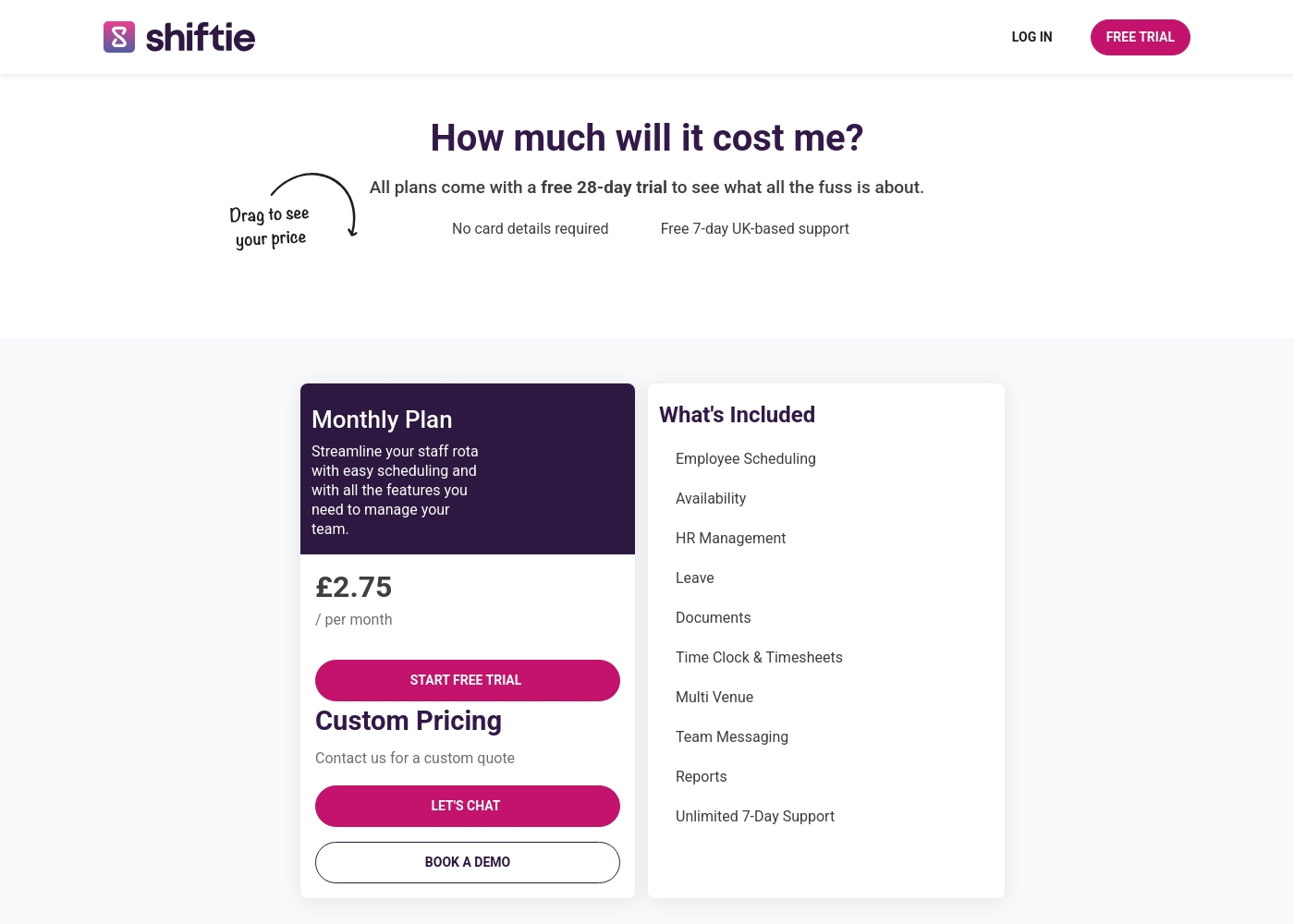
Leave Dates does not publish its subscription costs. You get a 30-day free trial to evaluate it. You must contact them for pricing details. Shiftie uses transparent per-active-employee pricing. It starts at £2.75 per employee per month. There are no separate feature tiers; one plan includes everything. The key difference is transparency. Shiftie tells you exactly what you'll pay. Leave Dates keeps costs hidden until you inquire. For budget planning, Shiftie's clear model is easier. Leave Dates requires you to talk to sales.
Integrations
Leave Dates integration details are unclear. Shiftie mentions limited integrations, with DigiTickets noted in a testimonial.
Leave Dates does not detail third-party integrations. You may need to contact support to learn about connecting with HR or payroll software. Shiftie mentions an integration with DigiTickets in a user testimonial. A full list isn't provided on their site. You should ask support for current options. Neither tool offers extensive integration details from the provided data. The difference is minimal based on available information. Both may require you to ask support for specifics.
Target Audience
Leave Dates targets small businesses needing simple leave tracking. Shiftie targets UK hospitality, leisure, and retail teams.
Leave Dates is positioned for small businesses ready to eliminate manual holiday admin. It's ideal for employers wanting a simple, affordable leave planner. Shiftie is designed for managers in sectors like hospitality, leisure, and retail. It's built for UK businesses needing to schedule shifts and track time. The difference is industry focus. Leave Dates is general for leave tracking. Shiftie is specialized for shift-based work. If your team works fixed shifts, Shiftie is better. If you need a basic leave tracker, Leave Dates fits.
While exact plan costs aren't detailed, we can outline the key information about starting your service experience with Leave Dates.
30-Day Free Trial
Best For: New businesses or teams looking to test full PTO tracking and customized approval workflows before subscribing. Refund Policy: Not applicable (Free trial) Other Features:
- No credit card needed to start the trial
- Ability to cancel service at any time
- Easily request, view, and approve leave
- Access reports, customize allowances, and set leave limits
- Simple and intuitive user interface
This risk-free trial is a great way to handle your holiday admin processes without financial commitment. You can import your current data, set specific rules, and check how intuitive the beautiful interface feels before you decide to subscribe. It's a full-featured trial designed for thorough evaluation.
- Try for free
- No credit card needed
- Cancel any time
- Easily request leave
- View Leave Dates calendar on laptop, phone or tablet
Shiftie pricing: Shiftie keeps things simple with a monthly plan starting at £2.75 per employee. You'll get full access to all scheduling and HR features with no upfront card details required for your trial period.
To help your team hit the ground running, we offer a generous 28-day free trial along with seven-day UK-based support to answer any questions you might have. It's built to be flexible, so you're only billed for the active users on your account each month.
Plus, you can cancel at any time directly through your billing settings if your needs change. This approach ensures your costs scale naturally as your team grows or shrinks, keeping your budget predictable and your admin time low.
Pricing Head-to-Head
User Reviews
Users consistently praise Leave Dates as a super simple and intuitive tool for managing annual leave. Reviewers often highlight the beautiful and user-friendly interface, noting it's easy for both administrators and employees to learn quickly.
The system successfully replaces clunky spreadsheets, leading to streamlined and effortless administration. Customer support receives high marks for responsiveness, described as prompt, helpful, and efficient in resolving any encountered issues.
This annual leave planner is incredibly simple to implement and use daily. We finally threw away our unreliable spreadsheets, making the transition seamless. My team now manages their own time off easily, gaining great visibility.
We couldn't access any external user reviews for Shiftie on Trustpilot or Capterra during our research. The Capterra page returned a security error, and Trustpilot had no available data. Without this external feedback, our assessment is based solely on the product's features and the company's own presentation. We encourage you to try the free trial to experience the software firsthand and gather your own user feedback.
We switched from spreadsheets and the difference is night and day. Shiftie has saved our management team at least a few hours every week on scheduling alone.
Our Verdict
The bottom line: choose based on what you actually need to manage. Leave Dates and Shiftie serve different purposes, so the winner depends on your team's daily challenges. Leave Dates is a specialist. It excels at one thing: managing annual leave. Its superpower is simplicity. It's praised for a beautiful, intuitive interface that replaces spreadsheets. Employees get 24/7 access to their entitlements. It's a focused tool that does its job well. Shiftie is a generalist. It's an all-in-one platform for scheduling, time tracking, and team management. Its superpower is breadth. You get drag-and-drop rota planning, automatic timesheets, and real-time labour cost data. It's built for shift-based industries like hospitality and retail. The deciding factor is your core need. If you only need to track vacations and time off, Leave Dates is simpler and more focused. If you need to manage shifts, track hours, and run payroll, Shiftie is the comprehensive solution. Final verdict: Pick Leave Dates if your main pain point is holiday admin for a small team. Pick Shiftie if you're managing a workforce with complex schedules and attendance tracking. They're not direct competitors—they're solutions for different problems.
Frequently Asked Questions
Which is better for small teams: Leave Dates or Shiftie?
Leave Dates is better if your small team only needs to track annual leave. Shiftie is better if your small team needs shift scheduling and time tracking. Both are easy to use, but serve different needs.
Does Leave Dates have shift scheduling like Shiftie?
No, Leave Dates does not have shift scheduling. It is purely for managing annual leave and time-off requests. Shiftie offers full scheduling with drag-and-drop calendars.
Is Shiftie worth the extra cost over Leave Dates?
Shiftie costs £2.75 per employee monthly. It's worth it if you need shift scheduling and time tracking. Leave Dates pricing isn't public, but it's focused on leave planning.
Can I migrate data from Leave Dates to Shiftie?
Leave Dates allows data import. Shiftie doesn't detail migration options. You'd likely need to contact support to discuss moving data between the two platforms.
Which tool has better customer support?
Both tools have good support. Leave Dates support is praised as prompt and helpful. Shiftie offers 7-day UK support with clear hours from 08:00-20:00.
Does Shiftie work outside the UK?
Shiftie's pricing is in GBP and support is UK-based. It's designed primarily for the UK market. Leave Dates doesn't specify regional limitations.
Ready to Choose?
Both tools have their strengths. Choose based on your specific needs.