Leadpages vs Sender
Leadpages and Sender tackle different parts of your marketing funnel. Leadpages specializes in high-converting landing pages, while Sender focuses on email marketing and automation. The choice depends on whether you need to capture leads or nurture them.
Best for: Marketing teams focused on conversion rate optimization, Agencies managing multiple client landing pages
Best for: Startups and small businesses on a tight budget, Solopreneurs new to email marketing
Powerful Builder, Risky Billing Model
We found Leadpages offers a powerful tool for quickly building high-converting landing pages complete with built-in A/B testing and direct sales features. Overall, we are deeply concerned about the platform’s reported severe failures concerning customer billing transparency and the subscription cancellation process, which overshadows the product's functional utility.
Pros
- Code-free, drag-and-drop landing page creation.
- Features robust A/B testing capabilities for optimization.
- Allows direct on-page sales and transactions.
- Unlimited traffic and leads are included across all plans.
Cons
- Frequent complaints regarding unauthorized or surprise billing.
- Cancellation mechanism often reported as intentionally misleading or broken.
- Customer service responsiveness is widely criticized as poor or ineffective.
- Users report sudden and steep price increases without proper notice.
Simple, free, and effective for basics.
We found Sender to be a solid, no-frills tool for core email marketing tasks. Its free plan is a major draw for startups and small businesses. Overall, it delivers good value with a straightforward interface, though it may lack some advanced features for power users.
Pros
- Extremely generous free plan (2,500 contacts, 15k emails/month).
- Clean, user-friendly interface that's easy to learn.
- Transparent, affordable pricing with no hidden fees.
- Includes essential automation features from the start.
Cons
- Advanced features and segmentation are limited on lower tiers.
- Some users report occasional email deliverability issues.
- Integrations can be inconsistent with certain platforms.
- Free plan lacks SMS marketing capabilities.
AboutLeadpages
Leadpages is a data-driven solution built for creating powerful, high-converting landing pages. It’s designed to be simple so you can avoid long development cycles. Best of all, you don't need to write a single line of code to get started.
This tool is powerful and versatile. It offers tailored solutions for Marketing Teams, Agencies, Businesses, and even larger Enterprise groups looking to streamline their marketing stack. Whether you need to scale performance or optimize lead collection, Leadpages empowers your success. ✅
AboutSender
Sender is an email marketing platform designed for businesses of all sizes. It helps you build, automate, and send email campaigns that people actually want to read. Think of it as your straightforward tool for staying in touch with your audience and driving sales. 🚀
Highlights
Feature Comparison
Features Overview
We highlight the main differences and pick a winner for each feature.
Core Purpose
Leadpages builds landing pages; Sender sends emails. They're complementary, not direct competitors.
Leadpages is a specialized tool for creating high-converting landing pages, pop-ups, and alert bars. It focuses on capturing leads and driving sales directly from pages. Sender is an email marketing platform. It helps you build subscriber lists, send newsletters, and automate email sequences to nurture leads. The key difference is your marketing goal. Use Leadpages to get people into your funnel, then use Sender to talk to them.
Ease of Use
Both are user-friendly, but Sender's setup is faster. Leadpages offers more design power.
Leadpages has an intuitive drag-and-drop builder. Creating a professional landing page takes minutes, but mastering all features has a learning curve. Sender emphasizes a 5-minute setup. Its interface is clean and simple, designed for quick email campaign creation without fuss. Sender wins for sheer simplicity. Leadpages wins for powerful, code-free page design.
Pricing Model
Sender offers a permanent free plan. Leadpages requires payment after a 14-day trial.
Leadpages pricing starts at $37/month (billed annually). There's no free tier, only a 14-day trial. Pricing is usage-based on features and domains. Sender has a robust Free Forever plan with 2,500 contacts and 15,000 emails/month. Paid plans start at $7/month, scaling with subscribers. Sender's model is far more accessible for startups and small budgets. Leadpages' pricing is higher but includes unlimited traffic and leads.
Automation Features
Sender includes email automation from day one. Leadpages focuses on page conversion, not email sequences.
Leadpages doesn't offer email automation. Its optimization comes through A/B testing landing pages and pop-ups. Sender provides powerful email automation on all plans, including the free one. You can build welcome series, cart abandonment flows, and nurture campaigns. If email nurturing is critical, Sender is the clear choice. Leadpages helps you get subscribers; Sender helps you engage them.
Customer Support
Sender offers 24/7 live support. Leadpages support receives widespread criticism.
Leadpages has a major problem with customer support. Users report slow, unhelpful responses and poor resolution of billing issues. Sender provides 24/7 live support on all plans. Users generally praise the responsiveness and helpfulness of the team. This is a significant difference. Reliable support is crucial when you're stuck, and Sender delivers.
Scalability
Leadpages scales with domains and users. Sender scales with subscriber count and emails.
Leadpages scales by upgrading plans for more domains (up to 3) and adding team seats ($15/user). It handles unlimited traffic and leads. Sender scales based on your email list size. Plans go up to 200,000 subscribers, with an Enterprise tier for unlimited sends. Both scale well, but for different things. Leadpages for page volume and team collaboration. Sender for growing your email audience.
Integration Ecosystem
Leadpages connects to major CRMs. Sender integrates with e-commerce and website platforms.
Leadpages integrates with a wide marketing stack: CRMs, analytics, email marketing platforms, and automation tools. It's built to plug into existing systems. Sender focuses on integrations with website and e-commerce platforms like WordPress, WooCommerce, and PrestaShop. Zapier connects it to other apps. Leadpages has broader marketing integrations. Sender has deeper, specialized integrations for online stores.
Reporting & Analytics
Leadpages focuses on conversion data. Sender provides basic email campaign metrics.
Leadpages emphasizes conversion rate optimization. Its reports show which page variations perform best, driving data-backed decisions. Sender's analytics cover open rates, click rates, and subscriber growth. Some users wish for more detailed segmentation and reporting. Leadpages wins for conversion-focused analytics. Sender provides the essentials for email campaign tracking.
Mobile Experience
Both offer mobile optimization, but Leadpages allows separate mobile page designs.
Leadpages lets you create unique mobile experiences for your pages. You can customize layouts specifically for phone users to maximize conversions. Sender's emails are mobile-responsive by default. The platform is web-based, so the mobile experience is about the editor and campaign management. Leadpages offers more granular control for mobile landing pages. Sender ensures your emails look good on any device.
Overall Value
Sender offers exceptional value with its free plan. Leadpages delivers value through high-converting page tools.
Sender's Free Forever plan is a game-changer for new businesses. You get core email marketing and automation without spending a dime. Leadpages justifies its cost with tools proven to increase conversions. Unlimited traffic and A/B testing help maximize ROI from your campaigns. Value depends on your need. Sender for affordable email. Leadpages for performance-driven landing pages.
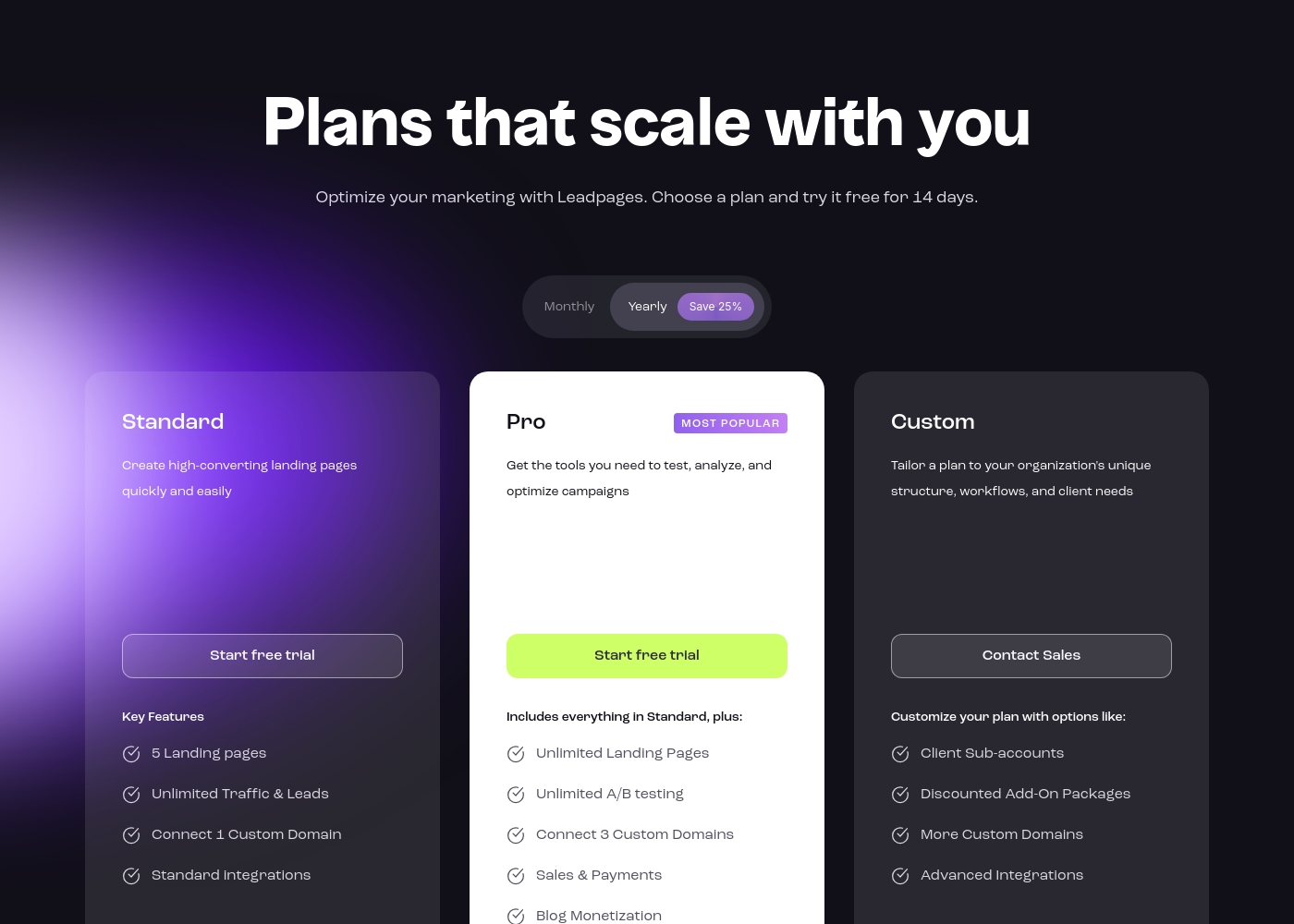
Leadpages costs between $37 and $74 per month (billed annually) with three plans: Standard at $37/month, Pro at $74/month, and Custom (Contact Sales).
The pricing structure is designed to be friendly and flexible, offering significant savings of 25% if you commit to annual billing. Here is a straightforward breakdown of what each plan includes to help you decide.
- 5 Landing pages
- Unlimited Traffic & Leads
- Connect 1 Custom Domain
- Standard integrations
- Unlimited A/B Testing
- Includes everything in Standard
- Unlimited Landing Pages
- Unlimited A/B testing
- Connect 3 Custom Domains
- Sales & Payments
- Client Sub-accounts
- Discounted Add-On Packages
- More Custom Domains
- Advanced Integrations
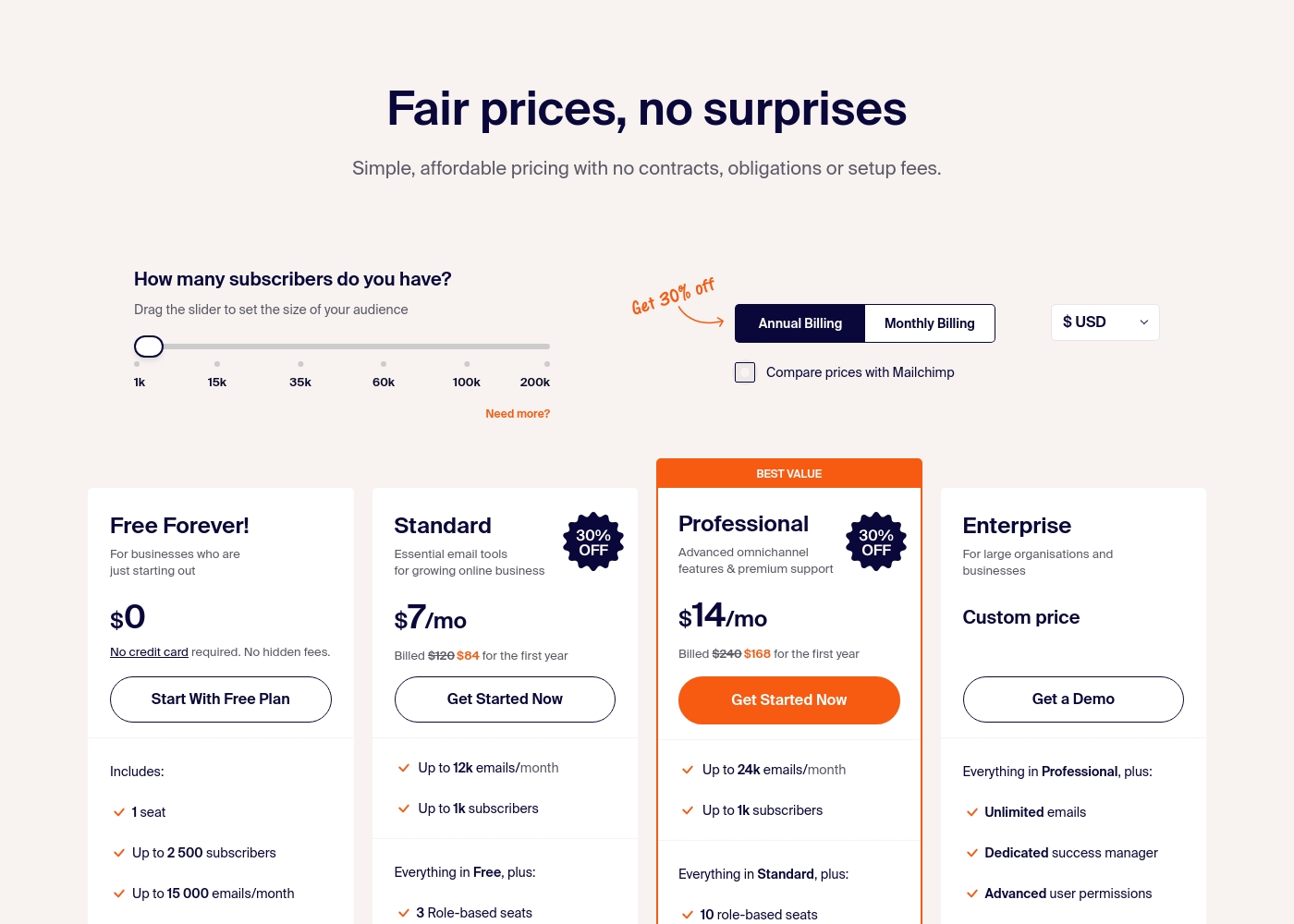
Sender costs between $0 and a custom price per month with 4 plans: Free Forever at $0, Standard at $7, Professional at $14, and Enterprise at Custom price.
Take a look at the specific features and limits included in each plan tier below.
Free Forever!
Price: $0 monthly Best For: Businesses who are just starting out Other Features: 1 seat, up to 2,500 subscribers, 15,000 emails/month, 24/7 live support, email automation.
- 1 seat
- Up to 2,500 subscribers
- Up to 15,000 emails/month
- 24/7 live support
- Email automation
- Up to 12k emails/month
- Up to 1k subscribers
- 3 Role-based seats
- Automated sequences
- Up to 24k emails/month
- Up to 1k subscribers
- 10 role-based seats
- Premium support
- Unlimited emails
- Dedicated success manager
- Advanced user permissions
Pricing Notes
- Leadpages offers a 14-day free trial but no permanent free plan.
- Sender has a robust Free Forever plan with 2,500 contacts and 15,000 emails/month.
- Leadpages pricing is based on features and domains, while Sender scales with subscriber count.
- Both offer discounts for annual billing (25% for Leadpages).
- Leadpages charges $15/user/month for additional team members.
- Sender includes 3-10 team seats on paid plans.
Pricing Head-to-Head
User Reviews
Leadpages receives severe criticism regarding its billing and subscription management practices, reflected in a low Trustpilot rating. Many users report facing unexpected, high charges, sometimes tripling their annual subscription without proper notification or consent.
The account cancellation process is repeatedly called “shady” and “disgraceful,” with reports that the cancellation button often does not work or that the company continues billing after confirmation. Support responsiveness is a major concern, often described as unhelpful or completely generic.
So far so good. I found the platform to be very user friendly, right from the start. I like the ease of use when building new pages.
User sentiment on Trustpilot and Capterra highlights Sender's generous free plan and ease of setup as major positives. Many praise the intuitive interface and reliable automation.
😊 However, some note occasional deliverability hiccups and a learning curve for advanced features. Customer support is frequently mentioned as responsive, though a few users report slow responses during peak times.
The free plan is unbeatable for a new business. I set up my first automation in minutes. The platform is simple and gets the job done without fuss.
Our Verdict
Here's the bottom line: Leadpages and Sender solve different problems, so the "better" tool depends entirely on your goal. Leadpages is a conversion machine. Its superpower is building beautiful, high-performing landing pages that turn visitors into leads and sales. The A/B testing and analytics are top-notch. Sender's superpower is accessible email marketing. The free plan is incredibly generous, letting you send 15,000 emails per month. Automation is included from the start. The deciding factor is your marketing funnel stage. Need to capture attention and get sign-ups? Choose Leadpages. Need to communicate with and nurture those sign-ups? Choose Sender. For most small businesses, Sender is the more practical starting point due to its free plan and lower cost. If you already have an email tool and need to boost conversions, Leadpages is a powerful addition.
Frequently Asked Questions
Can I use Leadpages for email marketing like Sender?
No. Leadpages is designed for landing pages and lead capture, not sending email campaigns. You would need to integrate it with an email tool like Sender to nurture the leads you capture.
Is Sender's free plan really free, or is there a catch?
Sender's Free Forever plan is genuinely free with no time limit. It includes 2,500 subscribers and 15,000 emails per month. No credit card is required to sign up.
Which tool is better for e-commerce stores?
Sender is generally better for e-commerce due to its email automation for cart recovery and integrations with WooCommerce. Leadpages is useful for creating specific sales or product launch pages.
Why does Leadpages have such bad reviews?
Leadpages reviews are dominated by complaints about unauthorized billing, difficult cancellation, and poor customer support. Users report surprise price hikes and unresponsive help.
Can I migrate from Leadpages to Sender easily?
Migration isn't direct because they are different tools. You would export your lead data from Leadpages and import it into Sender's email list. The processes are separate.
Which tool offers better value for a small team?
Sender offers better value for a small team, especially if budget is tight. Its free plan and included team seats (up to 10 on Professional) are more cost-effective than Leadpages' per-user fees.
Ready to Choose?
Both tools have their strengths. Choose based on your specific needs.