Leadfeeder vs Vista Social
Leadfeeder and Vista Social are in completely different leagues. Leadfeeder unmaskes anonymous B2B website visitors. Vista Social is your all-in-one social media command center. Your choice depends entirely on whether you need website leads or social media management.
Best for: B2B Sales Teams, Marketing Teams Generating Website Leads
Best for: Social Media Managers, Marketing Agencies Managing Client Accounts
Advanced B2B Lead Identification, High Risk.
We found Leadfeeder offers powerful B2B visitor identification features, including robust filtering and unique remote employee recognition capabilities. However, we note consistent customer reports detailing unresolved CRM integration failures and problematic auto-renewal billing policies that undermine its fundamental value proposition. Overall, the powerful features are currently overshadowed by serious concerns regarding support responsiveness.
Pros
- Highest company recognition rate available, identifying remote workers.
- Quick setup requiring a simple Google Analytics connection.
- Robust filtering system using over 50 firmographic and behavioral signals.
- Allows identification of companies engaging with ad campaigns.
Cons
- Reportedly flawed and unresolved two-way Dynamics CRM integration features.
- Aggressive annual auto-renewal policy lacking timely notification reminders.
- Customer support is frequently criticized as non-existent or unhelpful.
- High subscription cost scaling based significantly on volume of identified companies.
Powerful, scalable command center.
Vista Social delivers a robust, all-in-one platform that consolidates scheduling, analytics, and engagement for teams. We find its AI-powered workflow tools and broad channel support particularly strong for agencies and growing brands. Overall, it's a high-value solution for serious social media management.
Pros
- Comprehensive all-in-one platform for publishing, analytics, listening, and engagement.
- AI-powered features to automate tasks and provide insights.
- Designed for team collaboration and agency workflows with white-label options.
- Supports all major social channels, including niche platforms.
Cons
- Full external review data was inaccessible, limiting our independent sentiment analysis.
- Complex feature set may present a learning curve for very small teams or beginners.
- Pricing starts at a mid-range point, which may be a consideration for budget-conscious users.
AboutLeadfeeder
Leadfeeder is a powerful tool designed to help salespeople, marketers, and agencies find hidden opportunities in their web traffic. Its unique technology scans incoming traffic and identifies the companies visiting your website based on their IP address. This works even if employees are working from home. Once identified, the tool helps you uncover exactly what those companies are interested in, confirming their true buying intent. This crucial data processing meets all necessary GDPR legislation requirements. ✅
AboutVista Social
Vista Social is a comprehensive, AI-powered platform for social media management. 🤖 It's built for teams—like agencies or in-house marketing groups—who need to handle everything from publishing and analytics to engagement and listening across every major social channel. Think of it as your all-in-one hub, designed to replace a stack of separate tools and make your social workflow smoother.
Highlights
Feature Comparison
Features Overview
We highlight the main differences and pick a winner for each feature.
Core Purpose
Leadfeeder reveals company visitors. Vista Social manages social media.
Leadfeeder scans your website traffic to identify the companies visiting, based on IP address. It works even for remote employees. Vista Social is a comprehensive platform for scheduling posts, analyzing social performance, and engaging audiences across major social channels. The fundamental difference is data source: Leadfeeder uses your website data. Vista Social uses social media platform data. If your goal is sales pipeline, choose Leadfeeder. If it's brand presence and engagement, choose Vista Social.
Target Audience
Leadfeeder targets B2B sales. Vista Social targets social media pros.
Leadfeeder is built for B2B companies. It helps sales and marketing teams find and prioritize companies showing interest. Vista Social is built for social media managers, marketers, and agencies. It helps them manage content, collaboration, and client reporting. Leadfeeder's ideal user cares about company names and buying intent. Vista Social's ideal user cares about post performance and audience growth. A SaaS company's sales team uses Leadfeeder. A marketing agency's social team uses Vista Social.
Data & Insights
Leadfeeder offers firmographic & intent data. Vista Social offers social analytics.
Leadfeeder provides over 50 firmographic and behavioral filters. You see company size, industry, and which pages they viewed. Vista Social provides detailed analytics on reach, engagement, and sentiment across social networks. You can build custom dashboards. Leadfeeder's data answers "which companies are interested?". Vista Social's data answers "what social content works?". This is the clearest difference. Your decision should be based on which question you need to answer.
Integrations
Leadfeeder syncs with CRMs. Vista Social connects social platforms.
Leadfeeder offers native, two-way CRM integrations. It automatically syncs identified visitor data into tools like HubSpot or Salesforce. Vista Social integrates with all major social networks like Instagram, LinkedIn, and TikTok. It also connects to tools like Canva and Zapier. Leadfeeder's integrations are for passing lead data to sales tools. Vista Social's integrations are for pulling in social content and pushing it out. The integration choice depends on your existing tech stack and workflow.
Team Structure
Leadfeeder allows unlimited users. Vista Social has user limits per plan.
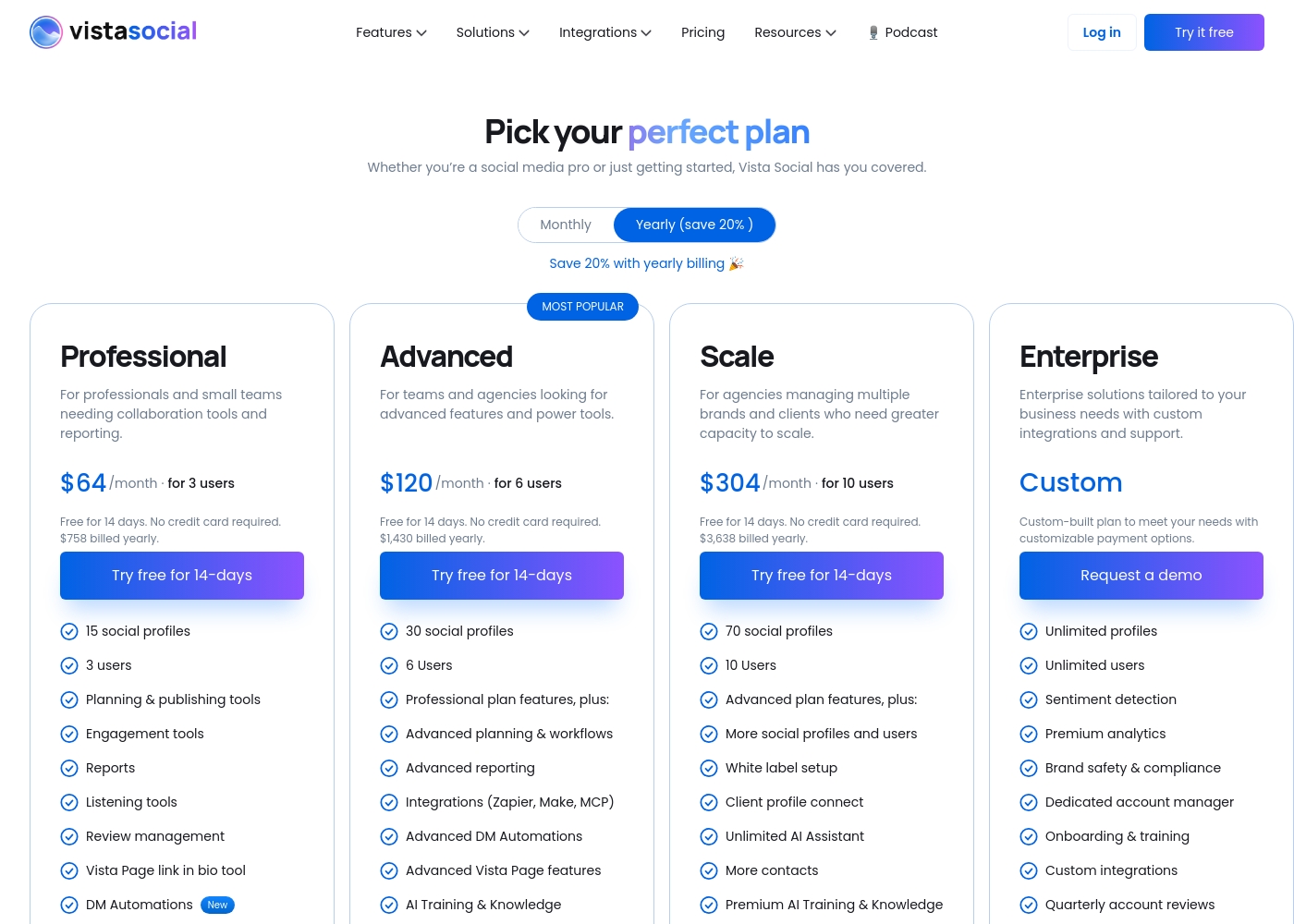
Leadfeeder's Paid plan includes unlimited users. Your cost doesn't increase as you add more team members. Vista Social plans include a specific number of users: 3 on Professional, 6 on Advanced, and 10 on Scale. You can likely add more. This makes Leadfeeder potentially more cost-effective for large sales teams. Vista Social's model is designed for structured social media teams. Consider your team size. A 20-person sales team benefits from Leadfeeder's unlimited model.
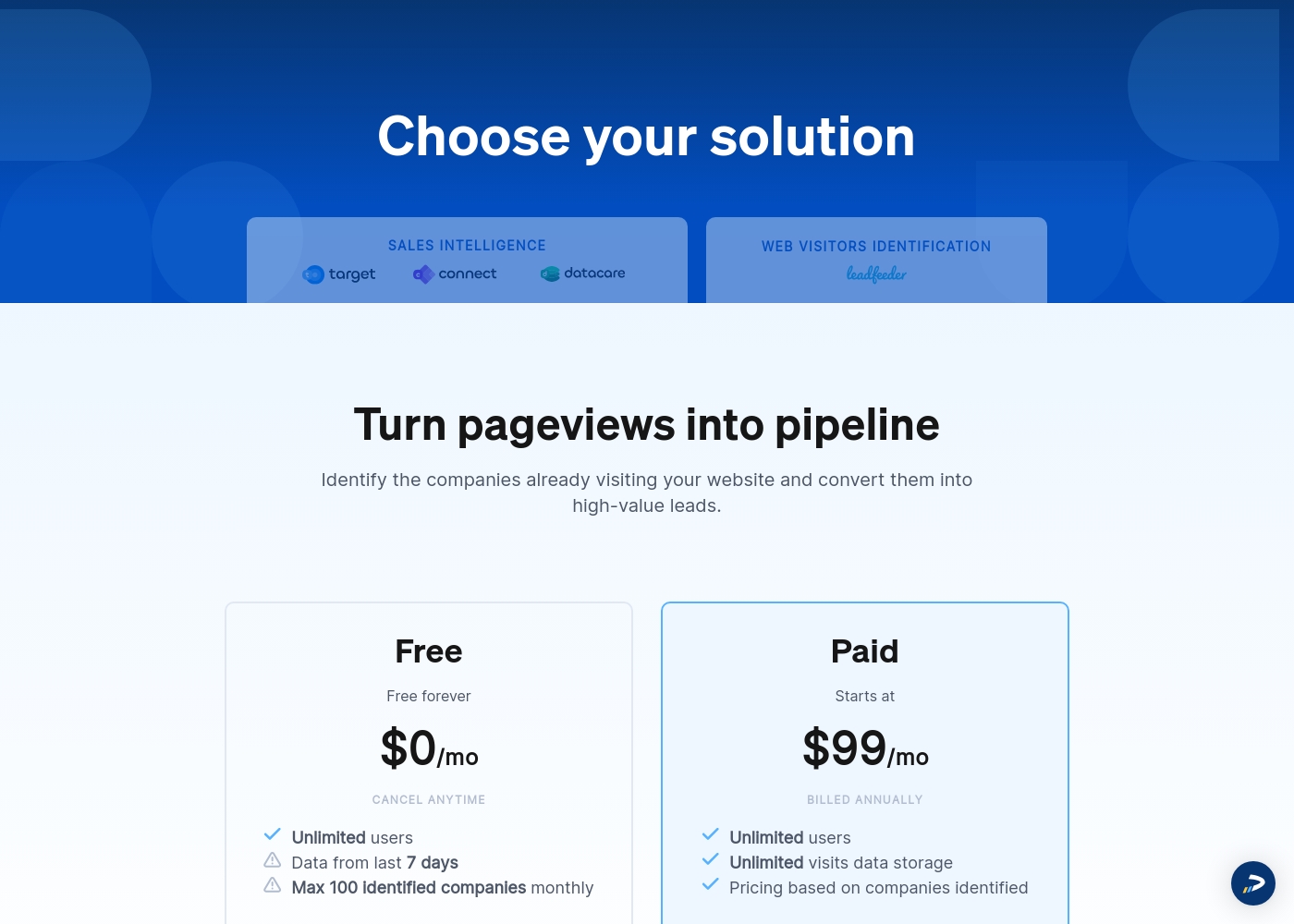
Leadfeeder costs between $0 and $99 per month (billed annually) with two plans: Free at $0 per month and Paid starting at $99 per month.
Here is a breakdown of what you get with each of the available identification solutions.
Free
Price: $0 per month Websites Supported: One per subscription (as subscriptions are priced per website) Best For: Small websites, evaluation, or testing the core feature set Refund Policy: Not applicable (It's free forever) Other Features: Unlimited users, data from the last 7 days, cancel anytime
- Free forever
- Unlimited users
- Verified company details (limited)
- Visitor data storage for the last 7 days
- Unlimited users
- Unlimited visits data storage
- All identified companies access
- Verified company details (firmographics & contact details)
- 25 contact export credits
Vista Social pricing: Vista Social offers flexible social media management plans starting at $64/month when billed annually. Every plan includes a 14-day free trial and features that scale with your team's growth and client needs.
Check out the full breakdown below to find the best fit for your social strategy.
Professional
Price: $64/month billed annually Websites Supported: 15 social profiles Best For: Professionals and small teams needing collaboration tools Other Features: Unlimited scheduling, Canva integration, AI Assistant (2,500 credits), social inbox, and basic reporting.
Pricing Notes
- Leadfeeder's pricing scales with the number of companies you identify. Costs can get high for high-traffic sites.
- Vista Social's pricing is based on plan tier, which determines social profiles and users included.
- Leadfeeder offers a free plan forever. Vista Social does not.
- Both offer a 14-day free trial. Annual billing saves money with both.
Pricing Head-to-Head
User Reviews
The customer feedback available paints a highly polarized picture of Leadfeeder. While users appreciate the core functionality—its ability to identify visiting companies and connect quickly with Google Analytics—recent experiences highlight significant operational and support issues.
Many users found the tool useful for generating leads when paired with high website traffic. However, recurring negative comments focus heavily on the financial practices.
Leadfeeder is a very useful tool and an honest company. It helps us correctly identify website visitors, which allows us to add high-quality prospects to our sales database. The support team has been genuinely helpful throughout our time using the product.
We were unable to access the full review content from Trustpilot and Capterra due to access restrictions (403 errors and security verifications). Therefore, we cannot synthesize a specific sentiment summary from those external sources based on the provided snippets. The URLs are listed for reference.
Our Verdict
This isn't a close fight. It's a choice between two entirely different missions. Leadfeeder is a specialist. It has one job: turn anonymous website visitors into B2B leads. It does this by revealing company names and intent, then pushing that data straight to your CRM. Vista Social is a generalist. It's a command center for all social media activity. It handles publishing, analytics, listening, and engagement across every major platform in one place. The deciding factor is your primary goal. Choose Leadfeeder if your success depends on filling a B2B sales pipeline from website traffic. Choose Vista Social if your success depends on building brand presence and managing social channels effectively. For most B2B companies, Leadfeeder is the clear choice. For most social media teams and agencies, Vista Social is the obvious winner. Ask yourself: Are we trying to generate leads from our website, or manage our social media presence? The answer points directly to the right tool.
Frequently Asked Questions
Which is better for small teams: Leadfeeder or Vista Social?
It depends on your goal. A small B2B sales team would benefit from Leadfeeder. A small team managing social media would find Vista Social more useful. Leadfeeder has a free plan for very small needs.
Can I use Leadfeeder to manage my social media accounts?
No. Leadfeeder is designed exclusively for B2B website visitor identification. It does not have features for scheduling posts, social analytics, or managing social accounts.
Is Vista Social worth the cost over using free scheduling tools?
Vista Social offers advanced features like team collaboration, deep analytics, and DM automation. If you need more than basic scheduling and are working with a team, its all-in-one platform can replace multiple tools.
Which tool has better customer support?
Based on user reviews, Vista Social appears to have better support. Leadfeeder receives consistent criticism for non-existent or unhelpful support, especially for technical issues.
Does Leadfeeder work for e-commerce businesses?
It can. Leadfeeder identifies the companies visiting your site. This could be useful for B2B e-commerce, but its core value is for sales-driven companies, not direct-to-consumer retail.
Can Vista Social help with lead generation?
Yes, indirectly. Its DM automation can capture leads from social comments. However, it's not designed for identifying anonymous website visitors like Leadfeeder is.
Ready to Choose?
Both tools have their strengths. Choose based on your specific needs.