Leadfeeder vs Uplead
Leadfeeder and Uplead address different stages of the lead generation funnel. Leadfeeder turns anonymous website activity into actionable company intent data. Uplead is specialized for finding and verifying specific high-quality B2B contact details. Choosing depends on if you need visitor context or guaranteed contact accuracy.
Best for: B2B companies with high website traffic needing deep intent insights., Marketing teams focused on measuring full ROI of ad campaigns and retargeting company IPs.
Best for: Outbound sales and SDR teams needing high volumes of verified contact data., Users who require a 95%+ data accuracy guarantee for email and mobile numbers.
Advanced B2B Lead Identification, High Risk.
We found Leadfeeder offers powerful B2B visitor identification features, including robust filtering and unique remote employee recognition capabilities. However, we note consistent customer reports detailing unresolved CRM integration failures and problematic auto-renewal billing policies that undermine its fundamental value proposition. Overall, the powerful features are currently overshadowed by serious concerns regarding support responsiveness.
Pros
- Highest company recognition rate available, identifying remote workers.
- Quick setup requiring a simple Google Analytics connection.
- Robust filtering system using over 50 firmographic and behavioral signals.
- Allows identification of companies engaging with ad campaigns.
Cons
- Reportedly flawed and unresolved two-way Dynamics CRM integration features.
- Aggressive annual auto-renewal policy lacking timely notification reminders.
- Customer support is frequently criticized as non-existent or unhelpful.
- High subscription cost scaling based significantly on volume of identified companies.
Top-Tier Data Accuracy, Complex Billing Model.
We confirm Uplead delivers impressively high-quality, verified B2B data, which users report drastically improves prospecting and reduces list bounce rates. While the service offers strong value and responsive support, we are concerned by multiple reports of deceptive auto-renewal practices tied to the free trial. Overall, Uplead is a powerful resource for lead generation, provided prospective users are diligent about managing their subscription settings immediately after sign-up.
Pros
- Exceptionally high data accuracy (95% guarantee)
- Real-time verification ensures credits are not wasted on invalid emails
- Access to mobile direct dials and cell phone numbers
- Competitive pricing compared to dominant industry platforms
Cons
- Lack of transparency regarding automatic annual subscription renewal
- Automatic high fee ($890) charging immediately after trial ends
- Difficulty managing or canceling billing within the platform interface
- Hidden pricing structure; high subscription fee plus cost for lead export credits
AboutLeadfeeder
Leadfeeder is a powerful tool designed to help salespeople, marketers, and agencies find hidden opportunities in their web traffic. Its unique technology scans incoming traffic and identifies the companies visiting your website based on their IP address. This works even if employees are working from home. Once identified, the tool helps you uncover exactly what those companies are interested in, confirming their true buying intent. This crucial data processing meets all necessary GDPR legislation requirements. ✅
AboutUplead
Uplead is a global lead generation tool trusted by over 4,000 businesses. It provides accurate contact information, including B2B emails and mobile direct dials, from a database of over 160 million leads.
The platform focuses intently on data accuracy. They back their commitments with a 95%+ accuracy guarantee. Their core technology combines AI validation and human quality assurance, ensuring data stays fresh and ready to use. Fun fact: Uplead’s CTO actually invented the original email verification-as-a-service. This commitment helps you find in-market buyers ready to engage. ✨
Highlights
Feature Comparison
Features Overview
We highlight the main differences and pick a winner for each feature.
Core Function
Leadfeeder finds website visitors; Uplead finds verified B2B contacts for outreach.
Leadfeeder turns anonymous web traffic into identified company leads based on IP address. Its core strength is tracking high-value visitor intent and behavior. Uplead is specialized for sourcing high-quality B2B contact data like verified emails and mobile numbers. The main difference is Leadfeeder determines *who* to chase, Uplead provides the verified *details*. Leadfeeder is ideal for inbound lead scoring and qualification first.
Contact Data Quality
Uplead guarantees 95%+ accuracy; Leadfeeder contacts are limited by monthly credits.
Uplead backs its data with a 95%+ accuracy guarantee for contacts and emails. Verification happens in real time during search and on export, ensuring low bounce rates. Leadfeeder offers 25 contact export credits per month in its standard Paid plan. While the data is robust, the volume is heavily restricted. Uplead also uses “Friendly Credits” to refund you quickly for any unusable or poor contact data. Uplead easily wins on contact volume, verification, and data guarantee.
Website Visitor Tracking
Leadfeeder is built for deep visitor analytics; Uplead focuses on contact intent data only.
Leadfeeder’s technology identifies anonymous company visitors using IP tracking, even remote employees. It uses 50+ behavioral filters to measure visitor intent based on pages viewed. Uplead excels at contact sourcing, offering Visitor Intent Data in its higher team plans. However, this is general market intent, not site-specific visitor tracking. If you need fine-grained insights into company activity on your site, Leadfeeder is mandatory.
Scalability & Cost
Leadfeeder includes unlimited users; Uplead requires paying per single-user seat for most plans.
Leadfeeder provides fantastic cost efficiency for large teams with unlimited users on all Paid plans. This means the price only scales based on website traffic volume, not team size. Uplead’s Essentials and Plus plans are strictly single-user licenses. Team functionality requires the annual Professional plan, which increases cost per seat. Scaling your sales team is dramatically cheaper and simpler with Leadfeeder's unlimited user model.
CRM Integration
Leadfeeder offers two-way syncing; Uplead focuses on easy contact export and enrichment.
Leadfeeder provides powerful native, two-way integrations with popular CRMs. This ensures that visitor data and intent updates flow automatically back and forth instantly. Uplead allows fast export of verified contacts directly to major CRMs like Salesforce and HubSpot. Uplead also offers data enrichment to keep existing records fresh. Leadfeeder is better for embedding visitor analytics directly into existing sales workflows via two-way sync.
Outbound Targeting
Uplead provides better filters and greater list volume; Leadfeeder focuses on inbound intent data.
Uplead allows users to build highly targeted list exports using 50+ filters. These include specific firmographics, job roles, and over 16K techographic data points. Leadfeeder's primary filtering is based on identifying company behavior on your website. Since Uplead allows unlimited monthly credits in custom plans, it supports much higher list building volume. Uplead is clearly designed for SDR teams doing aggressive outbound campaigns.
Customer Support
Uplead support is consistently praised; Leadfeeder support is a recurring source of user frustration.
Uplead users frequently cite responsive, helpful 24/7 human support in online reviews. They often mention seamless onboarding and quick resolution of minor issues. Leadfeeder reviews highlight recurring complaints about nonexistent or unhelpful support responses. Technical issues, like a faulty Dynamics integration, have remained unresolved for years. If reliable support is important, Uplead presents a much safer choice.
B2B Ad Tracking
Leadfeeder actively measures ad impact; Uplead does not offer this marketing functionality.
Leadfeeder helps marketers measure the full ROI of paid campaigns by identifying engaging companies. You can see which prospects came via specific ad platforms or landing pages. Leadfeeder offers programmatic ad targeting capabilities using the identified company IPs. Uplead focuses on contact list quality and does not have specific marketing attribution features. Leadfeeder is the only choice here for advanced B2B ad tracking.
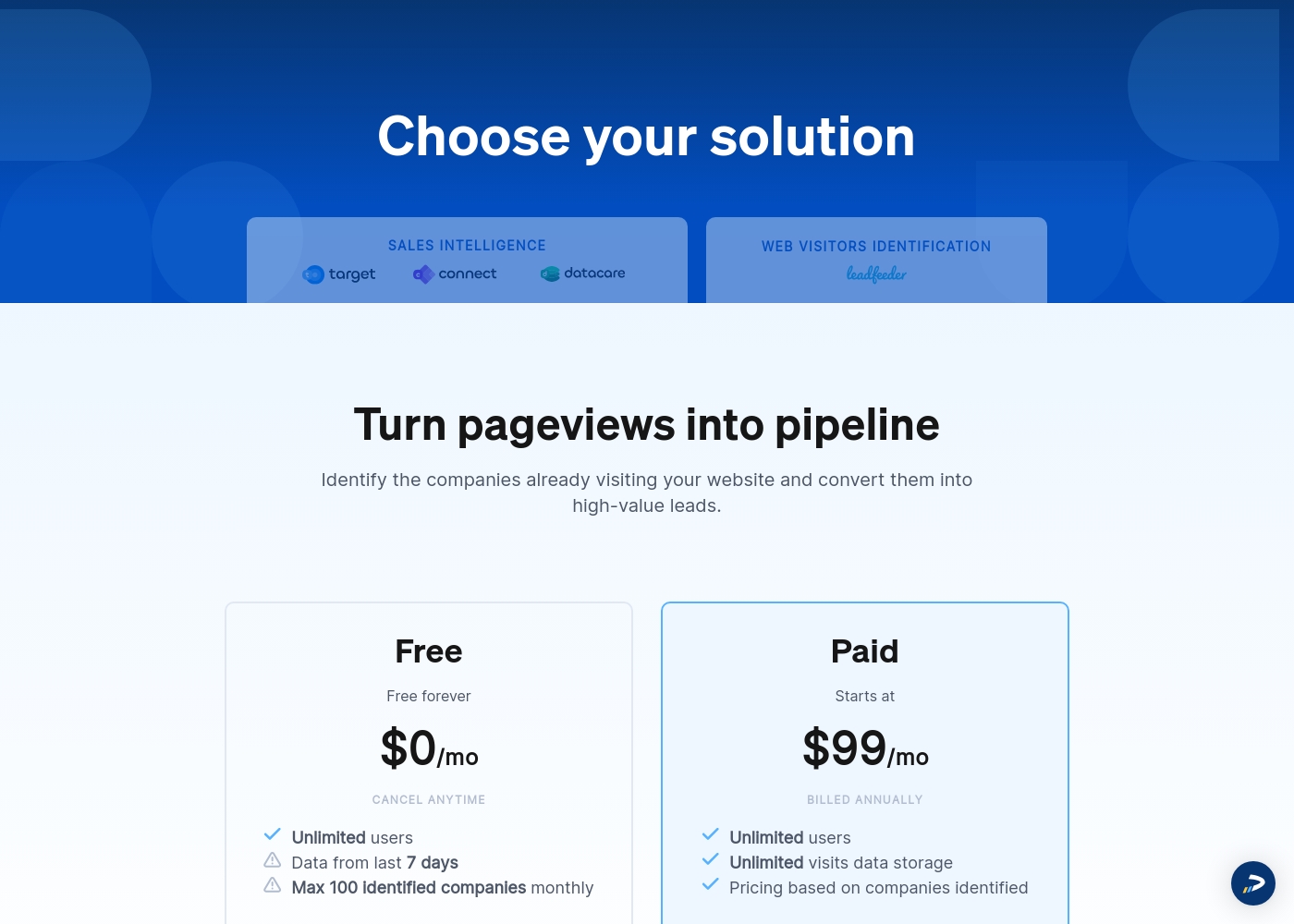
Leadfeeder costs between $0 and $99 per month (billed annually) with two plans: Free at $0 per month and Paid starting at $99 per month.
Here is a breakdown of what you get with each of the available identification solutions.
Free
Price: $0 per month Websites Supported: One per subscription (as subscriptions are priced per website) Best For: Small websites, evaluation, or testing the core feature set Refund Policy: Not applicable (It's free forever) Other Features: Unlimited users, data from the last 7 days, cancel anytime
- Free forever
- Unlimited users
- Verified company details (limited)
- Visitor data storage for the last 7 days
- Unlimited users
- Unlimited visits data storage
- All identified companies access
- Verified company details (firmographics & contact details)
- 25 contact export credits
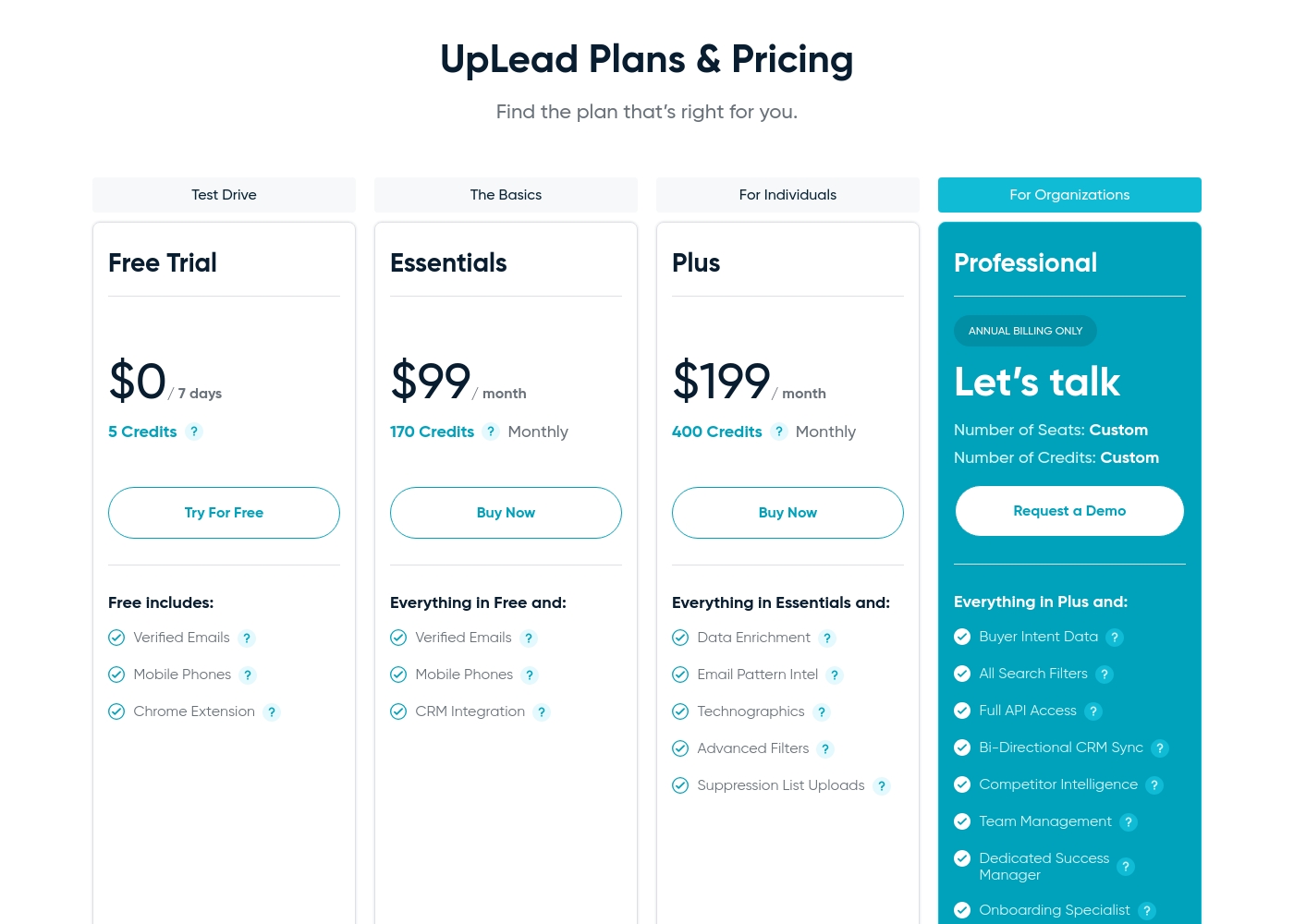
Uplead subscriptions cost between $99 and $199 per month with three main paid plans: Essentials at $99/month, Plus at $199/month, and Professional (Custom annual pricing).
Here are the details for the plans currently offered. Note that one credit unlocks a single contact for download or CRM export, granting access to their email and mobile direct dial.
Free Trial
Price: $0 / 7 days Best For: Testing accuracy and core features Other Features:
- Verified Emails (95% accuracy)
- Mobile Phones (Direct Dials)
- Chrome Extension
- 5 credits/7 days
- Verified Emails (95% accuracy)
- Mobile Phones (Direct Dials)
- Chrome Extension
- 170 credits/month
- Verified Emails & Mobile Phones
- CRM Integration
- Additional credits $0.60/credit
- 400 credits/month
- All Essentials features
- Data Enrichment
- Technographics
- Advanced Filters and Suppression List Uploads
- Custom Credits and Seats
- All Plus features
- Buyer Intent Data
- Full API Access
- Team Management
Pricing Notes
- Leadfeeder's cost is based on the volume of companies identified visiting your website monthly.
- Uplead's cost relies on credits; one credit typically unlocks one verified contact export.
- Leadfeeder includes unlimited users in all paid tiers, offering better value for large teams.
- Uplead's monthly plans are single-user; team features require the annual Professional plan.
- Leadfeeder has received criticism for aggressive auto-renewal policies without notification reminders.
- Uplead offers Friendly Credits, which refund users for contacts with poor data quality or email bounces.
Pricing Head-to-Head
User Reviews
The customer feedback available paints a highly polarized picture of Leadfeeder. While users appreciate the core functionality—its ability to identify visiting companies and connect quickly with Google Analytics—recent experiences highlight significant operational and support issues.
Many users found the tool useful for generating leads when paired with high website traffic. However, recurring negative comments focus heavily on the financial practices.
Leadfeeder is a very useful tool and an honest company. It helps us correctly identify website visitors, which allows us to add high-quality prospects to our sales database. The support team has been genuinely helpful throughout our time using the product.
Users generally praise UpLead’s B2B data quality, citing that results track closely with the advertised 95% accuracy guarantee. Many reviewers find the platform easy to use and highly effective for lead identification, often highlighting its ability to find specific contacts and hard-to-get mobile direct dials.
The system automatically credits users for invalid emails, which boosts confidence in data reliability. Customers frequently mention the significant value and cost savings compared to major competitors, noting that UpLead is often much more economical.
The accuracy of the data and ease of my accessing it is what's most important to me—and they truly deliver. I can quickly filter and access verified contact information, improving outreach efficiency and reducing bounce rates.
Our Verdict
Leadfeeder and Uplead are not the same tool; they solve entirely different sales pipeline problems. Leadfeeder excels at telling you who visits your site, maximizing inbound leads. Uplead focuses on providing perfectly accurate contact data for outbound outreach. Leadfeeder’s primary superpower is turning anonymous web traffic into actionable B2B intent signals. It identifies visiting companies, even remote workers, using powerful IP tracking. Leadfeeder’s unlimited user model and two-way CRM syncs make intent data easily accessible. Uplead focuses on contact quality, guaranteeing 95%+ accuracy for B2B emails and mobile numbers. Uplead’s 50+ filters help you build precise target lists fast. Their Friendly Credits ensure you aren't paying for bad data, making Uplead a lower-risk investment. The decisive factor is the top of your funnel. If you have web traffic but no leads, choose Leadfeeder for ID and intent. If you have a target list but outdated contacts, Uplead is essential for data accuracy and validation. Choose Leadfeeder for intent tracking and maximizing the ROI of your website and ads. Go with Uplead for building high-volume, accurate lists to power your dedicated outbound sales efforts.
Frequently Asked Questions
Which is better for finding decision-maker contacts: Leadfeeder or Uplead?
Uplead is better for finding high volumes of verified contacts, guaranteeing 95%+ accuracy. Leadfeeder limits contact exports to 25 credits per month in its Paid plan. Uplead provides direct mobile dials and robust list building filters.
Does Leadfeeder verify emails in real time like Uplead does?
No, Leadfeeder does not offer real-time email verification as a core feature. Uplead features real-time verification and re-verification on export for guaranteed data quality. Uplead is superior for ensuring low bounce rates on outbound campaigns.
How is Leadfeeder's usage-based pricing different from Uplead's credit system?
Leadfeeder charges based on the volume of unique companies identified visiting your website monthly. Uplead charges per credit, where one credit unlocks one verified contact export. Leadfeeder costs scale with traffic; Uplead scales with list building needs.
Which tool is better for marketing teams for ad campaign tracking?
Leadfeeder is better for marketers needing attribution and campaign ROI insights. Leadfeeder identifies every company engaging with your ads for optimization insights. Uplead is primarily focused on providing contact data for direct outreach campaigns.
Which tool is more scalable for large teams with many sales reps?
Leadfeeder is more cost-effective for scaling users because all Paid plans include unlimited seats. Uplead charges per user seat and often locks team functionality behind annual contracts. Leadfeeder makes sharing intent data easier.
Can I use Uplead's data to track companies visiting my website?
Uplead is not a dedicated website visitor tracking tool like Leadfeeder. Uplead offers 'Buyer Intent Data' in certain tiers which indicates market readiness. You need Leadfeeder for granular, behavior-based website visitor tracking.
Ready to Choose?
Both tools have their strengths. Choose based on your specific needs.