Leadfeeder vs Lusha
Leadfeeder and Lusha attack sales intelligence from completely different directions. Leadfeeder excels at identifying anonymous web traffic and measuring buying intent. Lusha is a contact data factory, providing verified phone numbers and emails for outbound efforts. Your ultimate choice depends on where your sales pipeline originates.
Best for: B2B marketers focused on optimizing website conversion rates, Sales teams needing hot, inbound leads based on active web behavior
Best for: Sales Development Representatives (SDRs) focused purely on high-volume outbound outreach, Recruiting firms needing quick access to verified candidate contact details
Advanced B2B Lead Identification, High Risk.
We found Leadfeeder offers powerful B2B visitor identification features, including robust filtering and unique remote employee recognition capabilities. However, we note consistent customer reports detailing unresolved CRM integration failures and problematic auto-renewal billing policies that undermine its fundamental value proposition. Overall, the powerful features are currently overshadowed by serious concerns regarding support responsiveness.
Pros
- Highest company recognition rate available, identifying remote workers.
- Quick setup requiring a simple Google Analytics connection.
- Robust filtering system using over 50 firmographic and behavioral signals.
- Allows identification of companies engaging with ad campaigns.
Cons
- Reportedly flawed and unresolved two-way Dynamics CRM integration features.
- Aggressive annual auto-renewal policy lacking timely notification reminders.
- Customer support is frequently criticized as non-existent or unhelpful.
- High subscription cost scaling based significantly on volume of identified companies.
Serious questions about data privacy.
We observed extreme user concerns regarding Lusha’s data sourcing and privacy adherence, particularly concerning the alleged sharing of scraped personal contact numbers, which overshadows any intended utility. Overall, we cannot recommend a service facing such severe ethical and contractual complaints from its user base.
Pros
- Offers a generous Free plan to test basic functionality.
- Provides broad API and CRM integration options.
- Can be effective for prospecting when the data is accurate.
Cons
- Major concerns regarding the ethical sourcing and sharing of private contact data.
- Users struggle to opt-out or remove their personal information (GDPR violations alleged).
- Substantial complaints about high inaccuracy and obsolete contact details sold.
- Aggressive auto-renewal policies and opaque contract cancellation terms.
AboutLeadfeeder
Leadfeeder is a powerful tool designed to help salespeople, marketers, and agencies find hidden opportunities in their web traffic. Its unique technology scans incoming traffic and identifies the companies visiting your website based on their IP address. This works even if employees are working from home. Once identified, the tool helps you uncover exactly what those companies are interested in, confirming their true buying intent. This crucial data processing meets all necessary GDPR legislation requirements. ✅
AboutLusha
Lusha powers up your entire Go-To-Market (GTM) engine. It provides access to a massive database of over 280 million verified B2B contacts, helping teams reach precise decision makers. Professionals across Sales, RevOps, Marketing, and Recruiting use Lusha to streamline their work and maximize return. 💡
For sales teams, Lusha helps the pipeline grow with live leads and faster closes. RevOps benefits by keeping data stacks clean, compliant, and connected for better ROI. Marketers power campaigns with enriched audiences, and Recruiters quickly find top talent using highly accurate contact data. This tool truly helps you scale up your business using trusted data.
Highlights
Feature Comparison
Features Overview
We highlight the main differences and pick a winner for each feature.
Core Lead Generation
Leadfeeder captures inbound web intent; Lusha delivers verified outbound contact data.
Leadfeeder turns anonymous website traffic into identified company leads using IP tracking. It focuses on revealing buyer intent based on specific pages visited. Lusha accesses a database of over 280 million contacts, providing verified emails and phone numbers. Lusha is designed for immediate direct outreach and list building. This is the biggest functional split: Leadfeeder focuses on who is visiting; Lusha focuses on who to call. The platform you need depends entirely on whether your strategy leans inbound or outbound.
Data Accuracy & Volume
Lusha provides specific accuracy guarantees; Leadfeeder specializes in company recognition success.
Leadfeeder aims for the highest company recognition rate, successfully identifying remote workers frequently. Its strength is company entity recognition and firmographic details. Lusha boasts high-confidence contacts, claiming 98% email deliverability and 85% phone accuracy. Lusha’s sheer volume of 280M+ contacts is impressive. Lusha wins on the quality and breadth of actual person-level contact data. Leadfeeder wins on identifying the company itself and its intent. Without Lusha's specific contact accuracy claims, outbound SDRs can waste valuable time on bad data.
Pricing Structure
Leadfeeder includes unlimited users; Lusha charges per seat and per contact credit.
Leadfeeder's pricing scales based only on the volume of unique companies identified monthly. The annual Paid plan starts near $99 per month for entry volumes. Crucially, all Leadfeeder plans include unlimited users, avoiding per-seat costs for growing teams. Lusha requires per-seat licensing plus charges based on credit usage. Lusha costs can quickly escalate as your team and usage grow. Leadfeeder offers better overall value for teams focused on monitoring web traffic behavior. Lusha’s variable costs make budgeting harder for high-volume prospectors.
CRM Integration
Leadfeeder provides powerful two-way sync; Lusha focuses on contact data enrichment.
Leadfeeder supports native, two-way CRM integration, syncing identified visit data automatically. This capability embeds behavioral intelligence directly into your workflow. Lusha integrates primarily via API and MCP for contact enrichment and data syncing. Lusha helps RevOps keep contact lists clean and up-to-date. While Leadfeeder’s two-way sync is technically stronger, users report issues with its reliability in certain integrations (Dynamics CRM). Lusha’s enrichment sync is highly reliable for cleaning contact records and list exports.
Lead Prioritization
Leadfeeder uses automatic lead scoring; Lusha uses buying signals for timely outreach.
Leadfeeder applies automatic lead scoring based on 50+ firmographic and behavioral signals. It places the warmest, most active leads right at the top of your list. Lusha utilizes real-time buying signals to deliver daily streams of qualified, ready-to-connect prospects. This aims to prioritize timely, proactive outreach. Leadfeeder excels at prioritizing inbound prospects based on their observed activity on your site. Lusha focuses on identifying prospects showing external intent signals. Marketing and sales alignment improves when Leadfeeder routes high-score website visitors instantly.
Privacy and Trust
Leadfeeder explicitly assures compliance; Lusha users report high privacy concerns.
Leadfeeder explicitly states that its data processing meets GDPR and CCA legislation requirements comfortably. Identifying company IP addresses is generally low-risk. Lusha reviews are frequently dominated by concerns over data sourcing methods and user privacy. Users report unsolicited contact and difficulties with the opt-out process. Trustworthiness is a major obstacle for Lusha, leading to many negative user sentiments and compliance worries. Sales teams should consider the ethical and legal risks associated with Lusha’s questionable data acquisition methods.
Outbound Prospecting
Lusha is built for immediate outreach; Leadfeeder requires secondary contact data sources.
Lusha is tailor-made for outbound sales, providing instant, highly accurate emails and phone numbers. Its Chrome extension simplifies finding decision-makers on LinkedIn. Leadfeeder’s primary job is intent tracking, offering only 25 contact export credits per month on paid plans. You must then find contact details elsewhere. If your sales workflow starts with securing contact data, Lusha is the dedicated, specialized solution. Leadfeeder supports outbound only after the company has visited your website first. SDR teams focused on volume cold outreach will choose Lusha every time for pure data power.
Setup and Workflow
Lusha is extension-based and fast; Leadfeeder requires website tracking installation.
Leadfeeder requires a simple Google Analytics connection and potentially HTML code for tracking website visitors. This setup is passive and needs technical buy-in. Lusha's core utility is often the browser extension, providing instant details as reps browse LinkedIn or company sites. This workflow is highly active and immediate. Lusha's setup is marginally easier for the end-user, requiring low commitment to start prospecting. Leadfeeder is easy conceptually but relies on site integrity for data flow.
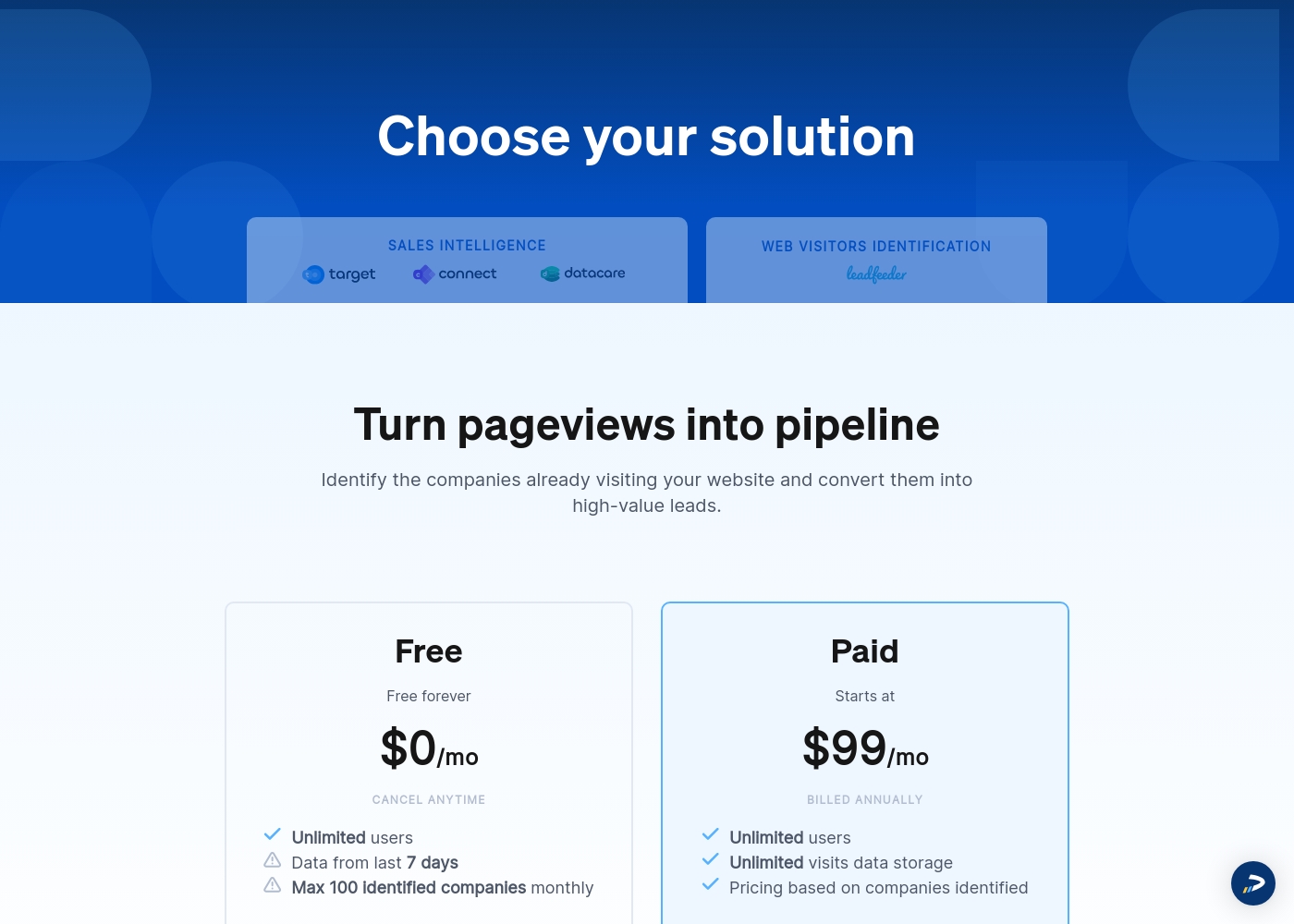
Leadfeeder costs between $0 and $99 per month (billed annually) with two plans: Free at $0 per month and Paid starting at $99 per month.
Here is a breakdown of what you get with each of the available identification solutions.
Free
Price: $0 per month Websites Supported: One per subscription (as subscriptions are priced per website) Best For: Small websites, evaluation, or testing the core feature set Refund Policy: Not applicable (It's free forever) Other Features: Unlimited users, data from the last 7 days, cancel anytime
- Free forever
- Unlimited users
- Verified company details (limited)
- Visitor data storage for the last 7 days
- Unlimited users
- Unlimited visits data storage
- All identified companies access
- Verified company details (firmographics & contact details)
- 25 contact export credits
Lusha offers plans starting at Free, with paid plans requiring contact for pricing details.
Details for specific pricing tiers were unavailable due to a technical error on the Lusha website itself, but we can review the featured plans based on the available text.
Free plan
Price: Free Best For: Getting started with B2B prospecting Refund Policy: Not applicable Other Features:
- Up to 70 credits per month
- Access to basic prospecting features
- Browser extension
- CRM integrations
- Up to 70 credits per month
- Basic prospecting features
- Browser extension
- CRM integrations
- Fully customizable
- Ability to limit credit usage per user
- Includes annual credit rollover option
- Designed for teams larger than 5 users
Pricing Notes
- Leadfeeder offers tremendous value for teams as all plans include unlimited users.
- Lusha mandates per-seat licensing, which significantly increases costs for growing sales organizations.
- Leadfeeder's cost scales with unique visitors; Lusha's cost scales with contact reveals (credits).
- Both Leadfeeder and Lusha received user complaints regarding poorly managed, aggressive auto-renewal policies.
Pricing Head-to-Head
User Reviews
The customer feedback available paints a highly polarized picture of Leadfeeder. While users appreciate the core functionality—its ability to identify visiting companies and connect quickly with Google Analytics—recent experiences highlight significant operational and support issues.
Many users found the tool useful for generating leads when paired with high website traffic. However, recurring negative comments focus heavily on the financial practices.
Leadfeeder is a very useful tool and an honest company. It helps us correctly identify website visitors, which allows us to add high-quality prospects to our sales database. The support team has been genuinely helpful throughout our time using the product.
User feedback concerning Lusha is overwhelmingly negative, centering on severe data ethics and privacy violations. Many reviewers allege Lusha scrapes and distributes personal contact information—including private mobile numbers—without user consent, leading to a huge volume of unsolicited calls and spam.
Users feel this is a "scammy" or "spam-enabling" practice that violates GDPR. A major complaint is the difficulty in getting personal details removed; many requests for data deletion are reportedly ignored, or the information reappears soon after.
I keep receiving daily unsolicited calls to my personal phone number. When I ask where they got my details, they consistently cite Lusha. This company shows a blatant disregard for privacy.
Our Verdict
Choosing between Leadfeeder and Lusha often means deciding between an inbound or outbound strategy. Leadfeeder is the essential tool if your goal is capitalizing on existing web traffic. It provides deep behavioral insights and automatic lead scoring to prioritize active prospects. The significant benefit is paying for volume of traffic, not per user, which saves large teams money. Lusha is the definitive choice for pure outbound sales teams and recruitment. It supplies verified phone numbers and emails instantly from its massive 280M+ database. The Lusha browser extension makes finding contacts simple and fast for daily prospecting tasks. The deciding factor should be trust and cost structure, given that both Leadfeeder and Lusha have billing complaint issues. Leadfeeder gives better privacy assurance and unlimited users. Lusha faces serious ethical and compliance questions regarding its contact data sourcing. If you need to monitor high-intent visitors on your website, choose Leadfeeder. If your SDR team needs verified cold contact data immediately, Lusha is necessary, but proceed with caution.
Frequently Asked Questions
Which is better for generating qualified, high-intent leads: Leadfeeder or Lusha?
Leadfeeder is better for intent leads because it tracks specific website behavior. It uses lead scoring and 50+ filters to grade visitors instantly. Lusha focuses on contact data, not deep behavioral tracking.
Does Lusha help identify anonymous website traffic like Leadfeeder?
No, Lusha does not offer anonymous website visitor identification capabilities. Leadfeeder is a specialized tool for IP tracking and linking activity to company names. Lusha's focus is sourcing personal contact details.
Which tool offers better value for large sales teams: Leadfeeder or Lusha?
Leadfeeder offers superior value because all paid plans include unlimited users. Lusha requires purchasing a license or seat for every team member. Lusha teams see costs increase fast as they scale.
How do the pricing models of Leadfeeder and Lusha differ substantially?
Leadfeeder uses usage-based pricing tied to the volume of company visitors identified monthly. Lusha uses a credit system where data revealing activities consume paid credits. Both models scale with usage demands.
Which tool is generally preferred regarding data privacy and GDPR compliance?
User sentiment strongly favors Leadfeeder, which explicitly assures GDPR compliance. Lusha frequently receives negative user reviews regarding privacy concerns and questionable data sourcing practices.
Can Lusha integrate with my CRM for two-way synchronization like Leadfeeder?
Lusha offers CRM integration for enrichment and data syncing via API. Leadfeeder offers native, two-way sync, which provides deeper data automation. Lusha handles contact data enrichment well, but Leadfeeder handles behavioral data sync better.
Ready to Choose?
Both tools have their strengths. Choose based on your specific needs.