Keynote vs Prezi
Keynote and Prezi offer powerful presentation tools but employ totally different styles. Keynote provides classic design power and consistency across Apple devices. Prezi uses a dynamic zooming canvas supported by powerful AI creation features. Choosing between Keynote and Prezi means deciding whether you prefer linear reliability or non-linear visual impact.
Best for: Users invested heavily in the Mac, iPad, and iPhone ecosystem, Teams needing seamless, free collaboration via a web browser (Keynote for iCloud)
Best for: Public speakers and educators aiming for 40% increased audience memorability, Users who need to generate initial presentation drafts quickly using AI prompts
Excellent software, problematic support ecosystem.
We find Keynote to be a powerful and reliable presentation tool, offering seamless cross-platform integration and advanced collaboration features suitable for any modern team. Overall, while the software performs exceptionally well and offers strong features, its overall value is negatively impacted by widespread, documented dissatisfaction with Apple's current customer support framework.
Pros
- Cross-platform use via native apps and web access (Windows/iCloud).
- Strong collaborative functionality for shared presentations.
- Powerful design controls, themes, and effortless setup.
- Dedicated features for virtual presenting (separate presenter notes).
Cons
- Pricing and specific subscription tiers are not transparently disclosed.
- General Apple customer support is rated very poorly by users (1.7 stars).
- Reports show generalized ecosystem billing and subscription issues.
Dynamic visuals hindered by frustrating pricing.
We found Prezi excels at creating engaging, non-linear visuals that capture audience attention, especially with the integrated AI tools and unique zooming canvas. Overall, while the dynamic presentation style is highly effective, we temper our rating due to recurring customer complaints regarding automatic renewal policies and subscription management issues.
Pros
- Provides the strongest visual impact due to its dynamic, non-linear zooming canvas.
- New AI integration quickly generates professional, full presentations from simple prompts.
- Proven effectiveness; independent studies show Prezi presentations are 40% more memorable.
- Prezi Video allows simultaneous display of the speaker and visual content for high engagement.
Cons
- Frequent issues reported regarding unexpected automatic subscription renewals and cancellation difficulties.
- Customer service responsiveness is a common point of concern for users.
- Some long-time users feel Prezi Next offers less creative freedom than the Classic version.
- The annual subscription price is considered steep by many following the initial free trial.
AboutKeynote
Keynote is a versatile presentation tool designed by Apple. It helps you quickly set up a professional presentation.
You can start by choosing a theme and adding new slides right away. It's built for users across Mac, iPhone, and iPad, giving you flexibility.
Keynote also extends its reach to users on Windows or those preferring a web interface through Keynote for iCloud. It provides essential tools for crafting and sharing visual stories.
AboutPrezi
Prezi is a dynamic platform designed specifically for visual storytelling. It has been a trusted presentation partner for over 15 years, relied upon by users in 180+ countries. Currently, Prezi is taking this proven approach and redefining the future of presenting with powerful AI assistance. 💡
It moves beyond sequential slides using a unique open canvas and dynamic movement. This method is effective for various settings, whether you need presentations tailored for business, university, or school audiences. The unique design combined with smart assistance makes creating impressive visuals easier than ever before.
Highlights
Feature Comparison
Features Overview
We highlight the main differences and pick a winner for each feature.
Presentation Style
Keynote is the master of traditional slide design; Prezi is all about dynamic, non-linear visuals.
Keynote provides strong design controls within a familiar, professional slide format. This traditional approach offers dependability and structure for professional use. Prezi utilizes a unique open canvas and dynamic movement system for storytelling. This non-sequential style lets you navigate fluidly, responding to live conversation needs. The visual difference is the most defining quality when comparing Keynote and Prezi. Prezi's style is scientifically proven to heighten audience engagement and memory retention.
AI Creation Power
Prezi leans heavily into AI assistance; Keynote does not advertise AI generation features.
Prezi allows users to generate full presentations instantly using simple text prompts. This AI functionality significantly minimizes design effort immediately. Prezi's top tiers offer unlimited AI credits for generating images and presentation structures rapidly. Keynote focuses on powerful design control but does not mention automated content generation features. If speed and automated drafting are essential, Prezi is far more advanced.
Team Collaboration
Keynote excels at sharing and concurrent editing; Prezi severely limits collaboration seats.
Keynote provides strong collaborative functionality across platforms, especially using Keynote for iCloud. Team members can easily edit and share presentations seamlessly from many devices. Prezi limits all individual paid plans to a strict maximum of only two collaborators per project. For teams larger than two people, Keynote clearly handles basic collaboration much better than Prezi. Complex projects involving many stakeholders should rely on Keynote for ease of use.
Cross-Platform Use
Keynote offers free access via web for Windows users; Prezi requires a paid plan for dedicated desktop apps.
Keynote for iCloud lets Windows and Mac users create and edit slides instantly through their web browser. This broad access promotes device flexibility and coordination without extra cost. Prezi offers a desktop application for offline access, but only users on the Plus plan or higher receive this feature. Keynote is inherently better for mixed-OS teams relying on web access for review and editing.
Offline & Export Control
Prezi guarantees offline access and PDF export on paid plans, which is vital for professionals.
The Prezi Plus plan unlocks critical professional capabilities like offline access via a dedicated desktop app. Plus users can also download their presentations and export them easily as a PDF. Keynote operates smoothly across integrated devices, but explicit offline guarantees and specific export controls are not detailed. When presenting in unpredictable environments, Prezi's paid tiers offer guaranteed reliability and control.
Audience Effectiveness
Prezi is proven to be more effective and memorable; Keynote offers polished, familiar quality.
Independent studies confirm Prezi is 25% more effective than using traditional sequential slides. The dynamic movement also makes Prezi content 40% more memorable for audiences. Keynote's strength lies in delivering a consistently professional and polished visual experience. If your goal is high memorability and deep impact, Prezi has the data to back up its claim.
Pricing Structure
Prezi fully discloses its subscription model; Keynote pricing is not transparent or explicitly clear.
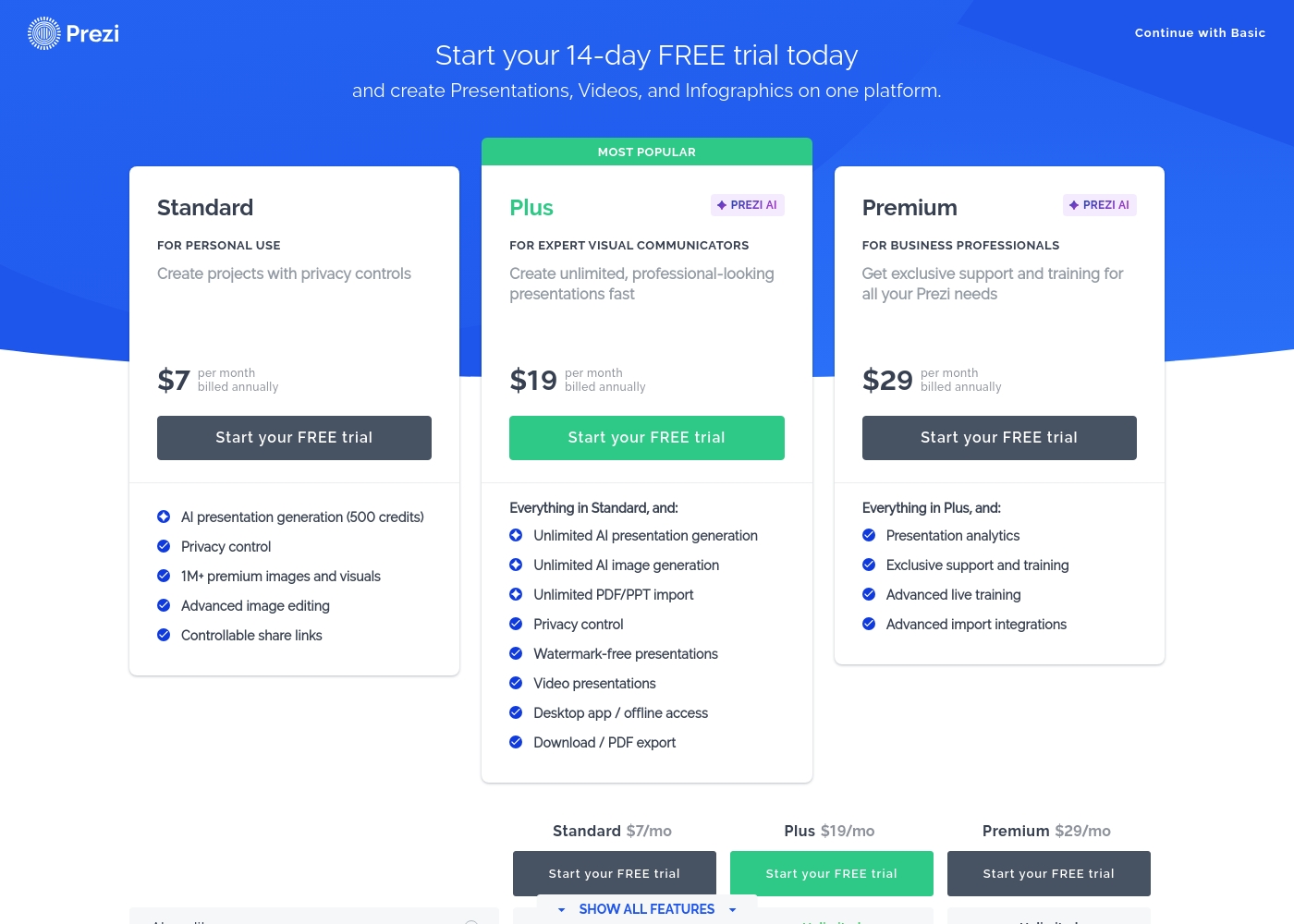
Prezi clearly outlines annual subscription costs and feature tiers, starting at $7/month for Standard. Every paid plan offers a 14-day free trial to test features before commitment. Keynote's pricing is not explicitly stated in the provided data, creating uncertainty. Users must seek pricing details through the Apple ecosystem or app store. Prezi is much easier to evaluate regarding financial investment.
Customer Support Quality
Both systems have support concerns, but Keynote’s overall ecosystem support rating is critical.
Keynote's support is tied to the general Apple ecosystem, which reviews rate extremely poorly (1.7 stars). Users report perpetual disconnections and billing issues across the ecosystem. Prezi users also cite frequent concerns regarding automatic renewal and cancellation difficulty. While both have administrative frustrations, Keynote’s general support environment is documented as significantly worse. Choose your poison carefully if you expect frequent needed assistance.
The following summary reflects only the facts available in the provided materials.
Since no specific pricing details or structured tiers are made visible in the provided context, we cannot outline individual plan costs or features tied to specific subscriptions.
We searched the documentation thoroughly for distinct tiers such as Basic, Pro, or Enterprise plans, but these structure names were not specified. Keynote's pricing model—whether it's a one-time purchase, a recurring subscription, or bundled with existing software—is not explicitly defined here.
Prezi costs between $7 and $29 per month when billed annually, offering three paid plans: Standard at $7/mo, Plus at $19/mo, and Premium at $29/mo.
Here is a detailed breakdown of how Prezi structures its paid subscriptions.
Standard
Price: $7 per month, billed annually Best For: Personal Use Other Features:
- AI presentation generation (500 credits)
- Privacy control
- 1M+ premium images and visuals
- Advanced image editing
- Controllable share links
- Essential creation tools
- Public sharing
- AI presentation generation (500 credits)
- Privacy control
- 1M+ premium images and visuals
- Advanced image editing
- Controllable share links
- Unlimited AI presentation generation
- Unlimited AI image generation
- Unlimited PDF/PPT import
- Watermark-free presentations
- Desktop app / offline access
- Presentation analytics
- Exclusive support and training
- Advanced live training
- Advanced import integrations
Pricing Notes
- Keynote's pricing structure, tiers, and costs are not publicly disclosed in product documentation.
- Prezi plans are priced based on an annual commitment, which must be considered during sign-up.
- Prezi offers a 14-day free trial on its paid plans, allowing feature testing before you commit.
- Prezi users frequently complain about difficulties canceling subscriptions and unexpected automatic renewals.
Pricing Head-to-Head
User Reviews
External feedback is overwhelmingly targeted at general Apple support and customer service, not the Keynote application directly. Across numerous interactions, users report widespread frustration with support responsiveness, citing perpetual disconnections, extremely long hold times, and unfulfilled promises of callbacks.
This has contributed to a very low TrustScore of 1.7 stars for the support channel. Reviewers often mention hidden charges, unsatisfactory staff attitudes, and difficulty resolving issues related to products, subscriptions (like Apple TV), and fraudulent third-party apps (Nebula) bypassing standard payment rules.
The worst customer service. We were forever getting cut off and sold promises that never transpired, with promised call backs that never happened. Everyone keeps promising to take ownership then disappears.
Prezi receives generally positive, albeit mixed, feedback across platforms like Trustpilot (3.4/5). Users consistently praise the platform for its dynamic movement and outstanding visual impact, confirming it’s much more engaging than traditional presentation tools.
The user-friendly interface and abundance of creative templates keep users inspired, particularly in educational and training settings. The recent AI integration is a major highlight, frequently noted for its ability to quickly generate professional presentations from simple prompts, saving significant time.
I just tried the AI tool to make a presentation for a job interview. I was very impressed with the presentation that was produced! The AI saved me significant time, and I only had to make minor changes.
Our Verdict
The choice between Keynote and Prezi hinges on your core presentation philosophy and technological needs. If you value consistency, polish, and seamless integration with the Apple ecosystem, Keynote is the safe bet. Keynote provides an effortless setup and excellent, free cross-OS web collaboration using iCloud. However, if you want to captivate your audience and leverage modern technology, Prezi is the better option. Prezi excels with its unique dynamic visuals, proven by studies to be significantly more memorable. Its powerful new AI tool instantly transforms ideas into full presentations, saving crucial creation time. Prezi offers critical features like offline access and audience analytics, but these come at a cost and require an annual commitment. Keynote provides basic collaboration for free, but Keynote's pricing is murky and tied to an ecosystem with notoriously poor support. Ultimately, pick Keynote if you need reliable, traditional design power. Choose Prezi if you want memorable, AI-assisted presentations that stand out.
Frequently Asked Questions
Which software is better for collaboration: Keynote or Prezi?
Keynote is far better for collaboration, offering strong, feature-rich sharing functionality. Prezi limits all individual paid subscribers to only two collaborators per project. Large teams should definitely use Keynote for ease of shared editing.
Does Keynote offer AI features like Prezi?
No, Keynote does not explicitly mention AI generation from text prompts. Prezi offers robust, unlimited AI assistance on its Plus plan and higher. Prezi can generate full presentation drafts instantly from a simple written prompt.
Is Prezi worth the extra monthly cost over Keynote?
Yes, if you prioritize dynamic movement, proven audience engagement, and specific features. Prezi guarantees offline access and PDF export on Plus tiers. If you only need traditional slide decks, Keynote is likely sufficient and easier to access.
Can Windows users easily work with Keynote files?
Yes, they can. Keynote for iCloud allows Windows users to create and edit shared presentations through any standard web browser. This functionality is free and seamless for mixed-OS teams.
Which tool provides better customer support?
Neither tool stands out, as both have documented issues, but Keynote’s ecosystem support rates very poorly (1.7 stars). Prezi users mainly complain about restrictive annual billing and renewal difficulties. Expect possible frustrations with support for both Keynote and Prezi.
Does Prezi offer detailed audience analytics?
Yes, Prezi does offer detailed Presentation Analytics to track audience engagement. This crucial capability is available exclusively on the top-tier Premium subscription plan.
Ready to Choose?
Both tools have their strengths. Choose based on your specific needs.